brakes CADILLAC CT4 2022 Owners Manual
[x] Cancel search | Manufacturer: CADILLAC, Model Year: 2022, Model line: CT4, Model: CADILLAC CT4 2022Pages: 464, PDF Size: 7.82 MB
Page 103 of 464

Cadillac CT4 Owner Manual (GMNA-Localizing-U.S./Canada-15283641) -
2022 - CRC - 10/12/21
102 INSTRUMENTS AND CONTROLS
SeeTowing the Vehicle (Electronic
Shifter) 0393 or
Towing the Vehicle (Mechanical Shifter)
0 395.
{Warning
The brake system might not be
working properly if the brake
system warning light is on. Driving
with the brake system warning light
on can lead to a crash. If the light is
still on after the vehicle has been
pulled off the road and carefully
stopped, have the vehicle towed for
service.
Electric Parking Brake
Light
MetricEnglish
This light comes on when the parking
brake is applied. If the light continues
flashing after the parking brake is released, or while driving, there is a
problem with the Electric Parking
Brake system. A message may also
display in the Driver Information
Center (DIC).
If the light does not come on,
or remains flashing, see your dealer.
Service Electric Parking
Brake Light
This light may come on briefly when
the vehicle is turned on. If it does not
come on, have it fixed so it will be
ready to warn if there is a problem.
If this light stays on or comes on
while driving, there is a problem with
the Electric Parking Brake (EPB). Take
the vehicle to a dealer as soon as
possible. In addition to the parking
brake, other safety functions that
utilize the EPB may also be degraded.
A message may also display in the
Driver Information Center (DIC). See
Electric Parking Brake
0254.
Antilock Brake System
(ABS) Warning Light
This warning light should come on
briefly when the vehicle is turned on.
If the light does not come on, have it
fixed so it will be ready to warn if
there is a problem.
If the light comes on while driving,
safely stop as soon as it is possible
and turn off the vehicle. Then turn on
the vehicle again to reset the system.
If the ABS warning light stays on,
or comes on again while driving, the
vehicle needs service. A chime may
also sound when the light stays on.
If the ABS warning light is the only
light on, the vehicle has regular
brakes, but ABS is not functioning.
Page 104 of 464
Cadillac CT4 Owner Manual (GMNA-Localizing-U.S./Canada-15283641) -
2022 - CRC - 10/12/21
INSTRUMENTS AND CONTROLS 103
If both the ABS warning light and the
brake system warning light are on,
ABS is not functioning and there is a
problem with the regular brakes. See
your dealer for service.
SeeBrake System Warning Light 0101.
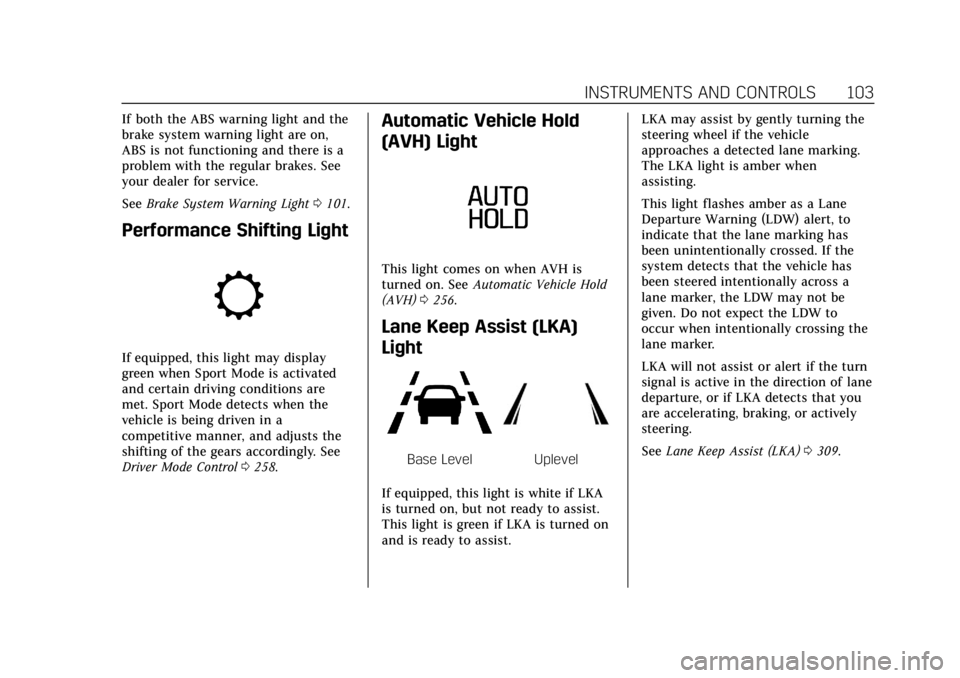
Performance Shifting Light
If equipped, this light may display
green when Sport Mode is activated
and certain driving conditions are
met. Sport Mode detects when the
vehicle is being driven in a
competitive manner, and adjusts the
shifting of the gears accordingly. See
Driver Mode Control 0258.
Automatic Vehicle Hold
(AVH) Light
This light comes on when AVH is
turned on. See Automatic Vehicle Hold
(AVH) 0256.
Lane Keep Assist (LKA)
Light
Base LevelUplevel
If equipped, this light is white if LKA
is turned on, but not ready to assist.
This light is green if LKA is turned on
and is ready to assist. LKA may assist by gently turning the
steering wheel if the vehicle
approaches a detected lane marking.
The LKA light is amber when
assisting.
This light flashes amber as a Lane
Departure Warning (LDW) alert, to
indicate that the lane marking has
been unintentionally crossed. If the
system detects that the vehicle has
been steered intentionally across a
lane marker, the LDW may not be
given. Do not expect the LDW to
occur when intentionally crossing the
lane marker.
LKA will not assist or alert if the turn
signal is active in the direction of lane
departure, or if LKA detects that you
are accelerating, braking, or actively
steering.
See
Lane Keep Assist (LKA) 0309.
Page 120 of 464
Cadillac CT4 Owner Manual (GMNA-Localizing-U.S./Canada-15283641) -
2022 - CRC - 10/12/21
INSTRUMENTS AND CONTROLS 119
The windshield is part of the HUD
system. If windshield replacement is
required, seeWindshield Replacement
0 351.
Vehicle Messages
Messages displayed on the Driver
Information Center (DIC) indicate the
status of the vehicle or some action
that may be needed to correct a
condition. Multiple messages may
appear one after another.
The messages that do not require
immediate action can be
acknowledged and cleared by pressing
the thumbwheel. The messages that
require immediate action cannot be
cleared until that action is performed.
All messages should be taken
seriously; clearing the message does
not correct the problem.
If a SERVICE message appears, see
your dealer. Follow the instructions given in the
messages. The system displays
messages regarding the following
topics:
.Service Messages
.Fluid Levels
.Vehicle Security
.Brakes
.Steering
.Ride Control Systems
.Driver Assistance Systems
.Cruise Control
.Lighting and Bulb Replacement
.Wiper/Washer Systems
.Doors and Windows
.Seat Belts
.Airbag Systems
.Engine and Transmission
.Tire Pressure
.Battery
Engine Power Messages
REDUCED ACCELERATION DRIVE
WITH CARE
This message displays when the
vehicle's propulsion power is reduced.
A reduction in propulsion power can
affect the vehicle's ability to
accelerate. If this message is on, but
there is no observed reduction in
performance, proceed to your
destination. Under certain conditions
the performance may be reduced the
next time the vehicle is driven. The
vehicle may be driven while this
message is on, but maximum
acceleration and speed may be
reduced. Anytime this message stays
on, or displays repeatedly, the vehicle
should be taken to your dealer for
service as soon as possible.
Under certain operating conditions,
propulsion will be disabled. Try
restarting after the ignition has been
off for two minutes.
Page 121 of 464

Cadillac CT4 Owner Manual (GMNA-Localizing-U.S./Canada-15283641) -
2022 - CRC - 10/12/21
120 INSTRUMENTS AND CONTROLS
Vehicle Speed Messages
SPEED LIMITED TO
XXX KM/H (MPH)
This message shows that the vehicle
speed has been limited to the speed
displayed. The limited speed is a
protection for various propulsion and
vehicle systems, such as lubrication,
thermal, brakes, suspension, Teen
Driver if equipped, or tires.
Vehicle Personalization
The following are all possible vehicle
personalization features. Depending
on the vehicle, some may not be
available.
For System, Apps, and Personal
features and functions, seeSettings
0 182.
To access the vehicle
personalization menu: 1. Touch the Settings icon on the Home Page of the infotainment
display.
2. Touch Vehicle to display a list of available options. 3. Touch to select the desired feature
setting.
4. Touch
9orRto turn a feature off
or on.
5. Touch
zto go to the top level of
the Settings menu.
The menu may contain the following:
Rear Seat Reminder
This allows for a chime and a message
when the rear door has been opened
before or during operation of the
vehicle.
Touch Off or On.
Buckle to Drive
This feature can prevent shifting out
of Park when the driver, and if
applicable the front passenger, seat
belt is not buckled. See Buckle To Drive
0 41.
Touch Off or On.
The vehicle may need to be restarted
to activate this feature.
Driver Mode Customization
Touch and the following may display:
.My Mode
.V-Mode
.Visualization
My Mode
Touch and the following may display:
.Engine Sound
.Steering
.Suspension
.Brake Feel
For information on the range of
settings, see “Driver Mode
Customization ”in Driver Mode Control
0 258.
V-Mode
Touch and the following may display:
.Engine Sound
.Steering
.Suspension
.Brake Feel
.Powertrain
Page 123 of 464
Cadillac CT4 Owner Manual (GMNA-Localizing-U.S./Canada-15283641) -
2022 - CRC - 10/12/21
122 INSTRUMENTS AND CONTROLS
.Lane Change Alert
.Rear Cross Traffic Alert
.Super Cruise Lane Change
Alert Type
This setting specifies the type of
vehicle feedback provided, either a
beep or seat vibration, when you are
in danger of colliding with an object.
Touch Beeps or Safety Alert Seat.
Forward Collision System
This setting can alert of a potential
crash with a detected vehicle ahead
and can apply brakes to help reduce a
collision’s severity.
Touch Off, Alert, or Alert and Brake.
Front Pedestrian Detection
This feature may help avoid or reduce
the harm caused by front-end crashes
with nearby pedestrians.
See Front Pedestrian Braking (FPB)
System 0305.
Touch Off, Alert, or Alert and Brake. Adaptive Cruise Go Notifier
This setting determines if an alert will
appear when Adaptive Cruise Control
brings the vehicle to a complete stop
and the vehicle ahead of you starts
moving again. See
Adaptive Cruise
Control (Advanced) 0269.
Touch Off or On.
Lane Change Alert
This setting specifies if an alert will
display on the outside mirror to help
you avoid crashing into a vehicle in
your blind spot, or rapidly
approaching your blind spot, during a
lane change maneuver. See Lane
Change Alert (LCA) 0307.
Touch Off or On.
Rear Cross Traffic Alert
This setting specifies if an alert will
display when the vehicle detects
approaching rear cross traffic when in
R (Reverse). See Rear Cross Traffic
Alert (RCTA) System 0300.
Touch Off or On. Super Cruise Lane Change
When on, the vehicle can change
lanes while Super Cruise is active. The
vehicle will only steer to change lanes
when traffic allows .
Touch Off or On.
Comfort and Convenience
Touch and the following may display:
.Chime Volume
.Reverse Tilt Mirror
.Remote Mirror Folding
.Rain Sense Wipers
Chime Volume
This setting determines the chime
volume level.
Touch the controls on the
infotainment display to adjust the
volume.
Reverse Tilt Mirror
When on, the driver, passenger,
or both driver and passenger outside
mirrors will tilt downward when the
vehicle is shifted into R (Reverse) to
improve visibility of the ground near
the rear wheels. They may move from
Page 193 of 464
Cadillac CT4 Owner Manual (GMNA-Localizing-U.S./Canada-15283641) -
2022 - CRC - 10/12/21
192 INFOTAINMENT SYSTEM
.Wide Open Throttle–the number
of times the accelerator pedal was
pressed nearly all the way down.
.Forward Collision Alerts –the
number of times the driver was
notified when approaching a vehicle
ahead too quickly and at potential
risk for a crash.
.Forward Automatic Braking, also
called Automatic Emergency
Braking (if equipped) –the number
of times the vehicle detected that a
forward collision was imminent and
applied the brakes.
.Reverse Automatic Braking (if
equipped) –the number of times
the vehicle detected that a rearward
collision was imminent and applied
the brakes.
.Traction Control –the number of
times the Traction Control System
activated to reduce wheel spin or
loss of traction.
.Stability Control –the number of
events which required the use of
electronic stability control.
.Antilock Braking System Active –
The number of Antilock Brake
System activations.
.Tailgating Alerts –the number of
times the driver was alerted for
following a vehicle ahead too
closely.
Report Card Data
Cumulative Data is saved for all trips
until the Report Card is reset or until
the maximum count is exceeded.
If the maximum count is exceeded for
a Report Card line item, that item will
no longer be updated in the Report
Card until it is reset. Each item will
report a maximum of 1,000 counts.
The distance driven will report a
maximum of 64,374 km (40,000 mi).
To delete Report Card data, do one of
the following:
.From the Report Card display, touch
Reset.
.Touch Clear All Teen Keys and PIN
from the Teen Driver menu. This
will also unregister any Teen Driver
keys and delete the PIN.
Forgotten PIN
See your dealer to reset the PIN.
Trademarks and License
Agreements
FCC Information
See Radio Frequency Statement 0438.
"Made for iPod," and "Made for
iPhone," mean that an electronic
accessory has been designed to
connect specifically to iPod or iPhone,
respectively, and has been certified by
the developer to meet Apple
performance standards. Apple is not
responsible for the operation of this
device or its compliance with safety
and regulatory standards. Please note
that the use of this accessory with
iPod or iPhone may affect wireless
performance. iPhone, iPod, iPod
classic, iPod nano, iPod shuffle, and
iPod touch are trademarks of Apple
Inc., registered in the U.S. and other
countries.
Page 209 of 464

Cadillac CT4 Owner Manual (GMNA-Localizing-U.S./Canada-15283641) -
2022 - CRC - 10/12/21
208 DRIVING AND OPERATING
Driving and
Operating
Driving Information
Driving for Better FuelEconomy . . . . . . . . . . . . . . . . . . . . . . . . 209
Distracted Driving . . . . . . . . . . . . . . . . 210
Defensive Driving . . . . . . . . . . . . . . . . 210
Impaired Driving . . . . . . . . . . . . . . . . . 210
Control of a Vehicle . . . . . . . . . . . . . . 211
Braking . . . . . . . . . . . . . . . . . . . . . . . . . . . . 211
Steering . . . . . . . . . . . . . . . . . . . . . . . . . . . 211
Off-Road Recovery . . . . . . . . . . . . . . . . 212
Loss of Control . . . . . . . . . . . . . . . . . . . 212
Track Events and Competitive Driving (V-Series and V-Series
Blackwing) . . . . . . . . . . . . . . . . . . . . . . 213
Driving on Wet Roads . . . . . . . . . . . 224
Hill and Mountain Roads . . . . . . . . 225
Winter Driving . . . . . . . . . . . . . . . . . . . . 226
If the Vehicle Is Stuck . . . . . . . . . . . 227
Vehicle Load Limits . . . . . . . . . . . . . . 228
Starting and Operating
New Vehicle Break-In . . . . . . . . . . . . 231
Composite Materials . . . . . . . . . . . . . 232
Ignition Positions . . . . . . . . . . . . . . . . 232
Starting the Engine . . . . . . . . . . . . . . 234
Stop/Start System . . . . . . . . . . . . . . . . 235 Engine Heater . . . . . . . . . . . . . . . . . . . . 236
Retained Accessory
Power (RAP) . . . . . . . . . . . . . . . . . . . . 237
Shifting Into Park (Mechanical Shifter) . . . . . . . . . . . . . . . . . . . . . . . . . . 238
Shifting Into Park (Electronic Shifter) . . . . . . . . . . . . . . . . . . . . . . . . . . 239
Shifting out of Park (Mechanical Shifter) . . . . . . . . . . . . . . . . . . . . . . . . . . 239
Shifting out of Park (Electronic Shifter) . . . . . . . . . . . . . . . . . . . . . . . . . . 240
Parking (Manual Transmission) . . . . . . . . . . . . . . . . . . . 240
Parking over Things That Burn . . . . . . . . . . . . . . . . . . . . . . . 240
Extended Parking . . . . . . . . . . . . . . . . . 240
Engine Exhaust
Engine Exhaust . . . . . . . . . . . . . . . . . . . 241
Running the Vehicle While Parked . . . . . . . . . . . . . . . . . . . . . . . . . . . 241
Automatic Transmission
Automatic Transmission(Mechanical Shifter) . . . . . . . . . . . . 242
Automatic Transmission (Electronic Shifter) . . . . . . . . . . . . . 244
Manual Mode (Mechanical Shifter) . . . . . . . . . . . . . . . . . . . . . . . . . . 248
Manual Mode (Electronic Shifter) . . . . . . . . . . . . . . . . . . . . . . . . . . 249
Manual Transmission
Manual Transmission . . . . . . . . . . . . 250
Active Rev Match . . . . . . . . . . . . . . . . 252
Drive Systems
All-Wheel Drive . . . . . . . . . . . . . . . . . . 253
Brakes
Electric Brake Boost . . . . . . . . . . . . . . 253
Antilock Brake System (ABS) . . . . 253
Electric Parking Brake . . . . . . . . . . . . 254
Brake Assist . . . . . . . . . . . . . . . . . . . . . . . 255
Hill Start Assist (HSA) . . . . . . . . . . . 256
Automatic VehicleHold (AVH) . . . . . . . . . . . . . . . . . . . . . 256
Ride Control Systems
Traction Control/ElectronicStability Control . . . . . . . . . . . . . . . . 257
Driver Mode Control . . . . . . . . . . . . . 258
Competitive Driving Mode . . . . . . . 264
Limited-Slip Differential . . . . . . . . . 266
Cruise Control
Cruise Control . . . . . . . . . . . . . . . . . . . . 266
Adaptive Cruise Control (Advanced) . . . . . . . . . . . . . . . . . . . . . . 269
Super Cruise . . . . . . . . . . . . . . . . . . . . . . 278
Page 212 of 464

Cadillac CT4 Owner Manual (GMNA-Localizing-U.S./Canada-15283641) -
2022 - CRC - 10/12/21
DRIVING AND OPERATING 211
Warning (Continued)
serious—or even fatal —collision
if you drive after drinking or taking
drugs.
Do not drive while under the
influence of alcohol or drugs,
or ride with a driver who has been
drinking or is impaired by drugs.
Find alternate transportation home;
or if you are with a group, designate
a driver who will remain sober.
Control of a Vehicle
Braking, steering, and accelerating are
important factors in helping to control
a vehicle while driving.
Braking
Braking action involves perception
time and reaction time. Deciding to
push the brake pedal is perception
time. Actually doing it is
reaction time.
Average driver reaction time is about
three-quarters of a second. In that
time, a vehicle moving at 100 km/h (60 mph) travels 20 m (66 ft), which
could be a lot of distance in an
emergency.
Helpful braking tips to keep in mind
include:
.Keep enough distance between you
and the vehicle in front of you.
.Avoid needless heavy braking.
.Keep pace with traffic.
If the engine ever stops or a brake
fault occurs, the brakes may lose
power assist. More effort will be
required to stop the vehicle and it can
take longer to stop.
Steering
Caution
To avoid damage to the steering
system, do not drive over curbs,
parking barriers, or similar objects
at speeds greater than 3 km/h
(1 mph). Use care when driving over
other objects such as lane dividers
and speed bumps. Damage caused
by misuse of the vehicle is not
covered by the vehicle warranty.
Electric Power Steering
The vehicle has electric power
steering. It does not have power
steering fluid. Regular maintenance is
not required.
If power steering assist is lost due to a
system malfunction, the vehicle can
be steered, but may require increased
effort.
If the steering assist is used for an
extended period of time while the
vehicle is not moving, power assist
may be reduced.
Page 214 of 464

Cadillac CT4 Owner Manual (GMNA-Localizing-U.S./Canada-15283641) -
2022 - CRC - 10/12/21
DRIVING AND OPERATING 213
If the vehicle starts to slide, follow
these suggestions:
.Ease your foot off the accelerator
pedal and steer the way you want
the vehicle to go. The vehicle may
straighten out. Be ready for a
second skid if it occurs.
.Slow down and adjust your driving
according to weather conditions.
Stopping distance can be longer and
vehicle control can be affected when
traction is reduced by water, snow,
ice, gravel, or other material on the
road. Learn to recognize warning
clues—such as enough water, ice,
or packed snow on the road to
make a mirrored surface —and
slow down when you have any
doubt.
.Try to avoid sudden steering,
acceleration, or braking, including
reducing vehicle speed by shifting
to a lower gear. Any sudden changes
could cause the tires to slide.
Remember: Antilock brakes help avoid
only the braking skid.
Track Events and
Competitive Driving
(V-Series and V-Series
Blackwing)
Before any track event, there are three
features that should be turned off:
.Automatic Emergency Braking
(AEB). See Automatic Emergency
Braking (AEB) 0303.
.Lane Keep Assist. See Lane Keep
Assist (LKA) 0309.
.Adaptive Cruise Control. See
Adaptive Cruise Control (Advanced)
0269.
{Danger
High-performance features are
intended for use only on closed
tracks by experienced and qualified
drivers and should not be used on
public roads. High-speed driving,
aggressive cornering, hard braking,
and other high-performance driving
can be dangerous. Improper driver
inputs for the conditions may result
(CONTINUED)
Danger (Continued)
in loss of control of the vehicle,
which could injure or kill you or
others. Always drive safely.
Track events and competitive driving
may affect the vehicle warranty. See
the warranty manual before using the
vehicle for competitive driving.
{Warning
Some of the adjustments and
procedures specified in this section
may require specialized skill,
training, and equipment. Failure to
perform these procedures properly
could cause malfunction,
potentially resulting in death,
personal injury, or damage to the
vehicle or property. Do not attempt
to perform these adjustments or
procedures unless properly
qualified.
Page 216 of 464
Cadillac CT4 Owner Manual (GMNA-Localizing-U.S./Canada-15283641) -
2022 - CRC - 10/12/21
DRIVING AND OPERATING 215
Caution (Continued)
drive as long or as fast the first
time the vehicle is driven on the
track or raced.
.The axle lubricant should be
replaced with new lubricant.
.On vehicles without a differential
cooler, additional cooling capacity is
required for continuous competitive
driving. The V-Series Blackwing has
a differential cooler, so no
additional cooling capacity is
necessary.
Engine OilCaution
If the vehicle is used for track
events and competitive driving, the
engine may use more oil than it
would with normal use. Low oil
levels can damage the engine.
Check the oil level often and
maintain the proper level. See
Engine Oil 0331. Check the oil level often during track
events and competitive driving, and
keep the oil level at or near the upper
mark. See
“Checking the Engine Oil" in
Engine Oil 0331.
Fuel
Use premium unleaded gasoline with
a posted octane rating of 93 at a track
event. Unleaded gasoline with a
posted octane rating of 91 may be
used, but performance will be
degraded. See Prohibited Fuels 0312.
Automatic or Manual
Transmission Fluid
Have the transmission fluid set to the
track specific oil level prior to track
usage. Transmission fluid should be
changed after every 15 hours of track
usage. Any transmission level set or
change should be performed at the
dealer.
Brakes
Battery Disconnect
Disconnect the battery before
servicing the hydraulic brake system.
It is critical to disconnect the battery before bleeding the system, replacing
the pads, or any other work. The
battery must be disconnected to
prevent the brake master cylinder
from pressurizing the hydraulic
system during its automated self
diagnostic tests that may occur when
a door is opened or the remote key is
present.
{Warning
To avoid personal injury and/or
vehicle damage, always disconnect
the battery before performing
service work on the hydraulic brake
system. Bleeding the brake system
with the battery connected can lead
to excessive pressurization of the
system during automatic diagnostic
tests or diagnosis of a leak or air in
the braking system. A Diagnostic
Trouble Code (DTC) may set and
vehicle speed may be limited.