instrument cluster CADILLAC CT4 2023 User Guide
[x] Cancel search | Manufacturer: CADILLAC, Model Year: 2023, Model line: CT4, Model: CADILLAC CT4 2023Pages: 524, PDF Size: 6.98 MB
Page 115 of 524
Cadillac CT4 Owner Manual (GMNA-Localizing-U.S./Canada-16500442) -
2023 - CRC - 5/4/22
114 Instruments and Controls
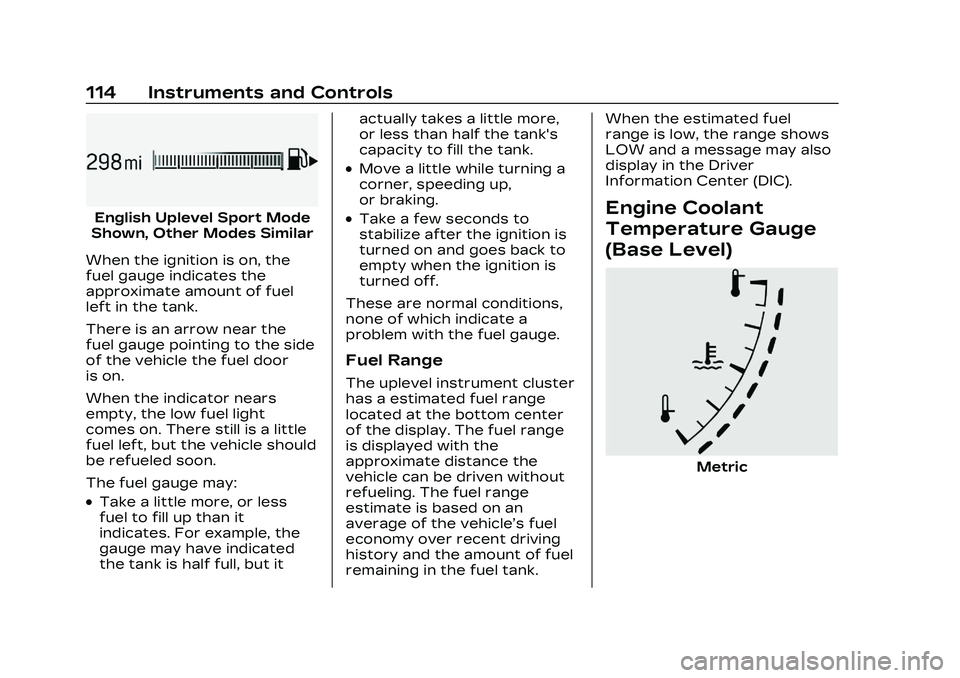
English Uplevel Sport Mode
Shown, Other Modes Similar
When the ignition is on, the
fuel gauge indicates the
approximate amount of fuel
left in the tank.
There is an arrow near the
fuel gauge pointing to the side
of the vehicle the fuel door
is on.
When the indicator nears
empty, the low fuel light
comes on. There still is a little
fuel left, but the vehicle should
be refueled soon.
The fuel gauge may:
.Take a little more, or less
fuel to fill up than it
indicates. For example, the
gauge may have indicated
the tank is half full, but it actually takes a little more,
or less than half the tank's
capacity to fill the tank.
.Move a little while turning a
corner, speeding up,
or braking.
.Take a few seconds to
stabilize after the ignition is
turned on and goes back to
empty when the ignition is
turned off.
These are normal conditions,
none of which indicate a
problem with the fuel gauge.
Fuel Range
The uplevel instrument cluster
has a estimated fuel range
located at the bottom center
of the display. The fuel range
is displayed with the
approximate distance the
vehicle can be driven without
refueling. The fuel range
estimate is based on an
average of the vehicle’s fuel
economy over recent driving
history and the amount of fuel
remaining in the fuel tank. When the estimated fuel
range is low, the range shows
LOW and a message may also
display in the Driver
Information Center (DIC).
Engine Coolant
Temperature Gauge
(Base Level)
Metric
Page 116 of 524

Cadillac CT4 Owner Manual (GMNA-Localizing-U.S./Canada-16500442) -
2023 - CRC - 5/4/22
Instruments and Controls 115
English
This gauge measures the
temperature of the vehicle's
engine.
While driving under normal
operating conditions, if the red
LED is illuminated, the engine
is too hot. Pull off the road,
stop the vehicle, and turn off
the engine as soon as
possible.
Engine Coolant
Temperature Gauge
(Uplevel)
Sport Mode Shown, Track Mode Similar
This gauge shows the engine
coolant temperature.
If the gauge pointer moves
into the red zone, the engine is
too hot.
This reading indicates the
same thing as the warning
light. It means that the engine
coolant has overheated. If the
vehicle has been operating
under normal driving
conditions, pull off the road,
stop the vehicle, and turn off
the engine as soon as possible. See Engine
Overheating
0391 for more
information.
Seat Belt Reminders
Driver Seat Belt Reminder
Light
There is a driver seat belt
reminder light on the
instrument cluster.
When the vehicle is started,
this light flashes and a chime
may come on to remind the
driver to fasten their seat belt.
Then the light stays on solid
until the belt is buckled. This
cycle may continue several
times if the driver remains or
becomes unbuckled while the
vehicle is moving.
Page 117 of 524

Cadillac CT4 Owner Manual (GMNA-Localizing-U.S./Canada-16500442) -
2023 - CRC - 5/4/22
116 Instruments and Controls
If the driver seat belt is
buckled, neither the light nor
the chime comes on.
Front Passenger Seat Belt
Reminder Light
The vehicle may have a front
passenger seat belt reminder
light near the passenger
airbag status indicator. See
Passenger Sensing System
066.
When the vehicle is started,
this light flashes and a chime
may come on to remind
passengers to fasten their
seat belt.
Then the light stays on solid
until the belt is buckled. This
cycle continues several times
if the front passenger remains
or becomes unbuckled while
the vehicle is moving. If the front passenger seat
belt is buckled, neither the
chime nor the light comes on.
The front passenger seat belt
reminder light and chime may
come on if an object is put on
the seat such as a briefcase,
handbag, grocery bag, laptop,
or other electronic device. To
turn off the reminder light
and/or chime, remove the
object from the seat or buckle
the seat belt.
Airbag Readiness
Light
This light shows if there is an
electrical problem with the
airbag system. It is located in
the instrument cluster. The
system check includes the
airbag sensor(s), the
passenger sensing system,
the pretensioners, the airbag
modules, the wiring, and the
crash sensing and diagnostic
module. For more information
on the airbag system, see
Airbag System
059.
The airbag readiness light
comes on for several seconds
when the vehicle is started.
If the light does not come on
then, have it fixed immediately.
{Warning
If the airbag readiness light
stays on after the vehicle is
started or comes on while
driving, it means the airbag
system might not be working
properly. The airbags in the
vehicle might not inflate in a
crash, or they could even
inflate without a crash. To
help avoid injury, have the
vehicle serviced right away.
If there is a problem with the
airbag system, a Driver
Information Center (DIC)
message may also come on.
Page 126 of 524

Cadillac CT4 Owner Manual (GMNA-Localizing-U.S./Canada-16500442) -
2023 - CRC - 5/4/22
Instruments and Controls 125
On some vehicles this light
comes on briefly while starting
the vehicle. If it does not, have
the vehicle serviced by the
dealer. If the system is
working normally the indicator
light goes off. For vehicles
with the reconfigurable
cluster, this light may not
come on when starting the
vehicle.
Caution
The engine coolant
temperature warning light
indicates that the vehicle
has overheated. Driving with
this light on can damage the
engine and it may not be
covered by the vehicle
warranty. See Engine
Overheating0391.
The engine coolant
temperature warning light
comes on when the engine has
overheated. If this happens pull over and
turn off the engine as soon as
possible. See Engine
Overheating
0391.
Driver Mode Control
Light
This light comes on when
Sport Mode is selected.
This light comes on when
Track Mode is selected. See
Driver Mode Control 0292.
This light comes on when
Snow/Ice Mode is selected.
This light comes on when V
Mode is selected. See Driver
Mode Control 0292.
This light comes on when My
Mode is selected. See Driver
Mode Control 0292.
Page 130 of 524

Cadillac CT4 Owner Manual (GMNA-Localizing-U.S./Canada-16500442) -
2023 - CRC - 5/4/22
Instruments and Controls 129
This light is white when the
Adaptive Cruise Control (ACC,
if equipped) is on and ready,
and turns green when the
ACC is set and active.
Curve Speed Control Light
If equipped, this light may
illuminate green when ACC is
actively controlling the vehicle
speed and detects a sharp
curve on the road ahead.
ACC automatically slows the
vehicle down while navigating
the curve and may increase
speed out of the curve, but will
not exceed the set speed.
See Adaptive Cruise Control
(Advanced)0304.
Super Cruise Light
This light comes on to show
the status of Super Cruise.
See Super Cruise 0316.
Door Ajar Light
This light comes on when a
door is open or not securely
latched. Before driving, check
that all doors are properly
closed.
Information
Displays
Driver Information
Center (DIC) (Base
Level)
The DIC is displayed in the
instrument cluster. It shows
the status of many vehicle
systems.
SorT:Press to move
between the interactive
display zones in the cluster.
Press
Sto go back to the
previous menu.
Page 133 of 524
Cadillac CT4 Owner Manual (GMNA-Localizing-U.S./Canada-16500442) -
2023 - CRC - 5/4/22
132 Instruments and Controls
based on the various vehicle
speeds recorded since the last
reset. Reset the average
speed by pressing the
thumbwheel while this display
is active to show a
confirmation window to select
yes or no.
Timer :This display can be
used as a timer. To start the
timer, press the thumbwheel
while this display is active. The
display will show the amount
of time that has passed since
the timer was last reset. To
stop the timer, press the
thumbwheel briefly while this
display is active and the timer
is running.
Press the thumbwheel while
this display is active to reset
the timer.
Follow Distance/Gap
Setting : When Adaptive
Cruise Control (ACC) is not
engaged, the current follow
time to the vehicle ahead is
displayed as a time value on
this page. When ACC has been engaged, the display switches
to the gap setting page. This
page shows the current gap
setting along with the vehicle
ahead telltale.
Driver Assistance :
If equipped, shows information
for Lane Keep Assist (LKA)
and Forward Collision
Alert (FCA).
Battery Voltage :
Shows the
current battery voltage.
Coolant Temperature :
Shows the engine coolant
temperature in either degrees
Celsius (°C) or degrees
Fahrenheit (°F).
Oil Temperature : Shows the
engine oil temperature in
either degrees Celsius (°C) or
degrees Fahrenheit (°F).
Engine Hours (Hourmeter) :
Shows the total number of
hours the engine has run. The
display also shows the engine
idle hours. Engine Boost :
Displays
engine manifold pressure
relative to ambient air
pressure. It will display boost
pressure generated by the
turbocharging system.
Transmission Fluid
Temperature : Shows the
temperature of the automatic
transmission fluid in either
degrees Celsius (°C) or
degrees Fahrenheit (°F).
Info Page Options : Scroll to
choose which info pages
appear on the DIC. Press the
thumbwheel to select or
deselect.
Blank Page : Allows for no
information to be displayed in
the cluster info display areas.
Driver Information
Center (DIC) (Uplevel)
The DIC is displayed in the
instrument cluster. It shows
the status of many vehicle
systems.
Page 134 of 524

Cadillac CT4 Owner Manual (GMNA-Localizing-U.S./Canada-16500442) -
2023 - CRC - 5/4/22
Instruments and Controls 133
DIC information is broken
down into two main zones:
Left Zone :Displays on the
instrument cluster to the left
of the speedometer.
Right Zone : Displays on the
instrument cluster to the right
of the speedometer.
SorT: Press to move left or
right between the interactive
display zones in the cluster.
Press the thumbwheel to
select.
yorz: Use the thumbwheel
to scroll up or down in a list.
Press the thumbwheel to
select.
DIC Info Tiles Selection
The following is the list of all
possible DIC Info Tiles.
Depending on the vehicle,
some may not be available.
Left Zone
Battery Voltage : Displays the
current battery voltage. The
battery voltage can fluctuate
while viewing this information
on the DIC. This is normal.
Coolant Temperature :
Displays the coolant
temperature in either degrees
Celsius (°C) or degrees
Fahrenheit (°F).
eLSD : Displays the amount of
rear differential coupling when
the Electronic Limited-Slip
Differential (eLSD) is active
and functioning during vehicle
operation. A reading of 1% is
an open differential and 100% is locked. It is normal for the
value to make small or large
changes due to driving
conditions and driver inputs.
For the V-Series Blackwing
models, the eLSD maintains
some coupling even if the
vehicle is stationary or not
accelerating. Coupling values
of 3% and up are typical. See
Limited-Slip Differential
0301.
Engine Boost : If equipped,
displays engine manifold
pressure relative to ambient
air pressure. It will display
boost pressure generated by
the turbocharging system.
Instantaneous Fuel
Economy/Economy Trend :
Displays the current fuel
economy in liters per
100 kilometers (L/100 km) or
miles per gallon (mpg). This
number reflects only the
approximate fuel economy and
changes frequently as driving
conditions change. This display
cannot be reset.
Page 137 of 524

Cadillac CT4 Owner Manual (GMNA-Localizing-U.S./Canada-16500442) -
2023 - CRC - 5/4/22
136 Instruments and Controls
displays, the engine air filter
should be replaced as soon as
possible.
Engine Hours :Displays the
total number of hours the
engine has run. The display
also shows the engine idle
hours.
Lifetime Revs : The display
shows total engine revolutions
divided by 10,000.
Brake Pad Life : If equipped,
this displays an estimate of
the remaining life of the front
and rear brake pads.
Messages are displayed based
on brake pad wear and the
state of the system. Reset the
Brake Pad Life display after
replacing the brake pads. See
Brake Pad Life System (If
Equipped) 0396.Head-Up
Display (HUD)
{Warning
If the HUD image is too
bright or too high in your
field of view, it may take you
more time to see things you
need to see when it is dark
outside. Be sure to keep the
HUD image dim and placed
low in your field of view.
If equipped with HUD, some
information concerning the
operation of the vehicle is
projected onto the windshield.
The information is projected
through the HUD lens on the
driver side of the instrument
panel and focused out toward
the front of the vehicle.
Caution
If you try to use the HUD
image as a parking aid, you
may misjudge the distance
and damage your vehicle. Do
not use the HUD image as a
parking aid.
The HUD information can be
displayed in various languages.
The speedometer reading and
other numerical values can be
displayed in either English or
metric units.
The language selection is
changed through the radio
and the units of measurement
are changed through the
instrument cluster. See
Settings 0207 and “Options”
under Instrument Cluster
(Base Level) 0106 or
Instrument Cluster (Uplevel)
0 108.
Page 139 of 524
Cadillac CT4 Owner Manual (GMNA-Localizing-U.S./Canada-16500442) -
2023 - CRC - 5/4/22
138 Instruments and Controls
the thumbwheel to enter the
Adjust Menu. Press
yorzto
adjust the angle of the HUD
display. Press
SorTto
highlight OK, then press the
thumbwheel to save the
setting. CANCEL can also be
selected to cancel the setting.
The vehicle must be in
P (Park). See Instrument
Cluster (Base Level) 0106 or
Instrument Cluster (Uplevel)
0 108.
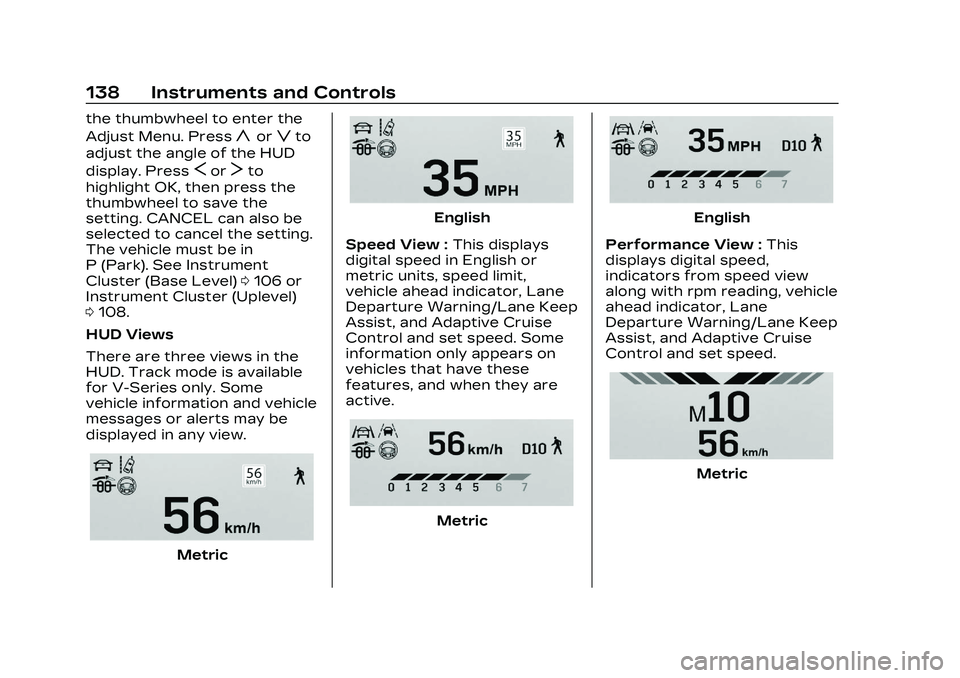
HUD Views
There are three views in the
HUD. Track mode is available
for V-Series only. Some
vehicle information and vehicle
messages or alerts may be
displayed in any view.
Metric
English
Speed View : This displays
digital speed in English or
metric units, speed limit,
vehicle ahead indicator, Lane
Departure Warning/Lane Keep
Assist, and Adaptive Cruise
Control and set speed. Some
information only appears on
vehicles that have these
features, and when they are
active.
Metric
English
Performance View : This
displays digital speed,
indicators from speed view
along with rpm reading, vehicle
ahead indicator, Lane
Departure Warning/Lane Keep
Assist, and Adaptive Cruise
Control and set speed.
Metric
Page 140 of 524
Cadillac CT4 Owner Manual (GMNA-Localizing-U.S./Canada-16500442) -
2023 - CRC - 5/4/22
Instruments and Controls 139
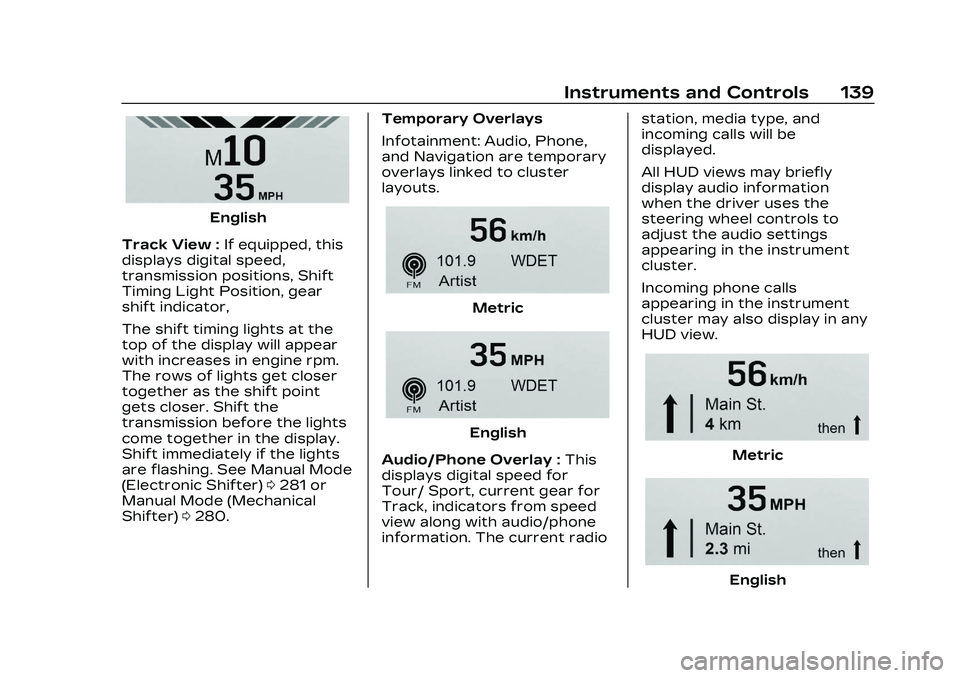
English
Track View : If equipped, this
displays digital speed,
transmission positions, Shift
Timing Light Position, gear
shift indicator,
The shift timing lights at the
top of the display will appear
with increases in engine rpm.
The rows of lights get closer
together as the shift point
gets closer. Shift the
transmission before the lights
come together in the display.
Shift immediately if the lights
are flashing. See Manual Mode
(Electronic Shifter) 0281 or
Manual Mode (Mechanical
Shifter) 0280. Temporary Overlays
Infotainment: Audio, Phone,
and Navigation are temporary
overlays linked to cluster
layouts.
Metric
English
Audio/Phone Overlay : This
displays digital speed for
Tour/ Sport, current gear for
Track, indicators from speed
view along with audio/phone
information. The current radio station, media type, and
incoming calls will be
displayed.
All HUD views may briefly
display audio information
when the driver uses the
steering wheel controls to
adjust the audio settings
appearing in the instrument
cluster.
Incoming phone calls
appearing in the instrument
cluster may also display in any
HUD view.
Metric
English