Wheel nut CADILLAC CT5 2020 Owner's Manual
[x] Cancel search | Manufacturer: CADILLAC, Model Year: 2020, Model line: CT5, Model: CADILLAC CT5 2020Pages: 359, PDF Size: 6.04 MB
Page 16 of 359
Cadillac CT5 Owner Manual (GMNA-Localizing-U.S./Canada-13060105) -
2020 - CRC - 2/14/20
KEYS, DOORS, AND WINDOWS 15
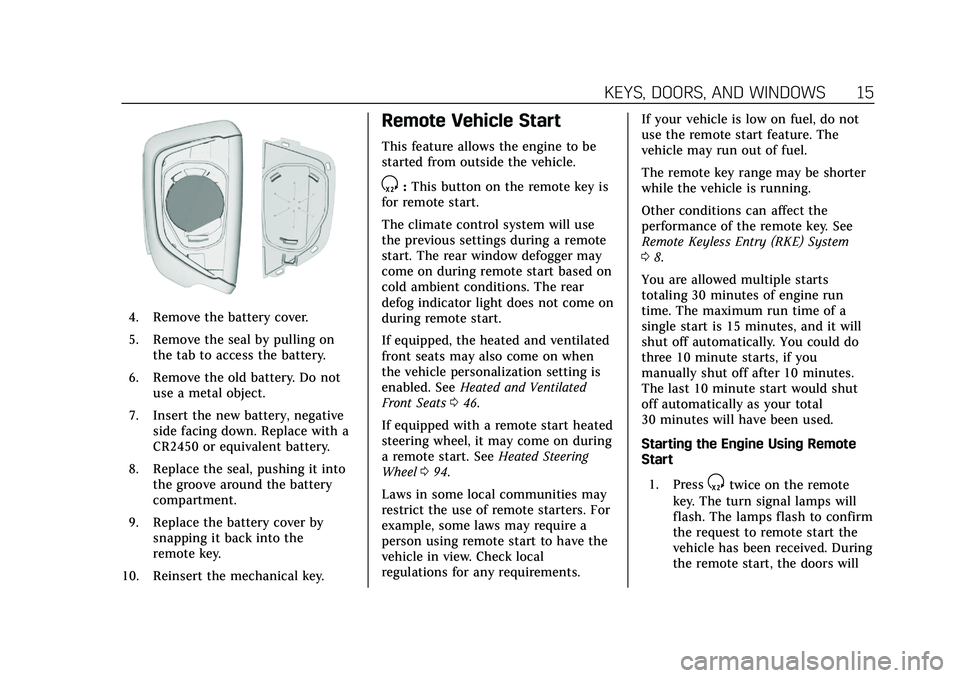
4. Remove the battery cover.
5. Remove the seal by pulling onthe tab to access the battery.
6. Remove the old battery. Do not use a metal object.
7. Insert the new battery, negative side facing down. Replace with a
CR2450 or equivalent battery.
8. Replace the seal, pushing it into the groove around the battery
compartment.
9. Replace the battery cover by snapping it back into the
remote key.
10. Reinsert the mechanical key.
Remote Vehicle Start
This feature allows the engine to be
started from outside the vehicle.
S: This button on the remote key is
for remote start.
The climate control system will use
the previous settings during a remote
start. The rear window defogger may
come on during remote start based on
cold ambient conditions. The rear
defog indicator light does not come on
during remote start.
If equipped, the heated and ventilated
front seats may also come on when
the vehicle personalization setting is
enabled. See Heated and Ventilated
Front Seats 046.
If equipped with a remote start heated
steering wheel, it may come on during
a remote start. See Heated Steering
Wheel 094.
Laws in some local communities may
restrict the use of remote starters. For
example, some laws may require a
person using remote start to have the
vehicle in view. Check local
regulations for any requirements. If your vehicle is low on fuel, do not
use the remote start feature. The
vehicle may run out of fuel.
The remote key range may be shorter
while the vehicle is running.
Other conditions can affect the
performance of the remote key. See
Remote Keyless Entry (RKE) System
0
8.
You are allowed multiple starts
totaling 30 minutes of engine run
time. The maximum run time of a
single start is 15 minutes, and it will
shut off automatically. You could do
three 10 minute starts, if you
manually shut off after 10 minutes.
The last 10 minute start would shut
off automatically as your total
30 minutes will have been used.
Starting the Engine Using Remote
Start
1. Press
Stwice on the remote
key. The turn signal lamps will
flash. The lamps flash to confirm
the request to remote start the
vehicle has been received. During
the remote start, the doors will
Page 48 of 359
Cadillac CT5 Owner Manual (GMNA-Localizing-U.S./Canada-13060105) -
2020 - CRC - 2/14/20
SEATS AND RESTRAINTS 47
Warning (Continued)
overheat. An overheated seat heater
may cause a burn or may damage
the seat.
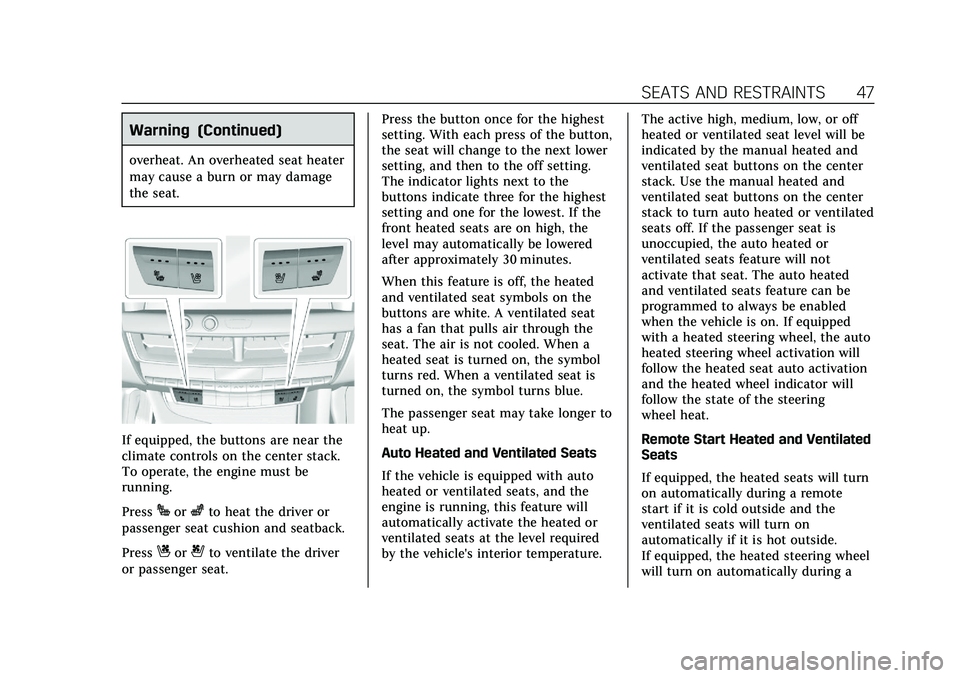
If equipped, the buttons are near the
climate controls on the center stack.
To operate, the engine must be
running.
Press
Jorzto heat the driver or
passenger seat cushion and seatback.
Press
Cor{to ventilate the driver
or passenger seat. Press the button once for the highest
setting. With each press of the button,
the seat will change to the next lower
setting, and then to the off setting.
The indicator lights next to the
buttons indicate three for the highest
setting and one for the lowest. If the
front heated seats are on high, the
level may automatically be lowered
after approximately 30 minutes.
When this feature is off, the heated
and ventilated seat symbols on the
buttons are white. A ventilated seat
has a fan that pulls air through the
seat. The air is not cooled. When a
heated seat is turned on, the symbol
turns red. When a ventilated seat is
turned on, the symbol turns blue.
The passenger seat may take longer to
heat up.
Auto Heated and Ventilated Seats
If the vehicle is equipped with auto
heated or ventilated seats, and the
engine is running, this feature will
automatically activate the heated or
ventilated seats at the level required
by the vehicle's interior temperature.
The active high, medium, low, or off
heated or ventilated seat level will be
indicated by the manual heated and
ventilated seat buttons on the center
stack. Use the manual heated and
ventilated seat buttons on the center
stack to turn auto heated or ventilated
seats off. If the passenger seat is
unoccupied, the auto heated or
ventilated seats feature will not
activate that seat. The auto heated
and ventilated seats feature can be
programmed to always be enabled
when the vehicle is on. If equipped
with a heated steering wheel, the auto
heated steering wheel activation will
follow the heated seat auto activation
and the heated wheel indicator will
follow the state of the steering
wheel heat.
Remote Start Heated and Ventilated
Seats
If equipped, the heated seats will turn
on automatically during a remote
start if it is cold outside and the
ventilated seats will turn on
automatically if it is hot outside.
If equipped, the heated steering wheel
will turn on automatically during a
Page 49 of 359
Cadillac CT5 Owner Manual (GMNA-Localizing-U.S./Canada-13060105) -
2020 - CRC - 2/14/20
48 SEATS AND RESTRAINTS
remote start if it is cold outside. The
heated and ventilated seat indicators
and heated steering wheel indicator
will come on during this operation.
The heated and ventilated seats and
heated steering wheel may cancel
when the vehicle is started. These
features can be manually selected
after the ignition is turned on.
The temperature performance of an
unoccupied seat may be reduced. This
is normal.
The remote start heated or ventilated
seats can be enabled or disabled in
the vehicle personalization menu. See
Remote Vehicle Start015 and
Vehicle Personalization 0124.Massage
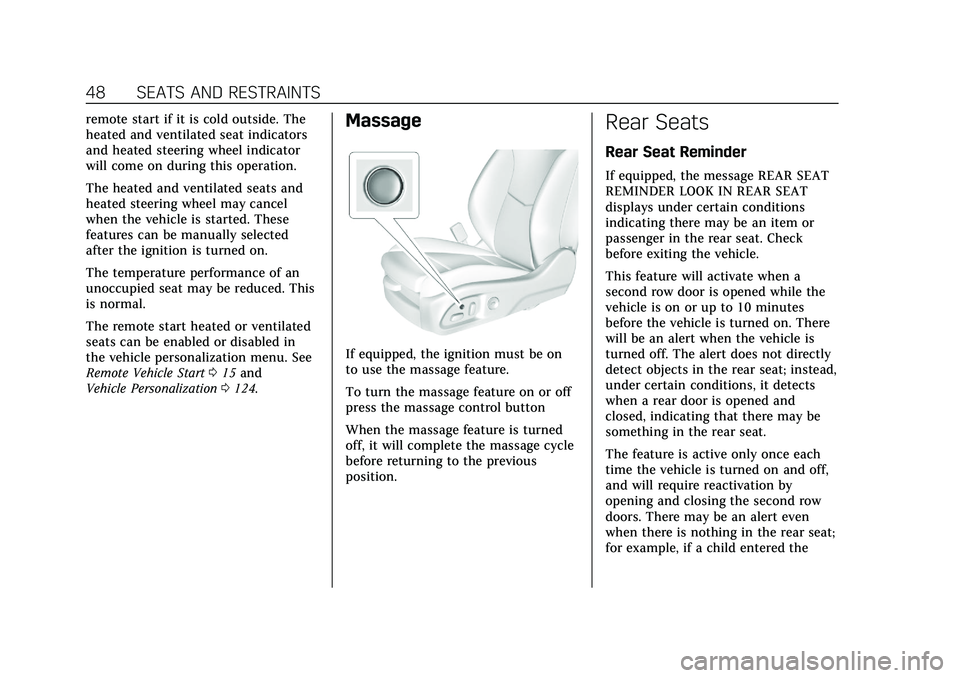
If equipped, the ignition must be on
to use the massage feature.
To turn the massage feature on or off
press the massage control button
When the massage feature is turned
off, it will complete the massage cycle
before returning to the previous
position.
Rear Seats
Rear Seat Reminder
If equipped, the message REAR SEAT
REMINDER LOOK IN REAR SEAT
displays under certain conditions
indicating there may be an item or
passenger in the rear seat. Check
before exiting the vehicle.
This feature will activate when a
second row door is opened while the
vehicle is on or up to 10 minutes
before the vehicle is turned on. There
will be an alert when the vehicle is
turned off. The alert does not directly
detect objects in the rear seat; instead,
under certain conditions, it detects
when a rear door is opened and
closed, indicating that there may be
something in the rear seat.
The feature is active only once each
time the vehicle is turned on and off,
and will require reactivation by
opening and closing the second row
doors. There may be an alert even
when there is nothing in the rear seat;
for example, if a child entered the
Page 64 of 359
Cadillac CT5 Owner Manual (GMNA-Localizing-U.S./Canada-13060105) -
2020 - CRC - 2/14/20
SEATS AND RESTRAINTS 63
either side of the vehicle is struck,
if the sensing system predicts that the
vehicle is about to roll over on its
side, or in a severe frontal impact.
In any particular crash, no one can
say whether an airbag should have
inflated simply because of the vehicle
damage or repair costs.
What Makes an Airbag
Inflate?
In a deployment event, the sensing
system sends an electrical signal
triggering a release of gas from the
inflator. Gas from the inflator fills the
airbag causing the bag to break out of
the cover. The inflator, the airbag, and
related hardware are all part of the
airbag module.
For airbag locations, seeWhere Are the
Airbags? 060.
How Does an Airbag
Restrain?
In moderate to severe frontal or near
frontal collisions, even belted
occupants can contact the steering wheel or the instrument panel. In
moderate to severe side collisions,
even belted occupants can contact the
inside of the vehicle.
Airbags supplement the protection
provided by seat belts by distributing
the force of the impact more evenly
over the occupant's body.
Rollover capable roof-rail airbags are
designed to help contain the head and
chest of occupants in the outboard
seating positions in the first and
second rows. The rollover capable
roof-rail airbags are designed to help
reduce the risk of full or partial
ejection in rollover events, although
no system can prevent all such
ejections.
But airbags would not help in many
types of collisions, primarily because
the occupant's motion is not toward
those airbags. See
When Should an
Airbag Inflate? 062.
Airbags should never be regarded as
anything more than a supplement to
seat belts.
What Will You See after an
Airbag Inflates?
After frontal, knee, and seat-mounted
side impact airbags inflate, they
quickly deflate, so quickly that some
people may not even realize the
airbags inflated. Roof-rail airbags may
still be at least partially inflated for
some time after they inflate. Some
components of the airbag module may
be hot for several minutes. For
location of the airbags, see Where Are
the Airbags? 060.
The parts of the airbag that come into
contact with you may be warm, but
not too hot to touch. There may be
some smoke and dust coming from
the vents in the deflated airbags.
Airbag inflation does not prevent the
driver from seeing out of the
windshield or being able to steer the
vehicle, nor does it prevent people
from leaving the vehicle.
Page 95 of 359
Cadillac CT5 Owner Manual (GMNA-Localizing-U.S./Canada-13060105) -
2020 - CRC - 2/14/20
94 INSTRUMENTS AND CONTROLS
Controls
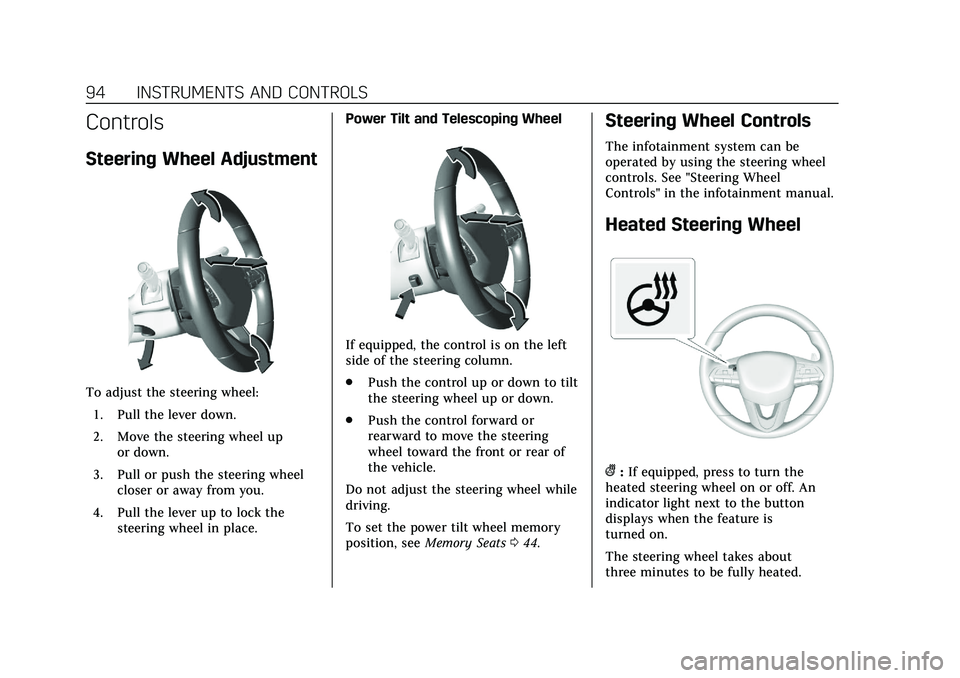
Steering Wheel Adjustment
To adjust the steering wheel:1. Pull the lever down.
2. Move the steering wheel up or down.
3. Pull or push the steering wheel closer or away from you.
4. Pull the lever up to lock the steering wheel in place. Power Tilt and Telescoping Wheel
If equipped, the control is on the left
side of the steering column.
.
Push the control up or down to tilt
the steering wheel up or down.
. Push the control forward or
rearward to move the steering
wheel toward the front or rear of
the vehicle.
Do not adjust the steering wheel while
driving.
To set the power tilt wheel memory
position, see Memory Seats 044.
Steering Wheel Controls
The infotainment system can be
operated by using the steering wheel
controls. See "Steering Wheel
Controls" in the infotainment manual.
Heated Steering Wheel
(:If equipped, press to turn the
heated steering wheel on or off. An
indicator light next to the button
displays when the feature is
turned on.
The steering wheel takes about
three minutes to be fully heated.
Page 105 of 359

Cadillac CT5 Owner Manual (GMNA-Localizing-U.S./Canada-13060105) -
2020 - CRC - 2/14/20
104 INSTRUMENTS AND CONTROLS
Display :Press the thumbwheel to
enter the Display menu. Select to turn
on or off the speedometer, time, fuel
range, or, if equipped, compass or
speed sign.
Speed Warning : The Speed Warning
display allows the driver to set a
warning at a speed that they do not
want to exceed. To set the Speed
Warning press the thumbwheel when
Speed Warning is displayed. Use the
thumbwheel to adjust the value and
press to set the speed.
Once the speed is set, this feature can
be turned off by pressing the
thumbwheel while viewing this page.
If the selected speed limit is exceeded,
a pop-up warning is displayed with a
chime.
Software Information : Displays open
source software information.
Speedometer
The speedometer shows the vehicle's
speed in either kilometers per hour
(km/h) or miles per hour (mph).
Odometer
The odometer shows how far the
vehicle has been driven, in either
kilometers or miles.
Trip Odometer
The trip odometer shows how far the
vehicle has been driven since the trip
odometer was last reset.
The trip odometer is accessed and
reset through the Driver Information
Center (DIC). See Driver Information
Center (DIC) 0117.
Tachometer
The tachometer displays the engine
speed in revolutions per minute (rpm).
For vehicles with the Stop/Start
system, when the ignition is on, the
tachometer indicates the vehicle
status. When pointing to AUTO STOP,
the engine is off but the vehicle is on
and can move. The engine could auto
start at any time. When the indicator
points to OFF, the vehicle is off. When the engine is on, the
tachometer will indicate the engine’s
revolutions per minute (rpm). The
tachometer may vary by several
hundred rpm’s, during Auto Stop
mode, when the engine is shutting off
and restarting.
Fuel Gauge
When the ignition is on, the fuel
gauge indicates about how much fuel
is left in the tank.
There is an arrow near the fuel gauge
pointing to the side of the vehicle the
fuel door is on.
Page 154 of 359
Cadillac CT5 Owner Manual (GMNA-Localizing-U.S./Canada-13060105) -
2020 - CRC - 2/14/20
DRIVING AND OPERATING 153
If the vehicle starts to slide, follow
these suggestions:
.Ease your foot off the accelerator
pedal and steer the way you want
the vehicle to go. The vehicle may
straighten out. Be ready for a
second skid if it occurs.
. Slow down and adjust your driving
according to weather conditions.
Stopping distance can be longer
and vehicle control can be affected
when traction is reduced by water,
snow, ice, gravel, or other material
on the road. Learn to recognize
warning clues —such as enough
water, ice, or packed snow on the
road to make a mirrored surface
— and slow down when you have
any doubt.
. Try to avoid sudden steering,
acceleration, or braking, including
reducing vehicle speed by shifting
to a lower gear. Any sudden
changes could cause the tires to
slide.
Remember: Antilock brakes help avoid
only the braking skid.Track Events and
Competitive Driving
(V-Series Only)
{Danger
High-performance features are
intended for use only on closed
tracks by experienced and qualified
drivers and should not be used on
public roads. High-speed driving,
aggressive cornering, hard braking,
and other high-performance driving
can be dangerous. Improper driver
inputs for the conditions may result
in loss of control of the vehicle,
which could injure or kill you or
others. Always drive safely.
Track events and competitive driving
may affect the vehicle warranty. See
the warranty manual before using the
vehicle for competitive driving.
{Warning
Prior to each track event and again
before returning to public roads,
tighten the wheel nuts with a
torque wrench to the proper torque
specification. Wheel nuts that are
improperly or incorrectly tightened
can cause the wheels to become
loose or come off, resulting in a
crash. See Capacities and
Specifications 0321 for wheel nut
torque specifications.
Caution
If the vehicle is used for track
events and competitive driving, the
engine may use more oil than it
would with normal use. Low oil
levels can damage the engine.
Check the oil level often and
maintain the proper level. See
Engine Oil 0246.
Page 176 of 359

Cadillac CT5 Owner Manual (GMNA-Localizing-U.S./Canada-13060105) -
2020 - CRC - 2/14/20
DRIVING AND OPERATING 175
To shift in and out of P (Park), see
Shifting Into Park0169 and
Shifting out of Park 0170.
Service Shift Lever Message
If the message SERVICE SHIFTER SEE
OWNER’S MANUAL appears in the
Driver Information Center (DIC), the
shift lever needs service. Have the
vehicle serviced as soon as possible.
If the vehicle is automatically shifting
into P (Park), check to see if the
P (Park) button on top of the shift
lever is stuck. To operate the vehicle,
hold the shift lever in the desired gear,
R (Reverse) or D (Drive), until vehicle
speed exceeds 15 km/h (10 mph), then
release the shift lever.
R : Use this gear to back up.
If the vehicle is shifted from either
R (Reverse) to D (Drive) or M (Manual
Mode), or M (Manual Mode) or
D (Drive) to R (Reverse) while the
speed is too high, the vehicle will shift
to N (Neutral). Reduce the vehicle
speed and try the shift again.
To shift into R (Reverse): 1. Bring the vehicle to a complete stop. 2. Press and hold shift lock release
button on the side of the shift
lever.
3. From the center position, move the shift lever forward through
the first detent to the end of
travel. R is illuminated in red.
4. After releasing the shift lever, it will return to the center position.
To shift out of R (Reverse): 1. Bring the vehicle to a complete stop.
2. Shift to the desired gear.
3. After releasing the shift lever, it will return to the center position.
At low vehicle speeds, R (Reverse) can
be used to rock the vehicle back and
forth to get out of snow, ice, or sand
without damaging the transmission.
See If the Vehicle Is Stuck 0159.
N : In this position, the engine does
not connect with the wheels. To
restart the engine when the vehicle is
already moving, use N (Neutral) only.
{Warning
Shifting into a drive gear while the
engine is running at high speed is
dangerous. Unless your foot is
firmly on the brake pedal, the
vehicle could move very rapidly.
You could lose control and hit
people or objects. Do not shift into
a drive gear while the engine is
running at high speed.
Caution
Shifting out of P (Park) or
N (Neutral) with the engine running
at high speed may damage the
transmission. The repairs would not
be covered by the vehicle warranty.
Be sure the engine is not running at
high speed when shifting the
vehicle.
The vehicle is not designed to stay in
N (Neutral) for more than
five minutes. It may automatically
shift into P (Park). N (Neutral) is not
Page 180 of 359

Cadillac CT5 Owner Manual (GMNA-Localizing-U.S./Canada-13060105) -
2020 - CRC - 2/14/20
DRIVING AND OPERATING 179
M (Manual Mode) can be exited to
return to D (Drive) at any speed by
pulling the lever rearward from the
center position. It is not necessary to
stop the vehicle or shift to N (Neutral)
or P (Park) prior to shifting back to
D (Drive).
Temporary Tap Manual Shift Mode
To enter Temporary Tap Shift Mode:1. With the transmission in D (Drive) and not in Permanent
Tap Shift Mode, the Tap Shift
controls will activate a
temporary tap manual shift
mode, allowing the transmission
to be manually shifted.
2. To shift to the lowest available gear, press and hold the left
control.
3. To deactivate, hold the right control briefly. Automatic shifts
return after no manual shifts
have been done for seven to
10 seconds. While using Tap Shift, the vehicle will
have firmer, quicker shifting. This can
be used for sport driving or when
climbing or descending hills, to stay in
gear longer, or to downshift for more
power or engine braking.
The transmission will only allow
shifting into gears appropriate for the
vehicle speed and engine revolutions
per minute (rpm). The transmission
will not automatically shift to the next
higher gear if the engine rpm is too
high. It will only automatically shift to
the next lower gear if the engine rpm
is much too low.Drive Systems
All-Wheel Drive
Vehicles with this feature always send
engine power to all four wheels. It is
fully automatic, and adjusts itself as
needed for road conditions.
Page 184 of 359
Cadillac CT5 Owner Manual (GMNA-Localizing-U.S./Canada-13060105) -
2020 - CRC - 2/14/20
DRIVING AND OPERATING 183
Warning (Continued)
not hear or feel alerts or warnings
provided by this system. Failure to
use proper care when driving may
result in injury, death, or vehicle
damage.
When Automatic Vehicle Hold (AVH)
is turned on and the vehicle is braked
to a stop, AVH prevents the vehicle
from moving during the transition
from brake pedal release to accelerator
pedal apply. The brakes release when
the accelerator pedal is applied. The
brakes may also release under other
conditions. Do not rely on AVH to
hold the vehicle. If the accelerator pedal is not applied
within a few minutes, the Electric
Parking Brake will apply. The parking
brake will also apply if the driver door
is opened or the driver seat belt is
unfastened while AVH is holding the
vehicle.
AVH can be turned on by pressing
AUTO HOLD. The indicator light on
the switch will come on. The AVH
light on the instrument panel will
come on while AVH is actively holding
the vehicle. See
Automatic Vehicle Hold
(AVH) Light 0111.
Ride Control Systems
Traction Control/Electronic
Stability Control
The vehicle has a Traction Control
System (TCS) and StabiliTrak/
Electronic Stability Control (ESC).
These systems help limit wheel slip
and assist the driver in maintaining
control, especially on slippery road
conditions.
TCS activates if it senses that any of
the drive wheels are spinning or
beginning to lose traction. When this
happens, the system brakes the
spinning wheel(s) and/or reduces
engine power to limit wheel spin.
StabiliTrak/ESC activates when the
computer senses a difference between
the intended path and the direction
the vehicle is actually traveling.
StabiliTrak/ESC selectively applies
braking pressure at any one of the
vehicle's brakes to help steer the
vehicle in the intended direction.