transmission CADILLAC CT5 2020 Owner's Manual
[x] Cancel search | Manufacturer: CADILLAC, Model Year: 2020, Model line: CT5, Model: CADILLAC CT5 2020Pages: 359, PDF Size: 6.04 MB
Page 7 of 359
Cadillac CT5 Owner Manual (GMNA-Localizing-U.S./Canada-13060105) -
2020 - CRC - 2/14/20
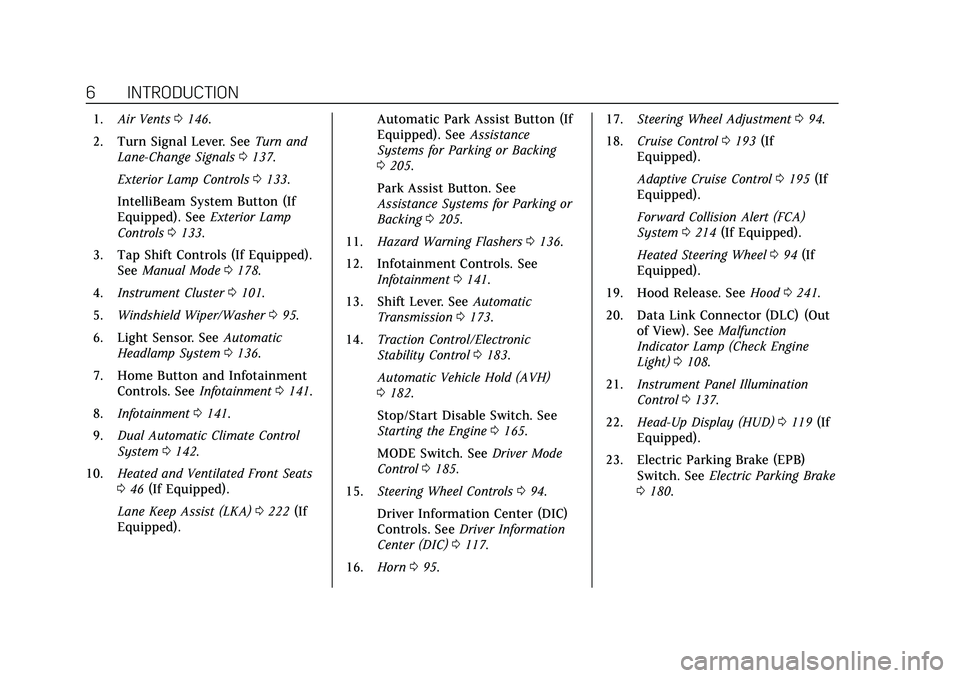
6 INTRODUCTION
1.Air Vents 0146.
2. Turn Signal Lever. See Turn and
Lane-Change Signals 0137.
Exterior Lamp Controls 0133.
IntelliBeam System Button (If
Equipped). See Exterior Lamp
Controls 0133.
3. Tap Shift Controls (If Equipped). See Manual Mode 0178.
4. Instrument Cluster 0101.
5. Windshield Wiper/Washer 095.
6. Light Sensor. See Automatic
Headlamp System 0136.
7. Home Button and Infotainment Controls. See Infotainment0141.
8. Infotainment 0141.
9. Dual Automatic Climate Control
System 0142.
10. Heated and Ventilated Front Seats
046 (If Equipped).
Lane Keep Assist (LKA) 0222 (If
Equipped). Automatic Park Assist Button (If
Equipped). See
Assistance
Systems for Parking or Backing
0 205.
Park Assist Button. See
Assistance Systems for Parking or
Backing 0205.
11. Hazard Warning Flashers 0136.
12. Infotainment Controls. See Infotainment 0141.
13. Shift Lever. See Automatic
Transmission 0173.
14. Traction Control/Electronic
Stability Control 0183.
Automatic Vehicle Hold (AVH)
0 182.
Stop/Start Disable Switch. See
Starting the Engine 0165.
MODE Switch. See Driver Mode
Control 0185.
15. Steering Wheel Controls 094.
Driver Information Center (DIC)
Controls. See Driver Information
Center (DIC) 0117.
16. Horn 095. 17.
Steering Wheel Adjustment 094.
18. Cruise Control 0193 (If
Equipped).
Adaptive Cruise Control 0195 (If
Equipped).
Forward Collision Alert (FCA)
System 0214 (If Equipped).
Heated Steering Wheel 094 (If
Equipped).
19. Hood Release. See Hood0241.
20. Data Link Connector (DLC) (Out of View). See Malfunction
Indicator Lamp (Check Engine
Light) 0108.
21. Instrument Panel Illumination
Control 0137.
22. Head-Up Display (HUD) 0119 (If
Equipped).
23. Electric Parking Brake (EPB) Switch. See Electric Parking Brake
0 180.
Page 20 of 359

Cadillac CT5 Owner Manual (GMNA-Localizing-U.S./Canada-13060105) -
2020 - CRC - 2/14/20
KEYS, DOORS, AND WINDOWS 19
Q:Press to lock the doors. The
indicator light in the switch will
illuminate when locked.
K: Press to unlock the doors.
The fuel door is also locked or
unlocked using these features.
Delayed Locking
This feature delays the actual locking
of the doors until five seconds after all
doors are closed.
When
Qis pressed on the power door
lock switch with the door open, a
chime will sound three times
indicating that delayed locking is
active.
The doors will then lock automatically
five seconds after all doors are closed.
If a door is reopened before
five seconds have elapsed, the
five-second timer will reset once all
the doors are closed again.
Press
Qon the door lock switch again,
or press
Qon the key, to override this
feature and lock the doors
immediately. Delayed locking can be programmed
through the Driver Information Center
(DIC). See
Vehicle Personalization
0 124.
Automatic Door Locks
The doors will lock automatically
when all doors are closed, the ignition
is on, and the vehicle is shifted out of
P (Park).
If a vehicle door is unlocked, and then
opened and closed, the doors will lock
either when your foot is removed from
the brake or the vehicle speed
becomes faster than 13 km/h (8 mph).
To unlock the doors:
.
Press
Kon the power door lock
switch.
. Shift the transmission into
P (Park).
Automatic door locking cannot be
disabled. Automatic door unlocking
can be programmed. See Vehicle
Personalization 0124.
Lockout Protection
If the vehicle is on or in ACC/
ACCESSORY and the power door lock
switch is pressed with the driver door
open, all the doors will lock and only
the driver door will unlock.
If the vehicle is off and locking is
requested while a door is open, when
all doors are closed the vehicle will
check for keys inside. If any remote
key programmed to the vehicle is
detected and the number of keys
inside has not reduced, the driver door
will unlock and the horn will chirp
three times.
Lockout Protection can be manually
overridden with the driver door open
by pressing and holding
Qon the
power door lock switch.
Page 24 of 359
Cadillac CT5 Owner Manual (GMNA-Localizing-U.S./Canada-13060105) -
2020 - CRC - 2/14/20
KEYS, DOORS, AND WINDOWS 23
If a remote key is again detected
within approximately 2 m (6 ft) of the
trunk, or another hands-free operation
has been detected, the one-minute
timer will be reset.
The projected logo will not work
under these conditions:
.The vehicle battery is low.
. The transmission is not in
P (Park).
. Hands Free Trunk Control is set to
Off in vehicle personalization. See
Vehicle Personalization 0124.
. The vehicle remains parked for
10 days or more, with no remote
key use or Keyless Access
operation. To re-enable, press any
button on the remote key or open
and close a vehicle door. The projected logo will not work for a
single remote key when a remote key:
.
Has been left within
approximately 2 m (6 ft) of the
trunk for several minutes.
. Has been left inside the vehicle
and all vehicle doors are closed.
. Has approached the area outside
of the trunk five times within
several minutes. Lens Cleaning
Clean the recessed lens with a
cotton swab.
Page 25 of 359
Cadillac CT5 Owner Manual (GMNA-Localizing-U.S./Canada-13060105) -
2020 - CRC - 2/14/20
24 KEYS, DOORS, AND WINDOWS
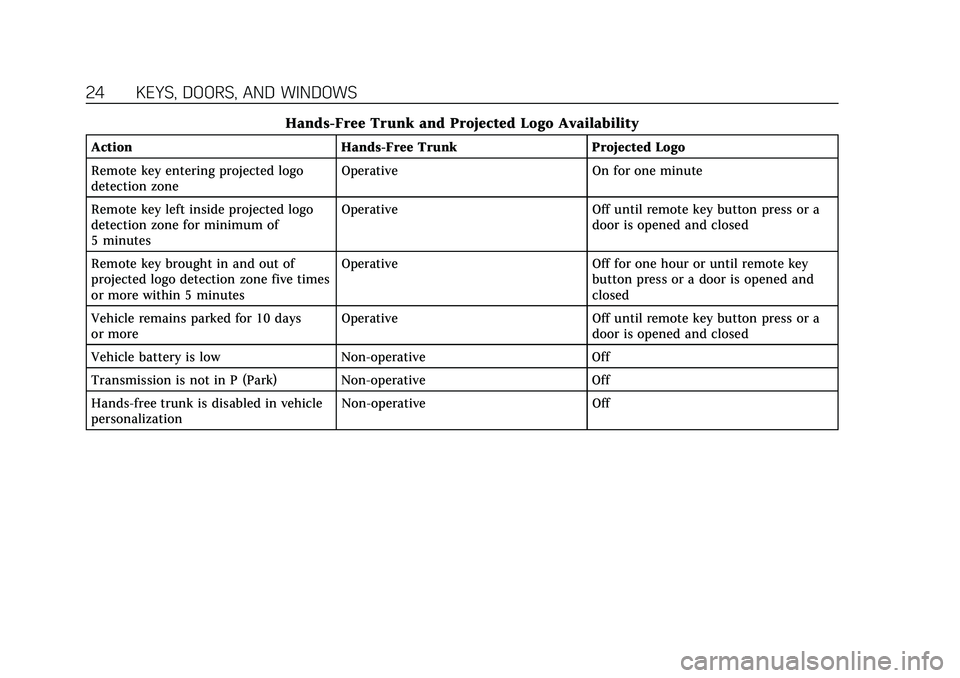
Hands-Free Trunk and Projected Logo Availability
ActionHands-Free Trunk Projected Logo
Remote key entering projected logo
detection zone Operative
On for one minute
Remote key left inside projected logo
detection zone for minimum of
5 minutes Operative
Off until remote key button press or a
door is opened and closed
Remote key brought in and out of
projected logo detection zone five times
or more within 5 minutes Operative
Off for one hour or until remote key
button press or a door is opened and
closed
Vehicle remains parked for 10 days
or more Operative
Off until remote key button press or a
door is opened and closed
Vehicle battery is low Non-operative Off
Transmission is not in P (Park) Non-operative Off
Hands-free trunk is disabled in vehicle
personalization Non-operative
Off
Page 97 of 359

Cadillac CT5 Owner Manual (GMNA-Localizing-U.S./Canada-13060105) -
2020 - CRC - 2/14/20
96 INSTRUMENTS AND CONTROLS
Warning (Continued)
vehicle, including all lamps and
windows. Reduced visibility from
snow and ice buildup could lead to
a crash.
Clear snow and ice from the wiper
blades and windshield before using
them. If frozen to the windshield,
carefully loosen or thaw them.
Damaged blades should be replaced.
See Wiper Blade Replacement 0261.
Wiper Parking
If the ignition is turned off while the
wipers are on LO, HI, or INT, they will
immediately stop.
If the windshield wiper lever is then
moved to OFF before the driver door is
opened or within 10 minutes, the
wipers will restart and move to the
base of the windshield.
If the ignition is turned off while the
wipers are performing wipes due to
windshield washing or Rainsense wipes, the wipers continue to run
until they reach the base of the
windshield.
Rainsense
There is a sensor near the top center
of the windshield detects the amount
of water on the windshield and
controls the frequency of the
windshield wiper. To turn this feature
on or off, see
“Rain Sense Wipers ”
under Vehicle Personalization 0124.
Keep this area of the windshield clear
of debris to allow for best system
performance.
AUTO : When enabled, move the
windshield wiper lever to AUTO. Turn
the
xAUTO band on the wiper
lever to adjust the sensitivity.
. Turn the band up for more
sensitivity to moisture. .
Turn the band down for less
sensitivity to moisture.
. Move the windshield wiper lever
out of the AUTO position to
deactivate Rainsense.
Wiper Arm Assembly Protection
If equipped with wiper arm assembly
protection, when using an automatic
car wash, move the windshield wiper
lever to OFF. This disables the
automatic Rainsense windshield
wipers.
With Rainsense, if the transmission is
in N (Neutral) and the vehicle speed is
very slow, the wipers will
automatically stop at the base of the
windshield.
The wiper operations return to normal
when the transmission is no longer in
N (Neutral) or the vehicle speed has
increased.
Wiper-Activated Headlamps
This feature activates the headlamps
and parking lamps after the
windshield wipers have been in use
for a while. The transition time for the
lamps coming on varies based on the
Page 109 of 359
Cadillac CT5 Owner Manual (GMNA-Localizing-U.S./Canada-13060105) -
2020 - CRC - 2/14/20
108 INSTRUMENTS AND CONTROLS
If the light stays on, or comes on
while driving, there may be a problem
with the electrical charging system.
Have it checked by your dealer.
Driving while this light is on could
drain the battery.
When this light comes on, or is
flashing, the Driver Information
Center (DIC) also displays a message.
If a short distance must be driven
with the light on, be sure to turn off
all accessories, such as the radio and
air conditioner.
Malfunction Indicator Lamp
(Check Engine Light)
This light is part of the vehicle’s
emission control on-board diagnostic
system. If this light is on while the
engine is running, a malfunction has
been detected and the vehicle may
require service. The light should come
on to show that it is working when
the ignition is in Service Mode. See
Ignition Positions0164.
Malfunctions are often indicated by
the system before any problem is
noticeable. Being aware of the light
and seeking service promptly when it
comes on may prevent damage.
Caution
If the vehicle is driven continually
with this light on, the emission
control system may not work as
well, the fuel economy may be
lower, and the vehicle may not run
smoothly. This could lead to costly
repairs that might not be covered
by the vehicle warranty.
Caution
Modifications to the engine,
transmission, exhaust, intake,
or fuel system, or the use of
replacement tires that do not meet
the original tire specifications, can
cause this light to come on. This
could lead to costly repairs not
covered by the vehicle warranty.
This could also affect the vehicle’s
ability to pass an Emissions
Inspection/Maintenance test. See
Accessories and Modifications 0240.
If the light is f lashing : A
malfunction has been detected that
could damage the emission control
system and increase vehicle
emissions. Diagnosis and service may
be required.
To help prevent damage, reduce
vehicle speed and avoid hard
accelerations and uphill grades.
If towing a trailer, reduce the amount
of cargo being hauled as soon as
possible.
Page 120 of 359
Cadillac CT5 Owner Manual (GMNA-Localizing-U.S./Canada-13060105) -
2020 - CRC - 2/14/20
INSTRUMENTS AND CONTROLS 119
Average Speed :Displays the average
vehicle speed of the vehicle in
kilometers per hour (km/h) or miles
per hour (mph). This average is based
on the various vehicle speeds recorded
since the last reset. Reset the average
speed by pressing the thumbwheel
while this display is active to show a
confirmation window to select yes
or no.
Timer : This display can be used as a
timer. To start the timer, press the
thumbwheel while this display is
active. The display will show the
amount of time that has passed since
the timer was last reset. To stop the
timer, press the thumbwheel briefly
while this display is active and the
timer is running.
Press the thumbwheel while this
display is active to reset the timer.
Follow Distance/Gap Setting : When
Adaptive Cruise Control (ACC) is not
engaged, the current follow time to
the vehicle ahead is displayed as a
time value on this page. When ACC
has been engaged, the display switches to the gap setting page. This
page shows the current gap setting
along with the vehicle ahead telltale.
Driver Assistance :
If equipped,
shows information for Lane Keep
Assist (LKA) and Forward Collision
Alert (FCA).
Battery Voltage : Shows the current
battery voltage.
Coolant Temperature : Shows the
engine coolant temperature in either
degrees Celsius (°C) or degrees
Fahrenheit (°F).
Oil Temperature : Shows the engine
oil temperature in either degrees
Celsius (°C) or degrees Fahrenheit (°F).
Engine Hours (Hourmeter) : Shows
the total number of hours the engine
has run. The display also shows the
engine idle hours.
Engine Boost : Displays engine
manifold pressure relative to ambient
air pressure. It will display boost
pressure generated by the
turbocharging system. Transmission Fluid Temperature :
Shows the temperature of the
automatic transmission fluid in either
degrees Celsius (°C) or degrees
Fahrenheit (°F).
Info Page Options :
Scroll to choose
which info pages appear on the DIC.
Press the thumbwheel to select or
deselect.
Blank Page : Allows for no
information to be displayed in the
cluster info display areas.
Head-Up Display (HUD)
{Warning
If the HUD image is too bright or
too high in your field of view, it
may take you more time to see
things you need to see when it is
dark outside. Be sure to keep the
HUD image dim and placed low in
your field of view.
If equipped with HUD, some
information concerning the operation
of the vehicle is projected onto the
Page 123 of 359
Cadillac CT5 Owner Manual (GMNA-Localizing-U.S./Canada-13060105) -
2020 - CRC - 2/14/20
122 INSTRUMENTS AND CONTROLS
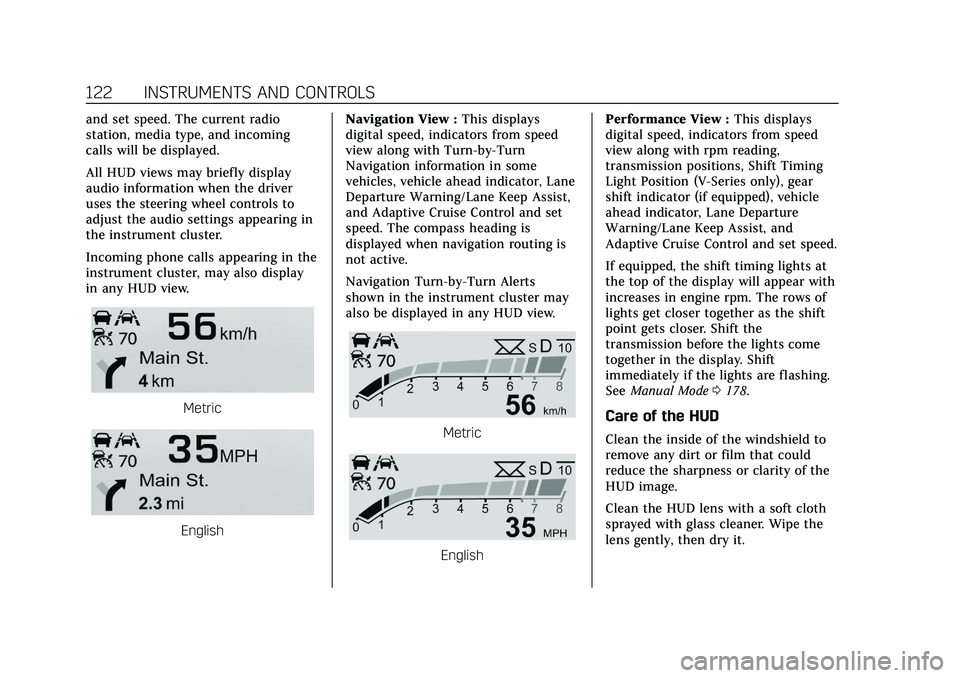
and set speed. The current radio
station, media type, and incoming
calls will be displayed.
All HUD views may briefly display
audio information when the driver
uses the steering wheel controls to
adjust the audio settings appearing in
the instrument cluster.
Incoming phone calls appearing in the
instrument cluster, may also display
in any HUD view.
Metric
EnglishNavigation View :
This displays
digital speed, indicators from speed
view along with Turn-by-Turn
Navigation information in some
vehicles, vehicle ahead indicator, Lane
Departure Warning/Lane Keep Assist,
and Adaptive Cruise Control and set
speed. The compass heading is
displayed when navigation routing is
not active.
Navigation Turn-by-Turn Alerts
shown in the instrument cluster may
also be displayed in any HUD view.
Metric
English Performance View :
This displays
digital speed, indicators from speed
view along with rpm reading,
transmission positions, Shift Timing
Light Position (V-Series only), gear
shift indicator (if equipped), vehicle
ahead indicator, Lane Departure
Warning/Lane Keep Assist, and
Adaptive Cruise Control and set speed.
If equipped, the shift timing lights at
the top of the display will appear with
increases in engine rpm. The rows of
lights get closer together as the shift
point gets closer. Shift the
transmission before the lights come
together in the display. Shift
immediately if the lights are flashing.
See Manual Mode 0178.
Care of the HUD
Clean the inside of the windshield to
remove any dirt or film that could
reduce the sharpness or clarity of the
HUD image.
Clean the HUD lens with a soft cloth
sprayed with glass cleaner. Wipe the
lens gently, then dry it.
Page 124 of 359
Cadillac CT5 Owner Manual (GMNA-Localizing-U.S./Canada-13060105) -
2020 - CRC - 2/14/20
INSTRUMENTS AND CONTROLS 123
HUD Troubleshooting
If you cannot see the HUD image
when the ignition is on, check that:
.Nothing is covering the HUD lens.
. The HUD brightness setting is not
too dim or too bright.
. The HUD is adjusted to the proper
height.
. Polarized sunglasses are not worn.
. The windshield and HUD lens are
clean.
If the HUD image is not correct,
contact your dealer.
The windshield is part of the HUD
system. If the windshield needs
replacing, see Windshield Replacement
0 262.
Vehicle Messages
Messages displayed on the Driver
Information Center (DIC) indicate the
status of the vehicle or some action
that may be needed to correct a
condition. Multiple messages may
appear one after another.
The messages that do not require
immediate action can be
acknowledged and cleared by pressing
the thumbwheel. The messages that
require immediate action cannot be
cleared until that action is performed.
All messages should be taken
seriously; clearing the message does
not correct the problem.
If a SERVICE message appears, see
your dealer.
Follow the instructions given in the
messages. The system displays
messages regarding the following
topics:
.
Service Messages
. Fluid Levels
. Vehicle Security
. Brakes .
Steering
. Ride Control Systems
. Driver Assistance Systems
. Cruise Control
. Lighting and Bulb Replacement
. Wiper/Washer Systems
. Doors and Windows
. Seat Belts
. Airbag Systems
. Engine and Transmission
. Tire Pressure
. Battery
Engine Power Messages
REDUCED ACCELERATION DRIVE
WITH CARE
This message displays when the
vehicle's propulsion power is reduced.
A reduction in propulsion power can
affect the vehicle's ability to
accelerate. If this message is on, but
there is no observed reduction in
performance, proceed to your
destination. Under certain conditions
Page 131 of 359
Cadillac CT5 Owner Manual (GMNA-Localizing-U.S./Canada-13060105) -
2020 - CRC - 2/14/20
130 INSTRUMENTS AND CONTROLS
Universal Remote
System
SeeRadio Frequency Statement 0334.
Universal Remote System
Programming
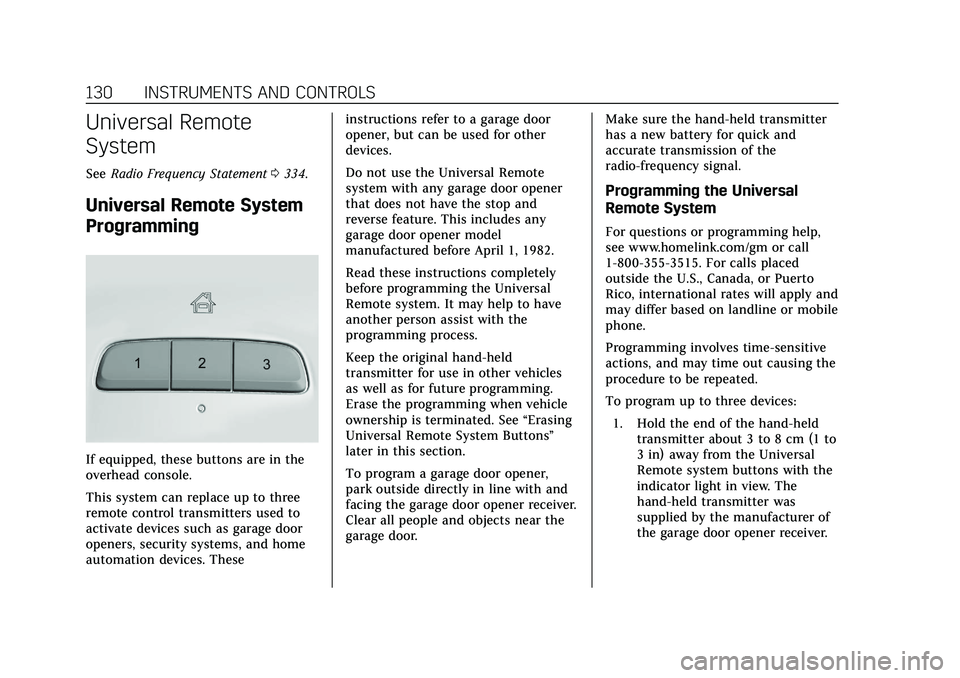
If equipped, these buttons are in the
overhead console.
This system can replace up to three
remote control transmitters used to
activate devices such as garage door
openers, security systems, and home
automation devices. These instructions refer to a garage door
opener, but can be used for other
devices.
Do not use the Universal Remote
system with any garage door opener
that does not have the stop and
reverse feature. This includes any
garage door opener model
manufactured before April 1, 1982.
Read these instructions completely
before programming the Universal
Remote system. It may help to have
another person assist with the
programming process.
Keep the original hand-held
transmitter for use in other vehicles
as well as for future programming.
Erase the programming when vehicle
ownership is terminated. See
“Erasing
Universal Remote System Buttons”
later in this section.
To program a garage door opener,
park outside directly in line with and
facing the garage door opener receiver.
Clear all people and objects near the
garage door. Make sure the hand-held transmitter
has a new battery for quick and
accurate transmission of the
radio-frequency signal.
Programming the Universal
Remote System
For questions or programming help,
see www.homelink.com/gm or call
1-800-355-3515. For calls placed
outside the U.S., Canada, or Puerto
Rico, international rates will apply and
may differ based on landline or mobile
phone.
Programming involves time-sensitive
actions, and may time out causing the
procedure to be repeated.
To program up to three devices:
1. Hold the end of the hand-held transmitter about 3 to 8 cm (1 to
3 in) away from the Universal
Remote system buttons with the
indicator light in view. The
hand-held transmitter was
supplied by the manufacturer of
the garage door opener receiver.