dic CADILLAC CT5 2022 Owners Manual
[x] Cancel search | Manufacturer: CADILLAC, Model Year: 2022, Model line: CT5, Model: CADILLAC CT5 2022Pages: 466, PDF Size: 7.21 MB
Page 215 of 466

Cadillac CT5 Owner Manual (GMNA-Localizing-U.S./Canada-15268585) -
2022 - CRC - 10/11/21
214 CLIMATE CONTROLS
Maintenance
Passenger Compartment
Air Filter
The filter reduces dust, pollen, and
other airborne irritants from outside
air that is pulled into the vehicle. The
filter should be replaced as part of
routine scheduled maintenance. See
Maintenance Schedule0410.
See your dealer regarding replacement
of the filter.
Service
All vehicles have a label underhood
that identifies the refrigerant used in
the vehicle. The refrigerant system
should only be serviced by trained and
certified technicians. The air
conditioning evaporator should never
be repaired or replaced by one from a
salvage vehicle. It should only be
replaced by a new evaporator to
ensure proper and safe operation.
During service, all refrigerants should
be reclaimed with proper equipment.
Venting refrigerants directly to the
atmosphere is harmful to the environment and may also create
unsafe conditions based on inhalation,
combustion, frostbite, or other
health-based concerns.
The air conditioning system requires
periodic maintenance. See
Maintenance Schedule
0410.
Page 225 of 466

Cadillac CT5 Owner Manual (GMNA-Localizing-U.S./Canada-15268585) -
2022 - CRC - 10/11/21
224 DRIVING AND OPERATING
A message will display in the Driver
Information Center (DIC) when the
brake pads show excessive wear.
Brake Fluid
Replace existing brake fluid with a
qualified DOT 4 high performance
brake fluid from a sealed container.
Brake fluid with a dry boiling point
>310 °C (590 °F) is qualified. If high
performance brake fluid is used,
replace it with GM approved brake
fluid before driving on public roads.
If high performance brake fluid is in
the vehicle and the age of the brake
fluid is over a month old or unknown,
replace the brake fluid before track
events and competitive driving. Do
not use silicone or DOT 5 brake fluids.
It is critical to disconnect the battery
before bleeding the system, replacing
the pads, or any other work. The
battery must be disconnected to
prevent the brake master cylinder
from pressurizing the hydraulic
system during its automated self
diagnostic tests that can possibly
occur when a door is opened or the
remote key is present.Check the fluid level before each
competitive driving event.
Brake System Flushing & Bleeding
The J56 brake system requires specific
processes for bleeding and fluid
flushing. These can be found in the
service manual.
Properly bleeding the brake system is
required for proper operation of the
hydraulic brake system.
Brake Leak Detection
The hydraulic braking system has
advanced diagnostic capability to help
detect hydraulic leaks, trapped air,
and other performance issues. These
diagnostics are active when the
hydraulic system is powered. In order
to avoid inadvertently setting a leak
Diagnostic Trouble Code (DTC),
disconnect the battery before
servicing the brake system.
If the vehicle sets a DTC related to a
brake system leak, the Brake System
Warning Light will come on and
vehicle speed may be limited to 100
kph (62 mph). Any time a leak DTC is
set, the vehicle should be inspectedcarefully for evidence of a leak and
should be repaired immediately. See
your dealer.
Brake Fade Warning Assist
The Brake Fade Warning Assist
system monitors the performance of
the brake system. If the system
detects brake fade, or if the brake
fluid is near the boiling point, the
driver will be alerted.
The Brake Fade Warning Assist
system is designed for use with the
factory-installed brake pads or GM
approved replacement pads. If the
brake pads on the vehicle need to be
replaced, use GM approved brake
pads. If this is not done, the brake
fade warning system may not function
properly.
Stage 1 :
The DIC displays a “Reduce
Braking to Avoid Overheating”
message, a chime sounds and brake
pedal effort and travel is increased.
When the message displays, the driver
should back up braking points and
reduce brake usage in order to reduce
brake temperature. This will allow for
continued lapping with no speed
limitations.
Page 226 of 466

Cadillac CT5 Owner Manual (GMNA-Localizing-U.S./Canada-15268585) -
2022 - CRC - 10/11/21
DRIVING AND OPERATING 225
Stage 2 :The DIC displays a Brakes
Overheated Service Now message, a
chime sounds, and brake pedal effort
and travel is further increased. This
code indicates that the brake fluid
temperature is excessive and is about
to boil. The system limits vehicle
speed to 100 km/h (62 mph). The
driver should immediately start a cool
down lap if on the track. If this
message displays, the vehicle needs to
be serviced. The brake system needs
to cool down, and the brake fluid
must be immediately flushed with
DOT 4 for street use, or to a qualified
DOT 4 race fluid for track use. Boiled
brake fluid is compromised and must
be replaced.
Brake Burnishing
New brake pads must be burnished
before racing or other competitive
driving.Caution
These procedures are specific to the
V-Series with performance brake
linings package. This procedure
should not be run on other models
as damage may result.
Caution
The new vehicle break-in period
should be completed before
performing the brake burnishing
procedure or damage may occur to
the powertrain/engine. See New
Vehicle Break-In 0236.
Caution
Brake pedal fade will occur during
any track burnish procedure and
can cause brake pedal travel and
force to increase. This could extend
stopping distance until the brakes
are fully burnished.
When performed as instructed, these
procedures will not damage the
brakes. During the burnishing procedure, the brake pads will smoke
and produce an odor. The braking
force and pedal travel may increase.
After the procedure is complete, the
brake pads may appear white at the
rotor contact.
Perform these procedures in a safe
manner and in compliance with all
local and state ordinances/laws
regarding motor vehicle operation.
Perform the procedures only on dry
pavement.
As with all high performance brake
systems, some amount of brake squeal
is normal.
Street High Performance Brake
Burnishing Procedure
This section is for the V-Series
Blackwing with J57 carbon ceramic
brake rotors only.
This procedure should only be run on
a track or other non-public area, and
only on dry pavement.
Page 228 of 466

Cadillac CT5 Owner Manual (GMNA-Localizing-U.S./Canada-15268585) -
2022 - CRC - 10/11/21
DRIVING AND OPERATING 227
that will increase the tire pressures by
35 kPa (5 psi). After this, immediately
let the tires cool to cold pressures.
Tire Inflation Pressure High Speed
SeeTire Pressure for High-Speed
Operation 0375.
Tire Inflation Pressure for Track
Driving
For driving on a race course, if the
vehicle is equipped with 275/35ZR19
(100Y) and 305/30ZR19 (102Y) tires,
set the cold (stationary) tire pressures
to 28 psi. During track sessions, set
the tire pressures at 35 to 38 psi for
hot tires. If pressures exceed 38 psi,
adjust the pressures down to 35 to
38 psi. Return the tires to the
recommended cold tire inflation
pressure when track driving has
ended.
Driving and Operating
{Warning
Operating the vehicle at high speeds
can be dangerous. Improper tire
inflation pressure can put (Continued)
Warning (Continued)
additional strain on the tires and
can cause a sudden failure. Make
sure the tires are in excellent
condition, and use the correct cold
tire inflation pressure for the
vehicle load and track/course.
{Warning
Tracks/courses put high loads on
tires operating at high speed, which
can lead to tire failure if not
inflated properly. Always limit
vehicle cargo to the driver plus one
passenger with no additional cargo.
{Warning
Track/course loads wear tires both
on the tread and internal to the
tire. When driven in track/course
conditions, even if tread is not worn
down to the treadwear indicator,
tires must be replaced after the
equivalent of two tanks of fuel or
approximately 160 km (100 mi).
Custom Launch Control (If
Equipped)
Custom Launch Control allows the
following parameters for Launch
Control to be modified:
.Launch RPM
.Slip Target (5%–15%)
.Surface Type
To adjust the Launch RPM, all of
these conditions must be met:
.The vehicle must be in Track Mode.
See “Track Mode ”under Driver Mode
Control 0259.
.Performance Traction Management
(PTM) Mode must be enabled. See
Driver Mode Control 0259.
.The steering wheel must be straight.
.The driver door must be closed.
.The transmission must be in D
(Drive) or forward gear.
.The parking brake must not be
engaged.
For more information on Competitive
Driving Mode, see Competitive Driving
Mode 0265.
Page 229 of 466

Cadillac CT5 Owner Manual (GMNA-Localizing-U.S./Canada-15268585) -
2022 - CRC - 10/11/21
228 DRIVING AND OPERATING
1. Using the DIC buttons on the rightside of the steering wheel, navigate
to the Launch Control menu. See
Driver Information Center (DIC)
(Base Level) 0116 or
Driver Information Center (DIC)
(Uplevel) 0119.
2. Press SEL to select Custom.
3. Scroll down to Launch RPM.
4. Adjust the desired RPM: 2000–4000 RPM for manual
transmissions and 1000–2400 for
automatic.
Manual Transmission
5. Set Slip Target to custom desired setting.
.Manual Trans: Apply full
throttle to activate Launch
Control and quickly release the
clutch pedal to launch the
vehicle.
Automatic Transmission
.Auto Trans: Firmly press and
hold the brake pedal to activate
Launch Control.
6. Auto Trans Only - Quickly applyfull throttle. Release the brake
pedal to launch the vehicle.
Page 230 of 466
Cadillac CT5 Owner Manual (GMNA-Localizing-U.S./Canada-15268585) -
2022 - CRC - 10/11/21
DRIVING AND OPERATING 229
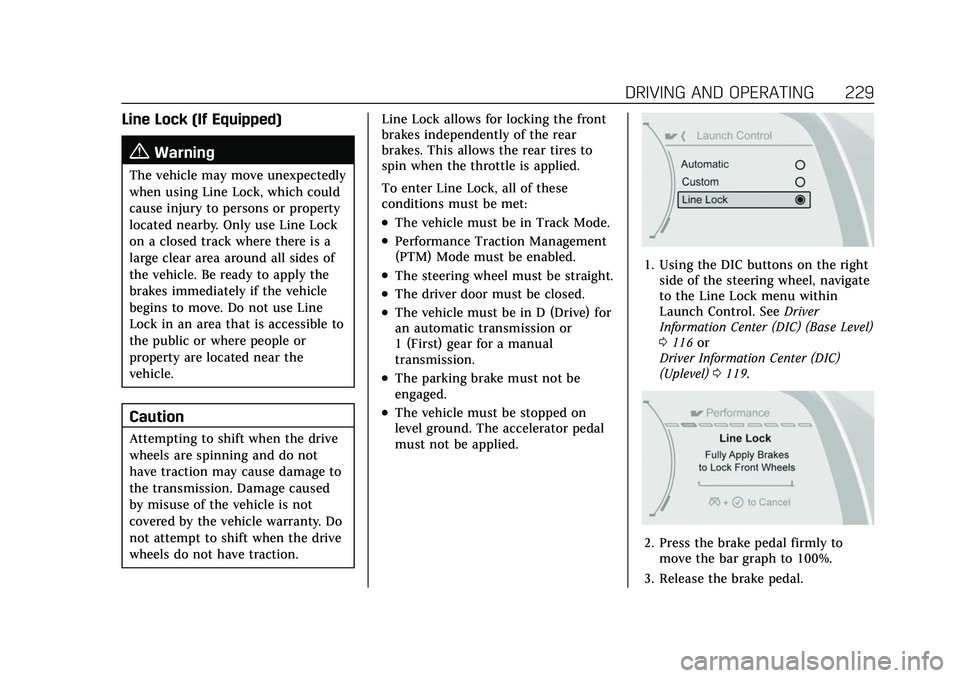
Line Lock (If Equipped)
{Warning
The vehicle may move unexpectedly
when using Line Lock, which could
cause injury to persons or property
located nearby. Only use Line Lock
on a closed track where there is a
large clear area around all sides of
the vehicle. Be ready to apply the
brakes immediately if the vehicle
begins to move. Do not use Line
Lock in an area that is accessible to
the public or where people or
property are located near the
vehicle.
Caution
Attempting to shift when the drive
wheels are spinning and do not
have traction may cause damage to
the transmission. Damage caused
by misuse of the vehicle is not
covered by the vehicle warranty. Do
not attempt to shift when the drive
wheels do not have traction.Line Lock allows for locking the front
brakes independently of the rear
brakes. This allows the rear tires to
spin when the throttle is applied.
To enter Line Lock, all of these
conditions must be met:
.The vehicle must be in Track Mode.
.Performance Traction Management
(PTM) Mode must be enabled.
.The steering wheel must be straight.
.The driver door must be closed.
.The vehicle must be in D (Drive) for
an automatic transmission or
1 (First) gear for a manual
transmission.
.The parking brake must not be
engaged.
.The vehicle must be stopped on
level ground. The accelerator pedal
must not be applied.
1. Using the DIC buttons on the right
side of the steering wheel, navigate
to the Line Lock menu within
Launch Control. See Driver
Information Center (DIC) (Base Level)
0 116 or
Driver Information Center (DIC)
(Uplevel) 0119.
2. Press the brake pedal firmly to
move the bar graph to 100%.
3. Release the brake pedal.
Page 239 of 466

Cadillac CT5 Owner Manual (GMNA-Localizing-U.S./Canada-15268585) -
2022 - CRC - 10/11/21
238 DRIVING AND OPERATING
{Warning
Rear end spoilers may break under
pressure, resulting in property
damage or injury. Do not push the
vehicle by the spoiler or use the
spoiler as a handle.
Ignition Positions
The vehicle has an electronic keyless
ignition with pushbutton start.
The Remote Key must be in the
vehicle for the system to operate.
If the pushbutton start is not working,
the vehicle may be near a strong radio
antenna signal causing interference tothe Keyless Access system. See
Remote
Keyless Entry (RKE) System Operation
0 7.
To shift out of P (Park), the vehicle
must be on and the brake pedal must
be applied.
Stopping the Engine/OFF (No
Indicator Lights) : When the vehicle
is stopped, press ENGINE START/
STOP once to turn the engine off.
If the vehicle is in P (Park), the
ignition will turn off, and Retained
Accessory Power (RAP) will remain
active. See Retained Accessory Power
(RAP) 0243.
If the vehicle has an automatic
transmission, and is not in P (Park),
the ignition will return to ACC/
ACCESSORY and display a message in
the Driver Information Center (DIC).
When the vehicle is shifted into
P (Park), the ignition system will
turn OFF.
If the vehicle has a manual
transmission and is stationary, the
ignition will turn off, and Retained Accessory Power (RAP) will remain
active. See
Retained Accessory Power
(RAP) 0243.
The vehicle may have an electric
steering column lock. The lock is
activated when the vehicle is switched
to OFF and the driver door is opened.
A sound may be heard as the lock
actuates or releases. The steering
column lock may not release with the
wheels turned off center. If this
happens, the vehicle may not start.
Move the steering wheel from left to
right while attempting to start the
vehicle. If this does not work, the
vehicle needs service.
Do not turn the engine off when the
vehicle is moving. This will cause a
loss of power assist in the brake and
steering systems and disable the
airbags.
If the vehicle must be shut off in an
emergency: 1. Brake using a firm and steady pressure. Do not pump the brakes
repeatedly. This may deplete power
assist, requiring increased brake
pedal force.
Page 240 of 466

Cadillac CT5 Owner Manual (GMNA-Localizing-U.S./Canada-15268585) -
2022 - CRC - 10/11/21
DRIVING AND OPERATING 239
2. Shift the vehicle to N (Neutral).This can be done while the vehicle
is moving. After shifting to
N (Neutral), firmly apply the brakes
and steer the vehicle to a safe
location.
3. Come to a complete stop. Shift to P (Park) with an automatic
transmission, or Neutral with a
manual transmission. Turn the
ignition off.
4. Set the parking brake. See Electric
Parking Brake 0255.
{Warning
Turning off the vehicle while
moving may cause loss of power
assist in the brake and steering
systems and disable the airbags.
While driving, only shut the vehicle
off in an emergency.
If the vehicle cannot be pulled over,
and must be shut off while driving,
press and hold ENGINE START/STOP
for longer than two seconds, or press
twice within five seconds. ACC/ACCESSORY (Amber Indicator
Light) :
This mode allows the use of
some electrical accessories when the
engine is off.
With the ignition off, pressing the
button one time without the brake
pedal applied will place the ignition
system in ACC/ACCESSORY.
The ignition will switch from ACC/
ACCESSORY to OFF after five minutes
to prevent battery rundown.
ON/RUN/START (Green Indicator
Light) : This mode is for driving and
starting. With the ignition off, and the
brake pedal applied, pressing the
button once will place the ignition
system in ON/RUN/START. Once
engine cranking begins, release the
button. Engine cranking will continue
until the engine starts. See Starting the
Engine 0239. The ignition will then
remain on.
Service Mode
This power mode is available for
service and diagnostics, and to verify
the proper operation of the
malfunction indicator lamp as may be
required for emission inspection purposes. With the vehicle off, and the
brake pedal not applied, pressing and
holding ENGINE START/STOP for
more than five seconds will place the
vehicle in Service Mode. The
instruments and audio systems will
operate as they do in ON/RUN, but
the vehicle will not be able to be
driven. The engine will not start in
Service Mode. Press the button again
to turn the vehicle off.
Starting the Engine
Place the transmission in the
proper gear
Caution
If you add electrical parts or
accessories, you could change the
way the engine operates. Any
resulting damage would not be
covered by the vehicle warranty. See
Add-On Electrical Equipment
0326.
Automatic Transmission
Move the shift lever to P (Park) or
N (Neutral). To restart the vehicle
when it is already moving, use
N (Neutral) only.
Page 241 of 466

Cadillac CT5 Owner Manual (GMNA-Localizing-U.S./Canada-15268585) -
2022 - CRC - 10/11/21
240 DRIVING AND OPERATING
Caution
Do not try to shift to P (Park) if the
vehicle is moving. If you do, you
could damage the transmission.
Shift to P (Park) only when the
vehicle is stopped.
Manual Transmission
The shift lever should be in Neutral
and the parking brake engaged. Hold
the clutch pedal down to the floor,
press the brake pedal, and start the
engine.
Starting the Vehicle 1. For vehicles with an automatic transmission, press the brake pedal,
then press ENGINE START/STOP
on the instrument panel. For a
manual transmission, place the
shift lever in Neutral with the
parking brake engaged. Hold the
clutch pedal down to the floor,
press the brake pedal, then press
ENGINE START/STOP.
If the remote key is not in the
vehicle, if there is interference, or if
the remote key battery is low, a
Driver Information Center (DIC) message will display. See
Remote
Keyless Entry (RKE) System
Operation 07.
Caution
Cranking the engine for long
periods of time, by pressing
ENGINE START/STOP immediately
after cranking has ended, can
overheat and damage the cranking
motor, and drain the battery. Wait
at least 15 seconds between each
try, to let the cranking motor
cool down.
2. If the engine does not start after five to 10 seconds, especially in
very cold weather (below −18 °C or
0 °F), it could be flooded with too
much gasoline. Try pushing the
accelerator pedal all the way to the
floor and hold it there, then press
ENGINE START/STOP for up to a
maximum of 15 seconds. Wait at
least 15 seconds between each try,
to allow the cranking motor to cool
down. When the engine starts, let
go of the button and the
accelerator. If the vehicle starts
briefly but then stops again, do the same thing. This clears the extra
gasoline from the engine. Do not
race the engine immediately after
starting it. Operate the engine and
transmission gently until the oil
warms up and lubricates all
moving parts.
Stopping the Engine
If the vehicle has an automatic
transmission, move the shift lever to
P (Park) and press and hold ENGINE
START/STOP on the instrument panel,
until the engine shuts off. If the shift
lever is not in P (Park), the engine
shuts off and the ignition goes to
ACC/ACCESSORY. The DIC displays
SHIFT TO PARK. Once the shift lever
is moved to P (Park), the vehicle
turns off.
If the vehicle has a manual
transmission, before getting out of the
vehicle, shift to 1 (First) or R (Reverse)
and apply the parking brake. Then
turn off the ignition off by pressing
ENGINE START/STOP and release the
clutch pedal when the engine has
stopped.
Page 242 of 466

Cadillac CT5 Owner Manual (GMNA-Localizing-U.S./Canada-15268585) -
2022 - CRC - 10/11/21
DRIVING AND OPERATING 241
If the remote key is not detected
inside the vehicle when it is turned off
the DIC displays a message.
Stop/Start System
If equipped, the Stop/Start system will
shut off the engine to help conserve
fuel. It has components designed for
the increased number of starts.
{Warning
The automatic engine Stop/Start
feature causes the engine to shut
off while the vehicle is still on. Do
not exit the vehicle before shifting
to P (Park). The vehicle may restart
and move unexpectedly. Always
shift to P (Park), and then turn the
ignition off before exiting the
vehicle.
Auto Engine Stop/Start
When the brakes are applied and the
vehicle is at a complete stop, the
engine may turn off. When stopped,
the tachometer displays AUTO STOP.
See Tachometer 0101. When the brake pedal is released or the accelerator
pedal is pressed, the engine will
restart.
To maintain vehicle performance,
other conditions may cause the engine
to automatically restart before the
brake pedal is released.
Auto Stops may not occur and/or Auto
Starts may occur because:
.The climate control settings require
the engine to be running to cool or
heat the vehicle interior.
.The vehicle battery needs to charge.
.The vehicle battery has recently
been disconnected.
.Minimum vehicle speed has not
been reached since the last
Auto Stop.
.The accelerator pedal is pressed.
.The engine or transmission is not at
the required operating temperature.
.The outside temperature is not in
the required operating range.
.The vehicle is shifted out of D
(Drive) to any gear other than
P (Park).
.Certain driver modes have been
selected. See
Driver Mode Control
0 259.
.The vehicle is on a steep hill or
grade.
.The driver door has been opened or
the driver seat belt has been
unbuckled.
.The hood has been opened.
.The Auto Stop has reached the
maximum allowed time.
Auto Stop Disable Switch