low oil pressure CADILLAC CT5 2022 User Guide
[x] Cancel search | Manufacturer: CADILLAC, Model Year: 2022, Model line: CT5, Model: CADILLAC CT5 2022Pages: 466, PDF Size: 7.21 MB
Page 412 of 466

Cadillac CT5 Owner Manual (GMNA-Localizing-U.S./Canada-15268585) -
2022 - CRC - 10/11/21
SERVICE AND MAINTENANCE 411
Engine Oil Change
When the CHANGE ENGINE OIL
SOON message displays, have the
engine oil and filter changed within
the next 1 000 km (600 mi). If driven
under the best conditions, the engine
oil life system may not indicate the
need for vehicle service for up to a
year. The engine oil and filter must be
changed at least once a year and the
oil life system must be reset. Your
trained dealer technician can perform
this work. If the engine oil life system
is reset accidentally, service the
vehicle within 5 000 km (3,000 mi)
since the last service. Reset the oil life
system when the oil is changed. See
Engine Oil Life System0338.
Air Conditioning Desiccant
(Replace Every Seven Years)
The air conditioning system requires
maintenance every seven years. This
service requires replacement of the
desiccant to help the longevity and
efficient operation of the air
conditioning system. This service can
be complex. See your dealer.
Tire Rotation and Required
Services Every 12 000 km
(7,500 mi)
Rotate the tires, if recommended for
the vehicle, and perform the following
services. See Tire Rotation0380.
.Check engine oil level and oil
life percentage. If needed, change
engine oil and filter, and reset oil
life system. See Engine Oil0336 and
Engine Oil Life System 0338.
.If equipped, check the air filter
life percentage. If necessary, replace
the engine air filter and reset the
engine air filter life system. See
Engine Air Filter Life System 0340.
If the vehicle is not equipped with
the engine air filter life system,
inspect the engine air cleaner filter.
See Engine Air Cleaner/Filter 0341.
.Check engine coolant level. See
Cooling System 0343.
.Check windshield washer fluid level.
See Washer Fluid 0348.
.Check tire inflation pressures. See
Tire Pressure 0374.
.Inspect tire wear. See Tire Inspection
0 380.
.Visually check for fluid leaks.
.Inspect brake system. See Exterior
Care 0399.
.Visually inspect steering,
suspension, and chassis
components for damage, including
cracks or tears in the rubber boots,
loose or missing parts, or signs of
wear at least once a year. See
Exterior Care 0399.
.Inspect power steering for proper
attachment, connections, binding,
leaks, cracks, chafing, etc.
Page 415 of 466
Cadillac CT5 Owner Manual (GMNA-Localizing-U.S./Canada-15268585) -
2022 - CRC - 10/11/21
414 SERVICE AND MAINTENANCE
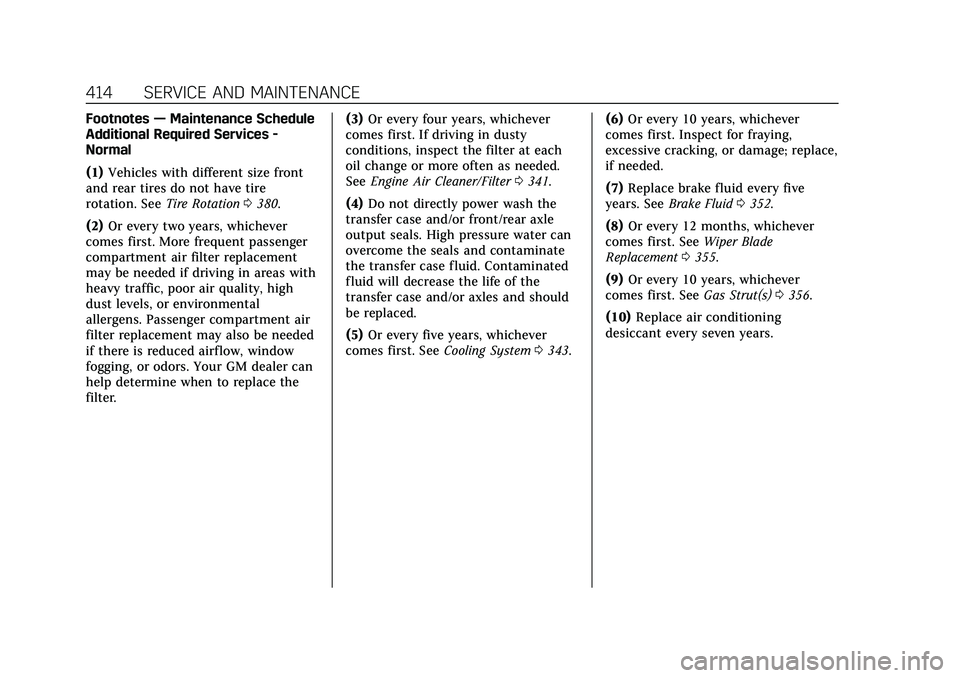
Footnotes—Maintenance Schedule
Additional Required Services -
Normal
(1) Vehicles with different size front
and rear tires do not have tire
rotation. See Tire Rotation0380.
(2) Or every two years, whichever
comes first. More frequent passenger
compartment air filter replacement
may be needed if driving in areas with
heavy traffic, poor air quality, high
dust levels, or environmental
allergens. Passenger compartment air
filter replacement may also be needed
if there is reduced airf low, window
fogging, or odors. Your GM dealer can
help determine when to replace the
filter. (3)
Or every four years, whichever
comes first. If driving in dusty
conditions, inspect the filter at each
oil change or more often as needed.
See Engine Air Cleaner/Filter 0341.
(4) Do not directly power wash the
transfer case and/or front/rear axle
output seals. High pressure water can
overcome the seals and contaminate
the transfer case fluid. Contaminated
fluid will decrease the life of the
transfer case and/or axles and should
be replaced.
(5) Or every five years, whichever
comes first. See Cooling System0343. (6)
Or every 10 years, whichever
comes first. Inspect for fraying,
excessive cracking, or damage; replace,
if needed.
(7) Replace brake fluid every five
years. See Brake Fluid 0352.
(8) Or every 12 months, whichever
comes first. See Wiper Blade
Replacement 0355.
(9) Or every 10 years, whichever
comes first. See Gas Strut(s)0356.
(10) Replace air conditioning
desiccant every seven years.
Page 417 of 466
Cadillac CT5 Owner Manual (GMNA-Localizing-U.S./Canada-15268585) -
2022 - CRC - 10/11/21
416 SERVICE AND MAINTENANCE
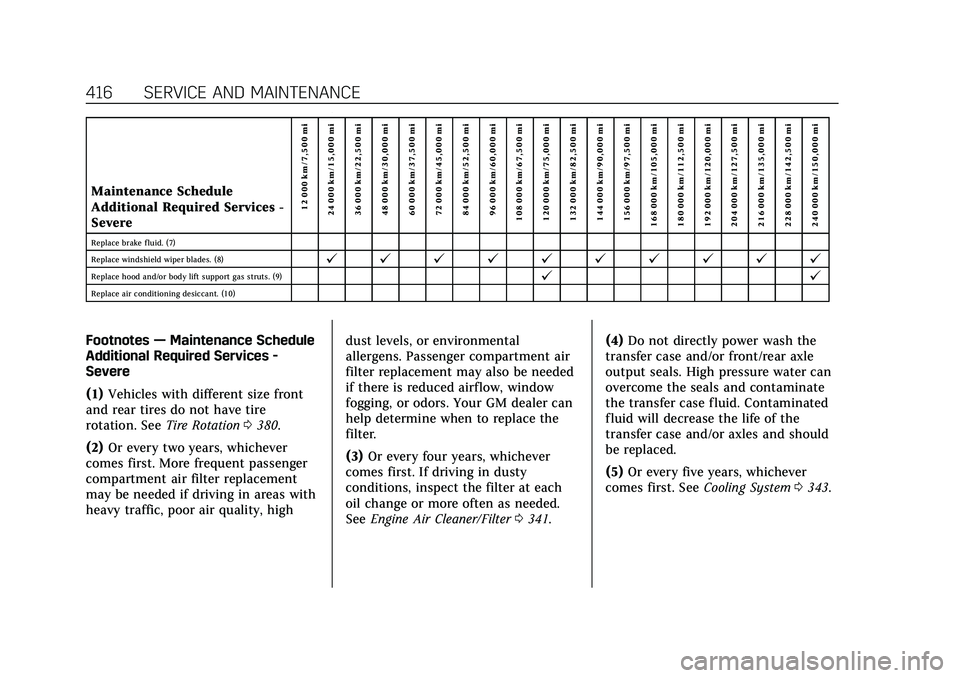
Maintenance Schedule
Additional Required Services -
Severe12 000 km/7,500 mi
24 000 km/15,000 mi
36 000 km/22,500 mi
48 000 km/30,000 mi
60 000 km/37,500 mi
72 000 km/45,000 mi
84 000 km/52,500 mi
96 000 km/60,000 mi
108 000 km/67,500 mi
120 000 km/75,000 mi
132 000 km/82,500 mi
144 000 km/90,000 mi
156 000 km/97,500 mi
168 000 km/105,000 mi
180 000 km/112,500 mi
192 000 km/120,000 mi
204 000 km/127,500 mi
216 000 km/135,000 mi
228 000 km/142,500 mi
240 000 km/150,000 mi
Replace brake fluid. (7)
Replace windshield wiper blades. (8)
@ @ @ @ @ @ @ @ @ @
Replace hood and/or body lift support gas struts. (9)@ @
Replace air conditioning desiccant. (10)
Footnotes—Maintenance Schedule
Additional Required Services -
Severe
(1) Vehicles with different size front
and rear tires do not have tire
rotation. See Tire Rotation0380.
(2) Or every two years, whichever
comes first. More frequent passenger
compartment air filter replacement
may be needed if driving in areas with
heavy traffic, poor air quality, high dust levels, or environmental
allergens. Passenger compartment air
filter replacement may also be needed
if there is reduced airf low, window
fogging, or odors. Your GM dealer can
help determine when to replace the
filter.
(3)
Or every four years, whichever
comes first. If driving in dusty
conditions, inspect the filter at each
oil change or more often as needed.
See Engine Air Cleaner/Filter 0341. (4)
Do not directly power wash the
transfer case and/or front/rear axle
output seals. High pressure water can
overcome the seals and contaminate
the transfer case fluid. Contaminated
fluid will decrease the life of the
transfer case and/or axles and should
be replaced.
(5) Or every five years, whichever
comes first. See Cooling System0343.
Page 452 of 466

Cadillac CT5 Owner Manual (GMNA-Localizing-U.S./Canada-15268585) -
2022 - CRC - 10/11/21
CONNECTED SERVICES 451
For coverage maps, see
www.onstar.com (U.S.) or
www.onstar.ca (Canada).
Ensuring Security
.Change the default passwords for
the Wi-Fi hotspot and myCadillac
mobile app. Make these passwords
different from each other and use a
combination of letters and numbers
to increase the security.
.Change the default name of the
SSID (Service Set Identifier). This is
your network’s name that is visible
to other wireless devices. Choose a
unique name and avoid family
names or vehicle descriptions.
Wi-Fi Hotspot (If Equipped)
The vehicle may have a built-in Wi-Fi
hotspot that provides access to the
Internet and web content at 4G LTE
speed. Up to seven mobile devices can
be connected. A data plan is required.
Use the in-vehicle controls only when
it is safe to do so. 1. To retrieve Wi-Fi hotspot information, press
=to open the
OnStar app on the infotainment display, then select Wi-Fi Hotspot.
On some vehicles, touch Wi-Fi or
Wi-Fi Settings on the screen.
2. The Wi-Fi settings will display the Wi-Fi hotspot name (SSID),
password, and on some vehicles,
the connection type (no Internet
connection, 3G, 4G, 4G LTE), and
signal quality (poor, good,
excellent). The LTE icon shows
connection to Wi-Fi. It is possible
that the icon may not illuminate
even though the vehicle has an
active connection.
3. To change the SSID or password, press
Qor call 1-888-4ONSTAR to
connect with an Advisor. On some
vehicles, the SSID and password
can be changed in the Wi-Fi
Hotspot menu.
After initial set-up, your vehicle’s
Wi-Fi hotspot will connect
automatically to your mobile devices.
Manage data usage by turning Wi-Fi
on or off on your mobile device, by
using the myCadillac mobile app,
or by contacting an OnStar Advisor. On some vehicles, Wi-Fi can also be
managed from the Wi-Fi
Hotspot menu.
MyCadillac Mobile App (If Available)
Download the myCadillac mobile app
to compatible Apple and Android
smartphones. Cadillac users can
access the following services from a
smartphone:
.Remotely start/stop the vehicle,
if factory-equipped.
.Lock/unlock doors, if equipped with
automatic locks.
.Activate the horn and lamps.
.Check the vehicle’s fuel level, oil
life, or tire pressure,
if factory-equipped with the Tire
Pressure Monitor System.
.Send destinations to the vehicle.
.Locate the vehicle on a map (U.S.
market only).
.Turn the vehicle's Wi-Fi hotspot on/
off, manage settings, and monitor
data consumption, if equipped.
.Locate a dealer and schedule
service.
.Request Roadside Service.
Page 460 of 466

Cadillac CT5 Owner Manual (GMNA-Localizing-U.S./Canada-15268585) -
2022 - CRC - 10/11/21
INDEX 459
Lights (cont'd)Brake System Warning . . . . . . . . . . . 108
Charging System . . . . . . . . . . . . . . . . . . 106
Check Engine (Malfunction
Indicator) . . . . . . . . . . . . . . . . . . . . . . . . 106
Cruise Control . . . . . . . . . . . . . . . . . . . . . 115
Door Ajar . . . . . . . . . . . . . . . . . . . . . . . . . . 116
Driver Mode Control . . . . . . . . . . . . . . 112
Electric Parking Brake . . . . . . . . . . . . 108
Engine Coolant Temperature Warning . . . . . . . . . . . . . . . . . . . . . . . . . 112
Engine Oil Pressure . . . . . . . . . . . . . . . 114
Flash-to-Pass . . . . . . . . . . . . . . . . . . . . . . 137
High-Beam On . . . . . . . . . . . . . . . . . . . . 115
High/Low Beam Changer . . . . . . . . . 137
Lane Keep Assist . . . . . . . . . . . . . . . . . . 110
Low Fuel Warning . . . . . . . . . . . . . . . . 114
Seat Belt Reminders . . . . . . . . . . . . . . 104
Security . . . . . . . . . . . . . . . . . . . . . . . . . . . . 115
Service Electric Parking Brake . . . . . . . . . . . . . . . . . . . . . . . . . . . . . 109
StabiliTrak OFF . . . . . . . . . . . . . . . . . . . 111
Tire Pressure . . . . . . . . . . . . . . . . . . . . . . 114
Traction Control System (TCS)/StabiliTrak . . . . . . . . . . . . . . . . 112
Traction Off . . . . . . . . . . . . . . . . . . . . . . . 111
Limited-Slip Differential . . . . . . . . . . . . 267 Lock
Steering Column . . . . . . . . . . . . . . . . . . . 24
Locks Automatic Door . . . . . . . . . . . . . . . . . . . . 17
Delayed Locking . . . . . . . . . . . . . . . . . . . 16
Door . . . . . . . . . . . . . . . . . . . . . . . . . . . . . . . . 14
Lockout Protection . . . . . . . . . . . . . . . . 17
Power Door . . . . . . . . . . . . . . . . . . . . . . . . . 16
Safety . . . . . . . . . . . . . . . . . . . . . . . . . . . . . . . 17
Loss of Control . . . . . . . . . . . . . . . . . . . . . . 220
Low Fuel Warning Light . . . . . . . . . . . 114
Low-Profile Tires . . . . . . . . . . . . . . . . . . . . 369
Lower Anchors and Tethers for Children (LATCH System) . . . . . . . . . 74
Lumbar Adjustment . . . . . . . . . . . . . . . . . 39 Front Seats . . . . . . . . . . . . . . . . . . . . . . . . . 39
M
Maintenance
Records . . . . . . . . . . . . . . . . . . . . . . . . . . . . 423
Maintenance and Care
Additional . . . . . . . . . . . . . . . . . . . . . . . . . 417
Maintenance Schedule . . . . . . . . . . . . . 410 Recommended Fluids andLubricants . . . . . . . . . . . . . . . . . . . . . . . 420
Malfunction Indicator Lamp . . . . . . . 106
Manual Mode . . . . . . . . . . . . . . . . . . . . . . . 250
Manual Transmission . . . . . . . . . . . . . . 251 Manual Transmission (cont'd)
Fluid . . . . . . . . . . . . . . . . . . . . . . . . . . . . . . . 339
Map Data Updates . . . . . . . . . . . . . . . . . . 171
Maps . . . . . . . . . . . . . . . . . . . . . . . . . . . . . . . . . 161
Massage Seats . . . . . . . . . . . . . . . . . . . . . . . . . . . . . . . . 40
Matching
Active Rev . . . . . . . . . . . . . . . . . . . . . . . . . 253
Media Avoiding Untrusted Devices . . . . . 154
Memory Seats . . . . . . . . . . . . . . . . . . . . . . . . 40
Messages Engine Power . . . . . . . . . . . . . . . . . . . . . 126
Vehicle . . . . . . . . . . . . . . . . . . . . . . . . . . . . . 125
Vehicle Speed . . . . . . . . . . . . . . . . . . . . . 126
Mirror
Rear Camera . . . . . . . . . . . . . . . . . . . . . . . 28
Mirrors Automatic Dimming . . . . . . . . . . . . . . . 28
Automatic Dimming Rearview . . . . 28
Convex . . . . . . . . . . . . . . . . . . . . . . . . . . . . . . 26
Folding . . . . . . . . . . . . . . . . . . . . . . . . . . . . . 26
Heated . . . . . . . . . . . . . . . . . . . . . . . . . . . . . . 28
Manual Rearview . . . . . . . . . . . . . . . . . . 28
Power . . . . . . . . . . . . . . . . . . . . . . . . . . . . . . . 26
Tilt in Reverse . . . . . . . . . . . . . . . . . . . . . 28
Mirrors, Interior Rearview . . . . . . . . . . . 28
Mode . . . . . . . . . . . . . . . . . . . . . . . . . . . . . . . . 259