steering wheel CADILLAC CT5 2022 Manual PDF
[x] Cancel search | Manufacturer: CADILLAC, Model Year: 2022, Model line: CT5, Model: CADILLAC CT5 2022Pages: 466, PDF Size: 7.21 MB
Page 323 of 466

Cadillac CT5 Owner Manual (GMNA-Localizing-U.S./Canada-15268585) -
2022 - CRC - 10/11/21
322 DRIVING AND OPERATING
necessary to go much farther beyond
the passed vehicle before returning to
the lane. Pass on level roadways.
Avoid passing on hills if possible.
Backing Up
Hold the bottom of the steering wheel
with one hand. To move the trailer to
the left, move that hand to the left. To
move the trailer to the right, move
that hand to the right. Always back up
slowly and, if possible, have someone
guide you.
Making TurnsCaution
Turn more slowly and make wider
arcs when towing a trailer to
prevent damage to your vehicle.
Making very sharp turns could
cause the trailer to contact the
vehicle.
Make wider turns than normal when
towing, so trailer will not go over soft
shoulders, over curbs, or strike road
signs, trees, or other objects. Always
signal turns well in advance. Do not
steer or brake suddenly.
Driving on Grades
Reduce speed and shift to a lower gear
before starting down a long or steep
downhill grade. If the transmission is
not shifted down, the brakes may
overheat and result in reduced braking
efficiency.
Vehicles can tow in D (Drive). Shift
the transmission to a lower gear if the
transmission shifts too often under
heavy loads and/or hilly conditions.
When towing at higher altitudes,
engine coolant will boil at a lower
temperature than at lower altitudes.
If the engine is turned off immediately
after towing at high altitude on steep
uphill grades, the vehicle could show
signs similar to engine overheating. To
avoid this, let the engine run,
preferably on level ground, with the
transmission in P (Park) for a few
minutes before turning the engine off.
If the overheat warning comes on, see
Engine Overheating 0347.
Parking on Hills
{Warning
To prevent serious injury or death,
always park your vehicle and trailer
on a level surface when possible.
When parking your vehicle and your
trailer on a hill: 1. Press the brake pedal, but do not shift into P (Park) yet. Turn the
wheels into the curb if facing
downhill or into traffic if facing
uphill.
2. Have someone place chocks under the trailer wheels.
3. When the wheel chocks are in place, gradually release the brake
pedal to allow the chocks to absorb
the load of the trailer.
4. Reapply the brake pedal. Then apply the parking brake and shift
into P (Park).
5. Release the brake pedal.
Leaving After Parking on a Hill
1. Apply and hold the brake pedal.
.Start the engine.
Page 340 of 466

Cadillac CT5 Owner Manual (GMNA-Localizing-U.S./Canada-15268585) -
2022 - CRC - 10/11/21
VEHICLE CARE 339
2. Press and hold the thumbwheel onthe steering wheel. When the
confirmation message displays,
select YES. The oil life will change
to 100%.
Be careful not to reset the oil life
display accidentally at any time
other than after the oil is changed.
It cannot be reset accurately until
the next oil change.
The oil life system can also be reset as
follows: 1. Using the DIC buttons, display REMAINING OIL LIFE on the DIC.
See Driver Information Center (DIC)
(Base Level) 0116 or
Driver Information Center (DIC)
(Uplevel) 0119.
2. Fully press and release the accelerator pedal three times
within five seconds.
If the CHANGE ENGINE OIL SOON
message is not on, the system is
reset.
The system is reset when the
CHANGE ENGINE OIL SOON message
is off. If the CHANGE ENGINE OIL SOON
message comes back on when the
vehicle is started, the engine oil life
system has not been reset. Repeat the
procedure.
Automatic Transmission
Fluid
How to Check Automatic
Transmission Fluid
It is not necessary to check the
transmission fluid level.
A transmission fluid leak is the only
reason for fluid loss. If a leak occurs,
take the vehicle to your dealer and
have it repaired as soon as possible.
The vehicle is not equipped with a
transmission fluid level dipstick.
There is a special procedure for
checking and changing the
transmission fluid. Because this
procedure is difficult, this should be
done at the dealer. Contact your dealer
for additional information.
Caution
Use of the incorrect automatic
transmission fluid may damage the
vehicle, and the damage may not be
covered by the vehicle warranty.
Always use the correct automatic
transmission fluid. See
Recommended Fluids and Lubricants
0
420.
Change the fluid and filter at the
intervals listed in Maintenance
Schedule 0410, and be sure to use the
fluid listed in Recommended Fluids and
Lubricants 0420.
Manual Transmission Fluid
It is not necessary to check the
manual transmission fluid level.
A transmission fluid leak is the only
reason for fluid loss. If a leak occurs,
take the vehicle to your dealer and
have it repaired as soon as possible.
See Recommended Fluids and
Lubricants 0420 for the proper fluid
to use.
Page 341 of 466

Cadillac CT5 Owner Manual (GMNA-Localizing-U.S./Canada-15268585) -
2022 - CRC - 10/11/21
340 VEHICLE CARE
Hydraulic Clutch
For vehicles with a manual
transmission, it is not necessary to
regularly check brake/clutch fluid
unless there is a leak suspected.
Adding fluid will not correct a leak.
A fluid loss in this system could
indicate a problem. Have the system
inspected and repaired.
When to Check and What to Use
The brake/hydraulic clutch fluid
reservoir cap has this symbol on it.
SeeEngine Compartment Overview
0 331 for reservoir location. The
common hydraulic clutch and brake
master cylinder fluid reservoir is filled
with brake fluid as indicated on the
reservoir cap. See Brake Fluid0352 for
brake fluid to use.
How to Check and Add Fluid
Visually check the brake/clutch fluid
reservoir to make sure the fluid level
is at the MIN (minimum) line on the
side of the reservoir. The brake/
hydraulic clutch fluid system should
be closed and sealed.
Do not remove the cap to check the
fluid level or to top-off the fluid level.
Remove the cap only when necessary
to add the proper fluid until the level
reaches the MIN line.
Engine Air Filter Life
System
If equipped, this feature provides the
engine air filter’s remaining life and
best timing for a change. The timing
to change an engine air filter depends
on driving and environmental
conditions.
When to Change the Engine Air
Filter
When the Driver Information Center
(DIC) displays a message to replace
the engine air filter at the next oil
change, follow this timing. When the DIC displays a message to
replace the engine air filter soon,
replace the engine air filter at the
earliest convenience.
The system must be reset after the
engine air filter is changed.
If the DIC displays a message to check
the engine air filter system, see your
dealer.
How to Reset the Engine Air
Filter Life System
To reset:
1. Place the vehicle in P (Park).
2. Display the Air Filter Life on the DIC. See Driver Information Center
(DIC) (Base Level) 0116 or
Driver Information Center (DIC)
(Uplevel) 0119.
3. Press
Ton the steering wheel,
or press the trip odometer reset
stem if the vehicle does not have
DIC controls, to move to the Reset/
Disable display area. Select Reset,
then press the thumbwheel or
press the reset stem for several
seconds.
Page 364 of 466

Cadillac CT5 Owner Manual (GMNA-Localizing-U.S./Canada-15268585) -
2022 - CRC - 10/11/21
VEHICLE CARE 363
FusesUsage
1 –
2 Heating, Ventilation, and Air Conditioning
Blower
3 –
4 – Fuses
Usage
5 Theft Deterrent/ Universal Garage
Door Opener/
Overhead Console/
Rain Sensor
6 –
7 Air Quality Ionizer
8 Heated Steering Wheel Fuses
Usage
9 –
10 Electronic Steering Column Lock 1
11 –
12 –
13 –
14 –
15 –
16 –
17 –
18 Display/Infotainment/ USB/Multi-function
Control Module
19 Sensing and Diagnostic Module/
Automatic Occupant
Sensing/Data Link
Connection/Wireless
Charging Module/
Virtual Key Module
20 Power Steering Column Module/
Electronic Steering
Column Lock 2
Page 365 of 466

Cadillac CT5 Owner Manual (GMNA-Localizing-U.S./Canada-15268585) -
2022 - CRC - 10/11/21
364 VEHICLE CARE
FusesUsage
21 Driver Monitor System/Performance
Data Recorder
22 –
23 –
24 –
25 USB
26 –
27 –
28 –
29 –
30 –
31 Headlamp Level
32 –
33 Body Ignition/IP Ignition
34 Exhaust Valve Fuses
Usage
35 Transmission Control Module Ignition/
Engine Control
Module Ignition/Shift
Ignition/Brake
Ignition
36 Shift Module
37 Body Control Module 1/Electronic
Park Brake Switch
38 Center Stack Module
39 Steering Wheel Controls
40 Body Control Module 2
41 Body Control Module 3
42 Body Control Module 4 Circuit
Breakers Usage
CB1 Auxiliary Power Outlet 1
CB2 Auxiliary Power Outlet 2
Relays Usage
1 Run After Park/ Accessory
2 Run Crank
3 –
4 –
5 –
Page 388 of 466

Cadillac CT5 Owner Manual (GMNA-Localizing-U.S./Canada-15268585) -
2022 - CRC - 10/11/21
VEHICLE CARE 387
Warning (Continued)
manufacturer's instructions. To
avoid vehicle damage, drive slowly
and readjust or remove the traction
device if it contacts the vehicle. Do
not spin the wheels. If traction
devices are used, install them on
the rear tires.
If a Tire Goes Flat
It is unusual for a tire to blow out
while driving, especially if the tires are
maintained properly. If air goes out of
a tire, it is much more likely to leak
out slowly. SeeTires0367 for
additional information. But if there
ever is a blowout, here are a few tips
about what to expect and what to do:
If a front tire fails, the flat tire creates
a drag that pulls the vehicle toward
that side. Take your foot off the
accelerator pedal and grip the steering
wheel firmly. Steer to maintain lane
position, and then gently brake to a
stop, well off the road, if possible. A rear blowout, particularly on a
curve, acts much like a skid and may
require the same correction as used in
a skid. Stop pressing the accelerator
pedal and steer to straighten the
vehicle. It may be very bumpy and
noisy. Gently brake to a stop, well off
the road, if possible.
{Warning
Driving on a flat tire will cause
permanent damage to the tire.
Re-inflating a tire after it has been
driven on while severely
underinflated or flat may cause a
blowout and a serious crash. Never
attempt to re-inflate a tire that has
been driven on while severely
underinflated or flat. Have your
dealer or an authorized tire service
center repair or replace the flat tire
as soon as possible.
If the vehicle has run-flat tires, there
is no need to stop on the side of the
road to change a flat tire. See Run-Flat
Tires 0368.
{Warning
Special tools and procedures are
required to service a run-flat tire.
If these special tools and
procedures are not used, injury or
vehicle damage may occur. Always
be sure the proper tools and
procedures, as described in the
service manual, are used.
If a tire goes flat, avoid further tire
and wheel damage by driving slowly
to a level place, well off the road,
if possible. Turn on the hazard
warning flashers. See Hazard Warning
Flashers 0138.
The vehicle has no spare tire, no tire
changing equipment, and no place to
store a tire.
If the vehicle has self-sealing tires, see
Self-Sealing Tires 0369. Tread
punctures typically will not cause tires
to lose air. However, if the vehicle
does get a flat tire, there is no spare
tire, tire changing equipment, or place
to store a tire. Contact Roadside
Service for help.
Page 404 of 466

Cadillac CT5 Owner Manual (GMNA-Localizing-U.S./Canada-15268585) -
2022 - CRC - 10/11/21
VEHICLE CARE 403
Caution
To avoid surface damage on wheels
and wheel trim, do not use strong
soaps, chemicals, abrasive polishes,
cleaners, or brushes. Use only GM
approved cleaners. Do not drive the
vehicle through an automatic car
wash that uses silicon carbide tire/
wheel cleaning brushes. Damage
could occur and the repairs would
not be covered by the vehicle
warranty.
Brake System
Visually inspect brake lines and hoses
for proper hook-up, binding, leaks,
cracks, chafing, etc. Inspect disc brake
pads for wear and rotors for surface
condition. Inspect brake linings/shoes
for wear or cracks. Inspect all other
brake parts.
Steering, Suspension, and
Chassis Components
Visually inspect steering, suspension,
and chassis components for damaged,
loose, or missing parts or signs of
wear at least once a year.Inspect power steering for proper
attachment, connections, binding,
leaks, cracks, chafing, etc.
Visually check constant velocity joint
boots and axle seals for leaks.
Body Component Lubrication
Lubricate all key lock cylinders, hood
hinges, liftgate hinges, and the steel
fuel door hinges, unless the
components are plastic. Applying
silicone grease on weatherstrips with a
clean cloth will make them last
longer, seal better, and not stick or
squeak.
Underbody Maintenance
Every six months, use plain water to
flush any corrosive materials from the
underbody. Take care to thoroughly
clean any areas where mud and other
debris can collect.
Do not directly power wash the
transfer case and/or front/rear axle
output seals. High pressure water can
overcome the seals and contaminate
the fluid. Contaminated fluid will
decrease the life of the transfer case
and/or axles and should be replaced.
Sheet Metal Damage
If the vehicle is damaged and requires
sheet metal repair or replacement,
make sure the body repair shop
applies anti-corrosion material to
parts repaired or replaced to restore
corrosion protection.
Original manufacturer replacement
parts will provide the corrosion
protection while maintaining the
vehicle warranty.
Finish Damage
Quickly repair minor chips and
scratches with touch-up materials
available from your dealer to avoid
corrosion. Larger areas of finish
damage can be corrected in your
dealer's body and paint shop.
Chemical Paint Spotting
Airborne pollutants can fall upon and
attack painted vehicle surfaces
causing blotchy, ring-shaped
discolorations, and small, irregular
dark spots etched into the paint
surface. See
“Finish Care”previously in
this section.
Page 419 of 466

Cadillac CT5 Owner Manual (GMNA-Localizing-U.S./Canada-15268585) -
2022 - CRC - 10/11/21
418 SERVICE AND MAINTENANCE
Brakes
Brakes stop the vehicle and are crucial
to safe driving.
.Signs of brake wear may include
chirping, grinding, or squealing
noises, or difficulty stopping.
.Trained dealer technicians have
access to tools and equipment to
inspect the brakes and recommend
quality parts engineered for the
vehicle.
Fluids
Proper fluid levels and approved fluids
protect the vehicle’s systems and
components. See Recommended Fluids
and Lubricants 0420 for GM approved
fluids.
.Engine oil and windshield washer
fluid levels should be checked at
every fuel fill.
.Instrument cluster lights may come
on to indicate that fluids may be
low and need to be filled. Hoses
Hoses transport fluids and should be
regularly inspected to ensure that
there are no cracks or leaks. With a
multi-point inspection, your dealer
can inspect the hoses and advise if
replacement is needed.
Lamps
Properly working headlamps,
taillamps, and brake lamps are
important to see and be seen on
the road.
.Signs that the headlamps need
attention include dimming, failure
to light, cracking, or damage. The
brake lamps need to be checked
periodically to ensure that they light
when braking.
.With a multi-point inspection, your
dealer can check the lamps and
note any concerns.
Shocks and Struts
Shocks and struts help aid in control
for a smoother ride.
.Signs of wear may include steering
wheel vibration, bounce/sway while
braking, longer stopping distance,
or uneven tire wear.
.As part of the multi-point
inspection, trained dealer
technicians can visually inspect the
shocks and struts for signs of
leaking, blown seals, or damage, and
can advise when service is needed.
Tires
Tires need to be properly inflated,
rotated, and balanced. Maintaining
the tires can save money and fuel, and
can reduce the risk of tire failure.
.Signs that the tires need to be
replaced include three or more
visible treadwear indicators; cord or
fabric showing through the rubber;
cracks or cuts in the tread or
sidewall; or a bulge or split in
the tire.
Page 425 of 466
Cadillac CT5 Owner Manual (GMNA-Localizing-U.S./Canada-15268585) -
2022 - CRC - 10/11/21
424 TECHNICAL DATA
Technical Data
Vehicle Identification
Vehicle IdentificationNumber (VIN) . . . . . . . . . . . . . . . . . . . 424
Vehicle Identification Number (VIN) (V-Series
Blackwing Only) . . . . . . . . . . . . . . . . 424
Service Parts Identification . . . . . . 425
Vehicle Data
Capacities and Specifications . . . . 426
Engine Drive Belt Routing . . . . . . . 430
Vehicle Identification
Vehicle Identification
Number (VIN)
This legal identifier is in the front
corner of the instrument panel, on the
driver side of the vehicle. It can be
seen through the windshield from
outside. The Vehicle Identification
Number (VIN) also appears on the
Vehicle Certification label and
certificates of title and registration.
Engine Identification
The eighth character in the VIN is the
engine code. This code identifies the
vehicle's engine, specifications, and
replacement parts. See “Engine
Specifications” underCapacities and
Specifications 0426 for the vehicle's
engine code.
Vehicle Identification
Number (VIN) (V-Series
Blackwing Only)
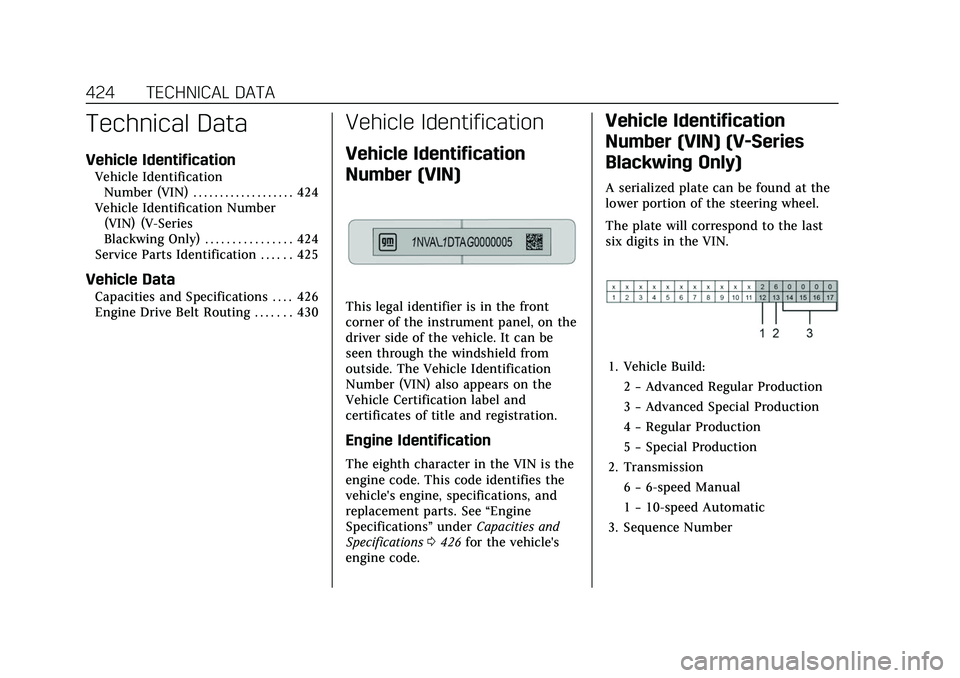
A serialized plate can be found at the
lower portion of the steering wheel.
The plate will correspond to the last
six digits in the VIN.
1. Vehicle Build:
2−Advanced Regular Production
3 −Advanced Special Production
4 −Regular Production
5 −Special Production
2. Transmission 6−6-speed Manual
1 −10-speed Automatic
3. Sequence Number
Page 456 of 466

Cadillac CT5 Owner Manual (GMNA-Localizing-U.S./Canada-15268585) -
2022 - CRC - 10/11/21
INDEX 455
Chains, Tire . . . . . . . . . . . . . . . . . . . . . . . . . 386
ChargingWireless . . . . . . . . . . . . . . . . . . . . . . . . . . . . 93
Charging System Light . . . . . . . . . . . . . 106
Check Engine Light (MalfunctionIndicator) . . . . . . . . . . . . . . . . . . . . . . . . 106
Child Restraints Infants and Young Children . . . . . . . 68
Lower Anchors and Tethersfor Children . . . . . . . . . . . . . . . . . . . . . . . 74
Older Children . . . . . . . . . . . . . . . . . . . . . 67
Securing . . . . . . . . . . . . . . . . . . . . . . . . 80, 82
Systems . . . . . . . . . . . . . . . . . . . . . . . . . . . . 70
Circuit Breakers . . . . . . . . . . . . . . . . . . . . . 359
Cleaning Exterior Care . . . . . . . . . . . . . . . . . . . . . . 399
Interior Care . . . . . . . . . . . . . . . . . . . . . . 404
Climate Control Systems Dual Automatic . . . . . . . . . . . . . . . . . . . 209
Clock . . . . . . . . . . . . . . . . . . . . . . . . . . . . . . . . . . 92
Cluster, Instrument . . . . . . . . . . . . . . 96, 98
Clutch, Hydraulic . . . . . . . . . . . . . . . . . . . 340
Collision Damage Repair . . . . . . . . . . . 438
Compartments
Storage . . . . . . . . . . . . . . . . . . . . . . . . . . . . . 85
Compass . . . . . . . . . . . . . . . . . . . . . . . . . . . . . . 92
Competitive Driving Mode . . . . . . . . . 265 Composite Materials . . . . . . . . . . . . . . . . 237
Compressor Kit, Tire Sealant . . . . . . . 388
Connected Services
Connections . . . . . . . . . . . . . . . . . . . . . . . 450
Diagnostics . . . . . . . . . . . . . . . . . . . . . . . . 452
Navigation . . . . . . . . . . . . . . . . . . . . . . . . . 450
Connections
Connected Services . . . . . . . . . . . . . . . 450
Control Traction and ElectronicStability . . . . . . . . . . . . . . . . . . . . . . . . . . 258
Control of a Vehicle . . . . . . . . . . . . . . . . 218
Controls Steering Wheel . . . . . . . . . . . . . . . . . . . . 146
Convex Mirrors . . . . . . . . . . . . . . . . . . . . . . 26
Coolant Engine TemperatureGauge . . . . . . . . . . . . . . . . . . . . . . 103, 104
Engine Temperature Warning Light . . . . . . . . . . . . . . . . . . . . . . . . . . . . . 112
Cooling . . . . . . . . . . . . . . . . . . . . . . . . . . . . . . 209
Cooling System . . . . . . . . . . . . . . . . . . . . . 343
Cornering Lamps . . . . . . . . . . . . . . . . . . . 139
Courtesy Lamps . . . . . . . . . . . . . . . . . . . . . 139
Courtesy Transportation
Program . . . . . . . . . . . . . . . . . . . . . . . . . . . . 437
Coverage Explanations . . . . . . . . . . . . . 171
Cruise Control . . . . . . . . . . . . . . . . . . . . . . . 268 Cruise Control (cont'd)
Light . . . . . . . . . . . . . . . . . . . . . . . . . . . . . . . 115
Cruise Control, Adaptive . . . . . . . . . . . 270
Cruise Control, Super . . . . . . . . . . . . . . . 279
Cupholders . . . . . . . . . . . . . . . . . . . . . . . . . . . 85
Customer Assistance . . . . . . . . . . . . . . . 433 Offices . . . . . . . . . . . . . . . . . . . . . . . . . . . . . 433
Text Telephone (TTY) Users . . . . . 433
Customer Information Publications OrderingInformation . . . . . . . . . . . . . . . . . . . . . . 440
Customer Satisfaction
Procedure . . . . . . . . . . . . . . . . . . . . . . . . . . 431
Cybersecurity . . . . . . . . . . . . . . . . . . . . . . . . 442
D
Damage Repair, Collision . . . . . . . . . . . 438
Danger, Warning, and Caution . . . . . . . . 2
Data Collection Infotainment System . . . . . . . . . . . . . 443
OnStar . . . . . . . . . . . . . . . . . . . . . . . . . . . . . 443
Data Recorder
Performance . . . . . . . . . . . . . . . . . . . . . . . 177
Data Recorders, Event . . . . . . . . . . . . . . 442
Database Coverage Explanations . . . . . . . . . . . . . . . . . . . . . . 171
Daytime Running Lamps (DRL) . . . 137
Defensive Driving . . . . . . . . . . . . . . . . . . . 217