park assist CADILLAC CT5 2022 Owners Manual
[x] Cancel search | Manufacturer: CADILLAC, Model Year: 2022, Model line: CT5, Model: CADILLAC CT5 2022Pages: 466, PDF Size: 7.21 MB
Page 4 of 466
Cadillac CT5 Owner Manual (GMNA-Localizing-U.S./Canada-15268585) -
2022 - CRC - 10/11/21
INTRODUCTION 3
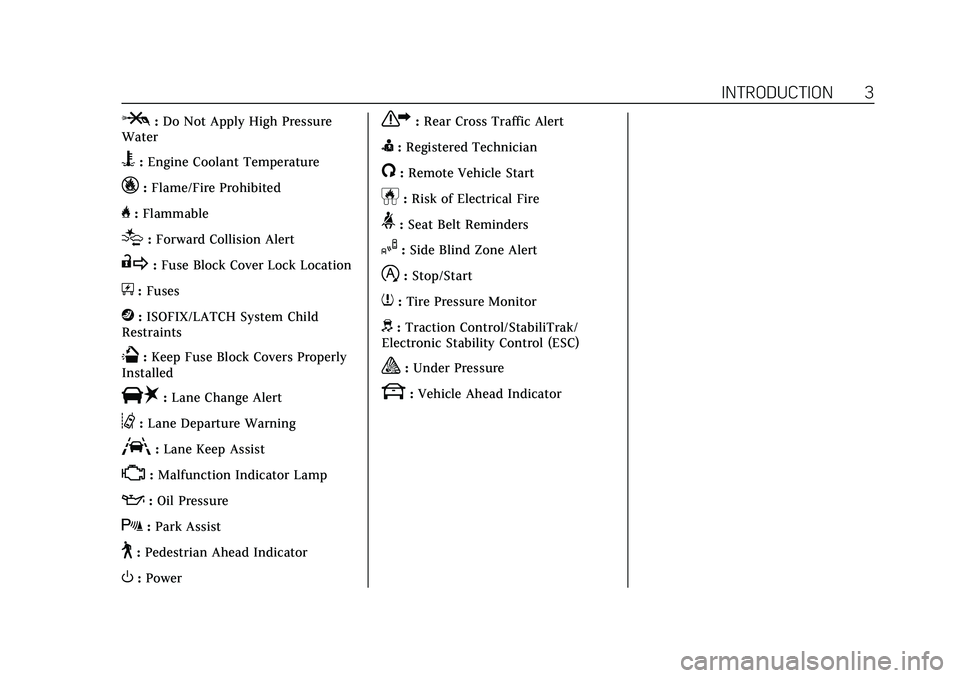
P:Do Not Apply High Pressure
Water
B: Engine Coolant Temperature
_:Flame/Fire Prohibited
H: Flammable
[:Forward Collision Alert
R:Fuse Block Cover Lock Location
+:Fuses
j:ISOFIX/LATCH System Child
Restraints
Q: Keep Fuse Block Covers Properly
Installed
|: Lane Change Alert
@:Lane Departure Warning
A:Lane Keep Assist
*: Malfunction Indicator Lamp
::Oil Pressure
X:Park Assist
~:Pedestrian Ahead Indicator
O:Power
7:Rear Cross Traffic Alert
I:Registered Technician
/:Remote Vehicle Start
h:Risk of Electrical Fire
>:Seat Belt Reminders
I:Side Blind Zone Alert
h:Stop/Start
7:Tire Pressure Monitor
d:Traction Control/StabiliTrak/
Electronic Stability Control (ESC)
a: Under Pressure
k: Vehicle Ahead Indicator
Page 6 of 466
Cadillac CT5 Owner Manual (GMNA-Localizing-U.S./Canada-15268585) -
2022 - CRC - 10/11/21
INTRODUCTION 5
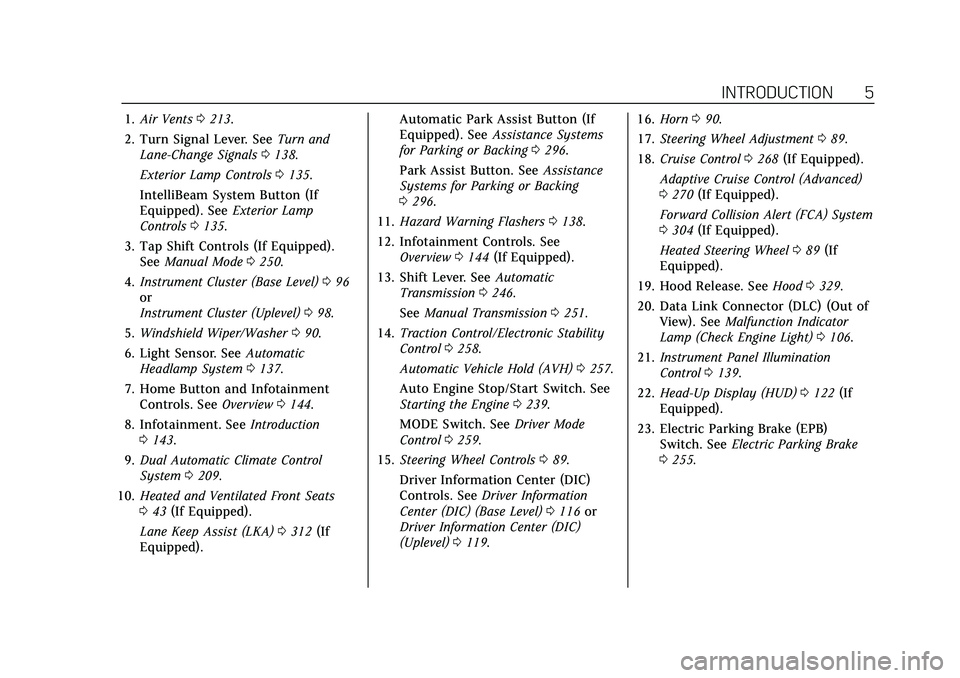
1.Air Vents 0213.
2. Turn Signal Lever. See Turn and
Lane-Change Signals 0138.
Exterior Lamp Controls 0135.
IntelliBeam System Button (If
Equipped). See Exterior Lamp
Controls 0135.
3. Tap Shift Controls (If Equipped). See Manual Mode 0250.
4. Instrument Cluster (Base Level) 096
or
Instrument Cluster (Uplevel) 098.
5. Windshield Wiper/Washer 090.
6. Light Sensor. See Automatic
Headlamp System 0137.
7. Home Button and Infotainment Controls. See Overview0144.
8. Infotainment. See Introduction
0 143.
9. Dual Automatic Climate Control
System 0209.
10. Heated and Ventilated Front Seats
043 (If Equipped).
Lane Keep Assist (LKA) 0312 (If
Equipped). Automatic Park Assist Button (If
Equipped). See
Assistance Systems
for Parking or Backing 0296.
Park Assist Button. See Assistance
Systems for Parking or Backing
0 296.
11. Hazard Warning Flashers 0138.
12. Infotainment Controls. See Overview 0144 (If Equipped).
13. Shift Lever. See Automatic
Transmission 0246.
See Manual Transmission 0251.
14. Traction Control/Electronic Stability
Control 0258.
Automatic Vehicle Hold (AVH) 0257.
Auto Engine Stop/Start Switch. See
Starting the Engine 0239.
MODE Switch. See Driver Mode
Control 0259.
15. Steering Wheel Controls 089.
Driver Information Center (DIC)
Controls. See Driver Information
Center (DIC) (Base Level) 0116 or
Driver Information Center (DIC)
(Uplevel) 0119. 16.
Horn 090.
17. Steering Wheel Adjustment 089.
18. Cruise Control 0268 (If Equipped).
Adaptive Cruise Control (Advanced)
0 270 (If Equipped).
Forward Collision Alert (FCA) System
0 304 (If Equipped).
Heated Steering Wheel 089 (If
Equipped).
19. Hood Release. See Hood0329.
20. Data Link Connector (DLC) (Out of View). See Malfunction Indicator
Lamp (Check Engine Light) 0106.
21. Instrument Panel Illumination
Control 0139.
22. Head-Up Display (HUD) 0122 (If
Equipped).
23. Electric Parking Brake (EPB) Switch. See Electric Parking Brake
0 255.
Page 38 of 466
Cadillac CT5 Owner Manual (GMNA-Localizing-U.S./Canada-15268585) -
2022 - CRC - 10/11/21
SEATS AND RESTRAINTS 37
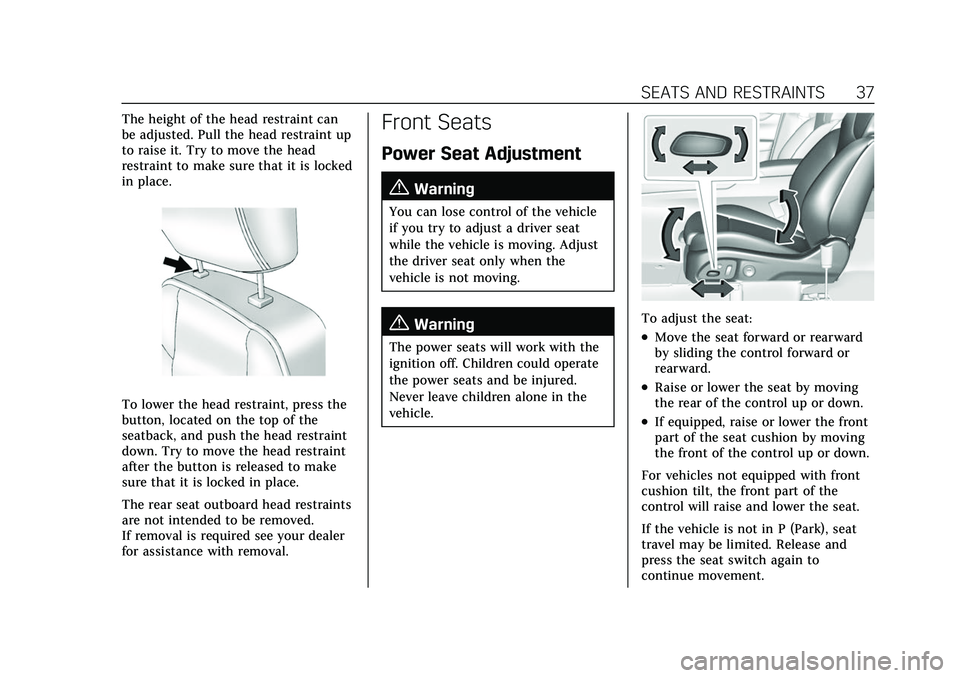
The height of the head restraint can
be adjusted. Pull the head restraint up
to raise it. Try to move the head
restraint to make sure that it is locked
in place.
To lower the head restraint, press the
button, located on the top of the
seatback, and push the head restraint
down. Try to move the head restraint
after the button is released to make
sure that it is locked in place.
The rear seat outboard head restraints
are not intended to be removed.
If removal is required see your dealer
for assistance with removal.
Front Seats
Power Seat Adjustment
{Warning
You can lose control of the vehicle
if you try to adjust a driver seat
while the vehicle is moving. Adjust
the driver seat only when the
vehicle is not moving.
{Warning
The power seats will work with the
ignition off. Children could operate
the power seats and be injured.
Never leave children alone in the
vehicle.
To adjust the seat:
.Move the seat forward or rearward
by sliding the control forward or
rearward.
.Raise or lower the seat by moving
the rear of the control up or down.
.If equipped, raise or lower the front
part of the seat cushion by moving
the front of the control up or down.
For vehicles not equipped with front
cushion tilt, the front part of the
control will raise and lower the seat.
If the vehicle is not in P (Park), seat
travel may be limited. Release and
press the seat switch again to
continue movement.
Page 89 of 466

Cadillac CT5 Owner Manual (GMNA-Localizing-U.S./Canada-15268585) -
2022 - CRC - 10/11/21
88 INSTRUMENTS AND CONTROLS
Instruments and
Controls
Controls
Steering Wheel Adjustment . . . . . . . 89
Steering Wheel Controls . . . . . . . . . . 89
Heated Steering Wheel . . . . . . . . . . . . 89
Horn . . . . . . . . . . . . . . . . . . . . . . . . . . . . . . . . 90
Windshield Wiper/Washer . . . . . . . . 90
Compass . . . . . . . . . . . . . . . . . . . . . . . . . . . . 92
Clock . . . . . . . . . . . . . . . . . . . . . . . . . . . . . . . 92
Power Outlets . . . . . . . . . . . . . . . . . . . . . . 92
Wireless Charging . . . . . . . . . . . . . . . . . 93
Warning Lights, Gauges, and
Indicators
Warning Lights, Gauges, andIndicators . . . . . . . . . . . . . . . . . . . . . . . . . 95
Instrument Cluster (Base Level) . . . . . . . . . . . . . . . . . . . . . . . . . . . . . 96
Instrument Cluster (Uplevel) . . . . . 98
Speedometer . . . . . . . . . . . . . . . . . . . . . . 101
Odometer . . . . . . . . . . . . . . . . . . . . . . . . . 101
Trip Odometer . . . . . . . . . . . . . . . . . . . . 101
Tachometer . . . . . . . . . . . . . . . . . . . . . . . 101
Fuel Gauge . . . . . . . . . . . . . . . . . . . . . . . . 102
Engine Coolant Temperature
Gauge (Base Level) . . . . . . . . . . . . . 103 Engine Coolant Temperature
Gauge (Uplevel) . . . . . . . . . . . . . . . . . 104
Seat Belt Reminders . . . . . . . . . . . . . . 104
Airbag Readiness Light . . . . . . . . . . 105
Passenger Airbag Status Indicator . . . . . . . . . . . . . . . . . . . . . . . . . 105
Charging System Light . . . . . . . . . . . 106
Malfunction Indicator Lamp (Check Engine Light) . . . . . . . . . . . 106
Brake System Warning Light . . . . 108
Electric Parking Brake Light . . . . . 108
Service Electric Parking Brake Light . . . . . . . . . . . . . . . . . . . . . . . . . . . . . 109
Antilock Brake System (ABS) Warning Light . . . . . . . . . . . . . . . . . . 109
Performance Shifting Light . . . . . . 109
Automatic Vehicle Hold (AVH) Light . . . . . . . . . . . . . . . . . . . . . . . . . . . . . 110
Lane Keep Assist (LKA) Light . . . 110
Automatic Emergency Braking (AEB) Disabled Light . . . . . . . . . . . 110
Vehicle Ahead Indicator . . . . . . . . . 110
Pedestrian Ahead Indicator . . . . . . 111
Traction Off Light . . . . . . . . . . . . . . . . 111
StabiliTrak OFF Light . . . . . . . . . . . . 111
Traction Control System (TCS)/ StabiliTrak Light . . . . . . . . . . . . . . . . 112
Engine Coolant Temperature Warning Light . . . . . . . . . . . . . . . . . . 112
Driver Mode Control Light . . . . . . . 112 Tire Pressure Light . . . . . . . . . . . . . . . 114
Engine Oil Pressure Light . . . . . . . . 114
Low Fuel Warning Light . . . . . . . . . 114
Security Light . . . . . . . . . . . . . . . . . . . . . 115
High-Beam On Light . . . . . . . . . . . . . 115
Lamps On Reminder . . . . . . . . . . . . . 115
Cruise Control Light . . . . . . . . . . . . . . 115
Door Ajar Light . . . . . . . . . . . . . . . . . . . 116
Information Displays
Driver Information Center (DIC)
(Base Level) . . . . . . . . . . . . . . . . . . . . . 116
Driver Information Center (DIC) (Uplevel) . . . . . . . . . . . . . . . . . . . . . . . . . 119
Head-Up Display (HUD) . . . . . . . . . 122
Vehicle Messages
Vehicle Messages . . . . . . . . . . . . . . . . . 125
Engine Power Messages . . . . . . . . . . 126
Vehicle Speed Messages . . . . . . . . . 126
Vehicle Personalization
Vehicle Personalization . . . . . . . . . . 126
Universal Remote System
Universal Remote System . . . . . . . . 132
Universal Remote System Programming . . . . . . . . . . . . . . . . . . . 132
Universal Remote System Operation . . . . . . . . . . . . . . . . . . . . . . . . 134
Page 109 of 466

Cadillac CT5 Owner Manual (GMNA-Localizing-U.S./Canada-15268585) -
2022 - CRC - 10/11/21
108 INSTRUMENTS AND CONTROLS
vehicle may affect vehicle operation.
SeeAdd-On Electrical Equipment 0326.
See your dealer if assistance is needed.
The vehicle may not pass
inspection if:
.The light is on when the engine is
running.
.The light does not come on when
the ignition is in Service Mode.
.Critical emission control systems
have not been completely
diagnosed. If this happens, the
vehicle would not be ready for
inspection and might require
several days of routine driving
before the system is ready for
inspection. This can happen if the
12-volt battery has recently been
replaced or run down, or if the
vehicle has been recently serviced.
See your dealer if the vehicle will not
pass or cannot be made ready for
the test.
Brake System Warning
Light
MetricEnglish
This light should come on briefly
when the vehicle is turned on. If it
does not come on then, have it fixed
so it will be ready to warn you if there
is a problem.
If the light comes on and stays on at
start up, there is a brake problem.
Have the brake system inspected
right away.
If the light comes on while driving,
pull off the road and stop carefully.
The brake system has electric brake
boost. Vehicle speed may be limited
when the brake system warning light
comes on. The brake pedal might be
harder to push, or the brake pedal
may go closer to the floor. It could take longer to stop. If the light is still
on, have the vehicle towed for service.
See
Towing the Vehicle 0396.
{Warning
The brake system might not be
working properly if the brake
system warning light is on. Driving
with the brake system warning light
on can lead to a crash. If the light is
still on after the vehicle has been
pulled off the road and carefully
stopped, have the vehicle towed for
service.
Electric Parking Brake
Light
MetricEnglish
This light comes on when the parking
brake is applied. If the light continues
flashing after the parking brake is
released, or while driving, there is a
Page 123 of 466
Cadillac CT5 Owner Manual (GMNA-Localizing-U.S./Canada-15268585) -
2022 - CRC - 10/11/21
122 INSTRUMENTS AND CONTROLS
Head-Up Display (HUD)
{Warning
If the HUD image is too bright or
too high in your field of view, it
may take you more time to see
things you need to see when it is
dark outside. Be sure to keep the
HUD image dim and placed low in
your field of view.
If equipped with HUD, some
information concerning the operation
of the vehicle is projected onto the
windshield. The information is
projected through the HUD lens on
the driver side of the instrument
panel and focused out toward the
front of the vehicle.
Caution
If you try to use the HUD image as
a parking aid, you may misjudge
the distance and damage your
vehicle. Do not use the HUD image
as a parking aid. The HUD information can be
displayed in various languages in
some vehicles. The speedometer
reading and other numerical values
can be displayed in either English or
metric units.
The language selection is changed
through the radio and the units of
measurement is changed through the
instrument cluster. See
Settings0189
and “Options” underInstrument Cluster
(Base Level) 096 or
Instrument Cluster (Uplevel) 098.
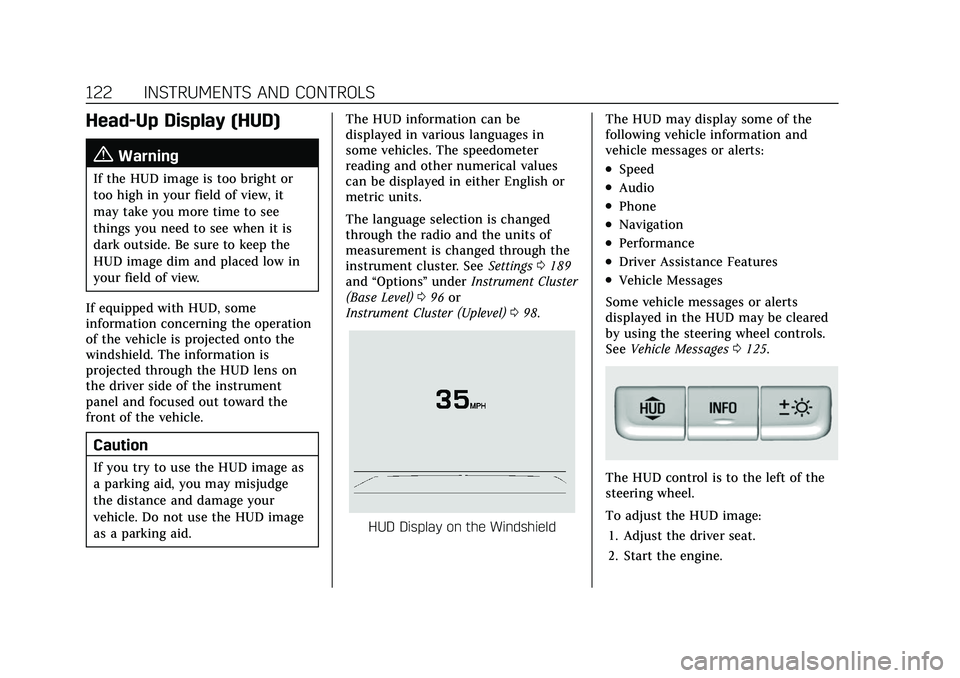
HUD Display on the Windshield The HUD may display some of the
following vehicle information and
vehicle messages or alerts:
.Speed
.Audio
.Phone
.Navigation
.Performance
.Driver Assistance Features
.Vehicle Messages
Some vehicle messages or alerts
displayed in the HUD may be cleared
by using the steering wheel controls.
See Vehicle Messages 0125.
The HUD control is to the left of the
steering wheel.
To adjust the HUD image:
1. Adjust the driver seat.
2. Start the engine.
Page 124 of 466
Cadillac CT5 Owner Manual (GMNA-Localizing-U.S./Canada-15268585) -
2022 - CRC - 10/11/21
INSTRUMENTS AND CONTROLS 123
3. Use the following settings to adjustthe HUD.
$:Press or lift to center the HUD
image. The HUD image can only be
adjusted up and down, not side
to side.
!: Press to select the display view.
Each press will change the
display view.
D: Lift and hold to brighten the
display. Press and hold to dim the
display. Continue to hold to turn the
display off.
The HUD image will automatically
dim and brighten to compensate for
outside lighting. The HUD brightness
control can also be adjusted as
needed.
The HUD image can temporarily light
up depending on the angle and
position of sunlight on the HUD
display. This is normal.
Polarized sunglasses could make the
HUD image harder to see. Head-Up Display (HUD) Rotation
Option
This feature allows for adjusting the
angle of the HUD image.
Press the thumbwheel while Adjust
Rotation is highlighted to enter Adjust
Mode. Scroll to adjust the angle of the
HUD display. Press the thumbwheel to
confirm and save the setting. This
feature may only be available in
P (Park). See
Instrument Cluster (Base
Level) 096 or
Instrument Cluster (Uplevel) 098.
HUD Views
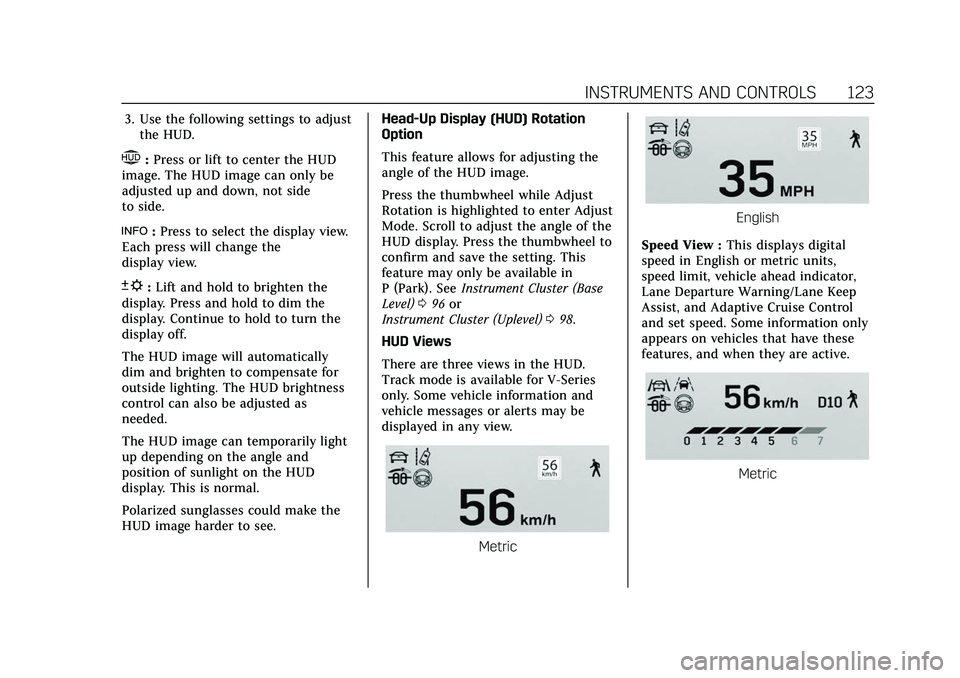
There are three views in the HUD.
Track mode is available for V-Series
only. Some vehicle information and
vehicle messages or alerts may be
displayed in any view.
Metric
English
Speed View : This displays digital
speed in English or metric units,
speed limit, vehicle ahead indicator,
Lane Departure Warning/Lane Keep
Assist, and Adaptive Cruise Control
and set speed. Some information only
appears on vehicles that have these
features, and when they are active.
Metric
Page 133 of 466
Cadillac CT5 Owner Manual (GMNA-Localizing-U.S./Canada-15268585) -
2022 - CRC - 10/11/21
132 INSTRUMENTS AND CONTROLS
2. Touch Enter to go to theconfirmation screen.
3. Re-enter the four-digit code.
Touch Lock or Unlock to lock or
unlock the system. Touch Back to go
back to the previous menu.
Universal Remote
System
See Radio Frequency Statement 0440.
Universal Remote System
Programming
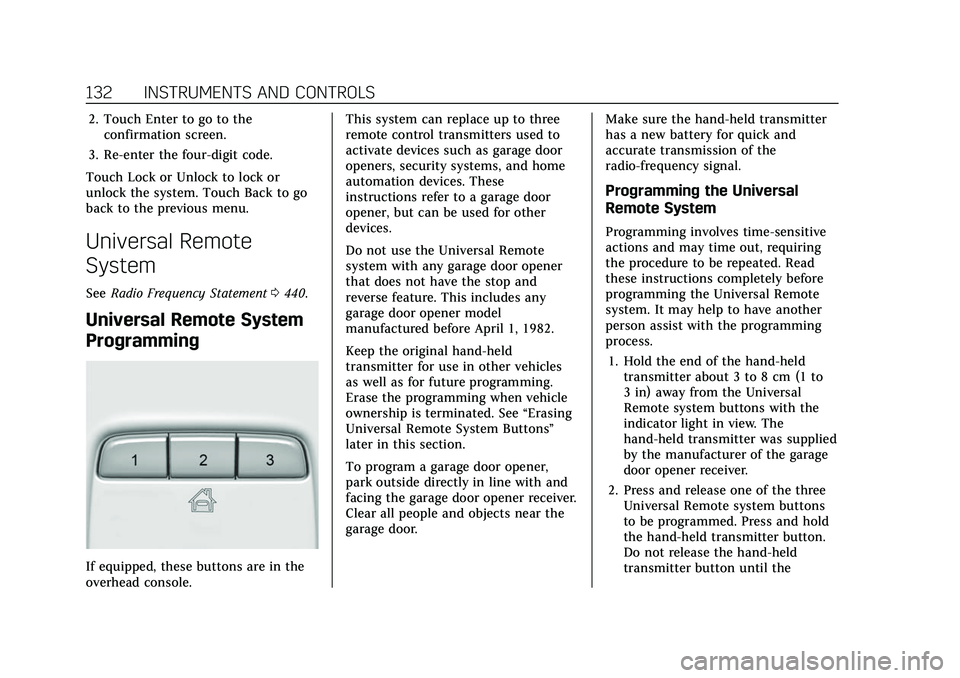
If equipped, these buttons are in the
overhead console. This system can replace up to three
remote control transmitters used to
activate devices such as garage door
openers, security systems, and home
automation devices. These
instructions refer to a garage door
opener, but can be used for other
devices.
Do not use the Universal Remote
system with any garage door opener
that does not have the stop and
reverse feature. This includes any
garage door opener model
manufactured before April 1, 1982.
Keep the original hand-held
transmitter for use in other vehicles
as well as for future programming.
Erase the programming when vehicle
ownership is terminated. See
“Erasing
Universal Remote System Buttons”
later in this section.
To program a garage door opener,
park outside directly in line with and
facing the garage door opener receiver.
Clear all people and objects near the
garage door. Make sure the hand-held transmitter
has a new battery for quick and
accurate transmission of the
radio-frequency signal.
Programming the Universal
Remote System
Programming involves time-sensitive
actions and may time out, requiring
the procedure to be repeated. Read
these instructions completely before
programming the Universal Remote
system. It may help to have another
person assist with the programming
process.
1. Hold the end of the hand-held transmitter about 3 to 8 cm (1 to
3 in) away from the Universal
Remote system buttons with the
indicator light in view. The
hand-held transmitter was supplied
by the manufacturer of the garage
door opener receiver.
2. Press and release one of the three Universal Remote system buttons
to be programmed. Press and hold
the hand-held transmitter button.
Do not release the hand-held
transmitter button until the
Page 216 of 466

Cadillac CT5 Owner Manual (GMNA-Localizing-U.S./Canada-15268585) -
2022 - CRC - 10/11/21
DRIVING AND OPERATING 215
Driving and
Operating
Driving Information
Driving for Better FuelEconomy . . . . . . . . . . . . . . . . . . . . . . . . 216
Distracted Driving . . . . . . . . . . . . . . . . 217
Defensive Driving . . . . . . . . . . . . . . . . 217
Impaired Driving . . . . . . . . . . . . . . . . . 217
Control of a Vehicle . . . . . . . . . . . . . . 218
Braking . . . . . . . . . . . . . . . . . . . . . . . . . . . . 218
Steering . . . . . . . . . . . . . . . . . . . . . . . . . . . 218
Off-Road Recovery . . . . . . . . . . . . . . . . 219
Loss of Control . . . . . . . . . . . . . . . . . . . 220
Track Events and Competitive Driving (V-Series and V-Series
Blackwing) . . . . . . . . . . . . . . . . . . . . . . 220
Driving on Wet Roads . . . . . . . . . . . 230
Hill and Mountain Roads . . . . . . . . 231
Winter Driving . . . . . . . . . . . . . . . . . . . . 231
If the Vehicle Is Stuck . . . . . . . . . . . 232
Vehicle Load Limits . . . . . . . . . . . . . . 233
Starting and Operating
New Vehicle Break-In . . . . . . . . . . . . 236
Composite Materials . . . . . . . . . . . . . 237
Ignition Positions . . . . . . . . . . . . . . . . 238
Starting the Engine . . . . . . . . . . . . . . 239
Stop/Start System . . . . . . . . . . . . . . . . 241 Engine Heater . . . . . . . . . . . . . . . . . . . . 242
Retained Accessory
Power (RAP) . . . . . . . . . . . . . . . . . . . . 243
Shifting Into Park . . . . . . . . . . . . . . . . 243
Shifting out of Park . . . . . . . . . . . . . . 244
Parking (Manual Transmission) . . . . . . . . . . . . . . . . . . . 244
Parking over Things That Burn . . . . . . . . . . . . . . . . . . . . . . . 244
Active Fuel Management . . . . . . . . 244
Extended Parking . . . . . . . . . . . . . . . . . 245
Engine Exhaust
Engine Exhaust . . . . . . . . . . . . . . . . . . . 245
Running the Vehicle While Parked . . . . . . . . . . . . . . . . . . . . . . . . . . . 246
Automatic Transmission
Automatic Transmission . . . . . . . . . 246
Manual Mode . . . . . . . . . . . . . . . . . . . . . 250
Manual Transmission
Manual Transmission . . . . . . . . . . . . 251
Active Rev Match . . . . . . . . . . . . . . . . 253
Drive Systems
All-Wheel Drive . . . . . . . . . . . . . . . . . . 254
Brakes
Electric Brake Boost . . . . . . . . . . . . . . 254
Antilock Brake System (ABS) . . . . 255
Electric Parking Brake . . . . . . . . . . . . 255 Brake Assist . . . . . . . . . . . . . . . . . . . . . . . 256
Hill Start Assist (HSA) . . . . . . . . . . . 257
Automatic Vehicle
Hold (AVH) . . . . . . . . . . . . . . . . . . . . . 257
Ride Control Systems
Traction Control/ElectronicStability Control . . . . . . . . . . . . . . . . 258
Driver Mode Control . . . . . . . . . . . . . 259
Competitive Driving Mode . . . . . . . 265
Limited-Slip Differential . . . . . . . . . 267
Cruise Control
Cruise Control . . . . . . . . . . . . . . . . . . . . 268
Adaptive Cruise Control (Advanced) . . . . . . . . . . . . . . . . . . . . . . 270
Super Cruise . . . . . . . . . . . . . . . . . . . . . . 279
Driver Assistance Systems
Driver Assistance Systems . . . . . . . 294
Assistance Systems for Parking or Backing . . . . . . . . . . . . . . . . . . . . . . . 296
Rear Vision Camera (RVC) . . . . . . . 296
Surround Vision System . . . . . . . . . 297
Park Assist . . . . . . . . . . . . . . . . . . . . . . . . 298
Automatic Parking Assist (APA) . . . . . . . . . . . . . . . . . . . . . 300
Reverse Automatic Braking (RAB) . . . . . . . . . . . . . . . . . . . 301
Rear Pedestrian Alert . . . . . . . . . . . . 303
Page 219 of 466

Cadillac CT5 Owner Manual (GMNA-Localizing-U.S./Canada-15268585) -
2022 - CRC - 10/11/21
218 DRIVING AND OPERATING
Warning (Continued)
serious—or even fatal —collision
if you drive after drinking or taking
drugs.
Do not drive while under the
influence of alcohol or drugs,
or ride with a driver who has been
drinking or is impaired by drugs.
Find alternate transportation home;
or if you are with a group, designate
a driver who will remain sober.
Control of a Vehicle
Braking, steering, and accelerating are
important factors in helping to control
a vehicle while driving.
Braking
Braking action involves perception
time and reaction time. Deciding to
push the brake pedal is perception
time. Actually doing it is
reaction time.
Average driver reaction time is about
three-quarters of a second. In that
time, a vehicle moving at 100 km/h (60 mph) travels 20 m (66 ft), which
could be a lot of distance in an
emergency.
Helpful braking tips to keep in mind
include:
.Keep enough distance between you
and the vehicle in front of you.
.Avoid needless heavy braking.
.Keep pace with traffic.
If the engine ever stops or a brake
fault occurs, the brakes may lose
power assist. More effort will be
required to stop the vehicle and it can
take longer to stop.
Steering
Caution
To avoid damage to the steering
system, do not drive over curbs,
parking barriers, or similar objects
at speeds greater than 3 km/h
(1 mph). Use care when driving over
other objects such as lane dividers
and speed bumps. Damage caused
by misuse of the vehicle is not
covered by the vehicle warranty.
Variable Effort Steering
The vehicle has a steering system that
varies the amount of effort required to
steer the vehicle in relation to the
speed of the vehicle.
The amount of steering effort required
is less at slower speeds to make the
vehicle more maneuverable and easier
to park. At faster speeds, the steering
effort increases to provide a sport-like
feel to the steering. This provides
maximum control and stability.