parking brake CADILLAC CT5 2022 Owners Manual
[x] Cancel search | Manufacturer: CADILLAC, Model Year: 2022, Model line: CT5, Model: CADILLAC CT5 2022Pages: 466, PDF Size: 7.21 MB
Page 6 of 466
Cadillac CT5 Owner Manual (GMNA-Localizing-U.S./Canada-15268585) -
2022 - CRC - 10/11/21
INTRODUCTION 5
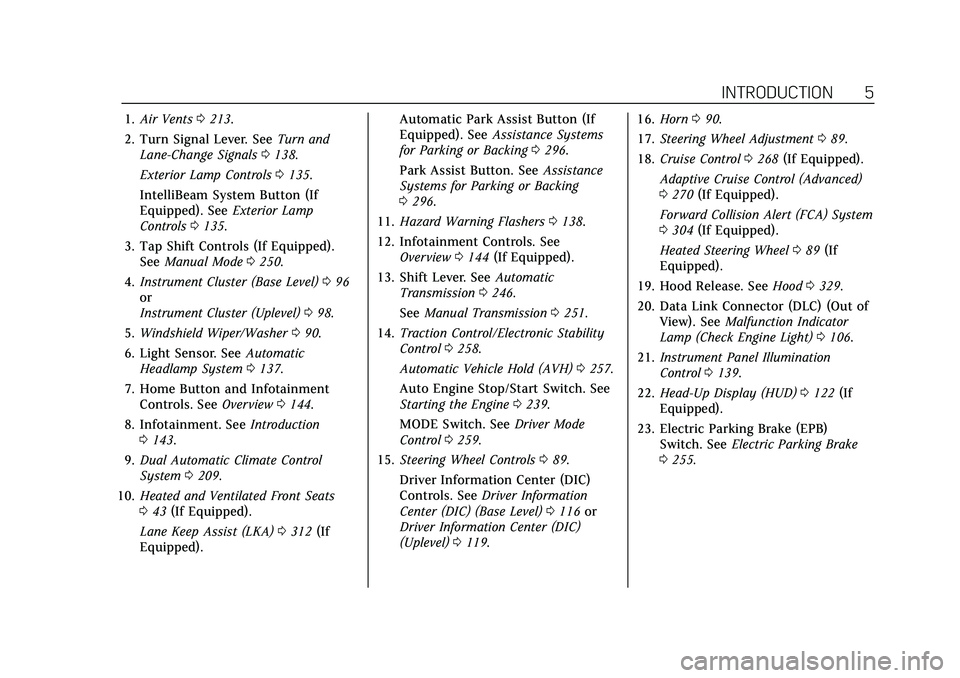
1.Air Vents 0213.
2. Turn Signal Lever. See Turn and
Lane-Change Signals 0138.
Exterior Lamp Controls 0135.
IntelliBeam System Button (If
Equipped). See Exterior Lamp
Controls 0135.
3. Tap Shift Controls (If Equipped). See Manual Mode 0250.
4. Instrument Cluster (Base Level) 096
or
Instrument Cluster (Uplevel) 098.
5. Windshield Wiper/Washer 090.
6. Light Sensor. See Automatic
Headlamp System 0137.
7. Home Button and Infotainment Controls. See Overview0144.
8. Infotainment. See Introduction
0 143.
9. Dual Automatic Climate Control
System 0209.
10. Heated and Ventilated Front Seats
043 (If Equipped).
Lane Keep Assist (LKA) 0312 (If
Equipped). Automatic Park Assist Button (If
Equipped). See
Assistance Systems
for Parking or Backing 0296.
Park Assist Button. See Assistance
Systems for Parking or Backing
0 296.
11. Hazard Warning Flashers 0138.
12. Infotainment Controls. See Overview 0144 (If Equipped).
13. Shift Lever. See Automatic
Transmission 0246.
See Manual Transmission 0251.
14. Traction Control/Electronic Stability
Control 0258.
Automatic Vehicle Hold (AVH) 0257.
Auto Engine Stop/Start Switch. See
Starting the Engine 0239.
MODE Switch. See Driver Mode
Control 0259.
15. Steering Wheel Controls 089.
Driver Information Center (DIC)
Controls. See Driver Information
Center (DIC) (Base Level) 0116 or
Driver Information Center (DIC)
(Uplevel) 0119. 16.
Horn 090.
17. Steering Wheel Adjustment 089.
18. Cruise Control 0268 (If Equipped).
Adaptive Cruise Control (Advanced)
0 270 (If Equipped).
Forward Collision Alert (FCA) System
0 304 (If Equipped).
Heated Steering Wheel 089 (If
Equipped).
19. Hood Release. See Hood0329.
20. Data Link Connector (DLC) (Out of View). See Malfunction Indicator
Lamp (Check Engine Light) 0106.
21. Instrument Panel Illumination
Control 0139.
22. Head-Up Display (HUD) 0122 (If
Equipped).
23. Electric Parking Brake (EPB) Switch. See Electric Parking Brake
0 255.
Page 14 of 466
Cadillac CT5 Owner Manual (GMNA-Localizing-U.S./Canada-15268585) -
2022 - CRC - 10/11/21
KEYS, DOORS, AND WINDOWS 13
6. Remove the old battery. Do not usea metal object.
7. Insert the new battery, negative side facing down. Replace with a
CR2450 or equivalent battery.
8. Replace the seal, pushing it into the groove around the battery
compartment.
9. Replace the battery cover by snapping it back into the
remote key.
10. Reinsert the mechanical key.
Remote Vehicle Start
This feature allows the engine to be
started from outside the vehicle. It is
not available on vehicles with a
manual transmission.
S: This button on the remote key is
for remote start.
The climate control system will use
the previous settings during a remote
start. The rear window defogger may
come on during remote start based on
cold ambient conditions. The rear
defog indicator light does not come on
during remote start. If equipped, the heated and ventilated
front seats may also come on when
the vehicle personalization setting is
enabled. See
Heated and Ventilated
Front Seats 043.
If equipped with a remote start heated
steering wheel, it may come on during
a remote start. See Heated Steering
Wheel 089.
Laws in some local communities may
restrict the use of remote starters. For
example, some laws may require a
person using remote start to have the
vehicle in view. Check local
regulations for any requirements.
If your vehicle is low on fuel, do not
use the remote start feature. The
vehicle may run out of fuel.
The remote key range may be shorter
while the vehicle is running.
Other conditions can affect the
performance of the remote key. See
Remote Keyless Entry (RKE) System
0 7.
You are allowed multiple starts
totaling 30 minutes of engine run
time. The maximum run time of a
single start is 15 minutes, and it will shut off automatically. You could do
three 10 minute starts, if you
manually shut off after 10 minutes.
The last 10 minute start would shut
off automatically as your total
30 minutes will have been used.
Starting the Engine Using Remote
Start
1. Press
Stwice on the remote key.
The turn signal lamps will flash.
The lamps flash to confirm the
request to remote start the vehicle
has been received. During the
remote start, the parking lamps
will remain on as long as the
engine is running.
2. The engine will shut off after 15 minutes or after the remainder
of the 30 minute total running
time is used, unless you stop the
remote start before engine running
has completed or the vehicle is
turned on.
3. Press the brake pedal and turn the ignition on to drive the vehicle.
Additional Engine Run Time
Remote start can be used for up to
30 minutes of total engine run time.
Page 43 of 466

Cadillac CT5 Owner Manual (GMNA-Localizing-U.S./Canada-15268585) -
2022 - CRC - 10/11/21
42 SEATS AND RESTRAINTS
Positions and Auto Seat Exit Memory
Recall features, repeat Steps 1–4 using
B, the exit button.
Manually Recalling Seating
Positions
Press and hold 1, 2, or
Bbutton until
the recall is complete, to recall the
positions previously saved to that
button.
Manual Memory recall movement for
1, 2 or
Bbuttons may be initiated
and will complete to the saved
memory position if the vehicle is in or
out of P (Park).
If manual transmission equipped,
Manual Memory recall movement for
1, 2, or
Bbuttons may be initiated
and will complete to the saved
memory position if the vehicle parking
brake is set or released.
Enable Automatic Recalls under
Vehicle Personalization Settings
.For Seat Entry Memory that begins
movement to the preferred driving
position of the 1 or 2 button when
the vehicle is turned on, select the
Settings menu, then Vehicle, then Seating Position, then Seat Entry
Memory, and then Select ON or
OFF. See
“Auto Seat Entry Memory
Recall” later in this section.
.For Seat Exit Memory that begins
movement to the preferred exit
position of the
Bbutton when the
vehicle is turned off and the driver
door is open or opened, select the
Settings menu, then Vehicle, then
Seating Position, then Seat Exit
Memory, and then Select ON or
OFF. See “Auto Seat Exit Memory
Recall” later in this section.
.SeeVehicle Personalization 0126 for
additional setting information.
Auto Seat Entry Memory Recall
Seat Entry Memory will automatically
begin movement to the seating
positions of the 1 or 2 button
corresponding to the driver’s remote
key number 1 or 2 detected by the
vehicle when:
.The vehicle is turned ON.
.Seating positions have been
previously saved to the same 1 or 2
button. See “Saving Seating
Positions” previously in this section.
.Seat Entry Memory is enabled. See
“Enable Automatic Recalls” under
“Vehicle Personalization Settings”
previously in this section.
.The shift lever is in P (Park).
Seat Entry Memory Recall will
continue if the vehicle is shifted out
of P (Park) prior to reaching the saved
memory position.
If manual transmission equipped, Seat
Entry Memory Recall will continue if
the parking brake is released prior to
reaching the saved memory position.
If the saved memory seat position
does not automatically recall, verify
the recall is enabled. See “Enable
Automatic Recalls” under“Vehicle
Personalization Settings” previously in
this section.
If the memory seat recalls to the
wrong position, the driver’s remote
key number 1 or 2 may not match the
memory button number positions
they were saved to. Try the other
remote key or try saving the positions
to the other 1 or 2 memory button.
See “Saving Seating Positions ”
previously in this section.
Page 44 of 466
Cadillac CT5 Owner Manual (GMNA-Localizing-U.S./Canada-15268585) -
2022 - CRC - 10/11/21
SEATS AND RESTRAINTS 43
Automatic Seat Entry Memory recalls
are only available for driver’s remote
key numbers 1 and 2. Remote keys 3–
8 will not provide Seat Entry Memory
recalls.
Auto Seat Exit Memory Recall
Seat Exit Memory will begin
movement to the seating position of
the
Bbutton when:
.The vehicle is turned off and the
driver door is open or opened
within a short time.
.A seating position has been
previously been saved to the
B
memory button. See“Saving Seating
Positions” previously in this section.
.Seat Exit Memory is enabled. See
“Enable Automatic Recalls” under
“Vehicle Personalization Settings”
previously in this section.
.The shift lever is in P (Park).
.If manual transmission equipped,
the parking brake must be set.
Seat Exit Memory recall will continue
if the vehicle is shifted out of P (Park)
prior to reaching the saved memory
position. If manual transmission equipped, Seat
Exit Memory will continue if the
parking brake is released prior to
reaching the save memory position.
Seat Exit Memory is not linked to the
driver’s remote key. The seating
position saved to
Bis used for all
drivers.
Cancel Memory Seating Recalls
.During any memory recall:
Press a power seat control
Press SET memory button
.During Manual memory recall:
Release 1, 2, or
Bmemory button
.During Auto Seat Entry Memory
Recall:
Turn vehicle off
Press SET, 1, 2, or
Bmemory
buttons
.During Auto Seat Exit Memory
Recall:
Press SET, 1, 2, or
Bmemory
buttons Obstructions
If something has blocked the seat
while recalling a memory position, the
recall may stop. Remove the
obstruction and try the recall again.
If the memory position still does not
recall, see your dealer.
Heated and Ventilated
Front Seats
{Warning
If temperature change or pain to
the skin cannot be felt, the seat
heater may cause burns. To reduce
the risk of burns, use care when
using the seat heater, especially for
long periods of time. Do not place
anything on the seat that insulates
against heat, such as a blanket,
cushion, cover, or similar item. This
may cause the seat heater to
overheat. An overheated seat heater
may cause a burn or may damage
the seat.
Page 89 of 466

Cadillac CT5 Owner Manual (GMNA-Localizing-U.S./Canada-15268585) -
2022 - CRC - 10/11/21
88 INSTRUMENTS AND CONTROLS
Instruments and
Controls
Controls
Steering Wheel Adjustment . . . . . . . 89
Steering Wheel Controls . . . . . . . . . . 89
Heated Steering Wheel . . . . . . . . . . . . 89
Horn . . . . . . . . . . . . . . . . . . . . . . . . . . . . . . . . 90
Windshield Wiper/Washer . . . . . . . . 90
Compass . . . . . . . . . . . . . . . . . . . . . . . . . . . . 92
Clock . . . . . . . . . . . . . . . . . . . . . . . . . . . . . . . 92
Power Outlets . . . . . . . . . . . . . . . . . . . . . . 92
Wireless Charging . . . . . . . . . . . . . . . . . 93
Warning Lights, Gauges, and
Indicators
Warning Lights, Gauges, andIndicators . . . . . . . . . . . . . . . . . . . . . . . . . 95
Instrument Cluster (Base Level) . . . . . . . . . . . . . . . . . . . . . . . . . . . . . 96
Instrument Cluster (Uplevel) . . . . . 98
Speedometer . . . . . . . . . . . . . . . . . . . . . . 101
Odometer . . . . . . . . . . . . . . . . . . . . . . . . . 101
Trip Odometer . . . . . . . . . . . . . . . . . . . . 101
Tachometer . . . . . . . . . . . . . . . . . . . . . . . 101
Fuel Gauge . . . . . . . . . . . . . . . . . . . . . . . . 102
Engine Coolant Temperature
Gauge (Base Level) . . . . . . . . . . . . . 103 Engine Coolant Temperature
Gauge (Uplevel) . . . . . . . . . . . . . . . . . 104
Seat Belt Reminders . . . . . . . . . . . . . . 104
Airbag Readiness Light . . . . . . . . . . 105
Passenger Airbag Status Indicator . . . . . . . . . . . . . . . . . . . . . . . . . 105
Charging System Light . . . . . . . . . . . 106
Malfunction Indicator Lamp (Check Engine Light) . . . . . . . . . . . 106
Brake System Warning Light . . . . 108
Electric Parking Brake Light . . . . . 108
Service Electric Parking Brake Light . . . . . . . . . . . . . . . . . . . . . . . . . . . . . 109
Antilock Brake System (ABS) Warning Light . . . . . . . . . . . . . . . . . . 109
Performance Shifting Light . . . . . . 109
Automatic Vehicle Hold (AVH) Light . . . . . . . . . . . . . . . . . . . . . . . . . . . . . 110
Lane Keep Assist (LKA) Light . . . 110
Automatic Emergency Braking (AEB) Disabled Light . . . . . . . . . . . 110
Vehicle Ahead Indicator . . . . . . . . . 110
Pedestrian Ahead Indicator . . . . . . 111
Traction Off Light . . . . . . . . . . . . . . . . 111
StabiliTrak OFF Light . . . . . . . . . . . . 111
Traction Control System (TCS)/ StabiliTrak Light . . . . . . . . . . . . . . . . 112
Engine Coolant Temperature Warning Light . . . . . . . . . . . . . . . . . . 112
Driver Mode Control Light . . . . . . . 112 Tire Pressure Light . . . . . . . . . . . . . . . 114
Engine Oil Pressure Light . . . . . . . . 114
Low Fuel Warning Light . . . . . . . . . 114
Security Light . . . . . . . . . . . . . . . . . . . . . 115
High-Beam On Light . . . . . . . . . . . . . 115
Lamps On Reminder . . . . . . . . . . . . . 115
Cruise Control Light . . . . . . . . . . . . . . 115
Door Ajar Light . . . . . . . . . . . . . . . . . . . 116
Information Displays
Driver Information Center (DIC)
(Base Level) . . . . . . . . . . . . . . . . . . . . . 116
Driver Information Center (DIC) (Uplevel) . . . . . . . . . . . . . . . . . . . . . . . . . 119
Head-Up Display (HUD) . . . . . . . . . 122
Vehicle Messages
Vehicle Messages . . . . . . . . . . . . . . . . . 125
Engine Power Messages . . . . . . . . . . 126
Vehicle Speed Messages . . . . . . . . . 126
Vehicle Personalization
Vehicle Personalization . . . . . . . . . . 126
Universal Remote System
Universal Remote System . . . . . . . . 132
Universal Remote System Programming . . . . . . . . . . . . . . . . . . . 132
Universal Remote System Operation . . . . . . . . . . . . . . . . . . . . . . . . 134
Page 109 of 466

Cadillac CT5 Owner Manual (GMNA-Localizing-U.S./Canada-15268585) -
2022 - CRC - 10/11/21
108 INSTRUMENTS AND CONTROLS
vehicle may affect vehicle operation.
SeeAdd-On Electrical Equipment 0326.
See your dealer if assistance is needed.
The vehicle may not pass
inspection if:
.The light is on when the engine is
running.
.The light does not come on when
the ignition is in Service Mode.
.Critical emission control systems
have not been completely
diagnosed. If this happens, the
vehicle would not be ready for
inspection and might require
several days of routine driving
before the system is ready for
inspection. This can happen if the
12-volt battery has recently been
replaced or run down, or if the
vehicle has been recently serviced.
See your dealer if the vehicle will not
pass or cannot be made ready for
the test.
Brake System Warning
Light
MetricEnglish
This light should come on briefly
when the vehicle is turned on. If it
does not come on then, have it fixed
so it will be ready to warn you if there
is a problem.
If the light comes on and stays on at
start up, there is a brake problem.
Have the brake system inspected
right away.
If the light comes on while driving,
pull off the road and stop carefully.
The brake system has electric brake
boost. Vehicle speed may be limited
when the brake system warning light
comes on. The brake pedal might be
harder to push, or the brake pedal
may go closer to the floor. It could take longer to stop. If the light is still
on, have the vehicle towed for service.
See
Towing the Vehicle 0396.
{Warning
The brake system might not be
working properly if the brake
system warning light is on. Driving
with the brake system warning light
on can lead to a crash. If the light is
still on after the vehicle has been
pulled off the road and carefully
stopped, have the vehicle towed for
service.
Electric Parking Brake
Light
MetricEnglish
This light comes on when the parking
brake is applied. If the light continues
flashing after the parking brake is
released, or while driving, there is a
Page 110 of 466

Cadillac CT5 Owner Manual (GMNA-Localizing-U.S./Canada-15268585) -
2022 - CRC - 10/11/21
INSTRUMENTS AND CONTROLS 109
problem with the Electric Parking
Brake system. A message may also
display in the Driver Information
Center (DIC).
If the light does not come on,
or remains flashing, see your dealer.
Service Electric Parking
Brake Light
This light may come on briefly when
the vehicle is turned on. If it does not
come on, have it fixed so it will be
ready to warn if there is a problem.
If this light stays on or comes on
while driving, there is a problem with
the Electric Parking Brake (EPB). Take
the vehicle to a dealer as soon as
possible. In addition to the parking
brake, other safety functions that
utilize the EPB may also be degraded.A message may also display in the
Driver Information Center (DIC). See
Electric Parking Brake
0255.
Antilock Brake System
(ABS) Warning Light
This warning light should come on
briefly when the vehicle is turned on.
If the light does not come on, have it
fixed so it will be ready to warn if
there is a problem.
If the light comes on while driving,
safely stop as soon as it is possible
and turn off the vehicle. Then turn on
the vehicle again to reset the system.
If the ABS warning light stays on,
or comes on again while driving, the
vehicle needs service. A chime may
also sound when the light stays on.
If the ABS warning light is the only
light on, the vehicle has regular
brakes, but ABS is not functioning. If both the ABS warning light and the
brake system warning light are on,
ABS is not functioning and there is a
problem with the regular brakes. See
your dealer for service.
See
Brake System Warning Light 0108.
Performance Shifting Light
If equipped, this light may display
green when Sport Mode is activated
and certain driving conditions are
met. Sport Mode detects when the
vehicle is being driven in a
competitive manner, and adjusts the
shifting of the gears accordingly. See
Driver Mode Control 0259.
Page 197 of 466
Cadillac CT5 Owner Manual (GMNA-Localizing-U.S./Canada-15268585) -
2022 - CRC - 10/11/21
196 INFOTAINMENT SYSTEM
Profile Picture
Touch to choose or change your
profile picture.
Profile Identifiers
Touch to have the vehicle recognize
the identifier you choose.
Touch Vehicle Key 1 and/or
Vehicle Key 2.
If the remote key is lost or stolen, see
your dealer.
Security
Touch to have your profile secured
with a Personal Identification
Number (PIN).
Touch No or Yes.
Vehicle Name
Touch to edit your vehicle name.
Vehicle Account
Touch to view the vehicle account
information and to change the
account password.
Delete Profile
Touch to remove the profile from the
vehicle.Touch Remove or Cancel.
Teen Driver
If equipped, this allows multiple keys
to be registered for beginner drivers to
encourage safe driving habits. When
the vehicle is started with a Teen
Driver key, it will automatically
activate certain safety systems, allow
setting of some features, and limit the
use of others. The Report Card will
record vehicle data about driving
behavior that can be viewed later.
When the vehicle is started with a
registered key, the Driver Information
Center (DIC) displays a message that
Teen Driver is active.
To access:
1. Touch Settings on the Home Page, then touch Vehicle, and then Teen
Driver.
2. Create a Personal Identification Number (PIN) by choosing a
four-digit PIN. Re-enter the PIN to
confirm. To change the PIN, touch
Change PIN.
The PIN is required to:
.Register or unregister keys.
.Change Teen Driver settings.
.Change or clear the Teen
Driver PIN.
.Access or delete Report Card data.
Register keys to activate Teen
Driver and assign restrictions to
the key:
Any vehicle key can be registered, up
to a maximum of eight keys. Label the
key to tell it apart from the
other keys.
For a pushbutton start system: 1. Start the engine.
2. For automatic transmissions, the vehicle must be in P (Park). For
manual transmissions, the vehicle
must be stopped with the parking
brake set.
3. From the Settings menu, touch Vehicle and then Teen Driver.
4. Enter the PIN.
5. Place the remote key you wish to register in the rear cupholder. The
key does not need to be the one
Page 216 of 466

Cadillac CT5 Owner Manual (GMNA-Localizing-U.S./Canada-15268585) -
2022 - CRC - 10/11/21
DRIVING AND OPERATING 215
Driving and
Operating
Driving Information
Driving for Better FuelEconomy . . . . . . . . . . . . . . . . . . . . . . . . 216
Distracted Driving . . . . . . . . . . . . . . . . 217
Defensive Driving . . . . . . . . . . . . . . . . 217
Impaired Driving . . . . . . . . . . . . . . . . . 217
Control of a Vehicle . . . . . . . . . . . . . . 218
Braking . . . . . . . . . . . . . . . . . . . . . . . . . . . . 218
Steering . . . . . . . . . . . . . . . . . . . . . . . . . . . 218
Off-Road Recovery . . . . . . . . . . . . . . . . 219
Loss of Control . . . . . . . . . . . . . . . . . . . 220
Track Events and Competitive Driving (V-Series and V-Series
Blackwing) . . . . . . . . . . . . . . . . . . . . . . 220
Driving on Wet Roads . . . . . . . . . . . 230
Hill and Mountain Roads . . . . . . . . 231
Winter Driving . . . . . . . . . . . . . . . . . . . . 231
If the Vehicle Is Stuck . . . . . . . . . . . 232
Vehicle Load Limits . . . . . . . . . . . . . . 233
Starting and Operating
New Vehicle Break-In . . . . . . . . . . . . 236
Composite Materials . . . . . . . . . . . . . 237
Ignition Positions . . . . . . . . . . . . . . . . 238
Starting the Engine . . . . . . . . . . . . . . 239
Stop/Start System . . . . . . . . . . . . . . . . 241 Engine Heater . . . . . . . . . . . . . . . . . . . . 242
Retained Accessory
Power (RAP) . . . . . . . . . . . . . . . . . . . . 243
Shifting Into Park . . . . . . . . . . . . . . . . 243
Shifting out of Park . . . . . . . . . . . . . . 244
Parking (Manual Transmission) . . . . . . . . . . . . . . . . . . . 244
Parking over Things That Burn . . . . . . . . . . . . . . . . . . . . . . . 244
Active Fuel Management . . . . . . . . 244
Extended Parking . . . . . . . . . . . . . . . . . 245
Engine Exhaust
Engine Exhaust . . . . . . . . . . . . . . . . . . . 245
Running the Vehicle While Parked . . . . . . . . . . . . . . . . . . . . . . . . . . . 246
Automatic Transmission
Automatic Transmission . . . . . . . . . 246
Manual Mode . . . . . . . . . . . . . . . . . . . . . 250
Manual Transmission
Manual Transmission . . . . . . . . . . . . 251
Active Rev Match . . . . . . . . . . . . . . . . 253
Drive Systems
All-Wheel Drive . . . . . . . . . . . . . . . . . . 254
Brakes
Electric Brake Boost . . . . . . . . . . . . . . 254
Antilock Brake System (ABS) . . . . 255
Electric Parking Brake . . . . . . . . . . . . 255 Brake Assist . . . . . . . . . . . . . . . . . . . . . . . 256
Hill Start Assist (HSA) . . . . . . . . . . . 257
Automatic Vehicle
Hold (AVH) . . . . . . . . . . . . . . . . . . . . . 257
Ride Control Systems
Traction Control/ElectronicStability Control . . . . . . . . . . . . . . . . 258
Driver Mode Control . . . . . . . . . . . . . 259
Competitive Driving Mode . . . . . . . 265
Limited-Slip Differential . . . . . . . . . 267
Cruise Control
Cruise Control . . . . . . . . . . . . . . . . . . . . 268
Adaptive Cruise Control (Advanced) . . . . . . . . . . . . . . . . . . . . . . 270
Super Cruise . . . . . . . . . . . . . . . . . . . . . . 279
Driver Assistance Systems
Driver Assistance Systems . . . . . . . 294
Assistance Systems for Parking or Backing . . . . . . . . . . . . . . . . . . . . . . . 296
Rear Vision Camera (RVC) . . . . . . . 296
Surround Vision System . . . . . . . . . 297
Park Assist . . . . . . . . . . . . . . . . . . . . . . . . 298
Automatic Parking Assist (APA) . . . . . . . . . . . . . . . . . . . . . 300
Reverse Automatic Braking (RAB) . . . . . . . . . . . . . . . . . . . 301
Rear Pedestrian Alert . . . . . . . . . . . . 303
Page 219 of 466

Cadillac CT5 Owner Manual (GMNA-Localizing-U.S./Canada-15268585) -
2022 - CRC - 10/11/21
218 DRIVING AND OPERATING
Warning (Continued)
serious—or even fatal —collision
if you drive after drinking or taking
drugs.
Do not drive while under the
influence of alcohol or drugs,
or ride with a driver who has been
drinking or is impaired by drugs.
Find alternate transportation home;
or if you are with a group, designate
a driver who will remain sober.
Control of a Vehicle
Braking, steering, and accelerating are
important factors in helping to control
a vehicle while driving.
Braking
Braking action involves perception
time and reaction time. Deciding to
push the brake pedal is perception
time. Actually doing it is
reaction time.
Average driver reaction time is about
three-quarters of a second. In that
time, a vehicle moving at 100 km/h (60 mph) travels 20 m (66 ft), which
could be a lot of distance in an
emergency.
Helpful braking tips to keep in mind
include:
.Keep enough distance between you
and the vehicle in front of you.
.Avoid needless heavy braking.
.Keep pace with traffic.
If the engine ever stops or a brake
fault occurs, the brakes may lose
power assist. More effort will be
required to stop the vehicle and it can
take longer to stop.
Steering
Caution
To avoid damage to the steering
system, do not drive over curbs,
parking barriers, or similar objects
at speeds greater than 3 km/h
(1 mph). Use care when driving over
other objects such as lane dividers
and speed bumps. Damage caused
by misuse of the vehicle is not
covered by the vehicle warranty.
Variable Effort Steering
The vehicle has a steering system that
varies the amount of effort required to
steer the vehicle in relation to the
speed of the vehicle.
The amount of steering effort required
is less at slower speeds to make the
vehicle more maneuverable and easier
to park. At faster speeds, the steering
effort increases to provide a sport-like
feel to the steering. This provides
maximum control and stability.