brakes CADILLAC CT5 2023 User Guide
[x] Cancel search | Manufacturer: CADILLAC, Model Year: 2023, Model line: CT5, Model: CADILLAC CT5 2023Pages: 526, PDF Size: 6.85 MB
Page 252 of 526

Cadillac CT5 Owner Manual (GMNA-Localizing-U.S./Canada-16500419) -
2023 - CRC - 5/10/22
Driving and Operating 251
Brake Leak Detection
The hydraulic braking system
has advanced diagnostic
capability to help detect
hydraulic leaks, trapped air,
and other performance issues.
These diagnostics are active
when the hydraulic system is
powered. In order to avoid
inadvertently setting a leak
Diagnostic Trouble Code
(DTC), disconnect the battery
before servicing the brake
system.
If the vehicle sets a DTC
related to a brake system leak,
the Brake System Warning
Light will come on and vehicle
speed may be limited to 100
kph (62 mph). Any time a leak
DTC is set, the vehicle should
be inspected carefully for
evidence of a leak and should
be repaired immediately. See
your dealer.Brake Fade Warning Assist
The Brake Fade Warning
Assist system monitors the
performance of the brake
system. If the system detects
brake fade, or if the brake fluid
is near the boiling point, the
driver will be alerted.
The Brake Fade Warning
Assist system is designed for
use with the factory-installed
brake pads or GM approved
replacement pads. If the brake
pads on the vehicle need to be
replaced, use GM approved
brake pads. If this is not done,
the brake fade warning
system may not function
properly.
Stage 1 :
The DIC displays a
“Reduce Braking to Avoid
Overheating” message, a
chime sounds and brake pedal
effort and travel is increased.
When the message displays,
the driver should back up
braking points and reduce
brake usage in order to reduce brake temperature. This will
allow for continued lapping
with no speed limitations.
Stage 2 :
The DIC displays a
Brakes Overheated Service
Now message, a chime
sounds, and brake pedal effort
and travel is further increased.
This code indicates that the
brake fluid temperature is
excessive and is about to boil.
The system limits vehicle
speed to 100 km/h (62 mph).
The driver should immediately
start a cool down lap if on the
track. If this message displays,
the vehicle needs to be
serviced. The brake system
needs to cool down, and the
brake fluid must be
immediately flushed with DOT
4 for street use, or to a
qualified DOT 4 race fluid for
track use. Boiled brake fluid is
compromised and must be
replaced.
Page 253 of 526

Cadillac CT5 Owner Manual (GMNA-Localizing-U.S./Canada-16500419) -
2023 - CRC - 5/10/22
252 Driving and Operating
Brake Burnishing
New brake pads must be
burnished before racing or
other competitive driving.
Caution
These procedures are
specific to the V-Series with
performance brake linings
package. This procedure
should not be run on other
models as damage may
result.
Caution
The new vehicle break-in
period should be completed
before performing the brake
burnishing procedure or
damage may occur to the
powertrain/engine. See New
Vehicle Break-In0265.
Caution
Brake pedal fade will occur
during any track burnish
procedure and can cause
brake pedal travel and force
to increase. This could
extend stopping distance
until the brakes are fully
burnished.
When performed as
instructed, these procedures
will not damage the brakes.
During the burnishing
procedure, the brake pads will
smoke and produce an odor.
The braking force and pedal
travel may increase. After the
procedure is complete, the
brake pads may appear white
at the rotor contact.
Perform these procedures in a
safe manner and in compliance
with all local and state
ordinances/laws regarding
motor vehicle operation.
Perform the procedures only
on dry pavement. As with all high performance
brake systems, some amount
of brake squeal is normal.
Street High Performance
Brake Burnishing Procedure
This section is for the V-Series
Blackwing with J57 carbon
ceramic brake rotors only.
This procedure should only be
run on a track or other
non-public area, and only on
dry pavement.
Caution
Brake fade will occur during
this track burnish procedure
and can cause brake pedal
travel and force to increase.
This could extend stopping
distance until the brakes are
fully burnished.
1. From a stop, accelerate as rapidly as possible without
activating traction control
to a speed of 100 km/h
(60 mph).
Page 254 of 526

Cadillac CT5 Owner Manual (GMNA-Localizing-U.S./Canada-16500419) -
2023 - CRC - 5/10/22
Driving and Operating 253
2. Using the G-Force Gaugein the HUD display, use
enough pedal force to
completely stop the vehicle
in four to five seconds.
(~0.7g Decel level to stop
the vehicle in a straight
line). If ABS activates,
braking is too hard.
3. Repeat the first two steps 20 consecutive times, this
should take about
five minutes.
4. After completing the 20 stops, cool the brakes by
driving for 8 km (5 mi) at
100 km/h (60 mph).
Alternative Closed Course
Brake Burnishing Procedure
This brake burnish procedure
should only be run on vehicles
with a factory equipped brake
system.
This procedure should only be
run on a track and only on dry
pavement. Brake pedal fade
will occur during this track
burnish procedure and can cause brake pedal travel and
force to increase. This could
extend stopping distance until
the brakes are fully burnished.
1. Start track lapping at lower speeds and lower
braking efforts for
three minutes of driving.
Allow for increased braking
distances due to reduced
brake output.
2. After Step 1, increase speed and braking effort
for the next six minutes of
lapping, gradually ending
up at 90% effort. Continue
to allow for increased
braking distance due to
reduced brake output.
3. Cool the brakes by lapping with minimal light braking
for six minutes.
Wheel Alignment
Wheel alignment suggested
specs for track use:
Road Course (V-Series)
.Front: -2.0 deg camber,
0.2 deg total toe
.Rear: -1.7 deg camber,
0.2 deg total toe
Road Course (V-Series
Blackwing)
.Front: -2.5 deg camber,
0.1 deg total toe
.Rear: -1.5 deg camber,
0.1 deg total toe
Tire Inflation Pressure
Guidelines
Tire inflation pressures affect
vehicle handling and tire life,
and should be adjusted for
various types of tracks/
courses.
Inspect the tires prior to every
track/course session. Track/
course driving will reduce the
tire tread life.
To maximize tire life, drive
800 km (500 mi) prior to
racetrack driving or complete
the minimum track running
that will increase the tire
pressures by 35 kPa (5 psi).
After this, immediately let the
tires cool to cold pressures.
Page 257 of 526

Cadillac CT5 Owner Manual (GMNA-Localizing-U.S./Canada-16500419) -
2023 - CRC - 5/10/22
256 Driving and Operating
.Auto Trans: Firmly press
and hold the brake pedal
to activate Launch
Control.
6. Auto Trans Only - Quicklyapply full throttle. Release
the brake pedal to launch
the vehicle.
Line Lock (If Equipped)
{Warning
The vehicle may move
unexpectedly when using
Line Lock, which could cause
injury to persons or property
located nearby. Only use
Line Lock on a closed track
where there is a large clear
(Continued)
Warning (Continued)
area around all sides of the
vehicle. Be ready to apply
the brakes immediately if the
vehicle begins to move. Do
not use Line Lock in an area
that is accessible to the
public or where people or
property are located near
the vehicle.
Caution
Attempting to shift when
the drive wheels are
spinning and do not have
traction may cause damage
to the transmission. Damage
caused by misuse of the
vehicle is not covered by the
vehicle warranty. Do not
attempt to shift when the
drive wheels do not have
traction. Line Lock allows for locking
the front brakes
independently of the rear
brakes. This allows the rear
tires to spin when the throttle
is applied.
To enter Line Lock, all of
these conditions must be met:
.The vehicle must be in
Track Mode.
.Performance Traction
Management (PTM) Mode
must be enabled.
.The steering wheel must be
straight.
.The driver door must be
closed.
.The vehicle must be in D
(Drive) for an automatic
transmission or 1 (First) gear
for a manual transmission.
.The parking brake must not
be engaged.
.The vehicle must be stopped
on level ground. The
accelerator pedal must not
be applied.
Page 258 of 526
Cadillac CT5 Owner Manual (GMNA-Localizing-U.S./Canada-16500419) -
2023 - CRC - 5/10/22
Driving and Operating 257
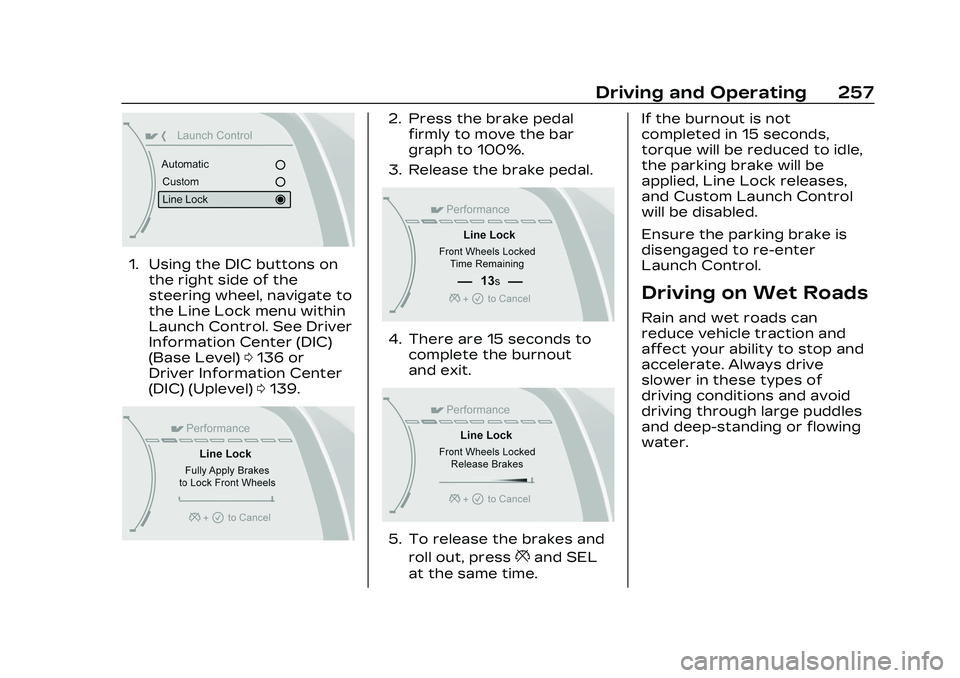
1. Using the DIC buttons onthe right side of the
steering wheel, navigate to
the Line Lock menu within
Launch Control. See Driver
Information Center (DIC)
(Base Level) 0136 or
Driver Information Center
(DIC) (Uplevel) 0139.
2. Press the brake pedal
firmly to move the bar
graph to 100%.
3. Release the brake pedal.
4. There are 15 seconds to complete the burnout
and exit.
5. To release the brakes and
roll out, press
*and SEL
at the same time. If the burnout is not
completed in 15 seconds,
torque will be reduced to idle,
the parking brake will be
applied, Line Lock releases,
and Custom Launch Control
will be disabled.
Ensure the parking brake is
disengaged to re-enter
Launch Control.
Driving on Wet Roads
Rain and wet roads can
reduce vehicle traction and
affect your ability to stop and
accelerate. Always drive
slower in these types of
driving conditions and avoid
driving through large puddles
and deep-standing or flowing
water.
Page 259 of 526

Cadillac CT5 Owner Manual (GMNA-Localizing-U.S./Canada-16500419) -
2023 - CRC - 5/10/22
258 Driving and Operating
{Warning
Wet brakes can cause
crashes. They might not
work as well in a quick stop
and could cause pulling to
one side. You could lose
control of the vehicle.
After driving through a large
puddle of water or a car/
vehicle wash, lightly apply
the brake pedal until the
brakes work normally.
Flowing or rushing water
creates strong forces.
Driving through flowing
water could cause the
vehicle to be carried away.
If this happens, you and
other vehicle occupants
could drown. Do not ignore
police warnings and be very
cautious about trying to
drive through flowing water.
Caution
Driving through deep
puddles or standing water
can cause water to come in
through the engine air intake
and damage the engine.
If deep puddles or standing
water cannot be avoided,
proceed with caution and do
not exceed 8 km/h (5 mph).
Do not drive through water
that may come close to or
cover the vehicle’s
underbody.
Hydroplaning
Hydroplaning is dangerous.
Water can build up under the
vehicle's tires so they actually
ride on the water. This can
happen if the road is wet
enough and you are going fast
enough. When the vehicle is
hydroplaning, it has little or no
contact with the road.There is no hard and fast rule
about hydroplaning. The best
advice is to slow down when
the road is wet.
Other Rainy Weather Tips
Besides slowing down, other
wet weather driving tips
include:
.Allow extra following
distance.
.Pass with caution.
.Keep windshield wiping
equipment in good shape.
.Keep the windshield washer
fluid reservoir filled.
.Have good tires with proper
tread depth. See Tires
0418.
.Turn off cruise control.
Hill and Mountain
Roads
Driving on steep hills or
through mountains is different
than driving on flat or rolling
terrain. Tips include:
.Keep the vehicle serviced
and in good shape.
Page 260 of 526
Cadillac CT5 Owner Manual (GMNA-Localizing-U.S./Canada-16500419) -
2023 - CRC - 5/10/22
Driving and Operating 259
.Check all fluid levels and
brakes, tires, cooling system,
and transmission.
.Shift to a lower gear when
going down steep or long
hills.
{Warning
Using the brakes to slow the
vehicle on a long downhill
slope can cause brake
overheating, can reduce
brake performance, and
could result in a loss of
braking. Shift the
transmission to a lower gear
to let the engine assist the
brakes on a steep downhill
slope.
{Warning
Coasting downhill in
N (Neutral) or with the
ignition off is dangerous.
This can cause overheating
of the brakes and loss of(Continued)
Warning (Continued)
steering assist. Always have
the engine running and the
vehicle in gear.
.Drive at speeds that keep
the vehicle in its own lane.
Do not swing wide or cross
the center line.
.Be alert on top of hills;
something could be in your
lane (e.g., stalled car, crash).
.Pay attention to special road
signs (e.g., falling rocks area,
winding roads, long grades,
passing or no-passing zones)
and take appropriate action.
Winter Driving
Driving on Snow or Ice
Caution
To avoid damage to the
wheels and brake
components, always clear (Continued)
Caution (Continued)
snow and ice from inside the
wheels and underneath the
vehicle before driving.
Snow or ice between the tires
and the road creates less
traction or grip, so drive
carefully. Wet ice can occur at
about 0 °C (32 °F) when
freezing rain begins to fall.
Avoid driving on wet ice or in
freezing rain until roads can be
treated.
For Slippery Road Driving:
.Accelerate gently.
Accelerating too quickly
causes the wheels to spin
and makes the surface under
the tires slick.
.Turn on Traction Control.
See Traction Control/
Electronic Stability Control
0 291.
.The Antilock Brake System
(ABS) improves vehicle
stability during hard stops,
but the brakes should be
Page 269 of 526

Cadillac CT5 Owner Manual (GMNA-Localizing-U.S./Canada-16500419) -
2023 - CRC - 5/10/22
268 Driving and Operating
The vehicle may have an
electric steering column lock.
The lock is activated when the
vehicle is switched to OFF and
the driver door is opened.
A sound may be heard as the
lock actuates or releases. The
steering column lock may not
release with the wheels
turned off center. If this
happens, the vehicle may not
start. Move the steering wheel
from left to right while
attempting to start the
vehicle. If this does not work,
the vehicle needs service.
Do not turn the engine off
when the vehicle is moving.
This will cause a loss of power
assist in the brake and
steering systems and disable
the airbags.
If the vehicle must be shut off
in an emergency:1. Brake using a firm and steady pressure. Do not
pump the brakes
repeatedly. This may deplete power assist,
requiring increased brake
pedal force.
2. Shift the vehicle to N (Neutral). This can be
done while the vehicle is
moving. After shifting to
N (Neutral), firmly apply the
brakes and steer the
vehicle to a safe location.
3. Come to a complete stop. Shift to P (Park) with an
automatic transmission,
or Neutral with a manual
transmission. Turn the
ignition off.
4. Set the parking brake. See Electric Parking Brake
0288.
{Warning
Turning off the vehicle while
moving may cause loss of
power assist in the brake
and steering systems and
disable the airbags. While
driving, only shut the vehicle
off in an emergency. If the vehicle cannot be pulled
over, and must be shut off
while driving, press and hold
ENGINE START/STOP for
longer than two seconds,
or press twice within
five seconds.
Accessory Mode (Amber
Indicator Light) :
This mode
allows the use of some
electrical accessories when
the engine is off.
With the ignition off, pressing
the button once without the
brake pedal applied will place
the ignition system in
accessory mode.
The ignition will switch from
accessory mode to OFF after
five minutes to prevent
battery rundown.
ON/RUN/START (Green
Indicator Light) : This mode is
for driving and starting. With
the ignition off, and the brake
pedal applied, pressing the
button once will place the
ignition system in ON/RUN/
START. Once engine cranking
Page 272 of 526

Cadillac CT5 Owner Manual (GMNA-Localizing-U.S./Canada-16500419) -
2023 - CRC - 5/10/22
Driving and Operating 271
{Warning
The automatic engine Stop/
Start feature causes the
engine to shut off while the
vehicle is still on. Do not exit
the vehicle before shifting to
P (Park). The vehicle may
restart and move
unexpectedly. Always shift
to P (Park), and then turn
the ignition off before
exiting the vehicle.
Auto Engine Stop/Start
When the brakes are applied
and the vehicle is at a
complete stop, the engine may
turn off. When stopped, the
tachometer displays AUTO
STOP. See Tachometer 0120.
When the brake pedal is
released or the accelerator
pedal is pressed, the engine
will restart. To maintain vehicle
performance, other conditions
may cause the engine to
automatically restart before
the brake pedal is released.
Auto Stops may not occur
and/or Auto Starts may occur
because:
.The climate control settings
require the engine to be
running to cool or heat the
vehicle interior.
.The vehicle battery needs to
charge.
.The vehicle battery has
recently been disconnected.
.Minimum vehicle speed has
not been reached since the
last Auto Stop.
.The accelerator pedal is
pressed.
.The engine or transmission
is not at the required
operating temperature.
.The outside temperature is
not in the required operating
range.
.The vehicle is shifted out of
D (Drive) to any gear other
than P (Park).
.Certain driver modes have
been selected. See Driver
Mode Control
0293.
.The vehicle is on a steep hill
or grade.
.The driver door has been
opened or the driver seat
belt has been unbuckled.
.The hood has been opened.
.The Auto Stop has reached
the maximum allowed time.
Auto Stop Disable Switch
Page 283 of 526
Cadillac CT5 Owner Manual (GMNA-Localizing-U.S./Canada-16500419) -
2023 - CRC - 5/10/22
282 Driving and Operating
Caution
Spinning the tires or holding
the vehicle in one place on a
hill using only the
accelerator pedal may
damage the transmission.
The repair will not be
covered by the vehicle
warranty. If the vehicle is
stuck, do not spin the tires.
When stopping on a hill, use
the brakes to hold the
vehicle in place.
If equipped with the 2.0L L4
engine, engine speeds may be
increased while driving at
highway speeds while the
engine is still warming up.
Manual Mode
Tap Shift Caution
Driving with the engine at a
high rpm without upshifting
while using Tap Shift, could
damage the vehicle. Always
upshift when necessary
while using Tap Shift.
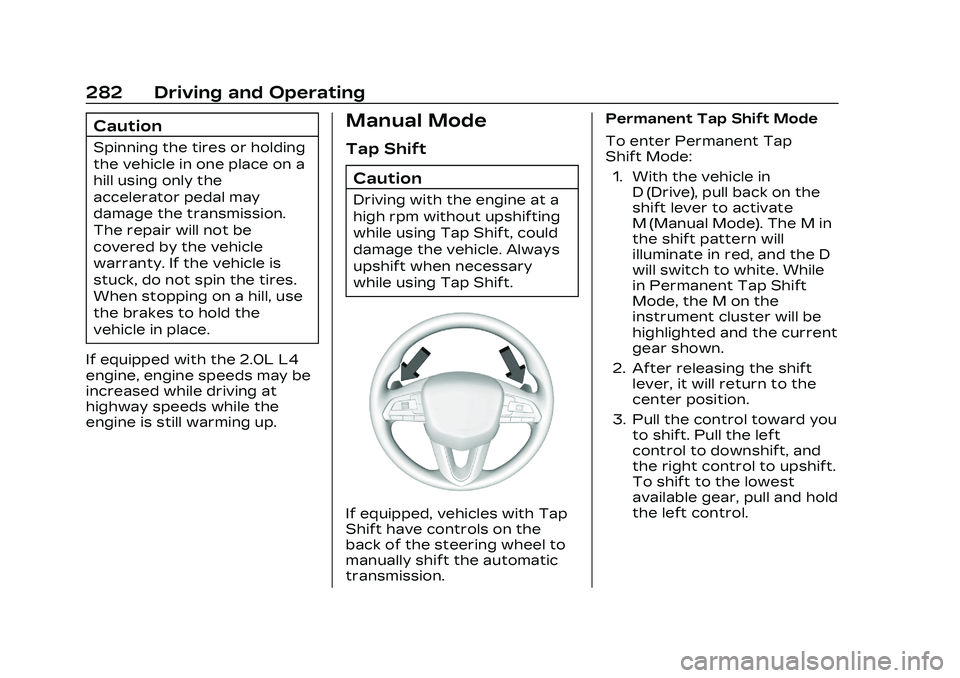
If equipped, vehicles with Tap
Shift have controls on the
back of the steering wheel to
manually shift the automatic
transmission. Permanent Tap Shift Mode
To enter Permanent Tap
Shift Mode:
1. With the vehicle in D (Drive), pull back on the
shift lever to activate
M (Manual Mode). The M in
the shift pattern will
illuminate in red, and the D
will switch to white. While
in Permanent Tap Shift
Mode, the M on the
instrument cluster will be
highlighted and the current
gear shown.
2. After releasing the shift lever, it will return to the
center position.
3. Pull the control toward you to shift. Pull the left
control to downshift, and
the right control to upshift.
To shift to the lowest
available gear, pull and hold
the left control.