charge battery CADILLAC CT5 2023 User Guide
[x] Cancel search | Manufacturer: CADILLAC, Model Year: 2023, Model line: CT5, Model: CADILLAC CT5 2023Pages: 526, PDF Size: 6.85 MB
Page 454 of 526
Cadillac CT5 Owner Manual (GMNA-Localizing-U.S./Canada-16500419) -
2023 - CRC - 5/6/22
Vehicle Care 453
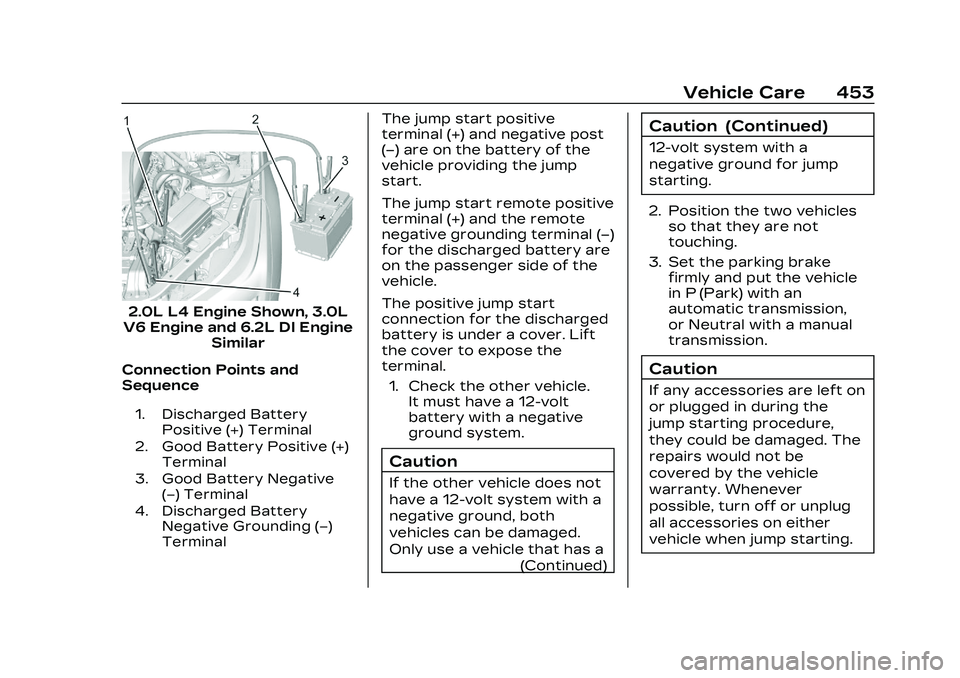
2.0L L4 Engine Shown, 3.0L
V6 Engine and 6.2L DI Engine Similar
Connection Points and
Sequence
1. Discharged Battery Positive (+) Terminal
2. Good Battery Positive (+) Terminal
3. Good Battery Negative (−) Terminal
4. Discharged Battery Negative Grounding (−)
Terminal
The jump start positive
terminal (+) and negative post
(−) are on the battery of the
vehicle providing the jump
start.
The jump start remote positive
terminal (+) and the remote
negative grounding terminal (−)
for the discharged battery are
on the passenger side of the
vehicle.
The positive jump start
connection for the discharged
battery is under a cover. Lift
the cover to expose the
terminal.
1. Check the other vehicle. It must have a 12-volt
battery with a negative
ground system.
Caution
If the other vehicle does not
have a 12-volt system with a
negative ground, both
vehicles can be damaged.
Only use a vehicle that has a
(Continued)
Caution (Continued)
12-volt system with a
negative ground for jump
starting.
2. Position the two vehicles so that they are not
touching.
3. Set the parking brake firmly and put the vehicle
in P (Park) with an
automatic transmission,
or Neutral with a manual
transmission.
Caution
If any accessories are left on
or plugged in during the
jump starting procedure,
they could be damaged. The
repairs would not be
covered by the vehicle
warranty. Whenever
possible, turn off or unplug
all accessories on either
vehicle when jump starting.
Page 455 of 526

Cadillac CT5 Owner Manual (GMNA-Localizing-U.S./Canada-16500419) -
2023 - CRC - 5/6/22
454 Vehicle Care
4. Turn the ignition off. Turnoff all lights and
accessories in both
vehicles, except the hazard
warning flashers if needed.
{Warning
An electric fan can start up
even when the engine is not
running and can injure you.
Keep hands, clothing, and
tools away from any
underhood electric fan.
{Warning
Using a match near a
battery can cause battery
gas to explode. People have
been hurt doing this, and
some have been blinded.
Use a flashlight if you need
more light.
Battery fluid contains acid
that can burn you. Do not
get it on you. If you
accidentally get it in your
(Continued)
Warning (Continued)
eyes or on your skin, flush
the place with water and get
medical help immediately.
{Warning
Fans or other moving engine
parts can injure you badly.
Keep your hands away from
moving parts once the
engine is running.
5. Connect one end of the red positive (+) cable to the
remote positive (+)
terminal on the discharged
battery.
6. Connect the other end of the red positive (+) cable to
the positive (+) terminal of
the good battery.
7. Connect one end of the black negative (–) cable to
the negative (–) terminal of
the good battery. Do not let the other end
touch anything until the
next step. The other end of
the negative (–) cable does
not go to the dead battery.
It goes to a heavy,
unpainted metal
engine part.
8. Connect the other end of the black negative (–) cable
to the negative (–)
grounding point for the
discharged battery.
9. Start the engine in the vehicle with the good
battery and run the engine
at idle speed for at least
four minutes.
10. Try to start the vehicle that had the dead battery.
If it will not start after a
few tries, it probably needs
service.
Jumper Cable Removal
Reverse the sequence exactly
when removing the jumper
cables.
Page 507 of 526
Cadillac CT5 Owner Manual (GMNA-Localizing-U.S./Canada-16500419) -
2023 - CRC - 5/6/22
506 OnStar
Unable to Connect to
OnStar Message
If there is limited cellular
coverage or the cellular
network has reached
maximum capacity, this
message may come on. Press
Qto try the call again or try
again after driving a few miles
into another cellular area.
Vehicle and Power Issues
OnStar services require a
vehicle electrical system,
wireless service, and GPS
satellite technologies to be
available and operating for
features to function properly.
These systems may not
operate if the battery is
discharged or disconnected.
Add-on Electrical
Equipment
The OnStar system is
integrated into the electrical
architecture of the vehicle. Do
not add any electrical equipment. See Add-On
Electrical Equipment
0372.
Added electrical equipment
may interfere with the
operation of the OnStar
system and cause it to not
operate.
Vehicle Software Updates
OnStar or GM may remotely
deliver software updates or
changes to the vehicle without
further notice or consent.
These updates or changes
may enhance or maintain
safety, security, or the
operation of the vehicle or the
vehicle systems. Software
updates or changes may
affect or erase data or
settings that are stored in the
vehicle, such as saved
navigation destinations or
pre-set radio stations. Neither
OnStar nor GM is responsible
for any affected or erased
data or settings. These
updates or changes may also
collect personal information.
Such collection is described in the OnStar privacy statement
or separately disclosed at the
time of installation. These
updates or changes may also
cause a system to
automatically communicate
with GM servers to collect
information about vehicle
system status, identify
whether updates or changes
are available, or deliver
updates or changes. An active
OnStar agreement constitutes
consent to these software
updates or changes and
agreement that either OnStar
or GM may remotely deliver
them to the vehicle.
Privacy
The complete OnStar Privacy
Statement may be found at
www.onstar.com (U.S.),
or www.onstar.ca (Canada).
We recommend that you
review it. If you have any
questions, call
1-888-4ONSTAR
(1-888-466-7827) or press
Q
to speak with an Advisor.