door lock CADILLAC CT5 2023 Owner's Manual
[x] Cancel search | Manufacturer: CADILLAC, Model Year: 2023, Model line: CT5, Model: CADILLAC CT5 2023Pages: 526, PDF Size: 6.85 MB
Page 41 of 526

Cadillac CT5 Owner Manual (GMNA-Localizing-U.S./Canada-16500419) -
2023 - CRC - 5/6/22
40 Keys, Doors, and Windows
Remote Window
Operation
If enabled through vehicle
settings, this feature allows all
side windows to be opened
remotely. To open, double
press and hold
Kon the
remote key.
If equipped, all windows can
also be closed using the
remote key. To close, double
press and hold
Qon the
remote key.
To view available settings for
this feature, touch the
Settings icon on the
infotainment home page.
Select “Vehicle” to display the
list of available options and
select “Remote Lock, Unlock,
Start”.
Sun Visors
Pull the sun visor down to
block glare. Detach the sun
visor from the center mount to
pivot to the side window and,
if equipped, extend along
the rod.
Roof
Sunroof
If equipped, the ignition must
be on or in accessory mode,
or Retained Accessory Power
(RAP) must be active to
operate the sunroof. See
Ignition Positions 0267 and
Retained Accessory Power
(RAP) 0273. While operating in express,
movement can be stopped by
pressing the switch again.
The sunroof cannot be opened
or closed if the vehicle has an
electrical failure.
1. SLIDE Switch
2. TILT Switch
Sunroof Operation:
.Press and releaseD(1) to
express-open to the fully
open position.
.Pull and releaseD(1) to
express-close.
Page 54 of 526
Cadillac CT5 Owner Manual (GMNA-Localizing-U.S./Canada-16500419) -
2023 - CRC - 5/6/22
Seats and Restraints 53
heated steering wheel
indicator may come on during
this operation.
The heated and ventilated
seats and heated steering
wheel may cancel when the
vehicle is started. These
features can be manually
selected after the ignition is
turned on.
The temperature performance
of an unoccupied seat may be
reduced. This is normal.
To enable or disable remote
start heated or ventilated
seats, select Settings >
Vehicle > Remote Lock,
Unlock, and Start > Remote
Start Auto Heat Seats or
Remote Start Auto Cool
Seats > ON or OFF. See
Remote Vehicle Start016.Rear Seats
Rear Seat Reminder
If equipped, the message
REAR SEAT REMINDER LOOK
IN REAR SEAT displays under
certain conditions indicating
there may be an item or
passenger in the rear seat.
Check before exiting the
vehicle.
This feature will activate when
a second row door is opened
while the vehicle is on or up to
10 minutes before the vehicle
is turned on. There will be an
alert when the vehicle is
turned off. The alert does not
directly detect objects in the
rear seat; instead, under
certain conditions, it detects
when a rear door is opened
and closed, indicating that
there may be something in the
rear seat.
The feature is active only once
each time the vehicle is turned
on and off, and will require
reactivation by opening and closing the second row doors.
There may be an alert even
when there is nothing in the
rear seat; for example, if a
child entered the vehicle
through the rear door and left
the vehicle without the vehicle
being shut off.
The feature can be turned on
or off. Select Settings >
Vehicle > Rear Seat
Reminder > ON or OFF.
Folding the Seatback
Either side of the seatback
can be folded for more cargo
space. Fold a seatback only
when the vehicle is not
moving.
Caution
Folding a rear seat with the
seat belts still fastened may
cause damage to the seat or
the seat belts. Always
unbuckle the seat belts and
return them to their normal
stowed position before
folding a rear seat.
Page 63 of 526

Cadillac CT5 Owner Manual (GMNA-Localizing-U.S./Canada-16500419) -
2023 - CRC - 5/6/22
62 Seats and Restraints
in use to prevent the latch
plate from rattling against the
interior trim.
Always stow the seat belt
slowly. If the seat belt webbing
returns quickly to the stowed
position, the retractor may
lock and cannot be pulled out.
If this happens, pull the seat
belt straight out firmly to
unlock the webbing, and then
release it. If the webbing is still
locked in the retractor, see
your dealer.
Before a door is closed, be
sure the seat belt is out of the
way. If a door is slammed
against a seat belt, damage
can occur to both the seat
belt and the vehicle.
Shoulder Belt Height
Adjuster
The vehicle has a shoulder
belt height adjuster for the
driver and front outboard
passenger seating positions.Adjust the height so the
shoulder portion of the belt is
on the shoulder and not falling
off of it. The belt should be
close to, but not contacting,
the neck. Improper shoulder
belt height adjustment could
reduce the effectiveness of
the seat belt in a crash. See
How to Wear Seat Belts
Properly
057.Press the release button and
move the height adjuster to
the desired position. The
adjuster can be moved up by
pushing the slide/trim up.
After the adjuster is set to the desired position, try to move it
down without pressing the
release button to make sure it
has locked into position.
Automatic Seat Belt
Tightening System
The vehicle may have the
Automatic Seat Belt
Tightening System.
Each time the vehicle is
started with the front seat
belts buckled, the system
activates once to tighten the
seat belts when the forward
vehicle speed exceeds the
threshold for activation.
The system also activates
during emergency braking
and/or sudden driving
maneuvers and releases when
driving conditions return to
normal.
The system will not activate if
the Traction Control/
Electronic Stability Control
system is not functioning
Page 70 of 526

Cadillac CT5 Owner Manual (GMNA-Localizing-U.S./Canada-16500419) -
2023 - CRC - 5/6/22
Seats and Restraints 69
Warning (Continued)
causing severe injury or
even death. The path of an
inflating airbag must be kept
clear. Do not put anything
between an occupant and an
airbag, and do not attach or
put anything on the steering
wheel hub or on or near any
other airbag covering.
Do not use seat accessories
that block the inflation path
of a seat-mounted side
impact airbag.
Never secure anything to
the roof of a vehicle with
roof-rail airbags by routing a
rope or tie‐down through
any door or window opening.
If you do, the path of an
inflating roof-rail airbag will
be blocked.
When Should an
Airbag Inflate?
This vehicle is equipped with
airbags. See Airbag System
065. Airbags are designed to
inflate if the impact exceeds
the specific airbag system's
deployment threshold.
Deployment thresholds are
used to predict how severe a
crash is likely to be in time for
the airbags to inflate and help
restrain the occupants. The
vehicle has electronic sensors
that help the airbag system
determine the severity of the
impact. Deployment
thresholds can vary with
specific vehicle design.
Frontal airbags are designed
to inflate in moderate to
severe frontal crashes to help
reduce the potential for
severe injuries, mainly to the
driver's or front outboard
passenger's head and chest. Whether the frontal airbags
will or should inflate is not
based primarily on how fast
the vehicle is traveling.
It depends on what is hit, the
direction of the impact, and
how quickly the vehicle
slows down.
Frontal airbags may inflate at
different crash speeds
depending on whether the
vehicle hits an object straight
on or at an angle, and whether
the object is fixed or moving,
rigid or deformable, narrow
or wide.
Frontal airbags are not
intended to inflate during
vehicle rollovers, in rear
impacts, or in many side
impacts.
In addition, the vehicle has
advanced technology frontal
airbags. Advanced technology
frontal airbags adjust the
restraint according to crash
severity.
Page 72 of 526

Cadillac CT5 Owner Manual (GMNA-Localizing-U.S./Canada-16500419) -
2023 - CRC - 5/6/22
Seats and Restraints 71
But airbags would not help in
many types of collisions,
primarily because the
occupant's motion is not
toward those airbags. See
When Should an Airbag
Inflate?069.
Airbags should never be
regarded as anything more
than a supplement to seat
belts.
What Will You See
after an Airbag
Inflates?
After frontal, knee, and
seat-mounted side impact
airbags inflate, they quickly
deflate, so quickly that some
people may not even realize
the airbags inflated. Roof-rail
airbags may still be at least
partially inflated for some time
after they inflate. Some
components of the airbag
module may be hot for several
minutes. For location of the
airbags, see Where Are the
Airbags? 067. The parts of the airbag that
come into contact with you
may be warm, but not too hot
to touch. There may be some
smoke and dust coming from
the vents in the deflated
airbags. Airbag inflation does
not prevent the driver from
seeing out of the windshield or
being able to steer the vehicle,
nor does it prevent people
from leaving the vehicle.
{Warning
When an airbag inflates,
there may be dust in the air.
This dust could cause
breathing problems for
people with a history of
asthma or other breathing
trouble. To avoid this,
everyone in the vehicle
should get out as soon as it
is safe to do so. If you have
breathing problems but
cannot get out of the vehicle
after an airbag inflates, then
get fresh air by opening a
(Continued)
Warning (Continued)
window or a door. If you
experience breathing
problems following an airbag
deployment, you should seek
medical attention.
The vehicle has a feature that
may automatically unlock the
doors, turn on the interior
lamps and hazard warning
flashers, and shut off the fuel
system after the airbags
inflate. The feature may also
activate, without airbag
inflation, after an event that
exceeds a predetermined
threshold. After turning the
ignition off and then on again,
the fuel system will return to
normal operation; the doors
can be locked, the interior
lamps can be turned off, and
the hazard warning flashers
can be turned off using the
controls for those features.
If any of these systems are
damaged in the crash they
may not operate as normal.
Page 104 of 526
Cadillac CT5 Owner Manual (GMNA-Localizing-U.S./Canada-16500419) -
2023 - CRC - 5/6/22
Instruments and Controls 103
Instruments and
Controls
Controls
Steering WheelAdjustment . . . . . . . . . . . . . . . . . 104
Heated Steering Wheel . . . . . . . . . . . . . . . . . . . . . . . . 105
Horn . . . . . . . . . . . . . . . . . . . . . . . . . . . 105
Windshield Wiper/ Washer . . . . . . . . . . . . . . . . . . . . . . 105
Compass . . . . . . . . . . . . . . . . . . . . . 107
Clock . . . . . . . . . . . . . . . . . . . . . . . . . . 108
Power Outlets . . . . . . . . . . . . . . 108
Wireless Charging . . . . . . . . . 109
Warning Lights, Gauges,
and Indicators
Warning Lights, Gauges, and Indicators . . . . . . . . . . . . . . 112
Instrument Cluster (Base
Level) . . . . . . . . . . . . . . . . . . . . . . . . . 113
Instrument Cluster (Uplevel) . . . . . . . . . . . . . . . . . . . . . 115
Speedometer . . . . . . . . . . . . . . . . 119
Odometer . . . . . . . . . . . . . . . . . . . . . 119
Trip Odometer . . . . . . . . . . . . . . . 119
Tachometer . . . . . . . . . . . . . . . . . 120
Fuel Gauge . . . . . . . . . . . . . . . . . . . 120 Engine Coolant
Temperature Gauge
(Base Level) . . . . . . . . . . . . . . . . . 121
Engine Coolant Temperature Gauge
(Uplevel) . . . . . . . . . . . . . . . . . . . . . 122
Seat Belt Reminders . . . . . . 122
Airbag Readiness Light . . . . . . . . . . . . . . . . . . . . . . . . . . 123
Passenger Airbag Status Indicator . . . . . . . . . . . . . . . . . . . . . 124
Charging System Light . . . 124
Malfunction Indicator Lamp (Check Engine
Light) . . . . . . . . . . . . . . . . . . . . . . . . . 125
Brake System Warning Light . . . . . . . . . . . . . . . . . . . . . . . . . . 127
Electric Parking Brake Light . . . . . . . . . . . . . . . . . . . . . . . . . . 128
Service Electric Parking Brake Light . . . . . . . . . . . . . . . . . 128
Antilock Brake System (ABS) Warning Light . . . . . 128
Performance Shifting Light . . . . . . . . . . . . . . . . . . . . . . . . . . 129
Automatic Vehicle Hold (AVH) Light . . . . . . . . . . . . . . . . . 129
Lane Keep Assist (LKA) Light . . . . . . . . . . . . . . . . . . . . . . . . . . 129 Automatic Emergency
Braking (AEB) Disabled
Light . . . . . . . . . . . . . . . . . . . . . . . . . 130
Vehicle Ahead Indicator . . . . . . . . . . . . . . . . . . . . 130
Pedestrian Ahead Indicator . . . . . . . . . . . . . . . . . . . . 130
Traction Off Light . . . . . . . . . 130
StabiliTrak OFF Light . . . . . 131
Traction Control System (TCS)/StabiliTrak
Light . . . . . . . . . . . . . . . . . . . . . . . . . . 131
Engine Coolant Temperature Warning
Light . . . . . . . . . . . . . . . . . . . . . . . . . . 131
Driver Mode Control Light . . . . . . . . . . . . . . . . . . . . . . . . . . 132
Tire Pressure Light . . . . . . . 133
Engine Oil Pressure Light . . . . . . . . . . . . . . . . . . . . . . . . . 134
Low Fuel Warning Light . . . . . . . . . . . . . . . . . . . . . . . . . 134
Security Light . . . . . . . . . . . . . . . 135
High-Beam On Light . . . . . . 135
Lamps On Reminder . . . . . . 135
Cruise Control Light . . . . . . 135
Door Ajar Light . . . . . . . . . . . . . 136
Page 107 of 526

Cadillac CT5 Owner Manual (GMNA-Localizing-U.S./Canada-16500419) -
2023 - CRC - 5/6/22
106 Instruments and Controls
lamp control is in AUTO. See
“Wiper-Activated Headlamps”
later in this section.
OFF :Use to turn the
wipers off.
1X : For a single wipe, briefly
move the wiper lever down.
For several wipes, hold the
wiper lever down.
n L: Pull the windshield wiper
lever toward you to spray
windshield washer fluid and
activate the wipers. The
wipers will continue until the
lever is released or the
maximum wash time is
reached. When the windshield
wiper lever is released,
additional wipes may occur
depending on how long the
windshield washer had been
activated. See Washer Fluid
0 399 for information on filling
the windshield washer fluid
reservoir.
{Warning
In freezing weather, do not
use the washer until the
windshield is warmed.
Otherwise the washer fluid
can form ice on the
windshield, blocking your
vision.
{Warning
Before driving the vehicle,
always clear snow and ice
from the hood, windshield,
washer nozzles, roof, and
rear of the vehicle, including
all lamps and windows.
Reduced visibility from snow
and ice buildup could lead to
a crash.
Clear snow and ice from the
wiper blades and windshield
before using them. If frozen to
the windshield, carefully
loosen or thaw them. Damaged blades should be
replaced. See Wiper Blade
Replacement
0407.
Wiper Parking
If the ignition is turned off
while the wipers are on LO, HI,
or INT, they will
immediately stop.
If the windshield wiper lever is
then moved to OFF before the
driver door is opened or within
10 minutes, the wipers will
restart and move to the base
of the windshield.
If the ignition is turned off
while the wipers are
performing wipes due to
windshield washing or
Rainsense wipes, the wipers
continue to run until they
reach the base of the
windshield.
Rainsense
There is a sensor near the top
center of the windshield
detects the amount of water
Page 155 of 526

Cadillac CT5 Owner Manual (GMNA-Localizing-U.S./Canada-16500419) -
2023 - CRC - 5/6/22
154 Lighting
the AUTO or2position to
reactivate the IntelliBeam
system. The instrument
cluster light will come on to
indicate the IntelliBeam
system is reactivated.
The high beams may not turn
off automatically if the system
cannot detect another
vehicle's lamps because of any
of the following:
.The other vehicle's lamps
are missing, damaged,
obstructed from view,
or otherwise undetected.
.The other vehicle's lamps
are covered with dirt, snow,
and/or road spray.
.The other vehicle's lamps
cannot be detected due to
dense exhaust, smoke, fog,
snow, road spray, mist,
or other airborne
obstructions.
.The vehicle's windshield is
dirty, cracked, or obstructed
by something that blocks the
view of the light sensor.
.The vehicle is loaded such
that the front end points
upward, causing the light
sensor to aim high and not
detect headlamps and
taillamps.
.The vehicle is being driven
on winding or hilly roads.
The automatic high-beam
headlamps may need to be
disabled if any of the above
conditions exist.
Exterior Lamps Off
Reminder
A warning chime sounds if the
driver door is opened while
the ignition is off and the
exterior lamps are on.
Headlamp High/
Low-Beam Changer
3: Push the turn signal lever
away from you and release, to
turn the high beams on. To
return to low beams, push the
lever again or pull it toward
you and release.
This indicator light turns on in
the instrument cluster when
the high-beam headlamps
are on.
Flash-to-Pass
To flash the high beams, pull
the turn signal lever toward
you, and release.
Daytime Running
Lamps (DRL)
DRL can make it easier for
others to see the front of your
vehicle during the day. Fully
functional DRL are required on
all vehicles first sold in
Canada.
Page 219 of 526
Cadillac CT5 Owner Manual (GMNA-Localizing-U.S./Canada-16500419) -
2023 - CRC - 5/6/22
218 Infotainment System
Vehicle
The menu may contain the
following:
Rear Seat Reminder
Allows for a chime and a
message when the rear door
has been opened before or
during operation of the
vehicle.
Buckle to Drive
This feature can prevent
shifting out of Park when the
driver, and if applicable the
front passenger, seat belt is
not buckled. See Buckle To
Drive056.
Driver Mode Customization
See “Driver Mode
Customization” in Driver Mode
Control 0293.
Climate and Air Quality
Adjusts different climate
settings. Collision/Detection Systems
Adjusts different driver
assistance system settings.
Comfort and Convenience
Adjusts different comfort and
convenience settings.
Lighting
Adjusts different lighting
settings.
Power Door Locks
Adjusts different door lock
settings.
Remote Lock, Unlock, and
Start
Adjusts different remote lock
settings.
Seating Position
Adjusts different seat
settings.
Teen Driver
See Teen Driver
0219. Valet Mode
This will lock the infotainment
system and steering wheel
controls. It may also limit
access to vehicle storage
locations, if equipped.
To enable valet mode:
1. Enter a four-digit code on the keypad.
2. Select Enter to go to the confirmation screen.
3. Re-enter the four-digit code.
Touch Lock or Unlock to lock
or unlock the system. Touch
Back to go back to the
previous menu.
Personal
If equipped, this menu allows
adjustment of different user
profile settings. See “Users”in
Using the System 0165 for
information on setting up user
profiles.
Page 250 of 526
Cadillac CT5 Owner Manual (GMNA-Localizing-U.S./Canada-16500419) -
2023 - CRC - 5/10/22
Driving and Operating 249
self diagnostic tests that may
occur when a door is opened
or the remote key is present.
{Warning
To avoid personal injury and/
or vehicle damage, always
disconnect the battery
before performing service
work on the hydraulic brake
system. Bleeding the brake
system with the battery
connected can lead to
excessive pressurization of
the system during automatic
diagnostic tests or diagnosis
of a leak or air in the braking
system. A Diagnostic
Trouble Code (DTC) may set
and vehicle speed may be
limited.Brake Cooling (V-Series
Blackwing)
Prior to any track event, high
speed driving event,
or competitive driving,
complete the following:
1. Ensure all the brake cooling parts are correctly
secured and installed.
2. Inspect and replace any deflectors that have
damage.
3. Inspect for blockage in the front brake cooling duct
prior to every event.
4. Remove front tire deflector (if equipped).
If improved brake cooling is
desired on vehicles with
cast-iron brakes (RPO JGH),
install the ball joint protector
front shields, remove both
upper and lower rear rotor
shields, and install the rear
lower control arm cooling
deflectors, per the
instructions included with the
brake cooling kit. These parts are for track use only. After
track events, reinstall the
original front and rear rotor
shields and remove the rear
lower control arm cooling
deflectors.
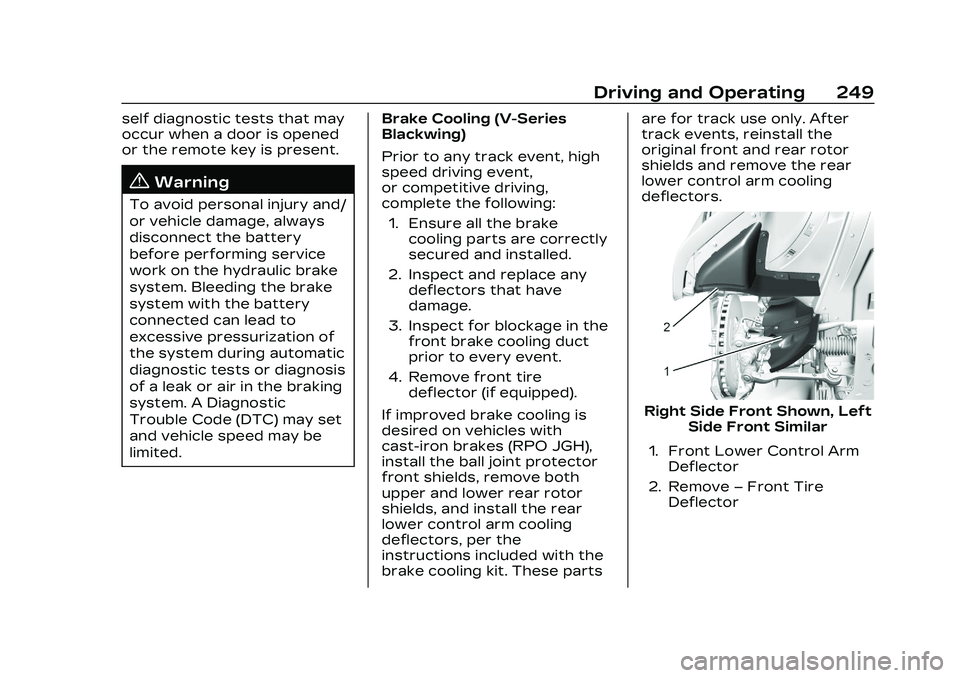
Right Side Front Shown, Left
Side Front Similar
1. Front Lower Control Arm Deflector
2. Remove –Front Tire
Deflector