brake light CADILLAC CT5 2023 Owner's Guide
[x] Cancel search | Manufacturer: CADILLAC, Model Year: 2023, Model line: CT5, Model: CADILLAC CT5 2023Pages: 526, PDF Size: 6.85 MB
Page 331 of 526
Cadillac CT5 Owner Manual (GMNA-Localizing-U.S./Canada-16500419) -
2023 - CRC - 5/10/22
330 Driving and Operating
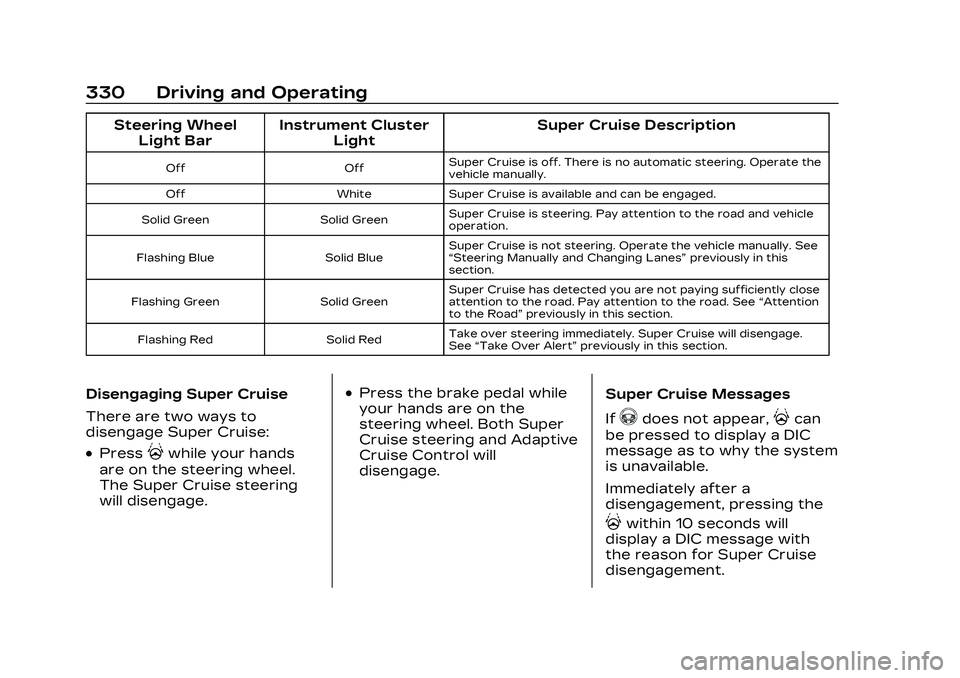
Steering WheelLight Bar Instrument Cluster
Light Super Cruise Description
Off
OffSuper Cruise is off. There is no automatic steering. Operate the
vehicle manually.
Off WhiteSuper Cruise is available and can be engaged.
Solid Green Solid GreenSuper Cruise is steering. Pay attention to the road and vehicle
operation.
Flashing Blue Solid BlueSuper Cruise is not steering. Operate the vehicle manually. See
“Steering Manually and Changing Lanes”
previously in this
section.
Flashing Green Solid GreenSuper Cruise has detected you are not paying sufficiently close
attention to the road. Pay attention to the road. See
“Attention
to the Road” previously in this section.
Flashing Red Solid RedTake over steering immediately. Super Cruise will disengage.
See
“Take Over Alert” previously in this section.
Disengaging Super Cruise
There are two ways to
disengage Super Cruise:
.Press]while your hands
are on the steering wheel.
The Super Cruise steering
will disengage.
.Press the brake pedal while
your hands are on the
steering wheel. Both Super
Cruise steering and Adaptive
Cruise Control will
disengage. Super Cruise Messages
If
^does not appear,]can
be pressed to display a DIC
message as to why the system
is unavailable.
Immediately after a
disengagement, pressing the
]within 10 seconds will
display a DIC message with
the reason for Super Cruise
disengagement.
Page 341 of 526
Cadillac CT5 Owner Manual (GMNA-Localizing-U.S./Canada-16500419) -
2023 - CRC - 5/10/22
340 Driving and Operating
front are higher pitched than
beeps for the rear. If equipped
with Safety Alert seat, both
sides of the seat will pulse
alongside the beeps.
When the System Does Not
Seem to Work Properly
The following messages may
be displayed on the DIC:
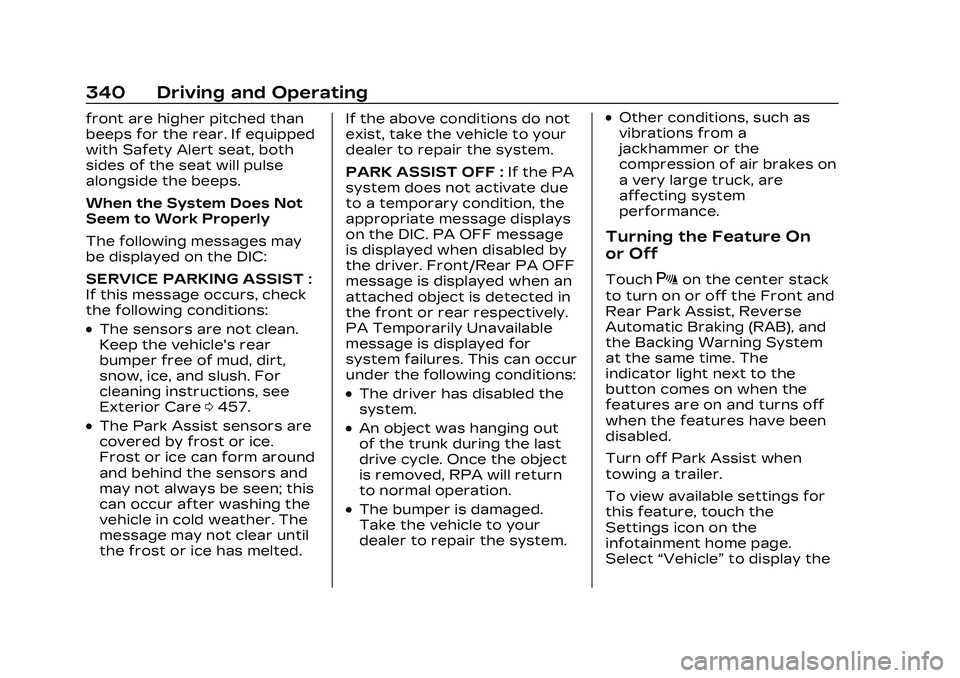
SERVICE PARKING ASSIST :
If this message occurs, check
the following conditions:
.The sensors are not clean.
Keep the vehicle's rear
bumper free of mud, dirt,
snow, ice, and slush. For
cleaning instructions, see
Exterior Care0457.
.The Park Assist sensors are
covered by frost or ice.
Frost or ice can form around
and behind the sensors and
may not always be seen; this
can occur after washing the
vehicle in cold weather. The
message may not clear until
the frost or ice has melted. If the above conditions do not
exist, take the vehicle to your
dealer to repair the system.
PARK ASSIST OFF :
If the PA
system does not activate due
to a temporary condition, the
appropriate message displays
on the DIC. PA OFF message
is displayed when disabled by
the driver. Front/Rear PA OFF
message is displayed when an
attached object is detected in
the front or rear respectively.
PA Temporarily Unavailable
message is displayed for
system failures. This can occur
under the following conditions:
.The driver has disabled the
system.
.An object was hanging out
of the trunk during the last
drive cycle. Once the object
is removed, RPA will return
to normal operation.
.The bumper is damaged.
Take the vehicle to your
dealer to repair the system.
.Other conditions, such as
vibrations from a
jackhammer or the
compression of air brakes on
a very large truck, are
affecting system
performance.
Turning the Feature On
or Off
TouchXon the center stack
to turn on or off the Front and
Rear Park Assist, Reverse
Automatic Braking (RAB), and
the Backing Warning System
at the same time. The
indicator light next to the
button comes on when the
features are on and turns off
when the features have been
disabled.
Turn off Park Assist when
towing a trailer.
To view available settings for
this feature, touch the
Settings icon on the
infotainment home page.
Select “Vehicle” to display the
Page 354 of 526

Cadillac CT5 Owner Manual (GMNA-Localizing-U.S./Canada-16500419) -
2023 - CRC - 5/10/22
Driving and Operating 353
If this happens, Automatic
Braking may engage the
Electric Parking Brake (EPB)
to hold the vehicle at a stop.
Release the EPB. A firm press
of the accelerator pedal will
also release Automatic
Braking and the EPB.
{Warning
FPB may alert or
automatically brake the
vehicle suddenly in
situations where it is
unexpected and undesired.
It could falsely alert or brake
for objects similar in shape
or size to pedestrians,
including shadows. This is
normal operation and the
vehicle does not need
service. To override
Automatic Braking, firmly
press the accelerator pedal,
if it is safe to do so.Automatic Braking can be
disabled through vehicle
personalization. To view
available settings for this
feature, touch the Settings
icon on the infotainment home
page. Select
“Vehicle”to
display the list of available
options and select “Collision/
Detection Systems”.{Warning
Using the FPB system while
towing a trailer could cause
you to lose control of the
vehicle and crash. Turn the
system to Alert or Off when
towing a trailer.
Cleaning the System
If FPB does not seem to
operate properly, cleaning the
outside of the windshield in
front of the rearview mirror
may correct the issue.
Side Blind Zone
Alert (SBZA)
If equipped, the SBZA system
is a lane-changing aid that
assists drivers with avoiding
crashes that occur with
moving vehicles in the side
blind zone, or blind spot areas.
When the vehicle is in a
forward gear, the left or right
side mirror display will light up
if a moving vehicle is detected
in that blind zone. If the turn
signal is activated and a
vehicle is also detected on the
same side, the display will flash
as an extra warning not to
change lanes. Since this
system is part of the Lane
Change Alert (LCA) system,
read the entire LCA section
before using this feature.
Lane Change
Alert (LCA)
If equipped, the LCA system is
a lane-changing aid that
assists drivers with avoiding
lane change crashes that
Page 373 of 526

Cadillac CT5 Owner Manual (GMNA-Localizing-U.S./Canada-16500419) -
2023 - CRC - 5/10/22
372 Driving and Operating
and the trailer brakes may not
function, which could result in
a crash.
Turn Signals When
Towing a Trailer
When properly connected, the
trailer turn signals will
illuminate to indicate the
vehicle is turning, changing
lanes, or stopping. When
towing a trailer, the arrows on
the instrument cluster will
illuminate even if the trailer is
not properly connected or the
bulbs are burned out.
Conversions and
Add-Ons
Add-On Electrical
Equipment
{Warning
The Data Link Connector
(DLC) is used for vehicle
service and Emission
Inspection/Maintenance
testing. See Malfunction
Indicator Lamp (Check
Engine Light)0125. A device
connected to the DLC —
such as an aftermarket fleet
or driver-behavior tracking
device —may interfere with
vehicle systems. This could
affect vehicle operation and
cause a crash. Such devices
may also access information
stored in the vehicle’s
systems.
Caution
Some electrical equipment
can damage the vehicle or
cause components to not
work and would not be
covered by the vehicle
warranty. Always check with
your dealer before adding
electrical equipment.
Add-on equipment can drain
the vehicle's 12-volt battery,
even if the vehicle is not
operating.
The vehicle has an airbag
system. Before attempting to
add anything electrical to the
vehicle, see Servicing the
Airbag-Equipped Vehicle 077
and
Adding Equipment to the
Airbag-Equipped Vehicle 077.
Page 374 of 526
Cadillac CT5 Owner Manual (GMNA-Localizing-U.S./Canada-16500419) -
2023 - CRC - 5/6/22
Vehicle Care 373
Vehicle Care
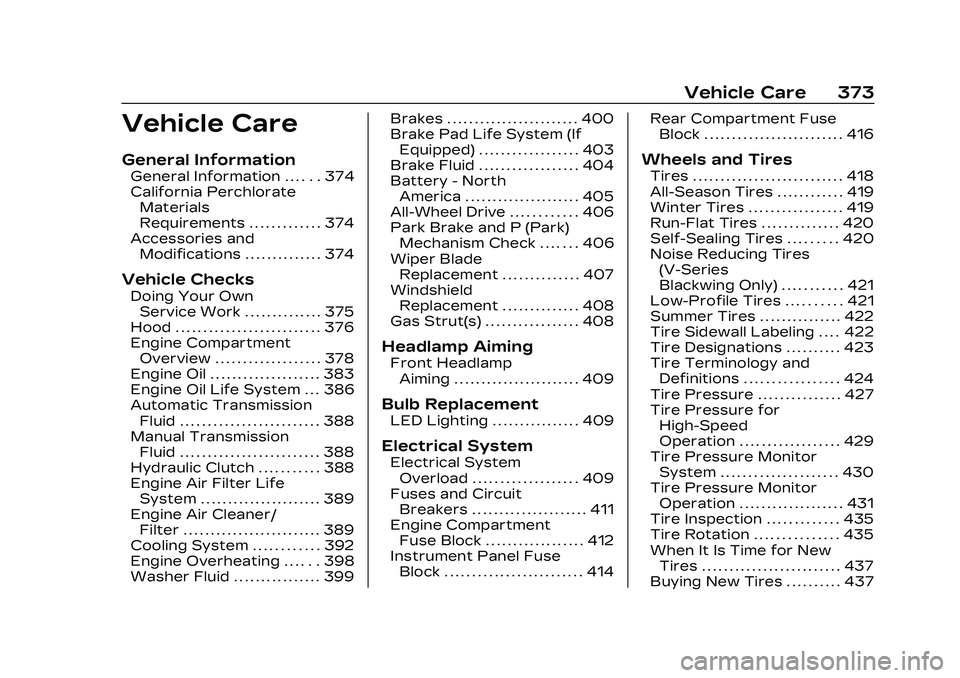
General Information
General Information . . . . . . 374
California PerchlorateMaterials
Requirements . . . . . . . . . . . . . 374
Accessories and Modifications . . . . . . . . . . . . . . 374
Vehicle Checks
Doing Your OwnService Work . . . . . . . . . . . . . . 375
Hood . . . . . . . . . . . . . . . . . . . . . . . . . . 376
Engine Compartment Overview . . . . . . . . . . . . . . . . . . . 378
Engine Oil . . . . . . . . . . . . . . . . . . . . 383
Engine Oil Life System . . . 386
Automatic Transmission Fluid . . . . . . . . . . . . . . . . . . . . . . . . . 388
Manual Transmission Fluid . . . . . . . . . . . . . . . . . . . . . . . . . 388
Hydraulic Clutch . . . . . . . . . . . 388
Engine Air Filter Life System . . . . . . . . . . . . . . . . . . . . . . 389
Engine Air Cleaner/ Filter . . . . . . . . . . . . . . . . . . . . . . . . . 389
Cooling System . . . . . . . . . . . . 392
Engine Overheating . . . . . . 398
Washer Fluid . . . . . . . . . . . . . . . . 399 Brakes . . . . . . . . . . . . . . . . . . . . . . . . 400
Brake Pad Life System (If
Equipped) . . . . . . . . . . . . . . . . . . 403
Brake Fluid . . . . . . . . . . . . . . . . . . 404
Battery - North America . . . . . . . . . . . . . . . . . . . . . 405
All-Wheel Drive . . . . . . . . . . . . 406
Park Brake and P (Park) Mechanism Check . . . . . . . 406
Wiper Blade Replacement . . . . . . . . . . . . . . 407
Windshield Replacement . . . . . . . . . . . . . . 408
Gas Strut(s) . . . . . . . . . . . . . . . . . 408
Headlamp Aiming
Front Headlamp Aiming . . . . . . . . . . . . . . . . . . . . . . . 409
Bulb Replacement
LED Lighting . . . . . . . . . . . . . . . . 409
Electrical System
Electrical SystemOverload . . . . . . . . . . . . . . . . . . . 409
Fuses and Circuit Breakers . . . . . . . . . . . . . . . . . . . . . 411
Engine Compartment Fuse Block . . . . . . . . . . . . . . . . . . 412
Instrument Panel Fuse Block . . . . . . . . . . . . . . . . . . . . . . . . . 414 Rear Compartment Fuse
Block . . . . . . . . . . . . . . . . . . . . . . . . . 416
Wheels and Tires
Tires . . . . . . . . . . . . . . . . . . . . . . . . . . . 418
All-Season Tires . . . . . . . . . . . . 419
Winter Tires . . . . . . . . . . . . . . . . . 419
Run-Flat Tires . . . . . . . . . . . . . . 420
Self-Sealing Tires . . . . . . . . . 420
Noise Reducing Tires(V-Series
Blackwing Only) . . . . . . . . . . . 421
Low-Profile Tires . . . . . . . . . . 421
Summer Tires . . . . . . . . . . . . . . . 422
Tire Sidewall Labeling . . . . 422
Tire Designations . . . . . . . . . . 423
Tire Terminology and Definitions . . . . . . . . . . . . . . . . . 424
Tire Pressure . . . . . . . . . . . . . . . 427
Tire Pressure for High-Speed
Operation . . . . . . . . . . . . . . . . . . 429
Tire Pressure Monitor System . . . . . . . . . . . . . . . . . . . . . 430
Tire Pressure Monitor Operation . . . . . . . . . . . . . . . . . . . 431
Tire Inspection . . . . . . . . . . . . . 435
Tire Rotation . . . . . . . . . . . . . . . 435
When It Is Time for New Tires . . . . . . . . . . . . . . . . . . . . . . . . . 437
Buying New Tires . . . . . . . . . . 437
Page 406 of 526

Cadillac CT5 Owner Manual (GMNA-Localizing-U.S./Canada-16500419) -
2023 - CRC - 5/6/22
Vehicle Care 405
Do not top off the brake/
clutch fluid. Adding fluid does
not correct a leak. If fluid is
added when the linings are
worn, there will be too much
fluid when new brake linings
are installed. Add or remove
fluid, as necessary, only when
work is done on the brake/
clutch hydraulic system.
{Warning
If too much brake fluid is
added, it can spill on the
engine and burn, if the
engine is hot enough. You or
others could be burned, and
the vehicle could be
damaged. Add brake fluid
only when work is done on
the brake/clutch hydraulic
system.
When the brake/clutch fluid
falls to a low level, the brake
warning light comes on. See
Brake System Warning Light
0 127. Brake fluid absorbs water over
time which degrades the
effectiveness of the brake
fluid. Replace brake fluid at the
specified intervals to prevent
increased stopping distance.
See Maintenance Schedule
0
471.
What to Add
Use only GM approved DOT 4
brake fluid from a clean, sealed
container. See Recommended
Fluids and Lubricants 0476.
{Warning
The wrong or contaminated
brake fluid could result in
damage to the brake
system. This could result in
the loss of braking leading to
a possible injury. Always use
the proper GM approved
brake fluid.
Caution
If brake fluid is spilled on the
vehicle's painted surfaces,
the paint finish can be
damaged. Immediately wash
off any painted surface.
Battery - North
America
The original equipment battery
is maintenance free. Do not
remove the cap and do not
add fluid.
Refer to the replacement
number shown on the original
battery label when a new
battery is needed.
The vehicle has an Absorbed
Glass Mat (AGM) 12-volt
battery. Installation of a
standard 12-volt battery will
result in reduced 12-volt
battery life.
When using a 12-volt battery
charger on the 12-volt AGM
battery, some chargers have
an AGM battery setting on the
Page 414 of 526

Cadillac CT5 Owner Manual (GMNA-Localizing-U.S./Canada-16500419) -
2023 - CRC - 5/6/22
Vehicle Care 413
Fuses Usage
1 Long Range RadarFront Sensor
2 Park/Daytime Running Lamps
3 Exterior Lighting Module 4
4 Exterior Lighting Module 7
5 Headlamp Level
6 –
Fuses Usage
7 Electronic Brake
Control Module
8 Washer Pump
9 –
10 –
11 –
12 Horn
13 Front Wiper
Fuses Usage
14 Exterior Lighting Module 6
15 Exterior Lighting Module 1
16 Exterior Lighting Module 5
17 Exterior Lighting Module 3
18 Aero Shutter
19 –
20 –
21 Virtual Key System/ Power Sounder
Module
22 Engine Control Module Battery
23 Transmission Control Module
24 Active Engine Mount
25 –
26 Engine Control Module
27 Injectors/Ignition 2
28 Charged Air Cooler/ Not Used
29 Transmission Aux Oil Pump/Transmission
Reverse Lock Out
Page 434 of 526

Cadillac CT5 Owner Manual (GMNA-Localizing-U.S./Canada-16500419) -
2023 - CRC - 5/6/22
Vehicle Care 433
tire pressure warning light
flashes for about one minute
and then stays on for the
remainder of the ignition cycle.
A DIC warning message also
displays. The malfunction light
and DIC warning message
come on at each ignition cycle
until the problem is corrected.
Some of the conditions that
can cause these to come
on are:
.One of the road tires has
been replaced with the
spare tire. The spare tire
does not have a TPMS
sensor. The malfunction light
and DIC message should go
off after the road tire is
replaced and the sensor
matching process is
performed successfully. See
“TPMS Sensor Matching
Process”later in this section.
.The TPMS sensor matching
process was not done or not
completed successfully after
rotating the tires. The
malfunction light and the DIC
message should go off after successfully completing the
sensor matching process.
See "TPMS Sensor Matching
Process" later in this section.
.One or more TPMS sensors
are missing or damaged. The
malfunction light and the DIC
message should go off when
the TPMS sensors are
installed and the sensor
matching process is
performed successfully. See
your dealer for service.
.Replacement tires or wheels
do not match the original
equipment tires or wheels.
Tires and wheels other than
those recommended could
prevent the TPMS from
functioning properly. See
Buying New Tires
0437.
.Operating electronic devices
or being near facilities using
radio wave frequencies
similar to the TPMS could
cause the TPMS sensors to
malfunction. If the TPMS is not functioning
properly it cannot detect or
signal a low tire pressure
condition. See your dealer for
service if the TPMS
malfunction light and DIC
message come on and stay on.
Tire Fill Alert (If Equipped)
This feature provides visual
and audible alerts outside the
vehicle to help when inflating
an underinflated tire to the
recommended cold tire
pressure.
When the low tire pressure
warning light comes on:
1. Park the vehicle in a safe, level place.
2. Set the parking brake firmly.
3. Place the vehicle in P (Park).
4. Add air to the tire that is underinflated. The turn
signal lamp will flash.
Page 476 of 526
Cadillac CT5 Owner Manual (GMNA-Localizing-U.S./Canada-16500419) -
2023 - CRC - 5/6/22
Service and Maintenance 475
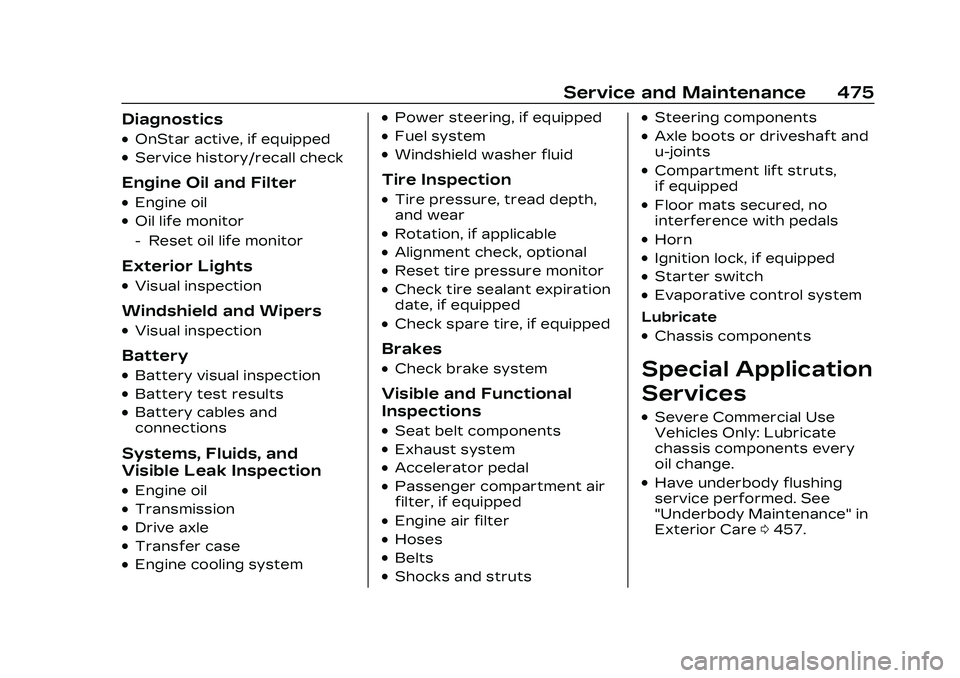
Diagnostics
.OnStar active, if equipped
.Service history/recall check
Engine Oil and Filter
.Engine oil
.Oil life monitor
‐Reset oil life monitor
Exterior Lights
.Visual inspection
Windshield and Wipers
.Visual inspection
Battery
.Battery visual inspection
.Battery test results
.Battery cables and
connections
Systems, Fluids, and
Visible Leak Inspection
.Engine oil
.Transmission
.Drive axle
.Transfer case
.Engine cooling system
.Power steering, if equipped
.Fuel system
.Windshield washer fluid
Tire Inspection
.Tire pressure, tread depth,
and wear
.Rotation, if applicable
.Alignment check, optional
.Reset tire pressure monitor
.Check tire sealant expiration
date, if equipped
.Check spare tire, if equipped
Brakes
.Check brake system
Visible and Functional
Inspections
.Seat belt components
.Exhaust system
.Accelerator pedal
.Passenger compartment air
filter, if equipped
.Engine air filter
.Hoses
.Belts
.Shocks and struts
.Steering components
.Axle boots or driveshaft and
u-joints
.Compartment lift struts,
if equipped
.Floor mats secured, no
interference with pedals
.Horn
.Ignition lock, if equipped
.Starter switch
.Evaporative control system
Lubricate
.Chassis components
Special Application
Services
.Severe Commercial Use
Vehicles Only: Lubricate
chassis components every
oil change.
.Have underbody flushing
service performed. See
"Underbody Maintenance" in
Exterior Care 0457.
Page 513 of 526
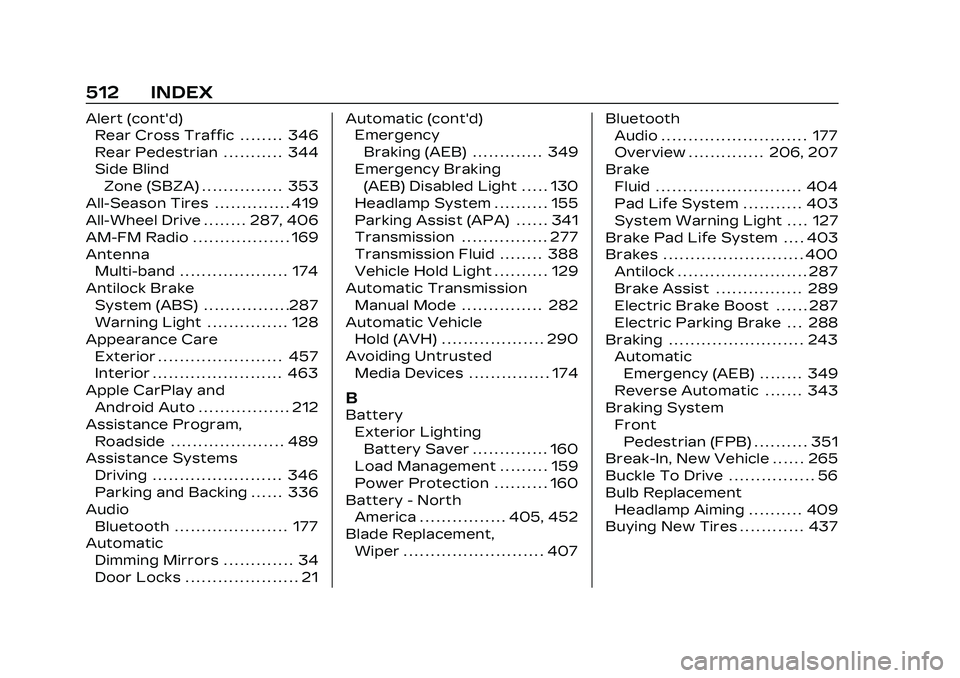
Cadillac CT5 Owner Manual (GMNA-Localizing-U.S./Canada-16500419) -
2023 - CRC - 5/11/22
512 INDEX
Alert (cont'd)Rear Cross Traffic . . . . . . . . 346
Rear Pedestrian . . . . . . . . . . . 344
Side Blind
Zone (SBZA) . . . . . . . . . . . . . . . 353
All-Season Tires . . . . . . . . . . . . . . 419
All-Wheel Drive . . . . . . . . 287, 406
AM-FM Radio . . . . . . . . . . . . . . . . . . 169
Antenna Multi-band . . . . . . . . . . . . . . . . . . . . 174
Antilock Brake System (ABS) . . . . . . . . . . . . . . . .287
Warning Light . . . . . . . . . . . . . . . 128
Appearance Care Exterior . . . . . . . . . . . . . . . . . . . . . . . 457
Interior . . . . . . . . . . . . . . . . . . . . . . . . 463
Apple CarPlay and Android Auto . . . . . . . . . . . . . . . . . 212
Assistance Program, Roadside . . . . . . . . . . . . . . . . . . . . . 489
Assistance Systems
Driving . . . . . . . . . . . . . . . . . . . . . . . . 346
Parking and Backing . . . . . . 336
Audio Bluetooth . . . . . . . . . . . . . . . . . . . . . 177
Automatic
Dimming Mirrors . . . . . . . . . . . . . 34
Door Locks . . . . . . . . . . . . . . . . . . . . . 21 Automatic (cont'd)
Emergency
Braking (AEB) . . . . . . . . . . . . . 349
Emergency Braking (AEB) Disabled Light . . . . . 130
Headlamp System . . . . . . . . . . 155
Parking Assist (APA) . . . . . . 341
Transmission . . . . . . . . . . . . . . . . 277
Transmission Fluid . . . . . . . . 388
Vehicle Hold Light . . . . . . . . . . 129
Automatic Transmission Manual Mode . . . . . . . . . . . . . . . 282
Automatic Vehicle Hold (AVH) . . . . . . . . . . . . . . . . . . . 290
Avoiding Untrusted Media Devices . . . . . . . . . . . . . . . 174
B
Battery
Exterior LightingBattery Saver . . . . . . . . . . . . . . 160
Load Management . . . . . . . . . 159
Power Protection . . . . . . . . . . 160
Battery - North America . . . . . . . . . . . . . . . . 405, 452
Blade Replacement,
Wiper . . . . . . . . . . . . . . . . . . . . . . . . . . 407 Bluetooth
Audio . . . . . . . . . . . . . . . . . . . . . . . . . . . 177
Overview . . . . . . . . . . . . . . 206, 207
Brake Fluid . . . . . . . . . . . . . . . . . . . . . . . . . . . 404
Pad Life System . . . . . . . . . . . 403
System Warning Light . . . . 127
Brake Pad Life System . . . . 403
Brakes . . . . . . . . . . . . . . . . . . . . . . . . . . 400 Antilock . . . . . . . . . . . . . . . . . . . . . . . . 287
Brake Assist . . . . . . . . . . . . . . . . 289
Electric Brake Boost . . . . . . 287
Electric Parking Brake . . . 288
Braking . . . . . . . . . . . . . . . . . . . . . . . . . 243 AutomaticEmergency (AEB) . . . . . . . . 349
Reverse Automatic . . . . . . . 343
Braking System FrontPedestrian (FPB) . . . . . . . . . . 351
Break-In, New Vehicle . . . . . . 265
Buckle To Drive . . . . . . . . . . . . . . . . 56
Bulb Replacement
Headlamp Aiming . . . . . . . . . . 409
Buying New Tires . . . . . . . . . . . . 437