park assist CADILLAC CT5 2023 Owners Manual
[x] Cancel search | Manufacturer: CADILLAC, Model Year: 2023, Model line: CT5, Model: CADILLAC CT5 2023Pages: 526, PDF Size: 6.85 MB
Page 5 of 526
Cadillac CT5 Owner Manual (GMNA-Localizing-U.S./Canada-16500419) -
2023 - CRC - 5/6/22
4 Introduction
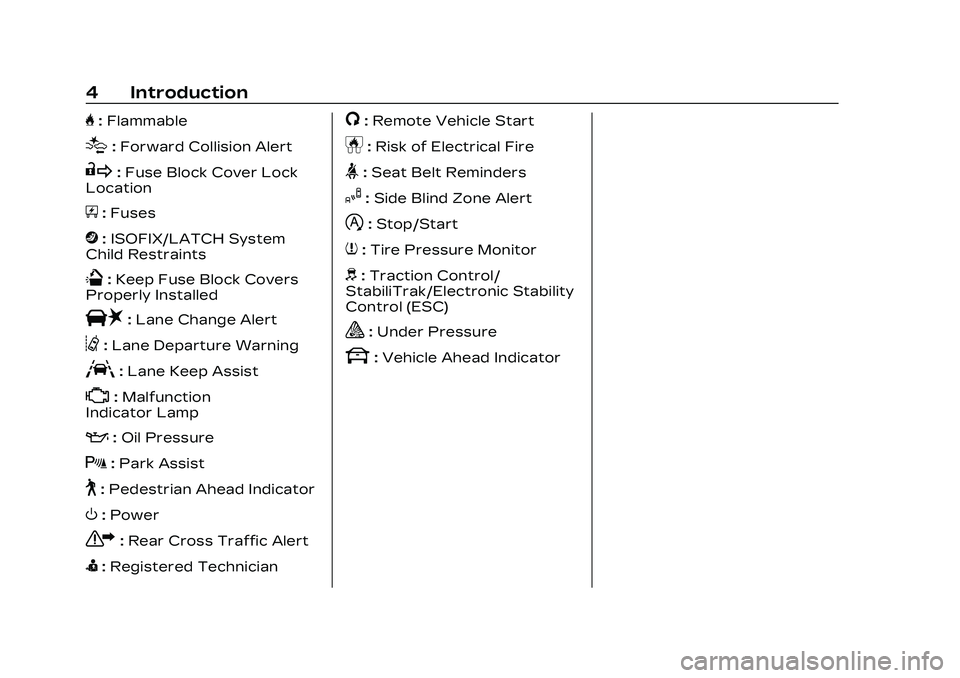
H:Flammable
[:Forward Collision Alert
R:Fuse Block Cover Lock
Location
+: Fuses
j:ISOFIX/LATCH System
Child Restraints
Q: Keep Fuse Block Covers
Properly Installed
|: Lane Change Alert
@:Lane Departure Warning
A:Lane Keep Assist
*: Malfunction
Indicator Lamp
:: Oil Pressure
X:Park Assist
~:Pedestrian Ahead Indicator
O:Power
7:Rear Cross Traffic Alert
I:Registered Technician
/:Remote Vehicle Start
h:Risk of Electrical Fire
>:Seat Belt Reminders
I:Side Blind Zone Alert
h:Stop/Start
7:Tire Pressure Monitor
d:Traction Control/
StabiliTrak/Electronic Stability
Control (ESC)
a: Under Pressure
k: Vehicle Ahead Indicator
Page 7 of 526
Cadillac CT5 Owner Manual (GMNA-Localizing-U.S./Canada-16500419) -
2023 - CRC - 5/6/22
6 Introduction
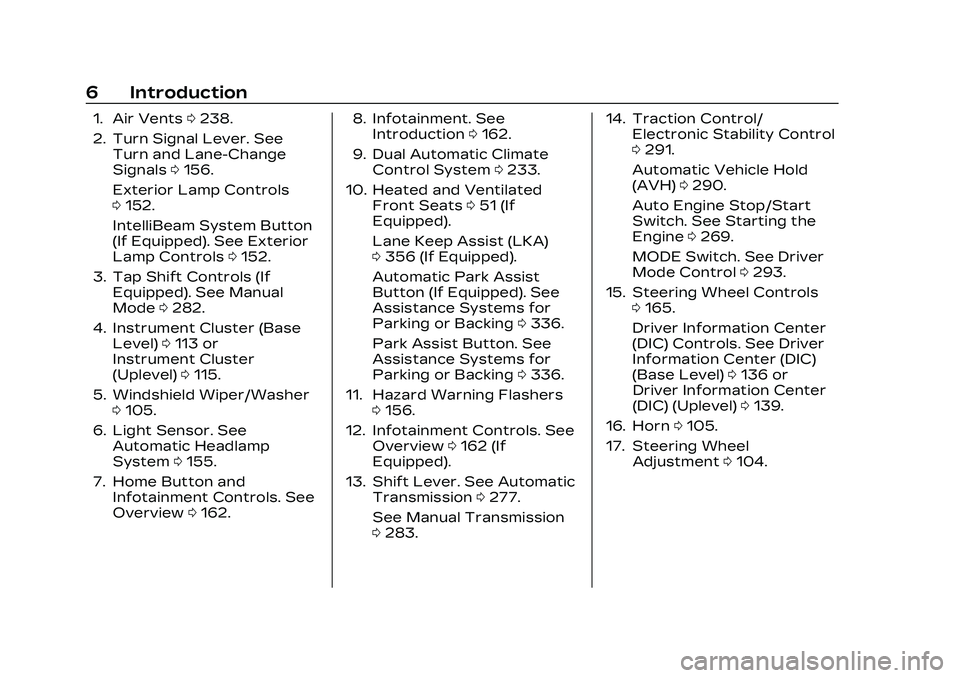
1. Air Vents0238.
2. Turn Signal Lever. See Turn and Lane-Change
Signals 0156.
Exterior Lamp Controls
0 152.
IntelliBeam System Button
(If Equipped). See Exterior
Lamp Controls 0152.
3. Tap Shift Controls (If Equipped). See Manual
Mode 0282.
4. Instrument Cluster (Base Level) 0113 or
Instrument Cluster
(Uplevel) 0115.
5. Windshield Wiper/Washer 0105.
6. Light Sensor. See Automatic Headlamp
System 0155.
7. Home Button and Infotainment Controls. See
Overview 0162. 8. Infotainment. See
Introduction 0162.
9. Dual Automatic Climate Control System 0233.
10. Heated and Ventilated Front Seats 051 (If
Equipped).
Lane Keep Assist (LKA)
0 356 (If Equipped).
Automatic Park Assist
Button (If Equipped). See
Assistance Systems for
Parking or Backing 0336.
Park Assist Button. See
Assistance Systems for
Parking or Backing 0336.
11. Hazard Warning Flashers 0156.
12. Infotainment Controls. See Overview 0162 (If
Equipped).
13. Shift Lever. See Automatic Transmission 0277.
See Manual Transmission
0 283. 14. Traction Control/
Electronic Stability Control
0291.
Automatic Vehicle Hold
(AVH) 0290.
Auto Engine Stop/Start
Switch. See Starting the
Engine 0269.
MODE Switch. See Driver
Mode Control 0293.
15. Steering Wheel Controls 0165.
Driver Information Center
(DIC) Controls. See Driver
Information Center (DIC)
(Base Level) 0136 or
Driver Information Center
(DIC) (Uplevel) 0139.
16. Horn 0105.
17. Steering Wheel Adjustment 0104.
Page 104 of 526
Cadillac CT5 Owner Manual (GMNA-Localizing-U.S./Canada-16500419) -
2023 - CRC - 5/6/22
Instruments and Controls 103
Instruments and
Controls
Controls
Steering WheelAdjustment . . . . . . . . . . . . . . . . . 104
Heated Steering Wheel . . . . . . . . . . . . . . . . . . . . . . . . 105
Horn . . . . . . . . . . . . . . . . . . . . . . . . . . . 105
Windshield Wiper/ Washer . . . . . . . . . . . . . . . . . . . . . . 105
Compass . . . . . . . . . . . . . . . . . . . . . 107
Clock . . . . . . . . . . . . . . . . . . . . . . . . . . 108
Power Outlets . . . . . . . . . . . . . . 108
Wireless Charging . . . . . . . . . 109
Warning Lights, Gauges,
and Indicators
Warning Lights, Gauges, and Indicators . . . . . . . . . . . . . . 112
Instrument Cluster (Base
Level) . . . . . . . . . . . . . . . . . . . . . . . . . 113
Instrument Cluster (Uplevel) . . . . . . . . . . . . . . . . . . . . . 115
Speedometer . . . . . . . . . . . . . . . . 119
Odometer . . . . . . . . . . . . . . . . . . . . . 119
Trip Odometer . . . . . . . . . . . . . . . 119
Tachometer . . . . . . . . . . . . . . . . . 120
Fuel Gauge . . . . . . . . . . . . . . . . . . . 120 Engine Coolant
Temperature Gauge
(Base Level) . . . . . . . . . . . . . . . . . 121
Engine Coolant Temperature Gauge
(Uplevel) . . . . . . . . . . . . . . . . . . . . . 122
Seat Belt Reminders . . . . . . 122
Airbag Readiness Light . . . . . . . . . . . . . . . . . . . . . . . . . . 123
Passenger Airbag Status Indicator . . . . . . . . . . . . . . . . . . . . . 124
Charging System Light . . . 124
Malfunction Indicator Lamp (Check Engine
Light) . . . . . . . . . . . . . . . . . . . . . . . . . 125
Brake System Warning Light . . . . . . . . . . . . . . . . . . . . . . . . . . 127
Electric Parking Brake Light . . . . . . . . . . . . . . . . . . . . . . . . . . 128
Service Electric Parking Brake Light . . . . . . . . . . . . . . . . . 128
Antilock Brake System (ABS) Warning Light . . . . . 128
Performance Shifting Light . . . . . . . . . . . . . . . . . . . . . . . . . . 129
Automatic Vehicle Hold (AVH) Light . . . . . . . . . . . . . . . . . 129
Lane Keep Assist (LKA) Light . . . . . . . . . . . . . . . . . . . . . . . . . . 129 Automatic Emergency
Braking (AEB) Disabled
Light . . . . . . . . . . . . . . . . . . . . . . . . . 130
Vehicle Ahead Indicator . . . . . . . . . . . . . . . . . . . . 130
Pedestrian Ahead Indicator . . . . . . . . . . . . . . . . . . . . 130
Traction Off Light . . . . . . . . . 130
StabiliTrak OFF Light . . . . . 131
Traction Control System (TCS)/StabiliTrak
Light . . . . . . . . . . . . . . . . . . . . . . . . . . 131
Engine Coolant Temperature Warning
Light . . . . . . . . . . . . . . . . . . . . . . . . . . 131
Driver Mode Control Light . . . . . . . . . . . . . . . . . . . . . . . . . . 132
Tire Pressure Light . . . . . . . 133
Engine Oil Pressure Light . . . . . . . . . . . . . . . . . . . . . . . . . 134
Low Fuel Warning Light . . . . . . . . . . . . . . . . . . . . . . . . . 134
Security Light . . . . . . . . . . . . . . . 135
High-Beam On Light . . . . . . 135
Lamps On Reminder . . . . . . 135
Cruise Control Light . . . . . . 135
Door Ajar Light . . . . . . . . . . . . . 136
Page 127 of 526
Cadillac CT5 Owner Manual (GMNA-Localizing-U.S./Canada-16500419) -
2023 - CRC - 5/6/22
126 Instruments and Controls
and increase vehicle
emissions. Diagnosis and
service may be required.
To help prevent damage,
reduce vehicle speed and
avoid hard accelerations and
uphill grades. If towing a
trailer, reduce the amount of
cargo being hauled as soon as
possible.
If the light continues to flash,
find a safe place to park. Turn
the vehicle off and wait at
least 10 seconds before
restarting the engine. If the
light is still flashing, follow the
previous guidelines and see
your dealer for service as
soon as possible.
If the light is on steady :A
malfunction has been
detected. Diagnosis and
service may be required.
Check the following:
.If fuel has been added to the
vehicle using the capless fuel
funnel adapter, make sure
that it has been removed. See
“Filling the Tank with a
Portable Gas Can” under
Filling the Tank 0362. The
diagnostic system can
detect if the adapter has
been left installed in the
vehicle, allowing fuel to
evaporate into the
atmosphere. A few driving
trips with the adapter
removed may turn off the
light.
.Poor fuel quality can cause
inefficient engine operation
and poor driveability, which
may go away once the
engine is warmed up. If this
occurs, change the fuel
brand. It may require at least
one full tank of the proper
fuel to turn the light off. See
Recommended Fuel (LSY
2.0L L4 Engine) 0360 or
Recommended Fuel (LGY
3.0L V6 and LT4 6.2L
V8 Engines) 0361.
If the light remains on, see
your dealer.
Emissions Inspection and
Maintenance Programs
If the vehicle requires an
Emissions Inspection/
Maintenance test, the test
equipment will likely connect
to the vehicle's Data Link
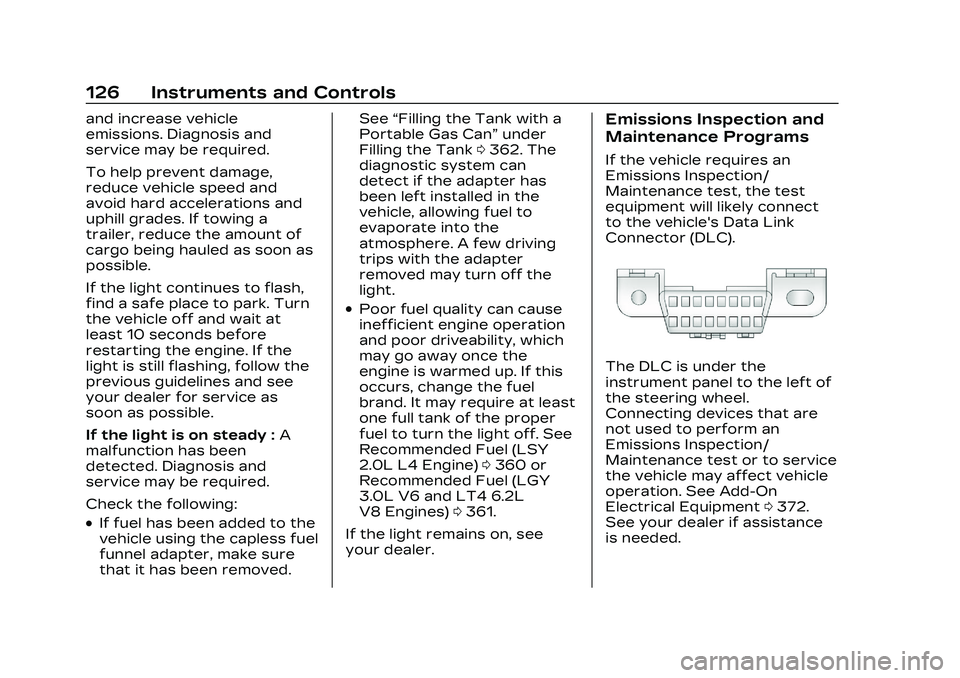
Connector (DLC).
The DLC is under the
instrument panel to the left of
the steering wheel.
Connecting devices that are
not used to perform an
Emissions Inspection/
Maintenance test or to service
the vehicle may affect vehicle
operation. See Add-On
Electrical Equipment 0372.
See your dealer if assistance
is needed.
Page 146 of 526

Cadillac CT5 Owner Manual (GMNA-Localizing-U.S./Canada-16500419) -
2023 - CRC - 5/6/22
Instruments and Controls 145
to confirm and save the
setting. This feature may only
be available in P (Park). See
Instrument Cluster (Base
Level)0113 or
Instrument Cluster (Uplevel)
0 115.
HUD Views
There are three views in the
HUD. Track mode is available
for V-Series only. Some
vehicle information and vehicle
messages or alerts may be
displayed in any view.
Metric
English Speed View :
This displays
digital speed in English or
metric units, speed limit,
vehicle ahead indicator, Lane
Departure Warning/Lane Keep
Assist, and Adaptive Cruise
Control and set speed. Some
information only appears on
vehicles that have these
features, and when they are
active.
Metric
English
Performance View : This
displays digital speed,
indicators from speed view along with rpm reading, vehicle
ahead indicator, Lane
Departure Warning/Lane Keep
Assist, and Adaptive Cruise
Control and set speed.
Metric
English
Track View : If equipped, this
displays digital speed,
transmission positions, Shift
Timing Light Position, gear
shift indicator,
The shift timing lights at the
top of the display will appear
with increases in engine rpm.
Page 150 of 526

Cadillac CT5 Owner Manual (GMNA-Localizing-U.S./Canada-16500419) -
2023 - CRC - 5/6/22
Instruments and Controls 149
Do not use the Universal
Remote system with any
garage door opener that does
not have the stop and reverse
feature. This includes any
garage door opener model
manufactured before
April 1, 1982.
Keep the original hand-held
transmitter for use in other
vehicles as well as for future
programming. Erase the
programming when vehicle
ownership is terminated. See
“Erasing Universal Remote
System Buttons”later in this
section.
To program a garage door
opener, park outside directly in
line with and facing the garage
door opener receiver. Clear all
people and objects near the
garage door.
Make sure the hand-held
transmitter has a new battery
for quick and accurate
transmission of the
radio-frequency signal.Programming the
Universal Remote System
Programming involves
time-sensitive actions and may
time out, requiring the
procedure to be repeated.
Read these instructions
completely before
programming the Universal
Remote system. It may help to
have another person assist
with the programming
process.
1. Hold the end of the hand-held transmitter
about 3 to 8 cm (1 to 3 in)
away from the Universal
Remote system buttons
with the indicator light in
view. The hand-held
transmitter was supplied
by the manufacturer of the
garage door opener
receiver.
2. Press and release one of the three Universal
Remote system buttons to
be programmed. Press and
hold the hand-held transmitter button. Do not
release the hand-held
transmitter button until
the indicator light changes
from a slow to a rapid flash
or continuous light. Then
release the hand-held
transmitter button.
Some garage door
openers may require
substitution of Step 2 with
the procedure under
“Radio Signals for Some
Gate Operators”
later in
this section.
3. Press and hold the newly programmed Universal
Remote system button for
five seconds while
watching the indicator light
and garage door
activation.
.If the indicator light
stays on continuously or
the garage door moves
when the button is
pressed, then
programming is
Page 219 of 526
Cadillac CT5 Owner Manual (GMNA-Localizing-U.S./Canada-16500419) -
2023 - CRC - 5/6/22
218 Infotainment System
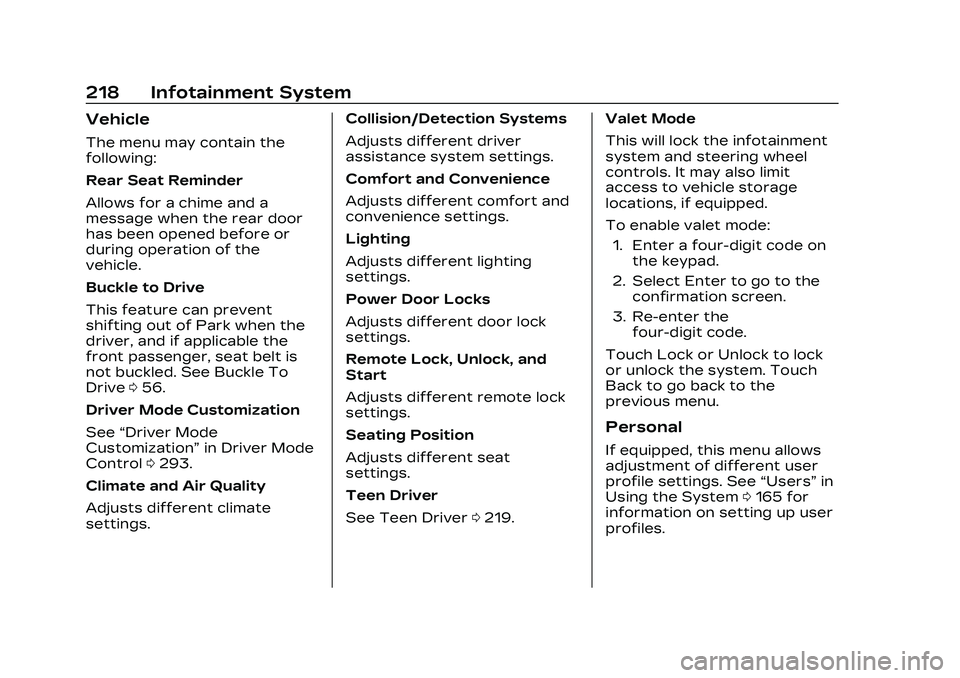
Vehicle
The menu may contain the
following:
Rear Seat Reminder
Allows for a chime and a
message when the rear door
has been opened before or
during operation of the
vehicle.
Buckle to Drive
This feature can prevent
shifting out of Park when the
driver, and if applicable the
front passenger, seat belt is
not buckled. See Buckle To
Drive056.
Driver Mode Customization
See “Driver Mode
Customization” in Driver Mode
Control 0293.
Climate and Air Quality
Adjusts different climate
settings. Collision/Detection Systems
Adjusts different driver
assistance system settings.
Comfort and Convenience
Adjusts different comfort and
convenience settings.
Lighting
Adjusts different lighting
settings.
Power Door Locks
Adjusts different door lock
settings.
Remote Lock, Unlock, and
Start
Adjusts different remote lock
settings.
Seating Position
Adjusts different seat
settings.
Teen Driver
See Teen Driver
0219. Valet Mode
This will lock the infotainment
system and steering wheel
controls. It may also limit
access to vehicle storage
locations, if equipped.
To enable valet mode:
1. Enter a four-digit code on the keypad.
2. Select Enter to go to the confirmation screen.
3. Re-enter the four-digit code.
Touch Lock or Unlock to lock
or unlock the system. Touch
Back to go back to the
previous menu.
Personal
If equipped, this menu allows
adjustment of different user
profile settings. See “Users”in
Using the System 0165 for
information on setting up user
profiles.
Page 241 of 526

Cadillac CT5 Owner Manual (GMNA-Localizing-U.S./Canada-16500419) -
2023 - CRC - 5/10/22
240 Driving and Operating
Driving and
Operating
Driving Information
Driving for Better FuelEconomy . . . . . . . . . . . . . . . . . . . . 241
Distracted Driving . . . . . . . . . 242
Defensive Driving . . . . . . . . . . 242
Impaired Driving . . . . . . . . . . . 243
Control of a Vehicle . . . . . . 243
Braking . . . . . . . . . . . . . . . . . . . . . . . 243
Steering . . . . . . . . . . . . . . . . . . . . . . 244
Off-Road Recovery . . . . . . . 245
Loss of Control . . . . . . . . . . . . 245
Track Events and Competitive Driving
(V-Series and V-Series
Blackwing) . . . . . . . . . . . . . . . . . 246
Driving on Wet Roads . . . . 257
Hill and Mountain Roads . . . . . . . . . . . . . . . . . . . . . . . 258
Winter Driving . . . . . . . . . . . . . . 259
If the Vehicle Is Stuck . . . . . 261
Vehicle Load Limits . . . . . . . 261
Starting and Operating
New Vehicle Break-In . . . . 265
Composite Materials . . . . . 266
Ignition Positions . . . . . . . . . . 267 Starting the Engine . . . . . . . 269
Stop/Start System . . . . . . . . 270
Engine Heater . . . . . . . . . . . . . . 272
Retained Accessory
Power (RAP) . . . . . . . . . . . . . . . 273
Shifting Into Park . . . . . . . . . . 273
Shifting out of Park . . . . . . . 274
Parking (Manual Transmission) . . . . . . . . . . . . . 275
Parking over Things That Burn . . . . . . . . . . . . . . . . . . 275
Active Fuel Management . . . . . . . . . . . . . . 275
Extended Parking . . . . . . . . . 275
Engine Exhaust
Engine Exhaust . . . . . . . . . . . . 276
Running the Vehicle While Parked . . . . . . . . . . . . . . 276
Automatic Transmission
AutomaticTransmission . . . . . . . . . . . . . . 277
Manual Mode . . . . . . . . . . . . . . . 282
Manual Transmission
Manual Transmission . . . . . 283
Active Rev Match . . . . . . . . . 286
Drive Systems
All-Wheel Drive . . . . . . . . . . . . . 287
Brakes
Electric Brake Boost . . . . . . 287
Antilock Brake System (ABS) . . . . . . . . . . . . . 287
Electric Parking Brake . . . 288
Brake Assist . . . . . . . . . . . . . . . . 289
Hill Start Assist (HSA) . . . . 289
Automatic Vehicle Hold (AVH) . . . . . . . . . . . . . . . . . 290
Ride Control Systems
Traction Control/Electronic Stability
Control . . . . . . . . . . . . . . . . . . . . . . 291
Driver Mode Control . . . . . . 293
Competitive Driving Mode . . . . . . . . . . . . . . 299
Limited-Slip
Differential . . . . . . . . . . . . . . . . . 302
Cruise Control
Cruise Control . . . . . . . . . . . . . 302
Adaptive Cruise Control(Advanced) . . . . . . . . . . . . . . . . 305
Super Cruise . . . . . . . . . . . . . . . . 317
Driver Assistance
Systems
Driver Assistance Systems . . . . . . . . . . . . . . . . . . . . 334
Page 242 of 526

Cadillac CT5 Owner Manual (GMNA-Localizing-U.S./Canada-16500419) -
2023 - CRC - 5/10/22
Driving and Operating 241
Assistance Systems forParking or Backing . . . . . . 336
Rear Vision Camera (RVC) . . . . . . . . . . . . . 336
Surround Vision
System . . . . . . . . . . . . . . . . . . . . . . 337
Park Assist . . . . . . . . . . . . . . . . . . 338
Automatic Parking Assist (APA) . . . . . . . . . . . . . . . . 341
Reverse Automatic Braking (RAB) . . . . . . . . . . . . . 343
Rear Pedestrian Alert . . . . 344
Rear Cross Traffic Alert (RCTA) System . . . . . . . . . . . 346
Assistance Systems for Driving . . . . . . . . . . . . . . . . . . . . . . 346
Forward Collision Alert (FCA) System . . . . . . . . . . . . . 346
Automatic Emergency Braking (AEB) . . . . . . . . . . . . . 349
Front Pedestrian Braking (FPB) System . . . . . . . . . . . . . . 351
Side Blind Zone Alert (SBZA) . . . . . . . . . . . . . . . 353
Lane Change Alert (LCA) . . . . . . . . . . . . . . . . . 353
Lane Keep Assist (LKA) . . . . . . . . . . . . . . . 356
Surround Vision Recorder . . . . . . . . . . . . . . . . . . . 358Fuel
Top Tier Fuel . . . . . . . . . . . . . . . 360
Recommended Fuel (LSY2.0L L4 Engine) . . . . . . . . . . 360
Recommended Fuel (LGY 3.0L V6 and LT4 6.2L
V8 Engines) . . . . . . . . . . . . . . . . 361
Prohibited Fuels . . . . . . . . . . . . 361
Fuels in Foreign Countries . . . . . . . . . . . . . . . . . . . 361
Fuel Additives . . . . . . . . . . . . . . 362
Filling the Tank . . . . . . . . . . . . . 362
Filling a Portable Fuel Container . . . . . . . . . . . . . . . . . . 364
Trailer Towing
General TowingInformation . . . . . . . . . . . . . . . . 364
Driving Characteristics and Towing Tips . . . . . . . . . 365
Trailer Towing (LSY 2.0L L4 and LGY 3.0L
V6 Engines Only) . . . . . . . . . 369
Towing Equipment . . . . . . . . . 371
Conversions and Add-Ons
Add-On Electrical Equipment . . . . . . . . . . . . . . . . . 372
Driving
Information
Driving for Better
Fuel Economy
Driving habits can affect fuel
mileage. Here are some driving
tips to get the best fuel
economy possible:
.Set the climate controls to
the desired temperature
after the engine is started,
or turn them off when not
required.
.Avoid fast starts and
accelerate smoothly.
.Brake gradually and avoid
abrupt stops.
.Avoid idling the engine for
long periods of time.
.When road and weather
conditions are appropriate,
use cruise control.
.Always follow posted speed
limits or drive more slowly
when conditions require.
Page 245 of 526

Cadillac CT5 Owner Manual (GMNA-Localizing-U.S./Canada-16500419) -
2023 - CRC - 5/10/22
244 Driving and Operating
Steering
Caution
To avoid damage to the
steering system, do not
drive over curbs, parking
barriers, or similar objects at
speeds greater than 3 km/h
(1 mph). Use care when
driving over other objects
such as lane dividers and
speed bumps. Damage
caused by misuse of the
vehicle is not covered by the
vehicle warranty.
Variable Effort Steering
The vehicle has a steering
system that varies the amount
of effort required to steer the
vehicle in relation to the speed
of the vehicle.
The amount of steering effort
required is less at slower
speeds to make the vehicle
more maneuverable and easier
to park. At faster speeds, the
steering effort increases to
provide a sport-like feel to the
steering. This provides
maximum control and stability.
Electric Power Steering
The vehicle is equipped with
an electric power steering
system, which reduces the
amount of effort needed to
steer the vehicle. It does not
have power steering fluid.
Regular maintenance is not
required.
If the vehicle experiences a
system malfunction and loses
power steering, greater
steering effort may berequired. Power steering
assist also may be reduced if
you turn the steering wheel as
far as it can turn and hold it
there with force for an
extended period of time.
See your dealer if there is a
problem.
Curve Tips
.Take curves at a reasonable
speed.
.Reduce speed before
entering a curve.
.Maintain a reasonable
steady speed through the
curve.
.Wait until the vehicle is out
of the curve before
accelerating gently into the
straightaway.
Steering in Emergencies
.There are some situations
when steering around a
problem may be more
effective than braking.