instrument panel CADILLAC CT6 2017 1.G User Guide
[x] Cancel search | Manufacturer: CADILLAC, Model Year: 2017, Model line: CT6, Model: CADILLAC CT6 2017 1.GPages: 337, PDF Size: 3.89 MB
Page 85 of 337
Cadillac CT6 Owner Manual (GMNA-Localizing-MidEast-10293390) - 2017 -
CRC - 6/21/16
84 SEATS AND RESTRAINTS
Adding Equipment to the
Airbag-Equipped Vehicle
Adding accessories that change the
vehicle's frame, bumper system,
height, front end, or side sheet metal
may keep the airbag system from
working properly. The operation of the
airbag system can also be affected by
changing any parts of the front seats,
safety belts, the airbag sensing and
diagnostic module, steering wheel,
instrument panel, any of the airbag
modules, ceiling or pillar garnish trim,
front sensors, side impact sensors,
or airbag wiring.
Your dealer and the service manual
have information about the location of
the airbag sensors, sensing and
diagnostic module, and airbag wiring.
In addition, the vehicle has a
passenger sensing system for the front
outboard passenger position, which
includes sensors that are part of the
passenger seat. The passenger sensing
system may not operate properly if
the original seat trim is replaced with
non-GM covers, upholstery, or trim; or
with GM covers, upholstery, or trim
designed for a different vehicle. Anyobject, such as an aftermarket seat
heater or a comfort-enhancing pad or
device, installed under or on top of
the seat fabric, could also interfere
with the operation of the passenger
sensing system. This could either
prevent proper deployment of the
passenger airbag(s) or prevent the
passenger sensing system from
properly turning off the passenger
airbag(s). See
Passenger Sensing
System 079.
The vehicle has rollover roof-rail
airbags. See Different Size Tires and
Wheels 0288 for additional important
information.
If your vehicle needs to be modified
because you have a disability and you
have questions about whether the
modifications will affect the vehicle's
airbag system, or if you have
questions about whether the airbag
system will be affected if the vehicle is
modified for any other reason, see
your dealer.
Airbag System Check
The airbag system does not need
regularly scheduled maintenance or
replacement. Make sure the airbag
readiness light is working. See Airbag
Readiness Light 0126.
Caution
If an airbag covering is damaged,
opened, or broken, the airbag may
not work properly. Do not open or
break the airbag coverings. If there
are any opened or broken airbag
coverings, have the airbag covering
and/or airbag module replaced. For
the location of the airbags, see
Where Are the Airbags? 075. See
your dealer for service.
Page 104 of 337

Cadillac CT6 Owner Manual (GMNA-Localizing-MidEast-10293390) - 2017 -
CRC - 6/21/16
STORAGE 103
Storage
Storage Compartments
Storage Compartments . . . . . . . . . . 103
Instrument Panel Storage . . . . . . . . 103
Glove Box . . . . . . . . . . . . . . . . . . . . . . . . . 103
Armrest Storage . . . . . . . . . . . . . . . . . . 104
Rear Storage . . . . . . . . . . . . . . . . . . . . . . 104
Center Console Storage . . . . . . . . . . 104
Additional Storage Features
Cargo Tie-Downs . . . . . . . . . . . . . . . . . 105
Convenience Net . . . . . . . . . . . . . . . . . 105
Safety Kit . . . . . . . . . . . . . . . . . . . . . . . . . 105
Storage Compartments
{Warning
Do not store heavy or sharp objects
in storage compartments. In a
crash, these objects may cause the
cover to open and could result in
injury.
Instrument Panel Storage
Press to release the cover.
Glove Box
To open, touch the GLOVE BOX
button. Close the glove box manually.
Page 112 of 337
Cadillac CT6 Owner Manual (GMNA-Localizing-MidEast-10293390) - 2017 -
CRC - 6/21/16
INSTRUMENTS AND CONTROLS 111
lever returns to its starting position
when released. SeeRear Camera
Mirror 047.
Clock
The infotainment system controls are
used to access the time and date
settings through the menu system.
See “Home Page ”in the infotainment
manual for information about how to
use the menu system.
Setting the Clock
Time
To set the time:
1. From the Home Page, touch the SETTINGS screen button, then
touch Time and Date.
2. Touch Set Time, then touch + or −to increase or decrease hours
or minutes, and change AM
or PM.
3. Touch 12-24 Hr for a 12 or 24 hour clock.
4. Touch
0to go back to the
previous menu. Date
To set the date:
1. Touch the SETTINGS screen button, then touch Time
and Date.
2. Touch Set Date, then touch + or −to increase or decrease month,
day, or year.
3. Touch
0to go back to the
previous menu.
Auto Set
When on, the time and date will
automatically update.
To set auto set: 1. Touch the SETTINGS screen button, then touch Time
and Date.
2. Touch Set Time or Set Date.
3. Touch Auto Set, then select On-Cell Network or Off-Manual
to manually set the time
and date.
4. Touch
0to go back to the
previous menu. If auto set is on, the time displayed on
the clock may not update immediately
when driving into a new time zone.
Clock Display
When on, the digital clock will display
on the infotainment screen.
To set the clock display:
1. Touch the SETTINGS screen button, then touch Time
and Date.
2. Touch Clock Display, then select Off or On.
3. Touch
0to go back to the
previous menu.
Power Outlets
Power Outlet 12-Volt Direct Current
The 12-volt accessory power outlet
can be used to plug in electrical
equipment, such as a cell phone or
MP3 player.
The vehicle has an accessory power
outlet on the rear seat trim panel.
Page 113 of 337
Cadillac CT6 Owner Manual (GMNA-Localizing-MidEast-10293390) - 2017 -
CRC - 6/21/16
112 INSTRUMENTS AND CONTROLS
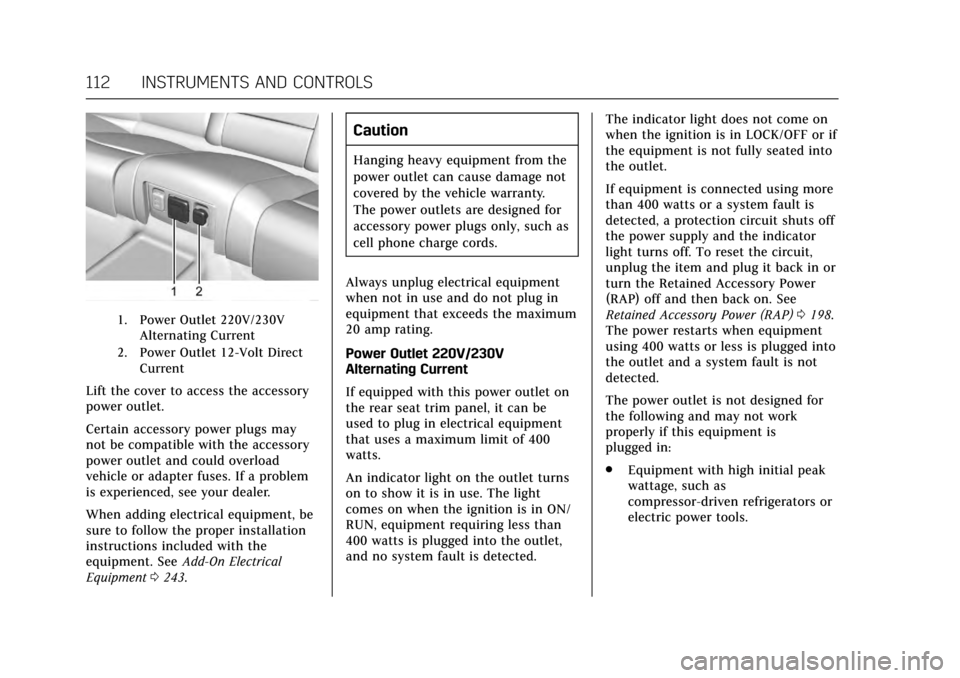
1. Power Outlet 220V/230VAlternating Current
2. Power Outlet 12-Volt Direct Current
Lift the cover to access the accessory
power outlet.
Certain accessory power plugs may
not be compatible with the accessory
power outlet and could overload
vehicle or adapter fuses. If a problem
is experienced, see your dealer.
When adding electrical equipment, be
sure to follow the proper installation
instructions included with the
equipment. See Add-On Electrical
Equipment 0243.
Caution
Hanging heavy equipment from the
power outlet can cause damage not
covered by the vehicle warranty.
The power outlets are designed for
accessory power plugs only, such as
cell phone charge cords.
Always unplug electrical equipment
when not in use and do not plug in
equipment that exceeds the maximum
20 amp rating.
Power Outlet 220V/230V
Alternating Current
If equipped with this power outlet on
the rear seat trim panel, it can be
used to plug in electrical equipment
that uses a maximum limit of 400
watts.
An indicator light on the outlet turns
on to show it is in use. The light
comes on when the ignition is in ON/
RUN, equipment requiring less than
400 watts is plugged into the outlet,
and no system fault is detected. The indicator light does not come on
when the ignition is in LOCK/OFF or if
the equipment is not fully seated into
the outlet.
If equipment is connected using more
than 400 watts or a system fault is
detected, a protection circuit shuts off
the power supply and the indicator
light turns off. To reset the circuit,
unplug the item and plug it back in or
turn the Retained Accessory Power
(RAP) off and then back on. See
Retained Accessory Power (RAP)
0198.
The power restarts when equipment
using 400 watts or less is plugged into
the outlet and a system fault is not
detected.
The power outlet is not designed for
the following and may not work
properly if this equipment is
plugged in:
. Equipment with high initial peak
wattage, such as
compressor-driven refrigerators or
electric power tools.
Page 130 of 337

Cadillac CT6 Owner Manual (GMNA-Localizing-MidEast-10293390) - 2017 -
CRC - 6/21/16
INSTRUMENTS AND CONTROLS 129
up. If this occurs, change the fuel
brand. It may require at least one
full tank of the proper fuel to turn
the light off. SeeFuel0240.
If the light remains on, see your
dealer.
Emissions Inspection and
Maintenance Programs
If the vehicle requires an Emissions
Inspection/Maintenance test, the test
equipment will likely connect to the
vehicle's Data Link Connector (DLC).
The DLC is under the instrument
panel to the left of the steering wheel.
Connecting devices that are not used
to perform an Emissions Inspection/
Maintenance test or to service the
vehicle may affect vehicle operation.
See Add-On Electrical Equipment 0243.
See your dealer if assistance is needed. The vehicle may not pass
inspection if:
.
The light is on when the engine is
running.
. The light does not come on when
the ignition is in Service
Only Mode.
. Critical emission control systems
have not been completely
diagnosed. If this happens, the
vehicle would not be ready for
inspection and might require
several days of routine driving
before the system is ready for
inspection. This can happen if the
12-volt battery has recently been
replaced or run down, or if the
vehicle has been recently serviced.
See your dealer if the vehicle will not
pass or cannot be made ready for
the test.
Brake System Warning
Light
The vehicle brake system consists of
two hydraulic circuits. If one circuit is
not working, the remaining circuit can still work to stop the vehicle. For
normal braking performance, both
circuits need to be working.
If the warning light comes on, there is
a problem with the braking system.
Have the brake system inspected
right away.
This light should come on briefly
when the engine is started. If it does
not come on then, have it fixed so it
will be ready to warn you if there is a
problem.
If the light comes on and stays on,
there is a base brake problem.
{Warning
The brake system might not be
working properly if the brake
system warning light is on. Driving
(Continued)
Page 139 of 337
Cadillac CT6 Owner Manual (GMNA-Localizing-MidEast-10293390) - 2017 -
CRC - 6/21/16
138 INSTRUMENTS AND CONTROLS
engaged, the current follow time to
the vehicle ahead is displayed as a
time value on this page.
Battery Voltage :Shows the current
battery voltage.
Oil Life : Shows an estimate of the
oil's remaining useful life.
If REMAINING OIL LIFE 99% is
displayed, that means 99% of the
current oil life remains.
When the remaining oil life is low, the
CHANGE ENGINE OIL SOON message
will appear on the display. See Engine
Oil Messages 0144. The oil should be
changed as soon as possible. See
Engine Oil 0250. In addition to the
engine oil life system monitoring the
oil life, additional maintenance is
recommended. See Maintenance
Schedule 0311.
The Oil Life display must be reset
after each oil change. It will not reset
itself. Do not reset the Oil Life display
accidentally at any time other than
when the oil has just been changed.
It cannot be reset accurately until the
next oil change. To reset the engine
oil life system, press and hold SEL for several seconds while the Oil Life
display is active. See
Engine Oil Life
System 0252.
Tire Pressure : Shows the
approximate pressures of all four tires.
Tire pressure is displayed in either
kilopascal (kPa) or in pounds per
square inch (psi). If the pressure is
low, the value for that tire is shown in
amber. See Tire Pressure Monitor
System 0280 and Tire Pressure
Monitor Operation 0281.
Vehicle Odometer (Base Cluster) :
Shows the odometer.
Blank Page : Allows for no
information to be displayed in the
cluster info display areas.
Head-Up Display (HUD)
{Warning
If the HUD image is too bright or
too high in your field of view, it
may take you more time to see
things you need to see when it is
(Continued)
Warning (Continued)
dark outside. Be sure to keep the
HUD image dim and placed low in
your field of view.
If equipped with HUD, some
information concerning the operation
of the vehicle is projected onto the
windshield. The image is projected
through the HUD lens on top of the
instrument panel. The information
appears as an image focused out
toward the front of the vehicle.
Caution
If you try to use the HUD image as
a parking aid, you may misjudge
the distance and damage your
vehicle. Do not use the HUD image
as a parking aid.
The HUD information can be
displayed in various languages in
some vehicles. The speedometer
reading and other numerical values
can be displayed in either English or
metric units.
Page 164 of 337
Cadillac CT6 Owner Manual (GMNA-Localizing-MidEast-10293390) - 2017 -
CRC - 6/21/16
LIGHTING 163
Lighting
Exterior Lighting
Exterior Lamp Controls . . . . . . . . . . 163
Exterior Lamps Off Reminder . . . 164
Headlamp High/Low-BeamChanger . . . . . . . . . . . . . . . . . . . . . . . . . . 164
Flash-to-Pass . . . . . . . . . . . . . . . . . . . . . 165
Daytime Running Lamps (DRL) . . . . . . . . . . . . . . . . . . . . 165
Automatic Headlamp System . . . 165
Hazard Warning Flashers . . . . . . . . 166
Turn and Lane-Change Signals . . . . . . . . . . . . . . . . . . . . . . . . . . . 166
Interior Lighting
Instrument Panel IlluminationControl . . . . . . . . . . . . . . . . . . . . . . . . . . 167
Courtesy Lamps . . . . . . . . . . . . . . . . . . 167
Dome Lamps . . . . . . . . . . . . . . . . . . . . . 167
Reading Lamps . . . . . . . . . . . . . . . . . . . 167
Lighting Features
Entry Lighting . . . . . . . . . . . . . . . . . . . . 168
Exit Lighting . . . . . . . . . . . . . . . . . . . . . . 169
Battery Power Protection . . . . . . . . 169
Exterior Lighting Battery Saver . . . . . . . . . . . . . . . . . . . . . . . . . . . . . 169
Exterior Lighting
Exterior Lamp Controls
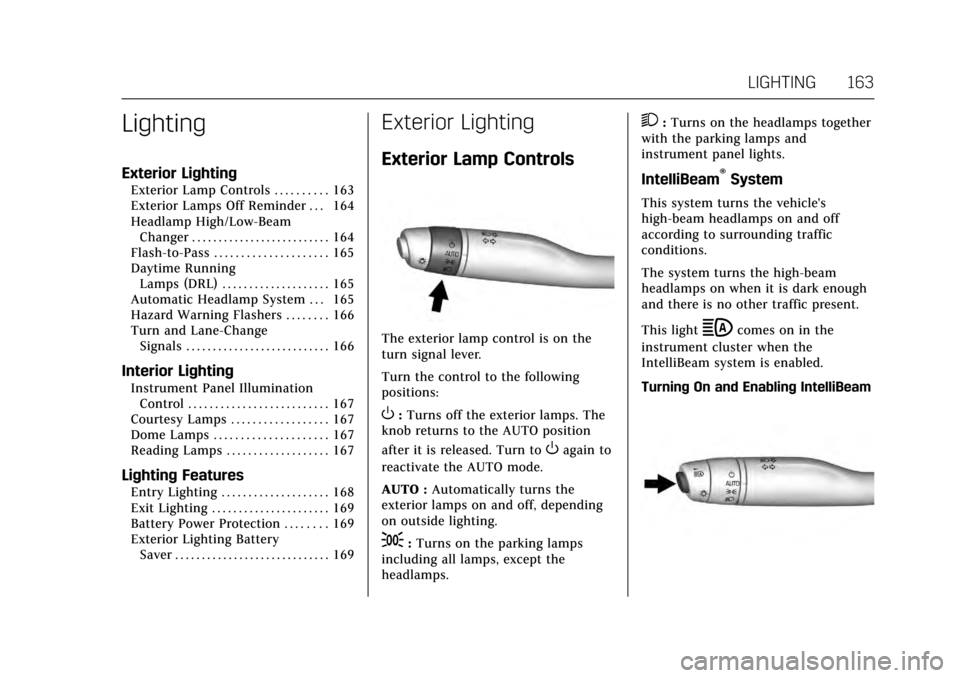
The exterior lamp control is on the
turn signal lever.
Turn the control to the following
positions:
O:Turns off the exterior lamps. The
knob returns to the AUTO position
after it is released. Turn to
Oagain to
reactivate the AUTO mode.
AUTO : Automatically turns the
exterior lamps on and off, depending
on outside lighting.
;: Turns on the parking lamps
including all lamps, except the
headlamps.
2: Turns on the headlamps together
with the parking lamps and
instrument panel lights.
IntelliBeam®System
This system turns the vehicle's
high-beam headlamps on and off
according to surrounding traffic
conditions.
The system turns the high-beam
headlamps on when it is dark enough
and there is no other traffic present.
This light
bcomes on in the
instrument cluster when the
IntelliBeam system is enabled.
Turning On and Enabling IntelliBeam
Page 166 of 337

Cadillac CT6 Owner Manual (GMNA-Localizing-MidEast-10293390) - 2017 -
CRC - 6/21/16
LIGHTING 165
This indicator light turns on in the
instrument cluster when the
high-beam headlamps are on.
Flash-to-Pass
To flash the high beams, pull the turn
signal lever toward you, and release.
Daytime Running
Lamps (DRL)
DRL can make it easier for others to
see the front of your vehicle during
the day.
If equipped with Light-Emitting Diode
(LED) headlamps, the dedicated DRL
will come on when all of the following
conditions are met:
.The ignition is on.
. The exterior lamp control is
in AUTO. .
The light sensor determines it is
daytime.
When the DRL are on, the taillamps
and other lamps will not be on.
The DRL turn off when the headlamps
are turned to
Oor the ignition is off.
Automatic Headlamp
System
When the exterior lamp control is set
to AUTO and it is dark enough
outside, the headlamps come on
automatically.
There is a light sensor on top of the
instrument panel. Do not cover the
sensor.
The system may also turn on the
headlamps when driving through a
parking garage or tunnel.
If the vehicle is started in a dark
garage, the automatic headlamp
system comes on immediately. If it is
light outside when the vehicle leaves
the garage, there is a slight delay
before the automatic headlamp
system changes to the DRL. During
that delay, the instrument cluster may
not be as bright as usual. Make sure
the instrument panel brightness
control is in the full bright position.
See Instrument Panel Illumination
Control 0167.
When it is bright enough outside, the
headlamps will turn off or may change
to Daytime Running Lamps (DRL).
The automatic headlamp system turns
off when the exterior lamp control is
turned to
Oor the ignition is off.
Page 168 of 337

Cadillac CT6 Owner Manual (GMNA-Localizing-MidEast-10293390) - 2017 -
CRC - 6/21/16
LIGHTING 167
Interior Lighting
Instrument Panel
Illumination Control
The brightness of the instrument
panel lighting and steering wheel
controls can be adjusted.
D:Move the thumbwheel up or
down to brighten or dim the lights.
The brightness of the displays
automatically adjusts based on
outdoor lighting. The instrument
panel illumination control will set the
lowest level to which the displays will
be automatically adjusted.
Courtesy Lamps
The courtesy lamps come on when
any door is opened unless the dome
lamp override is activated. To
deactivate the dome lamp override,
press
(OFF and the indicator light
on the button will turn off.
Dome Lamps
The dome lamp is in the overhead
console.
To change the dome lamp settings,
press:
(OFF : Turns the lamp off, even
when a door is open.
+ON/OFF : Turns the lamp on
or off.
Reading Lamps
There are front and rear reading
lamps on the overhead console and
over the rear passenger doors. These
lamps come on automatically when
any door is opened.
To manually turn the reading lamps
on or off:
Pressmornnext to each overhead
console reading lamp.
Page 174 of 337

Cadillac CT6 Owner Manual (GMNA-Localizing-MidEast-10293390) - 2017 -
CRC - 6/21/16
CLIMATE CONTROLS 173
To improve fuel efficiency and to cool
the vehicle faster, recirculation may be
automatically selected in warm
weather. The recirculation light will
not come on in AUTO mode. Press
@to select recirculation; press it
again to select outside air.
English units can be changed to
metric units through the instrument
cluster. See “Cluster Options Menu ”or
“Cluster Menu ”under Instrument
Cluster (Base Level) 0115 or
Instrument Cluster (Uplevel) 0118.
OFF : Press to turn the fan on or off.
The temperature control and air
delivery mode can still be adjusted.
Q/R: The temperature can be
adjusted separately for the driver and
the passenger. Press to increase or
decrease the temperature. Press and
hold to rapidly increase or decrease
the temperature.
The driver and passenger
temperatures can also be adjusted by
touching the buttons on the touch
screen. SYNC :
Touch SYNC on the touch
screen to link all climate zone settings
to the driver settings. When all
climate zone settings are linked the
SYNC indicator will be lit. Adjust the
driver side temperature control to
change the linked temperature. When
the front or rear passenger settings
are adjusted, the SYNC indicator will
turn off.
Manual Operation
Q 9 R:Press the fan control
buttons or the touch screen fan
control, to increase or decrease the
fan speed. Press and hold the buttons
or the touch screen control to adjust
speed more quickly. The fan speed
setting displays. Pressing either button
cancels automatic fan control and the
fan can be controlled manually. Press
AUTO to return to automatic
operation.
Driver and Passenger Air Delivery
Mode Controls : When the climate
information is displayed, touch the
desired air delivery mode on the touch
screen to change the direction of the
airf low. The selected air delivery mode
button is lit. Touching any of the air delivery buttons cancels automatic air
delivery control and the direction of
the airf low can be controlled
manually. Press AUTO to return to
automatic operation.
To change the current mode, select
one of the following:
Y:
Air is directed to the instrument
panel outlets.
\: Air is divided between the
instrument panel outlets and the floor
outlets.
[: Air is directed to the floor
outlets.
-: Clears the windows of fog or
moisture. Air is directed to the
windshield and floor outlets.
0: Clears the windshield of fog or
frost more quickly. Air is directed to
the windshield. Press
0to turn on or
off. Changing the air delivery mode
also turns the defrost off.
A/C : Touch A/C on the touch screen
to turn the automatic air conditioning
on or off. If the fan is turned off or the