temp sensor CADILLAC CT6 2017 1.G User Guide
[x] Cancel search | Manufacturer: CADILLAC, Model Year: 2017, Model line: CT6, Model: CADILLAC CT6 2017 1.GPages: 337, PDF Size: 3.89 MB
Page 236 of 337

Cadillac CT6 Owner Manual (GMNA-Localizing-MidEast-10293390) - 2017 -
CRC - 6/21/16
DRIVING AND OPERATING 235
Adjust the instrument panel
brightness to make the image no
brighter than necessary. Turn the
image off by selecting another view
on the instrument cluster.
Warm objects, such as pedestrians,
animals, and other moving vehicles,
should appear whiter on the Night
Vision display. Cold objects, such as
the sky, signs, and parked vehicles,
should appear darker. Night Vision
only shows objects that are warmer or
colder than the surroundings. It does
not detect brake lamps, turn signals,
emergency flashers, traffic lights,
or sign information.
Use this system as an aid by
occasionally glancing at the image. Do
not stare at the image or use the
image under well-lit conditions.
{Warning
Do not stare at the image while
driving as this might cause
important objects ahead not to be
seen. You could crash, and you or
others could be injured.When a pedestrian or large animal is
detected, an amber box displays
around the pedestrian or animal on
the Night Vision display and an amber
pedestrian icon,
~, or animal
icon,
!, displays on the instrument
cluster. This pedestrian icon is also
shown on the Head-Up Display (HUD).
When the system detects the vehicle
is approaching a pedestrian much too
quickly, the amber box turns red, and
a red flashing icon,
~, displays on the
HUD with rapid beeping or pulsing of
the Safety Alert Seat, if equipped.
System pedestrian icons, beeps, and
(if equipped) Safety Alert Seat pulses
can be set to Off through vehicle
personalization by turning off the
Front Pedestrian Braking system. See
“Front Pedestrian Detection ”in
“Collision/Detection Systems” under
Vehicle Personalization 0152.
{Warning
The Night Vision system does not
automatically brake the vehicle.
It does not provide alerts unless it
detects a pedestrian or large
animal. The system may not detect
pedestrians, including children,
or animals:
. If they are less than 25 m
(82 ft) away.
. If they are not directly ahead
in the sensor coverage area,
fully visible, standing upright,
or part of a group.
. If the pedestrian or animal is
moving too quickly through
the field of view, such as a
bicyclist.
. If the pedestrian is wearing
certain types of clothing.
. If headlamps are off, except
when parked.
. If the outside temperature is
higher than 30 °C (86 °F).
(Continued)
Page 237 of 337

Cadillac CT6 Owner Manual (GMNA-Localizing-MidEast-10293390) - 2017 -
CRC - 6/21/16
236 DRIVING AND OPERATING
Warning (Continued)
.Due to poor visibility,
including in heavy fog, rain,
or snow.
. If the sensor is blocked by
dirt, snow, rain, or ice.
Be ready to take action and apply
the brakes. For more information,
see Defensive Driving 0185. Keep
the Night Vision sensor clean and
in good repair.
Pedestrian detection may not be
available in high outside temperatures.
An amber icon,
*, displays. The
system does not need service.
In rain, snow, or fog the image may
not be clear and the direction of the
road ahead may not be seen. In more
severe weather conditions, the image
may be unclear and unusable. The
system does not need service.
Keep the system sensor clean by
activating the windshield washer up to
five times when it is dark enough for
the system to operate. If the Night Vision image still looks blurry, use a
soft wet cloth to gently clean the
sensor camera lens and dry
thoroughly. The sensor is behind the
front grille to the inside of the driver
side headlamp.
The camera must also be aligned to
work correctly. If the camera needs
adjustment, see your dealer. Do not
attempt to adjust the camera yourself.
Side Blind Zone
Alert (SBZA)
If equipped, the SBZA system is a
lane-changing aid that assists drivers
with avoiding crashes that occur with
moving vehicles in the side blind zone
(or spot) areas. When the vehicle is in
a forward gear, the left or right side
mirror display will light up if a moving
vehicle is detected in that blind zone.
If the turn signal is activated and a
vehicle is also detected on the same
side, the display will flash as an extra
warning not to change lanes. Since
this system is part of the Lane Change
Alert (LCA) system, read the entire
LCA section before using this feature.
Lane Change Alert (LCA)
If equipped, the LCA system is a
lane-changing aid that assists drivers
with avoiding lane change crashes
that occur with moving vehicles in the
side blind zone (or spot) areas or with
vehicles rapidly approaching these
areas from behind. The LCA warning
display will light up in the
corresponding outside side mirror and
will flash if the turn signal is on.
{Warning
LCA does not alert the driver to
vehicles outside of the system
detection zones, pedestrians,
bicyclists, or animals. It may not
provide alerts when changing lanes
under all driving conditions. Failure
to use proper care when changing
lanes may result in injury, death,
or vehicle damage. Before making a
lane change, always check mirrors,
glance over your shoulder, and use
the turn signals.
Page 240 of 337

Cadillac CT6 Owner Manual (GMNA-Localizing-MidEast-10293390) - 2017 -
CRC - 6/21/16
DRIVING AND OPERATING 239
Warning (Continued)
or ice, if they are not in
proper condition, or if the sun
shines directly into the
camera.
. Detect road edges.
. Detect lanes on winding or
hilly roads.
If LKA only detects lane markings
on one side of the road, it will only
assist or provide an LDW alert
when approaching the lane on the
side where it has detected a lane
marking. Even with LKA and LDW,
you must steer the vehicle. Always
keep your attention on the road and
maintain proper vehicle position
within the lane, or vehicle damage,
injury, or death could occur. Always
keep the windshield, headlamps,
and camera sensors clean and in
good repair. Do not use LKA in bad
weather conditions.
{Warning
Using LKA while towing a trailer or
on slippery roads could cause loss
of control of the vehicle and a
crash. Turn the system off.
How the System Works
The LKA camera sensor is on the
windshield ahead of the rearview
mirror.
To turn LKA on and off, press
A
on the steering wheel.
When on,
Ais green if LKA is
available to assist and provide LDW
alerts. It may assist by gently turning
the steering wheel and display
A
as amber if the vehicle approaches a
detected lane marking without using a
turn signal in that direction. It may
also provide an LDW alert by
flashing
Aamber as the lane
marking is crossed. Additionally, there
will be three beeps, or the driver seat
will pulse three times, on the right or
left, depending on the lane departure
direction. The LKA system does not
continuously steer the vehicle. If LKA
does not detect active driver steering,
an alert and chime may be provided.
Move the steering wheel to dismiss.
When the System Does Not
Seem to Work Properly
The system performance may be
affected by:
.
Close vehicles ahead.
. Sudden lighting changes, such as
when driving through tunnels.
. Banked roads.
. Roads with poor lane markings,
such as two-lane roads.
If the LKA system is not functioning
properly when lane markings are
clearly visible, cleaning the windshield
may help.
LKA assistance and/or LDW alerts
may occur due to tar marks, shadows,
cracks in the road, temporary or
construction lane markings, or other
road imperfections. This is normal
system operation; the vehicle does not
need service. Turn LKA off if these
conditions continue.
Page 277 of 337
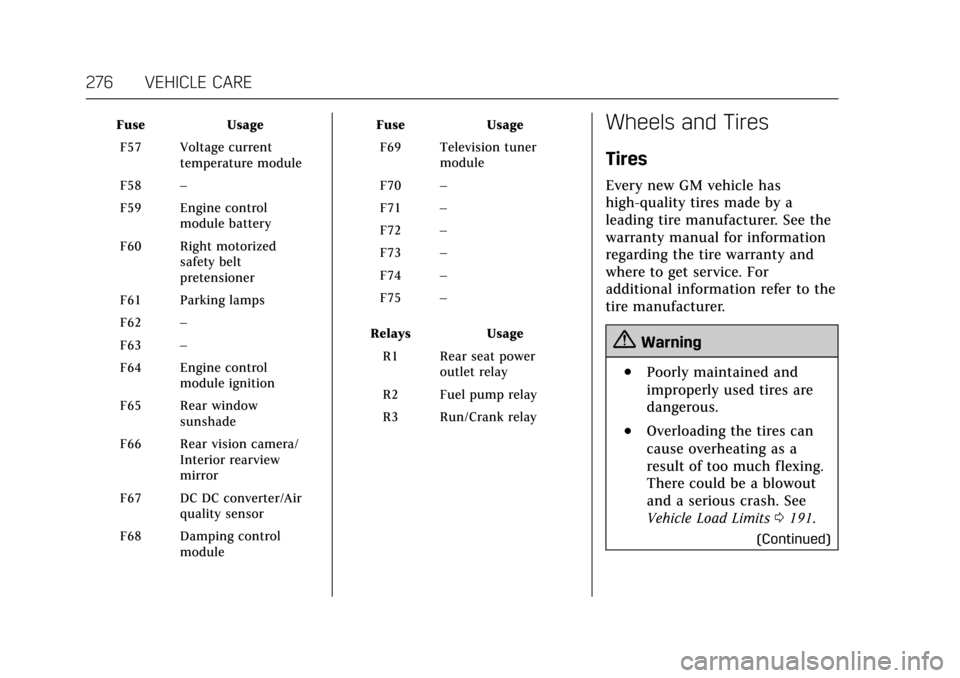
Cadillac CT6 Owner Manual (GMNA-Localizing-MidEast-10293390) - 2017 -
CRC - 6/21/16
276 VEHICLE CARE
FuseUsage
F57 Voltage current temperature module
F58 –
F59 Engine control module battery
F60 Right motorized safety belt
pretensioner
F61 Parking lamps
F62 –
F63 –
F64 Engine control module ignition
F65 Rear window sunshade
F66 Rear vision camera/ Interior rearview
mirror
F67 DC DC converter/Air quality sensor
F68 Damping control module Fuse
Usage
F69 Television tuner module
F70 –
F71 –
F72 –
F73 –
F74 –
F75 –
Relays Usage
R1 Rear seat power outlet relay
R2 Fuel pump relay
R3 Run/Crank relayWheels and Tires
Tires
Every new GM vehicle has
high-quality tires made by a
leading tire manufacturer. See the
warranty manual for information
regarding the tire warranty and
where to get service. For
additional information refer to the
tire manufacturer.
{Warning
.Poorly maintained and
improperly used tires are
dangerous.
.Overloading the tires can
cause overheating as a
result of too much flexing.
There could be a blowout
and a serious crash. See
Vehicle Load Limits 0191.
(Continued)