instrument panel CADILLAC CT6 2019 User Guide
[x] Cancel search | Manufacturer: CADILLAC, Model Year: 2019, Model line: CT6, Model: CADILLAC CT6 2019Pages: 438, PDF Size: 7.6 MB
Page 95 of 438

Cadillac CT6 Owner Manual (GMNA-Localizing-U.S./Canada-12533370) -
2019 - crc - 1/23/19
94 SEATS AND RESTRAINTS
Servicing the
Airbag-Equipped Vehicle
Airbags affect how the vehicle should
be serviced. There are parts of the
airbag system in several places around
the vehicle. Your dealer and the
service manual have information
about servicing the vehicle and the
airbag system. To purchase a service
manual, seePublication Ordering
Information 0410.
{Warning
For up to 10 seconds after the
vehicle is turned off and the 12‐volt
battery is disconnected, an airbag
can still inflate during improper
service. You can be injured if you
are close to an airbag when it
inflates. Avoid yellow connectors.
They are probably part of the airbag
system. Be sure to follow proper
service procedures, and make sure
the person performing work for you
is qualified to do so.
Adding Equipment to the
Airbag-Equipped Vehicle
Adding accessories that change the
vehicle's frame, bumper system,
height, front end, or side sheet metal
may keep the airbag system from
working properly.
The operation of the airbag system
can also be affected by changing,
including improperly repairing or
replacing, any parts of the following:
.
Airbag system, including airbag
modules, front or side impact
sensors, sensing and diagnostic
module, or airbag wiring
. Front seats, including stitching,
seams or zippers
. Seat belts
. Steering wheel, instrument panel,
overhead console, ceiling trim,
or pillar garnish trim
. Inner door seals, including
speakers
Your dealer and the service manual
have information about the location of
the airbag modules and sensors, sensing and diagnostic module, and
airbag wiring along with the proper
replacement procedures.
In addition, the vehicle has a
passenger sensing system for the front
outboard passenger position, which
includes sensors that are part of the
passenger seat. The passenger sensing
system may not operate properly if
the original seat trim is replaced with
non-GM covers, upholstery, or trim; or
with GM covers, upholstery, or trim
designed for a different vehicle. Any
object, such as an aftermarket seat
heater or a comfort-enhancing pad or
device, installed under or on top of
the seat fabric, could also interfere
with the operation of the passenger
sensing system. This could either
prevent proper deployment of the
passenger airbag(s) or prevent the
passenger sensing system from
properly turning off the passenger
airbag(s). See
Passenger Sensing
System 090.
If the vehicle has rollover roof-rail
airbags, see Different Size Tires and
Wheels 0356 for additional important
information.
Page 115 of 438
Cadillac CT6 Owner Manual (GMNA-Localizing-U.S./Canada-12533370) -
2019 - crc - 1/23/19
114 STORAGE
Storage
Storage Compartments
Storage Compartments . . . . . . . . . . 114
Instrument Panel Storage . . . . . . . . 114
Glove Box . . . . . . . . . . . . . . . . . . . . . . . . . 114
Cupholders . . . . . . . . . . . . . . . . . . . . . . . . 115
Armrest Storage . . . . . . . . . . . . . . . . . . 115
Rear Storage . . . . . . . . . . . . . . . . . . . . . . 116
Center Console Storage . . . . . . . . . . 116
Additional Storage Features
Cargo Tie-Downs . . . . . . . . . . . . . . . . . 117
Convenience Net . . . . . . . . . . . . . . . . . 117
Storage Compartments
{Warning
Do not store heavy or sharp objects
in storage compartments. In a
crash, these objects may cause the
cover to open and could result in
injury.
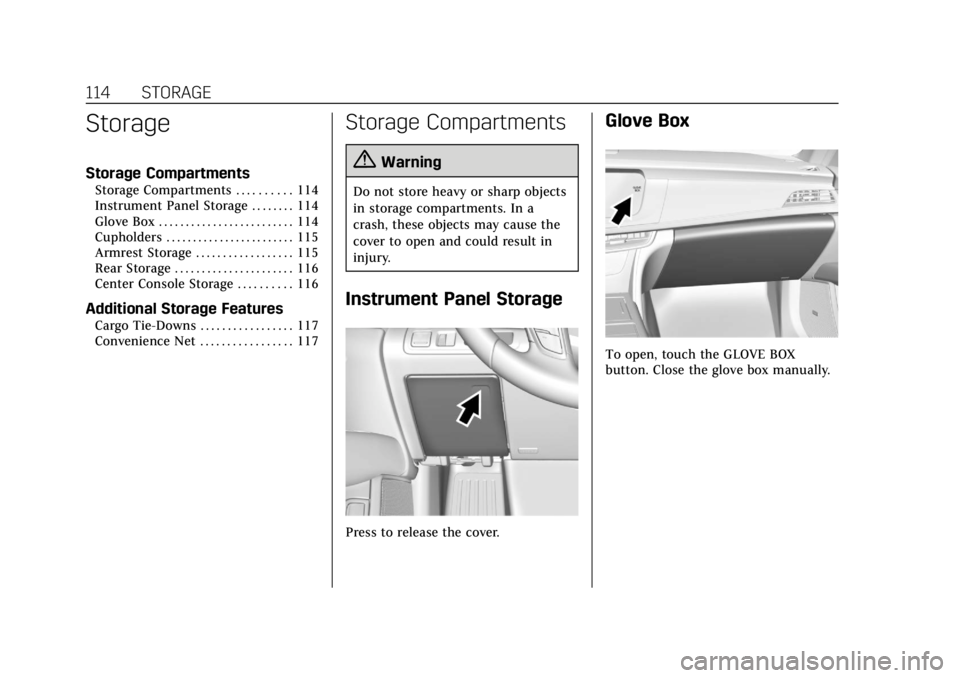
Instrument Panel Storage
Press to release the cover.
Glove Box
To open, touch the GLOVE BOX
button. Close the glove box manually.
Page 123 of 438
Cadillac CT6 Owner Manual (GMNA-Localizing-U.S./Canada-12533370) -
2019 - crc - 1/23/19
122 INSTRUMENTS AND CONTROLS
With Rainsense, if the transmission is
in N (Neutral) and the vehicle speed is
very slow, the wipers will
automatically stop at the base of the
windshield.
The wiper operations return to normal
when the transmission is no longer in
N (Neutral) or the vehicle speed has
increased.
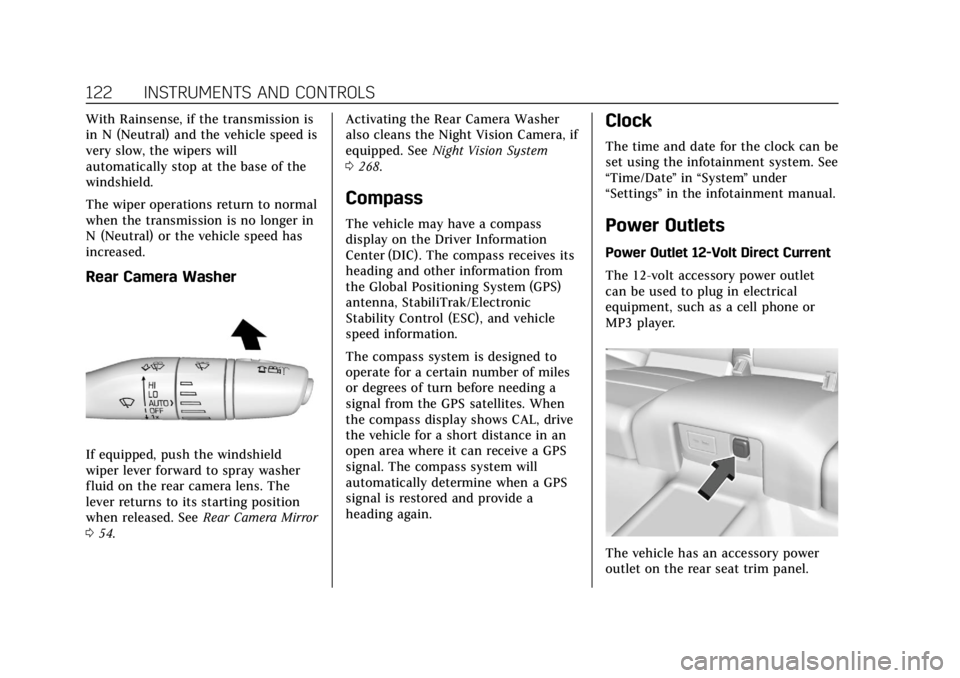
Rear Camera Washer
If equipped, push the windshield
wiper lever forward to spray washer
fluid on the rear camera lens. The
lever returns to its starting position
when released. SeeRear Camera Mirror
0 54. Activating the Rear Camera Washer
also cleans the Night Vision Camera, if
equipped. See
Night Vision System
0 268.
Compass
The vehicle may have a compass
display on the Driver Information
Center (DIC). The compass receives its
heading and other information from
the Global Positioning System (GPS)
antenna, StabiliTrak/Electronic
Stability Control (ESC), and vehicle
speed information.
The compass system is designed to
operate for a certain number of miles
or degrees of turn before needing a
signal from the GPS satellites. When
the compass display shows CAL, drive
the vehicle for a short distance in an
open area where it can receive a GPS
signal. The compass system will
automatically determine when a GPS
signal is restored and provide a
heading again.
Clock
The time and date for the clock can be
set using the infotainment system. See
“Time/Date ”in “System ”under
“Settings ”in the infotainment manual.
Power Outlets
Power Outlet 12-Volt Direct Current
The 12-volt accessory power outlet
can be used to plug in electrical
equipment, such as a cell phone or
MP3 player.
The vehicle has an accessory power
outlet on the rear seat trim panel.
Page 142 of 438

Cadillac CT6 Owner Manual (GMNA-Localizing-U.S./Canada-12533370) -
2019 - crc - 1/23/19
INSTRUMENTS AND CONTROLS 141
away once the engine is warmed
up. If this occurs, change the fuel
brand. It may require at least one
full tank of the proper fuel to turn
the light off. SeeRecommended
Fuel (2.0L L4 Turbo Engine) 0277
or
Recommended Fuel (3.0L Twin
Turbo V6 and 4.2L Twin Turbo
V8 Engines) 0277 or
Recommended Fuel (3.6L V6 Engine)
0 277.
If the light remains on, see your
dealer.
Emissions Inspection and
Maintenance Programs
If the vehicle requires an Emissions
Inspection/Maintenance test, the test
equipment will likely connect to the
vehicle's Data Link Connector (DLC).
The DLC is under the instrument
panel to the left of the steering wheel.
Connecting devices that are not used
to perform an Emissions Inspection/
Maintenance test or to service the
vehicle may affect vehicle operation.
See Add-On Electrical Equipment 0287.
See your dealer if assistance is needed.
The vehicle may not pass
inspection if:
. The light is on when the engine is
running.
. The light does not come on when
the ignition is in Service Mode.
. Critical emission control systems
have not been completely
diagnosed. If this happens, the
vehicle would not be ready for
inspection and might require
several days of routine driving
before the system is ready for
inspection. This can happen if the
12-volt battery has recently been
replaced or run down, or if the
vehicle has been recently serviced.
See your dealer if the vehicle will not
pass or cannot be made ready for
the test.Brake System Warning
Light (3.0L Twin Turbo and
3.6L V6 Engines)
The vehicle brake system consists of
two hydraulic circuits. If one circuit is
not working, the remaining circuit can
still work to stop the vehicle. For
normal braking performance, both
circuits need to be working.
If the warning light comes on, there is
a brake problem. Have the brake
system inspected right away.
MetricEnglish
This light should come on briefly
when the engine is started. If it does
not come on then, have it fixed so it
will be ready to warn you if there is a
problem.
If the light comes on and stays on,
there is a brake problem.
Page 153 of 438
Cadillac CT6 Owner Manual (GMNA-Localizing-U.S./Canada-12533370) -
2019 - crc - 1/23/19
152 INSTRUMENTS AND CONTROLS
Oil Life :Shows an estimate of the
oil's remaining useful life.
If REMAINING OIL LIFE 99% is
displayed, that means 99% of the
current oil life remains.
When the remaining oil life is low, the
CHANGE ENGINE OIL SOON message
will appear on the display. The oil
should be changed as soon as
possible. See Engine Oil0299. In
addition to the engine oil life system
monitoring the oil life, additional
maintenance is recommended. See
Maintenance Schedule 0383.
The Oil Life display must be reset
after each oil change. It will not reset
itself. Do not reset the Oil Life display
accidentally at any time other than
when the oil has just been changed.
It cannot be reset accurately until the
next oil change. To reset the engine
oil life system, press and hold SEL for
several seconds while the Oil Life
display is active. See Engine Oil Life
System 0302.
Engine Air Filter Life : Shows an
estimate of the engine air filter’s
remaining useful life and the state of
the system. Engine Air Filter Life 95% means 95% of the current air filter life
remains. Messages will display based
on the engine air filter life and the
state of the system. When the
REPLACE AT NEXT OIL CHANGE
message displays, the engine air filter
should be replaced at the time of the
next oil change. When the REPLACE
ENGINE AIR FILTER NOW message
displays, the engine air filter should
be replaced as soon as possible.
The Engine Air Filter Life display
must be reset after the engine air
filter replacement. To reset, see
Engine
Air Filter Life System 0304.
Brake Pad Life : This displays an
estimate of the remaining life of the
front and rear brake pads. Messages
will display based on brake pad wear
and the state of the system. Reset the
Brake Pad Life display after replacing
the brake pads. See Brake Pad Life
System 0315.
Tire Pressure : Shows the
approximate pressures of all four tires.
Tire pressure is displayed in either
kilopascal (kPa) or in pounds per
square inch (psi). If the pressure is
low, the value for that tire is shown in amber. See
Tire Pressure Monitor
System 0348 and
Tire Pressure Monitor Operation 0349.
Vehicle Odometer (Base Cluster) :
Shows the odometer.
Blank Page : Allows for no
information to be displayed in the
cluster info display areas.
Head-Up Display (HUD)
{Warning
If the HUD image is too bright or
too high in your field of view, it
may take you more time to see
things you need to see when it is
dark outside. Be sure to keep the
HUD image dim and placed low in
your field of view.
If equipped with HUD, some
information concerning the operation
of the vehicle is projected onto the
windshield. The information is
projected through the HUD lens on
top of the instrument panel. The
Page 167 of 438

Cadillac CT6 Owner Manual (GMNA-Localizing-U.S./Canada-12533370) -
2019 - crc - 1/23/19
166 LIGHTING
Lighting
Exterior Lighting
Exterior Lamp Controls . . . . . . . . . . 166
Exterior Lamps Off Reminder . . . 168
Headlamp High/Low-BeamChanger . . . . . . . . . . . . . . . . . . . . . . . . . . 168
Flash-to-Pass . . . . . . . . . . . . . . . . . . . . . 168
Daytime Running Lamps (DRL) . . . . . . . . . . . . . . . . . . . . 168
Automatic Headlamp System . . . 169
Hazard Warning Flashers . . . . . . . . 169
Turn and Lane-Change Signals . . . . . . . . . . . . . . . . . . . . . . . . . . . 170
Cornering Lamps . . . . . . . . . . . . . . . . . 170
Interior Lighting
Instrument Panel Illumination Control . . . . . . . . . . . . . . . . . . . . . . . . . . 170
Courtesy Lamps . . . . . . . . . . . . . . . . . . 171
Dome Lamps . . . . . . . . . . . . . . . . . . . . . 171
Reading Lamps . . . . . . . . . . . . . . . . . . . 171
Lighting Features
Entry Lighting . . . . . . . . . . . . . . . . . . . . 172
Exit Lighting . . . . . . . . . . . . . . . . . . . . . . 172
Battery Load Management . . . . . . 173
Battery Power Protection . . . . . . . . 173
Exterior Lighting Battery Saver . . . . . . . . . . . . . . . . . . . . . . . . . . . . . 173
Exterior Lighting
Exterior Lamp Controls
The exterior lamp control is on the
turn signal lever.
Turn the control to the following
positions:
O:Turns the exterior lamps off and
deactivates the AUTO mode. Turn to
Oagain to reactivate the AUTO mode.
In Canada, the headlamps will
automatically reactivate when the
vehicle is shifted out of P (Park).
AUTO : Automatically turns the
exterior lamps on and off, depending
on outside lighting.
Page 168 of 438

Cadillac CT6 Owner Manual (GMNA-Localizing-U.S./Canada-12533370) -
2019 - crc - 1/23/19
LIGHTING 167
;:Turns on the parking lamps
including all lamps, except the
headlamps.
2: Turns on the headlamps together
with the parking lamps and
instrument panel lights.
IntelliBeam System
If equipped, this system turns the
vehicle's high-beam headlamps on and
off according to surrounding traffic
conditions.
The system turns the high-beam
headlamps on when it is dark enough
and there is no other traffic present.
This light
bcomes on in the
instrument cluster when the
IntelliBeam system is enabled. Turning On and Enabling IntelliBeam
To enable the IntelliBeam system,
press the button on the end of the
turn signal lever when the exterior
lamp control is in the AUTO or
2
position.
Driving with IntelliBeam
The system only activates the high
beams when driving over 40 km/h
(25 mph).
The blue high-beam on light appears
on the instrument cluster when the
high beams are on.
There is a sensor near the top center
of the windshield that automatically
controls the system. Keep this area of
the windshield clear of debris to allow
for best system performance.The high-beam headlamps remain on,
under the automatic control, until one
of the following situations occurs:
.
The system detects an
approaching vehicle's headlamps.
. The system detects a preceding
vehicle's taillamps.
. The outside light is bright enough
that high-beam headlamps are not
required.
. The vehicle's speed drops below
20 km/h (12 mph).
. The IntelliBeam system is disabled
by the button on the turn signal
lever. If this happens, press the
button on the end of the turn
signal lever when the exterior
lamp control is in AUTO or
2to
reactivate the IntelliBeam system.
The instrument cluster light will
come on to indicate the
IntelliBeam is reactivated.
Page 170 of 438
Cadillac CT6 Owner Manual (GMNA-Localizing-U.S./Canada-12533370) -
2019 - crc - 1/23/19
LIGHTING 169
The DRL turn off when the headlamps
are turned to
Oor the ignition is off.
For vehicles first sold in Canada, the
DRL can only be turned off when the
vehicle is parked.
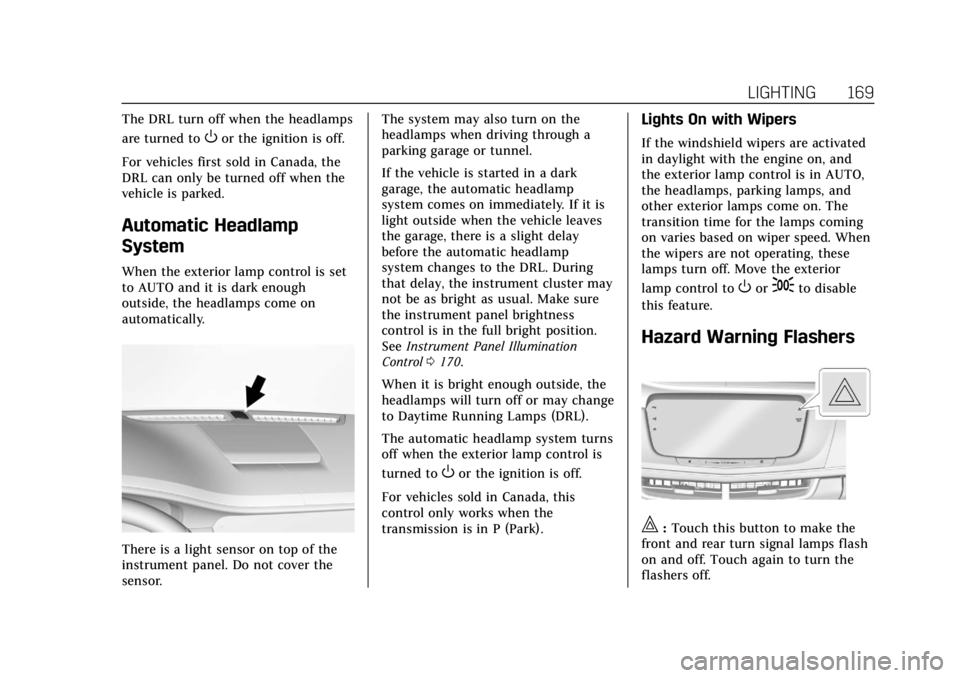
Automatic Headlamp
System
When the exterior lamp control is set
to AUTO and it is dark enough
outside, the headlamps come on
automatically.
There is a light sensor on top of the
instrument panel. Do not cover the
sensor. The system may also turn on the
headlamps when driving through a
parking garage or tunnel.
If the vehicle is started in a dark
garage, the automatic headlamp
system comes on immediately. If it is
light outside when the vehicle leaves
the garage, there is a slight delay
before the automatic headlamp
system changes to the DRL. During
that delay, the instrument cluster may
not be as bright as usual. Make sure
the instrument panel brightness
control is in the full bright position.
See
Instrument Panel Illumination
Control 0170.
When it is bright enough outside, the
headlamps will turn off or may change
to Daytime Running Lamps (DRL).
The automatic headlamp system turns
off when the exterior lamp control is
turned to
Oor the ignition is off.
For vehicles sold in Canada, this
control only works when the
transmission is in P (Park).
Lights On with Wipers
If the windshield wipers are activated
in daylight with the engine on, and
the exterior lamp control is in AUTO,
the headlamps, parking lamps, and
other exterior lamps come on. The
transition time for the lamps coming
on varies based on wiper speed. When
the wipers are not operating, these
lamps turn off. Move the exterior
lamp control to
Oor;to disable
this feature.
Hazard Warning Flashers
|: Touch this button to make the
front and rear turn signal lamps flash
on and off. Touch again to turn the
flashers off.
Page 171 of 438

Cadillac CT6 Owner Manual (GMNA-Localizing-U.S./Canada-12533370) -
2019 - crc - 1/23/19
170 LIGHTING
The hazard warning flashers turn on
automatically if the airbags deploy.
Turn and Lane-Change
Signals
Move the lever all the way up or down
to signal a turn.
An arrow on the instrument cluster
flashes in the direction of the turn or
lane change.
Raise or lower the lever until the
arrow starts to flash to signal a lane
change. Hold it there until the lane
change is completed. If the lever is
briefly pressed and released, the turn
signal flashes three times.The turn and lane-change signal can
be turned off manually by moving the
lever back to its original position.
If after signaling a turn or lane
change, the arrow flashes rapidly or
does not come on, a signal function
may be inoperative. This vehicle is
equipped with LED lighting. For
replacement of any LED lighting
contact your dealer.
Cornering Lamps
If equipped with cornering lamps, they
automatically come on when all of the
following occur:
.
The low-beam headlamps are on.
. The turn signals are activated or
the steering wheel is at a
calibrated angle.
. The vehicle speed is below the
calibrated speed.
Interior Lighting
Instrument Panel
Illumination Control
The brightness of the instrument
panel lighting and steering wheel
controls can be adjusted.
D:Move the thumbwheel up or
down to brighten or dim the lights.
The brightness of the displays
automatically adjusts based on
outdoor lighting. The instrument
Page 178 of 438
Cadillac CT6 Owner Manual (GMNA-Localizing-U.S./Canada-12533370) -
2019 - crc - 1/23/19
CLIMATE CONTROLS 177
To improve fuel efficiency and to cool
the vehicle faster, recirculation may be
automatically selected in warm
weather. The recirculation light will
not come on in AUTO mode. Press
@to select recirculation; press it
again to select outside air.
English units can be changed to
metric units through the instrument
cluster. See “Cluster Options Menu ”
under Instrument Cluster (Uplevel)
0 130 or
Instrument Cluster (Base Level) 0127.
OFF : Press to turn the fan on or off.
The temperature control and air
delivery mode can still be adjusted.
Q/R: The temperature can be
adjusted separately for the driver and
the passenger. Press up or down to
increase or decrease the temperature.
Press and hold up or down to rapidly
increase or decrease the temperature.
The driver and passenger
temperatures can also be adjusted by
touching the controls on the climate
control display. Sync :
Touch Sync on the climate
control display to link all climate zone
settings to the driver settings. When
all climate zone settings are linked,
the Sync indicator will be lit. Adjust
the driver side temperature control to
change the linked temperature. When
the front or rear passenger settings
are adjusted, the Sync indicator will
turn off.
Manual Operation
Q 9 R:Press or touch the fan
buttons on the center stack or climate
control display to increase or decrease
the fan speed. Press and hold the
buttons to adjust speed more quickly.
The fan speed setting displays.
Pressing either button cancels
automatic fan control and the fan can
be controlled manually. Press AUTO to
return to automatic operation.
Driver and Passenger Air Delivery
Mode Controls : When the climate
information is displayed, touch the
desired air delivery mode on the
climate control display to change the
direction of the airflow. The selected
air delivery mode button is lit.
Touching any of the air delivery buttons cancels automatic air delivery
control and the direction of the
airf low can be controlled manually.
Press AUTO to return to automatic
operation.
To change the current mode, select
one of the following:
Y:
Air is directed to the instrument
panel outlets.
\: Air is divided between the
instrument panel outlets and the floor
outlets.
[: Air is directed to the floor
outlets.
c: Clears the windows of fog or
moisture. Air is directed to the
windshield and floor outlets.
0: Clears the windshield of fog or
frost more quickly. Air is directed to
the windshield. Press
0to turn on or
off. Changing the air delivery mode
also turns the defrost off.
A/C : Touch A/C on the climate
control display to turn the automatic
air conditioning on or off. If the fan is