maintenance CADILLAC CT6 2019 User Guide
[x] Cancel search | Manufacturer: CADILLAC, Model Year: 2019, Model line: CT6, Model: CADILLAC CT6 2019Pages: 438, PDF Size: 7.6 MB
Page 153 of 438
Cadillac CT6 Owner Manual (GMNA-Localizing-U.S./Canada-12533370) -
2019 - crc - 1/23/19
152 INSTRUMENTS AND CONTROLS
Oil Life :Shows an estimate of the
oil's remaining useful life.
If REMAINING OIL LIFE 99% is
displayed, that means 99% of the
current oil life remains.
When the remaining oil life is low, the
CHANGE ENGINE OIL SOON message
will appear on the display. The oil
should be changed as soon as
possible. See Engine Oil0299. In
addition to the engine oil life system
monitoring the oil life, additional
maintenance is recommended. See
Maintenance Schedule 0383.
The Oil Life display must be reset
after each oil change. It will not reset
itself. Do not reset the Oil Life display
accidentally at any time other than
when the oil has just been changed.
It cannot be reset accurately until the
next oil change. To reset the engine
oil life system, press and hold SEL for
several seconds while the Oil Life
display is active. See Engine Oil Life
System 0302.
Engine Air Filter Life : Shows an
estimate of the engine air filter’s
remaining useful life and the state of
the system. Engine Air Filter Life 95% means 95% of the current air filter life
remains. Messages will display based
on the engine air filter life and the
state of the system. When the
REPLACE AT NEXT OIL CHANGE
message displays, the engine air filter
should be replaced at the time of the
next oil change. When the REPLACE
ENGINE AIR FILTER NOW message
displays, the engine air filter should
be replaced as soon as possible.
The Engine Air Filter Life display
must be reset after the engine air
filter replacement. To reset, see
Engine
Air Filter Life System 0304.
Brake Pad Life : This displays an
estimate of the remaining life of the
front and rear brake pads. Messages
will display based on brake pad wear
and the state of the system. Reset the
Brake Pad Life display after replacing
the brake pads. See Brake Pad Life
System 0315.
Tire Pressure : Shows the
approximate pressures of all four tires.
Tire pressure is displayed in either
kilopascal (kPa) or in pounds per
square inch (psi). If the pressure is
low, the value for that tire is shown in amber. See
Tire Pressure Monitor
System 0348 and
Tire Pressure Monitor Operation 0349.
Vehicle Odometer (Base Cluster) :
Shows the odometer.
Blank Page : Allows for no
information to be displayed in the
cluster info display areas.
Head-Up Display (HUD)
{Warning
If the HUD image is too bright or
too high in your field of view, it
may take you more time to see
things you need to see when it is
dark outside. Be sure to keep the
HUD image dim and placed low in
your field of view.
If equipped with HUD, some
information concerning the operation
of the vehicle is projected onto the
windshield. The information is
projected through the HUD lens on
top of the instrument panel. The
Page 176 of 438

Cadillac CT6 Owner Manual (GMNA-Localizing-U.S./Canada-12533370) -
2019 - crc - 1/23/19
CLIMATE CONTROLS 175
Climate Controls
Climate Control Systems
Automatic Climate ControlSystem (Dual Zone) . . . . . . . . . . . . 175
Automatic Climate Control System (Quad Zone) . . . . . . . . . . . . 180
Air Vents
Air Vents . . . . . . . . . . . . . . . . . . . . . . . . . . 187
Maintenance
Passenger Compartment AirFilter . . . . . . . . . . . . . . . . . . . . . . . . . . . . . 187
Service . . . . . . . . . . . . . . . . . . . . . . . . . . . . 187
Climate Control Systems
Automatic Climate Control System (Dual Zone)
The climate control buttons on the center stack and on the climate control
display are used to adjust the heating, cooling, and ventilation.
Center Stack Climate Controls
1. Driver and Passenger Temperature Controls
2. Fan Control
3. Driver and Passenger Heated and Ventilated Seats (If Equipped)
4. Rear Window Defogger 5. Defrost
6. OFF (Fan)
7. Recirculation
8. AUTO (Automatic Operation)
Page 188 of 438
Cadillac CT6 Owner Manual (GMNA-Localizing-U.S./Canada-12533370) -
2019 - crc - 1/23/19
CLIMATE CONTROLS 187
Air Vents
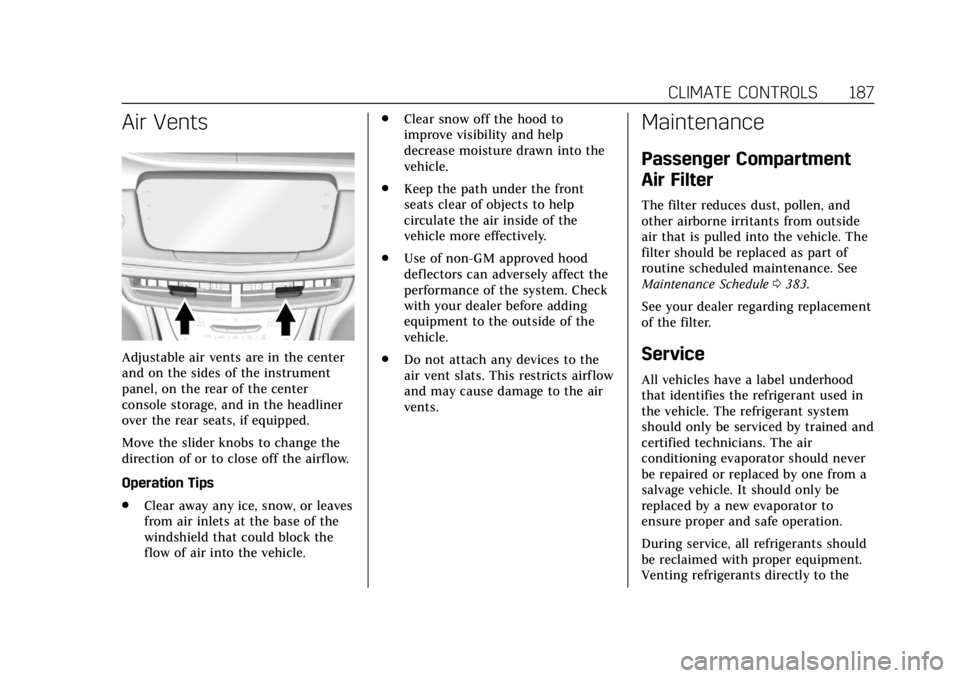
Adjustable air vents are in the center
and on the sides of the instrument
panel, on the rear of the center
console storage, and in the headliner
over the rear seats, if equipped.
Move the slider knobs to change the
direction of or to close off the airf low.
Operation Tips
.Clear away any ice, snow, or leaves
from air inlets at the base of the
windshield that could block the
flow of air into the vehicle. .
Clear snow off the hood to
improve visibility and help
decrease moisture drawn into the
vehicle.
. Keep the path under the front
seats clear of objects to help
circulate the air inside of the
vehicle more effectively.
. Use of non-GM approved hood
deflectors can adversely affect the
performance of the system. Check
with your dealer before adding
equipment to the outside of the
vehicle.
. Do not attach any devices to the
air vent slats. This restricts airflow
and may cause damage to the air
vents.
Maintenance
Passenger Compartment
Air Filter
The filter reduces dust, pollen, and
other airborne irritants from outside
air that is pulled into the vehicle. The
filter should be replaced as part of
routine scheduled maintenance. See
Maintenance Schedule 0383.
See your dealer regarding replacement
of the filter.
Service
All vehicles have a label underhood
that identifies the refrigerant used in
the vehicle. The refrigerant system
should only be serviced by trained and
certified technicians. The air
conditioning evaporator should never
be repaired or replaced by one from a
salvage vehicle. It should only be
replaced by a new evaporator to
ensure proper and safe operation.
During service, all refrigerants should
be reclaimed with proper equipment.
Venting refrigerants directly to the
Page 189 of 438
Cadillac CT6 Owner Manual (GMNA-Localizing-U.S./Canada-12533370) -
2019 - crc - 1/23/19
188 CLIMATE CONTROLS
atmosphere is harmful to the
environment and may also create
unsafe conditions based on inhalation,
combustion, frostbite, or other
health-based concerns.
The air conditioning system requires
periodic maintenance. See
Maintenance Schedule0383.
Page 193 of 438
Cadillac CT6 Owner Manual (GMNA-Localizing-U.S./Canada-12533370) -
2019 - crc - 1/23/19
192 DRIVING AND OPERATING
The amount of steering effort required
is less at slower speeds to make the
vehicle more maneuverable and easier
to park. At faster speeds, the steering
effort increases to provide a sport-like
feel to the steering. This provides
maximum control and stability.
Electric Power Steering
The vehicle has electric power
steering. It does not have power
steering fluid. Regular maintenance is
not required.
If power steering assist is lost due to a
system malfunction, the vehicle can
be steered, but may require increased
effort. See your dealer if there is a
problem.
If the steering wheel is turned until it
reaches the end of its travel and is
held against that position for an
extended period of time, power
steering assist may be reduced.
If the steering assist is used for an
extended period of time while the
vehicle is not moving, power assist
may be reduced.Normal use of the power steering
assist should return when the system
cools down.
See your dealer if there is a problem.
Curve Tips
.
Take curves at a reasonable speed.
. Reduce speed before entering a
curve.
. Maintain a reasonable steady
speed through the curve.
. Wait until the vehicle is out of the
curve before accelerating gently
into the straightaway.
Steering in Emergencies
.
There are some situations when
steering around a problem may be
more effective than braking.
. Holding both sides of the steering
wheel allows you to turn
180 degrees without removing
a hand.
. Antilock Brake System (ABS)
allows steering while braking.
Off-Road Recovery
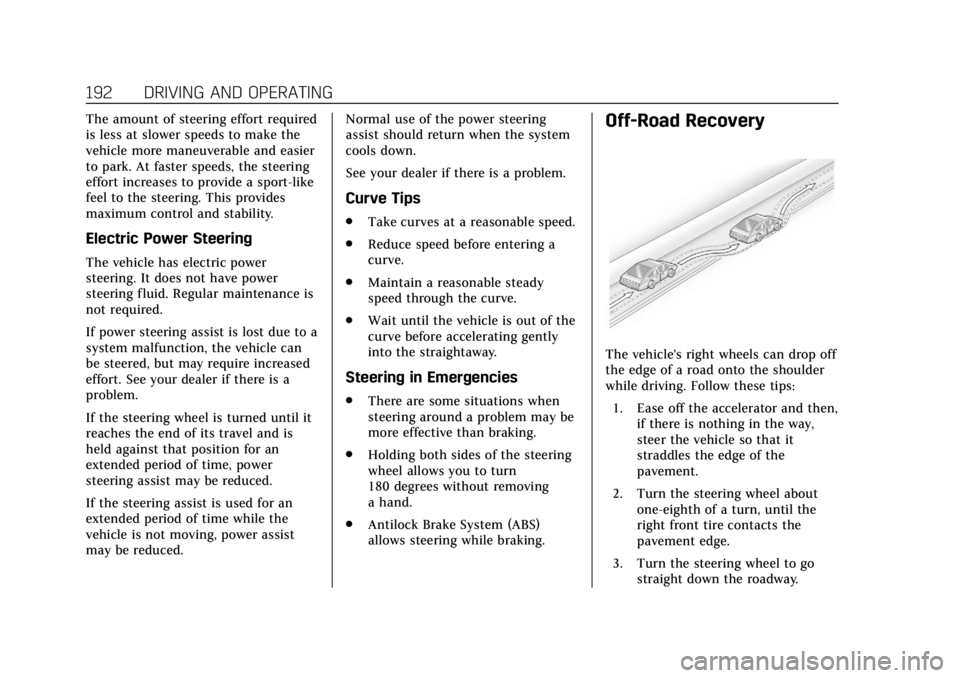
The vehicle's right wheels can drop off
the edge of a road onto the shoulder
while driving. Follow these tips:
1. Ease off the accelerator and then, if there is nothing in the way,
steer the vehicle so that it
straddles the edge of the
pavement.
2. Turn the steering wheel about one-eighth of a turn, until the
right front tire contacts the
pavement edge.
3. Turn the steering wheel to go straight down the roadway.
Page 227 of 438

Cadillac CT6 Owner Manual (GMNA-Localizing-U.S./Canada-12533370) -
2019 - crc - 1/23/19
226 DRIVING AND OPERATING
Engine Sound
Adjusts the volume of engine noise.
Adjusts the volume of engine noise
from quietest in Tour mode to most
robust in Track mode.
Steering
Adjusts from a lighter steering feel in
Tour Mode to reduced assist in Sport
and Track Mode for more
steering feel.
Suspension (if equipped with
Magnetic Ride)
Adjusts the shock dampening
firmness from a comfort tune in Tour
Mode to an optimized responsiveness
tune in Sport and Track.
Traction and Stability Control
StabiliTrak/Electronic Stability Control
(ESC) can be turned off by pressing
and holding the button for
five seconds.Driver Mode Customization
The Engine Sound Management,
steering, and suspension drive modes
can be set to the driver’s preference.
See
“Driving Mode ”under Vehicle
Personalization 0157.
When in the Track main vehicle mode,
you cannot overwrite the Steering or
Suspension settings. These settings
are designed to interact with the
advanced functions in the Track Mode
and cannot be overwritten.
The selections made in the Driving
Mode menu overwrite the main
vehicle mode selection via the buttons
or switch on the center console. In
order to customize and overwrite,
select one of the three settings by
touching the infotainment display.
When in the customization screen for
each system, select one of the
available options:
• Auto (Follows the MODE switch)
• Tour
• Sport
• Track (V-Series only) The default will be to follow the
vehicle MODE switch settings, but the
main vehicle mode selection for the
currently selected system can be
overwritten using this menu. The
settings selected in this menu will set
the vehicle behavior in all selected
vehicle modes, and will be retained
over each ignition cycle. They do not
have to be reset each time the vehicle
is started.
Locking Rear Axle
Vehicles with a limited-slip rear axle
can give more traction on snow, mud,
ice, sand, or gravel. When traction is
low, this feature allows the drive
wheel with the most traction to move
the vehicle. The limited-slip rear axle
also gives the driver enhanced control
when cornering hard or completing a
maneuver, such as a lane change. For
vehicles with limited-slip rear axle, the
rear axle fluid should be changed. See
Maintenance Schedule
0383.
Page 285 of 438
Cadillac CT6 Owner Manual (GMNA-Localizing-U.S./Canada-12533370) -
2019 - crc - 1/23/19
284 DRIVING AND OPERATING
3. When the wheel chocks are inplace, release the regular brakes
until the chocks absorb the load.
4. Reapply the brake pedal. Then apply the parking brake and shift
into P (Park).
5. Release the brake pedal.
Leaving After Parking on a Hill
1. Apply and hold the brake pedal. .Start the engine.
. Shift into a gear.
. Release the parking brake.
2. Let up on the brake pedal.
3. Drive slowly until the trailer is clear of the chocks.
4. Stop and have someone pick up and store the chocks.
Maintenance when Trailer
Towing
The vehicle needs service more often
when used to tow trailers. See
Maintenance Schedule 0383. It is
especially important to check the
automatic transmission fluid, engine oil, axle lubricant, belts, cooling
system, and brake system before and
during each trip.
Check periodically that all nuts and
bolts on the trailer hitch are tight.
Engine Cooling when Trailer
Towing
The cooling system may temporarily
overheat during severe operating
conditions. See
Engine Overheating
0 312.
Trailer Towing
Caution
Towing a trailer improperly can
damage the vehicle and result in
costly repairs not covered by the
vehicle warranty. To tow a trailer
correctly, follow the directions in
this section and see your dealer for
important information about
towing a trailer with the vehicle.
Trailer Weight
{Warning
Never exceed the towing capacity
for your vehicle.
Safe trailering requires monitoring the
weight, speed, altitude, road grades,
outside temperature, dimensions of
the front of the trailer, and how
frequently the vehicle is used to tow a
trailer.
{Warning
You and others could be seriously
injured or killed if the trailer is too
heavy or the trailer brakes are
inadequate for the load. The vehicle
may be damaged, and the repairs
would not be covered by the vehicle
warranty.
Only tow a trailer if all the steps in
this section have been followed. Ask
your dealer for advice and
information about towing a trailer.
Page 288 of 438

Cadillac CT6 Owner Manual (GMNA-Localizing-U.S./Canada-12533370) -
2019 - crc - 1/23/19
DRIVING AND OPERATING 287
Trailer tires deteriorate over time. The
trailer tire sidewall will show the week
and year the tire was manufactured.
Many trailer tire manufacturers
recommend replacing tires more than
six years old.
Overloading is another leading cause
of trailer tire blow-outs. Never load
your trailer with more weight than the
tires are designed to support. The load
rating is located on the trailer tire
sidewall.
Always know the maximum speed
rating for the trailer tires before
driving. This may be significantly
lower than the vehicle tire speed
rating. The speed rating may be on
the trailer tire sidewall. If the speed
rating is not shown, the default trailer
tire speed rating is 105 km/h
(65 mph).Conversions and
Add-Ons
Add-On Electrical
Equipment
{Warning
The Data Link Connector (DLC) is
used for vehicle service and
Emission Inspection/Maintenance
testing. SeeMalfunction Indicator
Lamp (Check Engine Light) 0139.
A device connected to the DLC —
such as an aftermarket fleet or
driver-behavior tracking device —
may interfere with vehicle systems.
This could affect vehicle operation
and cause a crash. Such devices
may also access information stored
in the vehicle’s systems.
Caution
Some electrical equipment can
damage the vehicle or cause
components to not work and would
not be covered by the vehicle
warranty. Always check with your
dealer before adding electrical
equipment.
Add-on equipment can drain the
vehicle's 12-volt battery, even if the
vehicle is not operating.
The vehicle has an airbag system.
Before attempting to add anything
electrical to the vehicle, see Servicing
the Airbag-Equipped Vehicle 094 and
Adding Equipment to the
Airbag-Equipped Vehicle 094.
Page 292 of 438
Cadillac CT6 Owner Manual (GMNA-Localizing-U.S./Canada-12533370) -
2019 - crc - 1/23/19
VEHICLE CARE 291
If equipped with remote vehicle start,
open the hood before performing any
service work to prevent remote
starting the vehicle accidentally. See
Remote Vehicle Start036.
Keep a record with all parts receipts
and list the mileage and the date of
any service work performed. See
Maintenance Records 0395.
Caution
Even small amounts of
contamination can cause damage to
vehicle systems. Do not allow
contaminants to contact the fluids,
reservoir caps, or dipsticks.
Hood
{Warning
Gas struts and other metal
components under the hood can get
hot after running the engine. Do
not touch these components as
they can burn unprotected skin and
could cause serious injury. Clear any snow from the hood before
opening.
To open the hood:
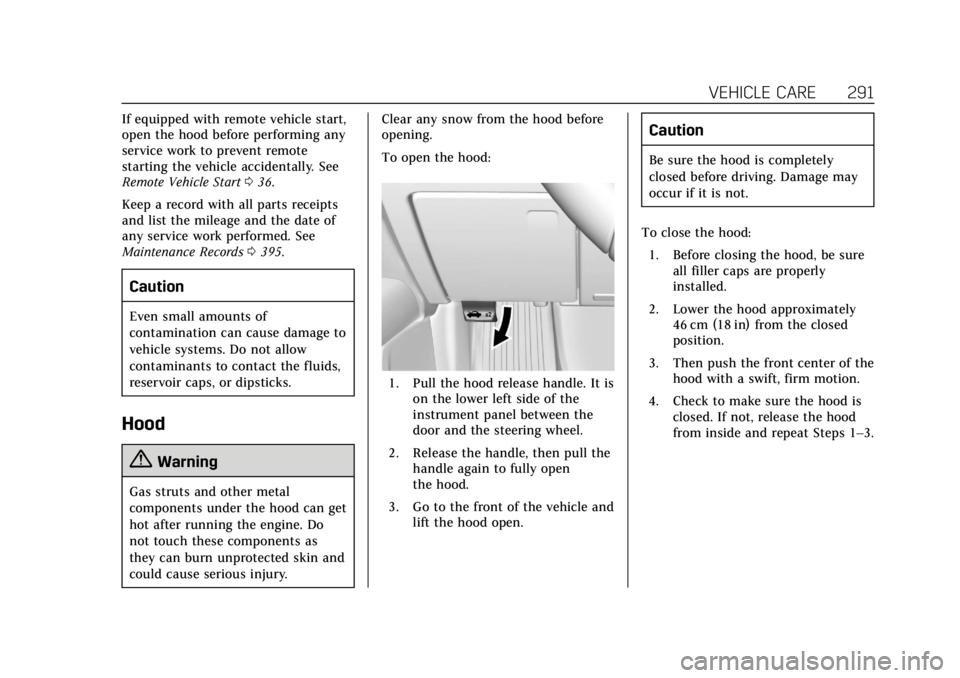
1. Pull the hood release handle. It is
on the lower left side of the
instrument panel between the
door and the steering wheel.
2. Release the handle, then pull the handle again to fully open
the hood.
3. Go to the front of the vehicle and lift the hood open.
Caution
Be sure the hood is completely
closed before driving. Damage may
occur if it is not.
To close the hood: 1. Before closing the hood, be sure all filler caps are properly
installed.
2. Lower the hood approximately 46 cm (18 in) from the closed
position.
3. Then push the front center of the hood with a swift, firm motion.
4. Check to make sure the hood is closed. If not, release the hood
from inside and repeat Steps 1–3.
Page 304 of 438
Cadillac CT6 Owner Manual (GMNA-Localizing-U.S./Canada-12533370) -
2019 - crc - 1/23/19
VEHICLE CARE 303
How to Reset the Engine Oil Life
System
Reset the system whenever the engine
oil is changed so that the system can
calculate the next engine oil change.
To reset the system:1. Using the DIC buttons, display REMAINING OIL LIFE on the
DIC. See Driver Information Center
(DIC) 0150.
2. Press and hold SEL to clear the CHANGE ENGINE OIL SOON
message and reset the oil life
at 100%.
Be careful not to reset the oil life
display accidentally at any time
other than after the oil is
changed. It cannot be reset
accurately until the next oil
change.
The oil life system can also be reset as
follows:
1. Using the DIC buttons, display REMAINING OIL LIFE on the
DIC. See Driver Information Center
(DIC) 0150. 2. Fully press and release the
accelerator pedal three times
within five seconds.
If the CHANGE ENGINE OIL
SOON message is not on, the
system is reset.
The system is reset when the
CHANGE ENGINE OIL SOON message
is off.
If the CHANGE ENGINE OIL SOON
message comes back on when the
vehicle is started, the engine oil life
system has not been reset. Repeat the
procedure.
Automatic Transmission
Fluid
How to Check Automatic
Transmission Fluid
It is not necessary to check the
transmission fluid level.
A transmission fluid leak is the only
reason for fluid loss. If a leak occurs,
take the vehicle to your dealer and
have it repaired as soon as possible. The vehicle is not equipped with a
transmission fluid level dipstick.
There is a special procedure for
checking and changing the
transmission fluid. Because this
procedure is difficult, this should be
done at the dealer. Contact your dealer
for additional information.
Caution
Use of the incorrect automatic
transmission fluid may damage the
vehicle, and the damage may not be
covered by the vehicle warranty.
Always use the correct automatic
transmission fluid. See
Recommended Fluids and Lubricants
0
392.
Change the fluid and filter at the
intervals listed in Maintenance
Schedule 0383, and be sure to use the
fluid listed in Recommended Fluids and
Lubricants 0392.