ignition CADILLAC CT6 2019 Workshop Manual
[x] Cancel search | Manufacturer: CADILLAC, Model Year: 2019, Model line: CT6, Model: CADILLAC CT6 2019Pages: 438, PDF Size: 7.6 MB
Page 219 of 438

Cadillac CT6 Owner Manual (GMNA-Localizing-U.S./Canada-12533370) -
2019 - crc - 1/23/19
218 DRIVING AND OPERATING
Electric Parking Brake
The vehicle has an Electric Parking
Brake (EPB). The EPB can always be
activated, even if the ignition is off. To
prevent draining the battery, avoid
repeated cycles of the EPB system
when the engine is not running.
The system has a
Yor PARK
Electric Parking Brake light, and a
8
Service Parking Brake light. See
Electric Parking Brake Light 0143 and
Service Electric Parking Brake Light
0 143. Before leaving the vehicle, check for
the
Yor PARK light to ensure that
the parking brake is applied.
EPB Apply
To apply the EPB:
1. Be sure the vehicle is at a complete stop.
2. Press the EPB switch momentarily.
The
Yor PARK light will flash and
then stay on once the EPB is fully
applied. If the
Yor PARK light
flashes continuously, then the EPB is
only partially applied or there is a
problem with the EPB. A DIC message
will display. Release the EPB and try
to apply it again. If the light does not
come on, or keeps flashing, have the
vehicle serviced. Do not drive the
vehicle if the
Yor PARK light is
flashing. See your dealer. See Electric
Parking Brake Light 0143.
If the
8light is on, press the EPB
switch and hold it. Continue to
hold the switch until the
Yor PARK light remains on. If
the
8light remains on, see your
dealer.
If the EPB is applied while the vehicle
is moving, the vehicle will decelerate
as long as the switch is pressed. If the
switch is pressed until the vehicle
comes to a stop, the EPB will remain
applied.
The vehicle may automatically apply
the EPB in some situations when the
vehicle is not moving. This is normal,
and is done to periodically check the
correct operation of the EPB system.
If the EPB fails to apply, block the rear
wheels to prevent vehicle movement.
EPB Release
To release the EPB:
1. Turn the ignition on or to ACC/ ACCESSORY.
2. Apply and hold the brake pedal.
3. Press the EPB switch momentarily.
The EPB is released when the
Yor
PARK light is off.
Page 227 of 438

Cadillac CT6 Owner Manual (GMNA-Localizing-U.S./Canada-12533370) -
2019 - crc - 1/23/19
226 DRIVING AND OPERATING
Engine Sound
Adjusts the volume of engine noise.
Adjusts the volume of engine noise
from quietest in Tour mode to most
robust in Track mode.
Steering
Adjusts from a lighter steering feel in
Tour Mode to reduced assist in Sport
and Track Mode for more
steering feel.
Suspension (if equipped with
Magnetic Ride)
Adjusts the shock dampening
firmness from a comfort tune in Tour
Mode to an optimized responsiveness
tune in Sport and Track.
Traction and Stability Control
StabiliTrak/Electronic Stability Control
(ESC) can be turned off by pressing
and holding the button for
five seconds.Driver Mode Customization
The Engine Sound Management,
steering, and suspension drive modes
can be set to the driver’s preference.
See
“Driving Mode ”under Vehicle
Personalization 0157.
When in the Track main vehicle mode,
you cannot overwrite the Steering or
Suspension settings. These settings
are designed to interact with the
advanced functions in the Track Mode
and cannot be overwritten.
The selections made in the Driving
Mode menu overwrite the main
vehicle mode selection via the buttons
or switch on the center console. In
order to customize and overwrite,
select one of the three settings by
touching the infotainment display.
When in the customization screen for
each system, select one of the
available options:
• Auto (Follows the MODE switch)
• Tour
• Sport
• Track (V-Series only) The default will be to follow the
vehicle MODE switch settings, but the
main vehicle mode selection for the
currently selected system can be
overwritten using this menu. The
settings selected in this menu will set
the vehicle behavior in all selected
vehicle modes, and will be retained
over each ignition cycle. They do not
have to be reset each time the vehicle
is started.
Locking Rear Axle
Vehicles with a limited-slip rear axle
can give more traction on snow, mud,
ice, sand, or gravel. When traction is
low, this feature allows the drive
wheel with the most traction to move
the vehicle. The limited-slip rear axle
also gives the driver enhanced control
when cornering hard or completing a
maneuver, such as a lane change. For
vehicles with limited-slip rear axle, the
rear axle fluid should be changed. See
Maintenance Schedule
0383.
Page 230 of 438

Cadillac CT6 Owner Manual (GMNA-Localizing-U.S./Canada-12533370) -
2019 - crc - 1/23/19
DRIVING AND OPERATING 229
Instrument Cluster (Base Level)0127.
The increment value used depends on
the units displayed.
Passing Another Vehicle While
Using Cruise Control
Use the accelerator pedal to increase
the vehicle speed. When you take your
foot off the pedal, the vehicle will slow
down to the previous set cruise speed.
While pressing the accelerator pedal
or shortly following the release to
override cruise, briefly applying SET−
will result in cruise set to the current
vehicle speed.
Using Cruise Control on Hills
How well the cruise control will work
on hills depends upon the vehicle
speed, load, and the steepness of the
hills. When going up steep hills, you
might have to step on the accelerator
pedal to maintain your speed. When
going downhill, the cruise control
system may automatically brake to
slow the vehicle down. Also, you may
have to brake or shift to a lower gear
to keep your speed down. If the brake
pedal is applied, cruise control
disengages. Ending Cruise Control
There are four ways to end cruise
control:
.
Step lightly on the brake pedal.
. Press
*.
. Shift the transmission to
N (Neutral).
. Press
J.
Erasing Speed Memory
The cruise control set speed is erased
from memory if
Jis pressed or if
the ignition is turned off.
Adaptive Cruise Control
If equipped with Adaptive Cruise
Control (ACC), it allows for selecting
the cruise control set speed and
following gap. Read this entire section
before using this system. ACC uses a
camera and radar sensors to detect
other vehicles. See Radio Frequency
Statement 0411. The following gap is
the following time (or distance)
between your vehicle and a vehicle
detected directly ahead in your path, moving in the same direction. If no
vehicle is detected in your path, ACC
works like regular cruise control.
If a vehicle is detected in your path,
ACC can speed up the vehicle or apply
limited, moderate braking to maintain
the selected following gap. To
disengage ACC, apply the brake. If the
Traction Control System (TCS) or
StabiliTrak/Electronic Stability Control
(ESC) system activates while ACC is
engaged, ACC may automatically
disengage. See
Traction Control/
Electronic Stability Control 0220. When
road conditions allow ACC to be safely
used, ACC can be turned back on. ACC
will not engage if the TCS or
StabiliTrak/ESC is disabled.
{Warning
ACC has limited braking ability and
may not have time to slow the
vehicle down enough to avoid a
collision with another vehicle you
are following. This can occur when
vehicles suddenly slow or stop
(Continued)
Page 236 of 438

Cadillac CT6 Owner Manual (GMNA-Localizing-U.S./Canada-12533370) -
2019 - crc - 1/23/19
DRIVING AND OPERATING 235
Notification to Resume ACC
ACC will maintain a follow gap behind
a detected vehicle and slow your
vehicle to a stop behind that vehicle.
If the stopped vehicle ahead has
driven away and ACC has not
resumed, the vehicle ahead indicator
will flash as a reminder to check
traffic ahead before proceeding. In
addition, the left and right sides of the
Safety Alert Seat will pulse three
times, or three beeps will sound. See
“Alert Type”and “Adaptive Cruise Go
Notifier” in“Collision/Detection
Systems” underVehicle Personalization
0 157.
When the vehicle ahead drives away,
ACC resumes automatically if the stop
was brief. If necessary, press RES+ or
the accelerator pedal to resume ACC.
If stopped for more than two minutes
or if the driver door is opened and the
driver seat belt is unbuckled, the ACC
automatically applies the Electric
Parking Brake (EPB) to hold the
vehicle. The EPB status light will turn
on. See Electric Parking Brake 0218.
To release the EPB, press the
accelerator pedal. A DIC warning message may display
indicating to shift to P (Park) before
exiting the vehicle.
{Warning
If ACC has stopped the vehicle, and
if ACC is disengaged, turned off,
or canceled, the vehicle will no
longer be held at a stop. The vehicle
can move. When ACC is holding the
vehicle at a stop, always be
prepared to manually apply the
brakes.
{Warning
Leaving the vehicle without placing
it in P (Park) can be dangerous. Do
not leave the vehicle while it is
being held at a stop by ACC. Always
place the vehicle in P (Park) and
turn off the ignition before leaving
the vehicle.
ACC Override
If using the accelerator pedal while
ACC is active, the ACC indicator turns
blue on the instrument cluster and in
the HUD, if equipped, to indicate that
automatic braking will not occur. ACC
will resume operation when the
accelerator pedal is not being pressed.
{Warning
The ACC will not automatically
apply the brakes if your foot is
resting on the accelerator pedal.
You could crash into a vehicle
ahead of you.
Curves in the Road
{Warning
On curves, ACC may not detect a
vehicle ahead in your lane. You
could be startled if the vehicle
accelerates up to the set speed,
especially when following a vehicle
exiting or entering exit ramps. You (Continued)
Page 238 of 438
Cadillac CT6 Owner Manual (GMNA-Localizing-U.S./Canada-12533370) -
2019 - crc - 1/23/19
DRIVING AND OPERATING 237
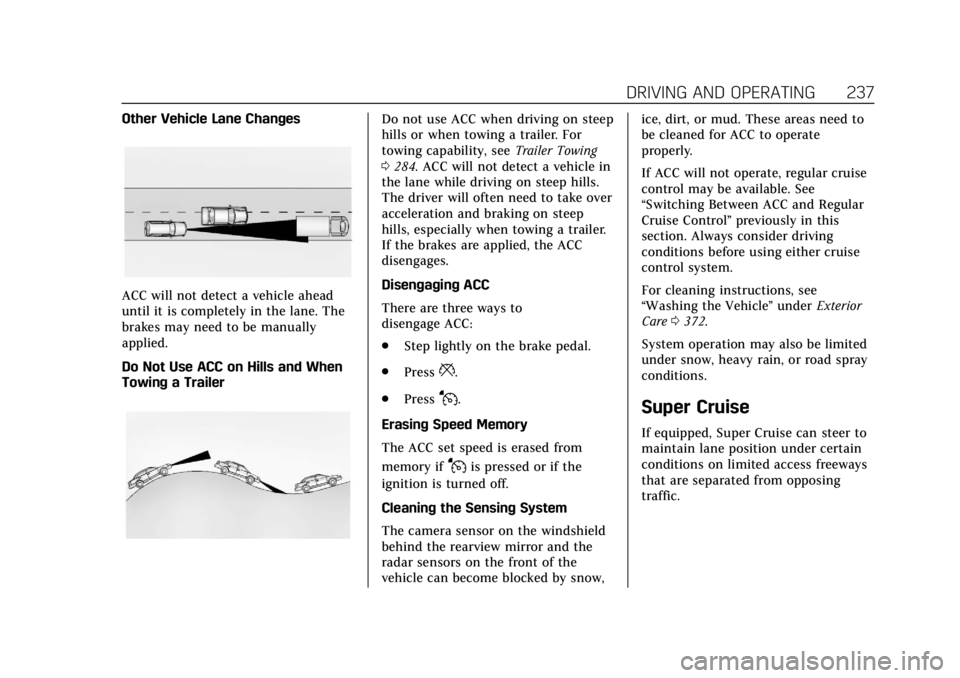
Other Vehicle Lane Changes
ACC will not detect a vehicle ahead
until it is completely in the lane. The
brakes may need to be manually
applied.
Do Not Use ACC on Hills and When
Towing a Trailer
Do not use ACC when driving on steep
hills or when towing a trailer. For
towing capability, seeTrailer Towing
0 284. ACC will not detect a vehicle in
the lane while driving on steep hills.
The driver will often need to take over
acceleration and braking on steep
hills, especially when towing a trailer.
If the brakes are applied, the ACC
disengages.
Disengaging ACC
There are three ways to
disengage ACC:
. Step lightly on the brake pedal.
. Press
*.
. Press
J.
Erasing Speed Memory
The ACC set speed is erased from
memory if
Jis pressed or if the
ignition is turned off.
Cleaning the Sensing System
The camera sensor on the windshield
behind the rearview mirror and the
radar sensors on the front of the
vehicle can become blocked by snow, ice, dirt, or mud. These areas need to
be cleaned for ACC to operate
properly.
If ACC will not operate, regular cruise
control may be available. See
“Switching Between ACC and Regular
Cruise Control
”previously in this
section. Always consider driving
conditions before using either cruise
control system.
For cleaning instructions, see
“Washing the Vehicle ”under Exterior
Care 0372.
System operation may also be limited
under snow, heavy rain, or road spray
conditions.
Super Cruise
If equipped, Super Cruise can steer to
maintain lane position under certain
conditions on limited access freeways
that are separated from opposing
traffic.
Page 245 of 438

Cadillac CT6 Owner Manual (GMNA-Localizing-U.S./Canada-12533370) -
2019 - crc - 1/23/19
244 DRIVING AND OPERATING
First Alert.
If the steering wheel light bar flashes green, the system has detected that your head and eyes
may not be directed toward the freeway.
. The flashing will stop when the system detects that your head and eyes appear to be directed
toward the freeway.
Second Alert .
If the steering wheel light bar flashes green for too long, Super Cruise will alert the driver to
take control of steering immediately by flashing the light bar red. Also, either beeps will sound
or the Safety Alert Seat will vibrate. See “Collision/Detection Systems”underVehicle
Personalization 0157.
. Take over steering, then Super Cruise will disengage.
. To re-engage Super Cruise, press
]. See "Using Super Cruise" previously in this section.
Third Alert .
If the steering wheel light bar flashes red for too long, a voice command will tell you to take
control of the vehicle.
. Take control of the steering immediately; ACC and Super Cruise will disengage.
. A DIC message will indicate that Super Cruise is locked out. Super Cruise cannot be re-engaged
until the next ignition cycle.
. Continued failure to take over steering will cause the vehicle to brake to a stop and OnStar will
be called. The brake lamps and hazard warning flashers will come on.
. Take control of the vehicle and continue driving.
Page 251 of 438

Cadillac CT6 Owner Manual (GMNA-Localizing-U.S./Canada-12533370) -
2019 - crc - 1/23/19
250 DRIVING AND OPERATING
Super Cruise Message Summary (cont'd)
Unavailable Driving Too FastThe vehicle is traveling faster than 137 km/h (85 mph).
The maximum Super Cruise speed in curves will vary based
on how sharp the curve is. The vehicle will automatically
decrease speed if needed.
Unavailable Driving in Exit Lane The Super Cruise system has detected that the vehicle is in
an exit lane.
Unavailable GPS Signal Lost .
There is poor reception in isolated areas.
. Reception is being blocked by buildings or other large
structures.
Unavailable You Have Taken Vehicle Control .
The brake pedal is being pressed.
. The Adaptive Cruise Control has been canceled or
turned off.
Unavailable Sensor Blocked Clear snow, ice, dirt, or other contaminants from the front
and rear areas of the vehicle.
Unavailable Sharp Curve Some curves are too sharp to be navigated by the Super
Cruise system. Super Cruise will be available after the curve
is traveled.
Super Cruise Unavailable Super Cruise is unavailable for reasons not described in
other messages.
Super Cruise Locked Out See Owner’s Manual The driver did not take control of the vehicle when
prompted by the Super Cruise system. The Super Cruise
system will be disabled until the ignition is turned off and
back on.
Page 270 of 438

Cadillac CT6 Owner Manual (GMNA-Localizing-U.S./Canada-12533370) -
2019 - crc - 1/23/19
DRIVING AND OPERATING 269
1. Low-Beam Headlamps
2. High-Beam Headlamps
3. Night Vision System
By selecting a view on the instrument
cluster, the Night Vision image can be
displayed. SeeInstrument Cluster
(Uplevel) 0130 or
Instrument Cluster (Base Level) 0127.
The Night Vision system can operate
only if:
. The ignition is on.
. The vehicle is in P (Park) or a
forward gear.
. It is dark enough outside.
. The headlamps are on. Adjust the instrument panel
brightness to make the image no
brighter than necessary. Turn the
image off by selecting another view
on the instrument cluster.
Warm objects, such as pedestrians,
animals, and other moving vehicles,
should appear whiter on the Night
Vision display. Cold objects, such as
the sky, signs, and parked vehicles,
should appear darker. Night Vision
only shows objects that are warmer or
colder than the surroundings. It does
not detect brake lamps, turn signals,
emergency flashers, traffic lights,
or sign information.
Use this system as an aid by
occasionally glancing at the image. Do
not stare at the image or use the
image under well-lit conditions.
{Warning
Do not stare at the image while
driving as this might cause
important objects ahead not to be
seen. You could crash, and you or
others could be injured.
When a pedestrian or large animal is
detected, an amber box displays
around the pedestrian or animal
on the Night Vision display and an
amber pedestrian icon,
~, or
animal icon,
!, displays on the
instrument cluster. This pedestrian
icon is also shown on the Head-Up
Display (HUD). When the system
detects the vehicle is approaching a
pedestrian much too quickly, the
amber pedestrian icon and box turns
red, and a red flashing icon,
~,
displays on the HUD with rapid
beeping or pulsing of the Safety Alert
Seat, if equipped.
System pedestrian icons, beeps, and
(if equipped) Safety Alert Seat pulses
can be set to Off through vehicle
personalization by turning off the
Front Pedestrian Braking system. See
“Front Pedestrian Detection ”in
“Collision/Detection Systems” under
Vehicle Personalization 0157.
Page 312 of 438

Cadillac CT6 Owner Manual (GMNA-Localizing-U.S./Canada-12533370) -
2019 - crc - 1/23/19
VEHICLE CARE 311
1. Remove the coolant surge tankpressure cap when the cooling
system, including the coolant
surge tank pressure cap and
upper radiator hose, is no
longer hot.
Turn the pressure cap slowly
counterclockwise about
one-quarter of a turn. If you hear
a hiss, wait for that to stop. This
will allow any pressure still left
to be vented out the
discharge hose.
2. Keep turning the pressure cap slowly and remove it.
3. Fill the coolant surge tank with the proper mixture to the
indicated level mark.
4. With the coolant surge tank pressure cap off, start the engine
and let it run until you can feel
the upper radiator hose getting
hot. Watch out for the engine
cooling fan.
By this time, the coolant level
inside the coolant surge tank
may be lower. If the level is
lower, add more of the proper mixture to the coolant surge
tank until the level reaches the
indicated level mark.
5. Replace the pressure cap tightly.
6. Verify coolant level after the engine is shut off and the
coolant is cold. If necessary,
repeat coolant fill procedure
Steps 1–6.
If the coolant still is not at the
proper level when the system
cools down again, see your
dealer.
Caution
If the pressure cap is not tightly
installed, coolant loss and engine
damage may occur. Be sure the cap
is properly and tightly secured.
2.0L L4 Engine Only - Automatic
Coolant Service Fill Instructions
If equipped, this feature assists in
filling and removing air from the
cooling system after service of
components or when coolant is added
after being too low.
To activate the fill and air removal
process:
1. With a cold system, add coolant to the COLD FILL mark on the
surge tank.
2. Replace the cap on the surge tank.
3. Connect the vehicle to a battery charger.
4. Turn the ignition to Service Mode. See Ignition Positions
0 201.
5. Turn off the air conditioning.
6. Set the parking brake.
7. At the same time, press the accelerator and the brake for
two seconds, then release.
Page 313 of 438

Cadillac CT6 Owner Manual (GMNA-Localizing-U.S./Canada-12533370) -
2019 - crc - 1/23/19
312 VEHICLE CARE
At the end of the cycle, check the
coolant level in the surge tank and
add coolant if it is low. Turn off the
vehicle, allow the Electronic Control
Module (ECM) to go to sleep, about
2 minutes, and repeat Steps 4-7.
Listen for pump activation and
movement of the control valves while
watching the level of the coolant in
the surge tank. If the tank empties,
turn the ignition off, carefully remove
the surge tank cap, refill to the COLD
FILL mark, and repeat Steps 4-7. The
fill and air removal process will run
for approximately 10 minutes.
4.2L V8 Engine OnlyCaution
This vehicle has a specific coolant
fill procedure. Failure to follow this
procedure could cause the engine to
overheat and be severely damaged.
See your dealer for assistance.
Because of possible engine failure or
damage if performed without the
proper tools and information, engine coolant should only be added
by a qualified technician. See your
dealer.
Engine Overheating
The vehicle has several indicators to
warn of the engine overheating.
There is an engine coolant
temperature gauge and an engine
coolant temperature warning light on
the instrument cluster. See
Engine
Coolant Temperature Gauge 0135 and
Engine Coolant Temperature Warning
Light 0146. The vehicle may also
display a message on the Driver
Information Center (DIC).
If the decision is made not to lift the
hood when this warning appears, get
service help right away. See Roadside
Service 0405.
If the decision is made to lift the
hood, make sure the vehicle is parked
on a level surface. Then check to see if
the engine cooling fan is running.
If the engine is overheating, the fan
should be running. If it is not, do not
continue to run the engine. Have the
vehicle serviced.
Caution
Do not run the engine if there is a
leak in the engine cooling system.
This can cause a loss of all coolant
and can damage the system and
vehicle. Have any leaks fixed
right away.
If Steam Is Coming from the
Engine Compartment
{Warning
Steam and scalding liquids from a
hot cooling system are under
pressure. Turning the pressure cap,
even a little, can cause them to
come out at high speed and you
could be burned. Never turn the cap
when the cooling system, including
the pressure cap, is hot. Wait for
the cooling system and pressure
cap to cool.