automatic transmission CADILLAC CT6 2019 Owner's Manual
[x] Cancel search | Manufacturer: CADILLAC, Model Year: 2019, Model line: CT6, Model: CADILLAC CT6 2019Pages: 438, PDF Size: 7.6 MB
Page 6 of 438
Cadillac CT6 Owner Manual (GMNA-Localizing-U.S./Canada-12533370) -
2019 - crc - 1/23/19
IN BRIEF 5
In Brief
Instrument Panel
Instrument Panel Overview . . . . . . . . . 6
Initial Drive Information
Initial Drive Information . . . . . . . . . . . 8
Stop/Start System . . . . . . . . . . . . . . . . . . . 8
Remote Keyless Entry (RKE)System . . . . . . . . . . . . . . . . . . . . . . . . . . . . . 8
Remote Vehicle Start . . . . . . . . . . . . . . . 9
Door Locks . . . . . . . . . . . . . . . . . . . . . . . . . . 9
Trunk . . . . . . . . . . . . . . . . . . . . . . . . . . . . . . . 10
Windows . . . . . . . . . . . . . . . . . . . . . . . . . . . 10
Seat Adjustment . . . . . . . . . . . . . . . . . . . 11
Memory Features . . . . . . . . . . . . . . . . . . 12
Second Row Seats . . . . . . . . . . . . . . . . . 12
Heated and Ventilated Seats . . . . . . 13
Head Restraint Adjustment . . . . . . . 13
Seat Belts . . . . . . . . . . . . . . . . . . . . . . . . . . . 14
Passenger Sensing System . . . . . . . . 14
Mirror Adjustment . . . . . . . . . . . . . . . . 14
Steering Wheel Adjustment . . . . . . . 15
Interior Lighting . . . . . . . . . . . . . . . . . . . 15
Exterior Lighting . . . . . . . . . . . . . . . . . . . 16
Windshield Wiper/Washer . . . . . . . . 16
Climate Controls . . . . . . . . . . . . . . . . . . . 18
Transmission . . . . . . . . . . . . . . . . . . . . . . . 19
Vehicle Features
Infotainment System . . . . . . . . . . . . . . 19
Steering Wheel Controls . . . . . . . . . . 19
Cruise Control . . . . . . . . . . . . . . . . . . . . . 19
Driver Information Center (DIC) . . . . . . . . . . . . . . . . . . . . . . 20
Forward Collision Alert (FCA) System . . . . . . . . . . . . . . . . . . . . . . . . . . . . 20
Night Vision System . . . . . . . . . . . . . . . 20
Forward Automatic Braking (FAB) . . . . . . . . . . . . . . . . . . . . 21
Front Pedestrian Braking (FPB) System . . . . . . . . . . . . . . . . . . . . . . . . . . . . 21
Lane Keep Assist (LKA) . . . . . . . . . . . 21
Lane Change Alert (LCA) . . . . . . . . . . 21
Surround Vision . . . . . . . . . . . . . . . . . . . 21
Rear Vision Camera (RVC) . . . . . . . . 22
Rear Cross Traffic Alert (RCTA) System . . . . . . . . . . . . . . . . . . . . . . . . . . . . 22
Park Assist . . . . . . . . . . . . . . . . . . . . . . . . . 22
Automatic Parking Assist (APA) . . . . . . . . . . . . . . . . . . . . . . 22
Reverse Automatic Braking (RAB) . . . . . . . . . . . . . . . . . . . . 22
Rear Pedestrian Alert . . . . . . . . . . . . . . 23
Surround Vision Recorder . . . . . . . . . 23
Power Outlets . . . . . . . . . . . . . . . . . . . . . . 23
Universal Remote System . . . . . . . . . 23
Sunroof . . . . . . . . . . . . . . . . . . . . . . . . . . . . . 24
Performance and Maintenance
Traction Control/Electronic Stability Control . . . . . . . . . . . . . . . . . . 24
Tire Pressure Monitor . . . . . . . . . . . . . 25
Fuel (2.0L L4 Turbo Engine) . . . . . . 25
Fuel (3.0L Twin Turbo V6 and 4.2L Twin Turbo V8 Engines) . . . . . . . . . 26
Fuel (3.6L V6 Engine) . . . . . . . . . . . . . 26
E85 or FlexFuel . . . . . . . . . . . . . . . . . . . . 26
Engine Oil Life System . . . . . . . . . . . . 26
Driving for Better Fuel Economy . . . . . . . . . . . . . . . . . . . . . . . . . . 27
Roadside Service . . . . . . . . . . . . . . . . . . . 27
Page 8 of 438

Cadillac CT6 Owner Manual (GMNA-Localizing-U.S./Canada-12533370) -
2019 - crc - 1/23/19
IN BRIEF 7
1.Air Vents 0187.
2. Exterior Lamp Controls 0166.
Turn Signal Lever. See Turn and
Lane-Change Signals 0170.
3. Tap Shift Controls (If Equipped). See Manual Mode 0215.
4. Instrument Cluster (Uplevel) 0130
or
Instrument Cluster (Base Level)
0 127.
Driver Information Center (DIC)
Display. See Driver Information
Center (DIC) 0150.
5. Windshield Wiper/Washer 0120.
6. ENGINE START/STOP Button. See Ignition Positions 0201.
7. Park Assist Button. See Assistance Systems for Parking or
Backing 0253.
Automatic Parking Assist (APA)
Button (If Equipped). See
Assistance Systems for Parking or
Backing 0253.
Automatic Engine Stop/Start
Disable Switch (If Equipped). See
Stop/Start System 0203. 8. Light Sensor. See
Automatic
Headlamp System 0169.
9. Hazard Warning Flashers 0169.
Glove Box Button. See Glove Box
0 114.
10. Infotainment 0174.
11. Heated and Ventilated Front Seats
070 (If Equipped).
12. Wireless Charging 0123.
13. Automatic Climate Control System
(Dual Zone) 0175 or
Automatic Climate Control System
(Quad Zone) 0180.
14. Automatic Vehicle Hold (AVH)
0220 (If Equipped).
MODE Button. See Driver Mode
Control 0222.
Traction Control/Electronic
Stability Control 0220.
15. Infotainment Control Knob. See the infotainment manual.
16. Shift Lever. See Automatic
Transmission 0210. 17. Driver Information Center (DIC)
Controls. See Driver Information
Center (DIC) 0150.
18. Steering Wheel Controls. See the infotainment manual.
19. Horn 0120.
20. Steering Wheel Adjustment 0119
(Out of View).
21. Forward Collision Alert (FCA)
System 0262 (If Equipped).
Lane Keep Assist (LKA) 0273 (If
Equipped).
Heated Steering Wheel 0119 (If
Equipped).
22. Cruise Control 0227.
Adaptive Cruise Control 0229 (If
Equipped).
Super Cruise 0237 (If Equipped).
Phone Button. See “Steering
Wheel Controls ”in the
infotainment manual.
23. Data Link Connector (DLC) (Out of View). See Malfunction
Indicator Lamp (Check Engine
Light) 0139.
Page 20 of 438
Cadillac CT6 Owner Manual (GMNA-Localizing-U.S./Canada-12533370) -
2019 - crc - 1/23/19
IN BRIEF 19
SeeAutomatic Climate Control System
(Dual Zone) 0175 or
Automatic Climate Control System
(Quad Zone) 0180.
Transmission
Tap Shift
If equipped, Tap Shift allows you to
shift an automatic transmission
similar to a manual transmission. To
use the Tap Shift feature:
1. When in D (Drive), pull back on the shift lever to enter
M (Manual Mode).
2. Use Tap Shift to manually shift the automatic transmission.
3. To exit, pull back on the shift lever a second time.
See Manual Mode 0215.
Vehicle Features
Infotainment System
See the infotainment manual for
information on the radio, audio
players, phone, and voice or speech
recognition. It also includes
information on settings.
Steering Wheel Controls
The infotainment system can be
operated by using the steering wheel
controls. See “Steering Wheel
Controls ”in the infotainment manual.
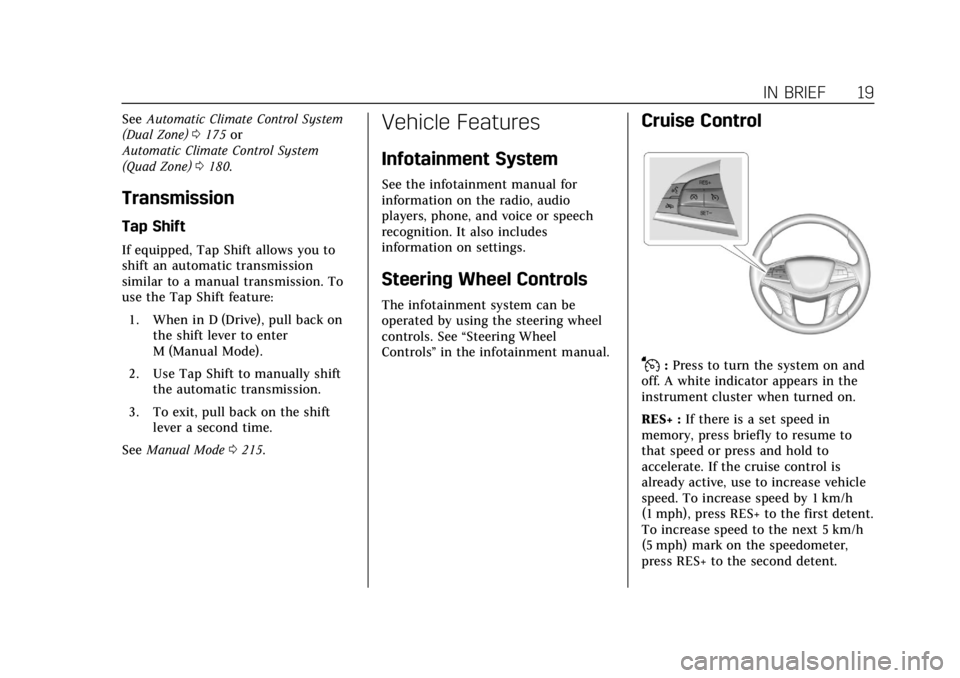
Cruise Control
J:Press to turn the system on and
off. A white indicator appears in the
instrument cluster when turned on.
RES+ : If there is a set speed in
memory, press briefly to resume to
that speed or press and hold to
accelerate. If the cruise control is
already active, use to increase vehicle
speed. To increase speed by 1 km/h
(1 mph), press RES+ to the first detent.
To increase speed to the next 5 km/h
(5 mph) mark on the speedometer,
press RES+ to the second detent.
Page 42 of 438

Cadillac CT6 Owner Manual (GMNA-Localizing-U.S./Canada-12533370) -
2019 - crc - 1/23/19
KEYS, DOORS, AND WINDOWS 41
To unlock the doors:
.Press
Kon the power door lock
switch.
. Shift the transmission into
P (Park).
Automatic door locking cannot be
disabled. Automatic door unlocking
can be programmed. See Vehicle
Personalization 0157.
Lockout Protection
If the ignition is on or in ACC/
ACCESSORY, and the power door lock
switch is pressed with the driver door
open, all the doors will lock and only
the driver door will unlock.
If the vehicle is off and locking is
requested while a door is open, when
all doors are closed the vehicle will
check for RKE transmitters inside.
If an RKE transmitter is detected and
the number of RKE transmitters inside
has not reduced, the driver door will
unlock and the horn will chirp three
times. Lockout protection can be manually overridden with the driver
door open by pressing and holding
Q
on the power door lock switch.
Open Door Anti-Lockout
If Open Door Anti-Lockout is turned
on and the vehicle is off, the driver
door is open, and locking is requested,
all the doors will lock and the driver
door will remain open. Press the
button again to lock the driver door.
The Open Door Anti-Lockout feature
can be turned on or off. See
Vehicle
Personalization 0157.
Safety Locks
The rear door safety locks prevent
passengers from opening the rear
doors from inside the vehicle.
Manual Safety Locks
If equipped, the safety lock is on the
inside edge of the rear doors. To use
the safety lock:
1. Move the lever down to the lock position.
2. Close the door.
3. Do the same for the other rear door.
Page 123 of 438
Cadillac CT6 Owner Manual (GMNA-Localizing-U.S./Canada-12533370) -
2019 - crc - 1/23/19
122 INSTRUMENTS AND CONTROLS
With Rainsense, if the transmission is
in N (Neutral) and the vehicle speed is
very slow, the wipers will
automatically stop at the base of the
windshield.
The wiper operations return to normal
when the transmission is no longer in
N (Neutral) or the vehicle speed has
increased.
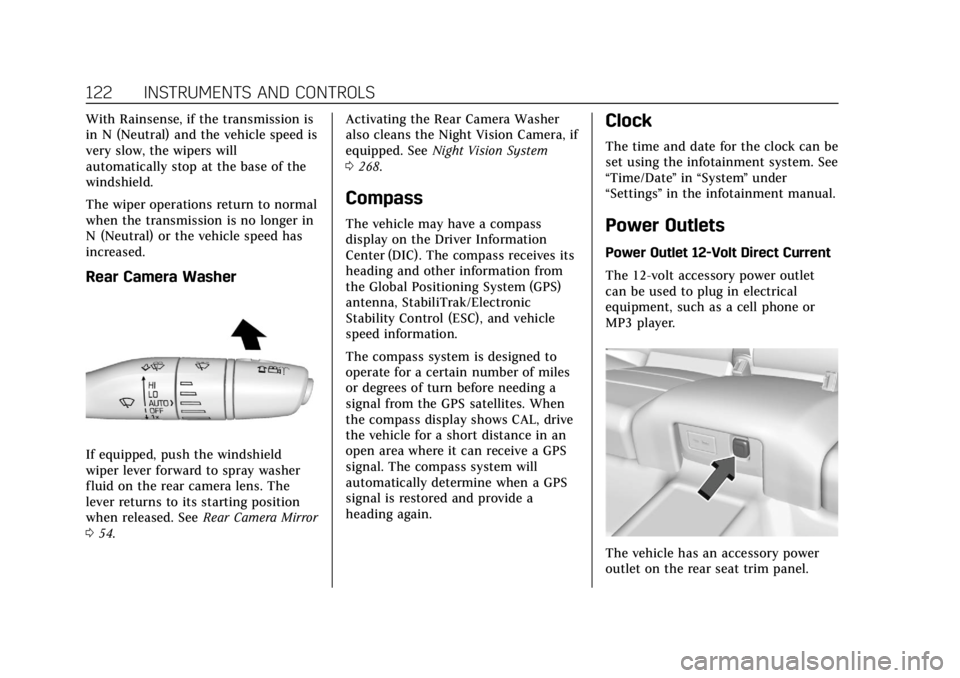
Rear Camera Washer
If equipped, push the windshield
wiper lever forward to spray washer
fluid on the rear camera lens. The
lever returns to its starting position
when released. SeeRear Camera Mirror
0 54. Activating the Rear Camera Washer
also cleans the Night Vision Camera, if
equipped. See
Night Vision System
0 268.
Compass
The vehicle may have a compass
display on the Driver Information
Center (DIC). The compass receives its
heading and other information from
the Global Positioning System (GPS)
antenna, StabiliTrak/Electronic
Stability Control (ESC), and vehicle
speed information.
The compass system is designed to
operate for a certain number of miles
or degrees of turn before needing a
signal from the GPS satellites. When
the compass display shows CAL, drive
the vehicle for a short distance in an
open area where it can receive a GPS
signal. The compass system will
automatically determine when a GPS
signal is restored and provide a
heading again.
Clock
The time and date for the clock can be
set using the infotainment system. See
“Time/Date ”in “System ”under
“Settings ”in the infotainment manual.
Power Outlets
Power Outlet 12-Volt Direct Current
The 12-volt accessory power outlet
can be used to plug in electrical
equipment, such as a cell phone or
MP3 player.
The vehicle has an accessory power
outlet on the rear seat trim panel.
Page 170 of 438
Cadillac CT6 Owner Manual (GMNA-Localizing-U.S./Canada-12533370) -
2019 - crc - 1/23/19
LIGHTING 169
The DRL turn off when the headlamps
are turned to
Oor the ignition is off.
For vehicles first sold in Canada, the
DRL can only be turned off when the
vehicle is parked.
Automatic Headlamp
System
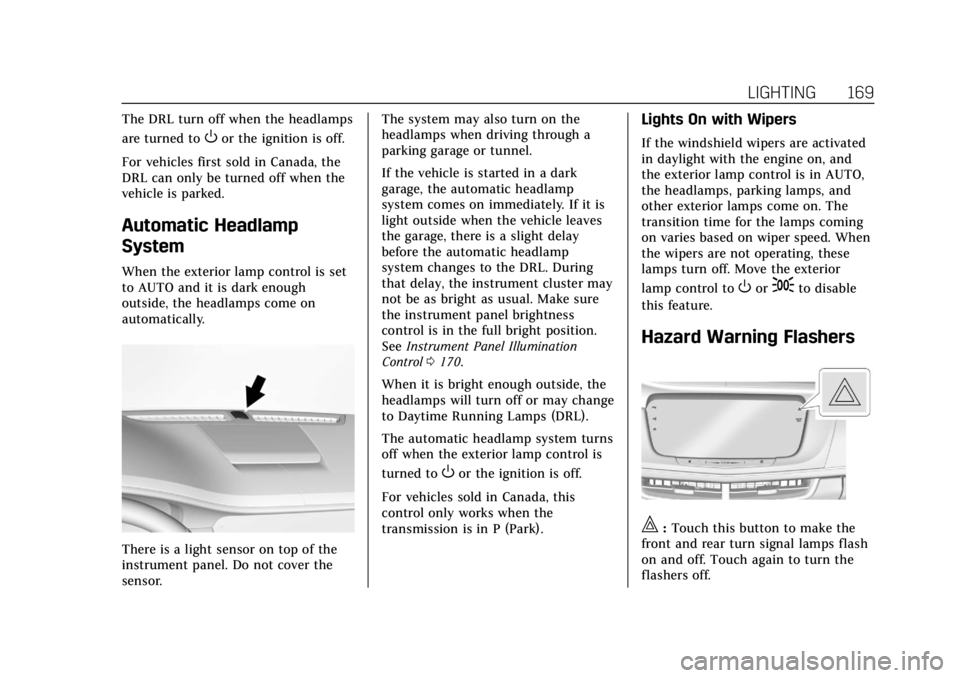
When the exterior lamp control is set
to AUTO and it is dark enough
outside, the headlamps come on
automatically.
There is a light sensor on top of the
instrument panel. Do not cover the
sensor. The system may also turn on the
headlamps when driving through a
parking garage or tunnel.
If the vehicle is started in a dark
garage, the automatic headlamp
system comes on immediately. If it is
light outside when the vehicle leaves
the garage, there is a slight delay
before the automatic headlamp
system changes to the DRL. During
that delay, the instrument cluster may
not be as bright as usual. Make sure
the instrument panel brightness
control is in the full bright position.
See
Instrument Panel Illumination
Control 0170.
When it is bright enough outside, the
headlamps will turn off or may change
to Daytime Running Lamps (DRL).
The automatic headlamp system turns
off when the exterior lamp control is
turned to
Oor the ignition is off.
For vehicles sold in Canada, this
control only works when the
transmission is in P (Park).
Lights On with Wipers
If the windshield wipers are activated
in daylight with the engine on, and
the exterior lamp control is in AUTO,
the headlamps, parking lamps, and
other exterior lamps come on. The
transition time for the lamps coming
on varies based on wiper speed. When
the wipers are not operating, these
lamps turn off. Move the exterior
lamp control to
Oor;to disable
this feature.
Hazard Warning Flashers
|: Touch this button to make the
front and rear turn signal lamps flash
on and off. Touch again to turn the
flashers off.
Page 190 of 438

Cadillac CT6 Owner Manual (GMNA-Localizing-U.S./Canada-12533370) -
2019 - crc - 1/23/19
DRIVING AND OPERATING 189
Driving and
Operating
Driving Information
Distracted Driving . . . . . . . . . . . . . . . . 190
Defensive Driving . . . . . . . . . . . . . . . . 191
Drunk Driving . . . . . . . . . . . . . . . . . . . . 191
Control of a Vehicle . . . . . . . . . . . . . . 191
Braking . . . . . . . . . . . . . . . . . . . . . . . . . . . . 191
Steering . . . . . . . . . . . . . . . . . . . . . . . . . . . 191
Off-Road Recovery . . . . . . . . . . . . . . . . 192
Loss of Control . . . . . . . . . . . . . . . . . . . 193
Track Events and CompetitiveDriving . . . . . . . . . . . . . . . . . . . . . . . . . . 193
Driving on Wet Roads . . . . . . . . . . . 193
Hill and Mountain Roads . . . . . . . . 194
Winter Driving . . . . . . . . . . . . . . . . . . . . 195
If the Vehicle Is Stuck . . . . . . . . . . . 196
Vehicle Load Limits . . . . . . . . . . . . . . 197
Starting and Operating
New Vehicle Break-In . . . . . . . . . . . . 200
Ignition Positions . . . . . . . . . . . . . . . . 201
Starting the Engine . . . . . . . . . . . . . . 202
Stop/Start System . . . . . . . . . . . . . . . . 203
Engine Heater . . . . . . . . . . . . . . . . . . . . 205
Retained Accessory Power (RAP) . . . . . . . . . . . . . . . . . . . . 206 Shifting Into Park . . . . . . . . . . . . . . . . 206
Shifting out of Park . . . . . . . . . . . . . . 207
Parking over Things
That Burn . . . . . . . . . . . . . . . . . . . . . . . 208
Active Fuel Management . . . . . . . . 208
Extended Parking . . . . . . . . . . . . . . . . . 209
Engine Exhaust
Engine Exhaust . . . . . . . . . . . . . . . . . . . 209
Running the Vehicle While
Parked . . . . . . . . . . . . . . . . . . . . . . . . . . . 210
Automatic Transmission
Automatic Transmission . . . . . . . . . 210
Manual Mode . . . . . . . . . . . . . . . . . . . . . 215
Drive Systems
All-Wheel Drive . . . . . . . . . . . . . . . . . . 216
Brakes
Antilock Brake System (ABS) . . . . 217
Electric Parking Brake . . . . . . . . . . . . 218
Brake Assist . . . . . . . . . . . . . . . . . . . . . . . 219
Hill Start Assist (HSA) . . . . . . . . . . . 219
Automatic VehicleHold (AVH) . . . . . . . . . . . . . . . . . . . . . 220
Ride Control Systems
Traction Control/ElectronicStability Control . . . . . . . . . . . . . . . . 220
Driver Mode Control . . . . . . . . . . . . . 222
Locking Rear Axle . . . . . . . . . . . . . . . . 226
Cruise Control
Cruise Control . . . . . . . . . . . . . . . . . . . . 227
Adaptive Cruise Control . . . . . . . . . 229
Super Cruise . . . . . . . . . . . . . . . . . . . . . . 237
Driver Assistance Systems
Driver Assistance Systems . . . . . . . 252
Assistance Systems for Parking or Backing . . . . . . . . . . . . . . . . . . . . . . . 253
Rear Pedestrian Alert . . . . . . . . . . . . 260
Assistance Systems for Driving . . . . . . . . . . . . . . . . . . . . . . . . . . 262
Forward Collision Alert (FCA) System . . . . . . . . . . . . . . . . . . . . . . . . . . 262
Forward Automatic Braking (FAB) . . . . . . . . . . . . . . . . . . . 264
Front Pedestrian Braking (FPB) System . . . . . . . . . . . . . . . . . . . . . . . . . . 266
Night Vision System . . . . . . . . . . . . . 268
Side Blind Zone Alert (SBZA) . . . . 270
Lane Change Alert (LCA) . . . . . . . . 271
Lane Departure Warning (LDW) . . . . . . . . . . . . . . . . . 272
Lane Keep Assist (LKA) . . . . . . . . . . 273
Surround Vision Recorder . . . . . . . 274
Fuel
Top Tier Fuel . . . . . . . . . . . . . . . . . . . . . 276
Recommended Fuel (2.0L L4 Turbo Engine) . . . . . . . . . . . . . . . . . . . 277
Page 205 of 438

Cadillac CT6 Owner Manual (GMNA-Localizing-U.S./Canada-12533370) -
2019 - crc - 1/23/19
204 DRIVING AND OPERATING
{Warning
The automatic engine Stop/Start
feature causes the engine to shut
off while the vehicle is still on. Do
not exit the vehicle before shifting
to P (Park). The vehicle may restart
and move unexpectedly. Always
shift to P (Park), and then turn the
ignition off before exiting the
vehicle.
Auto Engine Stop/Start
When the brakes are applied and the
vehicle is at a complete stop, the
engine may turn off. When stopped,
the tachometer displays AUTO STOP.
See Tachometer 0133. When the brake
pedal is released or the accelerator
pedal is pressed, the engine will
restart.
To maintain vehicle performance,
other conditions may cause the engine
to automatically restart before the
brake pedal is released. Auto Stops may not occur and/or Auto
Starts may occur because:
.
The climate control settings
require the engine to be running
to cool or heat the vehicle interior.
. The vehicle battery charge is low.
. The vehicle battery has recently
been disconnected.
. Minimum vehicle speed has not
been reached since the last
Auto Stop.
. The accelerator pedal is pressed.
. The engine or transmission is not
at the required operating
temperature.
. The outside temperature is not in
the required operating range.
. The vehicle transmission is shifted
out of D (Drive) to any gear other
than P (Park).
. Driver modes have been selected.
. The vehicle is on a steep hill or
grade. .
The driver door has been opened
or driver seat belt has been
unbuckled.
. The hood has been opened.
. The Auto Stop has reached the
maximum allowed time.
Auto Stop Disable Switch
The automatic engine Stop/Start
function can be disabled by
touching
hon the center stack. Auto
Stop is enabled each time you start
the vehicle.
When the light next to the
his
illuminated, the system is enabled.
Page 207 of 438
Cadillac CT6 Owner Manual (GMNA-Localizing-U.S./Canada-12533370) -
2019 - crc - 1/23/19
206 DRIVING AND OPERATING
Warning (Continued)
.While in use, do not let the
heater cord touch vehicle
parts or sharp edges. Never
close the hood on the
heater cord.
. Before starting the vehicle,
unplug the cord, reattach the
cover to the plug, and
securely fasten the cord. Keep
the cord away from any
moving parts.
4. Before starting the engine, be sure to unplug and store the cord
as it was before to keep it away
from moving engine parts. If you
do not, it could be damaged.
Contact your dealer for information
on how long to use the heater in your
particular area.
Retained Accessory
Power (RAP)
Some vehicle accessories may be used
after the ignition is turned off.
The power windows and sunroof,
if equipped, will continue to work for
up to 10 minutes or until any door is
opened.
The infotainment system will continue
to work for 10 minutes, until the
driver door is opened, or until the
ignition is turned on or placed in
ACC/ACCESSORY.
Shifting Into Park
To shift into P (Park):
1. Bring the vehicle to a stop, and hold the brake pedal down.
2. Press the button on top of the shift lever to shift into P (Park).
See Automatic Transmission
0 210.
3. The P indicator on the shift lever will turn red when the vehicle is
in P (Park).
Leaving the Vehicle with the
Engine Running
{Warning
It can be dangerous to leave the
vehicle with the engine running.
It could overheat and catch fire.
It is dangerous to get out of the
vehicle if the vehicle is not in
P (Park) with the parking brake set.
The vehicle can roll.
Do not leave the vehicle when the
engine is running. If you have left
the engine running, the vehicle can
move suddenly. You or others could
be injured. To be sure the vehicle
will not move, even when you are
on fairly level ground, always set
the parking brake and shift
to P (Park). See Shifting Into Park
0 206. If you are towing a trailer,
see Driving Characteristics and
Towing Tips 0281.
Page 211 of 438

Cadillac CT6 Owner Manual (GMNA-Localizing-U.S./Canada-12533370) -
2019 - crc - 1/23/19
210 DRIVING AND OPERATING
Warning (Continued)
.There are holes or openings
in the vehicle body from
damage or aftermarket
modifications that are not
completely sealed.
If unusual fumes are detected or if
it is suspected that exhaust is
coming into the vehicle: . Drive it only with the
windows completely down.
. Have the vehicle repaired
immediately.
Never park the vehicle with the
engine running in an enclosed area
such as a garage or a building that
has no fresh air ventilation.
Running the Vehicle While
Parked
It is better not to park with the engine
running.
If the vehicle is left with the engine
running, follow the proper steps to be
sure the vehicle will not move. See
Shifting Into Park 0206 and
Engine Exhaust 0209.
If parking on a hill and pulling a
trailer, see Driving Characteristics and
Towing Tips 0281.
Automatic Transmission
The shift pattern is displayed in the
top of the shift lever. The selected
gear position will illuminate red on
the shift lever, while all others will be
displayed in white. If the shift is not
immediate, as in very cold conditions,
the indicator on the shift lever may
flash until it is fully engaged.
The shift lever always starts from a
center position, represented by an up/
down arrow on the shift pattern. After
releasing the shift lever, it will return
to the center position.