seat adjustment CADILLAC CT6 2019 Owner's Manual
[x] Cancel search | Manufacturer: CADILLAC, Model Year: 2019, Model line: CT6, Model: CADILLAC CT6 2019Pages: 438, PDF Size: 7.6 MB
Page 6 of 438
Cadillac CT6 Owner Manual (GMNA-Localizing-U.S./Canada-12533370) -
2019 - crc - 1/23/19
IN BRIEF 5
In Brief
Instrument Panel
Instrument Panel Overview . . . . . . . . . 6
Initial Drive Information
Initial Drive Information . . . . . . . . . . . 8
Stop/Start System . . . . . . . . . . . . . . . . . . . 8
Remote Keyless Entry (RKE)System . . . . . . . . . . . . . . . . . . . . . . . . . . . . . 8
Remote Vehicle Start . . . . . . . . . . . . . . . 9
Door Locks . . . . . . . . . . . . . . . . . . . . . . . . . . 9
Trunk . . . . . . . . . . . . . . . . . . . . . . . . . . . . . . . 10
Windows . . . . . . . . . . . . . . . . . . . . . . . . . . . 10
Seat Adjustment . . . . . . . . . . . . . . . . . . . 11
Memory Features . . . . . . . . . . . . . . . . . . 12
Second Row Seats . . . . . . . . . . . . . . . . . 12
Heated and Ventilated Seats . . . . . . 13
Head Restraint Adjustment . . . . . . . 13
Seat Belts . . . . . . . . . . . . . . . . . . . . . . . . . . . 14
Passenger Sensing System . . . . . . . . 14
Mirror Adjustment . . . . . . . . . . . . . . . . 14
Steering Wheel Adjustment . . . . . . . 15
Interior Lighting . . . . . . . . . . . . . . . . . . . 15
Exterior Lighting . . . . . . . . . . . . . . . . . . . 16
Windshield Wiper/Washer . . . . . . . . 16
Climate Controls . . . . . . . . . . . . . . . . . . . 18
Transmission . . . . . . . . . . . . . . . . . . . . . . . 19
Vehicle Features
Infotainment System . . . . . . . . . . . . . . 19
Steering Wheel Controls . . . . . . . . . . 19
Cruise Control . . . . . . . . . . . . . . . . . . . . . 19
Driver Information Center (DIC) . . . . . . . . . . . . . . . . . . . . . . 20
Forward Collision Alert (FCA) System . . . . . . . . . . . . . . . . . . . . . . . . . . . . 20
Night Vision System . . . . . . . . . . . . . . . 20
Forward Automatic Braking (FAB) . . . . . . . . . . . . . . . . . . . . 21
Front Pedestrian Braking (FPB) System . . . . . . . . . . . . . . . . . . . . . . . . . . . . 21
Lane Keep Assist (LKA) . . . . . . . . . . . 21
Lane Change Alert (LCA) . . . . . . . . . . 21
Surround Vision . . . . . . . . . . . . . . . . . . . 21
Rear Vision Camera (RVC) . . . . . . . . 22
Rear Cross Traffic Alert (RCTA) System . . . . . . . . . . . . . . . . . . . . . . . . . . . . 22
Park Assist . . . . . . . . . . . . . . . . . . . . . . . . . 22
Automatic Parking Assist (APA) . . . . . . . . . . . . . . . . . . . . . . 22
Reverse Automatic Braking (RAB) . . . . . . . . . . . . . . . . . . . . 22
Rear Pedestrian Alert . . . . . . . . . . . . . . 23
Surround Vision Recorder . . . . . . . . . 23
Power Outlets . . . . . . . . . . . . . . . . . . . . . . 23
Universal Remote System . . . . . . . . . 23
Sunroof . . . . . . . . . . . . . . . . . . . . . . . . . . . . . 24
Performance and Maintenance
Traction Control/Electronic Stability Control . . . . . . . . . . . . . . . . . . 24
Tire Pressure Monitor . . . . . . . . . . . . . 25
Fuel (2.0L L4 Turbo Engine) . . . . . . 25
Fuel (3.0L Twin Turbo V6 and 4.2L Twin Turbo V8 Engines) . . . . . . . . . 26
Fuel (3.6L V6 Engine) . . . . . . . . . . . . . 26
E85 or FlexFuel . . . . . . . . . . . . . . . . . . . . 26
Engine Oil Life System . . . . . . . . . . . . 26
Driving for Better Fuel Economy . . . . . . . . . . . . . . . . . . . . . . . . . . 27
Roadside Service . . . . . . . . . . . . . . . . . . . 27
Page 8 of 438

Cadillac CT6 Owner Manual (GMNA-Localizing-U.S./Canada-12533370) -
2019 - crc - 1/23/19
IN BRIEF 7
1.Air Vents 0187.
2. Exterior Lamp Controls 0166.
Turn Signal Lever. See Turn and
Lane-Change Signals 0170.
3. Tap Shift Controls (If Equipped). See Manual Mode 0215.
4. Instrument Cluster (Uplevel) 0130
or
Instrument Cluster (Base Level)
0 127.
Driver Information Center (DIC)
Display. See Driver Information
Center (DIC) 0150.
5. Windshield Wiper/Washer 0120.
6. ENGINE START/STOP Button. See Ignition Positions 0201.
7. Park Assist Button. See Assistance Systems for Parking or
Backing 0253.
Automatic Parking Assist (APA)
Button (If Equipped). See
Assistance Systems for Parking or
Backing 0253.
Automatic Engine Stop/Start
Disable Switch (If Equipped). See
Stop/Start System 0203. 8. Light Sensor. See
Automatic
Headlamp System 0169.
9. Hazard Warning Flashers 0169.
Glove Box Button. See Glove Box
0 114.
10. Infotainment 0174.
11. Heated and Ventilated Front Seats
070 (If Equipped).
12. Wireless Charging 0123.
13. Automatic Climate Control System
(Dual Zone) 0175 or
Automatic Climate Control System
(Quad Zone) 0180.
14. Automatic Vehicle Hold (AVH)
0220 (If Equipped).
MODE Button. See Driver Mode
Control 0222.
Traction Control/Electronic
Stability Control 0220.
15. Infotainment Control Knob. See the infotainment manual.
16. Shift Lever. See Automatic
Transmission 0210. 17. Driver Information Center (DIC)
Controls. See Driver Information
Center (DIC) 0150.
18. Steering Wheel Controls. See the infotainment manual.
19. Horn 0120.
20. Steering Wheel Adjustment 0119
(Out of View).
21. Forward Collision Alert (FCA)
System 0262 (If Equipped).
Lane Keep Assist (LKA) 0273 (If
Equipped).
Heated Steering Wheel 0119 (If
Equipped).
22. Cruise Control 0227.
Adaptive Cruise Control 0229 (If
Equipped).
Super Cruise 0237 (If Equipped).
Phone Button. See “Steering
Wheel Controls ”in the
infotainment manual.
23. Data Link Connector (DLC) (Out of View). See Malfunction
Indicator Lamp (Check Engine
Light) 0139.
Page 12 of 438
Cadillac CT6 Owner Manual (GMNA-Localizing-U.S./Canada-12533370) -
2019 - crc - 1/23/19
IN BRIEF 11
Seat Adjustment
Power Seats
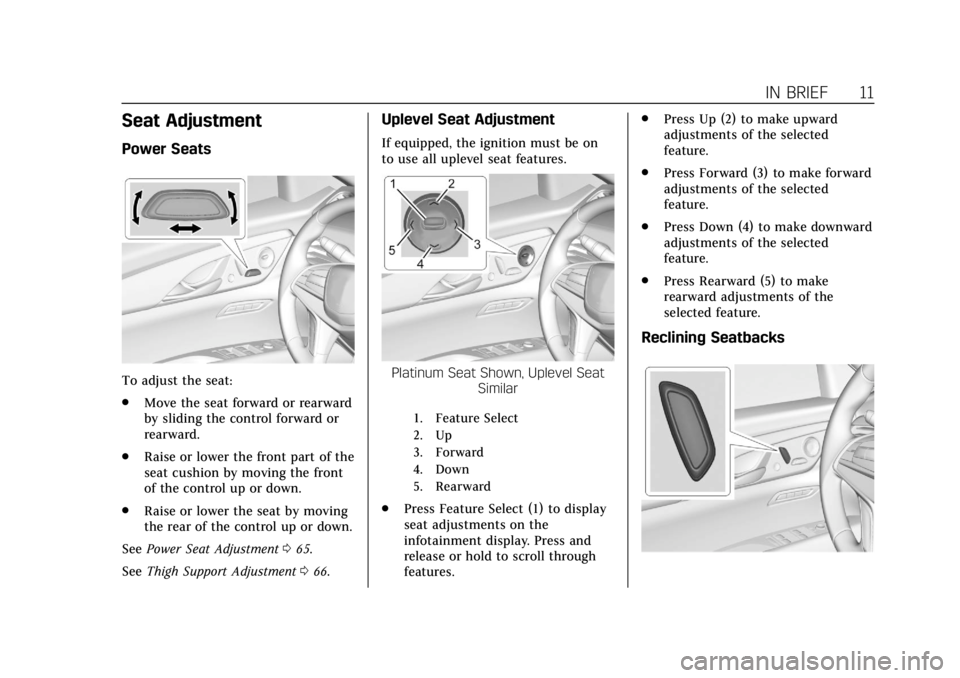
To adjust the seat:
.Move the seat forward or rearward
by sliding the control forward or
rearward.
. Raise or lower the front part of the
seat cushion by moving the front
of the control up or down.
. Raise or lower the seat by moving
the rear of the control up or down.
See Power Seat Adjustment 065.
See Thigh Support Adjustment 066.
Uplevel Seat Adjustment
If equipped, the ignition must be on
to use all uplevel seat features.
Platinum Seat Shown, Uplevel Seat
Similar
1. Feature Select
2. Up
3. Forward
4. Down
5. Rearward
.Press Feature Select (1) to display
seat adjustments on the
infotainment display. Press and
release or hold to scroll through
features. .
Press Up (2) to make upward
adjustments of the selected
feature.
. Press Forward (3) to make forward
adjustments of the selected
feature.
. Press Down (4) to make downward
adjustments of the selected
feature.
. Press Rearward (5) to make
rearward adjustments of the
selected feature.
Reclining Seatbacks
Page 13 of 438
Cadillac CT6 Owner Manual (GMNA-Localizing-U.S./Canada-12533370) -
2019 - crc - 1/23/19
12 IN BRIEF
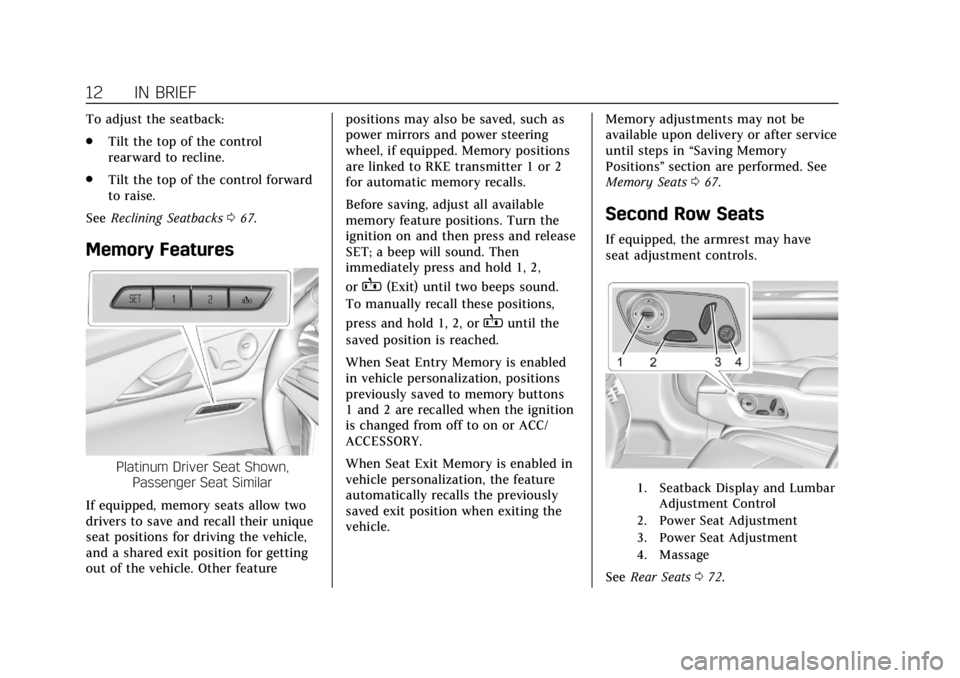
To adjust the seatback:
.Tilt the top of the control
rearward to recline.
. Tilt the top of the control forward
to raise.
See Reclining Seatbacks 067.
Memory Features
Platinum Driver Seat Shown,
Passenger Seat Similar
If equipped, memory seats allow two
drivers to save and recall their unique
seat positions for driving the vehicle,
and a shared exit position for getting
out of the vehicle. Other feature positions may also be saved, such as
power mirrors and power steering
wheel, if equipped. Memory positions
are linked to RKE transmitter 1 or 2
for automatic memory recalls.
Before saving, adjust all available
memory feature positions. Turn the
ignition on and then press and release
SET; a beep will sound. Then
immediately press and hold 1, 2,
or
B(Exit) until two beeps sound.
To manually recall these positions,
press and hold 1, 2, or
Buntil the
saved position is reached.
When Seat Entry Memory is enabled
in vehicle personalization, positions
previously saved to memory buttons
1 and 2 are recalled when the ignition
is changed from off to on or ACC/
ACCESSORY.
When Seat Exit Memory is enabled in
vehicle personalization, the feature
automatically recalls the previously
saved exit position when exiting the
vehicle. Memory adjustments may not be
available upon delivery or after service
until steps in
“Saving Memory
Positions” section are performed. See
Memory Seats 067.
Second Row Seats
If equipped, the armrest may have
seat adjustment controls.
1. Seatback Display and Lumbar
Adjustment Control
2. Power Seat Adjustment
3. Power Seat Adjustment
4. Massage
See Rear Seats 072.
Page 14 of 438
Cadillac CT6 Owner Manual (GMNA-Localizing-U.S./Canada-12533370) -
2019 - crc - 1/23/19
IN BRIEF 13
Easy Exit
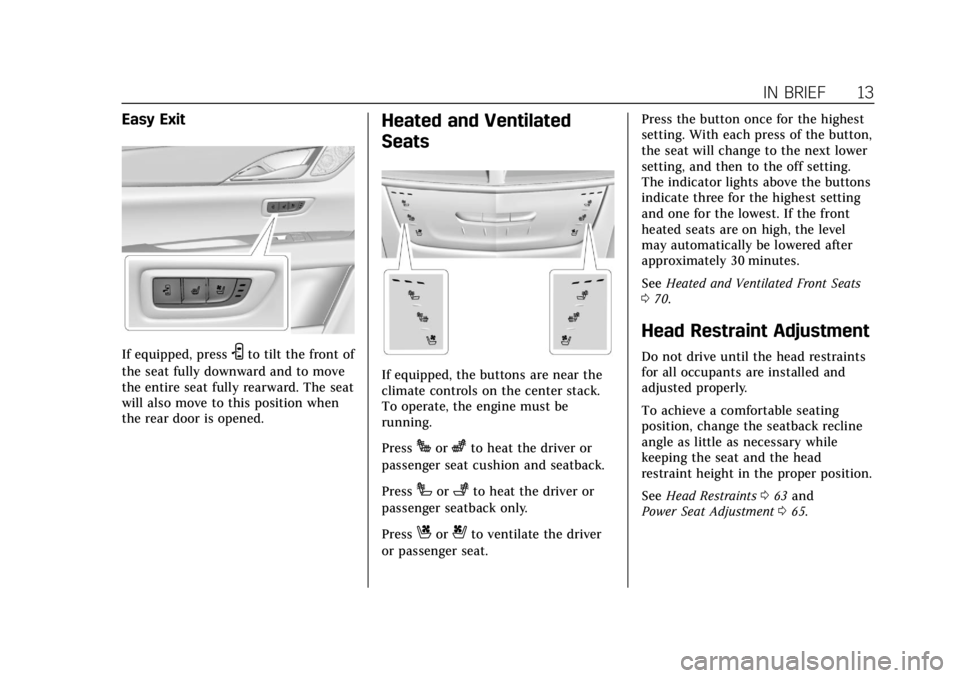
If equipped, pressSto tilt the front of
the seat fully downward and to move
the entire seat fully rearward. The seat
will also move to this position when
the rear door is opened.
Heated and Ventilated
Seats
If equipped, the buttons are near the
climate controls on the center stack.
To operate, the engine must be
running.
Press
Jorzto heat the driver or
passenger seat cushion and seatback.
Press
Ior+to heat the driver or
passenger seatback only.
Press
Cor{to ventilate the driver
or passenger seat. Press the button once for the highest
setting. With each press of the button,
the seat will change to the next lower
setting, and then to the off setting.
The indicator lights above the buttons
indicate three for the highest setting
and one for the lowest. If the front
heated seats are on high, the level
may automatically be lowered after
approximately 30 minutes.
See
Heated and Ventilated Front Seats
0 70.
Head Restraint Adjustment
Do not drive until the head restraints
for all occupants are installed and
adjusted properly.
To achieve a comfortable seating
position, change the seatback recline
angle as little as necessary while
keeping the seat and the head
restraint height in the proper position.
See Head Restraints 063 and
Power Seat Adjustment 065.
Page 15 of 438
Cadillac CT6 Owner Manual (GMNA-Localizing-U.S./Canada-12533370) -
2019 - crc - 1/23/19
14 IN BRIEF
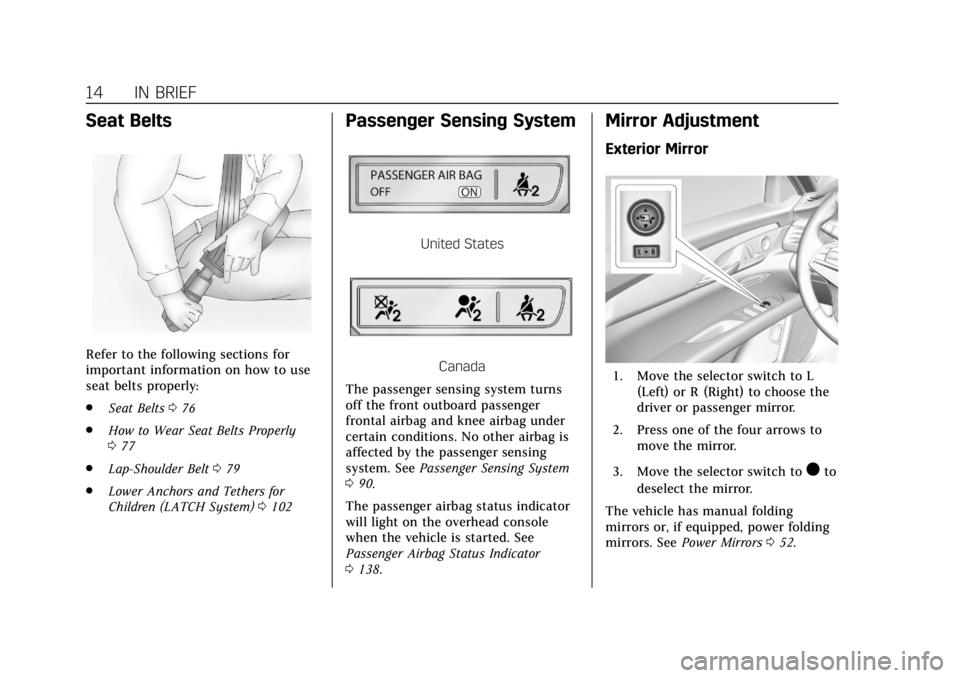
Seat Belts
Refer to the following sections for
important information on how to use
seat belts properly:
.Seat Belts 076
. How to Wear Seat Belts Properly
077
. Lap-Shoulder Belt 079
. Lower Anchors and Tethers for
Children (LATCH System) 0102
Passenger Sensing System
United States
Canada
The passenger sensing system turns
off the front outboard passenger
frontal airbag and knee airbag under
certain conditions. No other airbag is
affected by the passenger sensing
system. See Passenger Sensing System
0 90.
The passenger airbag status indicator
will light on the overhead console
when the vehicle is started. See
Passenger Airbag Status Indicator
0 138.
Mirror Adjustment
Exterior Mirror
1. Move the selector switch to L
(Left) or R (Right) to choose the
driver or passenger mirror.
2. Press one of the four arrows to move the mirror.
3. Move the selector switch to
)to
deselect the mirror.
The vehicle has manual folding
mirrors or, if equipped, power folding
mirrors. See Power Mirrors 052.
Page 63 of 438
Cadillac CT6 Owner Manual (GMNA-Localizing-U.S./Canada-12533370) -
2019 - crc - 1/23/19
62 SEATS AND RESTRAINTS
Seats and Restraints
Head Restraints
Head Restraints . . . . . . . . . . . . . . . . . . . . 63
Front Seats
Power Seat Adjustment . . . . . . . . . . . 65
Lumbar Adjustment . . . . . . . . . . . . . . . 65
Thigh Support Adjustment . . . . . . . . 66
Reclining Seatbacks . . . . . . . . . . . . . . . 67
Memory Seats . . . . . . . . . . . . . . . . . . . . . . 67
Heated and Ventilated FrontSeats . . . . . . . . . . . . . . . . . . . . . . . . . . . . . . 70
Massage . . . . . . . . . . . . . . . . . . . . . . . . . . . . 72
Rear Seats
Rear Seats . . . . . . . . . . . . . . . . . . . . . . . . . . 72
Lumbar Adjustment . . . . . . . . . . . . . . . 74
Heated and Ventilated Rear Seats . . . . . . . . . . . . . . . . . . . . . . . . . . . . . . 74
Rear Seat Pass-Through Door . . . . . 75
Seat Belts
Seat Belts . . . . . . . . . . . . . . . . . . . . . . . . . . . 76
How to Wear Seat Belts Properly . . . . . . . . . . . . . . . . . . . . . . . . . . . 77
Lap-Shoulder Belt . . . . . . . . . . . . . . . . . . 79
Seat Belt Use During Pregnancy . . . . . . . . . . . . . . . . . . . . . . . . . 82
Seat Belt Extender . . . . . . . . . . . . . . . . . 82 Safety System Check . . . . . . . . . . . . . . 82
Seat Belt Care . . . . . . . . . . . . . . . . . . . . . . 83
Replacing Seat Belt System Parts
after a Crash . . . . . . . . . . . . . . . . . . . . . . 83
Airbag System
Airbag System . . . . . . . . . . . . . . . . . . . . . 84
Where Are the Airbags? . . . . . . . . . . . 85
When Should an AirbagInflate? . . . . . . . . . . . . . . . . . . . . . . . . . . . 87
What Makes an Airbag Inflate? . . . 88
How Does an Airbag Restrain? . . . 88
What Will You See after an Airbag Inflates? . . . . . . . . . . . . . . . . . . . . . . . . . . 88
Passenger Sensing System . . . . . . . . 90
Servicing the Airbag-Equipped Vehicle . . . . . . . . . . . . . . . . . . . . . . . . . . . . 94
Adding Equipment to the Airbag-Equipped Vehicle . . . . . . . . 94
Airbag System Check . . . . . . . . . . . . . . 95
Replacing Airbag System Parts after a Crash . . . . . . . . . . . . . . . . . . . . . . 95
Child Restraints
Older Children . . . . . . . . . . . . . . . . . . . . . 96
Infants and Young Children . . . . . . 97
Child Restraint Systems . . . . . . . . . 100
Where to Put the Restraint . . . . . . 101
Lower Anchors and Tethers forChildren (LATCH System) . . . . . . 102 Replacing LATCH System Parts
After a Crash . . . . . . . . . . . . . . . . . . . . 108
Securing Child Restraints (With the Seat Belt in the
Rear Seat) . . . . . . . . . . . . . . . . . . . . . . . 108
Securing Child Restraints (With the Seat Belt in the
Front Seat) . . . . . . . . . . . . . . . . . . . . . . 111
Page 66 of 438
Cadillac CT6 Owner Manual (GMNA-Localizing-U.S./Canada-12533370) -
2019 - crc - 1/23/19
SEATS AND RESTRAINTS 65
Front Seats
Power Seat Adjustment
{Warning
You can lose control of the vehicle
if you try to adjust a driver seat
while the vehicle is moving. Adjust
the driver seat only when the
vehicle is not moving.
{Warning
The power seats will work with the
ignition off. Children could operate
the power seats and be injured.
Never leave children alone in the
vehicle.
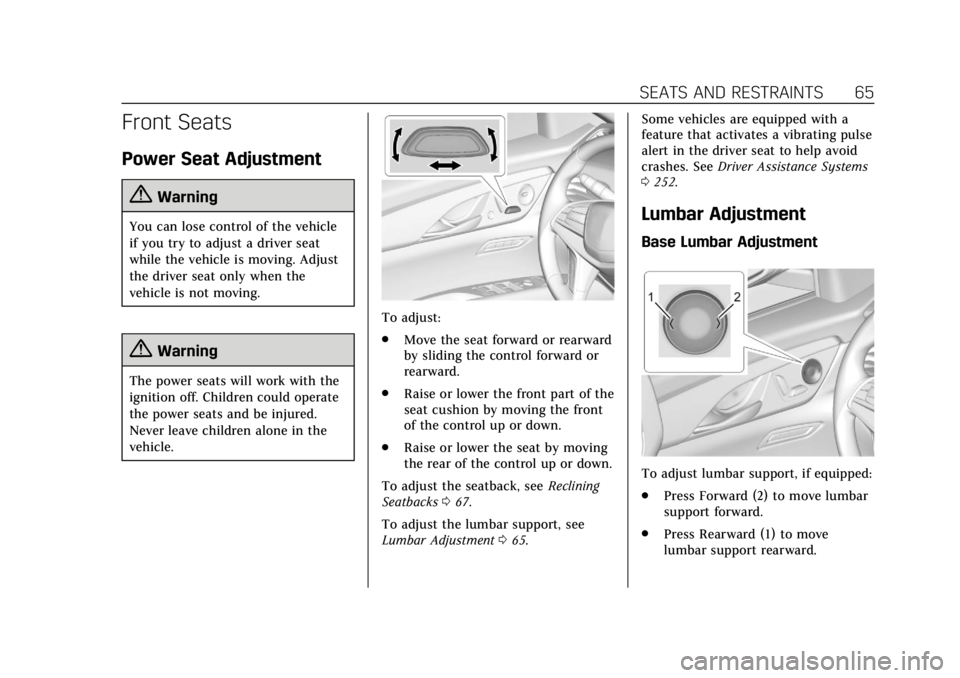
To adjust:
.Move the seat forward or rearward
by sliding the control forward or
rearward.
. Raise or lower the front part of the
seat cushion by moving the front
of the control up or down.
. Raise or lower the seat by moving
the rear of the control up or down.
To adjust the seatback, see Reclining
Seatbacks 067.
To adjust the lumbar support, see
Lumbar Adjustment 065. Some vehicles are equipped with a
feature that activates a vibrating pulse
alert in the driver seat to help avoid
crashes. See
Driver Assistance Systems
0 252.
Lumbar Adjustment
Base Lumbar Adjustment
To adjust lumbar support, if equipped:
.
Press Forward (2) to move lumbar
support forward.
. Press Rearward (1) to move
lumbar support rearward.
Page 67 of 438

Cadillac CT6 Owner Manual (GMNA-Localizing-U.S./Canada-12533370) -
2019 - crc - 1/23/19
66 SEATS AND RESTRAINTS
Uplevel Lumbar and Upper Back
Support Adjustment
If equipped, the ignition must be on
to use all uplevel seat features.
Platinum Seat
1. Feature Select
2. Up
3. Forward
4. Down
5. Rearward
1. To adjust lumbar support,if equipped: Toggle the Feature
Select (1) to view adjustable seat
options on the infotainment
display. 2. Select lumbar support.
.Press Up (2) to move lumbar
support upward.
. Press Forward (3) to move
lumbar support forward.
. Press Down (4) to move
lumbar support down.
. Press Rearward (5) to move
lumbar support rearward.
To adjust upper back support,
if equipped: 1. Toggle the Feature Select (1) to view adjustable seat options on
the infotainment display.
2. Select Upper Back Support.
3. Press Forward (3) to move support forward or Rearward (5)
to move support rearward.
Thigh Support Adjustment
To adjust thigh support, if equipped:
1. Toggle the Feature Select (3) to view adjustable seat options on
the infotainment display.
2. Select cushion length adjuster.
3. Press and hold the control forward (2) to increase or
rearward (1) to decrease cushion
length.
Page 69 of 438
Cadillac CT6 Owner Manual (GMNA-Localizing-U.S./Canada-12533370) -
2019 - crc - 1/23/19
68 SEATS AND RESTRAINTS
If equipped, memory seats allow two
drivers to save and recall their unique
seat positions for driving the vehicle,
and a shared exit position for getting
out of the vehicle. Other feature
positions may also be saved, such as
power mirrors and power steering
wheel, if equipped. Memory positions
are linked to RKE transmitter 1 or 2
for automatic memory recalls.
Before saving, adjust all available
memory feature positions. Turn the
ignition on and then press and release
SET; a beep will sound. Then
immediately press and hold 1, 2,
or
B(Exit) until two beeps sound.
To manually recall these positions,
press and hold 1, 2, or
Buntil the
saved position is reached. Follow the
instructions under “Saving Memory
Positions.”
The vehicle identifies the current
driver’s RKE transmitter number (1–
8). See Remote Keyless Entry (RKE)
System Operation 029. Only RKE
transmitters 1 and 2 can be used for
automatic memory recalls. A Driver
Information Center (DIC) welcome
message indicating the transmitter number may display for the first few
ignition cycles following a transmitter
change. For Seat Entry Memory to
work properly, save the positions to
the memory button (1 or 2) matching
the RKE transmitter number displayed
in the DIC welcome message. Carry
the linked RKE transmitter when
entering the vehicle.
Memory adjustments may not be
available upon delivery or after service
until steps in
“Saving Memory
Positions” section are performed.
Vehicle Personalization Settings
. To have the Seat Entry Memory
movement begin when the vehicle
is started, select the Settings
menu, then Vehicle, then Seating
Position, and then Seat Entry
Memory. Select On or Off. See
“Seat Entry Memory” later in this
section.
. Seat Exit Memory movement
begins when the ignition is turned
off and the driver door is opened,
or when the ignition is turned off
with the driver door already
opened, select the Settings menu, then Vehicle, then Seating
Position, and then Seat Exit
Memory. Select On or Off. See
“Seat Exit Memory”
later in this
section.
. See Vehicle Personalization 0157
for additional setting information.
Identifying Driver Number
To identify the driver number: 1. Start the vehicle with a different key or RKE transmitter. The DIC
should display the driver
number; 1 or 2. Turn the ignition
off and remove the key or RKE
transmitter from the vehicle.
2. Start the vehicle with the initial key or RKE transmitter. The DIC
should display the other driver
number not shown in Step 1.
Saving Memory Positions
Read these instructions completely
before saving memory positions.
To save preferred driving positions
1 and 2: 1. Turn the ignition on or to ACC/ ACCESSORY.