change wheel CADILLAC CT6 2020 User Guide
[x] Cancel search | Manufacturer: CADILLAC, Model Year: 2020, Model line: CT6, Model: CADILLAC CT6 2020Pages: 412, PDF Size: 7.13 MB
Page 137 of 412
Cadillac CT6 Owner Manual (GMNA-Localizing-U.S./Canada-13566829) -
2020 - CRC - 6/11/19
136 INSTRUMENTS AND CONTROLS
The language selection is changed
through the radio, and the units of
measurement is changed through the
instrument cluster. See“Settings”in
the infotainment manual and
"Options" under Instrument Cluster
(Base Level) 0110 or
Instrument Cluster (Uplevel) 0113.
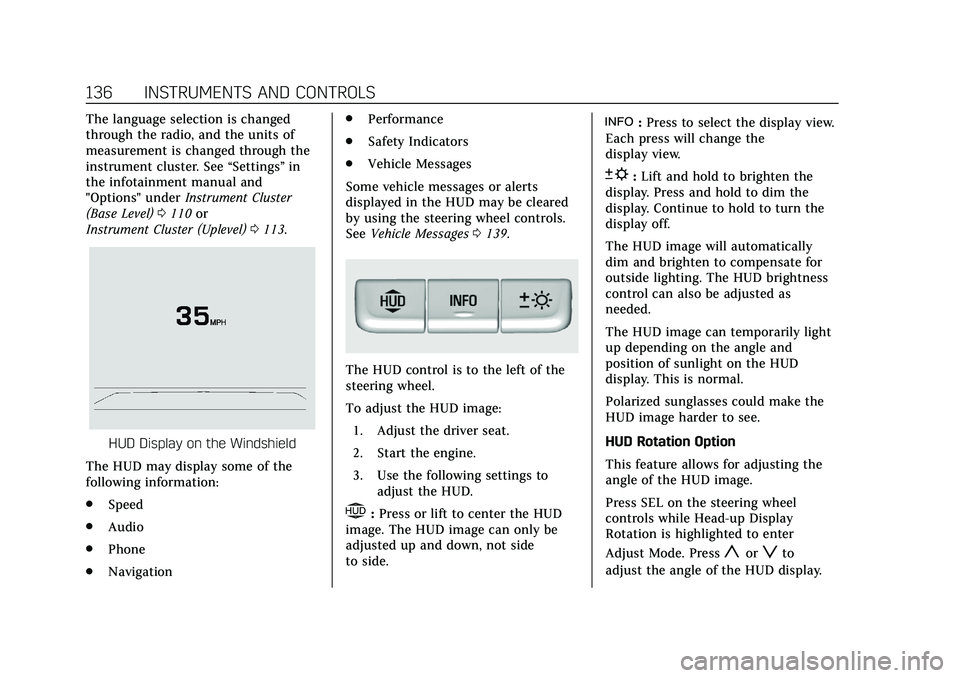
HUD Display on the Windshield
The HUD may display some of the
following information:
. Speed
. Audio
. Phone
. Navigation .
Performance
. Safety Indicators
. Vehicle Messages
Some vehicle messages or alerts
displayed in the HUD may be cleared
by using the steering wheel controls.
See Vehicle Messages 0139.
The HUD control is to the left of the
steering wheel.
To adjust the HUD image:
1. Adjust the driver seat.
2. Start the engine.
3. Use the following settings to adjust the HUD.
$:Press or lift to center the HUD
image. The HUD image can only be
adjusted up and down, not side
to side.
!: Press to select the display view.
Each press will change the
display view.
D: Lift and hold to brighten the
display. Press and hold to dim the
display. Continue to hold to turn the
display off.
The HUD image will automatically
dim and brighten to compensate for
outside lighting. The HUD brightness
control can also be adjusted as
needed.
The HUD image can temporarily light
up depending on the angle and
position of sunlight on the HUD
display. This is normal.
Polarized sunglasses could make the
HUD image harder to see.
HUD Rotation Option
This feature allows for adjusting the
angle of the HUD image.
Press SEL on the steering wheel
controls while Head-up Display
Rotation is highlighted to enter
Adjust Mode. Press
yorzto
adjust the angle of the HUD display.
Page 142 of 412

Cadillac CT6 Owner Manual (GMNA-Localizing-U.S./Canada-13566829) -
2020 - CRC - 6/11/19
INSTRUMENTS AND CONTROLS 141
Auto Fan Speed
This setting specifies the amount of
airf low when the climate control fan
setting is Auto Fan.
Touch Low, Medium, or High.
Air Quality Sensor
This setting switches the system into
Recirculation Mode based on the
quality of the outside air.
Touch Off, Low Sensitivity, or High
Sensitivity.
Auto Cooled Seats
When enabled, this feature will
automatically activate the ventilated
seats at the level required by the
interior temperature. SeeHeated and
Ventilated Front Seats 051.
Touch Off or On.
Auto Heated Seats
This setting automatically turns on
and regulates the heated seats when
the cabin temperature is cool. The
auto heated seats can be turned off by using the heated seat buttons on the
center stack. See
Heated and Ventilated
Front Seats 051.
If equipped with Auto Heated Steering
Wheel, this feature will turn on when
the Auto Heated Seats turn on.
Touch Off or On.
Auto Defog
This setting automatically turns the
front defogger on when the engine is
started.
Touch Off or On.
Auto Rear Defog
This setting automatically turns the
rear defogger on when the engine is
started.
Touch Off or On.
Ionizer
If equipped and on, this feature
purifies the air in the interior of the
vehicle. See Automatic Climate Control
System (Dual Zone) 0158 or
Automatic Climate Control System
(Quad Zone) 0163.
Touch Off or On.Collision / Detection Systems
Touch and the following may display:
. Alert Type
. Forward Collision System
. Front Pedestrian Detection
. Adaptive Cruise Go Notifier
. Lane Change Alert
. Rear Pedestrian Detection
. Rear Cross Traffic Alert
Alert Type
This setting specifies the type of
vehicle feedback provided, either a
beep or seat vibration, when you are
in danger of colliding with an object.
Touch Beeps or Safety Alert Seat.
Forward Collision System
This setting controls the vehicle
response when detecting a vehicle
ahead of you. The Off setting disables
all FCA and AEB functions. With the
Alert and Brake setting, both FCA and
AEB are available. The Alert setting
disables AEB. See Automatic
Emergency Braking (AEB) 0246.
Page 143 of 412
Cadillac CT6 Owner Manual (GMNA-Localizing-U.S./Canada-13566829) -
2020 - CRC - 6/11/19
142 INSTRUMENTS AND CONTROLS
Touch Off, Alert, or Alert and Brake.
Front Pedestrian Detection
This feature will turn on or off the
Front Pedestrian Braking (FPB) system
alerts and automatic braking. The Off
setting disables all FPB functions.
With the Alert & Brake setting, system
alerts and automatic braking are both
available. The Alert setting disables
automatic braking. SeeFront
Pedestrian Braking (FPB) System 0247.
Touch Off, Alert, or Alert & Brake.
Adaptive Cruise Go Notifier
This setting determines if an alert will
appear when Adaptive Cruise Control
brings the vehicle to a complete stop
and the vehicle ahead of you starts
moving again. See Adaptive Cruise
Control 0211.
Touch Off or On.
Lane Change Alert
This setting specifies if an alert will
display on the outside mirror to help
you avoid crashing into a vehicle in
your blind spot, or rapidly approaching your blind spot, during a
lane change maneuver. See
Lane
Change Alert (LCA) 0252.
When Lane Change Alert is disabled,
Side Blind Zone Alert is also disabled.
Touch Off or On.
Rear Pedestrian Detection
This setting specifies if there is an
alert when the system detects
pedestrians behind the vehicle when
in R (Reverse).
Touch Off or Alert.
Rear Cross Traffic Alert
This setting specifies if an alert will
display when the vehicle detects
approaching rear cross traffic when in
R (Reverse). See Assistance Systems for
Parking or Backing 0235.
Touch Off or On.
Comfort and Convenience
Touch and the following may display:
. Chime Volume
. Reverse Tilt Mirror
. Remote Mirror Folding .
Rain Sense Wipers
. Hands Free Liftgate/Trunk Control
Chime Volume
This setting determines the chime
volume level.
Touch the controls on the
infotainment display to adjust the
volume.
Reverse Tilt Mirror
When on, both the driver and
passenger, driver, or passenger outside
mirrors will tilt downward when the
vehicle is shifted to R (Reverse) to
improve visibility of the ground near
the rear wheels. They will return to
their previous driving position when
the vehicle is shifted out of
R (Reverse) or the engine is turned off.
Touch Off, On - Driver and Passenger,
On - Driver, or On - Passenger.
Page 145 of 412
Cadillac CT6 Owner Manual (GMNA-Localizing-U.S./Canada-13566829) -
2020 - CRC - 6/11/19
144 INSTRUMENTS AND CONTROLS
Remote Unlock Light Feedback
This setting flashes the exterior lamps
when the vehicle is unlocked with the
RKE transmitter.
Touch Off or Flash Lights.
Remote Lock Feedback
This setting specifies how the vehicle
responds when the vehicle is locked
with the RKE transmitter.
Touch Off, Lights and Horn, Lights
Only, or Horn Only.
Remote Door Unlock
This setting specifies whether all
doors, or just the driver door, unlock
when pressing
Kon the RKE
transmitter.
Touch All Doors or Driver Door.
Remote Start Auto Cool Seats
If equipped and turned on, this
feature will turn the ventilated seats
on when using remote start on
warm days.
Touch Off or On. Remote Start Auto Heat Seats
This setting automatically turns on
the heated seats when using the
remote start function on cold days.
See
Heated and Ventilated Front Seats
0 51 and
Remote Vehicle Start 017.
If equipped with Auto Heated Steering
Wheel, this feature will turn on when
the Remote Start Auto Heated Seats
turn on.
Touch Off or On.
Remote Window Operation
If equipped, this feature enables
remote operation of the windows with
the RKE transmitter. See Remote
Keyless Entry (RKE) System Operation
0 10.
Touch Off or On.
Passive Door Unlock
This setting specifies which doors
unlock when using the button on the
driver door handle to unlock the
vehicle.
Touch Off, All Doors, or Driver
Door Only. Passive Door Lock
This setting specifies if the vehicle will
automatically lock, or lock and
provide an alert after all the doors are
closed, and you walk away from the
vehicle with the RKE transmitter. See
Remote Keyless Entry (RKE) System
Operation
010.
Touch Off, On with Horn Chirp, or On.
Remote Left in Vehicle Alert
This feature sounds an alert when the
RKE transmitter is left in the vehicle.
This menu also enables Remote No
Longer in Vehicle Alert.
Touch Off or On.Seating Position
Touch and the following may display:
. Seat Entry Memory
. Seat Exit Memory
Seat Entry Memory
This feature automatically recalls the
previously stored 1 or 2 button
positions when the ignition is changed
from off to on or ACC/ACCESSORY.
See Memory Seats 048.
Page 146 of 412
Cadillac CT6 Owner Manual (GMNA-Localizing-U.S./Canada-13566829) -
2020 - CRC - 6/11/19
INSTRUMENTS AND CONTROLS 145
Touch On or Off.
Seat Exit Memory
This feature automatically recalls the
previously stored exit button positions
when the ignition is changed from on
or ACC/ACCESSORY to off if the driver
door is open or opened. SeeMemory
Seats 048.
Touch Off or On.
Teen Driver
See “Teen Driver” under“Settings ”in
the infotainment manual.
Valet Mode
This will lock the infotainment system
and steering wheel controls. It may
also limit access to vehicle storage
locations, if equipped.
To enable valet mode:
1. Enter a four-digit code on the keypad.
2. Touch Enter to go to the confirmation screen.
3. Re-enter the four-digit code.
Touch Lock or Unlock to lock or
unlock the system. Touch Back to go
back to the previous menu.
Universal Remote
System
See Radio Frequency Statement 0386.
Universal Remote System
Programming
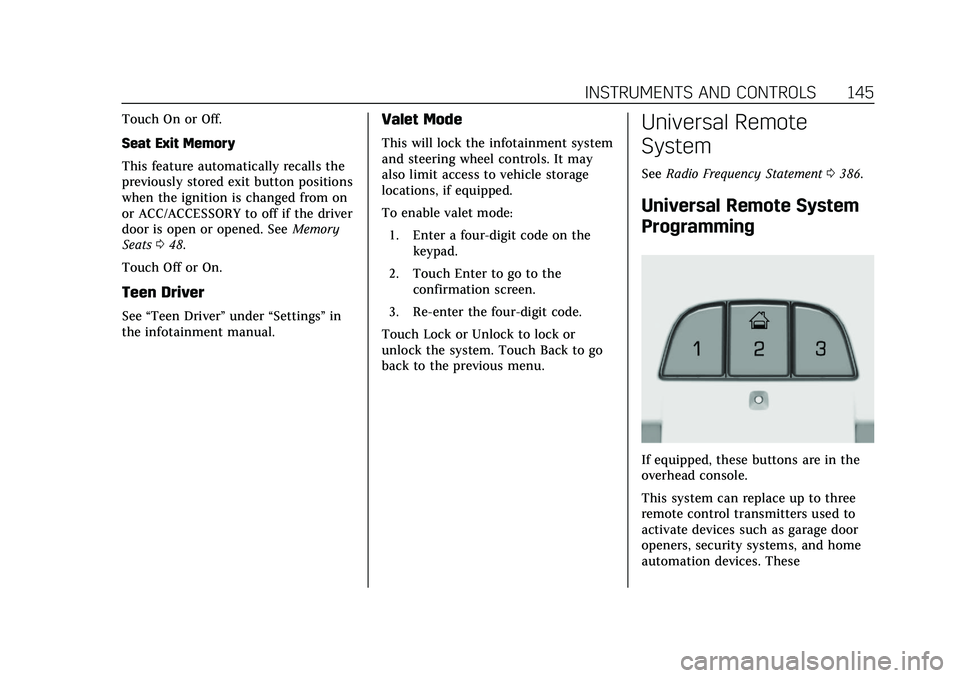
If equipped, these buttons are in the
overhead console.
This system can replace up to three
remote control transmitters used to
activate devices such as garage door
openers, security systems, and home
automation devices. These
Page 154 of 412

Cadillac CT6 Owner Manual (GMNA-Localizing-U.S./Canada-13566829) -
2020 - CRC - 6/11/19
LIGHTING 153
Turn and Lane-Change
Signals
Move the lever all the way up or down
to signal a turn.
An arrow on the instrument cluster
flashes in the direction of the turn or
lane change.
Raise or lower the lever until the
arrow starts to flash to signal a lane
change. Hold it there until the lane
change is completed. If the lever is
briefly pressed and released, the turn
signal flashes three times.The turn and lane-change signal can
be turned off manually by moving the
lever back to its original position.
If after signaling a turn or lane
change, the arrow flashes rapidly or
does not come on, a signal function
may be inoperative. This vehicle is
equipped with LED lighting. For
replacement of any LED lighting
contact your dealer.
Cornering Lamps
If equipped with cornering lamps, they
automatically come on when all of the
following occur:
.
The low-beam headlamps are on.
. The turn signals are activated or
the steering wheel is at a turning
angle.
. The vehicle speed is below 40 Km/
h or (25 mph).
Interior Lighting
Instrument Panel
Illumination Control
The brightness of the instrument
panel lighting and steering wheel
controls can be adjusted.
D:Move the thumbwheel up or
down to brighten or dim the lights.
Page 172 of 412

Cadillac CT6 Owner Manual (GMNA-Localizing-U.S./Canada-13566829) -
2020 - CRC - 6/14/19
DRIVING AND OPERATING 171
Driving and
Operating
Driving Information
Driving for Better FuelEconomy . . . . . . . . . . . . . . . . . . . . . . . . 172
Distracted Driving . . . . . . . . . . . . . . . . 172
Defensive Driving . . . . . . . . . . . . . . . . 173
Drunk Driving . . . . . . . . . . . . . . . . . . . . 173
Control of a Vehicle . . . . . . . . . . . . . . 173
Braking . . . . . . . . . . . . . . . . . . . . . . . . . . . . 174
Steering . . . . . . . . . . . . . . . . . . . . . . . . . . . 174
Off-Road Recovery . . . . . . . . . . . . . . . . 175
Loss of Control . . . . . . . . . . . . . . . . . . . 175
Track Events and Competitive Driving . . . . . . . . . . . . . . . . . . . . . . . . . . 176
Driving on Wet Roads . . . . . . . . . . . 176
Hill and Mountain Roads . . . . . . . . 177
Winter Driving . . . . . . . . . . . . . . . . . . . . 178
If the Vehicle Is Stuck . . . . . . . . . . . 179
Vehicle Load Limits . . . . . . . . . . . . . . 179
Starting and Operating
New Vehicle Break-In . . . . . . . . . . . . 183
Ignition Positions . . . . . . . . . . . . . . . . 183
Starting the Engine . . . . . . . . . . . . . . 185
Stop/Start System . . . . . . . . . . . . . . . . 186
Engine Heater . . . . . . . . . . . . . . . . . . . . 187 Retained Accessory
Power (RAP) . . . . . . . . . . . . . . . . . . . . 188
Shifting Into Park . . . . . . . . . . . . . . . . 188
Shifting out of Park . . . . . . . . . . . . . . 189
Parking over Things That Burn . . . . . . . . . . . . . . . . . . . . . . . 191
Active Fuel Management . . . . . . . . 191
Extended Parking . . . . . . . . . . . . . . . . . 191
Engine Exhaust
Engine Exhaust . . . . . . . . . . . . . . . . . . . 192
Running the Vehicle While Parked . . . . . . . . . . . . . . . . . . . . . . . . . . . 192
Automatic Transmission
Automatic Transmission . . . . . . . . . 193
Manual Mode . . . . . . . . . . . . . . . . . . . . . 197
Drive Systems
All-Wheel Drive . . . . . . . . . . . . . . . . . . 199
Brakes
Electric Brake Boost . . . . . . . . . . . . . . 199
Antilock Brake System (ABS) . . . . 199
Electric Parking Brake . . . . . . . . . . . . 200
Brake Assist . . . . . . . . . . . . . . . . . . . . . . . 201
Hill Start Assist (HSA) . . . . . . . . . . . 201
Automatic VehicleHold (AVH) . . . . . . . . . . . . . . . . . . . . . 202
Ride Control Systems
Traction Control/ElectronicStability Control . . . . . . . . . . . . . . . . 203
Driver Mode Control . . . . . . . . . . . . . 204
Locking Rear Axle . . . . . . . . . . . . . . . . 208
Cruise Control
Cruise Control . . . . . . . . . . . . . . . . . . . . 209
Adaptive Cruise Control . . . . . . . . . 211
Super Cruise . . . . . . . . . . . . . . . . . . . . . . 220
Driver Assistance Systems
Driver Assistance Systems . . . . . . . 234
Assistance Systems for Parking or Backing . . . . . . . . . . . . . . . . . . . . . . . 235
Rear Pedestrian Alert . . . . . . . . . . . . 242
Assistance Systems for Driving . . . . . . . . . . . . . . . . . . . . . . . . . . 243
Forward Collision Alert (FCA) System . . . . . . . . . . . . . . . . . . . . . . . . . . 244
Automatic Emergency Braking (AEB) . . . . . . . . . . . . . . . . . . . 246
Front Pedestrian Braking (FPB) System . . . . . . . . . . . . . . . . . . . . . . . . . . 247
Night Vision System . . . . . . . . . . . . . 250
Side Blind Zone Alert (SBZA) . . . . 252
Lane Change Alert (LCA) . . . . . . . . 252
Lane Keep Assist (LKA) . . . . . . . . . . 254
Surround Vision Recorder . . . . . . . 256
Page 200 of 412

Cadillac CT6 Owner Manual (GMNA-Localizing-U.S./Canada-13566829) -
2020 - CRC - 6/14/19
DRIVING AND OPERATING 199
Drive Systems
All-Wheel Drive
Vehicles with this feature always send
engine power to all four wheels. It is
fully automatic, and adjusts itself as
needed for road conditions.
Brakes
Electric Brake Boost
Vehicles equipped with electric brake
boost have hydraulic brake circuits
that are electronically controlled when
the brake pedal is applied during
normal operation. The system
performs routine tests and turns off
within a few minutes after the vehicle
is shutdown. Noise may be heard
during this time. If the brake pedal is
pressed during the tests or when the
electric brake boost system is off, a
noticeable change in pedal force and
travel may be felt. This is normal.
Antilock Brake
System (ABS)
The Antilock Brake System (ABS)
helps prevent a braking skid and
maintain steering while braking hard.
ABS performs a system check when
the vehicle is first driven.
A momentary motor or clicking noisemay be heard while this test is going
on, and the brake pedal may move
slightly. This is normal.
If there is a problem with ABS, this
warning light stays on. See
Antilock
Brake System (ABS) Warning Light
0 126.
ABS does not change the time needed
to get a foot on the brake pedal and
does not always decrease stopping
distance. If you get too close to the
vehicle ahead, there will not be
enough time to apply the brakes if
that vehicle suddenly slows or stops.
Always leave enough room ahead to
stop, even with ABS.
Page 206 of 412
Cadillac CT6 Owner Manual (GMNA-Localizing-U.S./Canada-13566829) -
2020 - CRC - 6/14/19
DRIVING AND OPERATING 205
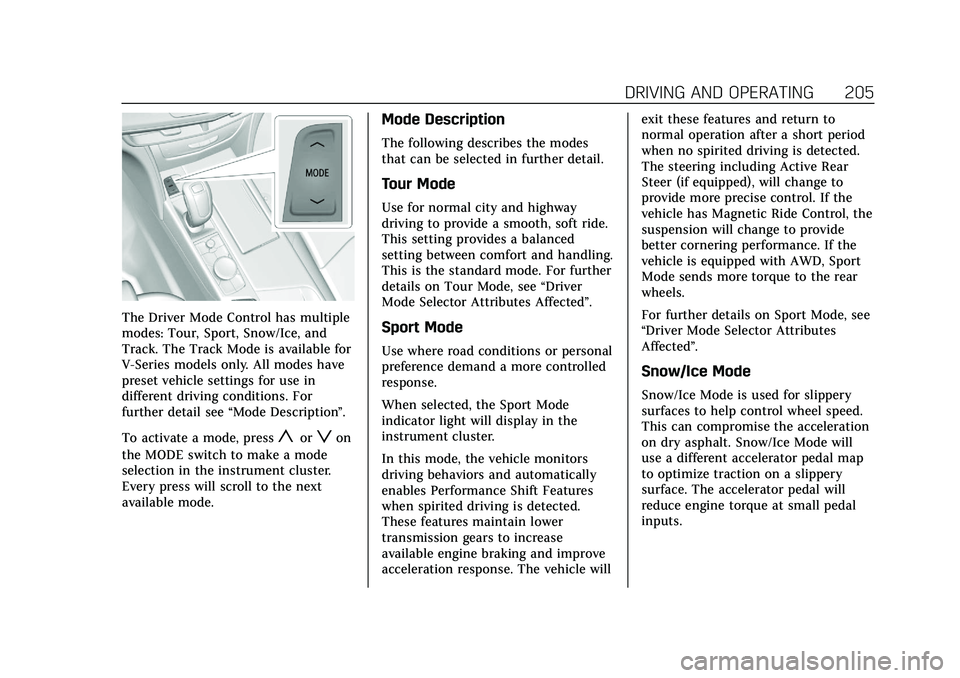
The Driver Mode Control has multiple
modes: Tour, Sport, Snow/Ice, and
Track. The Track Mode is available for
V-Series models only. All modes have
preset vehicle settings for use in
different driving conditions. For
further detail see“Mode Description ”.
To activate a mode, press
yorzon
the MODE switch to make a mode
selection in the instrument cluster.
Every press will scroll to the next
available mode.
Mode Description
The following describes the modes
that can be selected in further detail.
Tour Mode
Use for normal city and highway
driving to provide a smooth, soft ride.
This setting provides a balanced
setting between comfort and handling.
This is the standard mode. For further
details on Tour Mode, see “Driver
Mode Selector Attributes Affected ”.
Sport Mode
Use where road conditions or personal
preference demand a more controlled
response.
When selected, the Sport Mode
indicator light will display in the
instrument cluster.
In this mode, the vehicle monitors
driving behaviors and automatically
enables Performance Shift Features
when spirited driving is detected.
These features maintain lower
transmission gears to increase
available engine braking and improve
acceleration response. The vehicle will exit these features and return to
normal operation after a short period
when no spirited driving is detected.
The steering including Active Rear
Steer (if equipped), will change to
provide more precise control. If the
vehicle has Magnetic Ride Control, the
suspension will change to provide
better cornering performance. If the
vehicle is equipped with AWD, Sport
Mode sends more torque to the rear
wheels.
For further details on Sport Mode, see
“Driver Mode Selector Attributes
Affected”.
Snow/Ice Mode
Snow/Ice Mode is used for slippery
surfaces to help control wheel speed.
This can compromise the acceleration
on dry asphalt. Snow/Ice Mode will
use a different accelerator pedal map
to optimize traction on a slippery
surface. The accelerator pedal will
reduce engine torque at small pedal
inputs.
Page 209 of 412

Cadillac CT6 Owner Manual (GMNA-Localizing-U.S./Canada-13566829) -
2020 - CRC - 6/14/19
208 DRIVING AND OPERATING
Engine Sound
Adjusts the volume of engine noise
from quietest in Tour mode to most
robust in Track mode.
Steering
Adjusts from a lighter steering feel in
Tour Mode to reduced assist in Sport
and Track Mode for more
steering feel.
Suspension (if equipped with
Magnetic Ride)
Adjusts the shock dampening
firmness from a comfort tune in Tour
Mode to an optimized responsiveness
tune in Sport and Track.
Traction and Stability Control
StabiliTrak/Electronic Stability Control
(ESC) can be turned off by pressing
and holding the button for
five seconds.
Driver Mode Customization
The Engine Sound Management,
steering, and suspension drive modes
can be set to the driver’s preference.
See“Driving Mode ”under Vehicle
Personalization 0140. When in the Track main vehicle mode,
you cannot overwrite the Steering or
Suspension settings. These settings
are designed to interact with the
advanced functions in the Track Mode
and cannot be overwritten.
The selections made in the Driving
Mode menu overwrite the main
vehicle mode selection via the buttons
or switch on the center console. In
order to customize and overwrite,
select one of the three settings by
touching the infotainment display.
When in the customization screen for
each system, select one of the
available options:
•
Auto (Follows the MODE switch)
• Tour
• Sport
• Track (V-Series only) The default will be to follow the
vehicle MODE switch settings, but the
main vehicle mode selection for the
currently selected system can be
overwritten using this menu. The
settings selected in this menu will set
the vehicle behavior in all selected
vehicle modes, and will be retained
over each ignition cycle. They do not
have to be reset each time the vehicle
is started.
Locking Rear Axle
Vehicles with a limited-slip rear axle
can give more traction on snow, mud,
ice, sand, or gravel. When traction is
low, this feature allows the drive
wheel with the most traction to move
the vehicle. The limited-slip rear axle
also gives the driver enhanced control
when cornering hard or completing a
maneuver, such as a lane change. For
vehicles with limited-slip rear axle, the
rear axle fluid should be changed. See
Maintenance Schedule
0359.