seat CADILLAC CT6 2020 Owner's Manual
[x] Cancel search | Manufacturer: CADILLAC, Model Year: 2020, Model line: CT6, Model: CADILLAC CT6 2020Pages: 412, PDF Size: 7.13 MB
Page 2 of 412
Cadillac CT6 Owner Manual (GMNA-Localizing-U.S./Canada-13566829) -
2020 - CRC - 6/11/19
ContentsIntroduction . . . . . . . . . . . . . . . . . . . . . . . . . . 2
Keys, Doors, and Windows . . . . . . . . . . 9
Seats and Restraints . . . . . . . . . . . . . . . 43
Storage . . . . . . . . . . . . . . . . . . . . . . . . . . . . . . 98
Instruments and Controls . . . . . . . . 102
Lighting . . . . . . . . . . . . . . . . . . . . . . . . . . . . 149
Infotainment System . . . . . . . . . . . . . 157
Climate Controls . . . . . . . . . . . . . . . . . . 158
Driving and Operating . . . . . . . . . . . . 171
Vehicle Care . . . . . . . . . . . . . . . . . . . . . . . 270
Service and Maintenance . . . . . . . . . 357
Technical Data . . . . . . . . . . . . . . . . . . . . 372
Customer Information . . . . . . . . . . . . 376
Reporting Safety Defects . . . . . . . . . 386
OnStar . . . . . . . . . . . . . . . . . . . . . . . . . . . . . . 390
Connected Services . . . . . . . . . . . . . . . 397
Index . . . . . . . . . . . . . . . . . . . . . . . . 400
Page 5 of 412
Cadillac CT6 Owner Manual (GMNA-Localizing-U.S./Canada-13566829) -
2020 - CRC - 6/11/19
4 INTRODUCTION
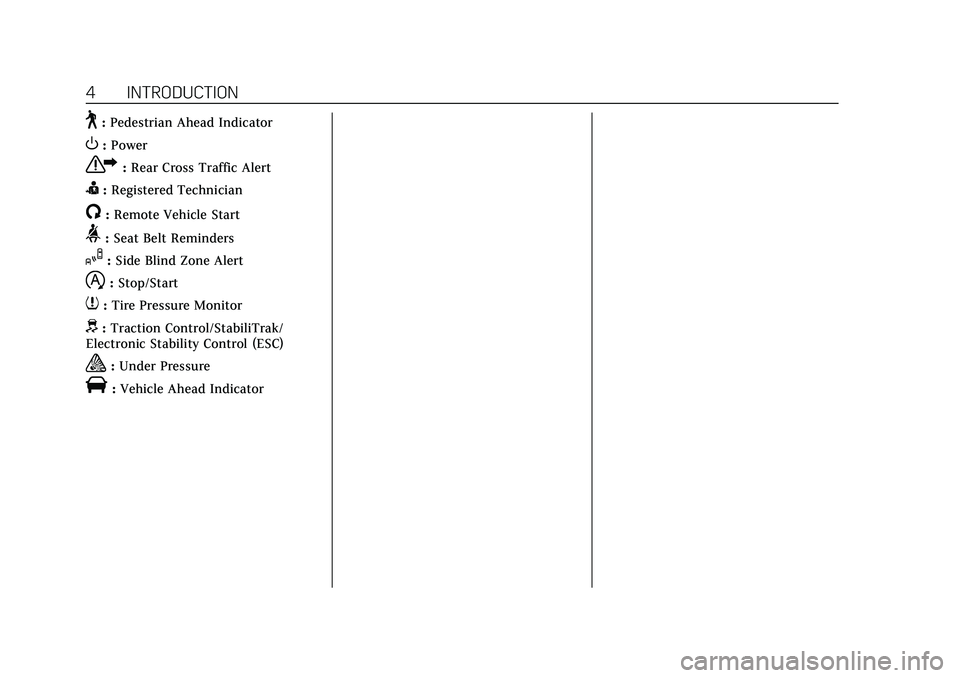
~:Pedestrian Ahead Indicator
O:Power
7: Rear Cross Traffic Alert
I:Registered Technician
/:Remote Vehicle Start
>: Seat Belt Reminders
I:Side Blind Zone Alert
h:Stop/Start
7: Tire Pressure Monitor
d:Traction Control/StabiliTrak/
Electronic Stability Control (ESC)
a: Under Pressure
V:Vehicle Ahead Indicator
Page 7 of 412
Cadillac CT6 Owner Manual (GMNA-Localizing-U.S./Canada-13566829) -
2020 - CRC - 6/11/19
6 INTRODUCTION
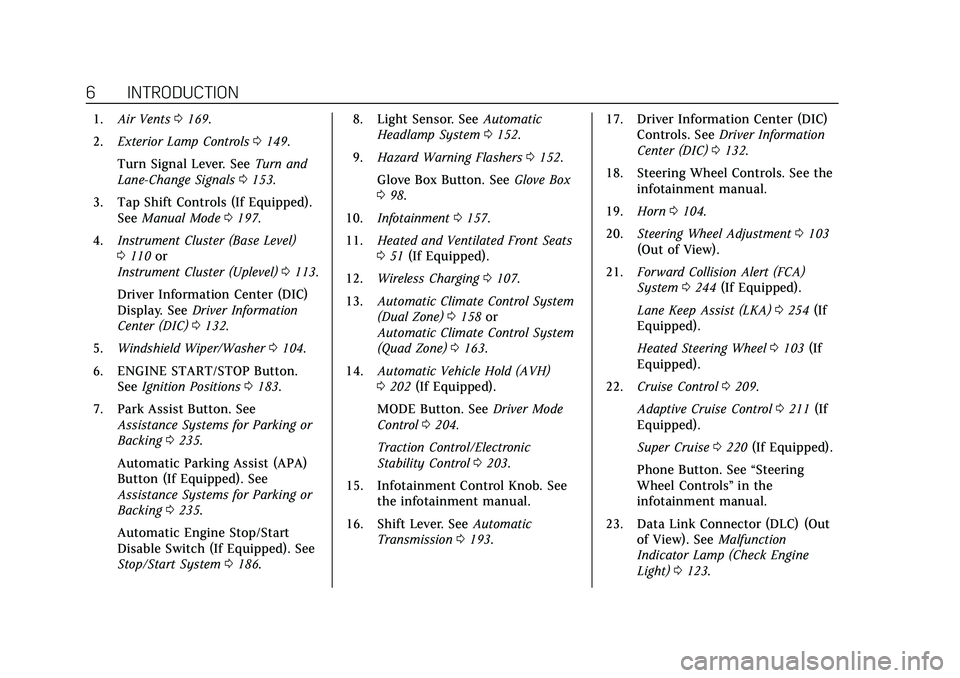
1.Air Vents 0169.
2. Exterior Lamp Controls 0149.
Turn Signal Lever. See Turn and
Lane-Change Signals 0153.
3. Tap Shift Controls (If Equipped). See Manual Mode 0197.
4. Instrument Cluster (Base Level)
0110 or
Instrument Cluster (Uplevel) 0113.
Driver Information Center (DIC)
Display. See Driver Information
Center (DIC) 0132.
5. Windshield Wiper/Washer 0104.
6. ENGINE START/STOP Button. See Ignition Positions 0183.
7. Park Assist Button. See Assistance Systems for Parking or
Backing 0235.
Automatic Parking Assist (APA)
Button (If Equipped). See
Assistance Systems for Parking or
Backing 0235.
Automatic Engine Stop/Start
Disable Switch (If Equipped). See
Stop/Start System 0186. 8. Light Sensor. See
Automatic
Headlamp System 0152.
9. Hazard Warning Flashers 0152.
Glove Box Button. See Glove Box
0 98.
10. Infotainment 0157.
11. Heated and Ventilated Front Seats
051 (If Equipped).
12. Wireless Charging 0107.
13. Automatic Climate Control System
(Dual Zone) 0158 or
Automatic Climate Control System
(Quad Zone) 0163.
14. Automatic Vehicle Hold (AVH)
0202 (If Equipped).
MODE Button. See Driver Mode
Control 0204.
Traction Control/Electronic
Stability Control 0203.
15. Infotainment Control Knob. See the infotainment manual.
16. Shift Lever. See Automatic
Transmission 0193. 17. Driver Information Center (DIC)
Controls. See Driver Information
Center (DIC) 0132.
18. Steering Wheel Controls. See the infotainment manual.
19. Horn 0104.
20. Steering Wheel Adjustment 0103
(Out of View).
21. Forward Collision Alert (FCA)
System 0244 (If Equipped).
Lane Keep Assist (LKA) 0254 (If
Equipped).
Heated Steering Wheel 0103 (If
Equipped).
22. Cruise Control 0209.
Adaptive Cruise Control 0211 (If
Equipped).
Super Cruise 0220 (If Equipped).
Phone Button. See “Steering
Wheel Controls ”in the
infotainment manual.
23. Data Link Connector (DLC) (Out of View). See Malfunction
Indicator Lamp (Check Engine
Light) 0123.
Page 13 of 412
Cadillac CT6 Owner Manual (GMNA-Localizing-U.S./Canada-13566829) -
2020 - CRC - 6/11/19
12 KEYS, DOORS, AND WINDOWS
Keyless Access Operation
The Keyless Access system lets you
lock and unlock the doors and access
the trunk without removing the RKE
transmitter from your pocket, purse,
briefcase, etc. The RKE transmitter
must be within 1 m (3 ft) of the trunk
or door being opened. If equipped,
there will be a button on the outside
door handles.
The Keyless Access system can be
programmed to unlock all doors on
the first lock/unlock button press from
the driver door. SeeVehicle
Personalization 0140.
If equipped with memory seats, RKE
transmitters 1 and 2 are linked to
seating positions of memory 1 or 2.
See Memory Seats 048.
Keyless Unlocking/Locking from the
Driver Door
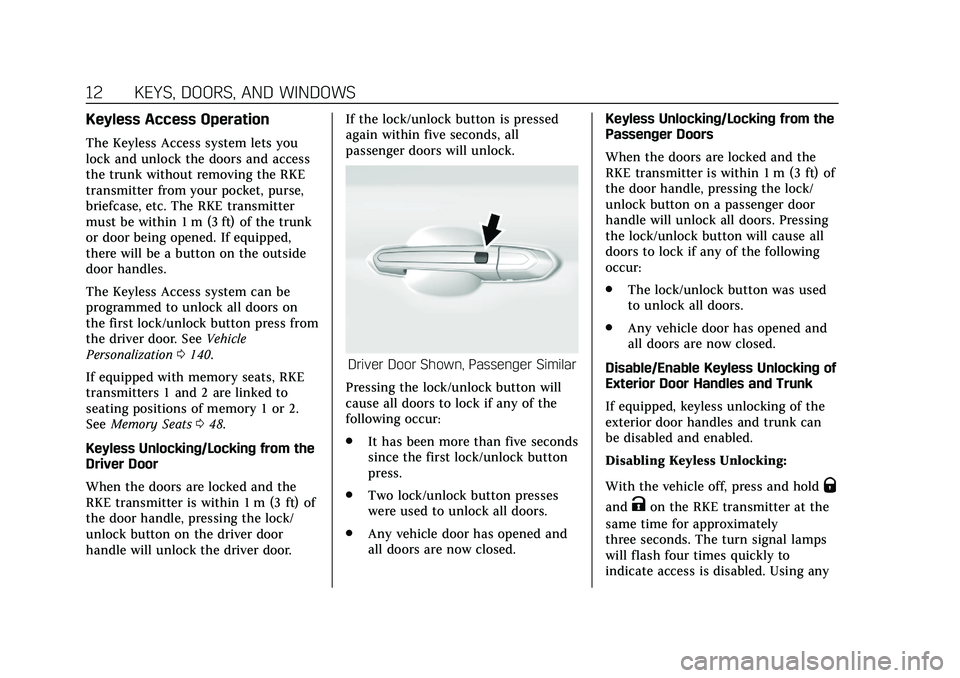
When the doors are locked and the
RKE transmitter is within 1 m (3 ft) of
the door handle, pressing the lock/
unlock button on the driver door
handle will unlock the driver door. If the lock/unlock button is pressed
again within five seconds, all
passenger doors will unlock.
Driver Door Shown, Passenger Similar
Pressing the lock/unlock button will
cause all doors to lock if any of the
following occur:
. It has been more than five seconds
since the first lock/unlock button
press.
. Two lock/unlock button presses
were used to unlock all doors.
. Any vehicle door has opened and
all doors are now closed. Keyless Unlocking/Locking from the
Passenger Doors
When the doors are locked and the
RKE transmitter is within 1 m (3 ft) of
the door handle, pressing the lock/
unlock button on a passenger door
handle will unlock all doors. Pressing
the lock/unlock button will cause all
doors to lock if any of the following
occur:
.
The lock/unlock button was used
to unlock all doors.
. Any vehicle door has opened and
all doors are now closed.
Disable/Enable Keyless Unlocking of
Exterior Door Handles and Trunk
If equipped, keyless unlocking of the
exterior door handles and trunk can
be disabled and enabled.
Disabling Keyless Unlocking:
With the vehicle off, press and hold
Q
andKon the RKE transmitter at the
same time for approximately
three seconds. The turn signal lamps
will flash four times quickly to
indicate access is disabled. Using any
Page 18 of 412
Cadillac CT6 Owner Manual (GMNA-Localizing-U.S./Canada-13566829) -
2020 - CRC - 6/11/19
KEYS, DOORS, AND WINDOWS 17
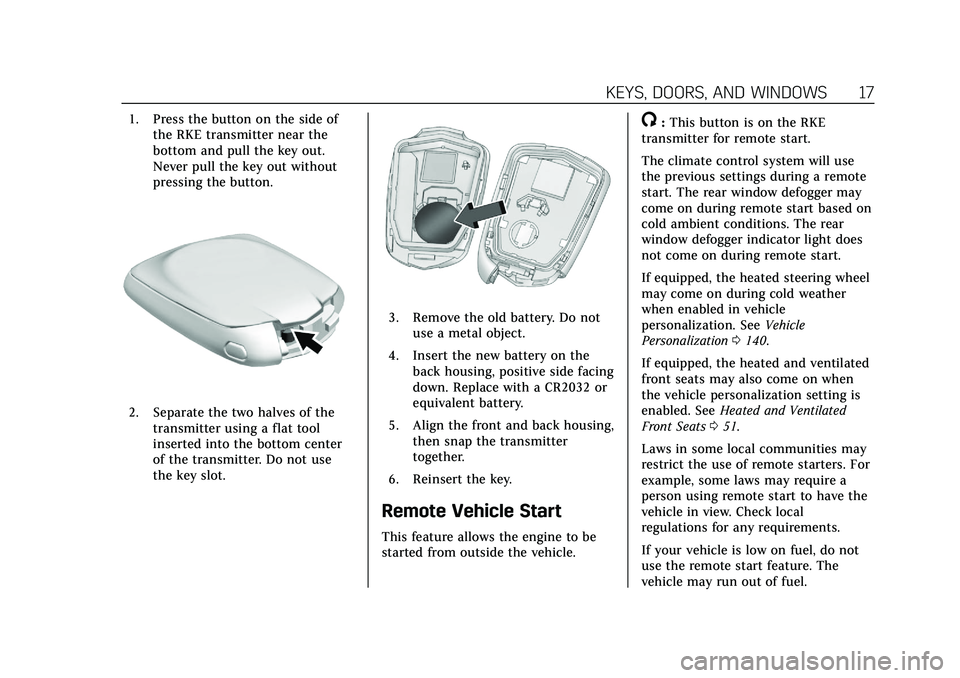
1. Press the button on the side ofthe RKE transmitter near the
bottom and pull the key out.
Never pull the key out without
pressing the button.
2. Separate the two halves of the
transmitter using a flat tool
inserted into the bottom center
of the transmitter. Do not use
the key slot.
3. Remove the old battery. Do notuse a metal object.
4. Insert the new battery on the back housing, positive side facing
down. Replace with a CR2032 or
equivalent battery.
5. Align the front and back housing, then snap the transmitter
together.
6. Reinsert the key.
Remote Vehicle Start
This feature allows the engine to be
started from outside the vehicle.
/: This button is on the RKE
transmitter for remote start.
The climate control system will use
the previous settings during a remote
start. The rear window defogger may
come on during remote start based on
cold ambient conditions. The rear
window defogger indicator light does
not come on during remote start.
If equipped, the heated steering wheel
may come on during cold weather
when enabled in vehicle
personalization. See Vehicle
Personalization 0140.
If equipped, the heated and ventilated
front seats may also come on when
the vehicle personalization setting is
enabled. See Heated and Ventilated
Front Seats 051.
Laws in some local communities may
restrict the use of remote starters. For
example, some laws may require a
person using remote start to have the
vehicle in view. Check local
regulations for any requirements.
If your vehicle is low on fuel, do not
use the remote start feature. The
vehicle may run out of fuel.
Page 20 of 412
Cadillac CT6 Owner Manual (GMNA-Localizing-U.S./Canada-13566829) -
2020 - CRC - 6/11/19
KEYS, DOORS, AND WINDOWS 19
Door Locks
{Warning
Unlocked doors can be dangerous.. Passengers, especially
children, can easily open the
doors and fall out of a moving
vehicle. The doors can be
unlocked and opened while
the vehicle is moving. The
chance of being thrown out of
the vehicle in a crash is
increased if the doors are not
locked. So, all passengers
should wear seat belts
properly and the doors should
be locked whenever the
vehicle is driven.
. Young children who get into
unlocked vehicles may be
unable to get out. A child can
be overcome by extreme heat
and can suffer permanent
injuries or even death from
heat stroke. Always lock the
vehicle whenever leaving it.
(Continued)
Warning (Continued)
.Outsiders can easily enter
through an unlocked door
when you slow down or stop
the vehicle. Locking the doors
can help prevent this from
happening.
To lock or unlock the door from
outside the vehicle:
. Press
QorKon the Remote
Keyless Entry (RKE) transmitter.
. In the case of a dead battery, use
the key in the driver door. The key
cylinder is covered with a cap.
To lock or unlock the door from inside
the vehicle:
. Press
QorKon the power door
lock switch.
. Pulling an interior door handle
will unlock the door. Pulling the
door handle again unlatches it. Keyless Access
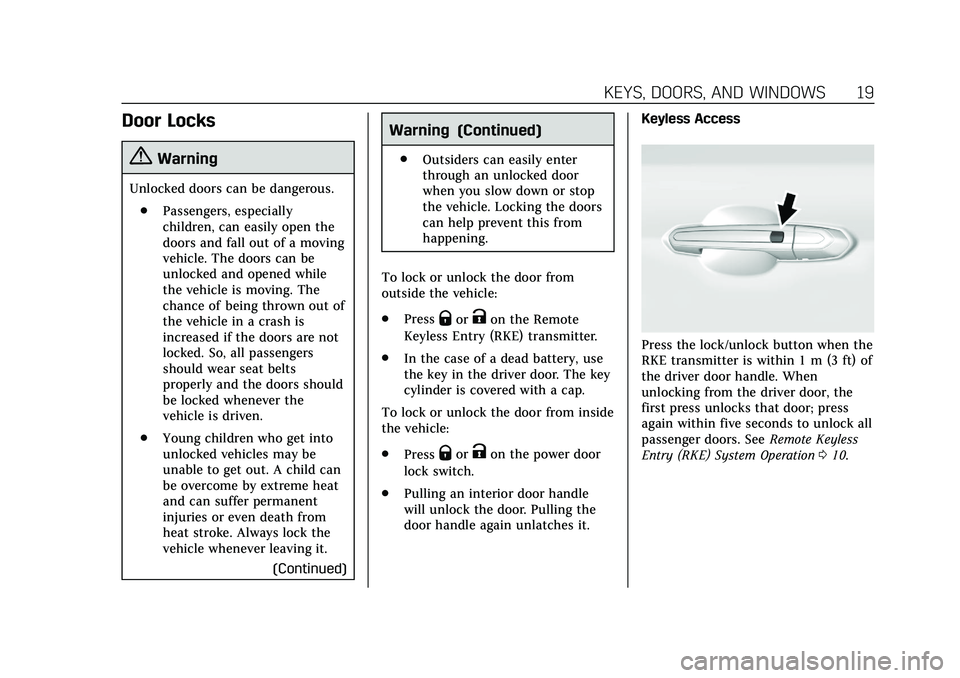
Press the lock/unlock button when the
RKE transmitter is within 1 m (3 ft) of
the driver door handle. When
unlocking from the driver door, the
first press unlocks that door; press
again within five seconds to unlock all
passenger doors. See
Remote Keyless
Entry (RKE) System Operation 010.
Page 30 of 412

Cadillac CT6 Owner Manual (GMNA-Localizing-U.S./Canada-13566829) -
2020 - CRC - 6/11/19
KEYS, DOORS, AND WINDOWS 29
Lens Cleaning
Clean the recessed lens using a soft,
dampened cloth.
Emergency Trunk Release
Handle
Caution
Do not use the emergency trunk
release handle as a tie-down or
anchor point when securing items
in the trunk as it could damage the
handle.
There is a glow-in-the-dark emergency
trunk release handle on the trunk lid.
This handle will glow following exposure to light. Pull the release
handle to open the trunk from the
inside.
After pulling the emergency trunk
release handle, return to the stored
position.
Rear Seat Pass-Through
If equipped, use the rear seat
pass-through door when transporting
long items. See
Rear Seat Pass-Through
Door 057.
Page 34 of 412
Cadillac CT6 Owner Manual (GMNA-Localizing-U.S./Canada-13566829) -
2020 - CRC - 6/11/19
KEYS, DOORS, AND WINDOWS 33
Exterior Mirrors
Convex Mirrors
{Warning
A convex mirror can make things,
like other vehicles, look farther
away than they really are. If you cut
too sharply into the right lane, you
could hit a vehicle on the right.
Check the inside mirror or glance
over your shoulder before changing
lanes.
The passenger side mirror is convex
shaped. A convex mirror's surface is
curved so more can be seen from the
driver seat.
Power Mirrors
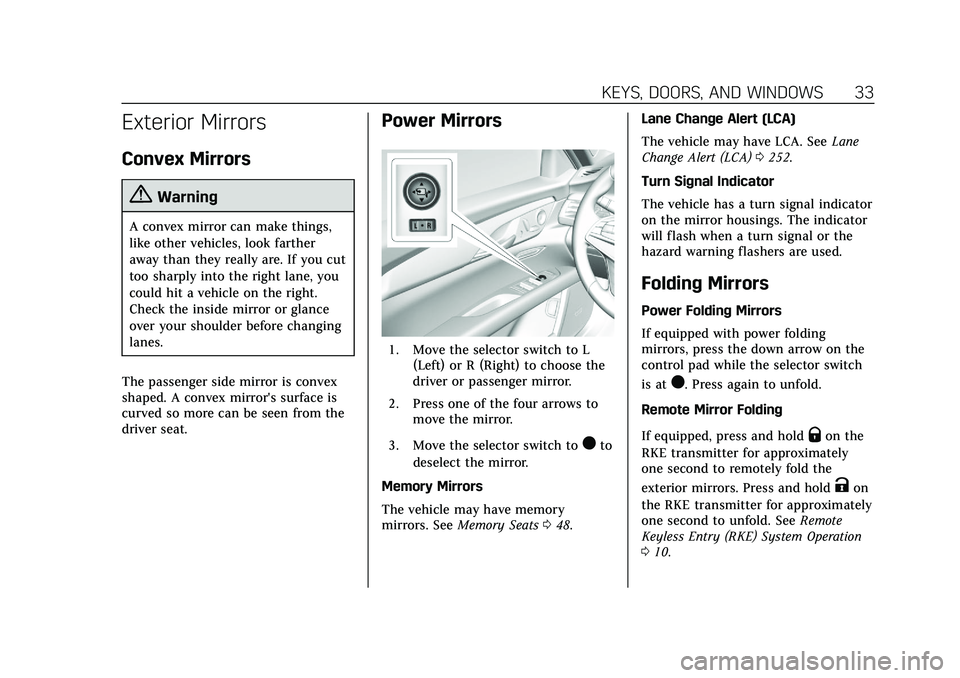
1. Move the selector switch to L (Left) or R (Right) to choose the
driver or passenger mirror.
2. Press one of the four arrows to move the mirror.
3. Move the selector switch to
)to
deselect the mirror.
Memory Mirrors
The vehicle may have memory
mirrors. See Memory Seats 048. Lane Change Alert (LCA)
The vehicle may have LCA. See
Lane
Change Alert (LCA) 0252.
Turn Signal Indicator
The vehicle has a turn signal indicator
on the mirror housings. The indicator
will flash when a turn signal or the
hazard warning flashers are used.
Folding Mirrors
Power Folding Mirrors
If equipped with power folding
mirrors, press the down arrow on the
control pad while the selector switch
is at
). Press again to unfold.
Remote Mirror Folding
If equipped, press and hold
Qon the
RKE transmitter for approximately
one second to remotely fold the
exterior mirrors. Press and hold
Kon
the RKE transmitter for approximately
one second to unfold. See Remote
Keyless Entry (RKE) System Operation
0 10.
Page 35 of 412
Cadillac CT6 Owner Manual (GMNA-Localizing-U.S./Canada-13566829) -
2020 - CRC - 6/11/19
34 KEYS, DOORS, AND WINDOWS
This feature is turned on or off
through vehicle personalization. See
Vehicle Personalization0140.
Resetting the Power Folding Mirrors
Reset the power folding mirrors if:
. The mirrors are accidentally
obstructed while folding.
. They are accidentally manually
folded/unfolded.
. The mirrors do not stay in the
unfolded position.
. The mirrors vibrate at normal
driving speeds.
Fold and unfold the mirrors one time
using the mirror controls to reset
them to their normal position. A noise
may be heard during the resetting of
the power folding mirrors. This sound
is normal after a manual folding
operation. Manual Folding Mirrors
If equipped, the mirrors can be folded
inward toward the vehicle to prevent
damage when going through an
automatic car wash. Push the mirror
outward to return it to the original
position.
Heated Mirrors
The rear window defogger also heats
the outside mirrors.
K:
Press to heat the outside mirrors.
See Automatic Climate Control System
(Dual Zone) 0158 or
Automatic Climate Control System
(Quad Zone) 0163.
Automatic Dimming Mirror
The vehicle has automatic dimming
outside mirrors. The mirrors will
adjust for the glare of the headlamps
behind you.
Reverse Tilt Mirrors
If equipped with memory seats, the
passenger and/or driver mirror tilts to
a preselected position when the
vehicle is in R (Reverse). This allows
the curb to be seen when parallel
parking.
The mirror(s) return to the original
position when:
.
The vehicle is shifted out of
R (Reverse), or remains in
R (Reverse) for about 30 seconds.
. The ignition is turned off.
. The vehicle is driven in
R (Reverse) above a set speed.
To turn this feature on or off, see
Vehicle Personalization 0140.
Page 39 of 412
Cadillac CT6 Owner Manual (GMNA-Localizing-U.S./Canada-13566829) -
2020 - CRC - 6/11/19
38 KEYS, DOORS, AND WINDOWS
pulsing sound when either rear
window is down and the front
windows are up. To reduce the sound,
open either a front window or the
sunroof, if equipped.
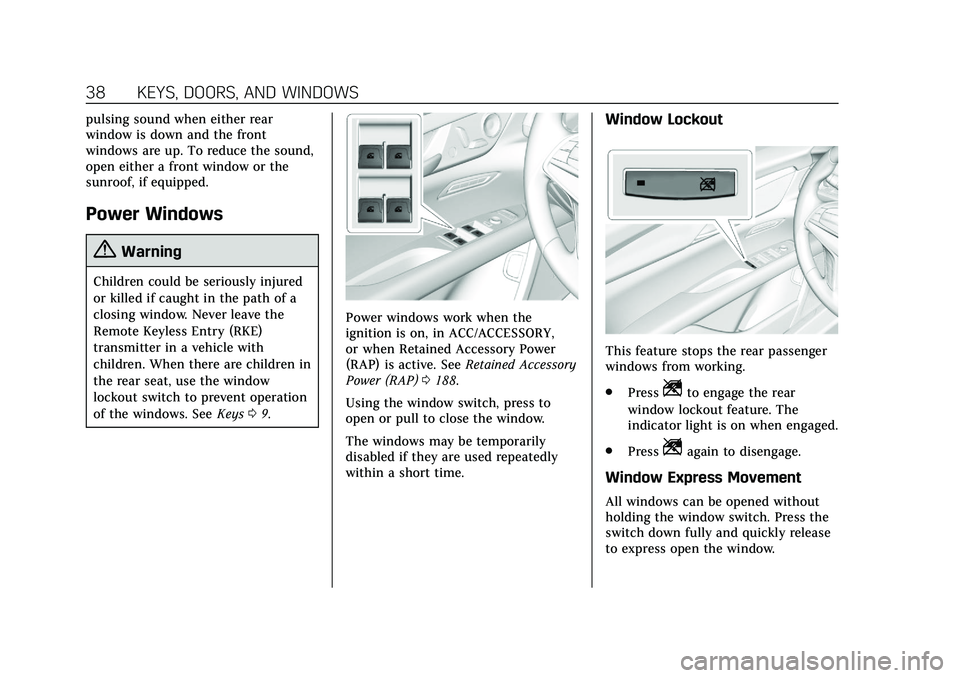
Power Windows
{Warning
Children could be seriously injured
or killed if caught in the path of a
closing window. Never leave the
Remote Keyless Entry (RKE)
transmitter in a vehicle with
children. When there are children in
the rear seat, use the window
lockout switch to prevent operation
of the windows. SeeKeys09.
Power windows work when the
ignition is on, in ACC/ACCESSORY,
or when Retained Accessory Power
(RAP) is active. See Retained Accessory
Power (RAP) 0188.
Using the window switch, press to
open or pull to close the window.
The windows may be temporarily
disabled if they are used repeatedly
within a short time.
Window Lockout
This feature stops the rear passenger
windows from working.
. Press
Zto engage the rear
window lockout feature. The
indicator light is on when engaged.
. Press
Zagain to disengage.
Window Express Movement
All windows can be opened without
holding the window switch. Press the
switch down fully and quickly release
to express open the window.