fuel CADILLAC CTS 2004 1.G User Guide
[x] Cancel search | Manufacturer: CADILLAC, Model Year: 2004, Model line: CTS, Model: CADILLAC CTS 2004 1.GPages: 454, PDF Size: 2.87 MB
Page 173 of 454
Here are a few concerns some owners have had about
the fuel gage. All of these situations are normal and
do not indicate that anything is wrong with the fuel gage:
At the gas station the gas pump shuts off before
the gage reads full.
The gage may change when you turn, stop quickly
or accelerate quickly.
It takes a little more or less fuel to ll the tank than
the gage indicated. For example, the gage may
have indicated that the tank was half full, but
it actually took a little more or less than half the
tank’s capacity to ll the tank.
Message Center
Message Center (CTS-V)
The message center can display information relating to
powertrain uids, tire pressures, vehicle dynamics,
speedometer and odometer information, and
transmission status. It also displays warning messages.
There are two different areas where message center
information will be displayed. One display is inside of the
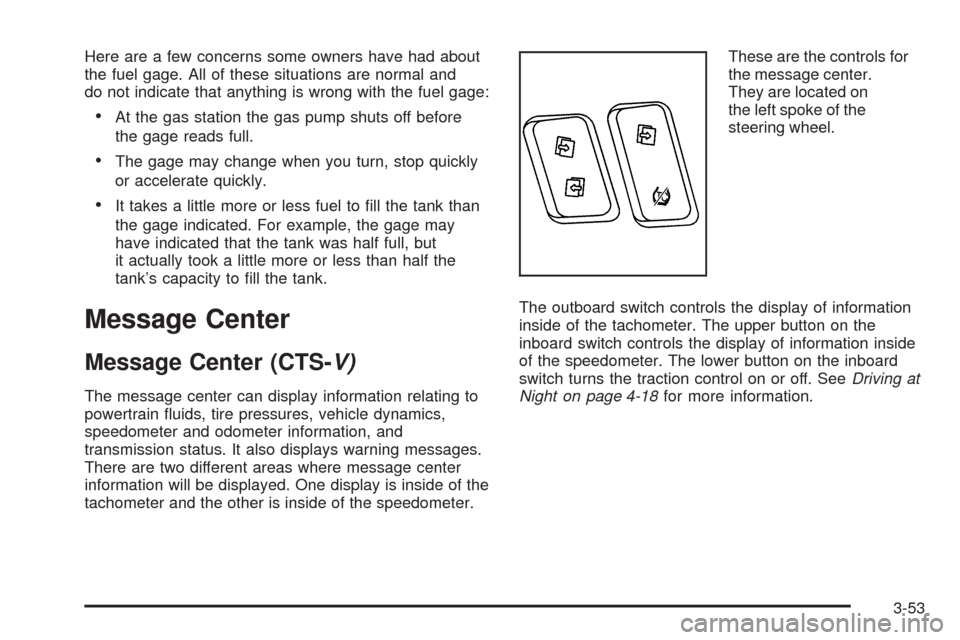
tachometer and the other is inside of the speedometer.These are the controls for
the message center.
They are located on
the left spoke of the
steering wheel.
The outboard switch controls the display of information
inside of the tachometer. The upper button on the
inboard switch controls the display of information inside
of the speedometer. The lower button on the inboard
switch turns the traction control on or off. SeeDriving at
Night on page 4-18for more information.
3-53
Page 182 of 454

Vehicle Information Menu
(Base Audio System)
To access this menu using the Base audio system,
press the up or down arrow on the INFO switch located
to the right of the display.
The following items are available:
BLANK LINE
OUTSIDE TEMP
MI TRIP A*
MI TRIP B*
MILES RANGE
MPG AVG*
MPG INST
GAL FUEL USED*
AVG MPH*
TIMER*
BATTERY VOLTS
ENGINE OIL LIFE*
TRANS FLUID LIFE* (Automatic Transmission Only)* These items can be reset. Each one must be reset
individually. For a detailed description of the menu items
and how to reset them, see “Vehicle Information
Menu Item Descriptions” later in this section.
You can view any of these items at any time, but only
one item can be displayed at a time.
Vehicle Information Menu
(Navigation System)
To access the Vehicle Info menu using the Navigation
system, press the INFO button to the left of the
screen. You can also access this menu through the
Setup menu. See “Setup Menu” in the Index of the CTS
Entertainment and Navigation System owner’s manual.
The following submenu appears when Vehicle Info
is selected:
Outside Air Temperature
Trip Odometer A*
Trip Odometer B*
Fuel Range
Average Fuel Economy*
3-62
Page 183 of 454

Instantaneous Fuel Economy
Fuel Used*
Average Vehicle Speed*
Timer*
Battery Voltage
Engine Oil Life*
Transmission Fluid Life* (Automatic Transmission
Only)
Blank Display
* These items can be reset. Each one must be reset
individually. For a detailed description of the menu items
and how to reset them, see “Vehicle Information
Menu Item Descriptions” following.
You can view any of these submenu items at any time
by selecting them using the TUNE/SEL knob. The
currently selected item is displayed at the top of the
screen. Only one item can be displayed at a time.
Vehicle Information Menu
Item Descriptions
The following paragraphs contain a more detailed
description of each menu item:
BLANK LINE/Blank Display:If you select this item,
nothing is displayed at the top of the screen.
OUTSIDE TEMP/Outside Air Temperature:If you
select this item, the current outside temperature
is displayed at the top of the screen. It will be in either
degrees Fahrenheit or degrees Celsius depending
upon whether the system is set for English or metric
units. If you wish to change the units on the Base audio
system, seeDIC Main Menu on page 3-66.Ifyou
have the optional Navigation System and wish to change
the units, see “Setup Menu” in the Index of the CTS
Entertainment and Navigation System owner’s manual.
MI TRIP A and B/Trip Odometer A and B:For
information on the trip odometers, see “Trip Odometers”
underSpeedometer and Odometer on page 3-40.
MPG AVG/Average Fuel Economy:If you select this
item, the approximate average miles per gallon (mpg) or
liters per 100 kilometers (L/100 km) is displayed.
This number is calculated based on the number of
mpg (L/100 km) recorded since the last time this menu
item was reset.
3-63
Page 184 of 454

To reset the MPG AVG using the Base audio system,
press the CLR button located to the right of the screen.
The display will return to zero.
To reset the Average Fuel Economy using the Navigation
system, press and hold the multifunction button that
corresponds to the Reset prompt in the upper right of the
display. The display will return to zero.
MPG INST/Instantaneous Fuel Economy:If you
select this item, the current fuel economy is displayed.
This number reects only the fuel economy that the
vehicle has right now and will change frequently
as driving conditions change. Unlike average fuel
economy, this menu item cannot be reset.
GAL FUEL USED/Fuel Used:If you select this item,
the number of gallons or liters of fuel used since the last
reset of this menu item is displayed.
To reset GAL FUEL USED using the Base audio
system, press the CLR button located to the right of the
screen. The display will return to zero.
To reset Fuel Used using the Navigation system, press
and hold the multifunction button that corresponds to
the Reset prompt in the upper right of the display.
The display will return to zero.MILES RANGE/Fuel Range:If you select this item, the
approximate number of remaining miles or kilometers
you can drive without refueling is displayed. This
estimate is based on the current driving conditions and
will change if the driving conditions change. For
example, if you are driving in traffic making frequent
stops, the display may read one number, but if you enter
the freeway, the number may change even though
you still have the same amount of gas in the gas tank.
This is because different driving conditions produce
different fuel economies. Generally, freeway driving
produces better fuel economy than city driving.
If your vehicle is low on fuel, the Low Fuel Level
message will be displayed. See “Low Fuel Level
Message” underDIC Warnings and Messages on
page 3-70for more information.
AVG MPH/Average Vehicle Speed:If you select this
item, the average speed of the vehicle is displayed in
miles per hour (mph) or kilometers per hour (km/h).
This average is calculated based on the various vehicle
speeds recorded since the last reset of this menu item.
To reset AVG MPH using the Base audio system, press
the CLR button located to the right of the screen.
The display will return to zero.
3-64
Page 197 of 454
Engine Overheated – Stop Engine
This symbol appears
with the Engine
Overheated – Stop
Engine message.
This message will appear when the engine has
overheated. Stop the vehicle and turn the engine off
immediately to avoid severe engine damage. See
Engine Overheating on page 5-31. A chime will also
sound when this message is displayed.
Notice:If you drive your vehicle while the engine is
overheating, severe engine damage may occur.
If an overheat warning appears on the instrument
panel cluster and/or DIC, stop the vehicle as soon as
possible. Do not increase the engine speed above
normal idling speed. SeeEngine Overheating
on page 5-31for more information.
Engine Power Reduced
This symbol appears
with the Engine Power
Reduced message.
This message informs you that the vehicle is reducing
engine power to try to protect the engine or transmission
from damage due to extreme operating conditions.
This also can affect the vehicle’s ability to accelerate.
Fuel Level Low
This symbol appears
with the Fuel Level
Low message.
When this message appears on the display, it means
that your vehicle is low on fuel. You should rell the tank
as soon as possible. A single chime will sound when
this message is displayed.
3-77
Page 201 of 454
Service Air Bag
This symbol appears
with the Service Air
Bag message.
There is a problem with the airbag system when this
message appears. Have your vehicle serviced by your
GM dealer immediately. SeeAirbag Readiness Light
on page 3-42for more information.
Service Charging System
This symbol appears with
the Service Charging
System message.
This message will display when a problem with the
charging system has been detected. Have your vehicle
serviced by your GM dealer.
Service Electrical System
This symbol appears with
the Service Electrical
System message.
This message will display if an electrical problem has
occurred within the Powertrain Control Module (PCM) or
the ignition switch. Have your vehicle serviced by
your GM dealer.
Service Fuel System
This symbol appears
with the Service Fuel
System message.
The Powertrain Control Module (PCM) has detected a
problem within the fuel system when this message
appears. Have your vehicle serviced by your GM dealer.
3-81
Page 206 of 454
Starting Disabled – Throttle Problem
This symbol appears
with the Starting
Disabled – Throttle
Problem message.
This message appears when your vehicle’s throttle
system is not functioning properly. Have your vehicle
serviced by your GM dealer.
Theft Attempted
This symbol appears
with the Theft
Attempted message.
This message is displayed if the content theft-deterrent
system has detected a break-in attempt while you
were away from your vehicle.
Top Speed – Fuel Cut Off
This symbol appears with
the Top Speed – Fuel Cut
Off message.
This message will appear when the Engine Control
Module (ECM) detects that the maximum speed for your
vehicle has been reached. Your vehicle’s top speed is
based on the top speed rating of the tires. This ensures
that your vehicle stays in a safe operating range for
the tires.
3-86
Page 272 of 454
When you want to leave the freeway, move to the
proper lane well in advance. If you miss your exit,
do not, under any circumstances, stop and back
up. Drive on to the next exit.
The exit ramp can be curved, sometimes quite sharply.
The exit speed is usually posted. Reduce your speed
according to your speedometer, not to your sense
of motion. After driving for any distance at higher
speeds, you may tend to think you are going slower
than you actually are.
Before Leaving on a Long Trip
Make sure you are ready. Try to be well rested. If you
must start when you are not fresh — such as after
a day’s work — do not plan to make too many miles that
rst part of the journey. Wear comfortable clothing
and shoes you can easily drive in.
Is your vehicle ready for a long trip? If you keep it
serviced and maintained, it is ready to go. If it needs
service, have it done before starting out. Of course, you
will nd experienced and able service experts in
GM dealerships all across North America. They will be
ready and willing to help if you need it.Here are some things you can check before a trip:
Windshield Washer Fluid:Is the reservoir full?
Are all windows clean inside and outside?
Wiper Blades:Are they in good shape?
Fuel, Engine Oil, Other Fluids:Have you checked
all levels?
Lamps:Are they all working? Are the lenses clean?
Tires:They are vitally important to a safe,
trouble-free trip. Is the tread good enough for
long-distance driving? Are the tires all inated to the
recommended pressure?
Weather Forecasts:What is the weather outlook
along your route? Should you delay your trip a
short time to avoid a major storm system?
Maps:Do you have up-to-date maps?
4-24
Page 279 of 454

{CAUTION:
Snow can trap exhaust gases under your
vehicle. This can cause deadly CO (carbon
monoxide) gas to get inside. CO could
overcome you and kill you. You cannot see it
or smell it, so you might not know it is in your
vehicle. Clear away snow from around the
base of your vehicle, especially any that is
blocking your exhaust pipe. And check around
again from time to time to be sure snow does
not collect there.
Open a window just a little on the side of the
vehicle that is away from the wind. This will
help keep CO out.Run your engine only as long as you must. This saves
fuel. When you run the engine, make it go a little
faster than just idle. That is, push the accelerator
slightly. This uses less fuel for the heat that you get and
it keeps the battery charged. You will need a
well-charged battery to restart the vehicle, and possibly
for signaling later on with your headlamps. Let the
heater run for a while.
Then, shut the engine off and close the window almost
all the way to preserve the heat. Start the engine
again and repeat this only when you feel really
uncomfortable from the cold. But do it as little as
possible. Preserve the fuel as long as you can. To help
keep warm, you can get out of the vehicle and do
some fairly vigorous exercises every half hour or so until
help comes.
4-31
Page 286 of 454

Loading Your Vehicle
Item Description Total
AVehicle Capacity Weight
for Example 3=1,000 lbs (453 kg)
BSubtract Occupant
Weight 200 lbs
(91 kg)×5=1,000 lbs (453 kg)
CAvailable Cargo
Weight =0 lbs (0 kg)
Refer to your vehicle’s Tire and Loading Information
label for specic information about your vehicle’s
capacity weight and seating positions. The combined
weight of the driver, passengers, and cargo should
never exceed your vehicle’s capacity weight.
Certication Label
The Certication label is found on the rear edge of the
driver’s side rear passenger door. It tells you the
gross weight capacity of your vehicle, called the Gross
Vehicle Weight Rating (GVWR). The GVWR includes
the weight of the vehicle, all occupants, fuel and cargo.
Never exceed the GVWR for your vehicle or the
Gross Axle Weight Rating (GAWR) for either the front or
rear axle. Example 3
4-38