airbag CADILLAC CTS 2004 1.G Owner's Manual
[x] Cancel search | Manufacturer: CADILLAC, Model Year: 2004, Model line: CTS, Model: CADILLAC CTS 2004 1.GPages: 454, PDF Size: 2.87 MB
Page 162 of 454

Airbag Readiness Light
There is an air bag readiness light on the instrument
panel, which shows the air bag symbol. The system
checks the air bag’s electrical system for malfunctions.
The light tells you if there is an electrical problem.
The system check includes the air bag sensors, the air
bag modules, the wiring and the diagnostic module.
For more information on the air bag system, seeAirbag
Systems on page 1-48.
This light will come on
when you start your
vehicle, and it will ash for
a few seconds. Then the
light should go out. This
means the system is ready.
If the air bag readiness light stays on after you start the
vehicle or comes on when you are driving, your air
bag system may not work properly. Have your vehicle
serviced right away.{CAUTION:
If the airbag readiness light stays on after you
start your vehicle, it means the airbag system
may not be working properly. The airbags in
your vehicle may not inate in a crash, or they
could even inate without a crash. To help
avoid injury to yourself or others, have your
vehicle serviced right away if the airbag
readiness light stays on after you start
your vehicle.
The air bag readiness light should ash for a few
seconds when you turn the ignition key to ON. If the
light doesn’t come on then, have it xed so it will
be ready to warn you if there is a problem.
If there is a problem with the air bag system in your
vehicle, the Service Air Bag message will appear on the
DIC display. SeeDIC Warnings and Messages on
page 3-70for more information.
3-42
Page 201 of 454
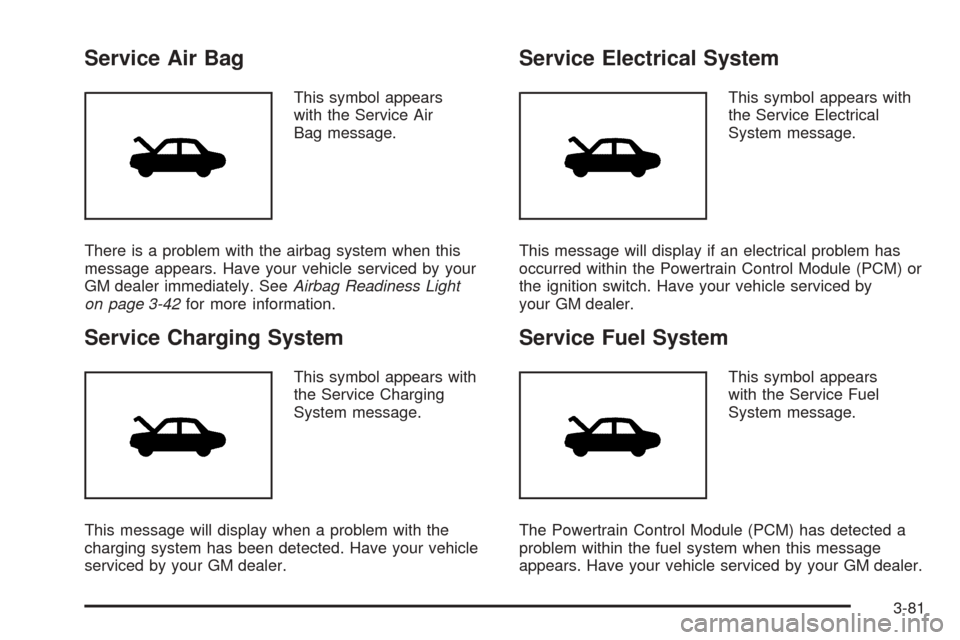
Service Air Bag
This symbol appears
with the Service Air
Bag message.
There is a problem with the airbag system when this
message appears. Have your vehicle serviced by your
GM dealer immediately. SeeAirbag Readiness Light
on page 3-42for more information.
Service Charging System
This symbol appears with
the Service Charging
System message.
This message will display when a problem with the
charging system has been detected. Have your vehicle
serviced by your GM dealer.
Service Electrical System
This symbol appears with
the Service Electrical
System message.
This message will display if an electrical problem has
occurred within the Powertrain Control Module (PCM) or
the ignition switch. Have your vehicle serviced by
your GM dealer.
Service Fuel System
This symbol appears
with the Service Fuel
System message.
The Powertrain Control Module (PCM) has detected a
problem within the fuel system when this message
appears. Have your vehicle serviced by your GM dealer.
3-81
Page 298 of 454

Doing Your Own Service Work
If you want to do some of your own service work,
you will want to use the proper service manual. It tells
you much more about how to service your vehicle
than this manual can. To order the proper service
manual, seeService Publications Ordering Information
on page 7-11.
Your vehicle has an air bag system. Before attempting
to do your own service work, seeServicing Your
Airbag-Equipped Vehicle on page 1-58.
You should keep a record with all parts receipts and list
the mileage and the date of any service work you
perform. SeeMaintenance Record on page 6-16.{CAUTION:
You can be injured and your vehicle could be
damaged if you try to do service work on a
vehicle without knowing enough about it.
Be sure you have sufficient knowledge,
experience, the proper replacement parts
and tools before you attempt any vehicle
maintenance task.
Be sure to use the proper nuts, bolts and
other fasteners. English and metric
fasteners can be easily confused. If you
use the wrong fasteners, parts can later
break or fall off. You could be hurt.
5-4
Page 394 of 454
Electrical System
Add-On Electrical Equipment
Notice:Don’t add anything electrical to your
vehicle unless you check with your dealer rst.
Some electrical equipment can damage your vehicle
and the damage wouldn’t be covered by your
warranty. Some add-on electrical equipment can
keep other components from working as they should.
Your vehicle has an air bag system. Before attempting to
add anything electrical to your vehicle, seeServicing
Your Airbag-Equipped Vehicle on page 1-58.
Windshield Wiper Fuses
The windshield wiper motor is protected by an internal
circuit breaker. If the wiper motor overheats due to
heavy snow, the wipers will stop until the motor cools
and will then restart.
Power Windows and Other
Power Options
Circuit breakers protect the power windows and power
seats. When the current load is too heavy, the circuit
breaker opens and closes, protecting the circuit until the
problem is xed or goes away.
Fuses and Circuit Breakers
The wiring circuits in your vehicle are protected from
short circuits by a combination of fuses and circuit
breakers. This greatly reduces the chance of res
caused by electrical problems.
Look at the silver-colored band inside the fuse. If the
band is broken or melted, replace the fuse. Be sure you
replace a bad fuse with a new one of the identical
size and rating. If a fuse blows, see your dealer
for service immediately.
If you ever have a problem on the road and don’t have
a spare fuse, you can “borrow” one that has the
same amperage. Pick some feature of your vehicle that
you can get along without – like the radio or cigarette
lighter – and use its fuse, if it is the correct amperage.
Replace it as soon as you can.
The fuses are located in three fuse blocks, one located
in the engine compartment on the passenger’s side
and the other two under the rear seat.
5-100
Page 437 of 454
A
Accessing the DIC Main Menu
(Base Audio System)...................................3-66
Accessory Power Outlets.................................3-27
Activating Program Type (PTY) Stations
(RDS and XM™).......................................3-116
Adding Washer Fluid.......................................5-41
Additional Program Information........................... 7-9
Additives, Fuel................................................. 5-6
Add-On Electrical Equipment...........................5-100
Adjusting the Speakers (Balance/Fade).............3-113
Air Cleaner/Filter, Engine.................................5-24
Air Conditioning..............................................3-29
Airbag
Readiness Light..........................................3-42
Airbag Sensing and Diagnostic Module (SDM)......... 7-9
Airbag Systems..............................................1-48
Adding Equipment to Your
Airbag-Equipped Vehicle............................1-58
How Does an Airbag Restrain?......................1-55
Servicing Your Airbag-Equipped Vehicle..........1-58
What Makes an Airbag Inate?......................1-55
What Will You See After an Airbag Inates?......1-56
When Should an Airbag Inate?....................1-54
Where Are the Airbags?...............................1-50
AM .............................................................3-125Antenna, Diversity Antenna System..................3-127
Antenna, XM™ Satellite Radio
Antenna System........................................3-127
Anti-lock Brake System (ABS)............................ 4-6
Anti-Lock Brake, System Warning Light..............3-44
Anti-Pinch Feature..................................2-16, 2-53
Appearance Care............................................5-92
Care of Safety Belts....................................5-94
Chemical Paint Spotting...............................5-97
Cleaning the Inside of Your Vehicle................5-92
Cleaning the Outside of Your Vehicle..............5-95
Finish Damage............................................5-97
Sheet Metal Damage...................................5-97
Underbody Maintenance...............................5-97
Vehicle Care/Appearance Materials................5-98
Weatherstrips..............................................5-94
Ashtray.........................................................3-28
Ashtrays........................................................3-28
Assist Handles...............................................2-51
Audio System(s)............................................3-107
Audio Steering Wheel Controls....................3-124
Care of Your CD Player..............................3-126
Care of Your CDs......................................3-126
Diversity Antenna System............................3-127
Navigation/Radio System.............................3-124
Radio with CD...........................................3-108
Setting the Time........................................3-108
1
Page 445 of 454
K
Key Release Button (Manual Transmission)........2-23
Keyless Entry System....................................... 2-4
Keys............................................................... 2-3
L
Lamps
Exterior......................................................3-24
Interior.......................................................3-26
Lap-Shoulder Belt...................................1-15, 1-23
LATCH System
Child Restraints...........................................1-41
Securing a Child Restraint Designed for
the LATCH System...................................1-43
Leaving Your Vehicle.......................................2-11
Leaving Your Vehicle With the Engine Running
(Automatic Transmission)..............................2-37
Left Rear Door Ajar.........................................3-78
Light
Airbag Readiness........................................3-42
Anti-Lock Brake System Warning...................3-44
Brake System Warning.................................3-43
Charging System.........................................3-43
Cruise Control.............................................3-52
Engine Coolant Temperature Warning.............3-45
Fog Lamp..................................................3-51Light (cont.)
Highbeam On.............................................3-52
Lights On Reminder.....................................3-51
Malfunction Indicator....................................3-47
Oil Pressure...............................................3-49
Safety Belt Reminder...................................3-41
Security.....................................................3-51
Sport Mode................................................3-50
TCS Warning Light......................................3-45
Tire Pressure..............................................3-46
Traction Control System (TCS) Warning..........3-45
Winter Driving Mode....................................3-50
Lighted Visor Vanity Mirror...............................2-17
Limited-Slip Rear Axle.....................................4-11
Loading Your Vehicle.......................................4-34
Lockout Protection..........................................2-11
Locks
Central Door Unlocking System....................... 2-9
Delayed Locking........................................... 2-9
Door........................................................... 2-8
Leaving Your Vehicle....................................2-11
Lockout Protection.......................................2-11
Power Door.................................................. 2-9
Programmable Automatic Door Locks.............2-10
Rear Door Security Locks.............................2-10
Loss of Control...............................................4-17
Lumbar
Power Controls............................................. 1-3
9