mirror CADILLAC CTS 2006 1.G User Guide
[x] Cancel search | Manufacturer: CADILLAC, Model Year: 2006, Model line: CTS, Model: CADILLAC CTS 2006 1.GPages: 442, PDF Size: 2.57 MB
Page 117 of 442

To adjust for compass variance, do the following:
1. Find your current location and variance zone
number on the zone map that follows.
2. Press and hold the on/off button until a zone
number appears on the display.
3. Once the zone number appears on the display, press
the on/off button quickly until you reach the correct
zone number. If C appears in the compass window,
the compass may need calibration. See “Compass
Calibration” listed previously.Passenger Airbag Indicator
The mirror may have a passenger airbag indicator on
the mirror glass, just above the buttons. If the vehicle
has this feature, the mirror will display the word ON, or
an airbag symbol in Canada, when the passenger
airbag is enabled. SeePassenger Sensing System on
page 1-63for more information.
Cleaning the Mirror
When cleaning the mirror, use a paper towel or similar
material dampened with glass cleaner. Do not spray
glass cleaner directly on the mirror as that may cause
the liquid cleaner to enter the mirror housing.
2-41
Page 118 of 442
Outside Power Mirrors
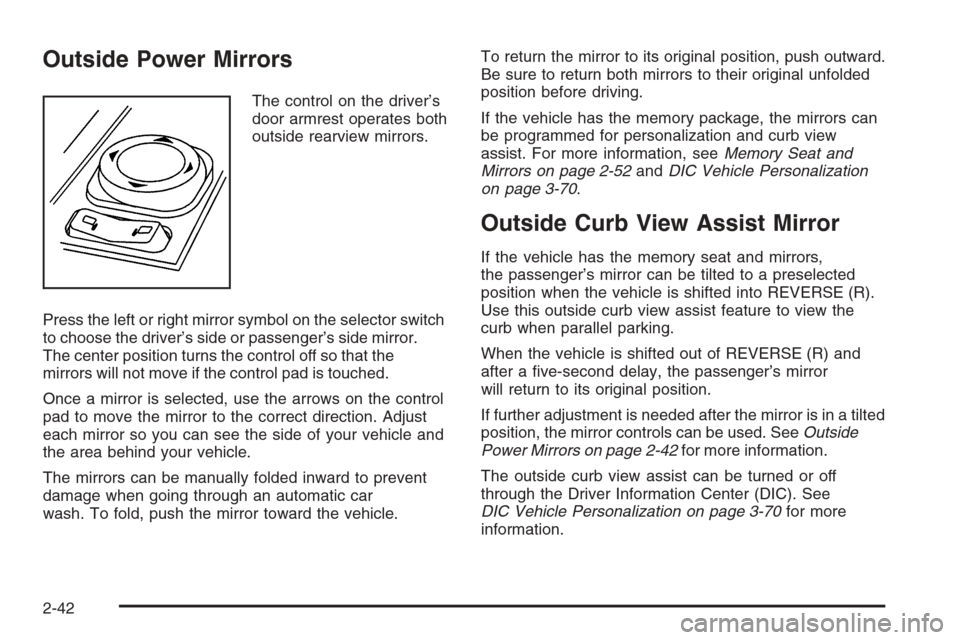
The control on the driver’s
door armrest operates both
outside rearview mirrors.
Press the left or right mirror symbol on the selector switch
to choose the driver’s side or passenger’s side mirror.
The center position turns the control off so that the
mirrors will not move if the control pad is touched.
Once a mirror is selected, use the arrows on the control
pad to move the mirror to the correct direction. Adjust
each mirror so you can see the side of your vehicle and
the area behind your vehicle.
The mirrors can be manually folded inward to prevent
damage when going through an automatic car
wash. To fold, push the mirror toward the vehicle.To return the mirror to its original position, push outward.
Be sure to return both mirrors to their original unfolded
position before driving.
If the vehicle has the memory package, the mirrors can
be programmed for personalization and curb view
assist. For more information, seeMemory Seat and
Mirrors on page 2-52andDIC Vehicle Personalization
on page 3-70.
Outside Curb View Assist Mirror
If the vehicle has the memory seat and mirrors,
the passenger’s mirror can be tilted to a preselected
position when the vehicle is shifted into REVERSE (R).
Use this outside curb view assist feature to view the
curb when parallel parking.
When the vehicle is shifted out of REVERSE (R) and
after a ve-second delay, the passenger’s mirror
will return to its original position.
If further adjustment is needed after the mirror is in a tilted
position, the mirror controls can be used. SeeOutside
Power Mirrors on page 2-42for more information.
The outside curb view assist can be turned or off
through the Driver Information Center (DIC). See
DIC Vehicle Personalization on page 3-70for more
information.
2-42
Page 119 of 442
Outside Convex Mirror
{CAUTION:
A convex mirror can make things (like other
vehicles) look farther away than they really are.
If you cut too sharply into the right lane, you
could hit a vehicle on your right. Check your
inside mirror or glance over your shoulder
before changing lanes.
The passenger’s side mirror is convex. A convex
mirror’s surface is curved so that more can be seen
from the driver’s seat. The mirror does not have
a dimming feature.
Outside Heated Mirrors
When the rear window defogger is turned on, it also
warms both outside rearview mirrors to help clear them
of fog or ice. See “Rear Window Defogger” under
Dual Climate Control System on page 3-23for more
information.
OnStar®System
OnStar®uses several innovative technologies and live
advisors to provide you with a wide range of safety,
security, information, and convenience services. If your
airbags deploy, the system is designed to make an
automatic call to OnStar
®Emergency where we
can request emergency services be sent to your
location. If you lock your keys in the car, call OnStar
®at
1-888-4-ONSTAR and they can send a signal to
unlock your doors. If you need roadside assistance,
press the OnStar
®button and they can contact
Roadside Service for you.
A complete OnStar
®Owner’s Guide and the Terms and
Conditions of the OnStar®Subscription Service
Agreement are included in the vehicle’s OnStar®
Subscriber Information packet located in your vehicle. For
more information, visit www.onstar.com or
www.onstar.ca, contact OnStar
®at 1-888-4-ONSTAR
(1-888-466-7827), or press the OnStar®button to speak
with an OnStar®advisor 24 hours a day, 7 days a week.
2-43
Page 128 of 442
Anti-Pinch Feature Override
A condition may exist that causes the anti-pinch feature
of the sunroof to activate due to weather or an
obstruction. In an emergency, the anti-pinch feature can
be overridden in a supervised mode.
To override the anti-pinch feature rotate the sunroof
control to the closed position, then press the control
upward and continue pressing upward until the sunroof
reaches the desired position.
In this mode, the sunroof can still close on an object in
its path. Use care when using the override mode.
Vehicle Personalization
In addition to the following features, your vehicle may
also have features that can be programmed through the
Driver Information Center (DIC). SeeDIC Vehicle
Personalization on page 3-70for more information.
Memory Seat and Mirrors
If your vehicle has the memory feature, you can
program and recall memory settings for the driver’s
seating and outside rearview mirror driving positions for
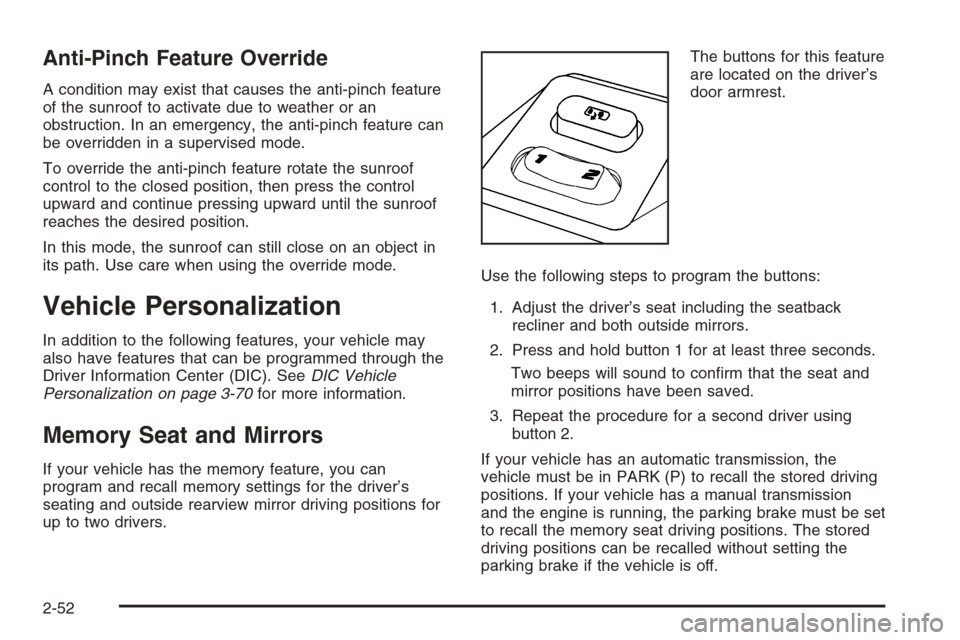
up to two drivers.The buttons for this feature
are located on the driver’s
door armrest.
Use the following steps to program the buttons:
1. Adjust the driver’s seat including the seatback
recliner and both outside mirrors.
2. Press and hold button 1 for at least three seconds.
Two beeps will sound to conrm that the seat and
mirror positions have been saved.
3. Repeat the procedure for a second driver using
button 2.
If your vehicle has an automatic transmission, the
vehicle must be in PARK (P) to recall the stored driving
positions. If your vehicle has a manual transmission
and the engine is running, the parking brake must be set
to recall the memory seat driving positions. The stored
driving positions can be recalled without setting the
parking brake if the vehicle is off.
2-52
Page 129 of 442
Press one of the numbered memory buttons to recall
the stored setting. Each time a memory button is
pressed, a single beep will sound.
Three chimes will sound and the setting will not be
recalled if you press button 1 or 2 when the vehicle is
not in PARK (P) on an automatic transmission or
the parking brake is not set on a manual transmission.
If you would like the stored driving positions to be
recalled when unlocking your vehicle with the remote
keyless entry transmitter or when you place the
key in the ignition, seeDIC Vehicle Personalization on
page 3-70.
To stop recall movement of the memory feature at any
time, press one of the power seat or mirror controls.
Two personalized exit positions can also be
programmed. Use the following steps to program exit
positions:
1. Press memory seat button 1 or the button with the
unlock symbol on the remote keyless entry
transmitter with the number 1 on the back to recall
the driving position.
2. Adjust the driver’s seat to the desired exit position.
3. Press and hold the exit button located above
buttons 1 and 2 on the driver’s door armrest
for at least three seconds.
Two beeps will sound to conrm that the exit
position has been saved.4. Repeat the procedure for a second driver using
memory seat button 2 or the remote keyless
entry transmitter with the number 2 on the back.
To recall the stored exit positions, press and release the
exit button. One beep will sound, and the seat will
move to the previously stored exit position for the
currently identied driver. If an exit position has not
been stored for this driver, the seat will move all the way
back. The position of the outside mirrors is not stored
or recalled for the exit position.
If your vehicle has an automatic transmission, the
vehicle must be in PARK (P) to recall the exit positions.
For a manual transmission, the parking brake must
be set to recall the stored exit positions.
Three chimes will sound and the exit setting will not be
recalled if you press the exit button when the vehicle
is not in PARK (P) on an automatic transmission or the
parking brake is not set on a manual transmission.
If you would like your stored exit position to be recalled
when unlocking the vehicle with the remote keyless
entry transmitter or when the ignition is turned off and
the driver’s door is opened, seeDIC Vehicle
Personalization on page 3-70.
2-53
Page 158 of 442
=(Rear Window Defogger):Press this button to
turn the rear window defogger on or off. Be sure to clear
as much snow from the rear window as possible.
The rear window defogger will turn off about 10 minutes
after the button is pressed, but if the vehicle’s speed
is above 30 mph (48 km/h), the rear defogger will stay
on continuously. If turned on again, the defogger
will only run for about ve minutes before turning off.
The defogger can also be turned off by pressing
the button again or by turning off the engine.
The heated outside rearview mirrors will heat to help
clear fog or frost from the surface of the mirror when the
rear window defogger button is on. SeeOutside
Heated Mirrors on page 2-43.
Notice:Do not try to clear frost or other material
from the inside of the front windshield and rear
window with a razor blade or anything else that is
sharp. This may damage the rear window defogger
grid and affect your radio’s ability to pick up
stations clearly. The repairs wouldn’t be covered by
your warranty.
Outlet Adjustment
Use the knobs located in the center of each outlet to
change the direction of the airow. Use the thumbwheels
to open or close the outlets.
j(Side Window Defog):Turn the thumbwheel to this
symbol to use the side window defog setting. The air
coming through the outlets will be directed toward
the side windows to clear fog.
k(Open):Turn the thumbwheel to this symbol to open
the outlets completely and allow the maximum amount
of air to enter your vehicle. A small amount of air will still
be directed to the side windows.
l(Closed):Turn the thumbwheel to this symbol to
close the outlets and minimize the amount of air entering
the vehicle.
Operation Tips
Clear away any ice, snow or leaves from the air
inlets at the base of the windshield that may
block the ow of air into your vehicle.
Use of non-GM approved hood deectors may
adversely affect the performance of the system.
Keep the path under the front seats clear of objects
to help circulate the air inside of your vehicle more
effectively.
If the airow seems low when the fan speed is at
the highest setting, the passenger compartment
air lter may need to be replaced. For more
information, seePassenger Compartment Air Filter
on page 3-29.
3-28
Page 165 of 442

If the airbag readiness light stays on after you start the
vehicle or comes on while you are driving, your
airbag system may not work properly. Have your vehicle
serviced right away.
{CAUTION:
If the airbag readiness light stays on after you
start your vehicle, it means the airbag system
may not be working properly. The airbags in
your vehicle may not inate in a crash, or they
could even inate without a crash. To help avoid
injury to yourself or others, have your vehicle
serviced right away if the airbag readiness light
stays on after you start your vehicle.
If there is a problem with the airbag system in your
vehicle, the Service Air Bag message will appear on the
Driver Information Center (DIC) display. SeeDIC
Warnings and Messages on page 3-61for more
information.
Passenger Airbag Status Indicator
Your rearview mirror has a passenger airbag status
indicator.
When the ignition key is turned to ON or START, the
passenger airbag status indicator will light ON and OFF,
or the symbol for on and off, for several seconds as a
system check. Then, after several more seconds,
the status indicator will light either ON or OFF, or either
the on or off symbol to let you know the status of the
right front passenger’s frontal airbag.United States
Canada
3-35
Page 200 of 442
DIC Vehicle Personalization
If your vehicle has the Navigation system, see the
Navigation system manual for instructions on operating
the DIC for your vehicle.
Your vehicle has personalization that allows you to
program certain features to a preferred setting for up to
two people. The number of programmable features
varies depending upon which model of the vehicle is
purchased.
On all vehicles, features such as climate control
settings, radio preset settings, exterior lighting at unlock,
remote lock and unlock conrmation, and automatic
door locks have already been programmed for
your convenience.
Some vehicles have additional features that can be
programmed including the seat and outside rearview
mirror position.
If your vehicle has the ability to program additional
personalization features, the driver’s preferences are
recalled by pressing the unlock button on the Remote
Keyless Entry (RKE) transmitter, 1 or 2, or by pressing
the appropriate memory button, 1 or 2, located on
the driver’s door. Certain features can be programmed
not to recall until the key is placed in the ignition.
To change feature preferences, see “Entering the
Personalization Menu” following.
Entering the Personalization Menu
To enter the feature programming mode, use the
following procedure:
1. Turn the ignition to ON, but do not start the engine.
Make sure an automatic transmission is in PARK (P)
or a manual transmission has the parking brake set.
To avoid excessive drain on the battery, it is
recommended that the headlamps are turned off.
2. If your vehicle has memory settings, press the
appropriate memory button, 1 or 2, located on
the driver’s door armrest. The DIC display will show
either Driver 1 or 2 depending on which button
was selected.
3. Press the PWR/VOL knob to turn the radio on.
4. Press the TUNE/SEL knob once to access the main
menu of the DIC.
5. Turn the TUNE/SEL knob until SETUP is highlighted.
6. Press the TUNE/SEL knob once to access the
SETUP menu.
7. Turn the TUNE/SEL knob until the feature you want
to change is highlighted, then press the TUNE/SEL
knob to turn the feature on or off. If the feature
is turned on, a check mark will appear next to the
feature name.
If none of the personalization items are turned on,
turn on the personalization menu by pressing
the TUNE/SEL knob. The list of features will then
appear, and you can repeat Step 6.
3-70
Page 202 of 442
Congure SWC (Steering Wheel
Controls) Keys
This feature allows you to customize the functions of the
four steering wheel controls located on the left spoke
of the steering wheel. SeeRecongurable Steering
Wheel Controls (SWC) (CTS) on page 3-7for
programming information.
Remote Recall Memory
If your vehicle has the optional memory package, you
will have this feature. When this feature is turned on, you
can recall any previously programmed seat and mirror
controls when the unlock button on the Remote Keyless
Entry (RKE) transmitter is pressed.
Programmable Modes
Mode 1:ON
Mode 2:OFF
Before your vehicle was shipped from the factory, it was
programmed to Mode 2. The mode to which the
vehicle was programmed may have been changed since
it left the factory.To program the vehicle to a different mode, use the
following procedure:
1. Enter the personalization portion of the SETUP
menu following the instructions listed previously.
2. Turn the TUNE/SEL knob until REMOTE RECALL
MEMORY is highlighted.
3. Press the TUNE/SEL knob to switch back and forth
between on and off.
When the mode is turned on, a check mark will
appear next to the feature name.
If this feature is selected, Remote Exit Recall or Key In
Recall Memory cannot be selected.
The mode you selected is now set. You can either exit
the programming mode by following the instructions
later in this section or program the next feature available
on your vehicle.
Remote Exit Recall
If your vehicle has the optional memory package, you
will have this feature. When this feature is turned on, you
can recall any previously programmed exit position for
the driver’s seat when the unlock button on the Remote
Keyless Entry (RKE) transmitter is pressed.
3-72
Page 203 of 442

Programmable Modes
Mode 1:ON
Mode 2:OFF
Before your vehicle was shipped from the factory, it was
programmed to Mode 2. The mode to which the
vehicle was programmed may have been changed since
it left the factory.
To program the vehicle to a different mode, use the
following procedure:
1. Enter the personalization portion of the SETUP
menu following the instructions listed previously.
2. Turn the TUNE/SEL knob until REMOTE EXIT
RECALL is highlighted.
3. Press the TUNE/SEL knob to switch back and forth
between on and off.
When the mode is turned on, a check mark will
appear next to the feature name.
If this feature is selected, Remote Recall Memory
cannot be selected.
The mode you selected is now set. You can either exit
the programming mode by following the instructions
later in this section or program the next feature available
on your vehicle.Key in Recall Memory
If your vehicle has the optional memory package, you
will have this feature. When this feature is turned on, you
can recall any previously programmed seat and mirror
positions when the key is inserted into the ignition.
Programmable Modes
Mode 1:ON
Mode 2:OFF
Before your vehicle was shipped from the factory, it was
programmed to Mode 2. The mode to which the
vehicle was programmed may have been changed since
it left the factory.
To program the vehicle to a different mode, use the
following procedure:
1. Enter the personalization portion of the SETUP
menu following the instructions listed previously.
2. Turn the TUNE/SEL knob until KEY IN RECALL
MEMORY is highlighted.
3. Press the TUNE/SEL knob to switch back and forth
between on and off.
When the mode is turned on, a check mark will
appear next to the feature name.
3-73