automatic transmission CADILLAC CTS 2006 1.G Owner's Manual
[x] Cancel search | Manufacturer: CADILLAC, Model Year: 2006, Model line: CTS, Model: CADILLAC CTS 2006 1.GPages: 442, PDF Size: 2.57 MB
Page 175 of 442
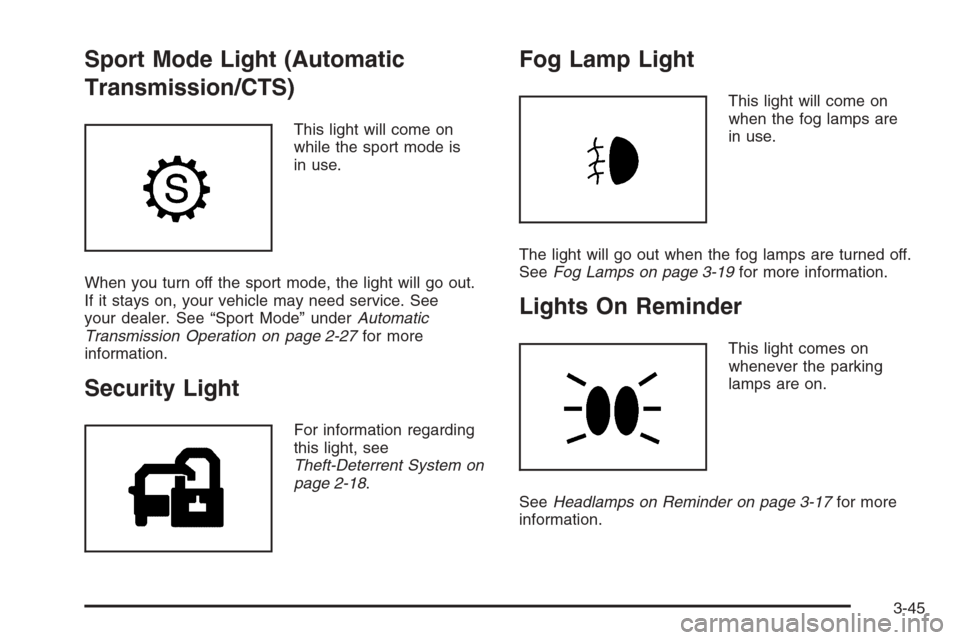
Sport Mode Light (Automatic
Transmission/CTS)
This light will come on
while the sport mode is
in use.
When you turn off the sport mode, the light will go out.
If it stays on, your vehicle may need service. See
your dealer. See “Sport Mode” underAutomatic
Transmission Operation on page 2-27for more
information.
Security Light
For information regarding
this light, see
Theft-Deterrent System on
page 2-18.
Fog Lamp Light
This light will come on
when the fog lamps are
in use.
The light will go out when the fog lamps are turned off.
SeeFog Lamps on page 3-19for more information.
Lights On Reminder
This light comes on
whenever the parking
lamps are on.
SeeHeadlamps on Reminder on page 3-17for more
information.
3-45
Page 184 of 442
TUNE/SEL (Select) Knob:Turn this knob, located in
the lower right corner of the audio system, to scroll
through the menu items displayed. Press this knob to
select the menu item.
Status of Vehicle Systems
You can view the status of several vehicle systems
using the DIC.
Vehicle Information Menu
To access this menu, press the up or down arrow on
the INFO switch located to the right of the display.
The following items are available when the ignition is in
ON. These items will not be available when the
ignition is in ACCESSORY. The tire pressure menu
items are only available if your vehicle has the
Tire Pressure Monitor (TPM) system:
OUTSIDE TEMP
MI TRIP A (KM TRIP A)*
MI TRIP B (KM TRIP B)*
MILES RANGE (KM RANGE)
MPG AVG (L/100 KM AVG)*
MPG INST (L/100 KM INST)
GAL FUEL USED (L FUEL USED)*
AVG MPH (AVG KM/H)*
TIMER*
BATTERY VOLTS
ENGINE OIL LIFE*
TRANS FLUID LIFE* (Automatic Transmission Only)
PSI LF TIRE (KPA LF TIRE)
PSI RF TIRE (KPA RF TIRE)
PSI RR TIRE (KPA RR TIRE)
PSI LR TIRE (KPA LR TIRE)
BLANK LINE
*These items can be reset. Each one must be reset
individually. For a detailed description of the menu items
and how to reset them, see “Vehicle Information
Menu Item Descriptions” later in this section.
You can view any of these items at any time, but only
one item can be displayed at a time.
Vehicle Information Menu Item
Descriptions
The following paragraphs contain a more detailed
description of each menu item:
OUTSIDE TEMP:If you select this item, the current
outside temperature is displayed at the top of the
screen. It will be in either degrees Fahrenheit (°F) or
degrees Celsius (°C) depending upon whether the
system is set for English or metric units. If you wish to
change the units, seeDIC Main Menu on page 3-57.
3-54
Page 186 of 442
To turn off the timer, press the CLR button again. When
the timer is off, the display will show the timer value
and TIMER OFF. The timing feature will stop.
To reset the timer, turn off the timer and then press and
hold the CLR button. The display will return to zero.
BATTERY VOLTS:If you select this item, the current
battery voltage is displayed. If the voltage is in the normal
range, the display will have OK after it. For example, the
display may read 13.2 BATTERY VOLTS OK.
If there is a problem with the battery charging system,
there are four possible DIC messages that may be
displayed. SeeDIC Warnings and Messages on
page 3-61for more information.
ENGINE OIL LIFE:If you select this item, the
percentage of remaining oil life is displayed. If you see
99% ENGINE OIL LIFE on the display, that means
that 99% of the current oil life remains.
When the oil life is depleted, the Change Engine Oil
message will appear on the display. See your dealer for
service. In addition to the engine oil life system
monitoring the oil life, additional maintenance is
recommended in the Maintenance Schedule in this
manual. SeeScheduled Maintenance on page 6-4and
Engine Oil on page 5-16for more information.When you reset the Change Engine Oil message by
clearing it from the display, you still must reset the
engine oil life system separately. For more information
on resetting the engine oil life system, see “How to
Reset the Engine Oil Life System and the Oil Life
Indicator” underEngine Oil Life System on page 5-20.
If you clear the Change Engine Oil message from
the display, it will not re-appear.
TRANS FLUID LIFE (Automatic Transmission):
If you select this item, the percentage of remaining
transmission uid life is displayed. If you see
99% TRANS FLUID LIFE on the display, that means
that 99% of the current transmission uid life remains.
When the transmission uid life is depleted, the Change
Trans Fluid message will appear on the display. You
should change the transmission uid as soon as
possible. Be sure to keep a written record of the mileage
and date of the uid change so you will have it for
future reference. SeeScheduled Maintenance on
page 6-4andRecommended Fluids and Lubricants on
page 6-13for more information.
When you reset the Change Trans Fluid message by
clearing it from the display, you still must reset the
transmission uid life monitor separately. For more
information on resetting the transmission uid life
monitor, seeAutomatic Transmission Fluid on
page 5-23.
3-56
Page 193 of 442
Change Engine Oil
This message indicates that the life of the engine oil
has expired and it should be changed and that
your vehicle is due for service. See your GM dealer.
SeeEngine Oil on page 5-16andScheduled
Maintenance on page 6-4for more information.
When you reset the Change Engine Oil message by
clearing it from the display, you still must reset the
engine oil life system separately. For more information
on resetting the engine oil life system, seeEngine
Oil Life System on page 5-20. If you clear this message
from the display, it will not re-appear.
Change Trans (Transmission) Fluid
(Automatic Transmission)
This message indicates that the life of the transmission
uid has expired and it should be changed. See
Scheduled Maintenance on page 6-4and
Recommended Fluids and Lubricants on page 6-13for
the proper uid and change intervals.
When you reset the Change Trans Fluid message by
clearing it from the display, you still must reset the
transmission uid life monitor separately. For more
information on resetting the transmission uid life
monitor, seeAutomatic Transmission Fluid on
page 5-23.
Check Brake Fluid
This message will display if the ignition is in ON to
inform the driver that the brake uid level is low.
Have the brake system serviced by your GM dealer as
soon as possible. SeeBrake System Warning Light
on page 3-38andBrakes on page 5-38for more
information.
Check Coolant Level
Notice:If your engine catches re because you
keep driving with no coolant, your vehicle can
be badly damaged. The costly repairs would not be
covered by your warranty. SeeOverheated Engine
Protection Operating Mode on page 5-30for
information on driving to a safe place in an
emergency.
This message will appear when there is a low level of
engine coolant. Have the cooling system serviced
by your GM dealer as soon as possible. SeeEngine
Coolant on page 5-26for more information.
Check Gas Cap
When this message appears on the display, the gas cap
has not been fully tightened. You should recheck the
gas cap to ensure that it is on and tightened properly.
See “If the Light Is On Steady” underMalfunction
Indicator Lamp on page 3-41for more information.
3-63
Page 194 of 442
Check Tire Pressure
If your vehicle has a Tire Pressure Monitor (TPM)
system, this message indicates that one or more of the
vehicle’s tires are low. SeeStatus of Vehicle Systems
on page 3-54for information on checking your vehicle’s
tire pressures. Also, seeTire Pressure Monitor
System on page 5-68andInation - Tire Pressure on
page 5-65for more information.
Check Washer Fluid
When this message appears on the display, it means
that your vehicle is low on windshield washer uid. You
should rell the windshield washer uid reservoir as
soon as possible. SeeWindshield Washer Fluid
on page 5-37for more information.
Competitive Driving (CTS-V)
When competitive driving mode is turned on with the
TC (traction control) button, this message will be
displayed on the DIC. The TC light will be on when the
competitive driving mode is on. The traction control
system will not operate while in competitive driving
mode. You should adjust your driving accordingly. See
the CTS-V portion ofTraction Control System (TCS)
(CTS) on page 4-9orTraction Control System (TCS)
(CTS-V) on page 4-10for more information.
Driver Door Ajar
When this message appears on the display, it means
that the driver’s door was not closed completely.
You should make sure that the driver’s door is
closed completely.
Engine Coolant Hot – AC
(Air Conditioning) Off
This message displays when the engine coolant
becomes hotter than the normal operating temperature.
To avoid added strain on a hot engine, the air
conditioning compressor is automatically turned off.
When the coolant temperature returns to normal, the air
conditioning compressor will turn back on. You can
continue to drive your vehicle.
If this message continues to appear, have the system
repaired by your GM dealer as soon as possible to avoid
damage to the engine or transmission.
3-64
Page 200 of 442
DIC Vehicle Personalization
If your vehicle has the Navigation system, see the
Navigation system manual for instructions on operating
the DIC for your vehicle.
Your vehicle has personalization that allows you to
program certain features to a preferred setting for up to
two people. The number of programmable features
varies depending upon which model of the vehicle is
purchased.
On all vehicles, features such as climate control
settings, radio preset settings, exterior lighting at unlock,
remote lock and unlock conrmation, and automatic
door locks have already been programmed for
your convenience.
Some vehicles have additional features that can be
programmed including the seat and outside rearview
mirror position.
If your vehicle has the ability to program additional
personalization features, the driver’s preferences are
recalled by pressing the unlock button on the Remote
Keyless Entry (RKE) transmitter, 1 or 2, or by pressing
the appropriate memory button, 1 or 2, located on
the driver’s door. Certain features can be programmed
not to recall until the key is placed in the ignition.
To change feature preferences, see “Entering the
Personalization Menu” following.
Entering the Personalization Menu
To enter the feature programming mode, use the
following procedure:
1. Turn the ignition to ON, but do not start the engine.
Make sure an automatic transmission is in PARK (P)
or a manual transmission has the parking brake set.
To avoid excessive drain on the battery, it is
recommended that the headlamps are turned off.
2. If your vehicle has memory settings, press the
appropriate memory button, 1 or 2, located on
the driver’s door armrest. The DIC display will show
either Driver 1 or 2 depending on which button
was selected.
3. Press the PWR/VOL knob to turn the radio on.
4. Press the TUNE/SEL knob once to access the main
menu of the DIC.
5. Turn the TUNE/SEL knob until SETUP is highlighted.
6. Press the TUNE/SEL knob once to access the
SETUP menu.
7. Turn the TUNE/SEL knob until the feature you want
to change is highlighted, then press the TUNE/SEL
knob to turn the feature on or off. If the feature
is turned on, a check mark will appear next to the
feature name.
If none of the personalization items are turned on,
turn on the personalization menu by pressing
the TUNE/SEL knob. The list of features will then
appear, and you can repeat Step 6.
3-70
Page 208 of 442

Driver Unlock in Park
(Automatic Transmission Only)
The feature allows the driver’s door to automatically
unlock when the transmission is shifted into PARK (P).
Programmable Modes
Mode 1:ON
Mode 2:OFF
Before your vehicle was shipped from the factory, it was
programmed to Mode 2. The mode to which the
vehicle was programmed may have been changed since
it left the factory.
To program the vehicle to a different mode, use the
following procedure:
1. Enter the personalization portion of the SETUP
menu following the instructions listed previously.
2. Turn the TUNE/SEL knob until DRIVER UNLOCK
IN PARK is highlighted.
3. Press the TUNE/SEL knob to switch back and forth
between on and off.
When the mode is turned on, a check mark will
appear next to the feature name.If this feature is selected, Driver Unlock Key Out/Off,
Doors Unlock Key Out/Off, or Doors Unlock in Park
cannot be selected.
The mode you selected is now set. You can either exit
the programming mode by following the instructions
later in this section or program the next feature available
on your vehicle.
Driver Unlock Key Out (Automatic
Transmission Only)/Driver Unlock Key Off
(Manual Transmission Only)
This feature allows the driver’s door to automatically
unlock when the key is removed from the ignition
on automatic transmission vehicles or when the ignition
is turned to OFF for manual transmission vehicles.
Programmable Modes
Mode 1:ON
Mode 2:OFF
Before your vehicle was shipped from the factory, it was
programmed to Mode 2. The mode to which the
vehicle was programmed may have been changed since
it left the factory.
3-78
Page 209 of 442

To program the vehicle to a different mode, use the
following procedure:
1. Enter the personalization portion of the SETUP
menu following the instructions listed previously.
2. Turn the TUNE/SEL knob until DRIVER UNLOCK
KEY OUT/OFF is highlighted.
3. Press the TUNE/SEL knob to switch between on
and off.
When the mode is turned on, a check mark will
appear next to the feature name.
If this feature is selected, Driver Unlock in Park
(automatic transmission), Doors Unlock in Park
(automatic transmission), or Doors Unlock Key Out/Off
cannot be selected.
The mode you selected is now set. You can either exit
the programming mode by following the instructions
later in this section or program the next feature available
on your vehicle.
Doors Unlock in Park (Automatic
Transmission Only)
The feature allows the doors to automatically unlock
when the transmission is shifted into PARK (P).Programmable Modes
Mode 1:ON
Mode 2:OFF
Before your vehicle was shipped from the factory, it was
programmed to Mode 2. The mode to which the
vehicle was programmed may have been changed since
it left the factory.
To program the vehicle to a different mode, use the
following procedure:
1. Enter the personalization portion of the SETUP
menu following the instructions listed previously.
2. Turn the TUNE/SEL knob until DOORS UNLOCK
IN PARK is highlighted.
3. Press the TUNE/SEL knob to switch back and forth
between on and off.
When the mode is turned on, a check mark will
appear next to the feature name.
If this feature is selected, Doors Unlock Key Out/Off,
Driver Unlock Key Out/Off, or Driver Unlock in Park
(automatic transmission) cannot be selected.
The mode you selected is now set. You can either exit
the programming mode by following the instructions
later in this section or program the next feature available
on your vehicle.
3-79
Page 210 of 442

Doors Unlock Key Out (Automatic
Transmission Only)/ Doors Unlock Key Off
(Manual Transmission Only)
This feature allows the doors to automatically unlock
when the key is removed from the ignition on automatic
transmission vehicles or when the ignition is turned
to OFF on manual transmission vehicles.
Programmable Modes
Mode 1:ON
Mode 2:OFF
Before your vehicle was shipped from the factory, it was
programmed to Mode 2. The mode to which the
vehicle was programmed may have been changed since
it left the factory.
To program the vehicle to a different mode, use the
following procedure:
1. Enter the personalization portion of the SETUP
menu following the instructions listed previously.
2. Turn the TUNE/SEL knob until DOORS UNLOCK
KEY OUT/OFF is highlighted.
3. Press the TUNE/SEL knob to switch between on
and off.
When the mode is turned on, a check mark will
appear next to the feature name.If this feature is selected, Doors Unlock in Park
(automatic transmission), Driver Unlock in Park
(automatic transmission), or Driver Unlock Key Out/Off
cannot be selected.
The mode you selected is now set. You can either exit
the programming mode by following the instructions
later in this section or program the next feature available
on your vehicle.
Delayed Locking
This feature delays the locking of the vehicle’s doors for
up to ve seconds after a power door lock switch or
the lock button on the Remote Keyless Entry (RKE)
transmitter is pressed. The ve second delay occurs
after the last door is closed.
Programmable Modes
Mode 1:ON
Mode 2:OFF
Before your vehicle was shipped from the factory, it was
programmed to Mode 1. The mode to which the
vehicle was programmed may have been changed since
it left the factory.
3-80
Page 273 of 442

Dolly Towing
Your vehicle can be towed using a dolly. To tow your
vehicle using a dolly, follow these steps:
1. Put the rear wheels on the dolly.
2. Put the vehicle in PARK (P) for an automatic
transmission or in NEUTRAL for a manual
transmission.3. Set the parking brake and then remove the key.
4. Clamp the steering wheel in a straight-ahead
position with a clamping device designed for towing.
5. Release the parking brake.
Towing a Trailer
Your vehicle is neither designed nor intended to tow
any trailer. If towing is required, see your dealer for
the proper towing equipment.
4-39