radio CADILLAC CTS 2007 1.G Owner's Guide
[x] Cancel search | Manufacturer: CADILLAC, Model Year: 2007, Model line: CTS, Model: CADILLAC CTS 2007 1.GPages: 518, PDF Size: 2.77 MB
Page 272 of 518

F3 RDM (Random):Press this rm key to listen
to the tracks in random, rather than sequential,
order. RANDOM appears on the display.
Press RDM again to turn off random play.
RANDOM disappears from the display.
F4 RPT (Repeat):Press this rm key to hear a
track over again. REPEAT appears on the display.
Press RPT again to turn off repeat play. REPEAT
disappears from the display.
F6 DISP (Display):Press this rm key to display
the time of the track. Press this rm key again
to remove the time of the track from the display.
QSEEKR:Press the up or the down arrow to go
to the next or to the previous track on the CD.
QSCANR:Press this button to listen to each
track for 10 seconds. The CD goes to a track,
plays for 10 seconds, then goes to the next track.
Press this button again to stop scanning.
X(Eject):Press this button to stop a CD when
it is playing or to eject a CD when it is not
playing. Eject may be activated with the ignition
and the radio off.
Using the Six-Disc CD Changer
The CD player can play the smaller 3 inch (8 cm)
single CDs with an adapter ring. Full-size CDs
and the smaller CDs are loaded in the same
manner.
If playing a CD-R, the sound quality may be
reduced due to CD-R quality, the method of
recording, the quality of the music that has been
recorded, and the way the CD-R has been
handled. There may be an increase in skipping,
difficulty in nding tracks, and/or difficulty in loading
and ejecting. If these problems occur, check the
bottom surface of the CD. If the surface of the CD
is damaged, such as cracked, broken, or
scratched, the CD will not play properly. If the
surface of the CD is soiled, seeCare of Your CDs
on page 283for more information.
If there is no apparent damage, try a known
good CD.
272
Page 273 of 518

Do not add any label to a CD, it could get caught
in the CD player. If a CD is recorded on a
personal computer and a description label is
needed, try labeling the top of the recorded CD
with a marking pen.
Notice:If a label is added to a CD, or more
than one CD is inserted into the slot at a time,
or an attempt is made to play scratched or
damaged CDs, the CD player could be
damaged. While using the CD player, use only
CDs in good condition without any label,
load one CD at a time, and keep the CD player
and the loading slot free of foreign materials,
liquids, and debris.
If an error appears on the display, see “CD
Messages” later in this section.
When a CD is inserted the CD functions appear
on the display above the rm keys, in place of the
preset stations, if programmed.LOAD:Press the LOAD button to load CDs into
the CD player. This CD player holds up to six CDs.
To insert one CD, do the following:
1. The ignition and the radio can be on or off.
2. Press and release the LOAD button.
Please Wait appears on the display.
3. Load the CD, when INSERT appears on the
display, insert a CD partway into the slot,
label side up. The player pulls the CD in.
When a CD is inserted, CD appears on the
display, the number of the CD and the track
number appears on the display if the radio is on.
If the radio is on, the CD begins to play
automatically.
To insert multiple CDs, do the following:
1. The ignition and the radio can be on or off.
2. Press and hold the LOAD button for
two seconds. Please Wait appears on
the display and you will hear a beep.
273
Page 274 of 518

3. Load the CD, when INSERT appears on the
display, insert a CD partway into the slot,
label side up. The player pulls the CD in.
Do not try to load two CDs at one time and
wait to load a CD until INSERT appears on the
display for each disc inserted. The CD
player takes up to six CDs. Do not try to load
more than six. If you want to load less
than six CDs, load the desired amount.
The CD player times out when it does not
receive any more CDs and the last CD loaded
begins to play.
If the radio is on, the last CD loaded begins to
play automatically.
F1 CD
n(Down):Press this rm key to go to the
previous CD.
F2 CD
m(Up):Press this rm key to go to the
next CD.
CD REV
{(Reverse):Press this rm key to go
to the previous track. Press and hold this rm
key to reverse quickly within the track. Release the
rm key to play the passage. The elapsed time
of the track appears on the display.CD FWD
|(Forward):Press this rm key to go
to the next track. Press and hold this rm key
to advance quickly within the track. Release the
rm key to play the passage. The elapsed time of
the track appears on the display.
F5 MODE:Press this rm key to select from
NORMAL, RPT TRCK (Repeat Track), RPT CD
(Repeat CD), RDM TRK (Random Track),
and RDM ALL (Random All CDs).
NORMAL:Sets the system for normal play of
the CD(s). NORMAL does not appear on the
display when in this mode.
RPT TRCK (Repeat Track):Repeats the
track over again. RPT TRCK appears on
the display. Press the MODE rm key again to
turn off repeat play. RPT TRCK disappears
from the display.
RPT CD (Repeat CD):Repeats the CD over
again. RPT DISC appears on the display.
Press the MODE rm key again to turn
off repeat play. RPT DISC disappears from
the display.
274
Page 275 of 518

RDM TRK (Random Track):Plays the tracks
on the current CD in random, rather than
sequential, order. RDM TRK appears on the
display. Press the MODE rm key again to turn
off random play. RDM TRK disappears from
the display.
RDM ALL (Random All CDs):Plays all of the
CDs loaded in random, rather than sequential,
order. RDM ALL appears on the display.
Press the MODE rm key again to turn off
random play. RDM ALL disappears from
the display.
F6 DISP (Display):Press this rm key to display
the time of the track. Press this rm key again
to display CD PLAY and press this rm key once
more to clear the display.
QSEEKR:Press the up or the down arrow to go
to the next or to the previous track on the CD.
QSCANR:Press this button to listen to each
track for 10 seconds. The CD goes to a track,
plays for 10 seconds, then goes to the next track.
Press this button again to stop scanning.
X(Eject):Press this button to eject the CD that
is currently playing, or press and hold this button
to eject all of the CDs loaded. You will hear a
beep. Eject may be activated with the ignition or
radio off.
CD Messages
If the CD comes out, it could be for one of the
following reasons:
If it is very hot. When the temperature returns
to normal, the CD should play.
If you are driving on a very rough road.
When the road becomes smoother, the
CD should play.
The CD is dirty, scratched, wet, or
upside down.
The air is very humid. If so, wait about an
hour and try again.
There may have been a problem while
burning the CD.
The label may be caught in the CD player.
If the CD is not playing correctly, for any other
reason, try a known good CD.
275
Page 276 of 518
If any error occurs repeatedly or if an error cannot
be corrected, contact your dealer. If the radio
displays an error message, write it down and
provide it to your dealer when reporting the
problem.
Congurable Radio Display Keys
This feature allows you to customize the four keys
that are located on each side of the radio display
to make it easier to adjust the radio features. Other
non-radio related features are also available for
customizing.
To program the congurable radio display keys,
perform the following steps:
1. Press the TUNE/SEL knob to enter the
main menu.
2. Turn the TUNE/SEL knob until SETUP
appears on the display.
3. Press the TUNE/SEL knob to enter
into SETUP.
4. Turn the TUNE/SEL knob until CONFIGURE
DISPLAY KEYS appears on the display.5. Press the TUNE/SEL knob to enter into
CONFIGURE DISPLAY KEYS.
6. Turn the TUNE/SEL knob to select which of
the four congurable keys you would like to
change. The currently assigned feature shows
on the display.
7. Press the TUNE/SEL knob to select the
congurable key to change.
8. Turn the TUNE/SEL knob to nd the feature
that you would like to store to the key.
9. Press the TUNE/SEL knob when you have
found the feature to be stored. The display
updates, by showing the symbol of the
feature that you selected next to the
congurable key.
10. Repeat the previous steps for each
congurable key.
Once a feature is programmed to a key, the
feature does not appear on the display when
programming the remaining congurable keys.
The congurable keys can be changed at any time.
276
Page 277 of 518
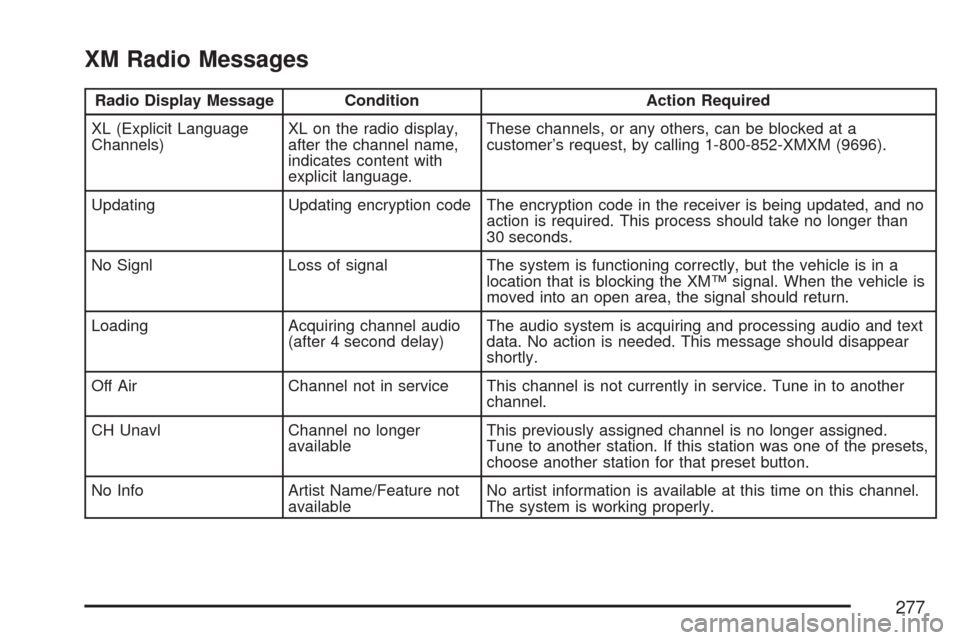
XM Radio Messages
Radio Display Message Condition Action Required
XL (Explicit Language
Channels)XL on the radio display,
after the channel name,
indicates content with
explicit language.These channels, or any others, can be blocked at a
customer’s request, by calling 1-800-852-XMXM (9696).
Updating Updating encryption code The encryption code in the receiver is being updated, and no
action is required. This process should take no longer than
30 seconds.
No Signl Loss of signal The system is functioning correctly, but the vehicle is in a
location that is blocking the XM™ signal. When the vehicle is
moved into an open area, the signal should return.
Loading Acquiring channel audio
(after 4 second delay)The audio system is acquiring and processing audio and text
data. No action is needed. This message should disappear
shortly.
Off Air Channel not in service This channel is not currently in service. Tune in to another
channel.
CH Unavl Channel no longer
availableThis previously assigned channel is no longer assigned.
Tune to another station. If this station was one of the presets,
choose another station for that preset button.
No Info Artist Name/Feature not
availableNo artist information is available at this time on this channel.
The system is working properly.
277
Page 278 of 518
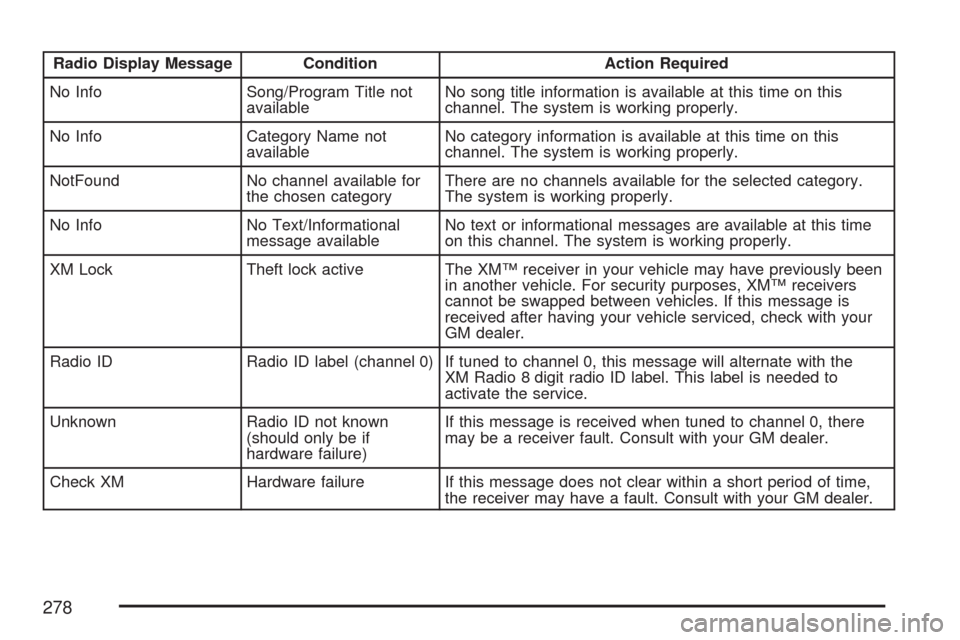
Radio Display Message Condition Action Required
No Info Song/Program Title not
availableNo song title information is available at this time on this
channel. The system is working properly.
No Info Category Name not
availableNo category information is available at this time on this
channel. The system is working properly.
NotFound No channel available for
the chosen categoryThere are no channels available for the selected category.
The system is working properly.
No Info No Text/Informational
message availableNo text or informational messages are available at this time
on this channel. The system is working properly.
XM Lock Theft lock active The XM™ receiver in your vehicle may have previously been
in another vehicle. For security purposes, XM™ receivers
cannot be swapped between vehicles. If this message is
received after having your vehicle serviced, check with your
GM dealer.
Radio ID Radio ID label (channel 0) If tuned to channel 0, this message will alternate with the
XM Radio 8 digit radio ID label. This label is needed to
activate the service.
Unknown Radio ID not known
(should only be if
hardware failure)If this message is received when tuned to channel 0, there
may be a receiver fault. Consult with your GM dealer.
Check XM Hardware failure If this message does not clear within a short period of time,
the receiver may have a fault. Consult with your GM dealer.
278
Page 279 of 518

Navigation/Radio System
Your vehicle may have a navigation radio system.
The navigation system has built-in features
intended to minimize driver distraction. Technology
alone, no matter how advanced, can never
replace your own judgment. See the Navigation
System manual for some tips to help you
reduce distractions while driving.
Theft-Deterrent Feature
THEFTLOCK®is designed to discourage theft
of your vehicle’s radio. The feature works
automatically by learning a portion of the Vehicle
Identication Number (VIN). If the radio is
moved to a different vehicle, it does not operate.
If the radio is removed from your vehicle, the
original VIN in the radio can be used to trace the
radio back to your vehicle.
With THEFTLOCK
®activated, the radio does not
operate if stolen.
Audio Steering Wheel
Controls (CTS)
Some audio functions
can be adjusted at the
steering wheel. They
include the following:
Volume:Turn this knob to increase or to
decrease the volume.
e(Band/Source):Press this button to switch
between FM1, FM2, AM, or XM1 or XM2
(if equipped), radio, or CD.
For vehicles with the six-disc CD changer radio:
If none of the audio sources are loaded, and
this button is pressed, NO SOURCE LOADED will
appear on the display.
279
Page 280 of 518

g(Mute/Voice Recognition):Press this button
to silence the system. Press this button again
or turn the VOL (volume) knob to turn the
sound on.
If your vehicle has the navigation system, press
this button to initiate voice recognition. See “Voice
Recognition” in the Navigation System manual
for more information.
SeeRecongurable
Steering Wheel Controls
(SWC) (CTS) on
page 169for more
information on
this feature.Audio Steering Wheel
Controls (CTS-V)
Depending on your vehicle, the audio steering
wheel controls may be different.
For the CTS-V, some audio controls can be
adjusted at the steering wheel. They include
the following:
0(Mute):Press this button to silence the system.
Press this button again, or any other radio
button, to turn the sound on.
280
Page 281 of 518

SRCE (Source):Press this button to switch
between FM1, FM2, AM, or XM1 or XM2
(if equipped), radio, or CD.
g(OnStar®/Voice Recognition):If your vehicle
has the Radio with CD or Radio with Six-Disc
CD audio system, press this button to interact with
the OnStar system.
If your vehicle has the navigation system, press
this button to initiate voice recognition. See “Voice
Recognition” in the Navigation System manual
for more information. While in Voice Recognition,
say “OnStar” to interact with the OnStar
®
system. See theOnStar®System on page 142in
this manual for more information.
1-6 (Preset Stations):Press this button to play
stations that are programmed on the radio
preset pushbuttons. The radio will only seek preset
stations with a strong signal that are in the
selected band.
When a CD is playing, press this button to go to
the next track.
When a CD is playing in the six-disc CD changer,
press this button to go to the next available CD,
if multiple CDs are loaded.+
u— (Volume):Press this button to increase
or to decrease the volume.
+
tu— (Seek):Press either arrow to go to
the next or the previous radio station and stay
there. The radio will only seek stations with
a strong signal that are in the selected band.
When a CD is playing, press the minus sign to go
to the start of the current track, if more than
10 seconds have played. Press the plus sign to go
to the next track. If either the minus or the plus
button are pressed more than once, the player will
continue moving backward or forward through
the CD.
Press and hold the SEEK plus or minus button,
until you hear a beep. The CD will fast forward or
fast reverse through the CD. Press either button
again to play the passage.
If you have the navigation system, some of the
audio steering wheel controls work when a DVD is
playing in the navigation radio. See the Navigation
System manual for more information.
281