fuel CADILLAC CTS 2008 2.G User Guide
[x] Cancel search | Manufacturer: CADILLAC, Model Year: 2008, Model line: CTS, Model: CADILLAC CTS 2008 2.GPages: 490, PDF Size: 2.59 MB
Page 185 of 490
An emission system malfunction might be corrected by
doing the following:
Make sure the fuel cap is fully installed. SeeFilling
the Tank on page 5-9. The diagnostic system can
determine if the fuel cap has been left off or
improperly installed. A loose or missing fuel cap
allows fuel to evaporate into the atmosphere.
A few driving trips with the cap properly installed
should turn the light off.
If the vehicle has been driven through a deep
puddle of water, the vehicle’s electrical system
might be wet. The condition is usually corrected
when the electrical system dries out. A few driving
trips should turn the light off.
Make sure to fuel the vehicle with quality fuel.
Poor fuel quality causes the engine not to run
as efficiently as designed and may cause: stalling
after start-up, stalling when the vehicle is changed
into gear, misring, hesitation on acceleration,
or stumbling on acceleration. These conditions
might go away once the engine is warmed up.
If one or more of these conditions occurs, change
the fuel brand used. It will require at least one
full tank of the proper fuel to turn the light off.
SeeGasoline Octane on page 5-7.
If none of the above have made the light turn off,
your dealer/retailer can check the vehicle.The dealer/retailer has the proper test equipment
and diagnostic tools to x any mechanical or
electrical problems that might have developed.
Emissions Inspection and Maintenance
Programs
Some state/provincial and local governments have or
might begin programs to inspect the emission control
equipment on the vehicle. Failure to pass this inspection
could prevent getting a vehicle registration.
Here are some things to know to help the vehicle pass
an inspection:
The vehicle will not pass this inspection if the check
engine light is on or not working properly.
The vehicle will not pass this inspection if the OBD
(on-board diagnostic) system determines that critical
emission control systems have not been completely
diagnosed by the system. The vehicle would be
considered not ready for inspection. This can happen
if the battery has recently been replaced or if the
battery has run down. The diagnostic system is
designed to evaluate critical emission control
systems during normal driving. This can take several
days of routine driving. If this has been done and the
vehicle still does not pass the inspection for lack of
OBD system readiness, your dealer/retailer can
prepare the vehicle for inspection.
3-43
Page 189 of 490

Highbeam On Light
This light comes on when
the high-beam headlamps
are in use.
SeeHeadlamp High/Low-Beam Changer on page 3-8
for more information.
Fuel Gage
The fuel gage shows
approximately how much
fuel is in the fuel tank.
It works only when
the ignition is in the
ON/RUN position.If the fuel supply gets low, the Fuel Level Low message
will appear on the Driver Information Center (DIC)
and a single chime will sound. SeeDIC Warnings and
Messages on page 3-56for more information.
Here are a few concerns some owners have had about
the fuel gage. All of these situations are normal and
do not indicate that anything is wrong with the fuel gage:
At the gas station the gas pump shuts off before
the gage reads full.
The gage may change when you turn, stop quickly
or accelerate quickly.
It takes a little more or less fuel to ll the tank than
the gage indicated. For example, the gage may
have indicated that the tank was half full, but
it actually took a little more or less than half the
tank’s capacity to ll the tank.
3-47
Page 190 of 490
Driver Information Center (DIC)
The Driver Information Center (DIC) gives you the
status of many of your vehicle’s systems. The DIC is
also used to display warning/status messages.
All messages appear in the DIC display located at the
bottom of the instrument panel cluster. The DIC buttons
are located on the instrument panel, next to the
steering wheel.
The DIC comes on when the ignition is on. After a short
delay, the DIC displays the information that was last
displayed before the engine was turned off.
The top line of the DIC display shows the DIC
information. The bottom line of the DIC display shows
the compass. The compass displays in the trip/fuel
menus and in some vehicle information menus.
If a problem is detected, a warning message appears
on the display. Take any message that appears on
the display seriously and remember that clearing
the message only makes the message disappear,
and does not correct the problem.
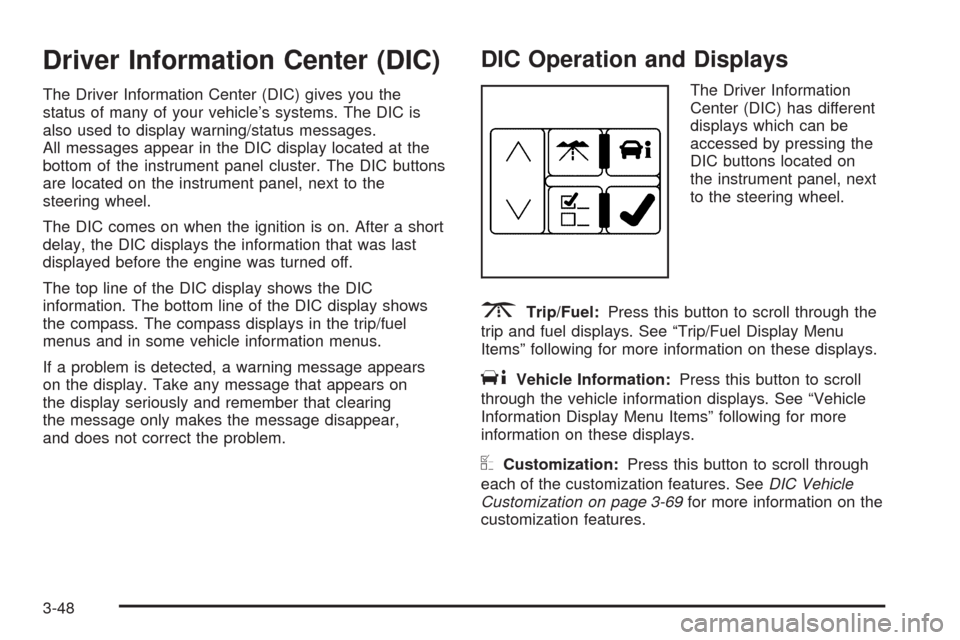
DIC Operation and Displays
The Driver Information
Center (DIC) has different
displays which can be
accessed by pressing the
DIC buttons located on
the instrument panel, next
to the steering wheel.
3Trip/Fuel:Press this button to scroll through the
trip and fuel displays. See “Trip/Fuel Display Menu
Items” following for more information on these displays.
TVehicle Information:Press this button to scroll
through the vehicle information displays. See “Vehicle
Information Display Menu Items” following for more
information on these displays.
UCustomization:Press this button to scroll through
each of the customization features. SeeDIC Vehicle
Customization on page 3-69for more information on the
customization features.
3-48
Page 191 of 490
VSet/Reset:Press this button to reset certain DIC
features and to acknowledge DIC warning messages
and clear them from the DIC display.
yzMenu Up/Down:Press this button to scroll up
and down the menu items.
Trip/Fuel Display Menu Items
3
(Trip/Fuel):The following display menu items can
be displayed by pressing the trip/fuel button:
Odometer
This display shows the distance the vehicle has been
driven in either miles (mi) or kilometers (km).
Trip A or Trip B
These displays show the current distance traveled since
the last reset for each trip odometer in either miles (mi)
or kilometers (km). Both odometers can be used at
the same time. Each trip odometer can be reset to zero
separately by pressing and holding the set/reset button
for a few seconds while the desired trip odometer is
displayed.
Fuel Range
This display shows the approximate number of
remaining miles (mi) or kilometers (km) you can drive
without relling the fuel tank. This estimate is based
on the current driving conditions and changes if the
driving conditions change. For example, if you are
driving in traffic and making frequent stops, the display
may read one number, but if you enter the freeway,
the number may change even though you still have the
same amount of fuel in the fuel tank. This is because
different driving conditions produce different fuel
economies. Generally, freeway driving produces better
fuel economy than city driving.
Once the range drops below about 30 miles (48 km)
remaining, the display shows Low Range.
If your vehicle is low on fuel, the Fuel Level Low
message displays. See “Fuel Level Low” under
DIC Warnings and Messages on page 3-56for more
information.
3-49
Page 192 of 490
AVG (Average) Economy
This display shows the approximate average miles per
gallon (mpg) or liters per 100 kilometers (L/100 km).
This number is calculated based on the number
of mpg (L/100 km) recorded since the last time this
display was reset. To reset this display to zero, press
the set/reset button.
Timer
This display can be used like a stopwatch. You can
record the time it takes to travel from one point to
another. To access the timer, press the trip/fuel button
until Timer 00:00:00 displays.
To turn on the timer, press the set/reset button until the
timer starts.
To turn off the timer, press the set/reset button again.
The timer stops and displays the end timing value.
To reset the timer to zero, press and hold the set/reset
button after the timer has been stopped.
Inst (Instantaneous) Economy
This display shows the current fuel economy
in either miles per gallon (mpg) or liters per
100 kilometers (L/100 km). This number reects only
the fuel economy that the vehicle has right now
and changes frequently as driving conditions change.
Unlike average economy, this display cannot be reset.
AVG (Average) Speed
This display shows the average speed of the vehicle
in either miles per hour (mph) or kilometers per
hour (km/h). This average is calculated based on the
various vehicle speeds recorded since the last reset of
this display. To reset this display to zero, press the
set/reset button.
Speedometer
This display shows a digital speedometer in the DIC.
The speed displays in either miles per hour (mph)
or kilometers per hour (km/h). To change the units from
English to metric, see “Units” later in this section.
Blank Display
This display shows no information.
3-50
Page 196 of 490

To adjust for compass variance, use the following
procedure:
Compass Variance (Zone) Procedure
1. Do not set the compass zone when the vehicle is
moving. On an automatic transmission vehicle,
only set it when the vehicle is in PARK (P). On a
manual transmission vehicle, only set it when
the vehicle is stopped.
Press the vehicle information button until
Press
VTo Change Compass Zone displays.
2. Find the vehicle’s current location and variance
zone number on the map.
Zones 1 through 15 are available.
3. Press the set/reset button to scroll through and
select the appropriate variance zone.
4. Press the trip/fuel button until the vehicle heading,
for example, N for North, is displayed in the DIC.
5. Calibrate the compass. See “Compass Calibration
Procedure” following.
3-54
Page 203 of 490
Engine Power Is Reduced
This message displays when the engine power is
being reduced to protect the engine from damage.
There could be several malfunctions that might cause
this message. Reduced engine power can affect
the vehicle’s ability to accelerate. If this message is on,
but there is no reduction in performance, proceed to
your destination. The performance may be reduced the
next time the vehicle is driven. The vehicle may be
driven at a reduced speed while this message is on, but
acceleration and speed may be reduced. Anytime this
message stays on, the vehicle should be taken to
your dealer/retailer for service as soon as possible.
Fuel Level Low
This message displays when your vehicle is low on fuel.
Rell the fuel tank as soon as possible. A chime may
sound when this message displays. SeeFilling the Tank
on page 5-9.
Heated Washer Fluid Wash (Washer)
Wipes Pending
If your vehicle has this feature, this message displays
when you turn on the heated windshield washer
uid system. See “Heated Windshield Washer” under
Windshield Washer on page 3-12for more information.
Heated Washer Fluid System Off
If your vehicle has this feature, this message displays
when you manually turn off the heated windshield
washer uid system or when the system automatically
turns off. See “Heated Windshield Washer” under
Windshield Washer on page 3-12for more information.
This message clears itself after 10 seconds.
Hood Open
This message displays when the hood is not closed
completely. Make sure that the hood is closed
completely.
Ice Possible Drive With Care
This message displays when the outside temperature is
cold enough to create icy road conditions. Adjust your
driving accordingly.
Learn Delay Active Wait XX Min
(Minutes)
If your vehicle has the keyless access system, this
message displays when matching new transmitters to
the vehicle. SeeKeyless Access System Operation
on page 2-10for more information.
3-61
Page 210 of 490
StabiliTrak Off
This message displays when you turn off StabiliTrak,
or when the stability control has been automatically
disabled. The TCS/StabiliTrak warning light on
the instrument panel cluster also comes on.
To realize the full benets of the stability enhancement
system, you should normally leave StabiliTrak on.
To turn the StabiliTrak system on or off, seeStabiliTrak
®
System on page 4-8.
There are several conditions that can cause this message
to appear.
One condition is overheating, which could occur if
StabiliTrak®activates continuously for an extended
period of time.
The message also displays if the brake system
warning light is on. SeeBrake System Warning Light
on page 3-38.
The message could display if the stability system
takes longer than usual to complete its diagnostic
checks due to driving conditions.
The message displays if an engine or vehicle related
problem has been detected and the vehicle needs
service. See your dealer/retailer.
The message turns off as soon as the conditions that
caused the message to be displayed are no longer
present.
Start Aborted By Theft Deterrent
This message displays if there is a communication
problem between the keyless access system and the
vehicle. The vehicle cannot be started when this
message displays. See your dealer/retailer for service.
Theft Attempted
This message displays if the theft-deterrent system has
detected a break-in attempt while you were away
from your vehicle. SeeTheft-Deterrent System on
page 2-28for more information.
Tighten Gas Cap
This message displays when the fuel cap has not been
fully tightened. Recheck the fuel cap to ensure that it
is on and tightened properly.
Tire Learning Active
This message displays when the Tire Pressure Monitor
System (TPMS) is re-learning the tire positions on
your vehicle. The tire positions must be re-learned after
rotating the tires or after replacing a tire or sensor.
SeeTire Inspection and Rotation on page 5-74,
Tire Pressure Monitor System on page 5-69, and
Inflation - Tire Pressure on page 5-66for more
information.
3-68
Page 223 of 490

See “Relearn Remote Key” underDIC Operation and
Displays on page 3-48for more information on matching
transmitters to driver ID numbers.
No Change:No change will be made to this feature.
The current setting will remain.
To select a setting, press the set/reset button while the
desired setting is displayed on the DIC.
Remote Start
If the vehicle has this feature, it allows you to turn the
remote start feature off or on. The remote start feature
allows you to start the engine from outside of the vehicle
using the Remote Keyless Entry (RKE) or keyless access
transmitter. SeeRemote Vehicle Start on page 2-16for
more information.
Press the customization button until Remote Start
appears in the DIC display. Press the set/reset button
once to access the settings for this feature. Then press
the menu up/down button to scroll through the following
settings:
Off:The remote start feature will be disabled.
On (default):The remote start feature will be enabled.
No Change:No change will be made to this feature.
The current setting will remain.
To select a setting, press the set/reset button while the
desired setting is displayed on the DIC.
Advanced Features Exit
This feature allows you to exit the advanced
features menu.
Press the customization button until Advanced Features
Press
VTo Exit appears in the DIC display. Press the
set/reset button once to exit the menu. Feature Settings
Press
VTo Exit will appear. Press the set/reset button to
exit the menu.
If you do not exit, pressing the customization button
again will return you to the beginning of the menu.
Exiting the Feature Settings/Advanced
Features Menu
The feature settings/advanced features menus will be
exited when any of the following occurs:
The vehicle is no longer in ON/RUN.
The trip/fuel or vehicle information DIC buttons
are pressed.
The end of the feature settings menu is reached
and exited.
A 40 second time period has elapsed with no
selection made.
3-81
Page 284 of 490
Before Leaving on a Long Trip
To prepare your vehicle for a long trip, consider having
it serviced by your dealer/retailer before departing.
Things to check on your own include:
Windshield Washer Fluid:Reservoir full? Windows
clean — inside and outside?
Wiper Blades:In good shape?
Fuel, Engine Oil, Other Fluids:All levels checked?
Lamps:Do they all work and are lenses clean?
Tires:Are treads good? Are tires inated to
recommended pressure?
Weather and Maps:Safe to travel? Have
up-to-date maps?
Highway Hypnosis
Always be alert and pay attention to your surroundings
while driving. If you become tired or sleepy, nd a
safe place to park your vehicle and rest.
Other driving tips include:
Keep the vehicle well ventilated.
Keep interior temperature cool.
Keep your eyes moving — scan the road ahead
and to the sides.
Check the rearview mirror and vehicle instruments
often.
Hill and Mountain Roads
Driving on steep hills or through mountains is different
than driving on at or rolling terrain. Tips for driving
in these conditions include:
Keep the vehicle serviced and in good shape.
Check all uid levels and brakes, tires, cooling
system, and transmission.
Going down steep or long hills, shift to a
lower gear.
4-16