ignition CADILLAC CTS 2008 2.G Repair Manual
[x] Cancel search | Manufacturer: CADILLAC, Model Year: 2008, Model line: CTS, Model: CADILLAC CTS 2008 2.GPages: 490, PDF Size: 2.59 MB
Page 224 of 490

Audio System(s)
Determine which radio your vehicle has and then read
the pages following to familiarize yourself with its
features.
{CAUTION:
This system provides you with far greater
access to audio stations and song listings.
Giving extended attention to entertainment
tasks while driving can cause a crash and you
or others can be injured or killed. Always keep
your eyes on the road and your mind on the
drive — avoid engaging in extended searching
while driving.
Keeping your mind on the drive is important for safe
driving. SeeDefensive Driving on page 4-2. Here are
some ways in which you can help avoid distraction
while driving.While your vehicle is parked:
Familiarize yourself with all of its controls.
Familiarize yourself with its operation.
Set up your audio system by presetting your
favorite radio stations, setting the tone, and
adjusting the speakers. Then, when driving
conditions permit, you can tune to your favorite
radio stations using the presets and steering wheel
controls if the vehicle has them.
Notice:Before adding any sound equipment to
your vehicle, such as an audio system, CD player,
CB radio, mobile telephone, or two-way radio, make
sure that it can be added by checking with your
dealer/retailer. Also, check federal rules covering
mobile radio and telephone units. If sound equipment
can be added, it is very important to do it properly.
Added sound equipment may interfere with the
operation of your vehicle’s engine, radio, or other
systems, and even damage them. Your vehicle’s
systems may interfere with the operation of sound
equipment that has been added.
Your vehicle has a feature called Retained Accessory
Power (RAP). With RAP, the audio system can be
played even after the ignition is turned off. SeeRetained
Accessory Power (RAP) on page 2-35for more
information.
3-82
Page 233 of 490

If the ignition or radio is turned off while a CD in the
player, it stays in the player. When the ignition or radio
is turned on, the CD starts playing where it stopped,
if it was the last selected audio source.
When a CD is inserted, the disc number displays on the
upper right side of the screen and the track number
displays at the left and center of the screen. The Shuffle
and Disc labels appear below. Press the pushbuttons
located under the Disc label to change to another
disc. The CD begins playback of the rst track on the
selected disc. As each new track starts to play the track
number displays in the left and center of the screen.
Shuffle:Press the pushbutton located below the
Shuffle label to play the tracks of a CD in random order.
Press again to turn Shuffle off. Shuffle Off displays
Z(Eject):To eject the disc that is currently playing,
press and release. Ejecting Disc displays and a beep
sounds. Once the disc is ejected, Remove Disc displays.
The disc can be removed. If the disc is not removed, after
several seconds, the disc automatically pulls back into
the player and begins playing.
For the Six-Disc CD player, press and hold for
two seconds to eject all discs.
©SEEK¨:Press the left arrow to go to the start of the
current track, if more than ve seconds have played.
Press the right arrow to go to the next track. If either
arrow is held, or pressed multiple times, the player
continues moving backward or forward through the tracks
on the CD.
sREV (Fast Reverse):Press and hold to reverse
playback quickly within a track. Sound is heard at
a reduced volume and the elapsed time of the track
displays. Release to resume playing the track.
\FWD (Fast Forward):Press and hold to advance
playback quickly within a track. Sound is heard at a
reduced volume and the elapsed time of the track
displays. Release to resume playing the track.
FM/AM:Press to listen to the radio when a CD is
playing. The CD remains inside the radio for future
listening.
CD:Press to play a CD when listening to the radio.
The disc and/or track number displays when a CD
is in the player.
AUX (Auxiliary):Press to automatically search for
an auxiliary input device, such as a portable audio
player. If a portable audio player is not connected,
“No Aux Input Device Found” displays.
3-91
Page 275 of 490
If you press the TC button once, the traction control
system will turn off and the TCS/StabiliTrak Warning
Light will come on. Press the TC button again to turn
the system back on. Press and hold the TC button for
ve seconds or longer, to turn the StabiliTrak system off.
The TCS/StabiliTrak warning light will come on. Press
the TC button again to turn Stabilitrak back on. For more
information, seeStabiliTrak
®System on page 4-8.
Adding non-dealer/non-retailer accessories can affect
your vehicle’s performance. SeeAccessories and
Modifications on page 5-4for more information.
Competitive Driving Mode
Press the TC button quickly two times to select this
optional handling mode. The StabiliTrak Competitive
Mode message displays in the Driver Information Center
(DIC). While in the StabiliTrak Competitive Mode, TCS
does not operate, and the TCS warning light comes on.
Adjust your driving accordingly.Press the TC button again, or turn the ignition to
ACC/ACCESSORY, to turn the TCS back on and the
TCS warning light off.
Notice:When traction control is turned off, or
Competitive Driving Mode is active, it is possible to
lose traction. If you attempt to shift with the rear
wheels spinning with a loss of traction, it is possible
to cause damage to the transmission. Do not attempt
to shift when the rear wheels do not have traction.
Damage caused by misuse of the vehicle is not
covered. See your warranty book for additional
information.Limited-Slip Rear Axle
Your vehicle may have this feature. A limited-slip rear
axle can give you additional traction on snow, mud, ice,
sand or gravel. It works like a standard axle most of
the time, but when one of the rear wheels has no
traction and the other does, this feature will allow the
wheel with traction to move the vehicle.
4-7
Page 285 of 490
{CAUTION:
If you do not shift down, the brakes could get
so hot that they would not work well. You
would then have poor braking or even none
going down a hill. You could crash. Shift down
to let the engine assist the brakes on a steep
downhill slope.
{CAUTION:
Coasting downhill in N (Neutral) or with the
ignition off is dangerous. The brakes will have
to do all the work of slowing down and they
could get so hot that they would not work well.
You would then have poor braking or even
none going down a hill. You could crash.
Always have the engine running and the
vehicle in gear when going downhill.
Stay in your own lane. Do not swing wide or cut
across the center of the road. Drive at speeds
that let you stay in your own lane.
Top of hills: Be alert — something could be in your
lane (stalled car, accident).
Pay attention to special road signs (falling rocks
area, winding roads, long grades, passing or
no-passing zones) and take appropriate action.
Winter Driving
Here are some tips for winter driving:
Have your vehicle in good shape for winter.
You might want to put winter emergency supplies in
your trunk.
Include an ice scraper, a small brush or broom, a
supply of windshield washer uid, a rag, some winter
outer clothing, a small shovel, a ashlight, a red
cloth, and a couple of reective warning triangles. And,
if you will be driving under severe conditions, include
a small bag of sand, a piece of old carpet, or a couple of
burlap bags to help provide traction. Be sure you
properly secure these items in your vehicle.
Also seeTires on page 5-58.
4-17
Page 328 of 490

How to Inspect the Engine Air
Cleaner/Filter
To inspect the air cleaner/lter, remove the lter from
the vehicle and lightly shake the lter to release loose
dust and dirt. If the lter remains caked with dirt, a new
lter is required.
To inspect or replace the engine air cleaner/lter, do the
following:
1. Turn the ignition off.
2. Remove side cover by pulling up on front of cover.3. Disconnect electrical connector from air box.
4. Loosen the screw on the clamp holding the air outlet
duct in place. Do not pry the clamp off. Position the
duct aside.
5. Remove the rubber hose from the air cleaner
housing mounting arm. Position the rubber hose
aside.
5-22
Page 347 of 490

Brakes
Brake Fluid
The brake master cylinder
reservoir is lled with
DOT-3 brake uid. See
Engine Compartment
Overview on page 5-14for
the location of the reservoir.
There are only two reasons why the brake uid level in
the reservoir might go down. The rst is that the brake
uid goes down to an acceptable level during normal
brake lining wear. When new linings are put in, the uid
level goes back up. The other reason is that uid is
leaking out of the brake hydraulic system. If it is, have
the brake hydraulic system xed, since a leak means
that sooner or later the brakes will not work well.Do not top off the brake uid. Adding brake uid will not
correct a leak. If uid is added when the linings are
worn, there will be too much uid when new brake
linings are installed. Add or remove brake uid, as
necessary, only when work is done on the brake
hydraulic system.
{CAUTION:
If your vehicle has too much brake uid, it can
spill on the engine. The uid will burn if the
engine is hot enough. You or others could be
burned, and your vehicle could be damaged.
Add brake uid only when work is done on
the brake hydraulic system.
If the ignition is in ON/RUN and the brake uid is low,
the Service Brake System message will be displayed in
the DIC. SeeDIC Warnings and Messages on page 3-56.
When the brake uid falls to a low level, the brake
warning light will come on. SeeBrake System Warning
Light on page 3-38.
5-41
Page 350 of 490
Battery
Your vehicle has a maintenance free battery. It is
located in the trunk, behind the trim panel, on the
passenger side of the vehicle. When it is time for a
new battery, see your dealer/retailer for one that has
the replacement number shown on the original battery’s
label.
Warning:Battery posts, terminals, and related
accessories contain lead and lead compounds,
chemicals known to the State of California to cause
cancer and reproductive harm. Wash hands after
handling.
After a power loss, such as disconnecting the battery or
removing the maxi fuses in the power distribution fuse
block, the following steps must be performed to calibrate
the electronic throttle control. If this is not done, the
engine will not run properly.
1. Turn the ignition to ON/RUN. Do not start the
engine.
2. Leave the ignition in ON/RUN for at least
three minutes so that the electronic throttle
control will cycle and re-learn its home position.
3. Turn the ignition to LOCK/OFF.
4. Start and run the engine for at least 30 seconds.
Vehicle Storage
{CAUTION:
Batteries have acid that can burn you and gas
that can explode. You can be badly hurt if you
are not careful. SeeJump Starting on page 5-45
for tips on working around a battery without
getting hurt.
Infrequent Usage: If you drive your vehicle infrequently,
remove the black, negative (−) cable from the battery.
This will help keep the battery from running down.
Extended Storage: For extended storage of your vehicle,
remove the black, negative (−) cable from the battery
or use a battery trickle charger. This will help maintain
the charge of the battery over an extended period
of time.
5-44
Page 352 of 490
Notice:If you leave your radio or other accessories
on during the jump starting procedure, they could
be damaged. The repairs would not be covered
by your warranty. Always turn off your radio and
other accessories when jump starting your vehicle.
3. Turn off the ignition on both vehicles. Unplug
unnecessary accessories plugged into the cigarette
lighter or the accessory power outlets. Turn off
the radio and all lamps that are not needed. This
will avoid sparks and help save both batteries. And
it could save the radio!
4. Open the hoods and locate the positive (+) and
negative (−) terminal locations or the remote
positive (+) and remote negative (−) terminals of the
other vehicle. Then locate the remote positive (+)
location on your vehicle. SeeEngine Compartment
Overview on page 5-14for more information on
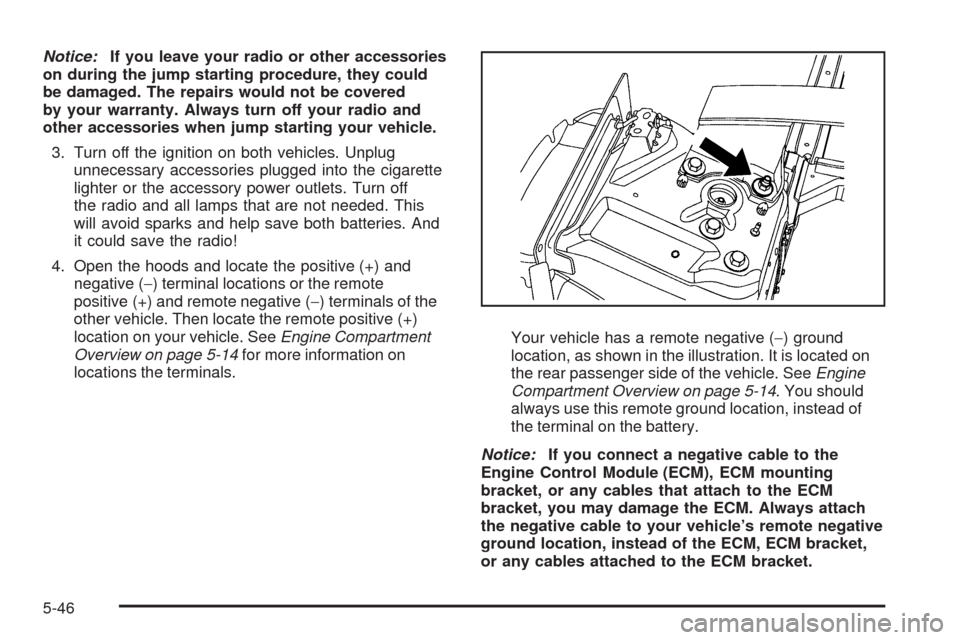
locations the terminals.Your vehicle has a remote negative (−) ground
location, as shown in the illustration. It is located on
the rear passenger side of the vehicle. SeeEngine
Compartment Overview on page 5-14. You should
always use this remote ground location, instead of
the terminal on the battery.
Notice:If you connect a negative cable to the
Engine Control Module (ECM), ECM mounting
bracket, or any cables that attach to the ECM
bracket, you may damage the ECM. Always attach
the negative cable to your vehicle’s remote negative
ground location, instead of the ECM, ECM bracket,
or any cables attached to the ECM bracket.
5-46
Page 363 of 490
Replacement Bulbs
Exterior Lamp Bulb Number
Fog Lamp (Uplevel Only) H11LL
License Plate Lamp W5WLL
For replacement bulbs not listed here, contact your
dealer/retailer.
Windshield Wiper Blade
Replacement
Windshield wiper blades should be inspected for wear
or cracking. SeeOwner Checks and Services on
page 6-10.
It is a good idea to clean or replace the wiper blade
assembly on a regular basis or when worn. For proper
windshield wiper blade length and type, seeMaintenance
Replacement Parts on page 6-16.
To replace the wiper blade assembly:
1. Turn the ignition to ON/RUN with the engine off.
2. Turn on the windshield wipers and turn them
off again when the wipers are in the out-wipe
position. The driver side blade will be straight up
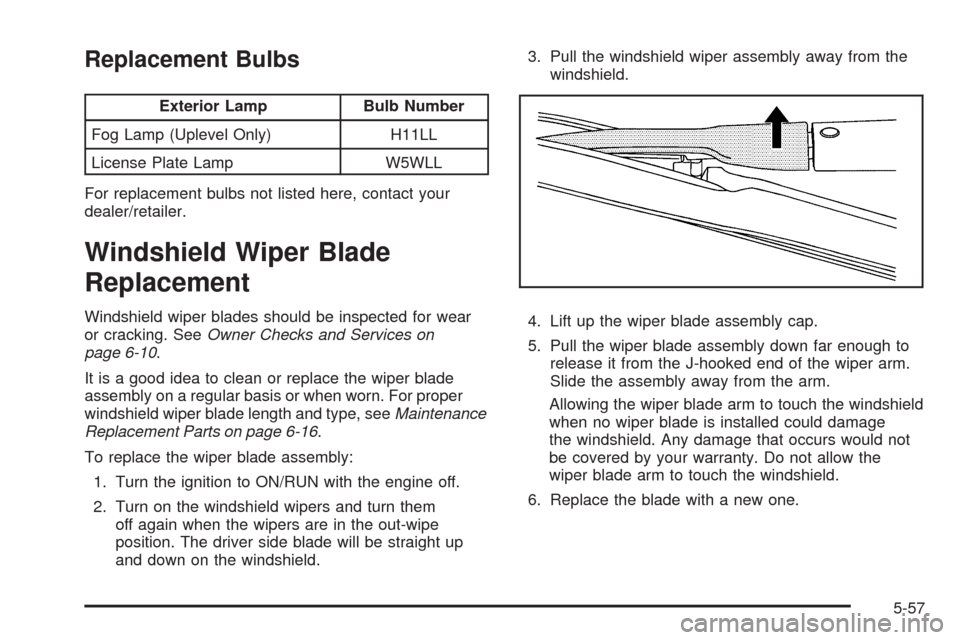
and down on the windshield.3. Pull the windshield wiper assembly away from the
windshield.
4. Lift up the wiper blade assembly cap.
5. Pull the wiper blade assembly down far enough to
release it from the J-hooked end of the wiper arm.
Slide the assembly away from the arm.
Allowing the wiper blade arm to touch the windshield
when no wiper blade is installed could damage
the windshield. Any damage that occurs would not
be covered by your warranty. Do not allow the
wiper blade arm to touch the windshield.
6. Replace the blade with a new one.
5-57
Page 377 of 490

A DIC warning message to check the pressure in a
specic tire is also shown on the DIC display screen.
The low tire pressure warning light and the DIC warning
message come at each ignition cycle until the tires
are inated to the correct ination pressure.
The low tire pressure warning light may come on in
cool weather when the vehicle is rst started, and then
turn off as you start to drive. This could be an early
indicator that the air pressure in the tire(s) are getting
low and need to be inated to the proper pressure.
The Tire and Loading Information label, attached to
your vehicle, shows the size of your vehicle’s original
equipment tires and the correct ination pressure for the
tires when they are cold. SeeLoading the Vehicle on
page 4-22, for an example of the Tire and Loading
Information label and its location on your vehicle.
Also seeInflation - Tire Pressure on page 5-66.Your vehicle’s TPMS can warn you about a low tire
pressure condition but it does not replace normal
tire maintenance. SeeTire Inspection and Rotation
on page 5-74andTires on page 5-58.
Notice:Using non-approved tire sealants could
damage the Tire Pressure Monitor System (TPMS)
sensors. TPMS sensor damage caused by using
an incorrect tire sealant is not covered by the
vehicle warranty. Always use the GM approved
tire sealant available through your dealer/retailer.
Your vehicle, when new, may have included a
factory-installed Tire Sealant and Compressor Kit.
This kit uses a GM approved liquid tire sealant. See
Tire Sealant and Compressor Kit (With Sealant Selector
Switch) on page 5-84orTire Sealant and Compressor
Kit (Without Sealant Selector Switch) on page 5-93.
5-71