climate control CADILLAC CTS 2009 2.G User Guide
[x] Cancel search | Manufacturer: CADILLAC, Model Year: 2009, Model line: CTS, Model: CADILLAC CTS 2009 2.GPages: 490, PDF Size: 2.68 MB
Page 170 of 490

Battery Run-Down Protection
This feature helps to prevent battery drain if accessory
lamps are left on. If accessory lamps such as the
vanity mirror, cargo, reading, console, or glove box
are left on, they automatically time-out after about
20 minutes. To reset the battery protection, all of the
above lamps must be turned off or the ignition must be
in the ACC/ACCESSORY position.
Accessory Power Outlet(s)
Accessory power outlets can be used to connect
auxiliary electrical equipment, such as a cellular
telephone.
There are three accessory power outlets. There is an
outlet located in the front storage area below the climate
control system, one inside the center console storage
bin, and one on the rear of the center console.
To use an outlet, remove the protective cap. When not
in use, always cover the outlet with the protective cap.
The accessory power outlet is operational at all times.Notice:If electrical devices are left plugged into
a power outlet, the battery may drain causing
the vehicle not to start or damage to the battery.
This would not be covered by the warranty.
Always unplug all electrical devices when turning
off the vehicle.
Certain electrical accessories may not be compatible
with the accessory power outlet and could result
in blown vehicle or adapter fuses. If you experience
a problem see your dealer/retailer for additional
information on accessory power outlets.
Notice:Adding any electrical equipment to the
vehicle can damage it or keep other components
from working as they should. The repairs would not
be covered by the vehicle warranty. Do not use
equipment exceeding maximum amperage rating of
20 amperes. Check with your dealer/retailer before
adding electrical equipment.
Notice:Improper use of the power outlet can cause
damage not covered by the warranty. Do not hang
any type of accessory or accessory bracket from the
plug because the power outlets are designed for
accessory power plugs only.
3-22
Page 172 of 490
Climate Controls
Dual Climate Control System
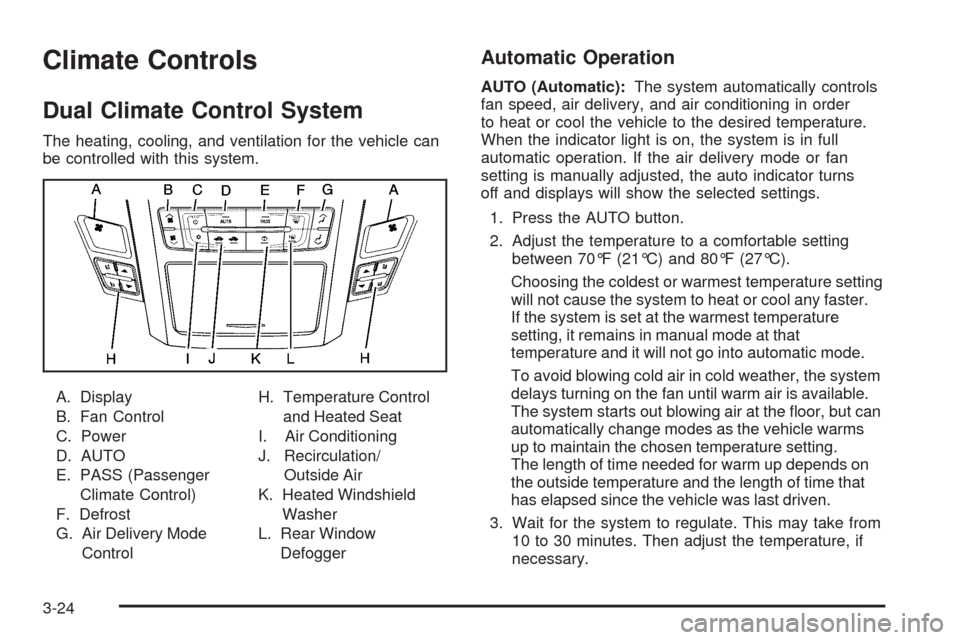
The heating, cooling, and ventilation for the vehicle can
be controlled with this system.
A. Display
B. Fan Control
C. Power
D. AUTO
E. PASS (Passenger
Climate Control)
F. Defrost
G. Air Delivery Mode
ControlH. Temperature Control
and Heated Seat
I. Air Conditioning
J. Recirculation/
Outside Air
K. Heated Windshield
Washer
L. Rear Window
Defogger
Automatic Operation
AUTO (Automatic):The system automatically controls
fan speed, air delivery, and air conditioning in order
to heat or cool the vehicle to the desired temperature.
When the indicator light is on, the system is in full
automatic operation. If the air delivery mode or fan
setting is manually adjusted, the auto indicator turns
off and displays will show the selected settings.
1. Press the AUTO button.
2. Adjust the temperature to a comfortable setting
between 70°F (21°C) and 80°F (27°C).
Choosing the coldest or warmest temperature setting
will not cause the system to heat or cool any faster.
If the system is set at the warmest temperature
setting, it remains in manual mode at that
temperature and it will not go into automatic mode.
To avoid blowing cold air in cold weather, the system
delays turning on the fan until warm air is available.
The system starts out blowing air at the oor, but can
automatically change modes as the vehicle warms
up to maintain the chosen temperature setting.
The length of time needed for warm up depends on
the outside temperature and the length of time that
has elapsed since the vehicle was last driven.
3. Wait for the system to regulate. This may take from
10 to 30 minutes. Then adjust the temperature, if
necessary.
3-24
Page 173 of 490

English can be changed to metric units through the
Driver Information Center (DIC). SeeDIC Vehicle
Customization on page 3-72.
Q/R(Temperature Control):The temperature can be
adjusted separately for the driver and the passenger.
Press to increase or decrease the automatic temperature
settings.
PASS (Passenger Climate Control):Press to set a
different temperature for the passenger. Then adjust
the passenger temperature buttons to a comfortable
setting.
Pressing the PASS button again automatically sets the
passenger’s temperature to the driver’s setting.
Turning the passenger’s temperature display off does
not shut the passenger’s climate control system off.
Manual Operation
O(Power):Press to turn the climate control system on
or off. When the climate control system is turned off
the air inlet defaults to outside air.
DC(Fan Control):Press the buttons to increase or
decrease the fan speed. Pressing either button cancels
automatic operation and the system goes into manual
mode. Press AUTO to return to automatic operation.
The blower may reduce during an Onstar
®session
to limit background noise.
If the airow seems low when the fan speed is at the
highest setting, the passenger compartment air
lter might need to be replaced. For more information,
seePassenger Compartment Air Filter on page 3-29
andScheduled Maintenance on page 6-4.
HG(Air Delivery Mode Control):Press the buttons to
change the direction of the airow. The current mode
appears in the display screen. Changing the mode
cancels the automatic operation and the system goes
into manual mode. Press AUTO to return to automatic
operation.
3-25
Page 176 of 490

Heated and Ventilated Seats:Press to heat or
ventilate the seat. SeeHeated and Ventilated Seats
on page 1-7.
_(Heated Windshield Washer, If Equipped):
For more information, seeWindshield Washer on
page 3-12.
Remote Start Climate Control Operation:For
vehicles with remote vehicle start feature and it is
activated, the climate control system heats and cools
the inside of the vehicle using the previous settings
of the system before the vehicle was turned off.
SeeRemote Vehicle Start on page 2-14.
The windshield defroster and/or rear window defogger
turn on if it is cold outside. If the vehicle has heated
seats, they turn on if the temperature inside the
vehicle is cooler than 54°F (12.5°C) or if the outside
temperature is cooler than 48°F (9°C).
Sensors
The solar sensor located
on the instrument panel,
near the windshield,
monitors the solar heat.
The interior temperature
sensor located on the
instrument panel to
the right of the steering
wheel, measures the
temperature of the
air inside the vehicle.
3-28
Page 177 of 490

The climate control system uses the information from
these sensors to adjust the fan speed and the air
delivery, in order to maintain the selected temperature.
The system may also supply cooler air to the side of
the vehicle facing the sun. The recirculation mode
will also be activated, as necessary.
Do not cover the sensors or the automatic climate
control system will not work properly.
Outlet Adjustment
Use the air outlets located in the center and on the side
of the instrument panel to direct the airow. Use the
thumbwheels near the air outlets to open or close off the
airow.
Operation Tips
Clear away any ice, snow, or leaves from air inlets
at the base of the windshield that could block the
ow of air into the vehicle.
Keep the path under the front seats clear of objects
to help circulate the air inside of the vehicle more
effectively.
Use of non-GM approved hood deectors can
adversely affect the performance of the system.
Check with your dealer/retailer before adding
equipment to the outside of the vehicle.
Passenger Compartment Air Filter
The passenger compartment air lter traps most of
the dust and pollen from the air entering the vehicle.
The lter will need to be changed periodically.
SeeScheduled Maintenance on page 6-4.
Using the climate control system without the passenger
air lter installed could let water or other debris enter
the system. This could cause a water leak or noises.
Make sure a new air lter is installed after removing the
old one.
The passenger compartment air lter is located under
the hood below the windshield wiper arm and the screen
on the passenger side of the vehicle. SeeEngine
Compartment Overview on page 5-14for more
information on location.
3-29
Page 205 of 490
Compass Calibration
The compass can be manually calibrated. Only calibrate
the compass in a magnetically clean and safe location,
such as an open parking lot, where driving the vehicle
in circles is not a danger. It is suggested to calibrate
away from tall buildings, utility wires, manhole covers, or
other industrial structures, if possible.
If CAL appears in the DIC display, the compass should
be calibrated.
If the DIC display does not show a heading, for example,
N for North, or the heading does not change after
making turns, there may be a strong magnetic eld
interfering with the compass. Interference may be
caused by a magnetic antenna mount, magnetic note
pad holder, or any other magnetic item. Turn off
the vehicle, move the magnetic item, then turn on
the vehicle and calibrate the compass.To calibrate the compass, use the following procedure:Compass Calibration Procedure
1. Before calibrating the compass, check that the
compass is set to the correct variance zone.
See “Compass Variance (Zone) Procedure” earlier
in this section.
Do not operate any switches such as window,
sunroof, climate controls, seats, etc. during
the calibration procedure.
2. Press the vehicle information button until
Press
VTo Calibrate Compass displays.
3. Press the set/reset button to start the compass
calibration.
4. The DIC will display Calibrating Drive In Circles.
Drive the vehicle in tight circles at less than
5 mph (8 km/h) to complete the calibration. The DIC
will display Calibration Complete for a few seconds
when the calibration is complete. The DIC display
will then return to Press
VTo Calibrate Compass.
3-57
Page 215 of 490
Service A/C System
This message displays when the electronic sensors that
control the air conditioning and heating systems are
no longer working. Have the climate control system
serviced by your dealer/retailer if you notice a drop in
heating and air conditioning efficiency.
Service All Wheel Drive
This message displays if a problem occurs with the
All-Wheel Drive (AWD) system. The vehicle will run in
2WD. This could be caused by:
An electronics problem
An AWD system oil overheat
Worn out or overheated clutch plates
Various electrical issues
If this message appears, stop as soon as possible
and turn off the ignition for 30 seconds. Restart
the vehicle and check for the message on the DIC
display. If the message is still displayed or appears
again when you begin driving, the system needs service.
See your dealer/retailer right away.
Service Battery Charging System
This message displays when there is a problem with the
generator and battery charging systems. Driving with this
problem could drain the battery. Turn off all unnecessary
accessories. Stop and turn off the vehicle as soon as it is
safe to do so. Have the electrical system checked by your
dealer/retailer. Under certain conditions, the charging
system light may also turn on in the instrument panel
cluster. SeeCharging System Light on page 3-38for
more information.
Service Brake Assist
This message displays if there is a problem with the
brake system. The brake system warning light and the
antilock brake system (ABS) warning light may also
display on the instrument panel cluster. SeeBrake
System Warning Light on page 3-39andAntilock Brake
System (ABS) Warning Light on page 3-40for more
information. Stop as soon as possible and turn off the
vehicle. Restart the vehicle and check for the message
on the DIC display. If the message displays immediately
or again after you begin driving, the brake system
needs service. See your dealer/retailer as soon as
possible. SeeBrakes on page 5-42for more information.
3-67
Page 294 of 490

Blizzard Conditions
Being stuck in snow can be in a serious situation.
Stay with the vehicle unless there is help nearby.
If possible, use theRoadside Service on page 7-7.
To get help and keep everyone in the vehicle safe:
Turn on theHazard Warning Flashers on page 3-6.
Tie a red cloth to an outside mirror.
{CAUTION:
Snow can trap engine exhaust under the vehicle.
This may cause exhaust gases to get inside.
Engine exhaust contains carbon monoxide (CO)
which cannot be seen or smelled. It can cause
unconsciousness and even death.
If the vehicle is stuck in the snow:
Clear away snow from around the base of
your vehicle, especially any that is blocking
the exhaust pipe.
Check again from time to time to be sure
snow does not collect there.
CAUTION: (Continued)
CAUTION: (Continued)
Open a window about two inches (5 cm) on
the side of the vehicle that is away from the
wind to bring in fresh air.
Fully open the air outlets on or under the
instrument panel.
Adjust the Climate Control system to a setting
that circulates the air inside the vehicle and
set the fan speed to the highest setting.
See Climate Control System in the Index.
For more information about carbon monoxide,
seeEngine Exhaust on page 2-50.
Snow can trap exhaust gases under your vehicle.
This can cause deadly CO (carbon monoxide) gas
to get inside. CO could overcome you and kill you.
You cannot see it or smell it, so you might not
know it is in your vehicle. Clear away snow from
around the base of your vehicle, especially any
that is blocking the exhaust
Run the engine for short periods only as needed to
keep warm, but be careful.
To save fuel, run the engine for only short periods as
needed to warm the vehicle and then shut the engine off
and close the window most of the way to save heat.
4-18
Page 391 of 490

While the tires available on General Motors
passenger cars and light trucks may vary with
respect to these grades, they must also conform
to federal safety requirements and additional
General Motors Tire Performance Criteria (TPC)
standards.
Treadwear
The treadwear grade is a comparative rating based
on the wear rate of the tire when tested under
controlled conditions on a specied government
test course. For example, a tire graded 150 would
wear one and a half (1.5) times as well on the
government course as a tire graded 100. The
relative performance of tires depends upon the
actual conditions of their use, however, and may
depart signicantly from the norm due to variations
in driving habits, service practices, and differences
in road characteristics and climate.
Traction – AA, A, B, C
The traction grades, from highest to lowest, are AA,
A, B, and C. Those grades represent the tire’s
ability to stop on wet pavement as measured under
controlled conditions on specied government test
surfaces of asphalt and concrete. A tire marked C
may have poor traction performance.
{WARNING:
The traction grade assigned to this tire is
based on straight-ahead braking traction
tests, and does not include acceleration,
cornering, hydroplaning, or peak traction
characteristics.
5-81
Page 479 of 490

Chemical Paint Spotting.................................5-113
Child Restraints
Child Restraint Systems...............................1-41
Infants and Young Children...........................1-37
Lower Anchors and Tethers for Children..........1-45
Older Children.............................................1-34
Securing a Child Restraint in a
Rear Seat Position...................................1-51
Securing a Child Restraint in the
Right Front Seat Position..........................1-54
Where to Put the Restraint...........................1-44
Cigarette Lighter.............................................3-23
Cleaning
Aluminum or Chrome-Plated Wheels.............5-112
Exterior Lamps/Lenses................................5-110
Fabric/Carpet............................................5-107
Finish Care...............................................5-110
Instrument Panel, Vinyl, and Other
Plastic Surfaces.....................................5-108
Interior.....................................................5-106
Leather....................................................5-108
Speaker Covers.........................................5-109
Tires........................................................5-113
Underbody Maintenance.............................5-113
Washing Your Vehicle.................................5-110
Weatherstrips............................................5-109
Windshield and Wiper Blades......................5-111
Wood Panels............................................5-109Climate Control System
Air Filter, Passenger Compartment.................3-29
Dual ..........................................................3-24
Outlet Adjustment........................................3-29
Clock............................................................3-23
Clutch, Hydraulic.............................................5-30
Collision Damage Repair..................................7-11
Compact Spare Tire......................................5-105
Compass.......................................................3-56
Competitive Driving.........................................4-13
Compressor Kit
Storing.......................................................5-95
Compressor Kit, Tire Sealant............................5-86
Control of a Vehicle.......................................... 4-3
Convenience Net............................................2-65
Coolant
Engine.......................................................5-32
Engine Temperature Gage............................3-42
Engine Temperature Warning Light.................3-41
Surge Tank Pressure Cap.............................5-37
Cooling System..............................................5-31
Cruise Control................................................3-14
Cruise Control Light........................................3-48
Cupholders....................................................2-64
Customer Assistance Information
Courtesy Transportation................................7-10
Customer Assistance for
Text Telephone (TTY) Users........................ 7-6
3