brakes CADILLAC CTS 2011 2.G User Guide
[x] Cancel search | Manufacturer: CADILLAC, Model Year: 2011, Model line: CTS, Model: CADILLAC CTS 2011 2.GPages: 496, PDF Size: 7.71 MB
Page 277 of 496
Black plate (17,1)Cadillac CTS/CTS-V Owner Manual - 2011
Driving and Operating 9-17
you have a manual transmission
vehicle, turn the steering wheel
left and right while you turn the
key hard. If none of this works,
then the vehicle needs service.
A (STOPPING THE ENGINE/
LOCK/OFF):When the vehicle is
stopped, turn the ignition switch to
LOCK/OFF to turn the engine off.
Retained Accessory Power (RAP)
will remain active. See Retained
Accessory Power (RAP)
on
page 9‑19for more information.
This is the only position in which the
key can be removed. This position
locks the ignition and shifter on
automatic transmission vehicles,
and the ignition and steering wheel
on manual transmission vehicles.
Do not turn the engine off when the
vehicle is moving. This will cause a
loss of power assist in the brake
and steering systems and disable
the airbags. In an emergency:
1. Brake using a firm and steady
pressure. Do not pump the
brakes repeatedly. This may
deplete power assist, requiring
increased brake pedal force.
2. Shift the vehicle to neutral. This can be done while the vehicle is
moving. After shifting to neutral,
firmly apply the brakes and steer
the vehicle to a safe location.
3. Come to a complete stop. Shift to P (Park) with an automatic
transmission, or Neutral with a
manual transmission. Turn the
ignition to LOCK/OFF.
4. Set the parking brake. See Parking Brake (Manual)
on
page 9‑33or Parking Brake
(Electric) on page 9‑34 The ignition switch can bind in the
LOCK/OFF position with the wheels
turned off center. If this happens,
move the steering wheel from right
to left while turning the key to ACC/
ACCESSORY. If this does not work,
then the vehicle needs service.
B (ACC/ACCESSORY):
This
position lets you use things like the
radio and the windshield wipers
when the engine is off. This position
allows you to turn off the engine.
C (ON/RUN): This position is for
driving. It is the position the ignition
switch returns to after the engine
starts, and the key is released.
To shift the transmission out of
P (Park), the ignition key has to be
in ACC/ACCESSORY or ON/RUN.
The battery could be drained if the
key is left in the ACC/ACCESSORY
or ON/RUN position with the engine
off. The vehicle might not start if the
battery is allowed to drain for an
extended period of time.
Page 278 of 496
Black plate (18,1)Cadillac CTS/CTS-V Owner Manual - 2011
9-18 Driving and Operating
D (START):This position starts the
engine. When the engine starts,
release the key. The ignition switch
returns to ON/RUN for driving.
A warning tone will sound when the
driver door is opened, the ignition is
in ACC/ACCESSORY or LOCK/
OFF, and the key is in the ignition.
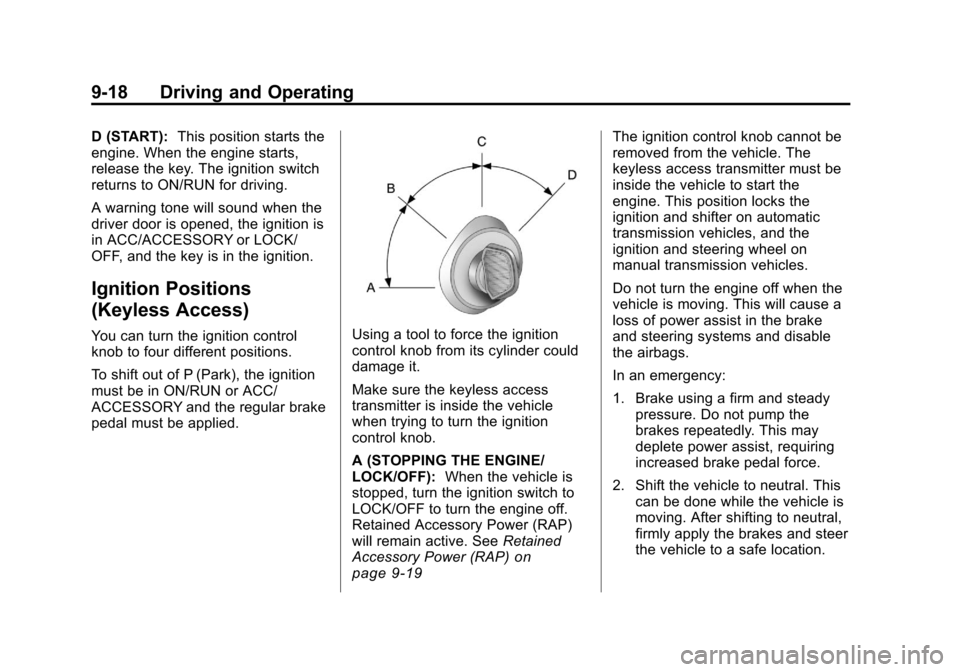
Ignition Positions
(Keyless Access)
You can turn the ignition control
knob to four different positions.
To shift out of P (Park), the ignition
must be in ON/RUN or ACC/
ACCESSORY and the regular brake
pedal must be applied.Using a tool to force the ignition
control knob from its cylinder could
damage it.
Make sure the keyless access
transmitter is inside the vehicle
when trying to turn the ignition
control knob.
A (STOPPING THE ENGINE/
LOCK/OFF): When the vehicle is
stopped, turn the ignition switch to
LOCK/OFF to turn the engine off.
Retained Accessory Power (RAP)
will remain active. See Retained
Accessory Power (RAP)
on
page 9‑19
The ignition control knob cannot be
removed from the vehicle. The
keyless access transmitter must be
inside the vehicle to start the
engine. This position locks the
ignition and shifter on automatic
transmission vehicles, and the
ignition and steering wheel on
manual transmission vehicles.
Do not turn the engine off when the
vehicle is moving. This will cause a
loss of power assist in the brake
and steering systems and disable
the airbags.
In an emergency:
1. Brake using a firm and steady pressure. Do not pump the
brakes repeatedly. This may
deplete power assist, requiring
increased brake pedal force.
2. Shift the vehicle to neutral. This can be done while the vehicle is
moving. After shifting to neutral,
firmly apply the brakes and steer
the vehicle to a safe location.
Page 286 of 496
Black plate (26,1)Cadillac CTS/CTS-V Owner Manual - 2011
9-26 Driving and Operating
Automatic
Transmission
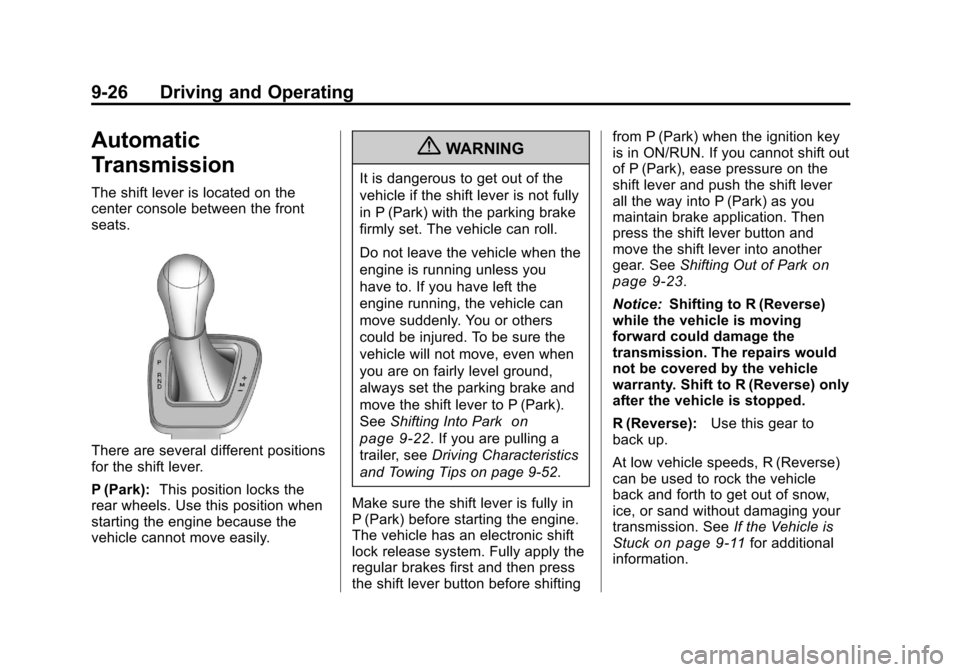
The shift lever is located on the
center console between the front
seats.
There are several different positions
for the shift lever.
P (Park):This position locks the
rear wheels. Use this position when
starting the engine because the
vehicle cannot move easily.
{WARNING
It is dangerous to get out of the
vehicle if the shift lever is not fully
in P (Park) with the parking brake
firmly set. The vehicle can roll.
Do not leave the vehicle when the
engine is running unless you
have to. If you have left the
engine running, the vehicle can
move suddenly. You or others
could be injured. To be sure the
vehicle will not move, even when
you are on fairly level ground,
always set the parking brake and
move the shift lever to P (Park).
See Shifting Into Park
on
page 9‑22
. If you are pulling a
trailer, see Driving Characteristics
and Towing Tips on page 9‑52.
Make sure the shift lever is fully in
P (Park) before starting the engine.
The vehicle has an electronic shift
lock release system. Fully apply the
regular brakes first and then press
the shift lever button before shifting from P (Park) when the ignition key
is in ON/RUN. If you cannot shift out
of P (Park), ease pressure on the
shift lever and push the shift lever
all the way into P (Park) as you
maintain brake application. Then
press the shift lever button and
move the shift lever into another
gear. See
Shifting Out of Park
on
page 9‑23.
Notice: Shifting to R (Reverse)
while the vehicle is moving
forward could damage the
transmission. The repairs would
not be covered by the vehicle
warranty. Shift to R (Reverse) only
after the vehicle is stopped.
R (Reverse): Use this gear to
back up.
At low vehicle speeds, R (Reverse)
can be used to rock the vehicle
back and forth to get out of snow,
ice, or sand without damaging your
transmission. See If the Vehicle is
Stuck
on page 9‑11for additional
information.
Page 287 of 496

Black plate (27,1)Cadillac CTS/CTS-V Owner Manual - 2011
Driving and Operating 9-27
N (Neutral):In this position, the
engine does not connect with the
wheels. To restart when the vehicle
is already moving, use N (Neutral)
only. You can also use N (Neutral)
when the vehicle is being towed.
{WARNING
Shifting into a drive gear while the
engine is running at high speed is
dangerous. Unless your foot is
firmly on the brake pedal, the
vehicle could move very rapidly.
You could lose control and hit
people or objects. Do not shift
into a drive gear while the engine
is running at high speed.
Notice: Shifting out of P (Park) or
N (Neutral) with the engine
running at high speed may
damage the transmission. The
repairs would not be covered by
the vehicle warranty. Be sure the
engine is not running at high
speed when shifting the vehicle. D (Drive):
This position is for
normal driving. It provides the best
fuel economy. If you need more
power for passing, and you are:
.Going less than 55 km/h
(35 mph), push the accelerator
pedal about halfway down.
.Going about 55 km/h (35 mph) or
more, push the accelerator all
the way down.
The transmission will shift down
to a lower gear and have more
power.
Downshifting the transmission in
slippery road conditions could result
in skidding; see “Skidding”under
Loss of Control on page 9‑6 While in D (Drive), the CTS‐V
vehicle's first forward gear
automatic shift after starting the
vehicle will be from 1 (First).
Afterwards, the CTS‐V vehicles will
always start in 2 (Second) gear.
While in M (Manual Mode), for
increased performance, the vehicle
will start in 1 (First) gear.
M (Manual Mode):
This position
allows the driver to select the range
of gears appropriate for current
driving conditions. See Driver Shift
Control (DSC) later in this section.
Notice: Spinning the tires or
holding the vehicle in one place
on a hill using only the
accelerator pedal may damage
the transmission. If you are stuck,
do not spin the tires. When
stopping on a hill, use the brakes
to hold the vehicle in place.
Page 292 of 496
Black plate (32,1)Cadillac CTS/CTS-V Owner Manual - 2011
9-32 Driving and Operating
Drive Systems
All-Wheel Drive
Vehicles with this feature always
send engine power to all four
wheels. It is fully automatic, and
adjusts itself as needed for road
conditions.
When using a compact spare tire on
an AWD vehicle, the system
automatically detects the compact
spare and disables AWD. To restore
AWD operation and prevent
excessive wear on the system,
replace the compact spare with a
full-size tire as soon as possible.
SeeCompact Spare Tire
on
page 10‑111for more information.
Brakes
Antilock Brake
System (ABS)
This vehicle has the Antilock Brake
System (ABS), an advanced
electronic braking system that helps
prevent a braking skid.
When the engine is started and the
vehicle begins to drive away, ABS
checks itself. A momentary motor or
clicking noise might be heard while
this test is going on, and it might
even be noticed that the brake
pedal moves a little. This is normal.
If there is a problem with ABS, this
warning light stays on. See Antilock
Brake System (ABS) Warning Light
on page 5‑23. If driving safely on a wet road and it
becomes necessary to slam on the
brakes and continue braking to
avoid a sudden obstacle, a
computer senses that the wheels
are slowing down. If one of the
wheels is about to stop rolling, the
computer will separately work the
brakes at each wheel.
ABS can change the brake pressure
to each wheel, as required, faster
than any driver could. This can help
the driver steer around the obstacle
while braking hard.
As the brakes are applied, the
computer keeps receiving updates
on wheel speed and controls
braking pressure accordingly.
Page 293 of 496

Black plate (33,1)Cadillac CTS/CTS-V Owner Manual - 2011
Driving and Operating 9-33
Remember: ABS does not change
the time needed to get a foot up to
the brake pedal or always decrease
stopping distance. If you get too
close to the vehicle in front of you,
there will not be enough time to
apply the brakes if that vehicle
suddenly slows or stops. Always
leave enough room up ahead to
stop, even with ABS.
Using ABS
Do not pump the brakes. Just hold
the brake pedal down firmly and let
ABS work. You might hear the ABS
pump or motor operating and feel
the brake pedal pulsate, but this is
normal.
Braking in Emergencies
ABS allows the driver to steer and
brake at the same time. In many
emergencies, steering can help
more than even the very best
braking.
Parking Brake (Manual)
The parking brake pedal is located
on the lower portion of the
instrument panel to the left of the
steering wheel.
To set the parking brake, hold the
brake pedal down, then push the
parking brake pedal down.
If the ignition is on, the brake
system warning light on the
instrument panel cluster should
come on. If it does not, you need tohave the vehicle serviced. See
Brake System Warning Light
on
page 5‑22for more information.
To release the parking brake, pull
the release lever located to the left
of the steering wheel on the
instrument panel.
Notice: Driving with the parking
brake on can overheat the brake
system and cause premature
wear or damage to brake system
parts. Make sure that the parking
brake is fully released and the
brake warning light is off before
driving.
Page 297 of 496

Black plate (37,1)Cadillac CTS/CTS-V Owner Manual - 2011
Driving and Operating 9-37
Ride Control Systems
Traction Control
System (TCS)
The vehicle has a Traction Control
System (TCS) that limits wheel
spin. This is especially useful in
slippery road conditions. On a
rear-wheel-drive vehicle, the system
operates if it senses that one or
both of the rear wheels are spinning
or beginning to lose traction. On an
All-Wheel-Drive (AWD) vehicle, the
system will operate if it senses that
any of the wheels are spinning or
beginning to lose traction. When this
happens, the system brakes the
spinning wheel(s) and/or reduces
engine power to limit wheel spin.
The system may be heard or felt
while it is working, but this is
normal.The TCS/StabiliTrak warning light
flashes when the traction control
system is limiting wheel spin.
The TCS/StabiliTrak warning light
comes on if there is a problem with
the traction control system. When
the TCS/StabiliTrak warning light is
on, the system will not limit wheel
spin. Adjust your driving
accordingly. SeeTraction Control
System (TCS)/StabiliTrak
®Lighton
page 5‑24for more information.
TCS automatically comes on
whenever the vehicle is started. To
limit wheel spin, especially in
slippery road conditions, the system
should always be left on, but it may
be necessary to turn the system off
if the vehicle is stuck in sand, mud
or snow and rocking the vehicle is
required. See If the Vehicle is Stuck
on page 9‑11for more information. See
Winter Driving
on page 9‑9for information on using TCS when
driving in snowy or icy conditions.
This button is located on the
instrument panel (CTS) or the
steering wheel (CTS-V).
Press and release the TCS/
StabiliTrak button and the traction
control system will turn off and the
TCS/StabiliTrak warning light will
come on. Press the button again to
turn the system back on. For
information on turning StabiliTrak off
and on, see StabiliTrak System
following.
Adding non‐dealer accessories can
affect your vehicle's performance.
SeeAccessories and Modifications
on page 10‑4for more information.
Page 298 of 496

Black plate (38,1)Cadillac CTS/CTS-V Owner Manual - 2011
9-38 Driving and Operating
StabiliTrak System
The vehicle has an electronic
stability control system called
StabiliTrak. It is an advanced
computer controlled system that
assists with directional control of the
vehicle in difficult driving conditions.
StabiliTrak activates when the
system senses a discrepancy
between the intended path and the
direction the vehicle is actually
traveling. StabiliTrak selectively
applies braking pressure at any one
of the vehicle's brakes to help steer
the vehicle in the direction which
you are steering.
When the system activates, this
warning light flashes on the
instrument panel. A noise may be
heard or a vibration may be felt inthe brake pedal. This is normal.
Continue to steer the vehicle in the
intended direction.
If there is a problem detected
with StabiliTrak, SERVICE
STABILITRAK displays on the
Driver Information Center (DIC) and
the TCS/StabiliTrak warning light
comes on the instrument panel
cluster. When this message and
warning light displays, the system is
not operational. Driving should be
adjusted accordingly. See
Driver
Information Center (DIC)
on
page 5‑27and Messages and
Traction Control System (TCS)/
StabiliTrak
®Lighton page 5‑24for
more information.
This button is located on the
instrument panel (CTS) or the
steering wheel (CTS-V).
StabiliTrak comes on automatically
whenever the vehicle is started. The
system should be left on to help
assist with directional control of the
vehicle. If StabiliTrak needs to be
turned off, press and hold the TCS/
StabiliTrak button until the TCS/
StabiliTrak warning light comes on
and STABILITRAK OFF comes on
the DIC. More steering effort is
required when the system is
turned off.
Page 300 of 496
Black plate (40,1)Cadillac CTS/CTS-V Owner Manual - 2011
9-40 Driving and Operating
The Driver Information Center (DIC)
briefly displays SUSPENSION
MODE TOUR or SUSPENSION
MODE SPORT on vehicle startup or
when a new mode is selected.
Press and release this button,
located in the center of the
instrument panel, to change modes.
Limited-Slip Rear Axle
Vehicles with a limited-slip rear axle
can give more traction on snow,
mud, ice, sand, or gravel. When
traction is low, this feature allows
the drive wheel with the most
traction to move the vehicle. The
limited-slip rear axle also gives the
driver enhanced control when
cornering hard or completing a
maneuver, such as a lane change.
Cruise Control
{WARNING
Cruise control can be dangerous
where you cannot drive safely at
a steady speed. So, do not use
the cruise control on winding
roads or in heavy traffic.
Cruise control can be dangerous
on slippery roads. On such roads,
fast changes in tire traction can
cause excessive wheel slip, and
you could lose control. Do not use
cruise control on slippery roads.
With cruise control, a speed of
about 40 km/h (25 mph) or more can
be maintained without keeping your
foot on the accelerator. Cruise
control does not work at speeds
below about 40 km/h (25 mph).
When the brakes are applied, the
cruise control turns off. If the vehicle has the Stabilitrak
®
system and begins to limit wheel
spin while you are using cruise
control, the cruise control will
automatically disengage. See
StabiliTrak System
on page 9‑38.
When road conditions allow you to
safely use it again, the cruise
control can be turned back on.
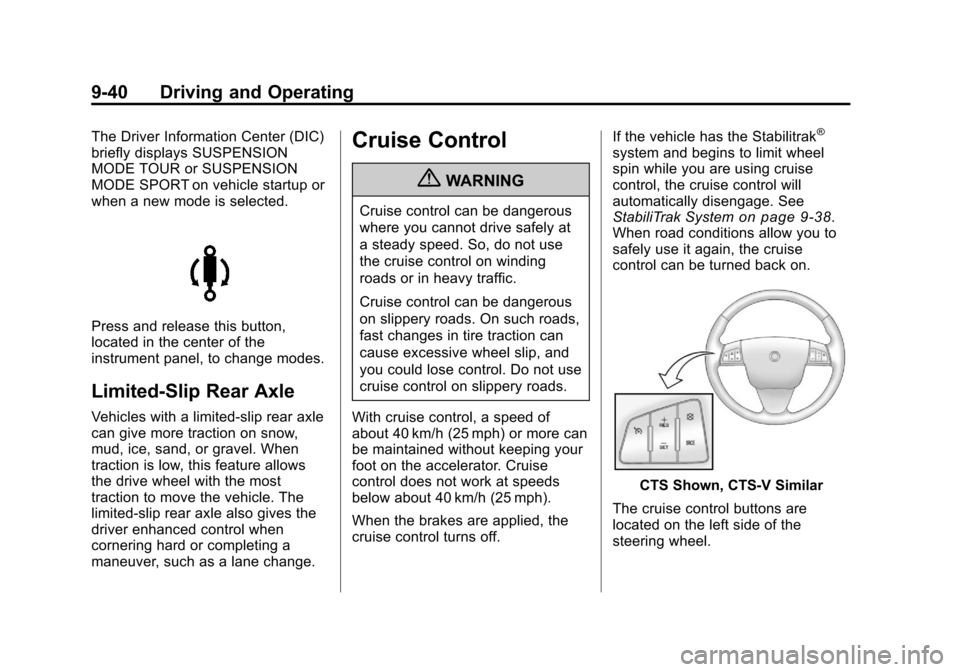
CTS Shown, CTS‐V Similar
The cruise control buttons are
located on the left side of the
steering wheel.
Page 301 of 496

Black plate (41,1)Cadillac CTS/CTS-V Owner Manual - 2011
Driving and Operating 9-41
I(On/Off):Turns the system on
or off. The indicator light on the
button turns on when cruise control
is on.
+RES (Resume/Accelerate):
Press briefly to make the vehicle
resume to a previously set speed,
or press and hold to accelerate.
−SET (Set/Coast): Press to set the
speed and activate cruise control or
make the vehicle decelerate.
[(Cancel): Press to disengage
cruise control without erasing the
set speed from memory.
Setting Cruise Control
If the cruise button is on when not in
use, it could get bumped and go into
cruise when not desired. Keep the
cruise control switch off when cruise
is not being used. The cruise control light on the
instrument panel cluster comes on
after the cruise control has been set
to the desired speed.
1. Press the
Ibutton.
2. Get up to the desired speed.
3. Press the −SET button and
release it.
4. Take your foot off the accelerator.
Resuming a Set Speed
If the cruise control is set at a
desired speed and then the brakes
are applied, the cruise control is
disengaged without erasing the set
speed from memory.
Once the vehicle is driving at about
40 km/h (25 mph) or more, press the
+RES button on the steering wheel.
The vehicle returns to the previous
set speed and stays there. Increasing Speed While Using
Cruise Control
If the cruise control system is
already activated,.Press and hold the +RES button
on the steering wheel until the
desired speed is reached, then
release it.
.To increase vehicle speed in
small amounts, press the +RES
button. Each time this is done,
the vehicle goes about 1.6 km/h
(1 mph) faster.
Reducing Speed While Using
Cruise Control
If the cruise control system is
already activated,
.Press and hold the −SET button
on the steering wheel until the
desired speed is reached, then
release it.