center console CADILLAC CTS 2011 2.G User Guide
[x] Cancel search | Manufacturer: CADILLAC, Model Year: 2011, Model line: CTS, Model: CADILLAC CTS 2011 2.GPages: 496, PDF Size: 7.71 MB
Page 177 of 496
Black plate (37,1)Cadillac CTS/CTS-V Owner Manual - 2011
Instruments and Controls 5-37
Electronic Key Already Known
If the vehicle has the keyless
access system, this message
displays if you try to match a
transmitter that has already been
learned. See the Keyless Access
information forRemote Keyless
Entry (RKE) System Operation (Key
Access)
on page 2‑5or Remote
Keyless Entry (RKE) System
Operation (Keyless Access)
on
page 2‑7for more information.
Electronic Key Not Detected
If the vehicle has the keyless
access system, this message
displays if the vehicle does not
detect the presence of a transmitter
when you have attempted to start
the vehicle or a vehicle door has
just closed. The following conditions
may cause this message to appear:
.Driver-added equipment plugged
into the accessory power outlet
on the center console is causing
interference. Examples of these
devices are cell phones and cell
phone chargers, two-way radios, power inverters, or similar items.
Try moving the keyless access
transmitter away from these
devices when starting the
vehicle. In addition, PDA devices
and remote garage and gate
openers may also generate
Electromagnetic Interference
(EMI) that may interfere with the
keyless access transmitter. Do
not carry the keyless access
transmitter in the same pocket or
bag as these devices.
.The vehicle is experiencing
Electromagnetic Interference
(EMI). Some locations, such as
airports, automatic toll booths,
and some gas stations have EMI
fields which may interfere with
the keyless access transmitter.
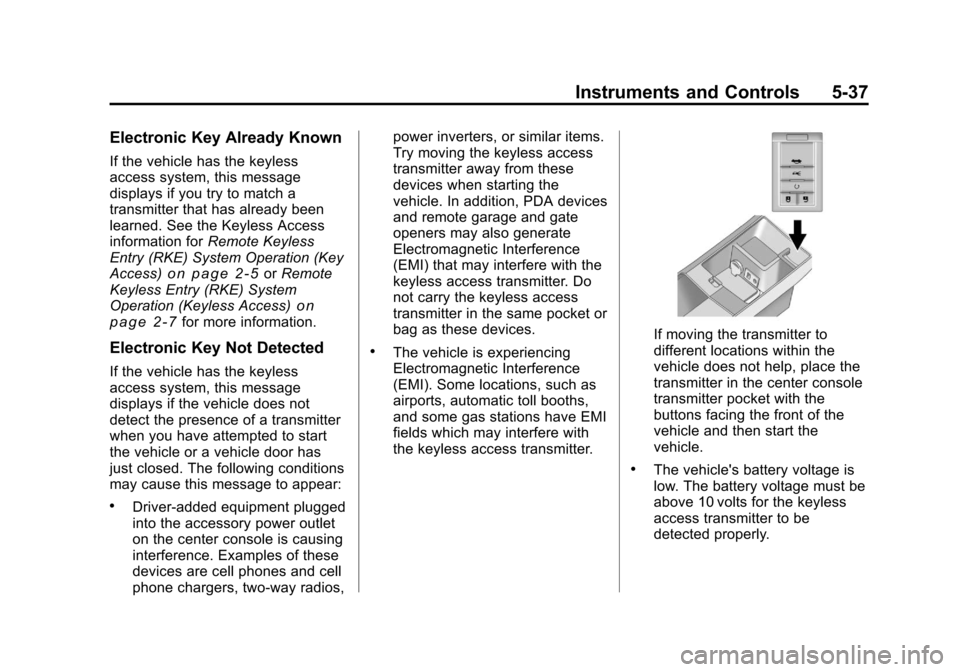
If moving the transmitter to
different locations within the
vehicle does not help, place the
transmitter in the center console
transmitter pocket with the
buttons facing the front of the
vehicle and then start the
vehicle.
.The vehicle's battery voltage is
low. The battery voltage must be
above 10 volts for the keyless
access transmitter to be
detected properly.
Page 205 of 496
Black plate (7,1)Cadillac CTS/CTS-V Owner Manual - 2011
Lighting 6-7
The battery can be discharged at
idle if the electrical loads are very
high. This is true for all vehicles.
This is because the generator
(alternator) may not be spinning fast
enough at idle to produce all the
power that is needed for very high
electrical loads.
A high electrical load occurs when
several of the following are on, such
as: headlamps, high beams, fog
lamps, rear window defogger,
climate control fan at high speed,
heated seats, engine cooling fans,
trailer loads, and loads plugged into
accessory power outlets.
EPM works to prevent excessive
discharge of the battery. It does this
by balancing the generator's output
and the vehicle's electrical needs.
It can increase engine idle speed to
generate more power, whenever
needed. It can temporarily reduce
the power demands of some
accessories.Normally, these actions occur in
steps or levels, without being
noticeable. In rare cases at the
highest levels of corrective action,
this action may be noticeable to the
driver. If so, a Driver Information
Center (DIC) message might be
displayed, such as BATTERY
SAVER ACTIVE or BATTERY
VOLTS LOW. If this message is
displayed, it is recommended that
the driver reduce the electrical loads
as much as possible. See
Driver
Information Center (DIC)
on
page 5‑27.
Battery Power Protection
This feature helps to prevent battery
drain if accessory lamps are left on.
If accessory lamps such as the
vanity mirror, cargo, reading,
console, or glove box are left on,
they automatically time-out after
about 20 minutes. To reset the
battery protection, all of the above
lamps must be turned off or the
ignition must be in the ACC/
ACCESSORY position.
Exterior Lighting Battery
Saver
The exterior lamps turn off about
10 minutes after the ignition is
turned to LOCK/OFF, if the parking
lamps or headlamps have been left
on. This protects against draining
the battery. The battery saver does
not work if the headlamps are
turned on after the ignition is turned
to LOCK/OFF.
To keep the lamps on for more than
10 minutes, turn the lamps back on
with the exterior lamp control.
Page 242 of 496
Black plate (36,1)Cadillac CTS/CTS-V Owner Manual - 2011
7-36 Infotainment System
On AM/FM, press the REV or FWD
button multiple times to rewind or
fast forward. Each press will rewind
or fast forward 30 seconds of
content. On XM, press the REV or
FWD button multiple times to jump
to the previous or next song or
commercial.
When the radio station is changed,
the buffer is cleared and
automatically restarted for the
current station. You cannot rewind
the content from a previously tuned
station.
Time shifting of AM/FM or XM is not
available while recording or while
other sources of playback are
selected.
Pausing AM/FM or XM™
(if equipped) with the Vehicle
Turned Off
If AM/FM or XM is paused before
the vehicle is turned off, the radio
will continue to buffer the current
radio station for up to one hour.
If the vehicle is turned back onwithin one hour, the radio will
automatically resume playback from
the pause point.
Auxiliary Devices
The 3.5 mm (1/8 in) input jack and
the USB port (if equipped), located
in the center console bin, allow
portable devices to connect to the
vehicle. This is not an audio output;
do not plug headphones into the
auxiliary input jack.
Set up auxiliary devices while the
vehicle is stopped. See
Defensive
Driving
on page 9‑2for more
information on driver distraction.
When a device is first connected to
the 3.5 mm (1/8 in) input jack or the
USB port (if equipped) the
infotainment system automatically
switches to that device. If an
auxiliary device has already been
connected, press the AUX or CD/
AUX button.
3.5 mm Jack
Connect a 3.5 mm (1/8 in) cable to
the auxiliary input jack to use a
portable audio player.
Playback of an audio device that is
connected to the 3.5 mm (1/8 in)
jack can only be controlled using
the controls on the device.
VOL/
O(Volume/Power): Turn
clockwise or counterclockwise to
increase or decrease the volume of
the portable player. Use the portable
device to make additional volume
adjustments.
CD or CD/AUX (CD/Auxiliary):
Press to play a CD when a portable
audio device is playing. Press again
to start playing audio from the
connected portable audio player. If a
portable audio player is not
connected, “No Aux Device”
displays.
Page 243 of 496
Black plate (37,1)Cadillac CTS/CTS-V Owner Manual - 2011
Infotainment System 7-37
USB Port
The USB connector uses the USB
standards, 1.1 and 2.0.
USB Supported Devices
.USB Flash Drives
.Portable USB Hard Drives
.Fifth generation or later iPods*
.First, Second, or Third
generation iPod nanos*
.iPod classics*
*For proper operation, make sure
the iPod has the latest firmware
from Apple
®. The iPod firmware can
be updated using the latest iTunes
application. See www.apple.com/
itunes.
Connecting a USB Storage Device
Connect the USB storage device to
the USB port located in the center
console. Some USB devices may
not be supported. Playing an MP3/WMA from a USB
Storage Device
See
MP3
on page 7‑25for more
information.
Connecting an iPod
To connect the iPod, connect one
end of the special iPod connection
cable to the iPod’s dock connector.
Connect the other end to both the
USB port and the auxiliary input jack
located in the center console. The
USB port and the auxiliary input jack
are located in the center console
bin. If the vehicle is on and the USB
connection works, a GM logo may
appear on the iPod. The iPod's
music information will be shown on
the radio’s display and the music
begins playing through the vehicle's
audio system. The iPod's battery charges while it
is connected to the vehicle and if
the ignition is turned to ACC/
ACCESSORY or ON/RUN. It can
also be left connected to the vehicle
after the vehicle is turned off. With
the vehicle turned off, the iPod will
automatically be powered off and
will not charge or draw power from
the vehicle's battery.
A standard iPod USB cable, like the
one that came with the iPod, cannot
be used to connect an iPod to the
vehicle. The special iPod
connection cable that came
equipped with the vehicle or that
was made available from your
dealer must be used to command
and control an iPod.
Use a standard 3.5 mm (1/8 in)
stereo cable to connect an older
iPod model that is not supported,
or if the special iPod connection
cable is missing. Command and
control of the iPod using the
infotainment control buttons and
knobs is not supported when only a
3.5 mm (1/8 in) stereo cable is used.
Page 286 of 496
Black plate (26,1)Cadillac CTS/CTS-V Owner Manual - 2011
9-26 Driving and Operating
Automatic
Transmission
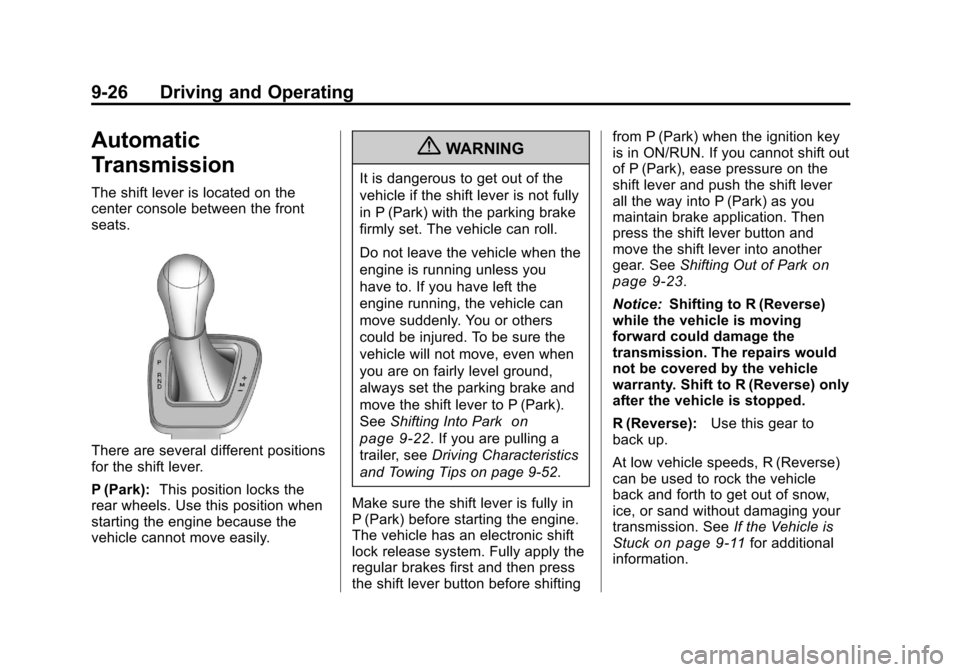
The shift lever is located on the
center console between the front
seats.
There are several different positions
for the shift lever.
P (Park):This position locks the
rear wheels. Use this position when
starting the engine because the
vehicle cannot move easily.
{WARNING
It is dangerous to get out of the
vehicle if the shift lever is not fully
in P (Park) with the parking brake
firmly set. The vehicle can roll.
Do not leave the vehicle when the
engine is running unless you
have to. If you have left the
engine running, the vehicle can
move suddenly. You or others
could be injured. To be sure the
vehicle will not move, even when
you are on fairly level ground,
always set the parking brake and
move the shift lever to P (Park).
See Shifting Into Park
on
page 9‑22
. If you are pulling a
trailer, see Driving Characteristics
and Towing Tips on page 9‑52.
Make sure the shift lever is fully in
P (Park) before starting the engine.
The vehicle has an electronic shift
lock release system. Fully apply the
regular brakes first and then press
the shift lever button before shifting from P (Park) when the ignition key
is in ON/RUN. If you cannot shift out
of P (Park), ease pressure on the
shift lever and push the shift lever
all the way into P (Park) as you
maintain brake application. Then
press the shift lever button and
move the shift lever into another
gear. See
Shifting Out of Park
on
page 9‑23.
Notice: Shifting to R (Reverse)
while the vehicle is moving
forward could damage the
transmission. The repairs would
not be covered by the vehicle
warranty. Shift to R (Reverse) only
after the vehicle is stopped.
R (Reverse): Use this gear to
back up.
At low vehicle speeds, R (Reverse)
can be used to rock the vehicle
back and forth to get out of snow,
ice, or sand without damaging your
transmission. See If the Vehicle is
Stuck
on page 9‑11for additional
information.
Page 290 of 496

Black plate (30,1)Cadillac CTS/CTS-V Owner Manual - 2011
9-30 Driving and Operating
Manual Transmission
If the vehicle has a manual
transmission, the shift lever is
located on the center console
between the front seats. The
following explains how to operate
the manual transmission.
CTS
CTS—V
1 (First):Press the clutch pedal
and shift into 1 (First). Slowly let up
on the clutch pedal while pressing
on the accelerator pedal.
Shift into 1 (First) when you are
going less than 40 km/h (25 mph).
For CTS-V, shift into 1 (First) when
you are going less than 64 km/h
(40 mph). After a complete stop, if it
is hard to shift into 1 (First), let up
on the clutch pedal, then press it
back down and shift into 1 (First). 2 (Second):
Press the clutch pedal
and let up on the accelerator pedal,
then shift into 2 (Second). Then,
slowly let up on the clutch pedal
while accelerating.
3 (Third), 4 (Fourth), 5 (Fifth), and
6 (Sixth): Shift into 3 (Third),
4 (Fourth), 5 (Fifth), and 6 (Sixth) the
same for 2 (Second).
To stop, let up on the accelerator
pedal and press the brake pedal.
Just before the vehicle stops, press
the clutch pedal and the brake
pedal, and shift to Neutral.
Neutral: Use this position when
you start or idle your engine. Your
shift lever is in Neutral when it is
centered in the shift pattern, not in
any gear.
R (Reverse): To back up, press
down the clutch pedal, completely
stop the vehicle, and shift into
R (Reverse). Let up on the clutch
pedal slowly while pressing the
accelerator pedal.
Page 294 of 496
Black plate (34,1)Cadillac CTS/CTS-V Owner Manual - 2011
9-34 Driving and Operating
A warning chime will sound if the
parking brake is set, the ignition is
on, and the vehicle begins to move.
To stop the chime, fully release the
parking brake.
If you are towing a trailer and
parking on a hill, seeDriving
Characteristics and Towing Tips
on
page 9‑52for more information.
Parking Brake (Electric)
{WARNING
On vehicles with a manual
transmission, releasing the clutch
and pressing the accelerator will
release the Electric Parking
Brake. If the vehicle is not in a
gear, the vehicle could move, and
you or others could be injured.
Make sure the vehicle is in a gear
before attempting to drive away.
(Continued)
WARNING (Continued)
To avoid unexpected vehicle
movement, do not partially
release the clutch or press the
accelerator pedal until you are
ready to release the parking
brake and drive away.
Vehicles with the electric parking
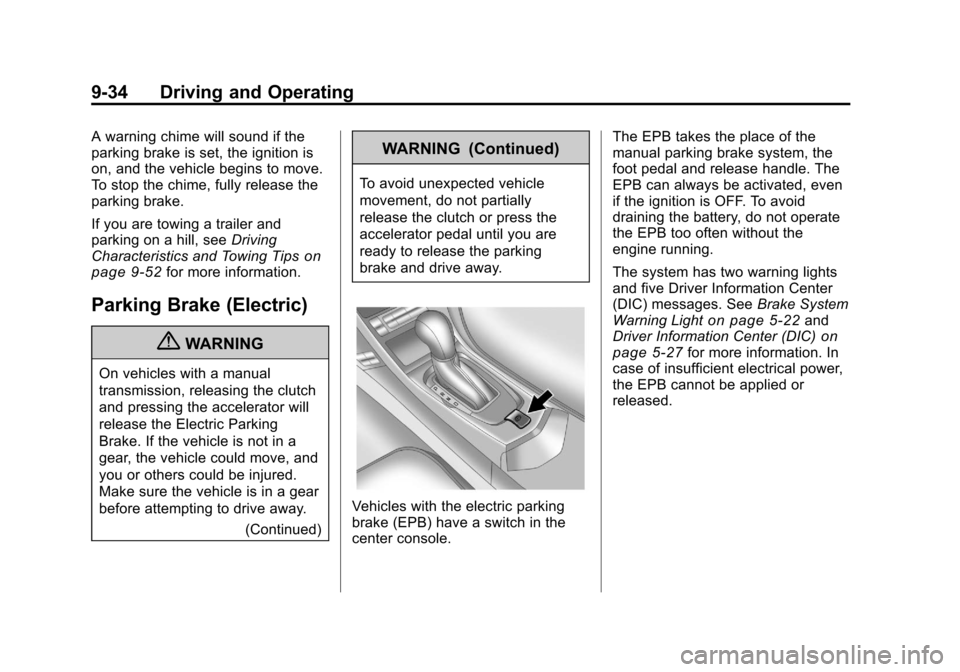
brake (EPB) have a switch in the
center console. The EPB takes the place of the
manual parking brake system, the
foot pedal and release handle. The
EPB can always be activated, even
if the ignition is OFF. To avoid
draining the battery, do not operate
the EPB too often without the
engine running.
The system has two warning lights
and five Driver Information Center
(DIC) messages. See
Brake System
Warning Light
on page 5‑22and
Driver Information Center (DIC)on
page 5‑27for more information. In
case of insufficient electrical power,
the EPB cannot be applied or
released.
Page 485 of 496

Black plate (3,1)Cadillac CTS/CTS-V Owner Manual - 2011
INDEX i-3
Cautions, Danger, andWarnings . . . . . . . . . . . . . . . . . . . . . . . . iv
CD DVD Player . . . . . . . . . . . . . . . . . . . 7-20
CD Player . . . . . . . . . . . . . . . . . . . . . 7-17
Center Console Storage . . . . . . . . 4-2
Central Door Unlock System . . . 2-15
Chains, Tire . . . . . . . . . . . . . . . . . . 10-89
Charging System Light . . . . . . . . 5-19
Check Engine Light . . . . . . . . . . . . . . . . . . 5-19
Ignition
Transmission Lock . . . . . . . . 10-33
Child Restraints Infants and YoungChildren . . . . . . . . . . . . . . . . . . . . . 3-47
Lower Anchors and Tethers for Children . . . . . . . . . 3-53
Older Children . . . . . . . . . . . . . . . . 3-44
Securing . . . . . . . . . . . . . . . . 3-60, 3-62
Systems . . . . . . . . . . . . . . . . . . . . . . 3-49
Where to Put the Restraint . . . 3-51
Cigarette Lighter . . . . . . . . . . . . . . . . 5-9
Circuit Breakers . . . . . . . . . . . . . . 10-42 Cleaning
Exterior Care . . . . . . . . . . . . . . 10-120
Interior Care . . . . . . . . . . . . . . . 10-124
Climate Control Systems Dual Automatic . . . . . . . . . . . . . . . . 8-1
Clock . . . . . . . . . . . . . . . . . . . . . . . . . . . 5-8
Cluster, IP . . . . . . . . . . . . . . . . . . . . . 5-11
Clutch, Hydraulic . . . . . . . . . . . . . 10-15
Collision Damage Repair . . . . . 13-12
Compact Spare Tire . . . . . . . . . 10-111
Compass . . . . . . . . . . . . . . . . . . . . . . . 5-7
Compass Messages . . . . . . . . . . . 5-34
Competitive Driving . . . . . . . . . . . . . 9-7
Competitive Driving Mode . . . . . 9-39
Compressor Kit, Tire Sealant . . . . . . . . . . . . . . . . . . . . . . 10-92
Control of a Vehicle . . . . . . . . . . . . . 9-3
Convenience Net . . . . . . . . . . . . . . . 4-6
Convex Mirrors . . . . . . . . . . . . . . . . 2-27
Coolant Engine . . . . . . . . . . . . . . . . . . . . . . 10-19
Engine Temperature
Gauge . . . . . . . . . . . . . . . . . . . . . . 5-16
Engine Temperature Warning Light . . . . . . . . . . . . . . . 5-25 Cooling System . . . . . . . . . . . . . . . 10-19
Engine Messages . . . . . . . . . . . . 5-35
Courtesy Transportation Program . . . . . . . . . . . . . . . . . . . . . 13-10
Covers Cargo . . . . . . . . . . . . . . . . . . . . . . . . . . 4-2
Engine . . . . . . . . . . . . . . . . . . . . . . 10-10
Cruise Control . . . . . . . . . . . . . . . . . 9-40 Light . . . . . . . . . . . . . . . . . . . . . . . . . . 5-27
Messages . . . . . . . . . . . . . . . . . . . . 5-34
Cupholders . . . . . . . . . . . . . . . . . . . . . 4-1
Customer Assistance
Offices . . . . . . . . . . . . . . . . . . 13-4, 13-5
Text Telephone (TTY)Users . . . . . . . . . . . . . . . . . . . . . . . 13-6
Customer Information
Service PublicationsOrdering Information . . . . . . 13-14
Customer Satisfaction Procedure . . . . . . . . . . . . . . 13-1, 13-3
Page 494 of 496

Black plate (12,1)Cadillac CTS/CTS-V Owner Manual - 2011
i-12 INDEX
Service (cont.)Maintenance, General
Information . . . . . . . . . . . . . . . . . . 11-1
Parts Identification Label . . . . . 12-1
Publications Ordering
Information . . . . . . . . . . . . . . . . 13-14
Scheduling Appointments . . . 13-10
Vehicle Messages . . . . . . . . . . . . 5-43
Servicing the
Airbag-Equipped Vehicle . . . . . 3-42
Shift Lock Control Function Check, Automatic
Transmission . . . . . . . . . . . . . . . . 10-33
Shifting
Into Park . . . . . . . . . . . . . . . . . . . . . . 9-22
Out of Park . . . . . . . . . . . . . . . . . . . 9-23
Signals, Turn and Lane-Change . . . . . . . . . . . . . . . . . 6-4
Spare Tire Compact . . . . . . . . . . . . . . . . . . . 10-111
Specifications and Capacities . . . . . . . . . . . . . . . . . . . . 12-2
Speed Limiter, Engine . . . . . . . . . 5-15
Speedometer . . . . . . . . . . . . . . . . . . 5-13 StabiliTrak®System . . . . . . . . . . . 9-38
Start Vehicle, Remote . . . . . . . . . 2-11
Starter Switch Check . . . . . . . . . 10-32
Starting the Engine . . . . . . . 1-4, 9-19
Steering . . . . . . . . . . . . . . . . . . . . . . . . 9-4
Fluid, Power . . . . . . . . . . . . . . . . 10-26
Heated Wheel . . . . . . . . . . . . . . . . . 5-4
Wheel Adjustment . . . . . . . . . . . . . 5-2
Wheel Controls . . . . . . . . . . . . . . . . 5-3
Storage Areas Cargo Cover . . . . . . . . . . . . . . . . . . . 4-2
Cargo Management System . . . 4-3
Center Console . . . . . . . . . . . . . . . . 4-2
Convenience Net . . . . . . . . . . . . . . 4-6
Glove Box . . . . . . . . . . . . . . . . . . . . . 4-1
Instrument Panel . . . . . . . . . . . . . . 4-1
Roof Rack System . . . . . . . . . . . . . 4-6
Storing the Tire Sealant and
Compressor Kit . . . 10-101, 10-102
Stuck Vehicle . . . . . . . . . . . . . . . . . . 9-11
Sun Visors . . . . . . . . . . . . . . . . . . . . . 2-31 Sunroof . . . . . . . . . . . . . . . . . . 2-32, 2-34
Symbols . . . . . . . . . . . . . . . . . . . . . . . . . . .v
System
Roof Rack . . . . . . . . . . . . . . . . . . . . . 4-6
T
Tachometer . . . . . . . . . . . . . . . . . . . . 5-13
Text Telephone (TTY) Users . . . 13-6
Theft-DeterrentSystems . . . . . . . . . . . . . . . 2-24, 2-26
Immobilizer . . . . . . . . . . . . . . . . . . . 2-24
Thigh Support Adjustment . . . . . . 3-8
Time . . . . . . . . . . . . . . . . . . . . . . . . . . . . 5-8
Tires Buying New Tires . . . . . . . . . . . 10-83
Chains . . . . . . . . . . . . . . . . . . . . . . 10-89
Changing . . . . . . . . . . . . . . . . . . 10-102
Compact Spare . . . . . . . . . . . . 10-111
Designations . . . . . . . . . . . . . . . 10-70
Different Size . . . . . . . . . . . . . . . 10-85
If a Tire Goes Flat . . . . . . . . . . 10-90
Inflation Monitor System . . . . 10-77