climate control CADILLAC CTS 2011 2.G User Guide
[x] Cancel search | Manufacturer: CADILLAC, Model Year: 2011, Model line: CTS, Model: CADILLAC CTS 2011 2.GPages: 496, PDF Size: 7.71 MB
Page 52 of 496
Black plate (20,1)Cadillac CTS/CTS-V Owner Manual - 2011
2-20 Keys, Doors and Windows
Liftgate (Wagon)
Power Liftgate Operation
{WARNING
Exhaust gases can enter the
vehicle if it is driven with the
liftgate, trunk/hatch open, or with
any objects that pass through the
seal between the body and the
trunk/hatch or liftgate. Engine
exhaust contains Carbon
Monoxide (CO) which cannot be
seen or smelled. It can cause
unconsciousness and even death.
If the vehicle must be driven with
the liftgate, or trunk/hatch open:
.Close all of the windows.
.Fully open the air outlets on
or under the instrument
panel.
.Adjust the Climate Control
system to a setting that
brings in only outside air and(Continued)
WARNING (Continued)
set the fan speed to the
highest setting. See Climate
Control System in the Index.
.If the vehicle is equipped with
a power liftgate, disable the
power liftgate function.
For more information about
carbon monoxide, see Engine
Exhaust on page 9‑24.
{WARNING
You or others could be injured if
caught in the path of the power
liftgate. Make sure there is no one
in the way of the liftgate as it is
opening and closing.
Notice: If you open the liftgate
without checking for overhead
obstructions such as a garage
door, you could damage the
liftgate or the liftgate glass. Always check to make sure the
area above and behind the liftgate
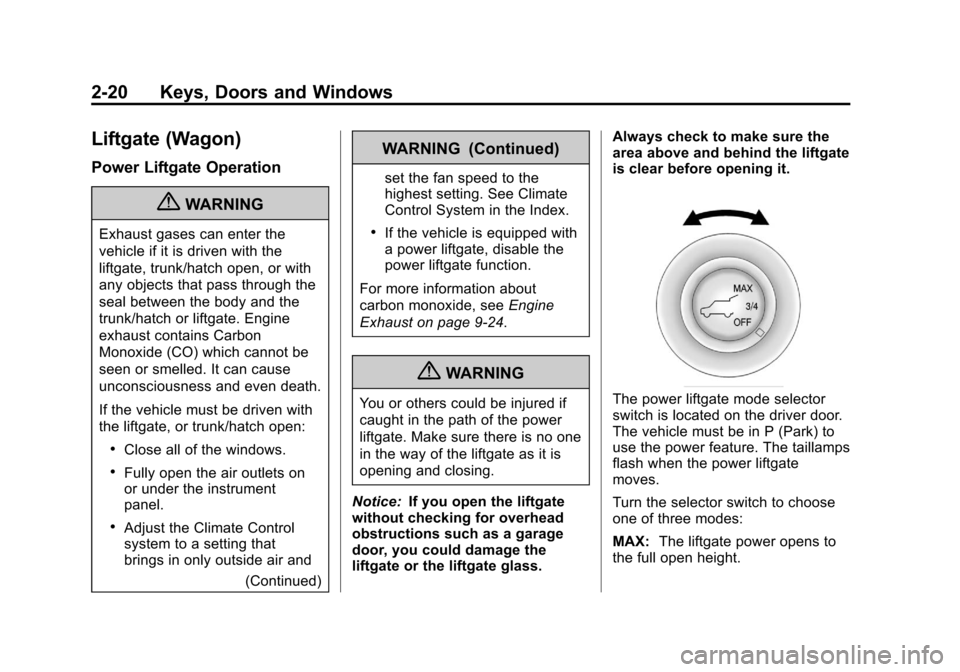
is clear before opening it.The power liftgate mode selector
switch is located on the driver door.
The vehicle must be in P (Park) to
use the power feature. The taillamps
flash when the power liftgate
moves.
Turn the selector switch to choose
one of three modes:
MAX:
The liftgate power opens to
the full open height.
Page 59 of 496

Black plate (27,1)Cadillac CTS/CTS-V Owner Manual - 2011
Keys, Doors and Windows 2-27
Exterior Mirrors
Convex Mirrors
{CAUTION
A convex mirror can make things,
like other vehicles, look farther
away than they really are. If you
cut too sharply into the right lane,
you could hit a vehicle on the
right. Check the inside mirror or
glance over your shoulder before
changing lanes.
The passenger side mirror is convex
shaped. A convex mirror's surface is
curved so more can be seen from
the driver seat.
Power Mirrors
Controls for the outside power
mirrors are on the driver door.
To adjust each mirror:
1. Press
}or|to select the
driver or passenger side mirror.
2. Press one of the four arrows to move the mirror.
3. Press either
}or|again to
deselect the mirror.
Folding Mirrors
Manual
Vehicles with manual fold mirrors
are folded inward toward the vehicle
to prevent damage when going
through an automatic car wash.
Push the mirror outward, to return it
to the original position.
Heated Mirrors
=
(Rear Window Defogger):
Press to heat the mirrors.
See Dual Automatic Climate Control
System on page 8‑1.
Page 79 of 496
Black plate (11,1)Cadillac CTS/CTS-V Owner Manual - 2011
Seats and Restraints 3-11
Heated Front Seats
{WARNING
If you cannot feel temperature
change or pain to the skin, the
seat heater may cause burns
even at low temperatures. To
reduce the risk of burns, people
with such a condition should use
care when using the seat heater,
especially for long periods of
time. Do not place anything on
the seat that insulates against
heat, such as a blanket, cushion,
cover or similar item. This may
cause the seat heater to
overheat. An overheated seat
heater may cause a burn or may
damage the seat.
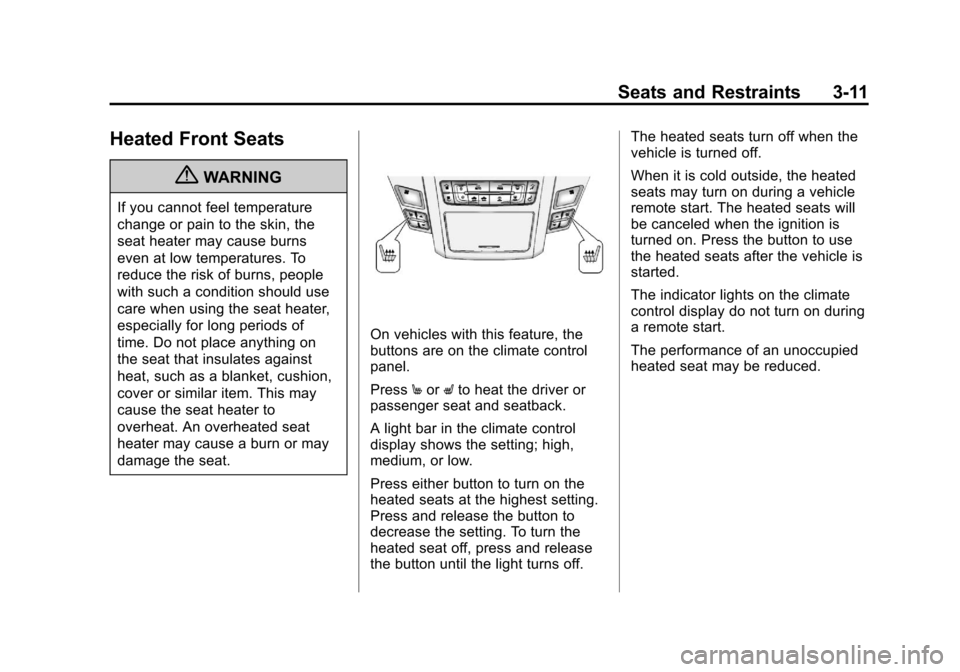
On vehicles with this feature, the
buttons are on the climate control
panel.
PressMor Lto heat the driver or
passenger seat and seatback.
A light bar in the climate control
display shows the setting; high,
medium, or low.
Press either button to turn on the
heated seats at the highest setting.
Press and release the button to
decrease the setting. To turn the
heated seat off, press and release
the button until the light turns off. The heated seats turn off when the
vehicle is turned off.
When it is cold outside, the heated
seats may turn on during a vehicle
remote start. The heated seats will
be canceled when the ignition is
turned on. Press the button to use
the heated seats after the vehicle is
started.
The indicator lights on the climate
control display do not turn on during
a remote start.
The performance of an unoccupied
heated seat may be reduced.
Page 80 of 496

Black plate (12,1)Cadillac CTS/CTS-V Owner Manual - 2011
3-12 Seats and Restraints
Heated and Ventilated
Front Seats
{WARNING
If you cannot feel temperature
change or pain to the skin, the
seat heater may cause burns
even at low temperatures. See
the Warning underHeated Front
Seats on page 3‑11.
On vehicles with this feature, the
buttons are on the climate control
panel.
z(Heated Seat and Seatback):
Press to heat the seat and
seatback.
{(Ventilated Seat): Press to
ventilate the seat.
A light bar in the climate control
display shows the setting: high,
medium, or low. Press either button to turn on the
feature at the highest setting. Press
and release the button to decrease
the setting. To turn the feature off,
press and release the button until
the light turns off.
The heated or ventilated seats turn
off when the vehicle is turned off.
During a remote start, the heated or
ventilated seats may turn on,
depending upon the outside
temperature. They are canceled
when the ignition is turned on. Press
the button to use the heated or
ventilated seats after the vehicle is
started.
The indicator lights on the climate
control display do not turn on during
a remote start.
The performance of an unoccupied
heated seat may be reduced.
Page 133 of 496

Black plate (1,1)Cadillac CTS/CTS-V Owner Manual - 2011
Storage 4-1
Storage
Storage Compartments
Instrument Panel Storage . . . . 4-1
Glove Box . . . . . . . . . . . . . . . . . . . . 4-1
Cupholders . . . . . . . . . . . . . . . . . . . 4-1
Center Console Storage . . . . . . 4-2
Additional Storage Features
Cargo Cover (Wagon) . . . . . . . . . 4-2
Cargo Management System(Wagon Only) . . . . . . . . . . . . . . . . 4-3
Cargo Net (Wagon) . . . . . . . . . . . 4-4
Convenience Net (Sedan and Coupe) . . . . . . . . . . . . . . . . . . . . . . 4-6
Roof Rack System
Roof Rack System (Wagon) . . . 4-6
Storage
Compartments
Instrument Panel Storage
There is a storage area below the
climate control system. To access,
push the cover.
Glove Box
To open, press the button. Use the
key to lock and unlock. The glove
box has a shelf that can be removed
by pulling it out.
Cupholders
There are cupholders in the front of
the center console. Push the
cover (A) to open.
There are also cupholders in the
rear center armrest. Pull the armrest
down to use.
Page 148 of 496
Black plate (8,1)Cadillac CTS/CTS-V Owner Manual - 2011
5-8 Instruments and Controls
3. PressVto scroll through and
select the appropriate
variance zone.
4. Press
3until the vehicle
heading, for example, N for
North, is displayed in the DIC.
5. Calibrate the compass. See “Compass Calibration
Procedure” following.
Compass Calibration
The compass can be manually
calibrated. Only calibrate the
compass in a magnetically clean
and safe location, such as an open
parking lot, where driving the
vehicle in circles is not a danger.
Also, away from tall buildings, utility
wires, manhole covers, or other
industrial structures, if possible.
If the DIC display does not show a
heading, for example, N for North,
or the heading does not change
after making turns, there may be a
strong magnetic field interfering with
the compass. Interference may be
caused by a magnetic antenna mount, magnetic note pad holder,
or any other magnetic item. Turn off
the vehicle, move the magnetic
item, then turn on the vehicle and
calibrate the compass.
Compass Calibration Procedure
1. Before calibrating the compass,
check that the compass is set to
the correct variance zone. See
“Compass Variance (Zone)
Procedure” earlier in this
section.
Do not operate any switches
such as window, sunroof,
climate controls, seats, etc.
during the calibration procedure.
2. Press
Tuntil PressVTo
Calibrate Compass displays.
3. Press
Vto start the compass
calibration.
4. The DIC will display Calibrating Drive In Circles. Drive the
vehicle in tight circles at less
than 8 km/h (5 mph) to complete
the calibration. The DIC will display Calibration Complete for
a few seconds then returns to
the Press
VTo Calibrate
Compass display.
Clock
The analog clock is located on the
instrument panel above the radio.
The clock is not connected with any
other vehicle system and runs by
itself. To adjust the clock:
1. Locate the adjustment buttons directly below the clock.
2. Push and release the right adjustment button to move the
clock hands forward or the left
adjustment button to make the
clock hands go backward.
Holding either button down will
cause the clock to advance
faster. Release the button before
the desired time is reached.
3. Push and release either button to adjust the time by one minute
increments.
Page 149 of 496
Black plate (9,1)Cadillac CTS/CTS-V Owner Manual - 2011
Instruments and Controls 5-9
Power Outlets
Accessory power outlets can be
used to plug in electrical equipment,
such as a cell phone, MP3
player, etc.
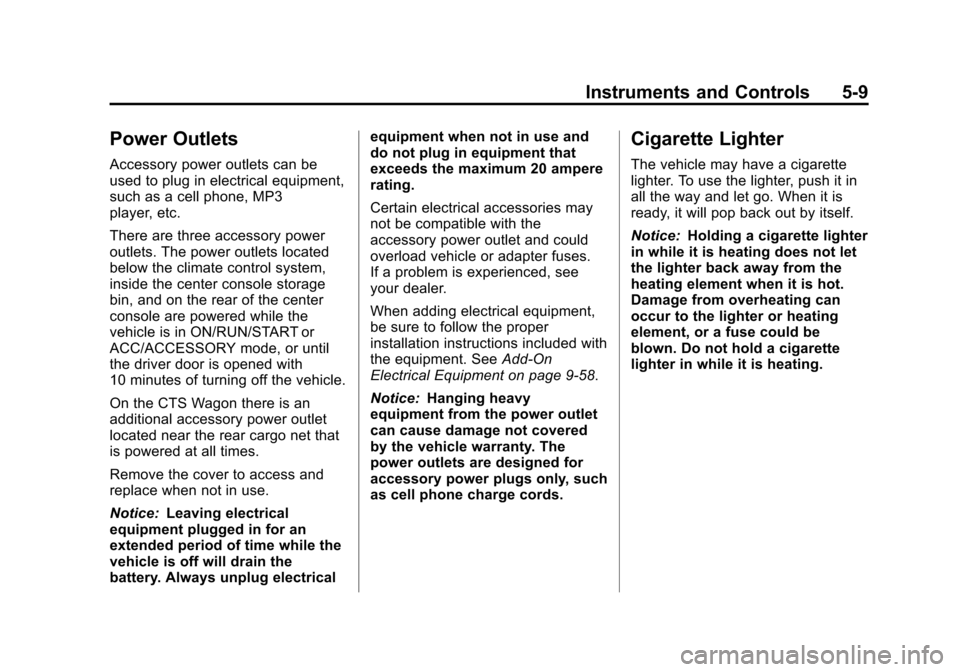
There are three accessory power
outlets. The power outlets located
below the climate control system,
inside the center console storage
bin, and on the rear of the center
console are powered while the
vehicle is in ON/RUN/START or
ACC/ACCESSORY mode, or until
the driver door is opened with
10 minutes of turning off the vehicle.
On the CTS Wagon there is an
additional accessory power outlet
located near the rear cargo net that
is powered at all times.
Remove the cover to access and
replace when not in use.
Notice:Leaving electrical
equipment plugged in for an
extended period of time while the
vehicle is off will drain the
battery. Always unplug electrical equipment when not in use and
do not plug in equipment that
exceeds the maximum 20 ampere
rating.
Certain electrical accessories may
not be compatible with the
accessory power outlet and could
overload vehicle or adapter fuses.
If a problem is experienced, see
your dealer.
When adding electrical equipment,
be sure to follow the proper
installation instructions included with
the equipment. See
Add-On
Electrical Equipment on page 9‑58.
Notice: Hanging heavy
equipment from the power outlet
can cause damage not covered
by the vehicle warranty. The
power outlets are designed for
accessory power plugs only, such
as cell phone charge cords.
Cigarette Lighter
The vehicle may have a cigarette
lighter. To use the lighter, push it in
all the way and let go. When it is
ready, it will pop back out by itself.
Notice: Holding a cigarette lighter
in while it is heating does not let
the lighter back away from the
heating element when it is hot.
Damage from overheating can
occur to the lighter or heating
element, or a fuse could be
blown. Do not hold a cigarette
lighter in while it is heating.
Page 183 of 496
Black plate (43,1)Cadillac CTS/CTS-V Owner Manual - 2011
Instruments and Controls 5-43
Start Aborted By Theft
Deterrent
This message displays if there is a
communication problem between
the keyless access system and the
vehicle. The vehicle cannot be
started when this message displays.
See your dealer for service.
Theft Attempted
This message displays if the
theft-deterrent system has detected
a break-in attempt while you were
away from the vehicle. See
Anti-Theft Alarm System
on
page 2‑23for more information.
Service Vehicle Messages
Service A/C System
This message displays when the
electronic sensors that control the
air conditioning and heating
systems are no longer working.
Have the climate control system
serviced by your dealer if you notice
a drop in heating and air
conditioning efficiency.
Service Vehicle Soon
This message displays when a
non-emissions related malfunction
occurs. Have the vehicle serviced
by your dealer as soon as possible.
Tire Messages
Service Tire Monitor System
This message displays if a part on
the Tire Pressure Monitor System
(TPMS) is not working properly. The
tire pressure light also flashes and
then remains on during the same
ignition cycle. See Tire Pressure
Light
on page 5‑25. Several
conditions may cause this message
to appear. See Tire Pressure
Monitor Operation
on page 10‑77for
more information. If the warning
comes on and stays on, there may
be a problem with the TPMS. See
your dealer.
Tire Learning Active
This message displays when the
Tire Pressure Monitor System
(TPMS) is re-learning the tire
positions on the vehicle. The tire
positions must be re-learned after
rotating the tires or after replacing a
tire or sensor. See Tire Rotation
on
page 10‑81, Tire Pressure Monitor
Systemon page 10‑76, and Tire
Pressureon page 10‑74for more
information.
Tire Low Add Air To Tire
On vehicles with the Tire Pressure
Monitor System (TPMS), this
message displays when the
pressure in one or more of the
vehicle’s tires is low. This message
also displays LEFT FRONT, RIGHT
FRONT, LEFT REAR, or RIGHT
REAR to indicate the location of the
low tire.
The low tire pressure warning light
will also come on. See Tire
Pressure Light
on page 5‑25.
Page 205 of 496
Black plate (7,1)Cadillac CTS/CTS-V Owner Manual - 2011
Lighting 6-7
The battery can be discharged at
idle if the electrical loads are very
high. This is true for all vehicles.
This is because the generator
(alternator) may not be spinning fast
enough at idle to produce all the
power that is needed for very high
electrical loads.
A high electrical load occurs when
several of the following are on, such
as: headlamps, high beams, fog
lamps, rear window defogger,
climate control fan at high speed,
heated seats, engine cooling fans,
trailer loads, and loads plugged into
accessory power outlets.
EPM works to prevent excessive
discharge of the battery. It does this
by balancing the generator's output
and the vehicle's electrical needs.
It can increase engine idle speed to
generate more power, whenever
needed. It can temporarily reduce
the power demands of some
accessories.Normally, these actions occur in
steps or levels, without being
noticeable. In rare cases at the
highest levels of corrective action,
this action may be noticeable to the
driver. If so, a Driver Information
Center (DIC) message might be
displayed, such as BATTERY
SAVER ACTIVE or BATTERY
VOLTS LOW. If this message is
displayed, it is recommended that
the driver reduce the electrical loads
as much as possible. See
Driver
Information Center (DIC)
on
page 5‑27.
Battery Power Protection
This feature helps to prevent battery
drain if accessory lamps are left on.
If accessory lamps such as the
vanity mirror, cargo, reading,
console, or glove box are left on,
they automatically time-out after
about 20 minutes. To reset the
battery protection, all of the above
lamps must be turned off or the
ignition must be in the ACC/
ACCESSORY position.
Exterior Lighting Battery
Saver
The exterior lamps turn off about
10 minutes after the ignition is
turned to LOCK/OFF, if the parking
lamps or headlamps have been left
on. This protects against draining
the battery. The battery saver does
not work if the headlamps are
turned on after the ignition is turned
to LOCK/OFF.
To keep the lamps on for more than
10 minutes, turn the lamps back on
with the exterior lamp control.
Page 253 of 496
Black plate (1,1)Cadillac CTS/CTS-V Owner Manual - 2011
Climate Controls 8-1
Climate Controls
Climate Control Systems
Dual Automatic Climate ControlSystem . . . . . . . . . . . . . . . . . . . . . . 8-1
Air Vents
Air Vents . . . . . . . . . . . . . . . . . . . . . . 8-6
Maintenance
Passenger Compartment AirFilter . . . . . . . . . . . . . . . . . . . . . . . . . 8-6
Climate Control Systems
Dual Automatic Climate Control System
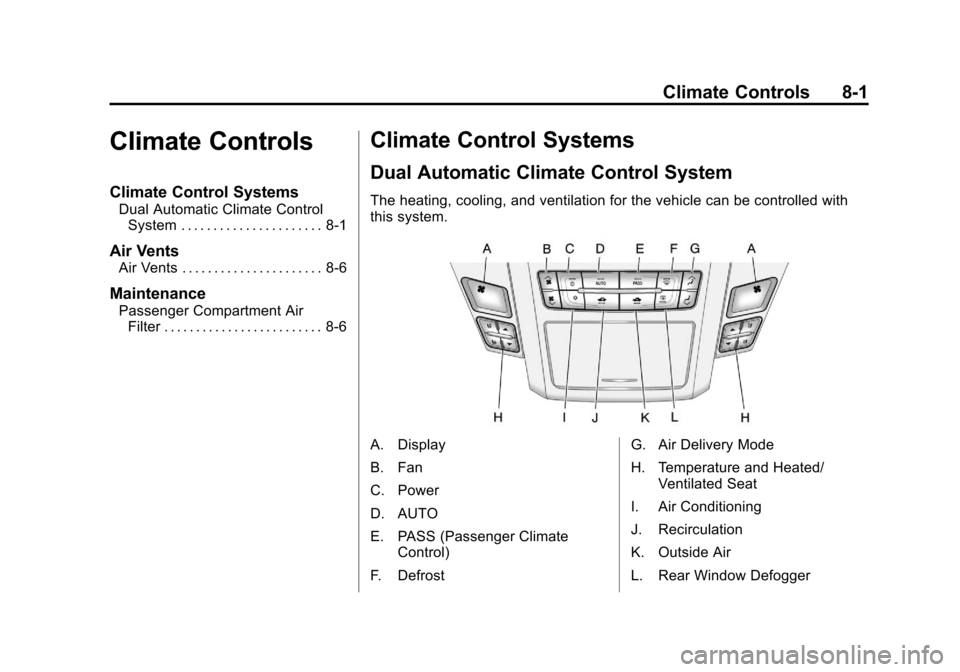
The heating, cooling, and ventilation for the vehicle can be controlled with
this system.
A. Display
B. Fan
C. Power
D. AUTO
E. PASS (Passenger Climate
Control)
F. Defrost G. Air Delivery Mode
H. Temperature and Heated/
Ventilated Seat
I. Air Conditioning
J. Recirculation
K. Outside Air
L. Rear Window Defogger