maintenance schedule CADILLAC CTS 2011 2.G User Guide
[x] Cancel search | Manufacturer: CADILLAC, Model Year: 2011, Model line: CTS, Model: CADILLAC CTS 2011 2.GPages: 496, PDF Size: 7.71 MB
Page 333 of 496
Black plate (15,1)Cadillac CTS/CTS-V Owner Manual - 2011
Vehicle Care 10-15
Automatic Transmission
Fluid
How to Check Automatic
Transmission Fluid
It is not necessary to check the
transmission fluid level.
A transmission fluid leak is the only
reason for fluid loss. If a leak
occurs, take the vehicle to the
dealer service department and have
it repaired as soon as possible.
The vehicle is not equipped with a
transmission fluid level dipstick.
There is a special procedure for
checking and changing the
transmission fluid. Because this
procedure is difficult, it should be
done at the dealer service
department. Contact your dealer for
additional information or refer to the
procedure in the service manual. To
purchase a service manual, see
Service Publications Ordering
Information on page 13‑14.Change the fluid and filter at the
intervals listed in
Scheduled
Maintenance
on page 11‑3, and be
sure to use the fluid listed in
Recommended Fluids and
Lubricants on page 11‑7.
Manual Transmission
Fluid
It is not necessary to check the
manual transmission fluid level.
A transmission fluid leak is the only
reason for fluid loss. If a leak
occurs, take the vehicle to a dealer
for service. Have it repaired as soon
as possible. You may also have the
fluid level checked by your dealer
when the oil is changed. See
Recommended Fluids and
Lubricants
on page 11‑7for the
proper fluid to use.
Hydraulic Clutch
It is not necessary to regularly
check clutch fluid unless you
suspect there is a leak in the
system. Adding fluid will not correct
a leak. A fluid loss in this system
could indicate a problem. Have the
system inspected and repaired.
When to Check and What
to Use
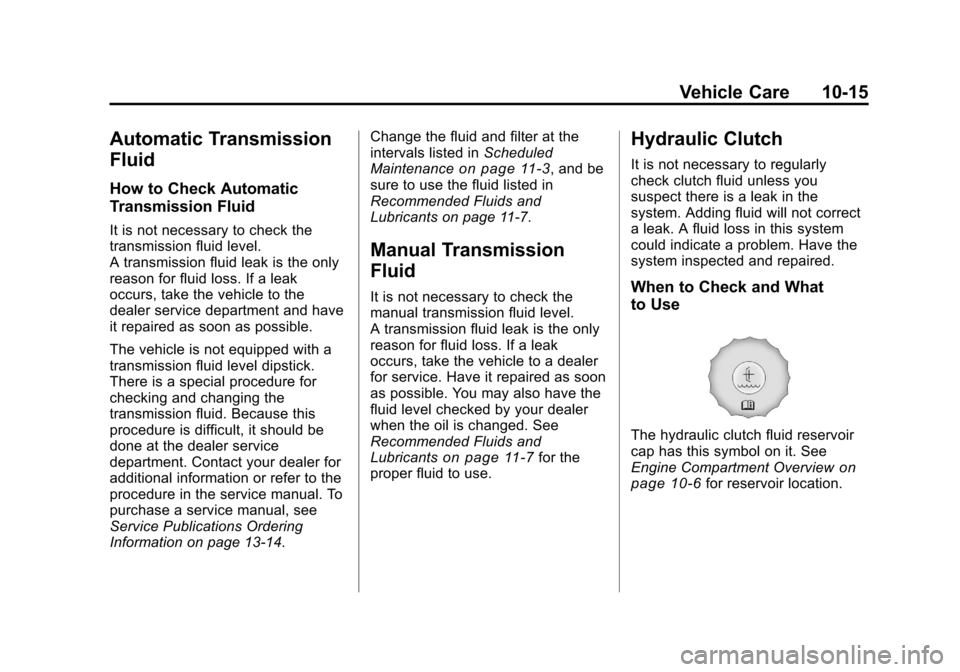
The hydraulic clutch fluid reservoir
cap has this symbol on it. See
Engine Compartment Overview
on
page 10‑6for reservoir location.
Page 334 of 496

Black plate (16,1)Cadillac CTS/CTS-V Owner Manual - 2011
10-16 Vehicle Care
Refer to the Maintenance Schedule
for the proper fluid to use. See
Recommended Fluids and
Lubricants
on page 11‑7. The fluid
requires changing every two years.
See Scheduled Maintenance
on
page 11‑3.
How to Check and Add Fluid
Visually check the clutch fluid
reservoir to make sure the fluid level
is at the MIN (minimum) line on the
side of the reservoir. The hydraulic
clutch fluid system should be closed
and sealed.
Do not remove the cap to check the
fluid level or to top‐off the fluid level.
Remove the cap only when
necessary to add the proper fluid
until the level reaches the MIN line.
Engine Air Cleaner/Filter
The engine air cleaner/filter is in the
engine compartment on the driver
side of the vehicle, near the front.
See Engine Compartment Overview
on page 10‑6for more information
on location.
When to Inspect the Engine Air
Cleaner/Filter
Inspect the air cleaner/filter at the
Maintenance IIintervals and replace
it at the first oil change after each
80 000 km (50,000 mile) interval.
See Scheduled Maintenance
on
page 11‑3for more information.
If you are driving in dusty/dirty
conditions, inspect the filter at each
engine oil change.
How to Inspect the Engine Air
Cleaner/Filter
To inspect the air cleaner/filter,
remove the filter from the vehicle
and lightly shake the filter to release
loose dust and dirt. If the filter
remains caked with dirt, a new filter
is required.
To inspect or replace the engine air
cleaner/filter:
1. Turn the ignition off.
2. Remove the side cover by
pulling up on the front of the
cover.
Page 349 of 496
Black plate (31,1)Cadillac CTS/CTS-V Owner Manual - 2011
Vehicle Care 10-31
All-Wheel Drive
If your vehicle is equipped with
all-wheel-drive, this is an additional
system that needs lubrication.
Transfer Case
When to Check Lubricant
It is not necessary to regularly
check the transfer case fluid unless
you suspect there is a leak or you
hear an unusual noise. A fluid loss
could indicate a problem. Have it
inspected and repaired.How to Check Lubricant
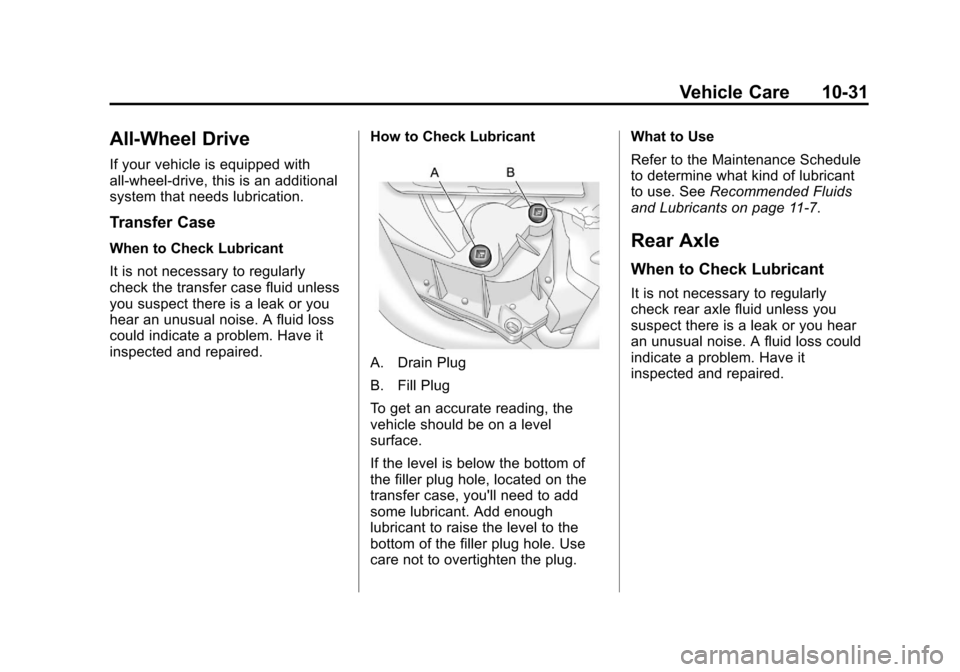
A. Drain Plug
B. Fill Plug
To get an accurate reading, the
vehicle should be on a level
surface.
If the level is below the bottom of
the filler plug hole, located on the
transfer case, you'll need to add
some lubricant. Add enough
lubricant to raise the level to the
bottom of the filler plug hole. Use
care not to overtighten the plug.What to Use
Refer to the Maintenance Schedule
to determine what kind of lubricant
to use. See
Recommended Fluids
and Lubricants on page 11‑7.
Rear Axle
When to Check Lubricant
It is not necessary to regularly
check rear axle fluid unless you
suspect there is a leak or you hear
an unusual noise. A fluid loss could
indicate a problem. Have it
inspected and repaired.
Page 350 of 496
Black plate (32,1)Cadillac CTS/CTS-V Owner Manual - 2011
10-32 Vehicle Care
How to Check Lubricant
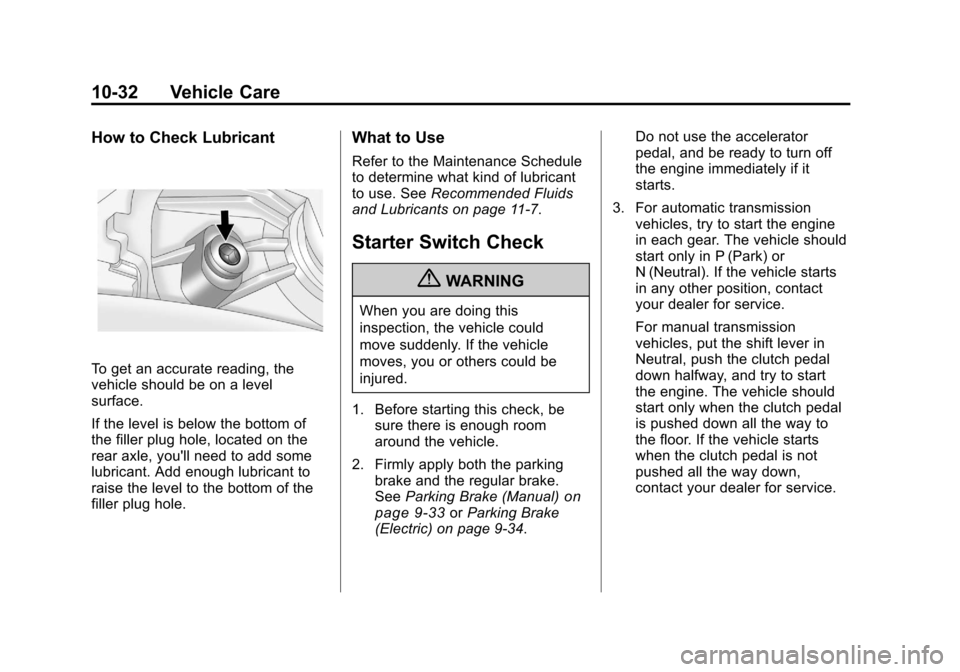
To get an accurate reading, the
vehicle should be on a level
surface.
If the level is below the bottom of
the filler plug hole, located on the
rear axle, you'll need to add some
lubricant. Add enough lubricant to
raise the level to the bottom of the
filler plug hole.
What to Use
Refer to the Maintenance Schedule
to determine what kind of lubricant
to use. SeeRecommended Fluids
and Lubricants on page 11‑7.
Starter Switch Check
{WARNING
When you are doing this
inspection, the vehicle could
move suddenly. If the vehicle
moves, you or others could be
injured.
1. Before starting this check, be sure there is enough room
around the vehicle.
2. Firmly apply both the parking brake and the regular brake.
See Parking Brake (Manual)
on
page 9‑33or Parking Brake
(Electric) on page 9‑34. Do not use the accelerator
pedal, and be ready to turn off
the engine immediately if it
starts.
3. For automatic transmission vehicles, try to start the engine
in each gear. The vehicle should
start only in P (Park) or
N (Neutral). If the vehicle starts
in any other position, contact
your dealer for service.
For manual transmission
vehicles, put the shift lever in
Neutral, push the clutch pedal
down halfway, and try to start
the engine. The vehicle should
start only when the clutch pedal
is pushed down all the way to
the floor. If the vehicle starts
when the clutch pedal is not
pushed all the way down,
contact your dealer for service.
Page 352 of 496
Black plate (34,1)Cadillac CTS/CTS-V Owner Manual - 2011
10-34 Vehicle Care
.To check the P (Park)
mechanism's holding ability:
With the engine running, shift to
P (Park). Then release the
parking brake followed by the
regular brake.
Contact your dealer if service is
required.
Wiper Blade Replacement
Windshield wiper blades should be
inspected for wear or cracking. See
Scheduled Maintenance
on
page 11‑3.
It is a good idea to clean or replace
the wiper blade assembly on a
regular basis or when worn. For
proper windshield wiper blade
length and type, see Maintenance
Replacement Parts on page 11‑9. To replace the wiper blade
assembly:
1. Turn the ignition to ON/RUN with
the engine off.
2. Turn on the windshield wipers and turn them off again when
the wipers are in the out-wipe
position. The driver side blade
will be straight up and down on
the windshield.
3. Pull the windshield wiper assembly away from the
windshield.
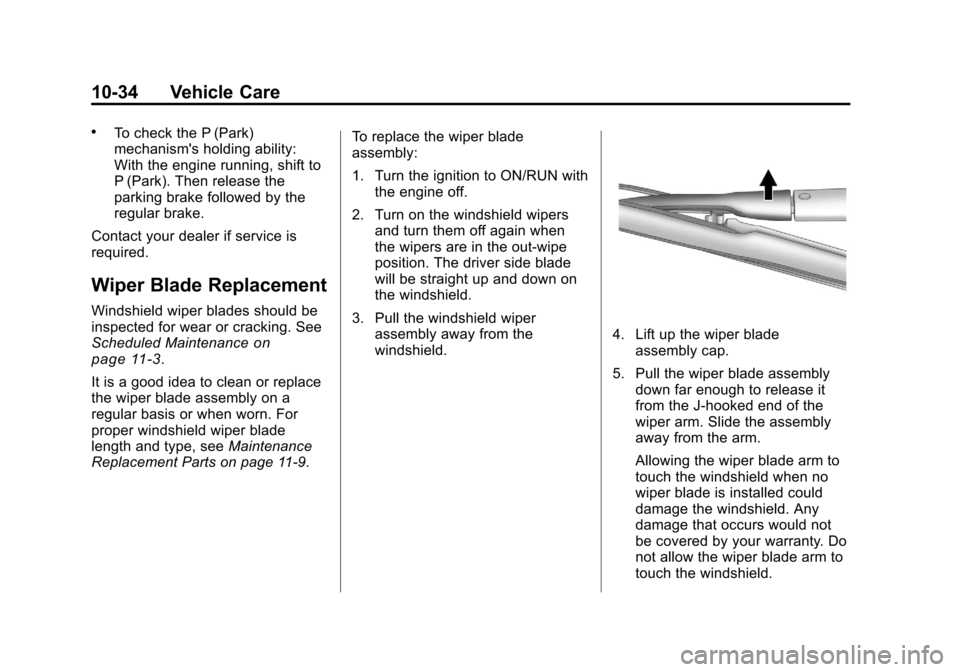
4. Lift up the wiper bladeassembly cap.
5. Pull the wiper blade assembly down far enough to release it
from the J-hooked end of the
wiper arm. Slide the assembly
away from the arm.
Allowing the wiper blade arm to
touch the windshield when no
wiper blade is installed could
damage the windshield. Any
damage that occurs would not
be covered by your warranty. Do
not allow the wiper blade arm to
touch the windshield.
Page 399 of 496

Black plate (81,1)Cadillac CTS/CTS-V Owner Manual - 2011
Vehicle Care 10-81
Tire Rotation
Tire rotation is not
recommended if the vehicle has
P235/50R18, 245/45ZR19 or
255/40R19 size tires on the front
wheels and P265/45R18, 275/
40ZR19 or 285/35R19 size tires
on the rear wheels.
Different tire sizes should not be
rotated front to rear. Each tire
and wheel should only be used
in its original front or rear
position.
Tire rotation is recommended if
the vehicle has the same size
tires on all four wheel positions.
These tires should be rotated
every 12 000 km (7,500 miles).
SeeScheduled Maintenance
on
page 11‑3
. The purpose of a regular tire
rotation is to achieve a uniform
wear for all tires on the vehicle.
This will ensure that the vehicle
continues to perform most like it
did when the tires were new.
Any time you notice unusual
wear, rotate the tires as soon as
possible and check wheel
alignment. Also check for
damaged tires or wheels.
SeeWhen It Is Time for New
Tires
on page 10‑82and
Wheel
Replacement
on page 10‑88.
Use the rotation pattern shown
here when rotating tires of the
same size installed on all four
wheel positions.
The compact spare tire, if the
vehicle has one, is not included
in the tire rotation.
Page 447 of 496

Black plate (1,1)Cadillac CTS/CTS-V Owner Manual - 2011
Service and Maintenance 11-1
Service and
Maintenance
General Information
General Information . . . . . . . . . . 11-1
Scheduled Maintenance
Scheduled Maintenance . . . . . 11-3
Recommended Fluids,
Lubricants, and Parts
Recommended Fluids andLubricants . . . . . . . . . . . . . . . . . . 11-7
Maintenance Replacement Parts . . . . . . . . . . . . . . . . . . . . . . . 11-9
Maintenance Records
Maintenance Records . . . . . . 11-11
General Information
Notice: Maintenance intervals,
checks, inspections,
recommended fluids, and
lubricants are necessary to keep
this vehicle in good working
condition. Damage caused by
failure to follow scheduled
maintenance might not be
covered by the vehicle warranty.
As the vehicle owner, you are
responsible for the scheduled
maintenance in this section. We
recommend having your dealer
perform these services. Proper
vehicle maintenance helps to keep
the vehicle in good working
condition, improves fuel economy,
and reduces vehicle emissions for
better air quality.
Because of all the different ways
people use vehicles, maintenance
needs vary. The vehicle might need
more frequent checks and services.
Please read the information under Scheduled Maintenance. To keep
the vehicle in good condition, see
your dealer.
The maintenance schedule is for
vehicles that:
.Carry passengers and cargo
within recommended limits on
the Tire and Loading Information
label. See
Vehicle Load Limits
on page 9‑11.
.Are driven on reasonable road
surfaces within legal driving
limits.
.Use the recommended fuel. See
Recommended Fuelon
page 9‑47.
Page 449 of 496

Black plate (3,1)Cadillac CTS/CTS-V Owner Manual - 2011
Service and Maintenance 11-3
Scheduled
Maintenance
When the Change Engine Oil
Soon Message Displays
Change engine oil and filter. See
Engine Oilon page 10‑11.An
Emission Control Service.
When the “Change Engine Oil
Soon” message displays, service is
required for the vehicle as soon as
possible, within the next 1 000 km/
600 miles. If driving under the best
conditions, the engine oil life system
might not indicate the need for
vehicle service for more than a year.
The engine oil and filter must be
changed at least once a year and
the oil life system must be reset.
Your dealer has trained service
technicians who will perform this
work and reset the system. If the
engine oil life system is reset
accidentally, service the vehicle
within 5 000 km/3,000 miles since
the last service. Reset the oil life system whenever the oil is changed.
See
Engine Oil Life System
on
page 10‑14.
Every Engine Oil Change
.Change engine oil and filter.
Reset oil life system. See
Engine Oil
on page 10‑11and
Engine Oil Life Systemon
page 10‑14. An Emission Control
Service.
.Engine coolant level check. See
Engine Coolant on page 10‑19.
.Engine cooling system
inspection. Visual inspection of
hoses, pipes, fittings, and
clamps and replacement,
if needed.
.Windshield washer fluid level
check. See Washer Fluidon
page 10‑26.
.Windshield wiper blade
inspection for wear, cracking,
or contamination and windshield
and wiper blade cleaning,
if contaminated. See Exterior
Care
on page 10‑120. Worn or
damaged wiper blade
replacement. See Wiper Blade
Replacement on page 10‑34.
.Tire inflation pressures check.
See Tire Pressure on
page 10‑74.
.Tire wear inspection. See Tire
Inspection on page 10‑80.
.If tire rotation is recommended
for the vehicle, rotate tires if
necessary. See Tire Rotation
on
page 10‑81.
.Fluids visual leak check
(or every 12 months, whichever
occurs first). A leak in any
system must be repaired and the
fluid level checked.
Page 457 of 496

Black plate (11,1)Cadillac CTS/CTS-V Owner Manual - 2011
Service and Maintenance 11-11
Maintenance Records
After the scheduled services are performed, record the date, odometer reading, who performed the service, and the
type of services performed in the boxes provided. Retain all maintenance receipts.
Maintenance Record
DateOdometer
Reading Serviced By Maintenance Stamp Services Performed
Page 470 of 496

Black plate (6,1)Cadillac CTS/CTS-V Owner Manual - 2011
13-6 Customer Information
Customer Assistance for
Text Telephone (TTY)
Users
To assist customers who are deaf,
hard of hearing, or speech-impaired
and who use Text Telephones
(TTYs), Cadillac has TTY equipment
available at its Customer Assistance
Center. Any TTY user can
communicate with Cadillac by
dialing: 1-800-833-2622. TTY users
in Canada can dial 1-800-263-3830.
Online Owner Center
Online Owner Center (U.S.)—
www.gmownercenter.com/
cadillac
Information and services
customized for your specific
vehicle —all in one convenient
place.
.Digital owner manual, warranty
information, and more
.Online service and maintenance
records
.Cadillac dealer locator for
service nationwide
.Exclusive privileges and offers
.Recall notices for your specific
vehicle
.OnStar®and GM Cardmember
Services Earnings summaries
Other Helpful Links:
Cadillac —www.cadillac.com
Cadillac Merchandise —
www.cadillaccollection.com
Help Center —www.cadillac.com/
helpcenter
.FAQ
.Contact Us
My GM Canada
(Canada) —www.gm.ca
My GM Canada is a
password-protected section of
www.gm.ca where you can save
information on GM vehicles, get
personalized offers, and use handy
tools and forms with greater ease. Here are a few of the valuable tools
and services you will have
access to:
.My Showroom: Find and save
information on vehicles and
current offers in your area.
.My Dealers: Save details such
as address and phone number
for each of your preferred GM
dealers.
.My Driveway: Access quick links
to parts and service estimates,
check trade-in values,
or schedule a service
appointment by adding the
vehicles you own to your
driveway profile.
.My Preferences: Manage your
profile and use tools and forms
with greater ease.
To sign up, visit the My GM Canada
section within www.gm.ca.