roof CADILLAC CTS 2011 2.G Owner's Manual
[x] Cancel search | Manufacturer: CADILLAC, Model Year: 2011, Model line: CTS, Model: CADILLAC CTS 2011 2.GPages: 496, PDF Size: 7.71 MB
Page 111 of 496

Black plate (43,1)Cadillac CTS/CTS-V Owner Manual - 2011
Seats and Restraints 3-43
passenger airbag(s). See
Passenger Sensing Systemon
page 3‑37.
If you have questions, call
Customer Assistance. The
phone numbers and addresses
for Customer Assistance are in
Step Two of the Customer
Satisfaction Procedure in this
manual. See Customer
Satisfaction Procedure
on
page 13‑1.
If the vehicle has rollover
roof-rail airbags, see Different
Size Tires and Wheels
on
page 10‑85for additional
important information. Q: Because I have a disability,
I have to get my vehicle
modified. How can I find out
whether this will affect my
airbag system?
A: If you have questions, call
Customer Assistance. The
phone numbers and addresses
for Customer Assistance are in
Step Two of the Customer
Satisfaction Procedure in this
manual. See Customer
Satisfaction Procedure
on
page 13‑1.
In addition, your dealer and the
service manual have information
about the location of the airbag
sensors, sensing and diagnostic
module and airbag wiring.
Airbag System Check
The airbag system does not need
regularly scheduled maintenance or
replacement. Make sure the airbag
readiness light is working. See
Airbag Readiness Light
on
page 5‑17for more information.
Notice: If an airbag covering is
damaged, opened, or broken, the
airbag may not work properly. Do
not open or break the airbag
coverings. If there are any
opened or broken airbag covers,
have the airbag covering and/or
airbag module replaced. For the
location of the airbag modules,
see What Makes an Airbag
Inflate?
on page 3‑35. See your
dealer for service.
Page 133 of 496

Black plate (1,1)Cadillac CTS/CTS-V Owner Manual - 2011
Storage 4-1
Storage
Storage Compartments
Instrument Panel Storage . . . . 4-1
Glove Box . . . . . . . . . . . . . . . . . . . . 4-1
Cupholders . . . . . . . . . . . . . . . . . . . 4-1
Center Console Storage . . . . . . 4-2
Additional Storage Features
Cargo Cover (Wagon) . . . . . . . . . 4-2
Cargo Management System(Wagon Only) . . . . . . . . . . . . . . . . 4-3
Cargo Net (Wagon) . . . . . . . . . . . 4-4
Convenience Net (Sedan and Coupe) . . . . . . . . . . . . . . . . . . . . . . 4-6
Roof Rack System
Roof Rack System (Wagon) . . . 4-6
Storage
Compartments
Instrument Panel Storage
There is a storage area below the
climate control system. To access,
push the cover.
Glove Box
To open, press the button. Use the
key to lock and unlock. The glove
box has a shelf that can be removed
by pulling it out.
Cupholders
There are cupholders in the front of
the center console. Push the
cover (A) to open.
There are also cupholders in the
rear center armrest. Pull the armrest
down to use.
Page 137 of 496

Black plate (5,1)Cadillac CTS/CTS-V Owner Manual - 2011
Storage 4-5
1. There are four installation pointsin the roof, two located in front of
and two behind the rear seats.
Insert the top corners of the
cargo net into the large opening
in the roof and secure by sliding
them into the small opening.
2. There are four tether positions for the lower hook straps. In the
front position, the seat backs
should be down for the net to
properly hold items.3. Mount the cargo net to the rearseat tethers located on the front
of the bottom cushions.4. The net can also be mounted tothe tethers on the back of the
rear seats when the seats are
upright.
Page 138 of 496
Black plate (6,1)Cadillac CTS/CTS-V Owner Manual - 2011
4-6 Storage
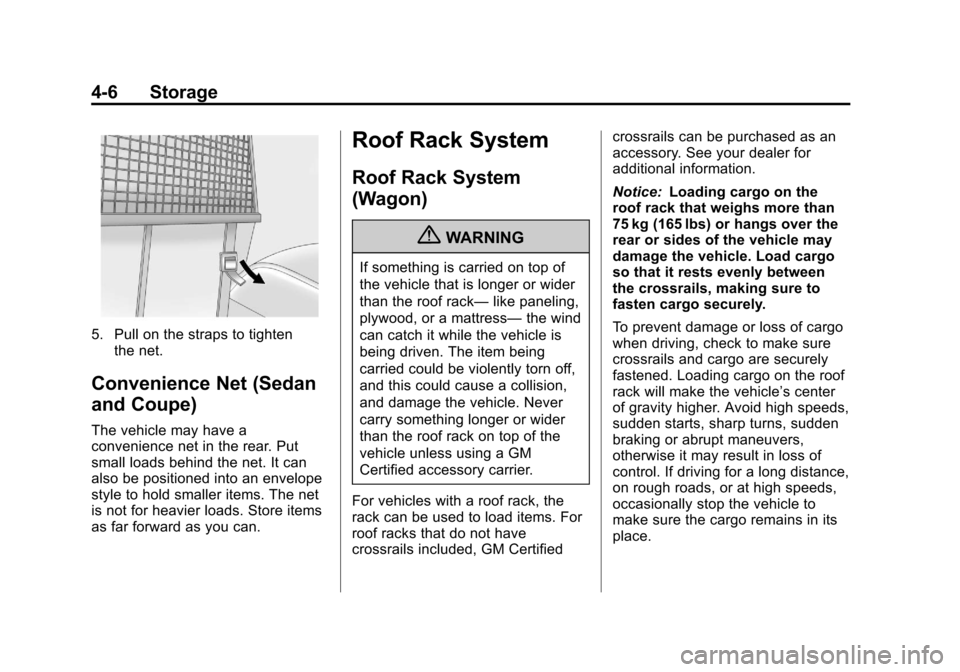
5. Pull on the straps to tightenthe net.
Convenience Net (Sedan
and Coupe)
The vehicle may have a
convenience net in the rear. Put
small loads behind the net. It can
also be positioned into an envelope
style to hold smaller items. The net
is not for heavier loads. Store items
as far forward as you can.
Roof Rack System
Roof Rack System
(Wagon)
{WARNING
If something is carried on top of
the vehicle that is longer or wider
than the roof rack— like paneling,
plywood, or a mattress— the wind
can catch it while the vehicle is
being driven. The item being
carried could be violently torn off,
and this could cause a collision,
and damage the vehicle. Never
carry something longer or wider
than the roof rack on top of the
vehicle unless using a GM
Certified accessory carrier.
For vehicles with a roof rack, the
rack can be used to load items. For
roof racks that do not have
crossrails included, GM Certified crossrails can be purchased as an
accessory. See your dealer for
additional information.
Notice:
Loading cargo on the
roof rack that weighs more than
75 kg (165 lbs) or hangs over the
rear or sides of the vehicle may
damage the vehicle. Load cargo
so that it rests evenly between
the crossrails, making sure to
fasten cargo securely.
To prevent damage or loss of cargo
when driving, check to make sure
crossrails and cargo are securely
fastened. Loading cargo on the roof
rack will make the vehicle’ s center
of gravity higher. Avoid high speeds,
sudden starts, sharp turns, sudden
braking or abrupt maneuvers,
otherwise it may result in loss of
control. If driving for a long distance,
on rough roads, or at high speeds,
occasionally stop the vehicle to
make sure the cargo remains in its
place.
Page 148 of 496
Black plate (8,1)Cadillac CTS/CTS-V Owner Manual - 2011
5-8 Instruments and Controls
3. PressVto scroll through and
select the appropriate
variance zone.
4. Press
3until the vehicle
heading, for example, N for
North, is displayed in the DIC.
5. Calibrate the compass. See “Compass Calibration
Procedure” following.
Compass Calibration
The compass can be manually
calibrated. Only calibrate the
compass in a magnetically clean
and safe location, such as an open
parking lot, where driving the
vehicle in circles is not a danger.
Also, away from tall buildings, utility
wires, manhole covers, or other
industrial structures, if possible.
If the DIC display does not show a
heading, for example, N for North,
or the heading does not change
after making turns, there may be a
strong magnetic field interfering with
the compass. Interference may be
caused by a magnetic antenna mount, magnetic note pad holder,
or any other magnetic item. Turn off
the vehicle, move the magnetic
item, then turn on the vehicle and
calibrate the compass.
Compass Calibration Procedure
1. Before calibrating the compass,
check that the compass is set to
the correct variance zone. See
“Compass Variance (Zone)
Procedure” earlier in this
section.
Do not operate any switches
such as window, sunroof,
climate controls, seats, etc.
during the calibration procedure.
2. Press
Tuntil PressVTo
Calibrate Compass displays.
3. Press
Vto start the compass
calibration.
4. The DIC will display Calibrating Drive In Circles. Drive the
vehicle in tight circles at less
than 8 km/h (5 mph) to complete
the calibration. The DIC will display Calibration Complete for
a few seconds then returns to
the Press
VTo Calibrate
Compass display.
Clock
The analog clock is located on the
instrument panel above the radio.
The clock is not connected with any
other vehicle system and runs by
itself. To adjust the clock:
1. Locate the adjustment buttons directly below the clock.
2. Push and release the right adjustment button to move the
clock hands forward or the left
adjustment button to make the
clock hands go backward.
Holding either button down will
cause the clock to advance
faster. Release the button before
the desired time is reached.
3. Push and release either button to adjust the time by one minute
increments.
Page 223 of 496
Black plate (17,1)Cadillac CTS/CTS-V Owner Manual - 2011
Infotainment System 7-17
Backglass Antenna
The AM-FM antenna is integrated
with the rear window defogger,
located in the rear window. Make
sure that the inside surface of the
rear window is not scratched and
that the lines on the glass are not
damaged. If the inside surface is
damaged, it could interfere with
radio reception. For proper radio
reception, the antenna connector
needs to be properly attached to the
post on the glass.
If a cellular telephone antenna
needs to be attached to the glass,
make sure that the grid lines for the
AM-FM antenna are not damaged.
There is enough space between the
grid lines to attach a cellular
telephone antenna without
interfering with radio reception.
Notice:Using a razor blade or
sharp object to clear the inside
rear window can damage the rear
window antenna and/or the rear
window defogger. Repairs would not be covered by the vehicle
warranty. Do not clear the inside
rear window with sharp objects.
Notice:
Do not apply aftermarket
glass tinting with metallic film.
The metallic film in some tinting
materials will interfere with or
distort the incoming radio
reception. Any damage caused to
your backglass antenna due to
metallic tinting materials will not
be covered by the vehicle
warranty.
Multi-Band Antenna
The antenna located on the roof of
the vehicle is used for the OnStar,
XM Satellite Radio Service System,
and GPS (Global Positioning
System), if the vehicle has these
features. Keep the antenna clear of
obstructions for clear reception.
If the vehicle has a sunroof and it is
open, the performance of OnStar,
XM, and GPS can be affected.
Audio Players
CD Player
The infotainment system's CD
player can play audio CDs and
MP3 CDs.
CDs that are 8 cm (3 in) in diameter
will not work in the CD player.
Care of CDs
If playing a CD, the sound quality
can be reduced due to disc quality,
the method of recording, the quality
of the music that has been
recorded, and the way the disc has
been handled. Handle discs
carefully. Store CDs in their original
cases or other protective cases and
away from direct sunlight and dust.
The CD player scans the bottom
surface of the disc. If the surface of
a disc is damaged, such as cracked,
broken, or scratched, the disc may
not play properly or not at all. Do
not touch the bottom side of a disc
while handling it; this could damage
Page 279 of 496
Black plate (19,1)Cadillac CTS/CTS-V Owner Manual - 2011
Driving and Operating 9-19
3. Come to a complete stop. Shiftto P (Park) with an automatic
transmission, or Neutral with a
manual transmission. Turn the
ignition to LOCK/OFF.
4. Set the parking brake. See Parking Brake (Manual)
on
page 9‑33or Parking Brake
(Electric) on page 9‑34
B (ACC/ACCESSORY): This
position allows you to use things
like the radio and the windshield
wipers when the engine is off. This
position will allow you to turn off the
engine.
C (ON/RUN): This position is for
driving. It is the position the ignition
switch returns to after the engine
starts, and the control knob is
released.
If you need to shift the transmission
out of P (Park), the ignition control
knob has to be in ACC/
ACCESSORY or ON/RUN. The battery could be drained if you
leave the ignition in the ACC/
ACCESSORY or ON/RUN position
with the engine off. You may not be
able to start the vehicle if the battery
is allowed to drain for an extended
period of time.
D (START):
This position starts the
engine.
Retained Accessory
Power (RAP)
These vehicle accessories can be
used for up to 10 minutes after the
engine is turned off:
.Audio System
.Power Windows
.Sunroof (if equipped)
Power to the audio system will work
up to 10 minutes or until the driver
door is opened. Power to the
windows or sunroof will work up to
10 minutes or until any door is
opened. For an additional 10 minutes of operation, close all
the doors and turn the key to ON/
RUN and then back to LOCK/OFF.
Starting the Engine
Place the transmission in the
proper gear.
If the vehicle has the keyless
access system, the keyless access
transmitter must be authenticated in
order for the ignition control knob to
turn. The transmitter can be
authenticated either by putting your
foot on the brake pedal or by
pushing the ignition control knob in.
Automatic Transmission
Move the shift lever to P (Park) or
N (Neutral). The engine will not start
in any other position. To restart the
engine when the vehicle is already
moving, use N (Neutral) only.
If the vehicle has the keyless
access system, your foot must be
on the brake pedal to start the
engine. To rotate the ignition control
knob, put your foot on the brake
Page 365 of 496
Black plate (47,1)Cadillac CTS/CTS-V Owner Manual - 2011
Vehicle Care 10-47
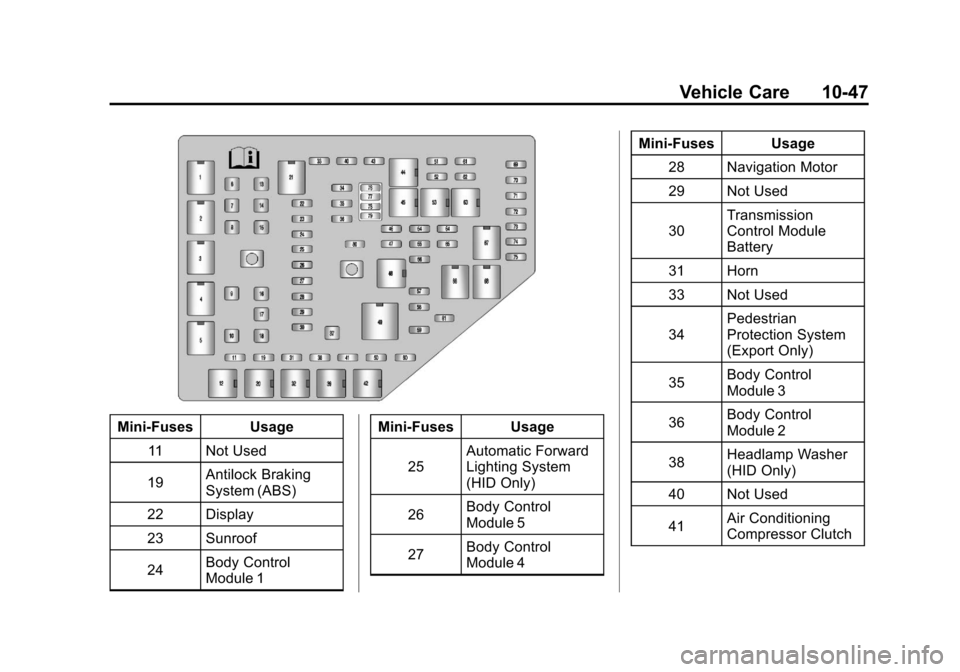
Mini‐Fuses Usage11 Not Used
19 Antilock Braking
System (ABS)
22 Display
23 Sunroof
24 Body Control
Module 1 Mini‐Fuses Usage
25 Automatic Forward
Lighting System
(HID Only)
26 Body Control
Module 5
27 Body Control
Module 4 Mini‐Fuses Usage
28 Navigation Motor
29 Not Used
30 Transmission
Control Module
Battery
31 Horn
33 Not Used
34 Pedestrian
Protection System
(Export Only)
35 Body Control
Module 3
36 Body Control
Module 2
38 Headlamp Washer
(HID Only)
40 Not Used
41 Air Conditioning
Compressor Clutch
Page 372 of 496
Black plate (54,1)Cadillac CTS/CTS-V Owner Manual - 2011
10-54 Vehicle Care
Engine Compartment
Fuse Block (CTS V
Wagon)
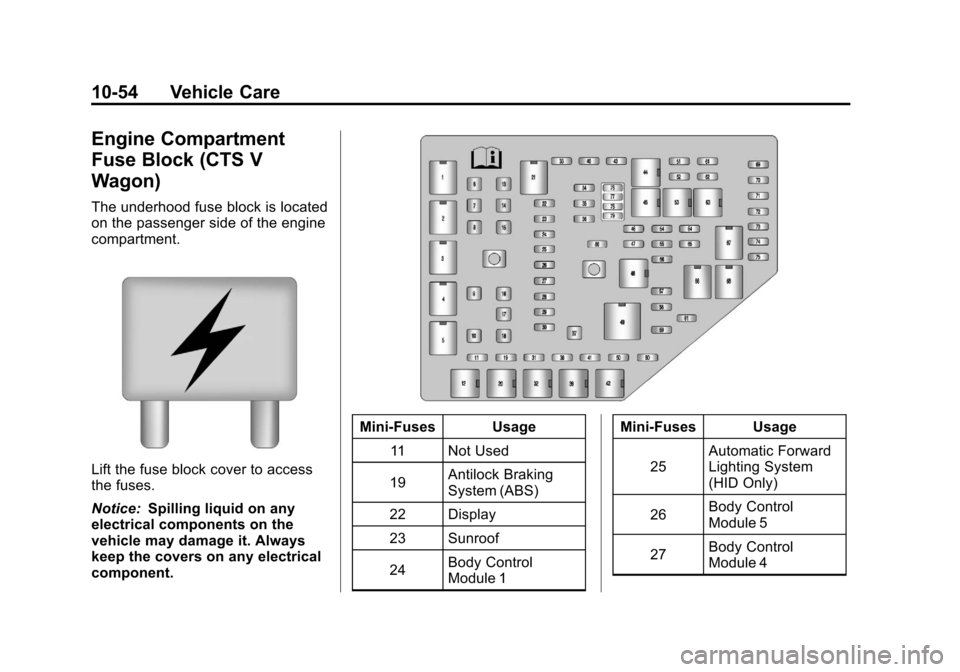
The underhood fuse block is located
on the passenger side of the engine
compartment.
Lift the fuse block cover to access
the fuses.
Notice:Spilling liquid on any
electrical components on the
vehicle may damage it. Always
keep the covers on any electrical
component.
Mini‐Fuses Usage
11 Not Used
19 Antilock Braking
System (ABS)
22 Display
23 Sunroof
24 Body Control
Module 1 Mini‐Fuses Usage
25 Automatic Forward
Lighting System
(HID Only)
26 Body Control
Module 5
27 Body Control
Module 4
Page 377 of 496
Black plate (59,1)Cadillac CTS/CTS-V Owner Manual - 2011
Vehicle Care 10-59
Mini‐Fuses Usage14 Right Position Lamp
15 Left Position Lamp
16 Door Lock
17 Console/Auxiliary
Power Outlet
18 Rear Fog/Export
Body Control
Module
(Export Only)
19 Trunk Release
20 Easy Entry Seats
(Coupe Only)
21 Sunroof
22 Right Position Lamp
(Export Only)
23 Regulated Voltage
Control Sensor
24 Audio System
(Radio)
25 Airbag System Mini‐Fuses Usage
26 Remote Keyless
Entry/PASS‐Key
®
Theft Deterrent
Module
27 Audio Speakers/
Subwoofer
28 OnStar
®System
29 Engine Control
Module
30 Canister Vent
31 Fuel Pump
33 Stop Lamps
(Export Only)
34 Theft Deterrent
System/Universal
Garage Door
Opener
35 Memory Seat
Module Mini‐Fuses Usage
36 Passenger Door
Module
38 Not Used
39 Amplifier
Circuit
Breakers Usage
1 Driver Power Seat
Switch
2 Passenger Power
Seat Switch
3 Power Windows
4 Power Steering
Column
32 Left Rear Window
Switch
37 Right Rear Window
Switch