driver seat adjustment CADILLAC CTS 2011 2.G Owners Manual
[x] Cancel search | Manufacturer: CADILLAC, Model Year: 2011, Model line: CTS, Model: CADILLAC CTS 2011 2.GPages: 496, PDF Size: 7.71 MB
Page 7 of 496
Black plate (1,1)Cadillac CTS/CTS-V Owner Manual - 2011
In Brief 1-1
In Brief
Instrument Panel
Instrument Panel . . . . . . . . . . . . . . 1-2
Initial Drive Information
Initial Drive Information . . . . . . . . 1-4
Starting the Engine . . . . . . . . . . . 1-4
Remote Keyless Entry (RKE)System . . . . . . . . . . . . . . . . . . . . . . 1-4
Remote Vehicle Start . . . . . . . . . 1-5
Door Locks . . . . . . . . . . . . . . . . . . . 1-5
Liftgate . . . . . . . . . . . . . . . . . . . . . . . . 1-6
Trunk Release . . . . . . . . . . . . . . . . 1-6
Windows . . . . . . . . . . . . . . . . . . . . . . 1-6
Seat Adjustment . . . . . . . . . . . . . . 1-7
Memory Features . . . . . . . . . . . . . 1-8
Heated and Ventilated Seats . . . . . . . . . . . . . . . . . . . . . . . . 1-9
Head Restraint Adjustment . . . . 1-9
Safety Belt . . . . . . . . . . . . . . . . . . . 1-10
Sensing System for Passenger Airbag . . . . . . . . . . 1-10
Mirror Adjustment . . . . . . . . . . . . 1-10 Steering Wheel
Adjustment . . . . . . . . . . . . . . . . . 1-11
Interior Lighting . . . . . . . . . . . . . . 1-12
Exterior Lighting . . . . . . . . . . . . . 1-12
Windshield Wiper/Washer . . . . 1-13
Climate Controls . . . . . . . . . . . . . 1-14
Transmission . . . . . . . . . . . . . . . . 1-15Vehicle Features
Radio(s) . . . . . . . . . . . . . . . . . . . . . 1-15
Satellite Radio . . . . . . . . . . . . . . . 1-16
Portable Audio Devices . . . . . . 1-16
Bluetooth
®. . . . . . . . . . . . . . . . . . . 1-16
Steering Wheel Controls (Audio) . . . . . . . . . . . . . . . . . . . . . 1-17
Navigation System . . . . . . . . . . . 1-17
Driver Information Center (DIC) . . . . . . . . . . . . . . . 1-18
Cruise Control . . . . . . . . . . . . . . . 1-18
Rear Vision Camera (RVC) . . . . . . . . . . . . . 1-19
Ultrasonic Parking Assist . . . . 1-19
Storage Compartments . . . . . . 1-19
Power Outlets . . . . . . . . . . . . . . . 1-20
Universal Remote System . . . 1-20
Sunroof . . . . . . . . . . . . . . . . . . . . . . 1-20
Performance and Maintenance
Traction Control System (TCS) . . . . . . . . . . . . . . 1-21
StabiliTrak
®. . . . . . . . . . . . . . . . . . 1-21
Tire Pressure Monitor . . . . . . . . 1-22
Tire Sealant and Compressor Kit . . . . . . . . . . . . . 1-22
Engine Oil Life System . . . . . . 1-22
Driving for Better Fuel Economy . . . . . . . . . . . . . . . . . . . 1-23
Roadside Service . . . . . . . . . . . . 1-23
OnStar
®. . . . . . . . . . . . . . . . . . . . . 1-24
Page 9 of 496

Black plate (3,1)Cadillac CTS/CTS-V Owner Manual - 2011
In Brief 1-3
A.Air Vents on page 8‑6.
B. Driver Information Center (DIC)
on page 5‑27.
C. Instrument Panel Illumination
Control on page 6‑5.
D. Turn and Lane-Change Signals
on page 6‑4.
E. Instrument Cluster
on
page 5‑11.
F. Windshield Wiper/Washer
on
page 5‑4.
Rear Window Wiper/Washer
on
page 5‑6(If Equipped).
G. Navigation Button (If Equipped). See Navigation System Manual.
H. Traction Control System (TCS)
on page 9‑37.
Magnetic Ride Control
on
page 9‑39(CTS‐V
Model Only).
I. Clock on page 5‑8.
J. Passenger Sensing System
on
page 3‑37. K.
Hazard Warning Flashers
on
page 6‑4.
L. Navigation Display Brightness Control (If Equipped). See
Navigation System Manual.
M. AM-FM Radio
on page 7‑9(Base Audio System).
Navigation/Radio System (If
Equipped). See Navigation
System Manual.
N. Parking Brake Release Lever. See Parking Brake (Manual)
on
page 9‑33or Parking Brake
(Electric) on page 9‑34.
O. Hood Release. See Hood
on
page 10‑5.
P. Cruise Control
on page 9‑40.
Heated Steering Wheel
on
page 5‑4(If Equipped).
Traction Control System (TCS)
Disable Button (CTS-V Model
Only). See Traction Control
System (TCS) on page 9‑37. Q. Tap Shift Controls (If Equipped).
See Manual Mode
on
page 9‑28.
R. Data Link Connector. See
Malfunction Indicator Lamp
on
page 5‑19.
S. Steering Wheel Adjustmenton
page 5‑2.
T. Horn on page 5‑4.
U. Steering Wheel Controls (Audio)
on page 5‑3.
V. Heated and Ventilated Front
Seats on page 3‑12.
W. Dual Automatic Climate Control
System on page 8‑1.
X. Parking Brake Button. See Parking Brake (Manual)
on
page 9‑33or Parking Brake
(Electric) on page 9‑34.
Y. Shift Lever. See Automatic
Transmission
on page 9‑26or
Manual Transmissionon
page 9‑30.
Z. Instrument Panel Storageon
page 4‑1.
Power Outlets on page 5‑9.
AA. Glove Box
on page 4‑1.
Page 14 of 496
Black plate (8,1)Cadillac CTS/CTS-V Owner Manual - 2011
1-8 In Brief
Press the top or bottom of the
control (A) to increase or decrease
support in the seat cushion bolsters.
Press the top or bottom of the
control (C) to increase or decrease
support in the seatback bolsters.
SeeLumbar Adjustment
on
page 3‑7.
Memory Features
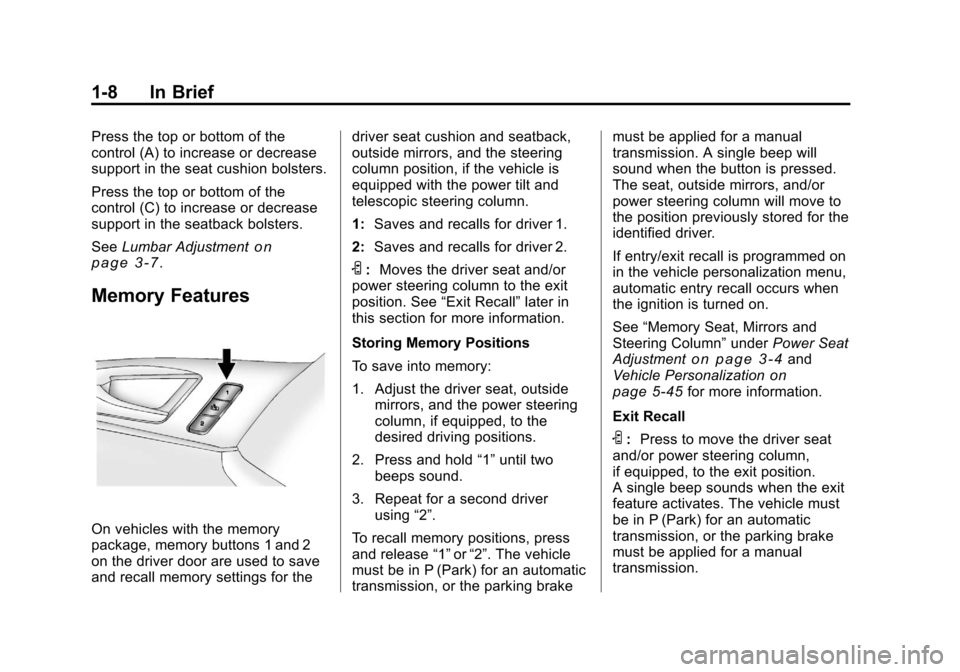
On vehicles with the memory
package, memory buttons 1 and 2
on the driver door are used to save
and recall memory settings for the driver seat cushion and seatback,
outside mirrors, and the steering
column position, if the vehicle is
equipped with the power tilt and
telescopic steering column.
1:
Saves and recalls for driver 1.
2: Saves and recalls for driver 2.
S:Moves the driver seat and/or
power steering column to the exit
position. See “Exit Recall”later in
this section for more information.
Storing Memory Positions
To save into memory:
1. Adjust the driver seat, outside mirrors, and the power steering
column, if equipped, to the
desired driving positions.
2. Press and hold “1”until two
beeps sound.
3. Repeat for a second driver using “2”.
To recall memory positions, press
and release “1”or“2”. The vehicle
must be in P (Park) for an automatic
transmission, or the parking brake must be applied for a manual
transmission. A single beep will
sound when the button is pressed.
The seat, outside mirrors, and/or
power steering column will move to
the position previously stored for the
identified driver.
If entry/exit recall is programmed on
in the vehicle personalization menu,
automatic entry recall occurs when
the ignition is turned on.
See
“Memory Seat, Mirrors and
Steering Column” underPower Seat
Adjustment
on page 3‑4and
Vehicle Personalizationon
page 5‑45for more information.
Exit Recall
S: Press to move the driver seat
and/or power steering column,
if equipped, to the exit position.
A single beep sounds when the exit
feature activates. The vehicle must
be in P (Park) for an automatic
transmission, or the parking brake
must be applied for a manual
transmission.
Page 15 of 496
Black plate (9,1)Cadillac CTS/CTS-V Owner Manual - 2011
In Brief 1-9
If entry/exit recall is programmed on
in the vehicle personalization menu,
automatic seat and/or steering
column movement occurs under the
following conditions:
.The ignition key is removed on
vehicles with Remote Keyless
Entry (RKE).
.The ignition is turned to OFF
and the driver door is opened on
vehicles with Remote Keyless
Access.
If entry/exit recall is programmed off
and the exit button is pressed, the
driver seat will move back a preset
distance and the steering column,
if equipped, will move up and
forward. See Vehicle
Personalization
on page 5‑45for
more information.
Heated and Ventilated
Seats
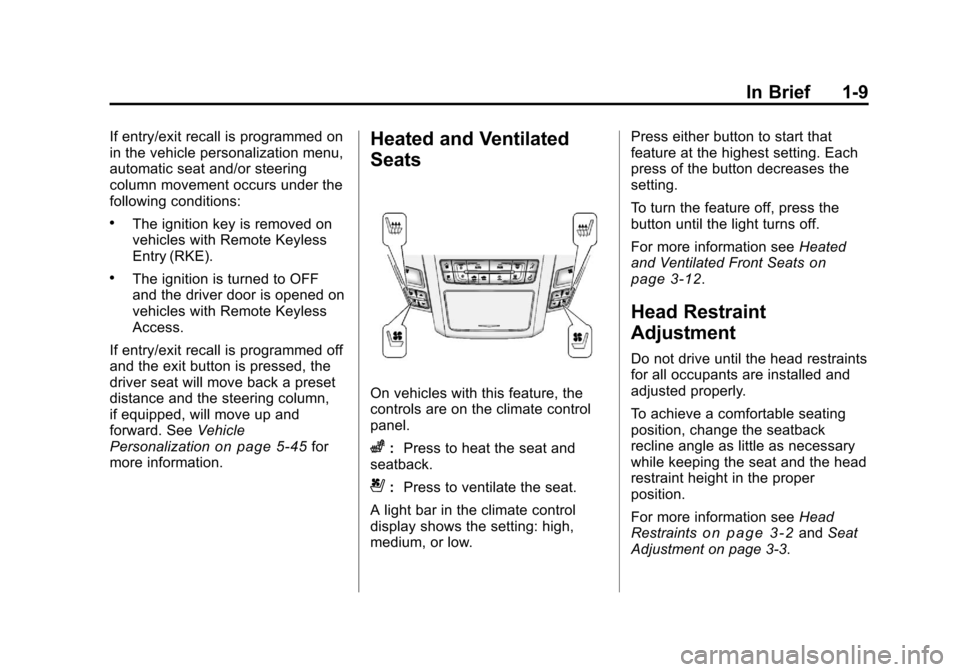
On vehicles with this feature, the
controls are on the climate control
panel.
z: Press to heat the seat and
seatback.
{: Press to ventilate the seat.
A light bar in the climate control
display shows the setting: high,
medium, or low. Press either button to start that
feature at the highest setting. Each
press of the button decreases the
setting.
To turn the feature off, press the
button until the light turns off.
For more information see
Heated
and Ventilated Front Seats
on
page 3‑12.
Head Restraint
Adjustment
Do not drive until the head restraints
for all occupants are installed and
adjusted properly.
To achieve a comfortable seating
position, change the seatback
recline angle as little as necessary
while keeping the seat and the head
restraint height in the proper
position.
For more information see Head
Restraints
on page 3‑2and Seat
Adjustment on page 3‑3.
Page 16 of 496
Black plate (10,1)Cadillac CTS/CTS-V Owner Manual - 2011
1-10 In Brief
Safety Belt
Refer to the following sections for
important information on how to use
safety belts properly.
.Safety Belts on page 3‑14.
.How to Wear Safety Belts
Properly on page 3‑17.
.Lap-Shoulder Belt on page 3‑23.
.Lower Anchors and Tethers for
Children (LATCH System)on
page 3‑53.
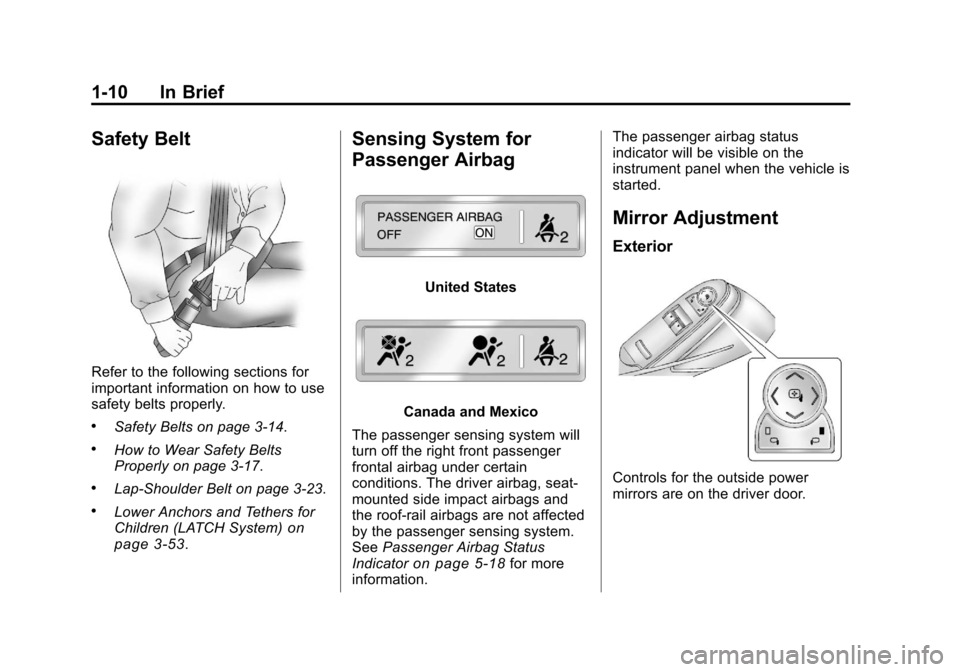
Sensing System for
Passenger Airbag
United States
Canada and Mexico
The passenger sensing system will
turn off the right front passenger
frontal airbag under certain
conditions. The driver airbag, seat‐
mounted side impact airbags and
the roof‐rail airbags are not affected
by the passenger sensing system.
See Passenger Airbag Status
Indicator
on page 5‑18for more
information. The passenger airbag status
indicator will be visible on the
instrument panel when the vehicle is
started.
Mirror Adjustment
Exterior
Controls for the outside power
mirrors are on the driver door.
Page 38 of 496
Black plate (6,1)Cadillac CTS/CTS-V Owner Manual - 2011
2-6 Keys, Doors and Windows
The vehicle comes with two
transmitters. Each transmitter will
have a number on top of it,
“1”or“2”. These numbers
correspond to the driver of the
vehicle. For example, the memory
seat position for driver 1 will be
recalled when using the transmitter
labeled “1”, if enabled through the
DIC. See “Memory Seat” under
Power Seat Adjustment
on
page 3‑4and Vehicle
Personalizationon page 5‑45for
more information.
Programming Transmitters to
the Vehicle
Only RKE transmitters programmed
to the vehicle will work. If a
transmitter is lost or stolen, a
replacement can be purchased and
programmed through your dealer.
When the replacement transmitter is programmed to the vehicle, all
remaining transmitters must also be
programmed. Any lost or stolen
transmitters no longer work once the
new transmitter is programmed.
Each vehicle can have up to eight
transmitters programmed to it.
Battery Replacement
Replace the battery if the Replace
Battery In Remote Key message
displays in the DIC. See
“Replace
Battery In Remote Key” underKey
and Lock Messages
on page 5‑36for additional information.
Notice: When replacing the
battery, do not touch any of the
circuitry on the transmitter. Static
from your body could damage the
transmitter.
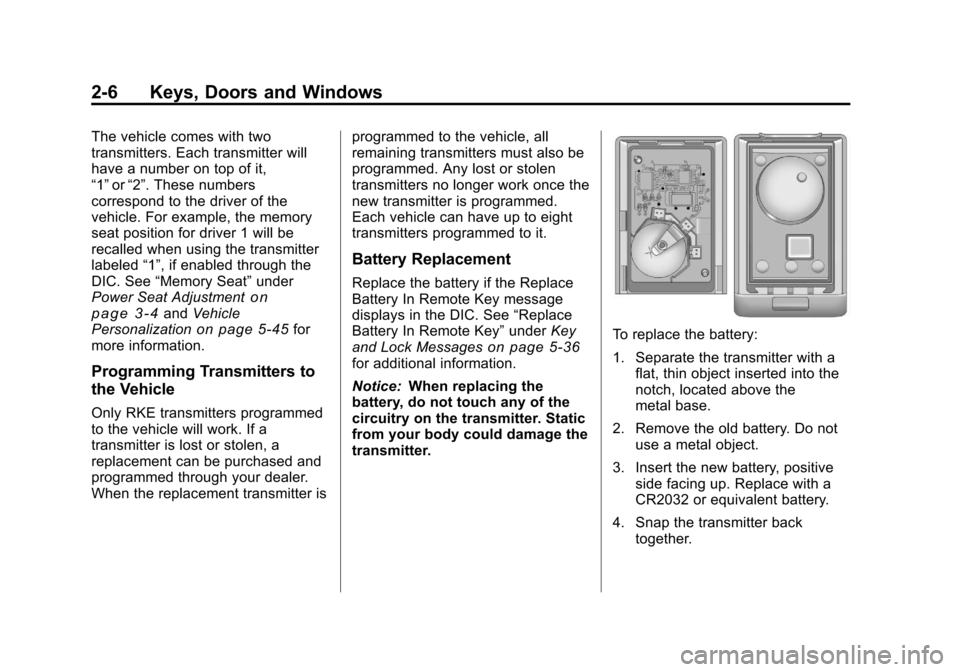
To replace the battery:
1. Separate the transmitter with a flat, thin object inserted into the
notch, located above the
metal base.
2. Remove the old battery. Do not use a metal object.
3. Insert the new battery, positive side facing up. Replace with a
CR2032 or equivalent battery.
4. Snap the transmitter back together.
Page 40 of 496
Black plate (8,1)Cadillac CTS/CTS-V Owner Manual - 2011
2-8 Keys, Doors and Windows
To program the vehicle so the turn
signal indicators do not flash and
the horn does not sound when
pressing
Qon the keyless access
transmitter, see “Remote Door Lock
Feedback” underVehicle
Personalization on page 5‑45.
K(Unlock): Press once to unlock
only the driver door. The turn signal
indicators flash twice.
Press
Ktwice within five seconds
to unlock all the doors. The interior
lamps may come on.
To program the vehicle so the turn
signal indicators do not flash and
the fog lamps and reverse lamps
remain on steady for about
20 seconds when the keyless
access transmitter is used to unlock
the vehicle, see “Remote Door
Unlock Feedback” underVehicle
Personalization on page 5‑45.
For vehicles with the memory
feature, press
Kon the keyless
access transmitter to program and
recall the memory settings. See “Memory Seat”
underPower Seat
Adjustment
on page 3‑4for more
information.
/(Remote Start): Press to
operate the remote start feature.
See Remote Vehicle Start
on
page 2‑11for additional
information.
V/&(Remote Trunk/Liftgate
Release): Press and hold for about
one second to unlock the trunk/
liftgate. The automatic transmission
must be in P (Park) or the manual
transmission must be in Neutral with
the parking brake set.
L(Vehicle Locator/Panic
Alarm): Press and release to
locate the vehicle. The horn sounds
three times and the turn signal
lamps flash three times.
Press and hold
Lfor
three seconds to sound the panic
alarm. The horn sounds and the
turn signal lamps flash for
30 seconds. Press and release
L
again to stop the alarm. The vehicle comes with two
transmitters. Each transmitter will
have a number on top of it,
“1”
or“2”. These numbers
correspond to the driver of the
vehicle. For example, the memory
seat position for driver 1 will be
recalled when using the transmitter
labeled “1”, if enabled through the
DIC. See “Memory Seat” under
Power Seat Adjustment
on
page 3‑4and Vehicle
Personalizationon page 5‑45for
more information.
Programming Transmitters to
the Vehicle
Only keyless access transmitters
programmed to the vehicle will work.
If a transmitter is lost or stolen, a
replacement can be purchased and
programmed through your dealer.
The vehicle can be reprogrammed
so that lost or stolen transmitters no
longer work. Each vehicle can have
up to four transmitters matched to it.
Page 71 of 496
Black plate (3,1)Cadillac CTS/CTS-V Owner Manual - 2011
Seats and Restraints 3-3
Active Head Restraints
The vehicle has an active head
restraint system in the front seating
positions. These automatically tilt
forward to reduce the risk of neck
injury if the vehicle is hit from
behind.
Front Seats
Seat Adjustment
{WARNING
You can lose control of the
vehicle if you try to adjust a
manual driver seat while the
vehicle is moving. The sudden
movement could startle and
confuse you, or make you push a
pedal when you do not want to.
Adjust the driver seat only when
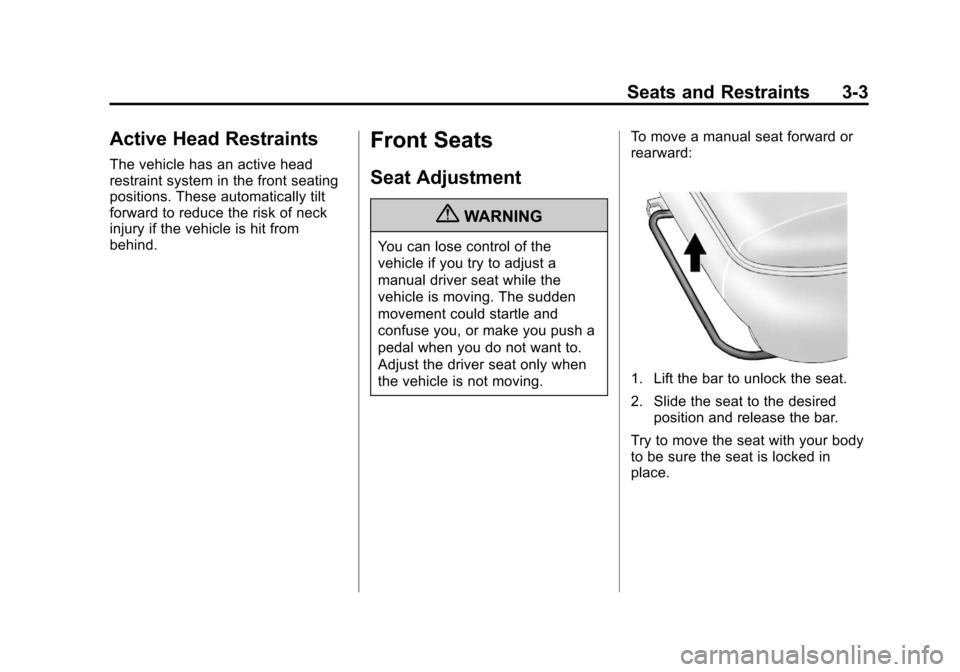
the vehicle is not moving.To move a manual seat forward or
rearward:
1. Lift the bar to unlock the seat.
2. Slide the seat to the desired
position and release the bar.
Try to move the seat with your body
to be sure the seat is locked in
place.
Page 72 of 496
Black plate (4,1)Cadillac CTS/CTS-V Owner Manual - 2011
3-4 Seats and Restraints
Easy Entry Seat (Coupe
Models Only)
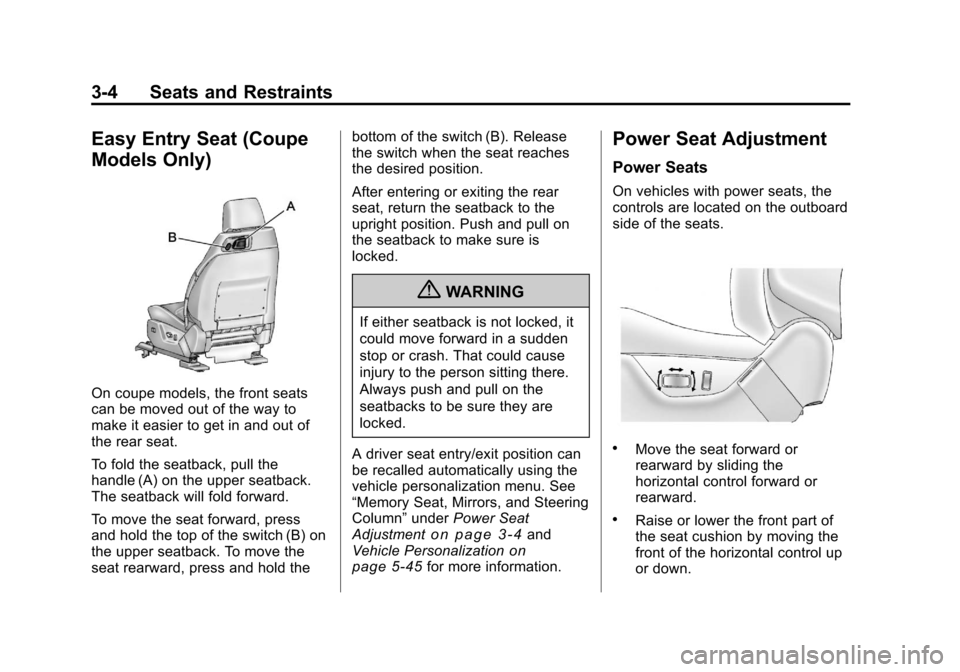
On coupe models, the front seats
can be moved out of the way to
make it easier to get in and out of
the rear seat.
To fold the seatback, pull the
handle (A) on the upper seatback.
The seatback will fold forward.
To move the seat forward, press
and hold the top of the switch (B) on
the upper seatback. To move the
seat rearward, press and hold thebottom of the switch (B). Release
the switch when the seat reaches
the desired position.
After entering or exiting the rear
seat, return the seatback to the
upright position. Push and pull on
the seatback to make sure is
locked.
{WARNING
If either seatback is not locked, it
could move forward in a sudden
stop or crash. That could cause
injury to the person sitting there.
Always push and pull on the
seatbacks to be sure they are
locked.
A driver seat entry/exit position can
be recalled automatically using the
vehicle personalization menu. See
“Memory Seat, Mirrors, and Steering
Column” underPower Seat
Adjustment
on page 3‑4and
Vehicle Personalizationon
page 5‑45for more information.
Power Seat Adjustment
Power Seats
On vehicles with power seats, the
controls are located on the outboard
side of the seats.
.Move the seat forward or
rearward by sliding the
horizontal control forward or
rearward.
.Raise or lower the front part of
the seat cushion by moving the
front of the horizontal control up
or down.
Page 75 of 496

Black plate (7,1)Cadillac CTS/CTS-V Owner Manual - 2011
Seats and Restraints 3-7
position again. If the exit position is
still not recalling, see your dealer for
service.
Lumbar Adjustment
The vehicle may have this feature.
The driver and passenger seatback
lumbar support can be adjusted by
moving the control located on the
outboard side of the seat cushions.
To increase or decrease support,
hold the control forward or rearward.
Adjust the seat as needed.
A. Seat Cushion BolsterAdjustment Control
B. Lumbar Support Control
C. Seatback Bolster Adjustment Control
Power Lumbar
On vehicles with this feature:
.Press and hold the top of the
control (B) to increase support to
the top of the seatback and
decrease support to the bottom
of the lumbar.
.Press and hold the bottom of the
control to decrease support to
the top of the seatback and
increase support to the bottom
of the seatback.
.Press and hold the front or rear
of the control to increase or
decrease support to the entire
seatback.