horn CADILLAC CTS 2011 2.G Owners Manual
[x] Cancel search | Manufacturer: CADILLAC, Model Year: 2011, Model line: CTS, Model: CADILLAC CTS 2011 2.GPages: 496, PDF Size: 7.71 MB
Page 9 of 496

Black plate (3,1)Cadillac CTS/CTS-V Owner Manual - 2011
In Brief 1-3
A.Air Vents on page 8‑6.
B. Driver Information Center (DIC)
on page 5‑27.
C. Instrument Panel Illumination
Control on page 6‑5.
D. Turn and Lane-Change Signals
on page 6‑4.
E. Instrument Cluster
on
page 5‑11.
F. Windshield Wiper/Washer
on
page 5‑4.
Rear Window Wiper/Washer
on
page 5‑6(If Equipped).
G. Navigation Button (If Equipped). See Navigation System Manual.
H. Traction Control System (TCS)
on page 9‑37.
Magnetic Ride Control
on
page 9‑39(CTS‐V
Model Only).
I. Clock on page 5‑8.
J. Passenger Sensing System
on
page 3‑37. K.
Hazard Warning Flashers
on
page 6‑4.
L. Navigation Display Brightness Control (If Equipped). See
Navigation System Manual.
M. AM-FM Radio
on page 7‑9(Base Audio System).
Navigation/Radio System (If
Equipped). See Navigation
System Manual.
N. Parking Brake Release Lever. See Parking Brake (Manual)
on
page 9‑33or Parking Brake
(Electric) on page 9‑34.
O. Hood Release. See Hood
on
page 10‑5.
P. Cruise Control
on page 9‑40.
Heated Steering Wheel
on
page 5‑4(If Equipped).
Traction Control System (TCS)
Disable Button (CTS-V Model
Only). See Traction Control
System (TCS) on page 9‑37. Q. Tap Shift Controls (If Equipped).
See Manual Mode
on
page 9‑28.
R. Data Link Connector. See
Malfunction Indicator Lamp
on
page 5‑19.
S. Steering Wheel Adjustmenton
page 5‑2.
T. Horn on page 5‑4.
U. Steering Wheel Controls (Audio)
on page 5‑3.
V. Heated and Ventilated Front
Seats on page 3‑12.
W. Dual Automatic Climate Control
System on page 8‑1.
X. Parking Brake Button. See Parking Brake (Manual)
on
page 9‑33or Parking Brake
(Electric) on page 9‑34.
Y. Shift Lever. See Automatic
Transmission
on page 9‑26or
Manual Transmissionon
page 9‑30.
Z. Instrument Panel Storageon
page 4‑1.
Power Outlets on page 5‑9.
AA. Glove Box
on page 4‑1.
Page 37 of 496
Black plate (5,1)Cadillac CTS/CTS-V Owner Manual - 2011
Keys, Doors and Windows 2-5
Remote Keyless Entry
(RKE) System Operation
(Key Access)
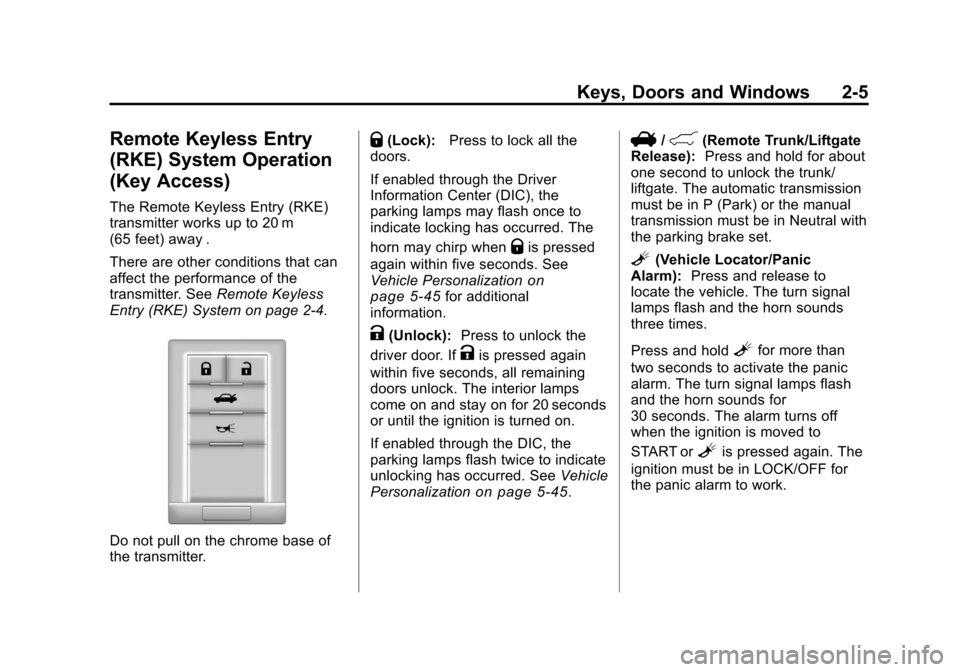
The Remote Keyless Entry (RKE)
transmitter works up to 20 m
(65 feet) away .
There are other conditions that can
affect the performance of the
transmitter. SeeRemote Keyless
Entry (RKE) System on page 2‑4.
Do not pull on the chrome base of
the transmitter.
Q(Lock): Press to lock all the
doors.
If enabled through the Driver
Information Center (DIC), the
parking lamps may flash once to
indicate locking has occurred. The
horn may chirp when
Qis pressed
again within five seconds. See
Vehicle Personalization
on
page 5‑45for additional
information.
K(Unlock): Press to unlock the
driver door. If
Kis pressed again
within five seconds, all remaining
doors unlock. The interior lamps
come on and stay on for 20 seconds
or until the ignition is turned on.
If enabled through the DIC, the
parking lamps flash twice to indicate
unlocking has occurred. See Vehicle
Personalization
on page 5‑45.
V/&(Remote Trunk/Liftgate
Release): Press and hold for about
one second to unlock the trunk/
liftgate. The automatic transmission
must be in P (Park) or the manual
transmission must be in Neutral with
the parking brake set.
L(Vehicle Locator/Panic
Alarm): Press and release to
locate the vehicle. The turn signal
lamps flash and the horn sounds
three times.
Press and hold
Lfor more than
two seconds to activate the panic
alarm. The turn signal lamps flash
and the horn sounds for
30 seconds. The alarm turns off
when the ignition is moved to
START or
Lis pressed again. The
ignition must be in LOCK/OFF for
the panic alarm to work.
Page 39 of 496
Black plate (7,1)Cadillac CTS/CTS-V Owner Manual - 2011
Keys, Doors and Windows 2-7
Remote Keyless Entry
(RKE) System Operation
(Keyless Access)
The Keyless Access System
transmitter will work up to 60 m
(195 feet) away.
The Keyless Access System locks
and unlocks the doors and trunk
without pressing the buttons on the
keyless access transmitter. The
keyless access transmitter must be
within 1 m (3 feet) of the door or
trunk being opened.
Keyless Unlocking
With the keyless access transmitter
within 1 m (3 feet), approach the
front door and pull the handle to
unlock and open the door. If the
transmitter is recognized, the door
will unlock and open.
To access the rear doors first, pull
the rear door handle once to unlock
all doors and a second time to open
the door.Entering any door other than the
driver door will cause all of the
doors to unlock. This is not
customizable.
To customize which doors unlock
when the driver door is opened, see
“Keyless Unlock”
underVehicle
Personalization on page 5‑45.
Keyless Locking
The doors lock after several
seconds if all doors are closed and
at least one keyless access
transmitter has been removed from
the interior of the vehicle. To
customize if the doors automatically
lock upon exiting the vehicle, see
“Keyless Locking” underVehicle
Personalization on page 5‑45.
Keyless Trunk Opening
Press the trunk release button
located on the trunk above the
license plate to open the trunk if the
keyless access transmitter is within
range. There are other conditions that
affect the performance of the
transmitter. See
Remote Keyless
Entry (RKE) System on page 2‑4.
With Remote Start Shown, Without
Similar
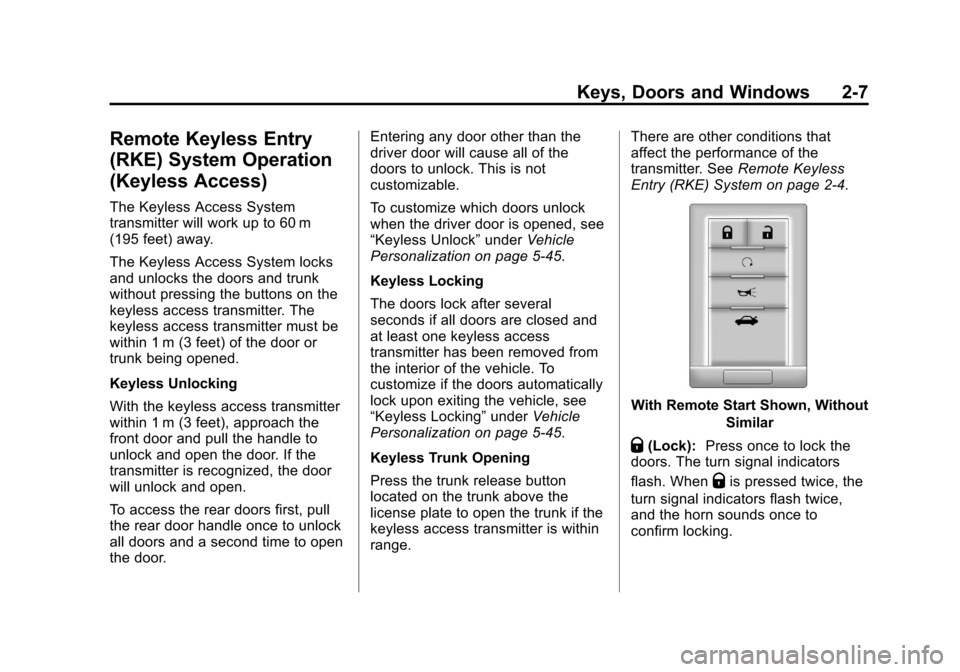
Q(Lock):Press once to lock the
doors. The turn signal indicators
flash. When
Qis pressed twice, the
turn signal indicators flash twice,
and the horn sounds once to
confirm locking.
Page 40 of 496
Black plate (8,1)Cadillac CTS/CTS-V Owner Manual - 2011
2-8 Keys, Doors and Windows
To program the vehicle so the turn
signal indicators do not flash and
the horn does not sound when
pressing
Qon the keyless access
transmitter, see “Remote Door Lock
Feedback” underVehicle
Personalization on page 5‑45.
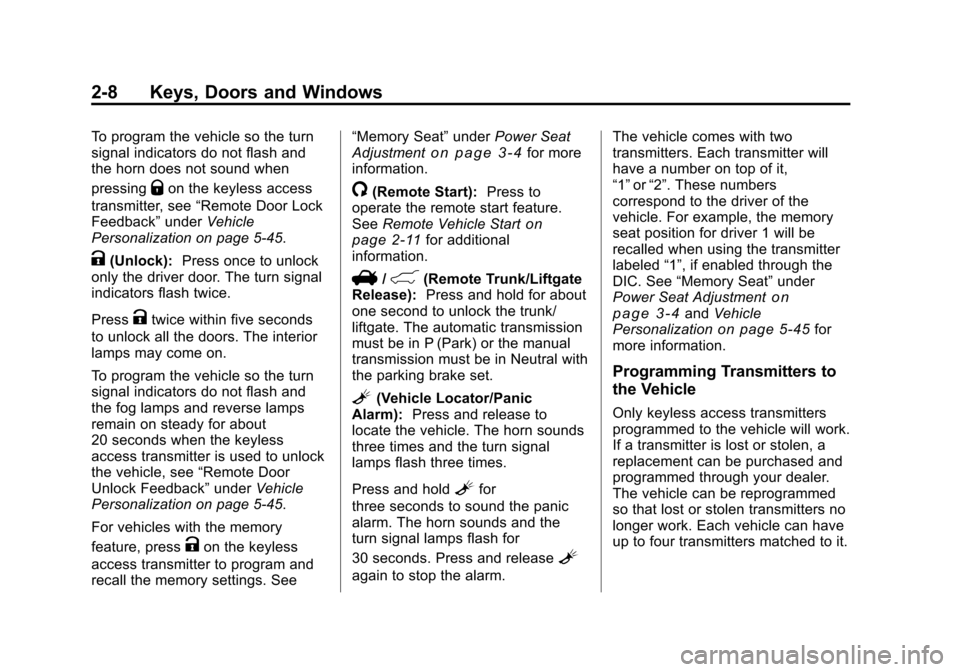
K(Unlock): Press once to unlock
only the driver door. The turn signal
indicators flash twice.
Press
Ktwice within five seconds
to unlock all the doors. The interior
lamps may come on.
To program the vehicle so the turn
signal indicators do not flash and
the fog lamps and reverse lamps
remain on steady for about
20 seconds when the keyless
access transmitter is used to unlock
the vehicle, see “Remote Door
Unlock Feedback” underVehicle
Personalization on page 5‑45.
For vehicles with the memory
feature, press
Kon the keyless
access transmitter to program and
recall the memory settings. See “Memory Seat”
underPower Seat
Adjustment
on page 3‑4for more
information.
/(Remote Start): Press to
operate the remote start feature.
See Remote Vehicle Start
on
page 2‑11for additional
information.
V/&(Remote Trunk/Liftgate
Release): Press and hold for about
one second to unlock the trunk/
liftgate. The automatic transmission
must be in P (Park) or the manual
transmission must be in Neutral with
the parking brake set.
L(Vehicle Locator/Panic
Alarm): Press and release to
locate the vehicle. The horn sounds
three times and the turn signal
lamps flash three times.
Press and hold
Lfor
three seconds to sound the panic
alarm. The horn sounds and the
turn signal lamps flash for
30 seconds. Press and release
L
again to stop the alarm. The vehicle comes with two
transmitters. Each transmitter will
have a number on top of it,
“1”
or“2”. These numbers
correspond to the driver of the
vehicle. For example, the memory
seat position for driver 1 will be
recalled when using the transmitter
labeled “1”, if enabled through the
DIC. See “Memory Seat” under
Power Seat Adjustment
on
page 3‑4and Vehicle
Personalizationon page 5‑45for
more information.
Programming Transmitters to
the Vehicle
Only keyless access transmitters
programmed to the vehicle will work.
If a transmitter is lost or stolen, a
replacement can be purchased and
programmed through your dealer.
The vehicle can be reprogrammed
so that lost or stolen transmitters no
longer work. Each vehicle can have
up to four transmitters matched to it.
Page 55 of 496
Black plate (23,1)Cadillac CTS/CTS-V Owner Manual - 2011
Keys, Doors and Windows 2-23
To open the liftgate, press the
touchpad on the handle on the
outside of the liftgate and lift. To
close the liftgate, use the pull cup.
With the power liftgate disabled, the
liftgate electric latch will still power
latch once contact is made with the
striker. Always close the liftgate
before driving.
If the RKE button is pressed while
power operation is disabled, the turn
signals will flash and the liftgate will
not move.
The liftgate has an electric latch.
If the battery is disconnected or has
low voltage, the liftgate will not
open. The liftgate will resume
operation when the battery is
reconnected and charged.Vehicle Security
This vehicle has theft-deterrent
features; however, they do not make
it impossible to steal.
Anti-Theft Alarm System
This vehicle has an anti-theft alarm
system.
The security light, located in the
instrument panel cluster, comes on
when the system is arming.
Arming the System
To arm the system,
1. Open the door.
2. Lock the door with thetransmitter. The security light
should come on and stay on.
3. Close all doors. The security light should go off after about
30 seconds. The alarm is not
armed until the security light
goes off.
If a locked door or trunk is opened
without using the key in the driver
door key cylinder or the transmitter,
a ten second pre-alarm will occur.
The horn will chirp and the lights will
flash. If the key is not placed in the
ignition and turned to START or the
door is not unlocked by pressing the
unlock button on the transmitter
during the ten second pre-alarm, the
alarm will go off. The headlamps will
flash and the horn will sound for
about 30 seconds, then will turn off
to save the battery power.
Page 56 of 496
Black plate (24,1)Cadillac CTS/CTS-V Owner Manual - 2011
2-24 Keys, Doors and Windows
The theft-deterrent system will not
activate if the doors are locked with
the key or the manual door lock.
It activates only if the power door
lock switch is used while the door is
open or with the transmitter. You
should also remember that you can
start the vehicle with the correct
ignition key if the alarm has been
set off.
To avoid setting off the alarm by
accident:
.Lock the vehicle with the door
key after the doors are closed.
.Always unlock a door with the
transmitter or by using the key in
the driver door cylinder.
Unlocking a door any other way
will set off the alarm.
Turn off the alarm by pressing the
unlock button on the transmitter.
How to Detect a Tamper
Condition
IfKis pressed and the horn
sounds, an attempted break-in has
occurred while the system was
armed.
If the alarm has been activated, the
Theft Attempted message will
appear on the DIC. See Key and
Lock Messages
on page 5‑36for
additional information.
Immobilizer
See Radio Frequency Statementon
page 13‑18for information regarding
Part 15 of the Federal
Communications Commission (FCC)
rules and Industry Canada
Standards RSS-210/220/310.
Immobilizer Operation
(Key Access)
This vehicle has a passive
theft-deterrent system.
The system does not have to be
manually armed or disarmed.
The vehicle is automatically
immobilized when the key is
removed from the ignition.
The system is automatically
disarmed when the vehicle is
started with the correct key. The key
uses a transponder that matches an
immobilizer control unit in the
vehicle and automatically disarms
the system. The vehicle may not
start if the key is damaged.
Page 141 of 496
Black plate (1,1)Cadillac CTS/CTS-V Owner Manual - 2011
Instruments and Controls 5-1
Instruments and
Controls
Controls
Steering Wheel Adjustment . . . 5-2
Steering Wheel Controls(Audio) . . . . . . . . . . . . . . . . . . . . . . 5-3
Heated Steering Wheel . . . . . . . 5-4
Horn . . . . . . . . . . . . . . . . . . . . . . . . . . 5-4
Windshield Wiper/Washer . . . . . 5-4
Rear Window Wiper/ Washer . . . . . . . . . . . . . . . . . . . . . . 5-6
Headlamp Washer . . . . . . . . . . . . 5-7
Compass . . . . . . . . . . . . . . . . . . . . . 5-7
Clock . . . . . . . . . . . . . . . . . . . . . . . . . 5-8
Power Outlets . . . . . . . . . . . . . . . . . 5-9
Cigarette Lighter . . . . . . . . . . . . . . 5-9
Ashtrays . . . . . . . . . . . . . . . . . . . . . 5-10
Warning Lights, Gauges, and
Indicators
Warning Lights, Gauges, and Indicators . . . . . . . . . . . . . . . . . . 5-10
Instrument Cluster . . . . . . . . . . . 5-11
Speedometer . . . . . . . . . . . . . . . . 5-13
Odometer . . . . . . . . . . . . . . . . . . . . 5-13
Trip Odometer . . . . . . . . . . . . . . . 5-13 Tachometer . . . . . . . . . . . . . . . . . . 5-13
Fuel Gauge . . . . . . . . . . . . . . . . . . 5-13
Boost Gauge . . . . . . . . . . . . . . . . 5-14
Engine Speed Limiter . . . . . . . . 5-15
Engine Oil Pressure
Gauge . . . . . . . . . . . . . . . . . . . . . . 5-15
Engine Coolant Temperature Gauge . . . . . . . . . . . . . . . . . . . . . . 5-16
Safety Belt Reminders . . . . . . . 5-17
Airbag Readiness Light . . . . . . 5-17
Passenger Airbag Status Indicator . . . . . . . . . . . . . . . . . . . . 5-18
Charging System Light . . . . . . 5-19
Malfunction Indicator Lamp . . . . . . . . . . . . . 5-19
Brake System Warning Light . . . . . . . . . . . . . . . . . . . . . . . 5-22
Antilock Brake System (ABS) Warning Light . . . . . . . . . . . . . . 5-23
Up-Shift Light . . . . . . . . . . . . . . . . 5-24
Traction Control System (TCS)/StabiliTrak
®Light . . . . 5-24
Engine Coolant Temperature Warning Light . . . . . . . . . . . . . . 5-25
Tire Pressure Light . . . . . . . . . . 5-25
Engine Oil Pressure Light . . . . 5-26
Security Light . . . . . . . . . . . . . . . . 5-26
High-Beam on Light . . . . . . . . . 5-26 Fog Lamp Light . . . . . . . . . . . . . . 5-27
Lamps on Reminder . . . . . . . . . 5-27
Cruise Control Light . . . . . . . . . 5-27
Information Displays
Driver Information
Center (DIC) . . . . . . . . . . . . . . . 5-27
Vehicle Messages
Vehicle Messages . . . . . . . . . . . 5-31
Battery Voltage and ChargingMessages . . . . . . . . . . . . . . . . . . 5-31
Brake System Messages . . . . 5-32
Compass Messages . . . . . . . . . 5-34
Cruise Control Messages . . . . 5-34
Door Ajar Messages . . . . . . . . . 5-34
Engine Cooling System Messages . . . . . . . . . . . . . . . . . . 5-35
Engine Oil Messages . . . . . . . . 5-35
Engine Power Messages . . . . 5-36
Fuel System Messages . . . . . . 5-36
Key and Lock Messages . . . . . 5-36
Lamp Messages . . . . . . . . . . . . . 5-39
Object Detection System Messages . . . . . . . . . . . . . . . . . . 5-39
Ride Control System Messages . . . . . . . . . . . . . . . . . . 5-40
Airbag System Messages . . . . 5-42
Page 144 of 496
Black plate (4,1)Cadillac CTS/CTS-V Owner Manual - 2011
5-4 Instruments and Controls
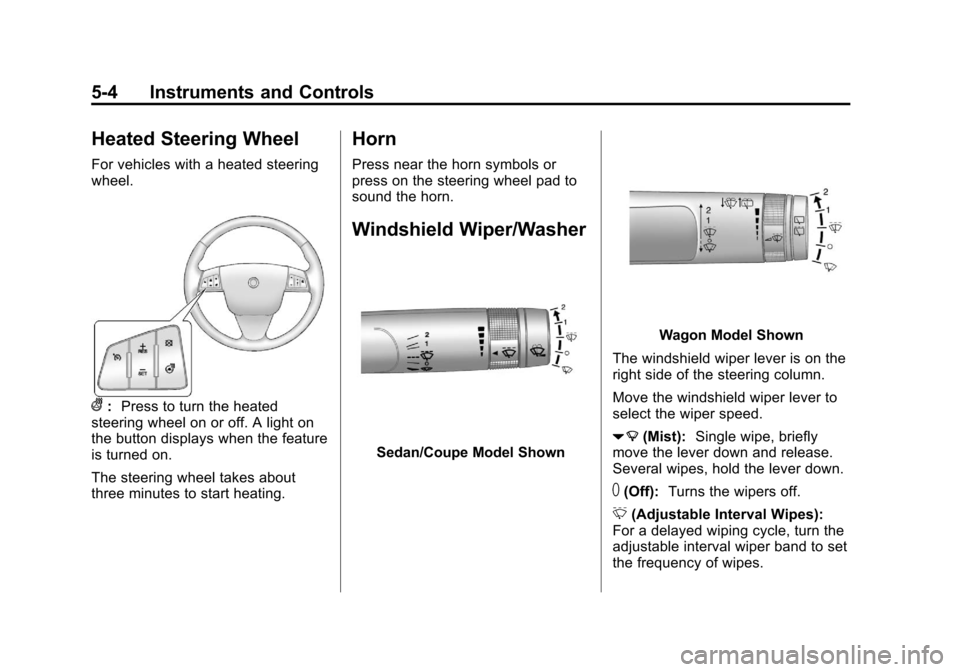
Heated Steering Wheel
For vehicles with a heated steering
wheel.
(:Press to turn the heated
steering wheel on or off. A light on
the button displays when the feature
is turned on.
The steering wheel takes about
three minutes to start heating.
Horn
Press near the horn symbols or
press on the steering wheel pad to
sound the horn.
Windshield Wiper/Washer
Sedan/Coupe Model Shown
Wagon Model Shown
The windshield wiper lever is on the
right side of the steering column.
Move the windshield wiper lever to
select the wiper speed.
7 (Mist): Single wipe, briefly
move the lever down and release.
Several wipes, hold the lever down.
T(Off): Turns the wipers off.
& (Adjustable Interval Wipes):
For a delayed wiping cycle, turn the
adjustable interval wiper band to set
the frequency of wipes.
Page 188 of 496
Black plate (48,1)Cadillac CTS/CTS-V Owner Manual - 2011
5-48 Instruments and Controls
Access)on page 2‑7or“Keyless
Locking” later in this section for
more information.
Press the customization button until
Remote Door Lock appears on the
DIC display. Press the set/reset
button once to access the settings
for this feature. Then press the
menu up/down button to scroll
through the following settings:
Off: There will be no feedback
when you press the lock button on
the transmitter.
Lights Only: The exterior lamps
will flash when you press the lock
button on the transmitter.
Horn Only: The horn will sound on
the second press of the lock button
on the transmitter.
Horn & Lights (default): The
exterior lamps will flash when you
press the lock button on the
transmitter, and the horn will sound
when the lock button is pressed
again within five seconds of the
previous command. No Change:
No change will be
made to this feature. The current
setting will remain.
To select a setting, press the set/
reset button while the desired
setting is displayed on the DIC.
Remote Door Unlock Feedback
This feature allows you to select the
type of feedback you will receive
when unlocking the vehicle with the
Remote Keyless Entry (RKE) or
keyless access transmitter, or when
the vehicle is automatically
unlocked using the Keyless Unlock
feature. You will not receive
feedback when unlocking the
vehicle with the transmitter if the
doors are open. See Remote
Keyless Entry (RKE) System
Operation (Key Access)
on
page 2‑5or Remote Keyless Entry
(RKE) System Operation (Keyless
Access)
on page 2‑7or “Keyless
Unlock” later in this section for more
information. Press the customization button until
Remote Door Unlock appears on
the DIC display. Press the set/reset
button once to access the settings
for this feature. Then press the
menu up/down button to scroll
through the following settings:
Lights Off:
The exterior lamps will
not flash when you press the unlock
button on the transmitter.
Lights On (default): The exterior
lamps will flash when you press the
unlock button on the transmitter.
No Change: No change will be
made to this feature. The current
setting will remain.
To select a setting, press the set/
reset button while the desired
setting is displayed on the DIC.
Exit Lighting
This feature allows you to select the
amount of time you want the
exterior lamps to remain on when it
is dark enough outside. This
happens after the key is turned from
ON/RUN to LOCK/OFF.
Page 190 of 496

Black plate (50,1)Cadillac CTS/CTS-V Owner Manual - 2011
5-50 Instruments and Controls
To select a setting, press the set/
reset button while the desired
setting is displayed on the DIC.
Keyless Locking
If the vehicle has the keyless
access system, this feature allows
you to select whether the doors
automatically lock during normal
vehicle exit. When the ignition is
turned off and all doors become
closed, the vehicle will determine
how many keyless access
transmitters remain in the vehicle
interior. If at least one keyless
access transmitter has been
removed from the interior of the
vehicle, the doors will lock after
several seconds.
For example, if there are two
keyless access transmitters in the
vehicle and one is removed, the
other will be locked in. The keyless
access transmitter locked in the
vehicle can still be used to start the
vehicle or unlock the doors,
if needed. A person approaching the
outside of the locked vehicle withoutan authorized keyless access
transmitter, however, will not be able
to open the door, even with a
transmitter in the vehicle. See the
Keyless Access information for
Remote Keyless Entry (RKE)
System Operation (Key Access)
on
page 2‑5or Remote Keyless Entry
(RKE) System Operation (Keyless
Access)
on page 2‑7for more
information.
You may temporarily disable the
keyless locking feature by pressing
the door unlock switch for
three seconds on an open door.
Keyless locking will then remain
disabled until a door lock switch is
pressed or until the power mode
transitions from the off power mode.
To select whether the horn sounds
or the lights flash when the vehicle
is locked, see “Remote Door Lock”
earlier in this section. Press the customization button until
Keyless Locking appears on the
DIC display. Press the set/reset
button once to access the settings
for this feature. Then press the
menu up/down button to scroll
through the following settings:
Off (default):
The keyless locking
feature will be disabled.
On: The keyless locking feature will
be enabled.
The doors will automatically lock
several seconds after you turn the
ignition off, remove a keyless
access transmitter from the interior
of the vehicle, and close all of the
doors.
No Change: No change will be
made to this feature. The current
setting will remain.
To select a setting, press the set/
reset button while the desired
setting is displayed on the DIC.