oil temperature CADILLAC CTS 2011 2.G Owners Manual
[x] Cancel search | Manufacturer: CADILLAC, Model Year: 2011, Model line: CTS, Model: CADILLAC CTS 2011 2.GPages: 496, PDF Size: 7.71 MB
Page 5 of 496
Black plate (5,1)Cadillac CTS/CTS-V Owner Manual - 2011
Introduction v
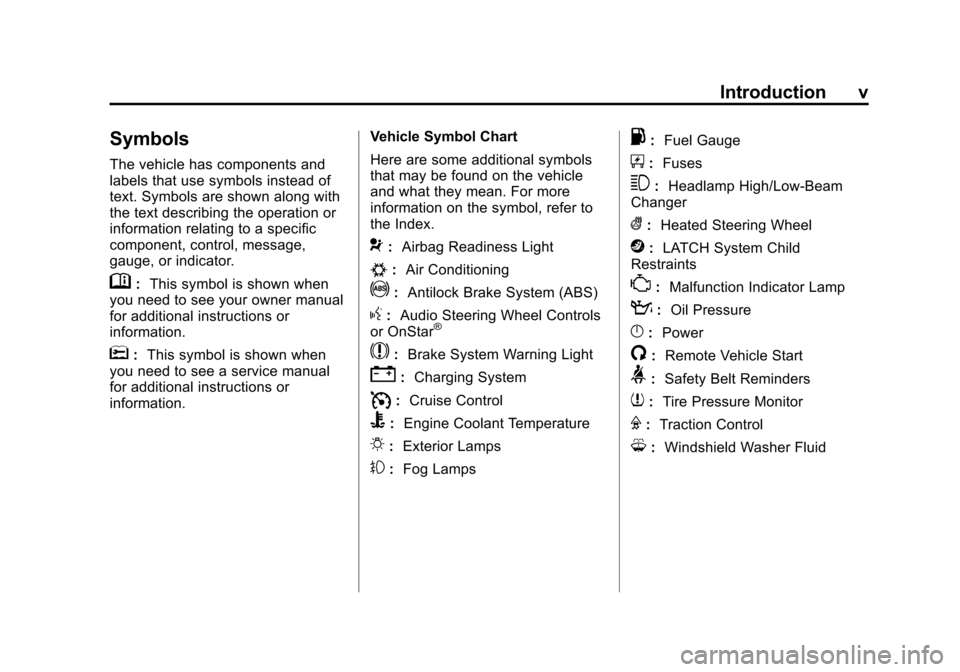
Symbols
The vehicle has components and
labels that use symbols instead of
text. Symbols are shown along with
the text describing the operation or
information relating to a specific
component, control, message,
gauge, or indicator.
M:This symbol is shown when
you need to see your owner manual
for additional instructions or
information.
*: This symbol is shown when
you need to see a service manual
for additional instructions or
information. Vehicle Symbol Chart
Here are some additional symbols
that may be found on the vehicle
and what they mean. For more
information on the symbol, refer to
the Index.
9:
Airbag Readiness Light
#:Air Conditioning
!:Antilock Brake System (ABS)
g:Audio Steering Wheel Controls
or OnStar®
$: Brake System Warning Light
":Charging System
I:Cruise Control
B: Engine Coolant Temperature
O:Exterior Lamps
#:Fog Lamps
.: Fuel Gauge
+:Fuses
3: Headlamp High/Low-Beam
Changer
(: Heated Steering Wheel
j:LATCH System Child
Restraints
*: Malfunction Indicator Lamp
::Oil Pressure
}:Power
/:Remote Vehicle Start
>:Safety Belt Reminders
7:Tire Pressure Monitor
F:Traction Control
M:Windshield Washer Fluid
Page 45 of 496
Black plate (13,1)Cadillac CTS/CTS-V Owner Manual - 2011
Keys, Doors and Windows 2-13
After the vehicle's engine has been
started two times using the remote
start button, the ignition must be
turned on and then back off before
the remote start procedure can be
used again.
Shutting the Engine Off After a
Remote Start
To manually shut off the engine after
a remote start, do any of the
following:
.Press/until the parking lamps
turn off.
.Turn on the hazard warning
flashers.
.Turn the ignition switch on and
then off. Conditions in Which Remote Start
Will Not Work
The remote vehicle start feature will
not operate if any of the following
occur:
.The ignition is in any position
other than LOCK/OFF.
.A keyless access transmitter is
inside the vehicle.
.The vehicle's hood is not closed.
.The hazard warning flashers
are on.
.There is an emission control
system malfunction.
.The engine coolant temperature
is too high.
.The oil pressure is low.
.Two remote vehicle starts have
already been used. The
maximum number of remote
starts or remote start attempts
between ignition cycles with the
key is two.
Page 141 of 496
Black plate (1,1)Cadillac CTS/CTS-V Owner Manual - 2011
Instruments and Controls 5-1
Instruments and
Controls
Controls
Steering Wheel Adjustment . . . 5-2
Steering Wheel Controls(Audio) . . . . . . . . . . . . . . . . . . . . . . 5-3
Heated Steering Wheel . . . . . . . 5-4
Horn . . . . . . . . . . . . . . . . . . . . . . . . . . 5-4
Windshield Wiper/Washer . . . . . 5-4
Rear Window Wiper/ Washer . . . . . . . . . . . . . . . . . . . . . . 5-6
Headlamp Washer . . . . . . . . . . . . 5-7
Compass . . . . . . . . . . . . . . . . . . . . . 5-7
Clock . . . . . . . . . . . . . . . . . . . . . . . . . 5-8
Power Outlets . . . . . . . . . . . . . . . . . 5-9
Cigarette Lighter . . . . . . . . . . . . . . 5-9
Ashtrays . . . . . . . . . . . . . . . . . . . . . 5-10
Warning Lights, Gauges, and
Indicators
Warning Lights, Gauges, and Indicators . . . . . . . . . . . . . . . . . . 5-10
Instrument Cluster . . . . . . . . . . . 5-11
Speedometer . . . . . . . . . . . . . . . . 5-13
Odometer . . . . . . . . . . . . . . . . . . . . 5-13
Trip Odometer . . . . . . . . . . . . . . . 5-13 Tachometer . . . . . . . . . . . . . . . . . . 5-13
Fuel Gauge . . . . . . . . . . . . . . . . . . 5-13
Boost Gauge . . . . . . . . . . . . . . . . 5-14
Engine Speed Limiter . . . . . . . . 5-15
Engine Oil Pressure
Gauge . . . . . . . . . . . . . . . . . . . . . . 5-15
Engine Coolant Temperature Gauge . . . . . . . . . . . . . . . . . . . . . . 5-16
Safety Belt Reminders . . . . . . . 5-17
Airbag Readiness Light . . . . . . 5-17
Passenger Airbag Status Indicator . . . . . . . . . . . . . . . . . . . . 5-18
Charging System Light . . . . . . 5-19
Malfunction Indicator Lamp . . . . . . . . . . . . . 5-19
Brake System Warning Light . . . . . . . . . . . . . . . . . . . . . . . 5-22
Antilock Brake System (ABS) Warning Light . . . . . . . . . . . . . . 5-23
Up-Shift Light . . . . . . . . . . . . . . . . 5-24
Traction Control System (TCS)/StabiliTrak
®Light . . . . 5-24
Engine Coolant Temperature Warning Light . . . . . . . . . . . . . . 5-25
Tire Pressure Light . . . . . . . . . . 5-25
Engine Oil Pressure Light . . . . 5-26
Security Light . . . . . . . . . . . . . . . . 5-26
High-Beam on Light . . . . . . . . . 5-26 Fog Lamp Light . . . . . . . . . . . . . . 5-27
Lamps on Reminder . . . . . . . . . 5-27
Cruise Control Light . . . . . . . . . 5-27
Information Displays
Driver Information
Center (DIC) . . . . . . . . . . . . . . . 5-27
Vehicle Messages
Vehicle Messages . . . . . . . . . . . 5-31
Battery Voltage and ChargingMessages . . . . . . . . . . . . . . . . . . 5-31
Brake System Messages . . . . 5-32
Compass Messages . . . . . . . . . 5-34
Cruise Control Messages . . . . 5-34
Door Ajar Messages . . . . . . . . . 5-34
Engine Cooling System Messages . . . . . . . . . . . . . . . . . . 5-35
Engine Oil Messages . . . . . . . . 5-35
Engine Power Messages . . . . 5-36
Fuel System Messages . . . . . . 5-36
Key and Lock Messages . . . . . 5-36
Lamp Messages . . . . . . . . . . . . . 5-39
Object Detection System Messages . . . . . . . . . . . . . . . . . . 5-39
Ride Control System Messages . . . . . . . . . . . . . . . . . . 5-40
Airbag System Messages . . . . 5-42
Page 155 of 496
Black plate (15,1)Cadillac CTS/CTS-V Owner Manual - 2011
Instruments and Controls 5-15
Engine Speed Limiter
This feature prevents the engine
speed from reaching an unsafe
level. If the level is too high, the
throttle closes or limits the fuel
supply until the engine speed
returns to a safe level. Throttle
operation and fuel supply return to
normal when engine speed is
lowered.
For the CTS-V, the tachometer
tracer lights flash prior to reaching
engine speed limit. The tracer lights
also flash on automatic transmission
vehicles while in the DSC or Tap
Shift modes.
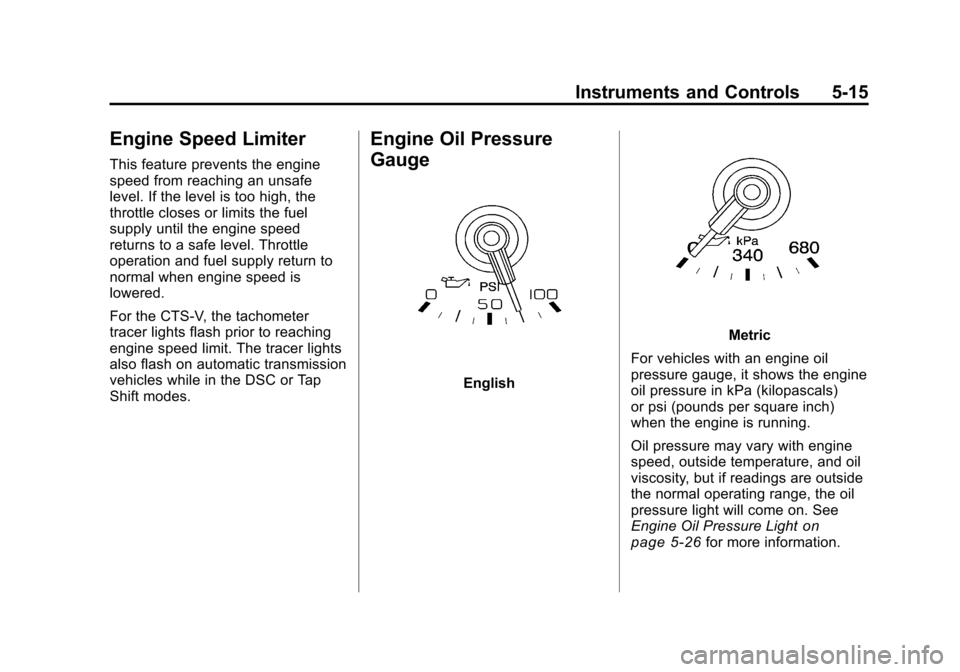
Engine Oil Pressure
Gauge
English
Metric
For vehicles with an engine oil
pressure gauge, it shows the engine
oil pressure in kPa (kilopascals)
or psi (pounds per square inch)
when the engine is running.
Oil pressure may vary with engine
speed, outside temperature, and oil
viscosity, but if readings are outside
the normal operating range, the oil
pressure light will come on. See
Engine Oil Pressure Light
on
page 5‑26for more information.
Page 156 of 496
Black plate (16,1)Cadillac CTS/CTS-V Owner Manual - 2011
5-16 Instruments and Controls
A reading outside the normal
operating range may be caused by
a dangerously low oil level or some
other problem causing low oil
pressure. Oil should be checked as
soon as possible. See Oil Pressure
Low Stop Engine underDriver
Information Center (DIC)
on
page 5‑27and Engine Oilon
page 10‑11.
{WARNING
Do not keep driving if the oil
pressure is low. The engine can
become so hot that it catches fire.
Someone could be burned. Check
the oil as soon as possible and
have the vehicle serviced.
Notice: Lack of proper engine oil
maintenance can damage the
engine. The repairs would not be
covered by the vehicle warranty.
Always follow the maintenance
schedule in this manual for
changing engine oil.
Engine Coolant
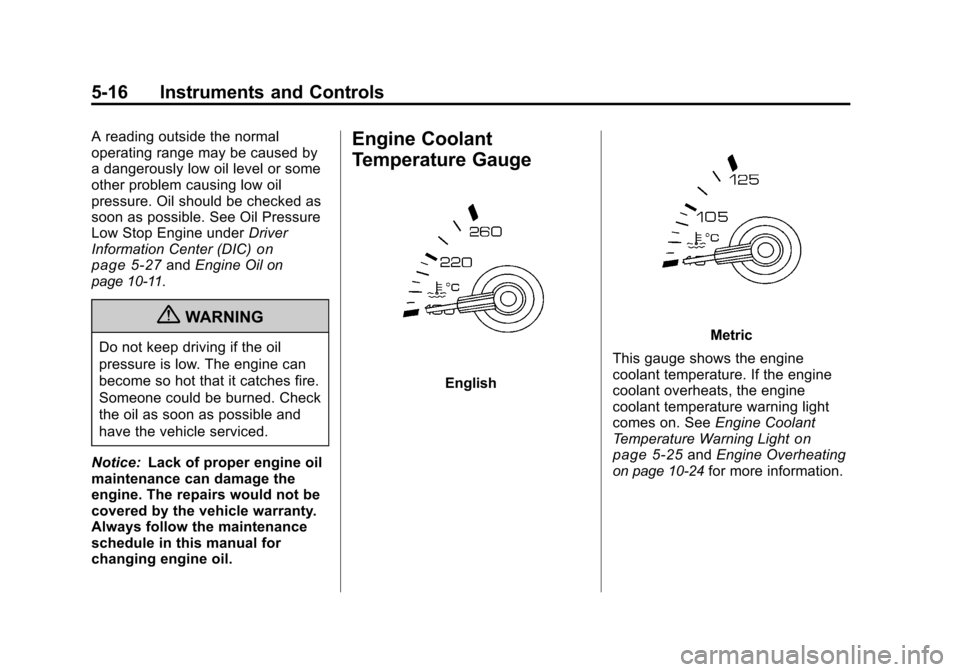
Temperature Gauge
English
Metric
This gauge shows the engine
coolant temperature. If the engine
coolant overheats, the engine
coolant temperature warning light
comes on. See Engine Coolant
Temperature Warning Light
on
page 5‑25and Engine Overheatingon page 10‑24for more information.
Page 171 of 496
Black plate (31,1)Cadillac CTS/CTS-V Owner Manual - 2011
Instruments and Controls 5-31
Trans (Transmission) Temp
(Temperature) (CTS-V Only)
This display shows the transmission
fluid temperature in either degrees
Fahrenheit (°F) or degrees
Celsius (°C).
Oil Pressure (CTS-V Only)
This display shows the oil pressure
in either pounds per square
inch (psi) or kilopascals (kPa).
Lateral Acceleration (CTS-V Only)
Lateral Acceleration measures the
force of a turn or corner. For
example, when turning right, it
forces to the left. This gauge
displays the“g”force from 0.0 g
to 2.0 g.
Blank Display
This display shows no information.
DIC Compass
The vehicle may have a compass in
the Driver Information Center (DIC).
See Compass
on page 5‑7for
information.
Vehicle Messages
Messages displayed on the DIC
indicate the status of the vehicle or
some action may be needed to
correct a condition. Multiple
messages may appear one after
another.
The messages that do not require
immediate action can be
acknowledged and cleared by
pressing
V(Set/Reset).
The messages that require
immediate action cannot be cleared
until that action is performed.
All messages should be taken
seriously and clearing the message
does not correct the problem.
The following are the possible
messages and some information
about them.
Battery Voltage and
Charging Messages
Battery Saver Active
This message displays when the
system detects that the battery
voltage is dropping below expected
levels. The battery saver system
starts reducing certain features of
the vehicle that may be noticeable.
At the point that the features are
disabled, this message is displayed.
It means that the vehicle is trying to
save the charge in the battery.
Turn off all unnecessary
accessories to allow the battery to
recharge.
The normal battery voltage range is
11.5 to 15.5 volts. You can monitor
battery voltage on the DIC by
pressing the vehicle information
button until Battery Voltage is
displayed.
Page 175 of 496
Black plate (35,1)Cadillac CTS/CTS-V Owner Manual - 2011
Instruments and Controls 5-35
Engine Cooling System
Messages
Engine Hot A/C (Air
Conditioning) Off
This message displays when the
engine coolant becomes hotter than
the normal operating temperature.
SeeEngine Coolant Temperature
Gauge
on page 5‑16. To avoid
added strain on a hot engine, the air
conditioning compressor
automatically turns off. When the
coolant temperature returns to
normal, the air conditioning
compressor turns back on. You can
continue to drive the vehicle.
If this message continues to appear,
have the system repaired by your
dealer as soon as possible to avoid
damage to the engine.
Engine Overheated Idle Engine
Notice: If you drive your vehicle
while the engine is overheating,
severe engine damage may
occur. If an overheat warning
appears on the instrument panel
cluster and/or DIC, stop the
vehicle as soon as possible. Do
not increase the engine speed
above normal idling speed. See
Engine Overheating
on page 10‑24for more information.
This message displays when the
engine coolant temperature is too
hot. Stop and allow the vehicle to
idle until it cools down. If the
message does not clear in a
few minutes or if the overheat light
stays on, shut the vehicle off and
have it serviced before driving
again. See Engine Coolant
Temperature Warning Light
on
page 5‑25.
See Overheated Engine Protection
Operating Mode
on page 10‑25for
information on driving to a safe
place in an emergency.
Engine Oil Messages
Change Engine Oil Soon
When this message displays, it
means that service is required for
the vehicle. See your dealer. See
Scheduled Maintenance
on
page 11‑3and Engine Oilon
page 10‑11for more information.
When you reset the Change Engine
Oil Soon message by clearing it
from the display, you still must reset
the engine oil life system separately.
For more information on resetting
the engine oil life system, see
Engine Oil Life System
on
page 10‑14.
Engine Oil Low Add Oil
If the vehicle has an oil level sensor,
this message displays if the oil level
in the vehicle is low. Check the oil
level and correct it as necessary.
You may need to let the vehicle cool
or warm up and cycle the ignition to
be sure this message clears.
Page 281 of 496

Black plate (21,1)Cadillac CTS/CTS-V Owner Manual - 2011
Driving and Operating 9-21
When first starting the vehicle,
the engine idle speed will be
elevated to allow the catalytic
converter, an emissions control
device, to quickly reach
operating temperature. After
approximately 20 seconds, the
engine will begin to transition to
it's normal, quieter idle speed,
which can vary depending on
the temperature. This is normal
operation.
Notice: Cranking the engine for
long periods of time, by returning
the key to the START position
immediately after cranking has
ended, can overheat and damage
the cranking motor, and drain the
battery. Wait at least 15 seconds
between each try, to let the
cranking motor cool down.
2. If the engine does not start after 5‐10 seconds, especially in
very cold weather (below 0°F
or−18°C), it could be flooded
with too much gasoline. Try
pushing the accelerator pedal all
the way to the floor and holding it there as you hold the key in
START for up to a maximum of
15 seconds. Wait at least
15 seconds between each try, to
allow the cranking motor to cool
down. When the engine starts,
let go of the key and accelerator.
If the vehicle starts briefly but
then stops again, do the same
thing. This clears the extra
gasoline from the engine. Do not
race the engine immediately
after starting it. Operate the
engine and transmission gently
until the oil warms up and
lubricates all moving parts.
Notice: The engine is designed to
work with the electronics in the
vehicle. If you add electrical parts
or accessories, you could change
the way the engine operates.
Before adding electrical
equipment, check with your
dealer. If you do not, the engine
might not perform properly. Any
resulting damage would not be
covered by the vehicle warranty.Engine Coolant Heater
Vehicles with the engine coolant
heater can use this option
in cold weather conditions at or
below −18°C (0°F) for easier
starting and better fuel economy
during engine warm-up. Plug in the
coolant heater at least four hours
before starting your vehicle. An
internal thermostat in the plug-end
of the cord may exist which will
prevent engine coolant heater
operation at temperatures
above −18°C (0°F).
To Use the Engine Coolant
Heater
1. Turn off the engine.
2. Open the hood and unwrap the
electrical cord. The cord is
located near the driver side strut
tower.
Remove the plastic cap to
access the plug.
Page 314 of 496
Black plate (54,1)Cadillac CTS/CTS-V Owner Manual - 2011
9-54 Driving and Operating
Passing
More passing distance is needed
when towing a trailer. Because the
rig is longer, it is necessary to go
much farther beyond the passed
vehicle before returning to the lane.
Backing Up
Hold the bottom of the steering
wheel with one hand. Then, to move
the trailer to the left, move that hand
to the left. To move the trailer to the
right, move your hand to the right.
Always back up slowly and,
if possible, have someone
guide you.
Making Turns
Notice:Making very sharp turns
while trailering could cause the
trailer to come in contact with the
vehicle. The vehicle could be
damaged. Avoid making very
sharp turns while trailering.
When turning with a trailer, make
wider turns than normal. Do this so
the trailer won't strike soft shoulders, curbs, road signs, trees
or other objects. Avoid jerky or
sudden maneuvers. Signal well in
advance.
Turn Signals When Towing a
Trailer
The arrows on the instrument panel
flash whenever signaling a turn or
lane change. Properly hooked up,
the trailer lamps also flash, telling
other drivers the vehicle is turning,
changing lanes, or stopping.
When towing a trailer, the arrows on
the instrument panel flash for turns
even if the bulbs on the trailer are
burned out. For this reason you may
think other drivers are seeing the
signal when they are not. It is
important to check occasionally to
be sure the trailer bulbs are still
working.
Driving On Grades
Reduce speed and shift to a
lower gear before starting down a
long or steep downgrade. If the
transmission is not shifted down, thebrakes might have to be used so
much that they would get hot and no
longer work well.
Vehicles with an automatic
transmission can tow in D (Drive)
but M (Manual Mode) is
recommended. Shift the
transmission to a lower gear if the
transmission shifts too often under
heavy loads and/or hilly conditions.
For vehicles with a manual
transmission, it is better not to use
the highest gear.
When towing at high altitude on
steep uphill grades, consider the
following: Engine coolant will boil at
a lower temperature than at normal
altitudes. If the engine is turned off
immediately after towing at high
altitude on steep uphill grades, the
vehicle may show signs similar to
engine overheating. To avoid this,
let the engine run while parked,
preferably on level ground, with the
automatic transmission in P (Park)
for a few minutes before turning the
engine off. For vehicles with manual
transmissions, let the engine run
Page 331 of 496

Black plate (13,1)Cadillac CTS/CTS-V Owner Manual - 2011
Vehicle Care 10-13
Use of Substitute Engine Oils if
dexos™is unavailable: In the
event that dexos™ approved
engine oil is not available at an oil
change or for maintaining proper
oil level, you may use substitute
engine oil displaying the API
Starburst symbol and of
SAE 5W-30 viscosity grade. Use
of oils that do not meet the
dexos™ specification, however,
may result in reduced
performance under certain
circumstances.
.Viscosity Grade
SAE 5W-30 is best viscosity
grade for the vehicle. Do not use
other viscosity grade oils such
as SAE 10W‐30, 10W‐40,
or 20W-50.
Cold Temperature Operation: In
an area of extreme cold, where
the temperature falls
below −29°C (−20°F), an
SAE 0W-30 oil should be used.
An oil of this viscosity grade will
provide easier cold starting for
the engine at extremely low
temperatures. When selecting
an oil of the appropriate viscosity
grade, be sure to always select
an oil that meets the required
specification, dexos™. See
“Specification” for more
information.
Engine Oil Additives/Engine
Oil Flushes
Do not add anything to the oil. The
recommended oils that meet the
dexos™ certification mark are all
that is needed for good performance
and engine protection.
Engine oil system flushes are not
recommended and could cause
engine damage not covered by the
vehicle warranty.