infotainment CADILLAC CTS 2012 2.G Infotainment Manual
[x] Cancel search | Manufacturer: CADILLAC, Model Year: 2012, Model line: CTS, Model: CADILLAC CTS 2012 2.GPages: 76, PDF Size: 0.61 MB
Page 22 of 76
Black plate (22,1)Cadillac CTS/CTS-V Navigation System (Includes Mex) - 2012
22 Infotainment System
If the CD/DVD is not playing
correctly, for any other reason, try a
known good disc.
If any error occurs repeatedly or if
an error cannot be corrected,
contact your dealer.
MP3
Using an MP3 CD and DVD
MP3 Format
There are guidelines that must be
met, when creating an MP3 disc.
If the guidelines are not met when
recording a CD-R(W), the CD may
not play. The guidelines are:
.Sampling rate: 8 kHz, 16 kHz,
22.05 kHz, 24 kHz, 32 kHz,
44.1 kHz, and 48 kHz.
.Bit rates supported: 8, 16, 24,
32, 40, 48, 56, 64, 80, 96, 112,
128, 144, 160, 192, 224, 256,
and 320 kbps.
.ID3 tag information is displayed
by the radio if it is available. The
radio will display a filename,
song name, artist name, album
name, and directory name.
.Maximum number of folders is
255 with a maximum hierarchy
of eight folders.
.Create a folder structure that
makes it easy to find songs
while driving. Each folder or
album should contain 18 songs
or less.
.It is recommended that there is a
maximum of 1024 files on a disc.
.The files can be recorded on a
CD-R or CD-RW with a
maximum capacity of 700 MB.Root Directory
The root directory is treated as a
folder. If the root directory has
compressed audio files, the
directory displays as DISC. All files
contained directly under the root
directory are accessed prior to any
root directory folders. However,
playlists can always be accessed
before root folders or files.
Empty Directory or Folder
If a root directory or a folder exists
somewhere in the file structure that
contains only folders/subfolders and
no compressed files directly
beneath them, the player advances
to the next folder in the file structure
that contains compressed audio
files and the empty folder will not be
displayed or numbered.
Page 23 of 76
Black plate (23,1)Cadillac CTS/CTS-V Navigation System (Includes Mex) - 2012
Infotainment System 23
No Folder
When the CD contains only
compressed files, the files are
located under the root folder. The
next and previous folder functions
have no function on a CD that was
recorded without folders or playlists.
When displaying the name of the
folder the radio displays Disc.
When the CD contains only playlists
and compressed audio files, but no
folders, all files are located under
the root folder. The left and right
arrow buttons search playlists (Px)
first and then goes to the root folder.
When the radio displays the name
of the folder the radio
displays DISC.Order of Play
Tracks are played in the following
order:
.Play begins from the first track in
the first playlist and continues
sequentially through all tracks in
each playlist. When the last
track of the last playlist has been
played, play continues from the
first track of the first playlist.
.If the CD does not contain any
playlists, then play begins from
the first track under the root
directory. When all tracks from
the root directory have been
played, play continues from files
according to their numerical
listing. After playing the last
track from the last folder, play
begins again at the first track of
the first folder or root directory.
When play enters a new folder, the
display automatically shows the new
folder name. The new track name
displays. File System and Naming
The song name that displays is the
song name contained in the file.
If the song name is not present in
the file, then the radio displays the
file name with the extension (such
as .mp3) as the track name.
Preprogrammed Playlists
Preprogrammed playlists which
were created by WinAmp™,
MusicMatch™, or Real Jukebox™
software can be accessed, however,
there is not editing capability. These
playlists are treated as special
folders containing compressed
audio song files.
Playing an MP3
With the ignition on, insert a MP3
CD partway into the slot, label side
up. The player pulls it in and the
MP3 should begin playing. While
playing a MP3, the navigation
system is available. If a MP3 is
inserted with the system off and the
ignition on, it starts to play.
Page 24 of 76
Black plate (24,1)Cadillac CTS/CTS-V Navigation System (Includes Mex) - 2012
24 Infotainment System
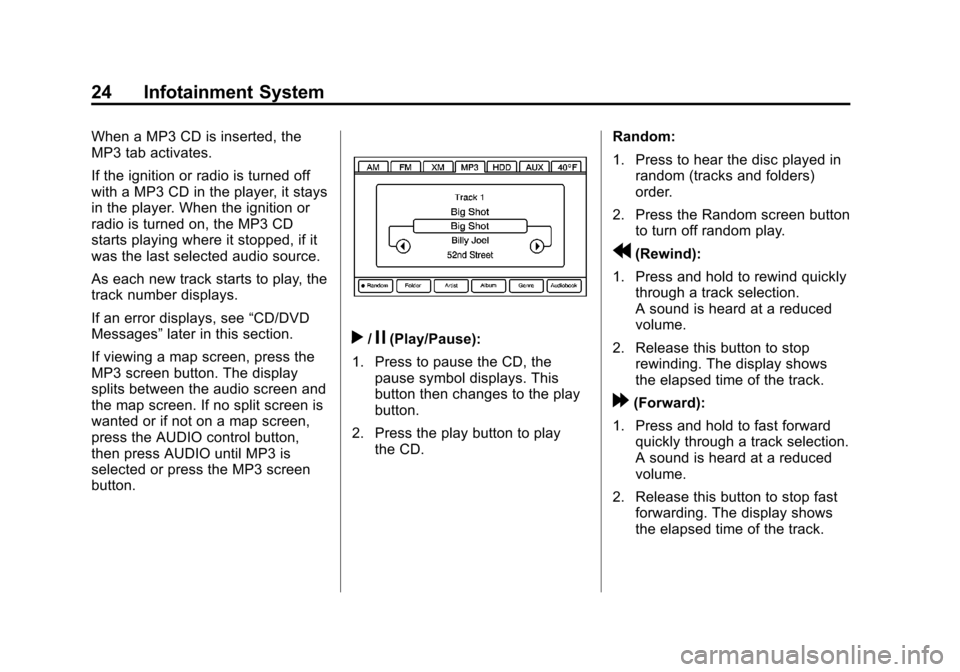
When a MP3 CD is inserted, the
MP3 tab activates.
If the ignition or radio is turned off
with a MP3 CD in the player, it stays
in the player. When the ignition or
radio is turned on, the MP3 CD
starts playing where it stopped, if it
was the last selected audio source.
As each new track starts to play, the
track number displays.
If an error displays, see“CD/DVD
Messages” later in this section.
If viewing a map screen, press the
MP3 screen button. The display
splits between the audio screen and
the map screen. If no split screen is
wanted or if not on a map screen,
press the AUDIO control button,
then press AUDIO until MP3 is
selected or press the MP3 screen
button.
r/j(Play/Pause):
1. Press to pause the CD, the pause symbol displays. This
button then changes to the play
button.
2. Press the play button to play the CD. Random:
1. Press to hear the disc played in
random (tracks and folders)
order.
2. Press the Random screen button to turn off random play.
r(Rewind):
1. Press and hold to rewind quickly through a track selection.
A sound is heard at a reduced
volume.
2. Release this button to stop rewinding. The display shows
the elapsed time of the track.
[(Forward):
1. Press and hold to fast forward quickly through a track selection.
A sound is heard at a reduced
volume.
2. Release this button to stop fast forwarding. The display shows
the elapsed time of the track.
Page 25 of 76
Black plate (25,1)Cadillac CTS/CTS-V Navigation System (Includes Mex) - 2012
Infotainment System 25
TUNE/TONE Knob:Turn to go to
the next or previous track.
q r(Category): Select the left or
right arrow to go to the previous or
next folder/Artist/Album/Genre on
the disc.
uSEEK /tSEEK:
1. Press the right arrow to go to the next track.
2. Press the left arrow to go to the start of the current track, if more
than five seconds have played
or to the previous track,
if five seconds or less have
played.
3. If either arrow is pressed more than once, the player will
continue moving backward or
forward through the CD. The
sound mutes while seeking.
Music Navigator: Press the center
button on the main screen to display
Music Navigator. Selecting any of the following
screen buttons, when in MP3,
displays the Music Navigator screen
for each of the following categories:
.All Songs: Press this to view all
songs stored on the Disc. Select
a song name from that list.
It may take a few minutes for the
system to show the list. Once a
song has been selected from
this category, the song name will
appear in the center button on
the main screen.
.Folder: Press to view the folders
that have been stored on the
Disc. Select a folder name to
view all songs in this folder,
select a song. It may take a few
minutes for the system to show
a list. Once a song has been
selected from this category, the
folder name appears in the
center button on the main
screen to show that music is
being played from a specific
folder.
.Artist: Press to view the artists
that have been stored on the
Disc. Select an artist name to
view all songs on that list, select
a song. It may take a few
minutes for the system to show
the list. Once a song has been
selected from this category, the
artist name appears in the
center button on the main
screen to show that music is
being played from a specific
artist.
.Album: Press to view the
albums that have been stored on
the Disc. Select an album name
to view all songs on that list,
select a song. It may take a few
minutes for the system to show
the list. Once a song has been
selected from this category, the
album name appears in the
center button on the main
screen to show that music is
being played from a specific
album.
Page 26 of 76
Black plate (26,1)Cadillac CTS/CTS-V Navigation System (Includes Mex) - 2012
26 Infotainment System
.Genre: Press to view the genres
that have been stored on the
Disc. Select a genre name to
view all songs on that list, select
a song. Once a song has been
selected from this category, the
genre name appears in the
center button on the main
screen to show that music is
being played from a specific
genre.Audiobooks are also available
through the Genre menu screen.Hard Drive Device (HDD)
With a hard drive device you are
able to record songs from your CD
player or a mass media storage
device connected by a USB
connector. The hard drive has at the
most 9 GB memory capacity for
storage of media files.
The types of formats supported by
the HDD are:
.MP3
.MP3-PRO (with Spectral Band
Replication)
.WMA
.AAC
.OGG Vorbis
.Audible.com
Recording from a CD
To record all tracks:
1. Load a CD.
To record an audio book from a
CD or a USB, you must register
with www.audible.com to receive
an ID number. The ID number
must be entered into the system.
See Audio Book later in this
section for information on
www.audible.com. See “Radio”
under Configure Menu on
page 55 for information on
entering your ID number.
2. Press REC.
3. A confirmation window displays. Press Yes to record all tracks;
press No to cancel the
operation.
A progress bar displays if Yes
was selected.
Page 27 of 76
Black plate (27,1)Cadillac CTS/CTS-V Navigation System (Includes Mex) - 2012
Infotainment System 27
To record selected tracks:
1. Load a CD.
2. Press the Track List screenbutton, located in the middle of
the screen.
3. Highlight the songs from the Music Navigator screen using
the TUNE knob.
To record an audio book from a
CD or a USB, you must register
with www.audible.com to receive
an ID number. The ID number
must be entered into the system.
See Audio Book later in this
section for information on
www.audible.com. See “Radio”
under Configure Menu on
page 55 for information on
entering your ID number.
4. Press REC. 5. A confirmation window displays.
Press Yes to record this track;
press No to cancel the
operation.
A progress bar displays if Yes
was selected.
While recording a CD to the HDD,
if the system is turned off, the
recording process stops. When the
system is turned back on, the
recording process will not continue.
Recording from a USB Device
To record all tracks:
1. Connect a USB device. To record an audio book from a
CD or a USB, you must register
with www.audible.com to receive
an ID number. The ID number
must be entered into the system.
See Audio Book later in this
section for information on
www.audible.com. See “Radio”
under Configure Menu on
page 55 for information on
entering your ID number. 2. Press REC.
3. A confirmation window displays.
Press Yes to record all tracks;
press No to cancel the
operation.
A progress bar displays if Yes
was selected.
To record selected tracks:
1. Connect a USB device.
2. Press the USB screen button, located in the middle of the
screen.
3. Select the media from the Music Navigator screen.
To record an audio book from a
CD or a USB, you must register
with www.audible.com to receive
an ID number. The ID number
must be entered into the system.
See Audio Book later in this
section for information on
www.audible.com. See “Radio”
under Configure Menu on
page 55 for information on
entering your ID number.
Page 28 of 76
Black plate (28,1)Cadillac CTS/CTS-V Navigation System (Includes Mex) - 2012
28 Infotainment System
4. Press REC.
5. A confirmation window displays.Press Yes to record this track;
press No to cancel the
operation.
A progress bar displays if Yes
was selected.
While recording a USB device to the
HDD, if the system is turned off, the
recording process stops. When the
system is turned back on, the
recording process will not continue.Edit: For tracks recorded from CD
audio discs to the HDD, it displays
“Multi Hit” on the screen when the
music information of two or more
that is the same as the current
album is retrieved from the
Gracenote database stored in the
radio. Then if the Edit button is
pressed, you can specify it for one
from the multi hit list that is
generated based on the Gracenote
database.
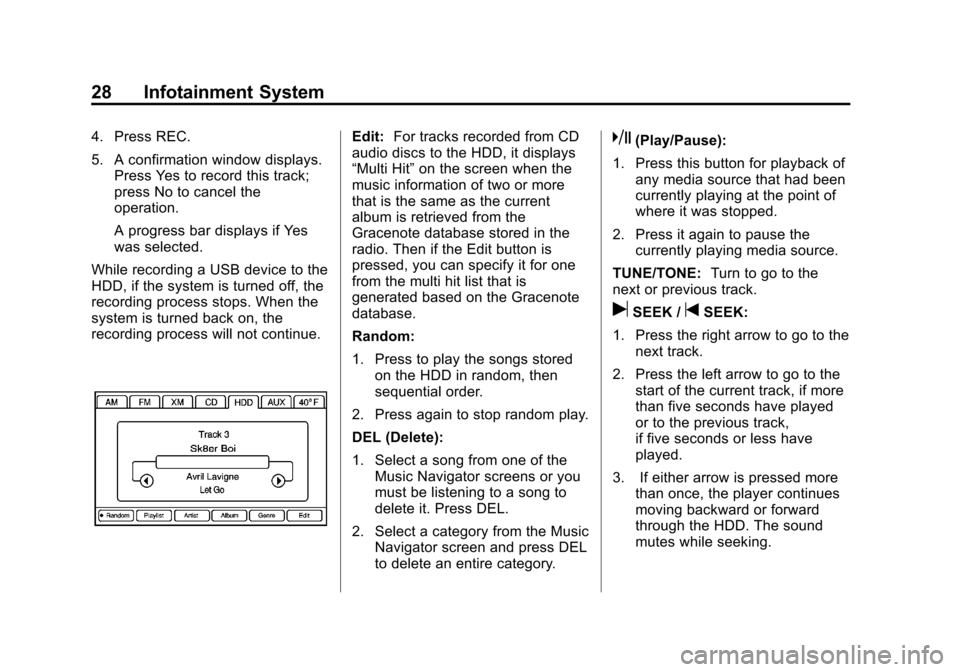
Random:
1. Press to play the songs stored on the HDD in random, then
sequential order.
2. Press again to stop random play.
DEL (Delete):
1. Select a song from one of the Music Navigator screens or you
must be listening to a song to
delete it. Press DEL.
2. Select a category from the Music Navigator screen and press DEL
to delete an entire category.k(Play/Pause):
1. Press this button for playback of any media source that had been
currently playing at the point of
where it was stopped.
2. Press it again to pause the currently playing media source.
TUNE/TONE: Turn to go to the
next or previous track.
uSEEK /tSEEK:
1. Press the right arrow to go to the next track.
2. Press the left arrow to go to the start of the current track, if more
than five seconds have played
or to the previous track,
if five seconds or less have
played.
3. If either arrow is pressed more than once, the player continues
moving backward or forward
through the HDD. The sound
mutes while seeking.
Page 29 of 76
Black plate (29,1)Cadillac CTS/CTS-V Navigation System (Includes Mex) - 2012
Infotainment System 29
q r(Category):
1. Select the left or right arrow to go to the previous or next
Album/Playlist/Artist/Genre/
Audiobook on the HDD.
2. Press the center button on the main screen to display Music
Navigator.
Music Navigator Screen
Selecting any of the following
screen buttons, when in HDD,
displays the Music Navigator screen
for each of the following categories.
All Songs:
1. Press to view all songs storedon HDD.
2. Select a song name from that list. It may take a few minutes for
the system to show the list.
Once a song has been selected
from this category, the song
name will appear in the center
button on the main screen. Playlists:
1. Press to view the playlists that
have been stored on the HDD.
2. Select a playlist name to view all songs that have been stored in
this list, select a song. Once a
song has been selected from
this category, the "Playlist”
appears in the center button on
the main screen to show that
music is being played in
this mode.
Under the playlist category, there is
a submenu button called, More
Like This.
1. Press this button to see a playlist of songs similar to the
current song is generated by
music recognition technology
and related data that are
provided by Gracenote.
2. Select a song to listen to after the list is created.
3. Press the Refresh screen button to generate the new list. Once a song has been selected
from this category, the
“AutoPlay”
appears in the center button on the
main screen to show music is being
played in this mode.
Artists:
1. Press to view the artists that have been stored on the HDD.
2. Select an artist name to view all songs in this list, select a song
to listen to.
Once a song has been selected
from this category, the “Artist”
appears in the center button on the
main screen to show that music is
being played in this mode.
Albums:
1. Press to view the albums that have been stored on the HDD.
2. Select an album name to view all songs in this list, select a
song to listen to.
Page 30 of 76
Black plate (30,1)Cadillac CTS/CTS-V Navigation System (Includes Mex) - 2012
30 Infotainment System
Once a song has been selected
from this category, the“Album”
appears in the center button on the
main screen to show that music is
being played in this mode.
Genres:
1. Press to view the genres that have been stored on the HDD.
2. Select a genre name to view all songs or audio books in this list,
select a song or book to
listen to.
Once a song or book has been
selected from this category, the
“Genre“ appears in the center button
on the main screen to show that
playback is in this mode.
Audio books are only available
through the Genre menu.
1. Press to view the genres that have been stored on the HDD.
Select an audio book name
(book title) to view all sections
in it. 2. Select a section to listen to.
If the “Last position” screen
button is pressed, the audio
book starts playback from the
position it was stopped the last
time played.
Compressed Audio
The HDD will play an MP3/WMA
disc that contains compressed CD
audio from all formats that are
supported. By default the radio
shows the CD label on the left side
of the screen but plays all supported
file formats in the order in which
they were recorded to the CD.
Background Recording
A CD can be copied and then
listened to or a CD can be recording
while listening to another source
such as AM, FM, HDD, or AUX. The
quality of the listening experience
should be the same whether
recording in the background or not,
and the speed of the recording
process does not take any longer
than normal. Timeshift cannot be activated during
the background recording function.
Duplicate Content
When record is executed the
system checks to see if the CD has
already been recorded to the hard
drive. If the entire contents of the
CD still exists on the hard drive the
system will not record the content.
If the system determines that none
or only some of a CD exists, the
entire CD records to the hard drive.
This could result in duplicate songs.
CD Eject
If the CD is ejected before the
recording process has completed,
tracks that have been completely
recorded are stored to the hard
drive, incomplete tracks are
discarded.
Page 31 of 76
Black plate (31,1)Cadillac CTS/CTS-V Navigation System (Includes Mex) - 2012
Infotainment System 31
Power Mode
If the system is turned off during a
CD or USB recording process, it will
stop. When the radio is turned back
on, the recording process needs to
be started again.
Saving HDD Favorites
During HDD playback, select one of
the lower buttons to save songs in
its category. Each category has six
presets.
To add a song from a category, you
must be listening to the song. Press
and hold the lower button until
“Favorite saved...”displays on the
screen.
Audio Book
The system is able to play back
audio book content downloaded
from www.audible.com. This content
can be transferred into the system
by either burning it to a CD or
recording it to a USB storage
device. The audio book playback requires
activation of the vehicle as a player
for downloaded content. The radio
system activates the audio-book
system when information is found
on either a CD inserted into the CD
player or if a USB storage device is
connected. Make sure the activation
file is copied onto a CD or a USB
storage device so that the
downloaded media is supported.
In the process of activation, the
Vehicle Identification Number (VIN)
number is required in order to
activate your vehicle.
Auxiliary Devices
The navigation system has an
auxiliary input jack located in the
center console. This is not an audio
output; do not plug the headphone
set into the front auxiliary input jack.
You can however, connect an
external audio device such as an
iPod, laptop computer, MP3 player,
CD changer, or cassette tape
player, etc. to the auxiliary input jack
for use as another source for audio
listening.
Drivers are encouraged to set up
any auxiliary device while the
vehicle is in P (Park). See
“Defensive Driving”
in the Index of
the vehicle owner manual for more
information on driver distraction.
To use a portable audio player,
connect a 3.5 mm (1/8 in) cable to
the auxiliary input jack. When a
device is connected, the system
detects and automatically begins
playing audio from the device over
the vehicle's speakers.
If a device is connected and you are
listening to another source (FM, XM
(if equipped), CD, MP3, etc.), press
the AUDIO control button then press
AUDIO repeatedly until AUX is
selected or press the AUX screen
button. An auxiliary device must be
connected for the AUX screen
button to appear as an option to
select.