light CADILLAC CTS 2012 2.G Owners Manual
[x] Cancel search | Manufacturer: CADILLAC, Model Year: 2012, Model line: CTS, Model: CADILLAC CTS 2012 2.GPages: 496, PDF Size: 6.36 MB
Page 400 of 496
Black plate (88,1)Cadillac CTS/CTS-V Owner Manual (Include Mex) - 2012
10-88 Vehicle Care
When using the tire sealant and
compressor kit during cold
temperatures, warm the kit in aheated environment for five minutes.
This will help to inflate the tire
faster.
If a tire goes flat, avoid further tire
and wheel damage by driving slowly
to a level place. Turn on the hazard
warning flashers. See
Hazard
Warning Flashers on page 6‑5.
See If a Tire Goes Flat on
page 10‑84 for other important
safety warnings.
Do not remove any objects that
have penetrated the tire.
1. Remove the tire sealant and compressor kit from its storage
location. See Storing the Tire
Sealant and Compressor Kit
(Wagon) on page 10‑93 or
Storing the Tire Sealant and
Compressor Kit (Coupe) on
page 10‑94 orStoring the Tire
Sealant and Compressor Kit
(Sedan) on page 10‑94.
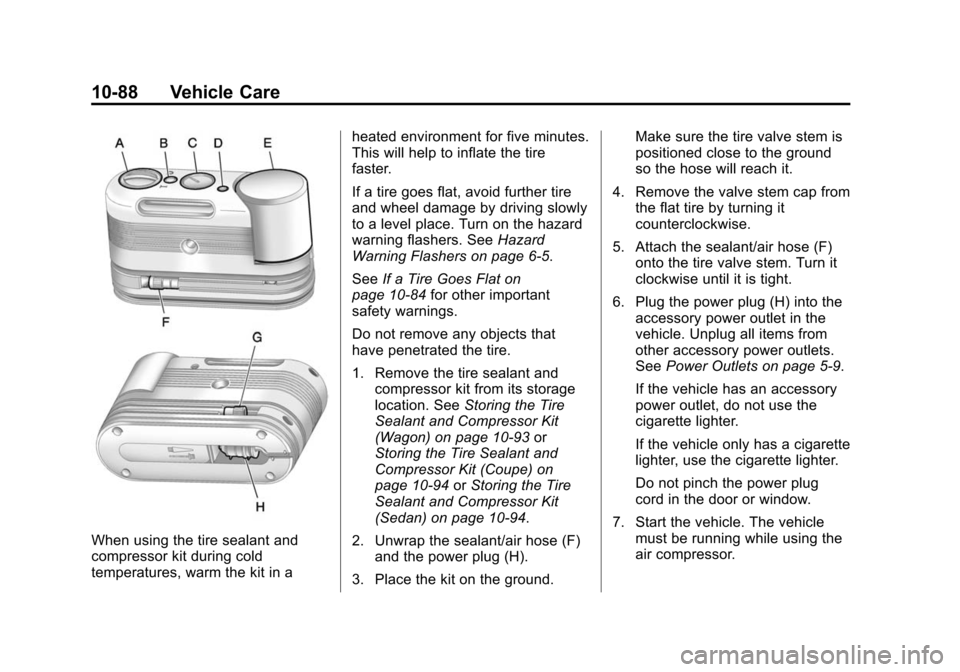
2. Unwrap the sealant/air hose (F) and the power plug (H).
3. Place the kit on the ground. Make sure the tire valve stem is
positioned close to the ground
so the hose will reach it.
4. Remove the valve stem cap from the flat tire by turning it
counterclockwise.
5. Attach the sealant/air hose (F) onto the tire valve stem. Turn it
clockwise until it is tight.
6. Plug the power plug (H) into the accessory power outlet in the
vehicle. Unplug all items from
other accessory power outlets.
See Power Outlets on page 5‑9.
If the vehicle has an accessory
power outlet, do not use the
cigarette lighter.
If the vehicle only has a cigarette
lighter, use the cigarette lighter.
Do not pinch the power plug
cord in the door or window.
7. Start the vehicle. The vehicle must be running while using the
air compressor.
Page 404 of 496

Black plate (92,1)Cadillac CTS/CTS-V Owner Manual (Include Mex) - 2012
10-92 Vehicle Care
4. Remove the tire valve stem capfrom the flat tire by turning it
counterclockwise.
5. Attach the air only hose (G) onto the tire valve stem by turning it
clockwise until it is tight.
6. Plug the power plug (H) into the accessory power outlet in the
vehicle. Unplug all items from
other accessory power outlets.
See Power Outlets on page 5‑9.
If the vehicle has an accessory
power outlet, do not use the
cigarette lighter.
If the vehicle only has a cigarette
lighter, use the cigarette lighter.
Do not pinch the power plug
cord in the door or window.
7. Start the vehicle. The vehicle must be running while using the
air compressor.
8. Turn the selector switch (A) clockwise to the Air Only
position. 9. Press the on/off button (B) to
turn the compressor on.
The compressor will inflate the
tire with air only.
10. Inflate the tire to the recommended inflation
pressure using the pressure
gauge (C). The recommended
inflation pressure can be found
on the Tire and Loading
Information label. See Tire
Pressure on page 10‑70.
The pressure gauge (C) may
read higher than the actual tire
pressure while the compressor
is on. Turn the compressor off
to get an accurate reading. The
compressor may be turned on/
off until the correct pressure is
reached.
If you inflate the tire higher
than the recommended
pressure you can adjust the
excess pressure by pressing
the pressure deflation
button (D) until the proper
pressure reading is reached. This option is only functional
when using the air only
hose (G).
11. Press the on/off button (B) to turn the tire sealant and
compressor kit off.
Be careful while handling the
tire sealant and compressor
kit as it could be warm after
usage.
12. Unplug the power plug (H) from the accessory power outlet in
the vehicle.
13. Disconnect the air only hose (G) from the tire valve
stem, by turning it
counterclockwise, and replace
the tire valve stem cap.
14. Replace the air only hose (G) and the power plug (H) and
cord back in its original
location.
15. Place the equipment in the original storage location in the
vehicle.
Page 416 of 496
Black plate (104,1)Cadillac CTS/CTS-V Owner Manual (Include Mex) - 2012
10-104 Vehicle Care
Jump Starting
For more information about the
vehicle battery, seeBattery on
page 10‑29.
If the vehicle battery has run down,
you may want to use another
vehicle and some jumper cables to
start your vehicle. Be sure to use
the following steps to do it safely.
{WARNING
Batteries can hurt you. They can
be dangerous because:
.They contain acid that can
burn you.
.They contain gas that can
explode or ignite.
.They contain enough
electricity to burn you.
If you do not follow these steps
exactly, some or all of these
things can hurt you. Notice:
Ignoring these steps
could result in costly damage to
the vehicle that would not be
covered by the warranty.
Trying to start the vehicle by
pushing or pulling it will not
work, and it could damage the
vehicle.
1. Check the other vehicle. It must
have a 12-volt battery with a
negative ground system.
Notice: Only use a vehicle that
has a 12-volt system with a
negative ground for jump
starting. If the other vehicle does
not have a 12-volt system with a
negative ground, both vehicles
can be damaged.
2. Get the vehicles close enough so the jumper cables can reach,
but be sure the vehicles are not
touching each other. If they are,
it could cause a ground
connection you do not want. You
would not be able to start your vehicle and the bad grounding
could damage the electrical
systems.
To avoid the possibility of the
vehicles rolling, set the parking
brake firmly on both vehicles
involved in the jump start
procedure. Put an automatic
transmission in P (Park) or a
manual transmission in Neutral
before setting the parking brake.
Notice: If any accessories are left
on or plugged in during the jump
starting procedure, they could be
damaged. The repairs would not
be covered by the vehicle
warranty. Whenever possible,
turn off or unplug all accessories
on either vehicle when jump
starting the vehicle.
3. Turn off the ignition on both
vehicles. Unplug unnecessary
accessories plugged into the
cigarette lighter or the accessory
power outlets. Turn off the radio
and all lamps that are not
Page 418 of 496

Black plate (106,1)Cadillac CTS/CTS-V Owner Manual (Include Mex) - 2012
10-106 Vehicle Care
{WARNING
Using an open flame near a
battery can cause battery gas to
explode. People have been hurt
doing this, and some have been
blinded. Use a flashlight if you
need more light.
Be sure the battery has enough
water. You do not need to add
water to the battery installed in
your new vehicle. But if a battery
has filler caps, be sure the right
amount of fluid is there. If it is low,
add water to take care of that
first. If you do not, explosive gas
could be present.
Battery fluid contains acid that
can burn you. Do not get it on
you. If you accidentally get it in
your eyes or on your skin, flush
the place with water and get
medical help immediately.
{WARNING
Fans or other moving engine
parts can injure you badly. Keep
your hands away from moving
parts once the engine is running.
5. Check that the jumper cables do not have loose or missing
insulation. If they do, you could
get a shock. The vehicles could
be damaged too.
Before you connect the cables,
here are some basic things you
should know. Positive (+) will go
to positive (+) or to a remote
positive (+) terminal if the vehicle
has one. Negative (−) will go to a
heavy, unpainted metal engine
part or to a remote negative (−)
terminal if the vehicle has one.
Do not connect positive (+) to
negative (−) or you will get a
short that would damage the
battery and maybe other parts
too. And do not connect the negative (−) cable to the
negative (−) terminal on the dead
battery because this can cause
sparks.
6. Connect the red positive (+)
cable to the positive (+) terminal
of the dead battery. Use a
remote positive (+) terminal if the
vehicle has one.
7. Do not let the other end touch metal. Connect it to the
positive (+) terminal of the
good battery. Use a remote
positive (+) terminal if the vehicle
has one.
Page 422 of 496
Black plate (110,1)Cadillac CTS/CTS-V Owner Manual (Include Mex) - 2012
10-110 Vehicle Care
4. Put the vehicle in P (Park) for anautomatic transmission or in
1 (First) for a manual
transmission.
5. Securely attach the vehicle being towed to the dolly.
6. Clamp the steering wheel in a straight-ahead position with a
clamping device designed for
towing.
7. Turn the ignition to LOCK/OFF.
Dolly Towing (All-Wheel-Drive
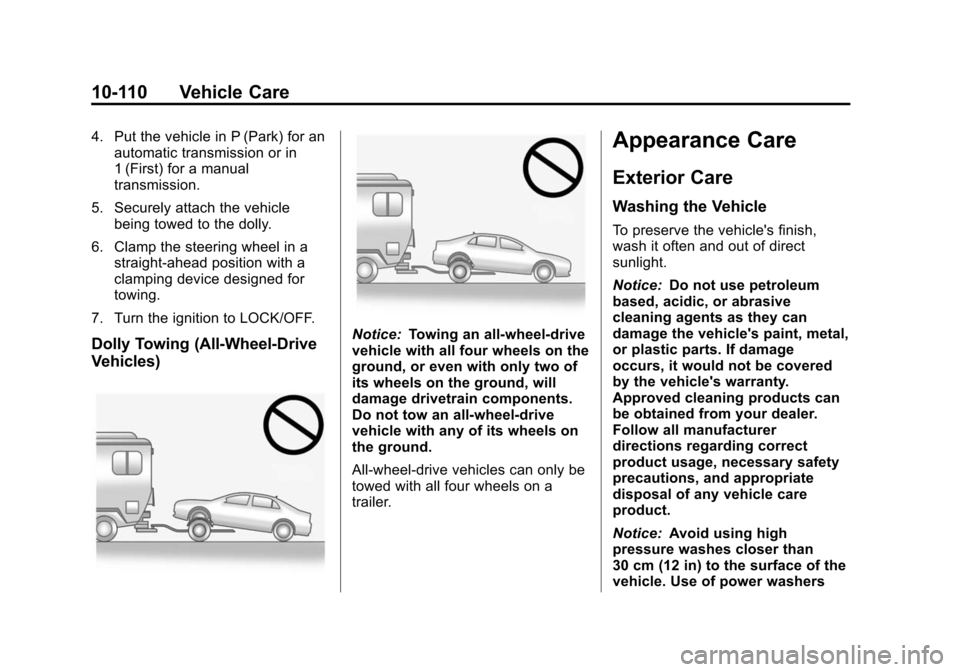
Vehicles)Notice: Towing an all-wheel-drive
vehicle with all four wheels on the
ground, or even with only two of
its wheels on the ground, will
damage drivetrain components.
Do not tow an all-wheel-drive
vehicle with any of its wheels on
the ground.
All-wheel-drive vehicles can only be
towed with all four wheels on a
trailer.
Appearance Care
Exterior Care
Washing the Vehicle
To preserve the vehicle's finish,
wash it often and out of direct
sunlight.
Notice: Do not use petroleum
based, acidic, or abrasive
cleaning agents as they can
damage the vehicle's paint, metal,
or plastic parts. If damage
occurs, it would not be covered
by the vehicle's warranty.
Approved cleaning products can
be obtained from your dealer.
Follow all manufacturer
directions regarding correct
product usage, necessary safety
precautions, and appropriate
disposal of any vehicle care
product.
Notice: Avoid using high
pressure washes closer than
30 cm (12 in) to the surface of the
vehicle. Use of power washers
Page 438 of 496

Black plate (10,1)Cadillac CTS/CTS-V Owner Manual (Include Mex) - 2012
11-10 Service and Maintenance
Additional
Maintenance and Care
Your vehicle is an important
investment and caring for it properly
may help to avoid future costly
repairs. To maintain vehicle
performance, additional
maintenance services may be
required. It is recommended
that your dealer perform these
services—their trained dealer
technicians know your vehicle best.
Your dealer can also perform a
thorough assessment with a
multi‐point inspection to recommend
when your vehicle may need
attention. The following list is
intended to explain the services and
conditions to look for that may
indicate services are required. Battery
The battery supplies power to start
the engine and operate any
additional electrical accessories.
.To avoid break‐down or failure to
start the vehicle, maintain a
battery with full cranking power.
.Trained dealer technicians have
the diagnostic equipment to test
the battery and ensure that the
connections and cables are
corrosion‐free.
Belts
.Belts may need replacing if they
squeak or show signs of
cracking or splitting.
.Trained dealer technicians
can inspect the belts and
recommend replacement when
necessary. Brakes
Brakes stop the vehicle and are
crucial to safe driving.
.Signs of brake wear may include
chirping, grinding, or squealing
noises, or difficulty stopping.
.Trained dealer technicians have
access to tools and equipment
to inspect the brakes and
recommend quality parts
engineered for the vehicle.
Fluids
Proper fluid levels and approved
fluids protect the vehicle’s
systems and components. See
Recommended Fluids and
Lubricants on page 11‑13 for GM
approved fluids.
.Engine oil and windshield
washer fluid levels should be
checked at every fuel fill.
.Instrument cluster lights may
come on to indicate that fluids
may be low and need to be
filled.
Page 439 of 496

Black plate (11,1)Cadillac CTS/CTS-V Owner Manual (Include Mex) - 2012
Service and Maintenance 11-11
Hoses
Hoses transport fluids and should
be regularly inspected to ensure
that there are no cracks or leaks.
With a multi‐point inspection, your
dealer can inspect the hoses and
advise if replacement is needed.
Lamps
Properly working headlamps,
taillamps, and brake lamps are
important to see and be seen on
the road.
.Signs that the headlamps need
attention include dimming, failure
to light, cracking, or damage.
The brake lamps need to be
checked periodically to ensure
that they light when braking.
.With a multi‐point inspection,
your dealer can check the lamps
and note any concerns.Shocks and Struts
Shocks and struts help aid in control
for a smoother ride.
.Signs of wear may include
steering wheel vibration, bounce/
sway while braking, longer
stopping distance, or uneven
tire wear.
.As part of the multi‐point
inspection, trained dealer
technicians can visually inspect
the shocks and struts for signs
of leaking, blown seals,
or damage, and can advise
when service is needed.
Tires
Tires need to be properly inflated,
rotated, and balanced. Maintaining
the tires can save money, fuel, and
can reduce the risk of tire failure.
.Signs that the tires need to be
replaced include three or more
visible treadwear indicators; cord
or fabric showing through the
rubber; cracks or cuts in the
tread or sidewall; or a bulge or
split in the tire.
.Trained dealer technicians can
inspect and recommend the right
tires. Your dealer can also
provide tire/wheel balancing
services to ensure smooth
vehicle operation at all speeds.
Your dealer sells and services
name brand tires.
Page 475 of 496

Black plate (1,1)Cadillac CTS/CTS-V Owner Manual (Include Mex) - 2012
OnStar 14-1
OnStar
OnStar Overview
OnStar Overview . . . . . . . . . . . . 14-1
OnStar Services
Emergency . . . . . . . . . . . . . . . . . . 14-2
Security . . . . . . . . . . . . . . . . . . . . . . 14-2
Navigation . . . . . . . . . . . . . . . . . . . 14-2
Connections . . . . . . . . . . . . . . . . . 14-4
Diagnostics . . . . . . . . . . . . . . . . . . 14-5
OnStar Additional Information
OnStar AdditionalInformation . . . . . . . . . . . . . . . . . 14-5
OnStar Overview
If equipped, this vehicle has a
comprehensive, in-vehicle system
that can connect to a live Advisor
for Emergency, Security, Navigation,
Connection, and Diagnostic
Services.
The OnStar system status light is
next to the OnStar buttons. If the
status light is:
.Solid Green: System is ready.
.Flashing Green: On a call.
.Red: Indicates a problem.
Push
Qor call 1‐888‐4‐ONSTAR
(1‐888‐466‐7827) to speak to an
Advisor. Push
Xto:
.Make a call, end a call,
or answer an incoming call.
.Give OnStar Hands-Free Calling
voice commands.
.Give OnStar Turn-by-Turn
Navigation voice commands.
Requires the available Directions
and Connections service plan.
Push
Qto connect to a live
Advisor to:
.Verify account information or
update contact information.
.Get driving directions. Requires
the available Directions and
Connections service plan.
.Receive On-Demand
Diagnostics for a check on the
vehicle’s key operating systems.
.Receive Roadside Assistance.
Page 483 of 496

Black plate (1,1)Cadillac CTS/CTS-V Owner Manual (Include Mex) - 2012
INDEX i-1
A
Accessories andModifications . . . . . . . . . . . . . . . . . 10-3
Accessory Power . . . . . . . . . . . . . . 9-22
Adaptive Forward Lighting (AFL) . . . . . . . . . . . . . . . . . 6-5
Add-On Electrical
Equipment . . . . . . . . . . . . . . . . . . . 9-61
Additional Information, OnStar
®. . . . . . . . . . . . . . . . . . . . . . 14-5
Adjustments
Lumbar, Front Seats . . . . . . . . . . . 3-5
Thigh Support . . . . . . . . . . . . . . . . . 3-6
Air Cleaner/Filter, Engine . . . . . 10-15
Air Filter, Passenger Compartment . . . . . . . . . . . . . . . . . 8-6
Air Vents . . . . . . . . . . . . . . . . . . . . . . . 8-6
Airbag Adding Equipment to theVehicle . . . . . . . . . . . . . . . . . . . . . . 3-32 Airbag System
Check . . . . . . . . . . . . . . . . . . . . . . . . 3-33
How Does an Airbag
Restrain? . . . . . . . . . . . . . . . . . . . 3-25
Passenger Sensing System . . . . . . . . . . . . . . . . . . . . . . 3-27
What Makes an Airbag
Inflate? . . . . . . . . . . . . . . . . . . . . . . 3-25
What Will You See after an Airbag Inflates? . . . . . . . . . . . . . 3-26
When Should an Airbag
Inflate? . . . . . . . . . . . . . . . . . . . . . . 3-23
Where Are the Airbags? . . . . . . 3-22
Airbags Passenger Status Indicator . . . 5-18
Readiness Light . . . . . . . . . . . . . . 5-17
Servicing Airbag-EquippedVehicles . . . . . . . . . . . . . . . . . . . . . 3-32
System Check . . . . . . . . . . . . . . . . 3-20 Alarm System
Anti-theft . . . . . . . . . . . . . . . . . . . . . . 2-24
All-Wheel Drive . . . . . . . . . 10-30, 9-33
AM-FM Radio . . . . . . . . . . . . . . . . . . . 7-8
Antenna Multi-band . . . . . . . . . . . . . . . . . . . . 7-16
Anti-theft
Alarm System . . . . . . . . . . . . . . . . 2-24
Alarm System Messages . . . . . 5-43
Antilock Brake System (ABS) . . . . . . . . . . . . . . . . 9-33
Warning Light . . . . . . . . . . . . . . . . . 5-23
Appearance Care Exterior . . . . . . . . . . . . . . . . . . . . 10-110
Interior . . . . . . . . . . . . . . . . . . . . . 10-113
Ashtrays . . . . . . . . . . . . . . . . . . . . . . . 5-10
Audio Players . . . . . . . . . . . . . . . . . 7-16
CD . . . . . . . . . . . . . . . . . . . . . . . . . . . 7-16
CD/DVD . . . . . . . . . . . . . . . . . . . . . . 7-19
MP3 . . . . . . . . . . . . . . . . . . . . . . . . . . 7-24
Page 484 of 496

Black plate (2,1)Cadillac CTS/CTS-V Owner Manual (Include Mex) - 2012
i-2 INDEX
Audio SystemBackglass Antenna . . . . . . . . . . . 7-16
Hard Drive Device (HDD) . . . . . 7-28
Radio Reception . . . . . . . . . . . . . . 7-15
Theft-Deterrent Feature . . . . . . . . 7-2
Automatic Door Locks . . . . . . . . . . . . . . . . . . . 2-17
Headlamp System . . . . . . . . . . . . . 6-4
Automatic Transmission . . . . . . . 9-27 Fluid . . . . . . . . . . . . . . . . . . . . . . . . 10-14
Manual Mode . . . . . . . . . . . . . . . . . 9-29
Shift Lock ControlFunction Check . . . . . . . . . . . 10-31
Auxiliary Devices . . . . . . . . . . . . . . 7-33B
Battery . . . . . . . . . . . . . . . . . . . . . . . 10-29 Exterior Lighting BatterySaver . . . . . . . . . . . . . . . . . . . . . . . . 6-9
Jump Starting . . . . . . . . . . . . . . 10-104
Load Management . . . . . . . . . . . . . 6-8
Power Protection . . . . . . . . . . . . . . 6-9
Voltage and Charging Messages . . . . . . . . . . . . . . . . . . . 5-31
Blade Replacement, Wiper . . . 10-32
Bluetooth . . . . . . . . . . . . . . . . . . . . . . 7-35
Boost Gauge . . . . . . . . . . . . . . . . . . 5-14
Brake System Warning Light . . . 5-22
Brakes . . . . . . . . . . . . . . . . . . . . . . . . 10-26 Antilock . . . . . . . . . . . . . . . . . . . . . . . 9-33
Assist . . . . . . . . . . . . . . . . . . . . . . . . . 9-37
Fluid . . . . . . . . . . . . . . . . . . . . . . . . 10-27
Parking . . . . . . . . . . . . . . . . . 9-34, 9-35
System Messages . . . . . . . . . . . . 5-32
Braking . . . . . . . . . . . . . . . . . . . . . . . . . 9-4 Break-In, New Vehicle . . . . . . . . . 9-16
Bulb Replacement . . . . . . . . . . . . 10-39
Fog Lamps . . . . . . . . . . . . . 10-37, 6-6
Halogen Bulbs . . . . . . . . . . . . . . 10-37
Headlamp Aiming . . . . . . . . . . . 10-34
Headlamps . . . . . . . . . . . . . . . . . 10-37
High Intensity Discharge(HID) Lighting . . . . . . . . . . . . . 10-37
License Plate Lamps . . . . . . . 10-38
Buying New Tires . . . . . . . . . . . . . 10-79
C
Calibration . . . . . . . . . . . . . . . . . . . . . . 5-7
California Fuel Requirements . . . . . . . . . . . 9-51
Perchlorate MaterialsRequirements . . . . . . . . . . . . . . . 10-3
Warning . . . . . . . . . . . . . . . . . . . . . . 10-3
Camera, Rear Vision . . . . . . . . . . 9-48
Canadian Vehicle Owners . . . . . . . . iii