seats CADILLAC CTS 2012 2.G User Guide
[x] Cancel search | Manufacturer: CADILLAC, Model Year: 2012, Model line: CTS, Model: CADILLAC CTS 2012 2.GPages: 496, PDF Size: 6.36 MB
Page 44 of 496
Black plate (12,1)Cadillac CTS/CTS-V Owner Manual (Include Mex) - 2012
2-12 Keys, Doors, and Windows
Remote Vehicle Start
This vehicle may have a remote
starting feature that allows you to
start the engine from outside the
vehicle.
/(Remote Vehicle Start):This
button will be on the RKE
transmitter if you have remote start.
The automatic climate control will
begin to heat or cool your vehicle
during remote start depending on
the temperature inside and outside
of the vehicle. The windshield
defroster and/or rear window
defogger turn on if it is cold outside.
If the vehicle has heated seats, they
may also be turned on during
remote start to warm up the seats in
cold weather. Normal operation of
the climate control system returns
after the ignition is turned to ON/
RUN. See Dual Automatic Climate
Control System on page 8‑1.
Laws in some local communities
may restrict the use of remote
starters. For example, some laws
may require a person using remote start to have the vehicle in view
when doing so. Check local
regulations for any requirements on
remote starting of vehicles.
If your vehicle is low on fuel, do not
use the remote start feature. The
vehicle may run out of fuel.
If your vehicle has the remote start
feature, the RKE transmitter
functions will have an increased
range of operation. However, the
range may be less while the vehicle
is running.
Other conditions can affect the
performance of the transmitter; see
Remote Keyless Entry (RKE)
System on page 2‑4
for additional
information.
Starting the Engine Using Remote
Start
To start the engine using the remote
start feature:
1. Aim the transmitter at the vehicle
and press and release
Qon the
transmitter. 2. Press and hold
/for at least
four seconds or until the
vehicle's turn signal lamps flash.
The parking lamps will turn on
and remain on as long as the
engine is running. The vehicle's
doors will be locked.
3. After entering the vehicle during a remote start, press the brake
pedal and turn the ignition to
ON/RUN to drive the vehicle.
After a remote start, the engine
will automatically shut off after
10 minutes unless a time
extension has been done or
the ignition has been turned to
ON/RUN.
Extending Engine Run Time
To extend the engine run time by
10 minutes, repeat Steps 1 and 2
while the engine is still running.
The engine run time can only be
extended if it is the first remote start
since the vehicle has been driven.
Remote start can be extended
one time.
Page 52 of 496
Black plate (20,1)Cadillac CTS/CTS-V Owner Manual (Include Mex) - 2012
2-20 Keys, Doors, and Windows
3. Pull forward on the trunk releasehandle to open the trunk lid.
On vehicles with a split folding
rear seat:
1. Fold down the rear seatback. See Rear Seats on page 3‑11
for more information.
2. Reach upward through the opening to locate the trunk
release handle.
3. Pull forward on the trunk release handle to open the trunk lid.
Close the trunk by pulling on the
handle. Do not use the handle as a
tie-down.
Rear-Seat Pass Through
If the vehicle has the rear-seat pass
through door, the trunk can be
accessed through the rear seat.
This is useful when transporting
long items.
To open the door, pull down the rear
seat armrest. Then pull the lever all
the way down to release the door. To close the door, push it up and
back into place. Then try to open
the door without pulling up on the
lever to make sure it is locked into
place.
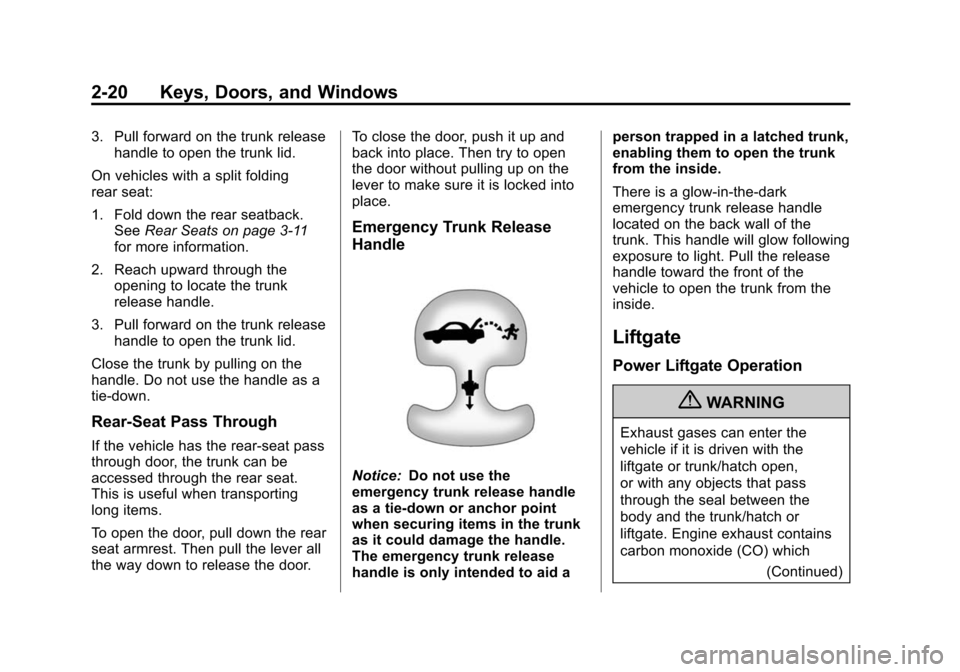
Emergency Trunk Release
Handle
Notice:
Do not use the
emergency trunk release handle
as a tie-down or anchor point
when securing items in the trunk
as it could damage the handle.
The emergency trunk release
handle is only intended to aid a person trapped in a latched trunk,
enabling them to open the trunk
from the inside.
There is a glow-in-the-dark
emergency trunk release handle
located on the back wall of the
trunk. This handle will glow following
exposure to light. Pull the release
handle toward the front of the
vehicle to open the trunk from the
inside.
Liftgate
Power Liftgate Operation
{WARNING
Exhaust gases can enter the
vehicle if it is driven with the
liftgate or trunk/hatch open,
or with any objects that pass
through the seal between the
body and the trunk/hatch or
liftgate. Engine exhaust contains
carbon monoxide (CO) which
(Continued)
Page 67 of 496

Black plate (1,1)Cadillac CTS/CTS-V Owner Manual (Include Mex) - 2012
Seats and Restraints 3-1
Seats and
Restraints
Head Restraints
Head Restraints . . . . . . . . . . . . . . . 3-2
Active Head Restraints . . . . . . . . 3-3
Front Seats
Seat Adjustment . . . . . . . . . . . . . . 3-3
Easy Entry Seat (CoupeModels Only) . . . . . . . . . . . . . . . . 3-4
Power Seat Adjustment . . . . . . . 3-4
Lumbar Adjustment . . . . . . . . . . . 3-5
Thigh Support Adjustment . . . . 3-6
Reclining Seatbacks . . . . . . . . . . 3-6
Memory Seats . . . . . . . . . . . . . . . . 3-8
Heated and Ventilated Front Seats . . . . . . . . . . . . . . . . . . . . . . . 3-10
Rear Seats
Rear Seats . . . . . . . . . . . . . . . . . . 3-11
Safety Belts
Safety Belts . . . . . . . . . . . . . . . . . . 3-12
How to Wear Safety BeltsProperly . . . . . . . . . . . . . . . . . . . . 3-13
Lap-Shoulder Belt . . . . . . . . . . . 3-14
Safety Belt Use During Pregnancy . . . . . . . . . . . . . . . . . . 3-18
Safety Belt Extender . . . . . . . . . 3-18
Safety System Check . . . . . . . . 3-18
Safety Belt Care . . . . . . . . . . . . . 3-19
Replacing Safety Belt System Parts after a Crash . . . . . . . . . 3-19
Airbag System
Airbag System . . . . . . . . . . . . . . . 3-20
Where Are the Airbags? . . . . . 3-22
When Should an AirbagInflate? . . . . . . . . . . . . . . . . . . . . . 3-23
What Makes an Airbag Inflate? . . . . . . . . . . . . . . . . . . . . . 3-25
How Does an Airbag Restrain? . . . . . . . . . . . . . . . . . . . 3-25
What Will You See after an Airbag Inflates? . . . . . . . . . . . . 3-26 Passenger Sensing
System . . . . . . . . . . . . . . . . . . . . . 3-27
Servicing the Airbag-Equipped Vehicle . . . . . . . . . . . . . . . . . . . . . 3-32
Adding Equipment to the
Airbag-Equipped Vehicle . . . 3-32
Airbag System Check . . . . . . . . 3-33
Replacing Airbag System Parts after a Crash . . . . . . . . . 3-34
Child Restraints
Older Children . . . . . . . . . . . . . . . 3-34
Infants and YoungChildren . . . . . . . . . . . . . . . . . . . . 3-37
Child Restraint Systems . . . . . 3-39
Where to Put the Restraint . . . 3-41
Lower Anchors and Tethers for Children (LATCH
System) . . . . . . . . . . . . . . . . . . . . 3-43
Replacing LATCH System Parts After a Crash . . . . . . . . . 3-49
Securing Child Restraints (Rear Seat) . . . . . . . . . . . . . . . . . 3-49
Securing Child Restraints (Front Passenger Seat) . . . . 3-52
Page 68 of 496
Black plate (2,1)Cadillac CTS/CTS-V Owner Manual (Include Mex) - 2012
3-2 Seats and Restraints
Head Restraints
Front Seats
The vehicle's front seats have
adjustable head restraints in the
outboard seating positions.
{WARNING
With head restraints that are not
installed and adjusted properly,
there is a greater chance that
occupants will suffer a neck/
spinal injury in a crash. Do not
drive until the head restraints for
all occupants are installed and
adjusted properly.
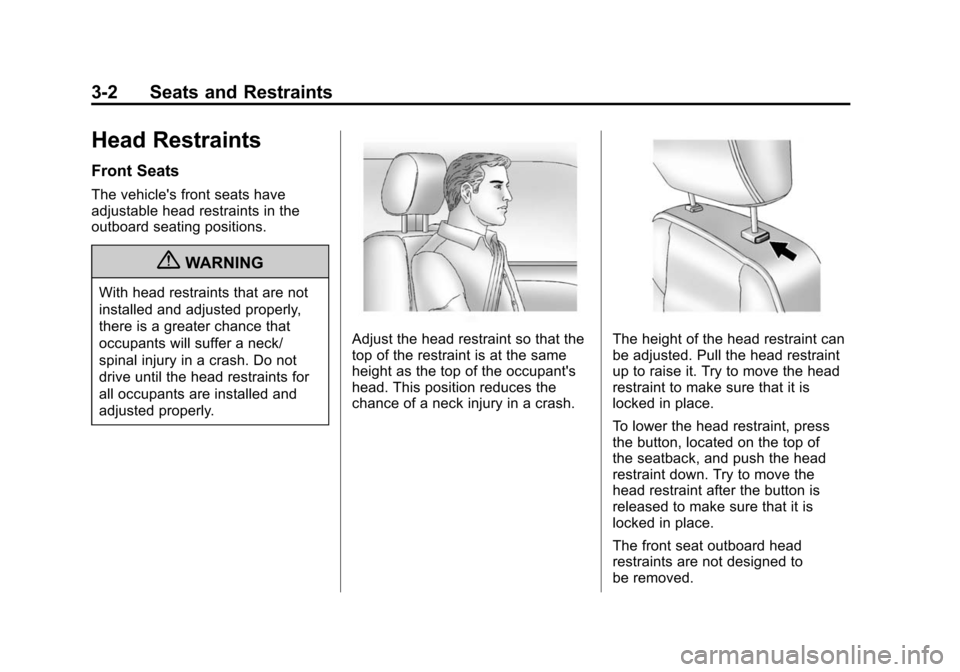
Adjust the head restraint so that the
top of the restraint is at the same
height as the top of the occupant's
head. This position reduces the
chance of a neck injury in a crash.The height of the head restraint can
be adjusted. Pull the head restraint
up to raise it. Try to move the head
restraint to make sure that it is
locked in place.
To lower the head restraint, press
the button, located on the top of
the seatback, and push the head
restraint down. Try to move the
head restraint after the button is
released to make sure that it is
locked in place.
The front seat outboard head
restraints are not designed to
be removed.
Page 69 of 496
Black plate (3,1)Cadillac CTS/CTS-V Owner Manual (Include Mex) - 2012
Seats and Restraints 3-3
Rear Seats
The vehicle's rear seats have head
restraints in the outboard seating
positions, but they are not
adjustable.
Rear outboard head restraints are
not designed to be removed.
Active Head Restraints
The vehicle has an active head
restraint system in the front seating
positions. These automatically tilt
forward to reduce the risk of neck
injury if the vehicle is hit from
behind.
Front Seats
Seat Adjustment
{WARNING
You can lose control of the
vehicle if you try to adjust a
manual driver seat while the
vehicle is moving. The sudden
movement could startle and
confuse you, or make you push a
pedal when you do not want to.
Adjust the driver seat only when
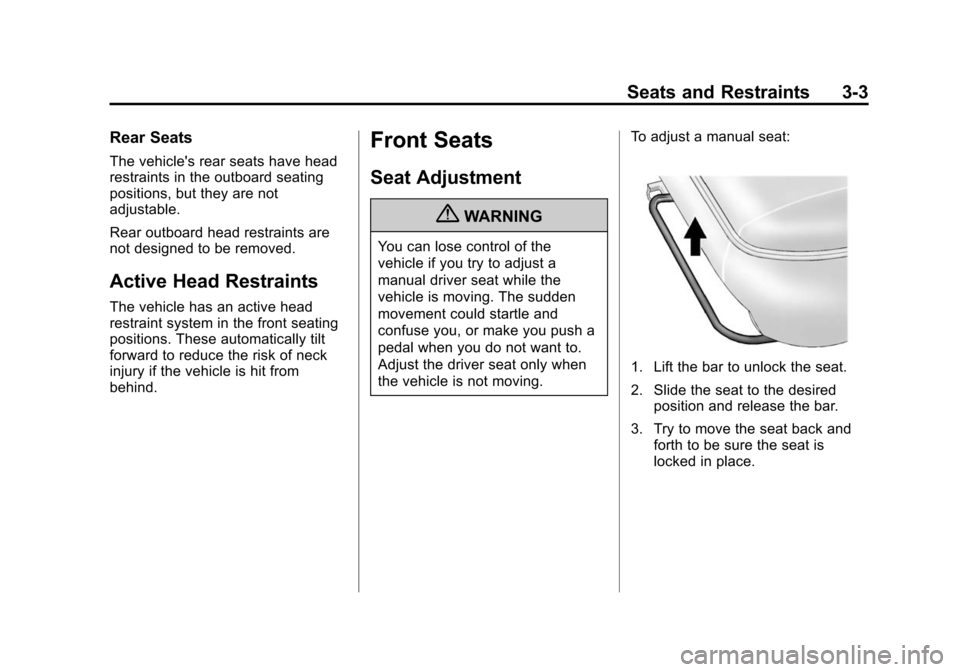
the vehicle is not moving.To adjust a manual seat:
1. Lift the bar to unlock the seat.
2. Slide the seat to the desired
position and release the bar.
3. Try to move the seat back and forth to be sure the seat is
locked in place.
Page 70 of 496

Black plate (4,1)Cadillac CTS/CTS-V Owner Manual (Include Mex) - 2012
3-4 Seats and Restraints
Easy Entry Seat (Coupe
Models Only)
A. Folding Seatback Handle
B. Seat Adjustment Switch
On coupe models, the front seats
can be moved out of the way to
make it easier to get in and out of
the rear seat.
To fold the seatback, pull the
handle (A) on the upper seatback.
The seatback will fold forward.To move the seat forward, press
and hold the top of the switch (B) on
the upper seatback. To move the
seat rearward, press and hold the
bottom of the switch (B). Release
the switch when the seat reaches
the desired position.
After entering or exiting the rear
seat, return the seatback to the
upright position. Push and pull on
the seatback to make sure it is
locked.
{WARNING
If either seatback is not locked, it
could move forward in a sudden
stop or crash. That could cause
injury to the person sitting there.
Always push and pull on the
seatbacks to be sure they are
locked.
A driver seat entry/exit position can
be recalled automatically using the
vehicle personalization menu. See Memory Seats on page 5‑46
and
Vehicle Personalization on
page 5‑46 for more information.
Power Seat Adjustment
To adjust a power seat, if equipped:
.Move the seat forward or
rearward by sliding the
horizontal control forward or
rearward.
.Raise or lower the front or rear
part of the seat cushion by
moving the front or rear of the
horizontal control up or down.
Page 71 of 496
Black plate (5,1)Cadillac CTS/CTS-V Owner Manual (Include Mex) - 2012
Seats and Restraints 3-5
.Raise or lower the entire seat by
moving the entire horizontal
control up or down.
To adjust the seatback, see “Power
Reclining Seatbacks” under
Reclining Seatbacks on page 3‑6 for
more information.
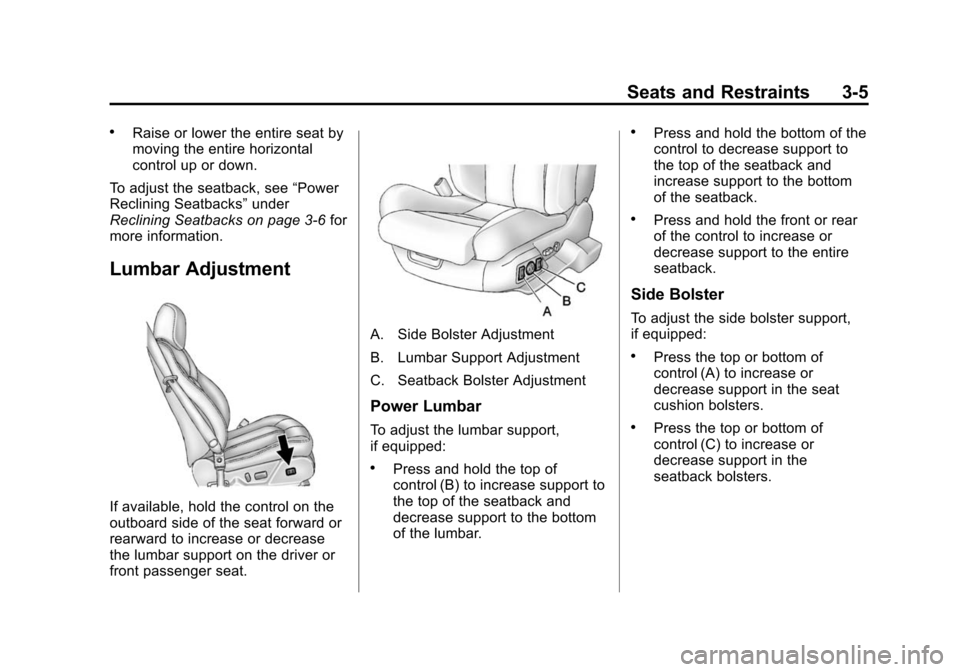
Lumbar Adjustment
If available, hold the control on the
outboard side of the seat forward or
rearward to increase or decrease
the lumbar support on the driver or
front passenger seat.
A. Side Bolster Adjustment
B. Lumbar Support Adjustment
C. Seatback Bolster Adjustment
Power Lumbar
To adjust the lumbar support,
if equipped:
.Press and hold the top of
control (B) to increase support to
the top of the seatback and
decrease support to the bottom
of the lumbar.
.Press and hold the bottom of the
control to decrease support to
the top of the seatback and
increase support to the bottom
of the seatback.
.Press and hold the front or rear
of the control to increase or
decrease support to the entire
seatback.
Side Bolster
To adjust the side bolster support,
if equipped:
.Press the top or bottom of
control (A) to increase or
decrease support in the seat
cushion bolsters.
.Press the top or bottom of
control (C) to increase or
decrease support in the
seatback bolsters.
Page 72 of 496
Black plate (6,1)Cadillac CTS/CTS-V Owner Manual (Include Mex) - 2012
3-6 Seats and Restraints
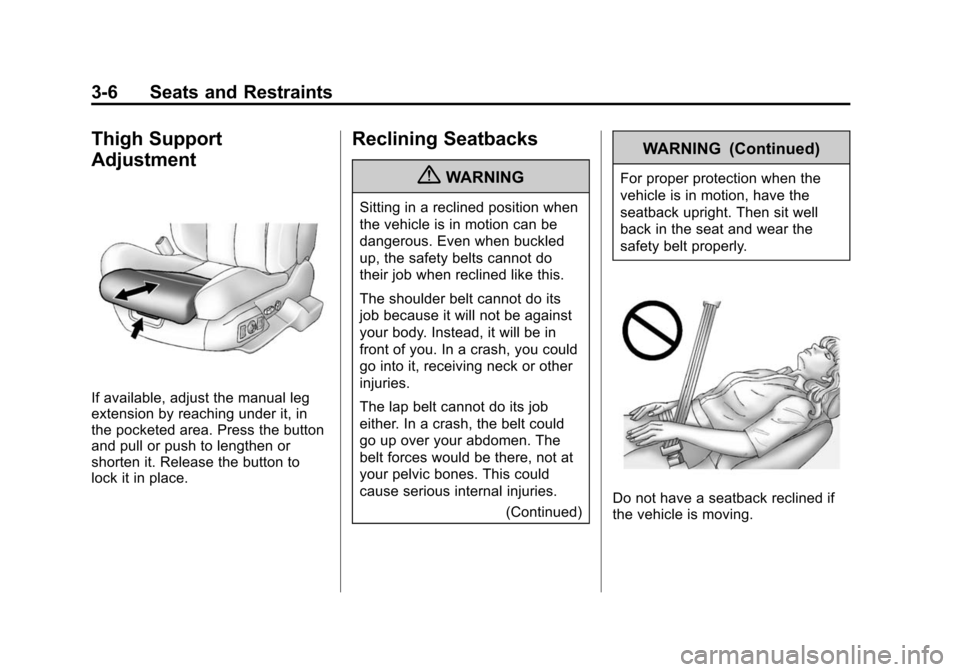
Thigh Support
Adjustment
If available, adjust the manual leg
extension by reaching under it, in
the pocketed area. Press the button
and pull or push to lengthen or
shorten it. Release the button to
lock it in place.
Reclining Seatbacks
{WARNING
Sitting in a reclined position when
the vehicle is in motion can be
dangerous. Even when buckled
up, the safety belts cannot do
their job when reclined like this.
The shoulder belt cannot do its
job because it will not be against
your body. Instead, it will be in
front of you. In a crash, you could
go into it, receiving neck or other
injuries.
The lap belt cannot do its job
either. In a crash, the belt could
go up over your abdomen. The
belt forces would be there, not at
your pelvic bones. This could
cause serious internal injuries.(Continued)
WARNING (Continued)
For proper protection when the
vehicle is in motion, have the
seatback upright. Then sit well
back in the seat and wear the
safety belt properly.
Do not have a seatback reclined if
the vehicle is moving.
Page 73 of 496
Black plate (7,1)Cadillac CTS/CTS-V Owner Manual (Include Mex) - 2012
Seats and Restraints 3-7
Manual Reclining Seatbacks
{WARNING
If either seatback is not locked, it
could move forward in a sudden
stop or crash. That could cause
injury to the person sitting there.
Always push and pull on the
seatbacks to be sure they are
locked.
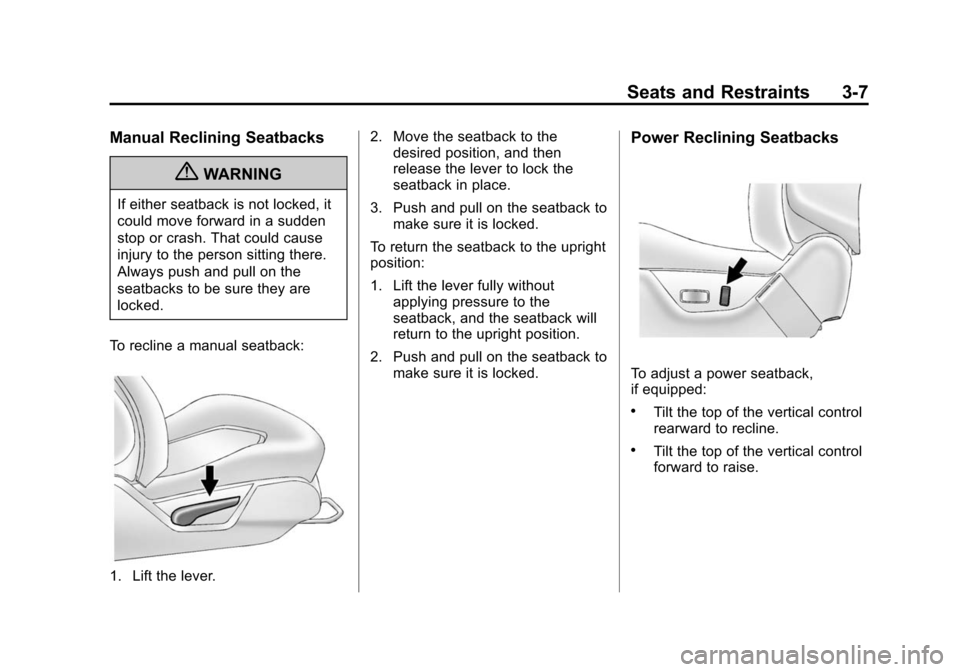
To recline a manual seatback:
1. Lift the lever. 2. Move the seatback to the
desired position, and then
release the lever to lock the
seatback in place.
3. Push and pull on the seatback to make sure it is locked.
To return the seatback to the upright
position:
1. Lift the lever fully without applying pressure to the
seatback, and the seatback will
return to the upright position.
2. Push and pull on the seatback to make sure it is locked.
Power Reclining Seatbacks
To adjust a power seatback,
if equipped:
.Tilt the top of the vertical control
rearward to recline.
.Tilt the top of the vertical control
forward to raise.
Page 74 of 496

Black plate (8,1)Cadillac CTS/CTS-V Owner Manual (Include Mex) - 2012
3-8 Seats and Restraints
Memory Seats
On vehicles with the memory
feature, memory buttons 1 and 2 on
the driver door are used to save and
recall memory settings for the driver
seat cushion and seatback, outside
mirrors, and the steering column
position, if the vehicle is equipped
with the power tilt and telescopic
steering column.
1:Saves and recalls for driver 1.
2: Saves and recalls for driver 2.
B(Exit Button): Moves the driver
seat and/or power steering column
to the exit position. See “Exit Recall”
later in this section for more
information.
Storing Memory Positions
To save into memory:
1. Adjust the driver seat, outside mirrors, and the power steering
column, if equipped, to the
desired driving positions.
2. Press and hold “1”until two
beeps sound.
3. Repeat for a second driver using “2.”
The vehicle comes with two
Remote Keyless Entry (RKE)
transmitters. Each transmitter has
a number “1”or“2” on it. These
numbers correspond to “1”and “2”
on the driver door. The current
driver is identified when
Kon the
RKE transmitter is pressed, or when
“1” or“2” on the driver door is
pressed. To recall memory positions, press
and release
“1”or“2.” The vehicle
must be in P (Park) for an automatic
transmission, or the parking brake
must be applied for a manual
transmission. A single beep will
sound when the button is pressed.
The seat, outside mirrors, and/or
power steering column will move to
the position previously stored for the
identified driver.
Automatic Entry Recall
If entry/exit recall is programmed on
in the vehicle personalization menu,
automatic entry recall occurs when
the ignition is turned on. See “Entry/
Exit Recall” underVehicle
Personalization on page 5‑46 for
more information.
To stop recall movement, press one
of the power seat, memory,
or outside mirror buttons, or the
power steering column switch,
if equipped.
If something has blocked the driver
seat or the steering column while
recalling a memory position, the