tow CADILLAC CTS 2012 2.G User Guide
[x] Cancel search | Manufacturer: CADILLAC, Model Year: 2012, Model line: CTS, Model: CADILLAC CTS 2012 2.GPages: 496, PDF Size: 6.36 MB
Page 97 of 496
Black plate (31,1)Cadillac CTS/CTS-V Owner Manual (Include Mex) - 2012
Seats and Restraints 3-31
Additional Factors Affecting
System Operation
Safety belts help keep the
passenger in position on the seat
during vehicle maneuvers and
braking, which helps the passenger
sensing system maintain the
passenger airbag status. See
“Safety Belts”and“Child Restraints”
in the Index for additional
information about the importance of
proper restraint use.
A thick layer of additional material,
such as a blanket or cushion,
or aftermarket equipment such as
seat covers, seat heaters, and seat
massagers can affect how well the
passenger sensing system
operates. We recommend that you
not use seat covers or other
aftermarket equipment except when
approved by GM for your specific
vehicle. See Adding Equipment to
the Airbag-Equipped Vehicle on
page 3‑32 for more information
about modifications that can affect
how the system operates. A wet seat can affect the
performance of the passenger
sensing system. Here is how:.The passenger sensing system
may turn off the passenger
airbag when liquid is soaked into
the seat. If this happens, the off
indicator will be lit, and the
airbag readiness light on the
instrument panel will also be lit.
.Liquid pooled on the seat that
has not soaked in may make it
more likely that the passenger
sensing system will enable (turn
on) the passenger airbag while a
child restraint or child occupant
is on the seat. If the passenger
airbag is turned on, the on
indicator will be lit.
If the passenger seat gets wet, dry
the seat immediately. If the airbag
readiness light is lit, do not install a
child restraint or allow anyone to
occupy the seat. See
Airbag
Readiness Light on page 5‑17 for
important safety information.
The on indicator may be lit if an
object, such as a briefcase,
handbag, grocery bag, laptop or
other electronic device, is put on an
unoccupied seat. If this is not
desired remove the object from
the seat.
{WARNING
Stowing of articles under the
passenger seat or between the
passenger seat cushion and
seatback may interfere with the
proper operation of the passenger
sensing system.
Page 113 of 496
Black plate (47,1)Cadillac CTS/CTS-V Owner Manual (Include Mex) - 2012
Seats and Restraints 3-47
{WARNING
Children can be seriously injured
or strangled if a shoulder belt is
wrapped around their neck and
the safety belt continues to
tighten. Buckle any unused safety
belts behind the child restraint so
children cannot reach them. Pull
the shoulder belt all the way out
of the retractor to set the lock,
if the vehicle has one, after the
child restraint has been installed.
Notice: Do not let the LATCH
attachments rub against the
vehicle’ s safety belts. This may
damage these parts. If necessary,
move buckled safety belts to
avoid rubbing the LATCH
attachments.
Do not fold the empty rear seat
with a safety belt buckled. This
could damage the safety belt or
the seat. Unbuckle and return the
safety belt to its stowed position,
before folding the seat. 1. Attach and tighten the lower
attachments to the lower
anchors. If the child restraint
does not have lower
attachments or the desired
seating position does not have
lower anchors, secure the child
restraint with the top tether and
the safety belts. Refer to your
child restraint manufacturer
instructions and the instructions
in this manual.
1.1. Find the lower anchors for
the desired seating
position.
1.2. Put the child restraint on the seat.
1.3. Attach and tighten the lower attachments on the child
restraint to the lower
anchors. 2. If the child restraint manufacturer
recommends that the top tether
be attached, attach and tighten
the top tether to the top tether
anchor, if equipped. Refer to the
child restraint instructions and
the following steps:
2.1. Find the top tether anchor.
2.2. Press the ribbed area of the
cover to open the cover and
expose the anchor.
2.3. If you have an adjustable head restraint, raise the
head restraint.
Page 117 of 496
Black plate (51,1)Cadillac CTS/CTS-V Owner Manual (Include Mex) - 2012
Seats and Restraints 3-51
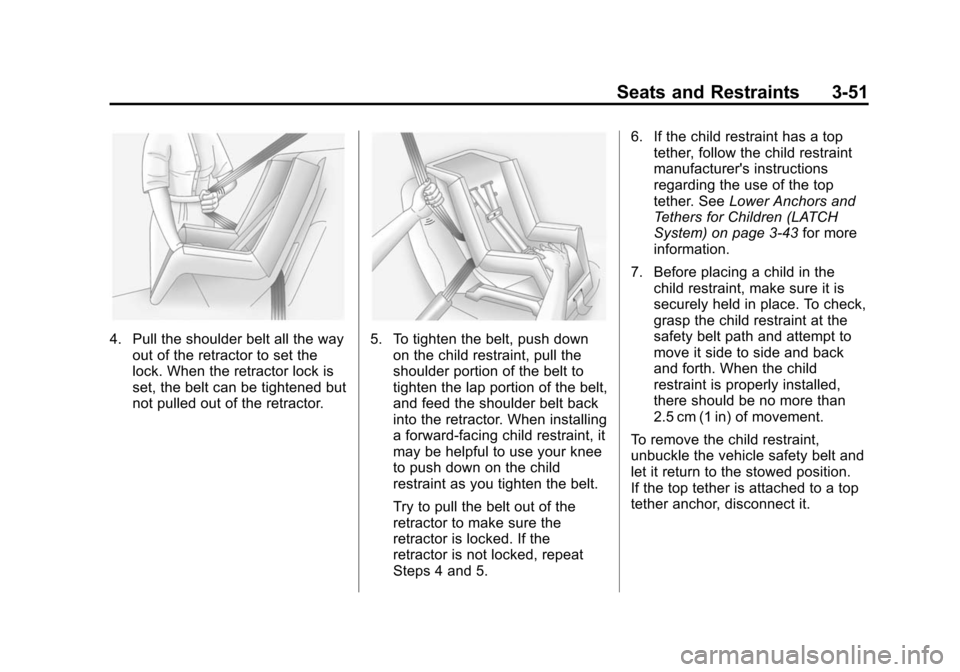
4. Pull the shoulder belt all the wayout of the retractor to set the
lock. When the retractor lock is
set, the belt can be tightened but
not pulled out of the retractor.5. To tighten the belt, push downon the child restraint, pull the
shoulder portion of the belt to
tighten the lap portion of the belt,
and feed the shoulder belt back
into the retractor. When installing
a forward-facing child restraint, it
may be helpful to use your knee
to push down on the child
restraint as you tighten the belt.
Try to pull the belt out of the
retractor to make sure the
retractor is locked. If the
retractor is not locked, repeat
Steps 4 and 5. 6. If the child restraint has a top
tether, follow the child restraint
manufacturer's instructions
regarding the use of the top
tether. See Lower Anchors and
Tethers for Children (LATCH
System) on page 3‑43 for more
information.
7. Before placing a child in the child restraint, make sure it is
securely held in place. To check,
grasp the child restraint at the
safety belt path and attempt to
move it side to side and back
and forth. When the child
restraint is properly installed,
there should be no more than
2.5 cm (1 in) of movement.
To remove the child restraint,
unbuckle the vehicle safety belt and
let it return to the stowed position.
If the top tether is attached to a top
tether anchor, disconnect it.
Page 120 of 496
Black plate (54,1)Cadillac CTS/CTS-V Owner Manual (Include Mex) - 2012
3-54 Seats and Restraints
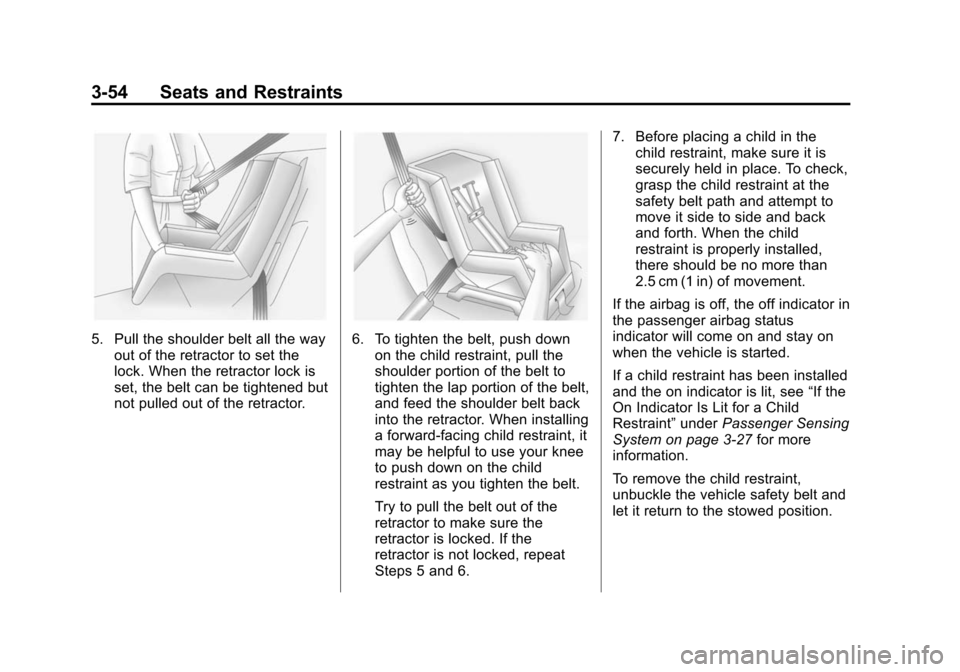
5. Pull the shoulder belt all the wayout of the retractor to set the
lock. When the retractor lock is
set, the belt can be tightened but
not pulled out of the retractor.6. To tighten the belt, push downon the child restraint, pull the
shoulder portion of the belt to
tighten the lap portion of the belt,
and feed the shoulder belt back
into the retractor. When installing
a forward-facing child restraint, it
may be helpful to use your knee
to push down on the child
restraint as you tighten the belt.
Try to pull the belt out of the
retractor to make sure the
retractor is locked. If the
retractor is not locked, repeat
Steps 5 and 6. 7. Before placing a child in the
child restraint, make sure it is
securely held in place. To check,
grasp the child restraint at the
safety belt path and attempt to
move it side to side and back
and forth. When the child
restraint is properly installed,
there should be no more than
2.5 cm (1 in) of movement.
If the airbag is off, the off indicator in
the passenger airbag status
indicator will come on and stay on
when the vehicle is started.
If a child restraint has been installed
and the on indicator is lit, see “If the
On Indicator Is Lit for a Child
Restraint” underPassenger Sensing
System on page 3‑27 for more
information.
To remove the child restraint,
unbuckle the vehicle safety belt and
let it return to the stowed position.
Page 122 of 496
Black plate (2,1)Cadillac CTS/CTS-V Owner Manual (Include Mex) - 2012
4-2 Storage
Center Console Storage
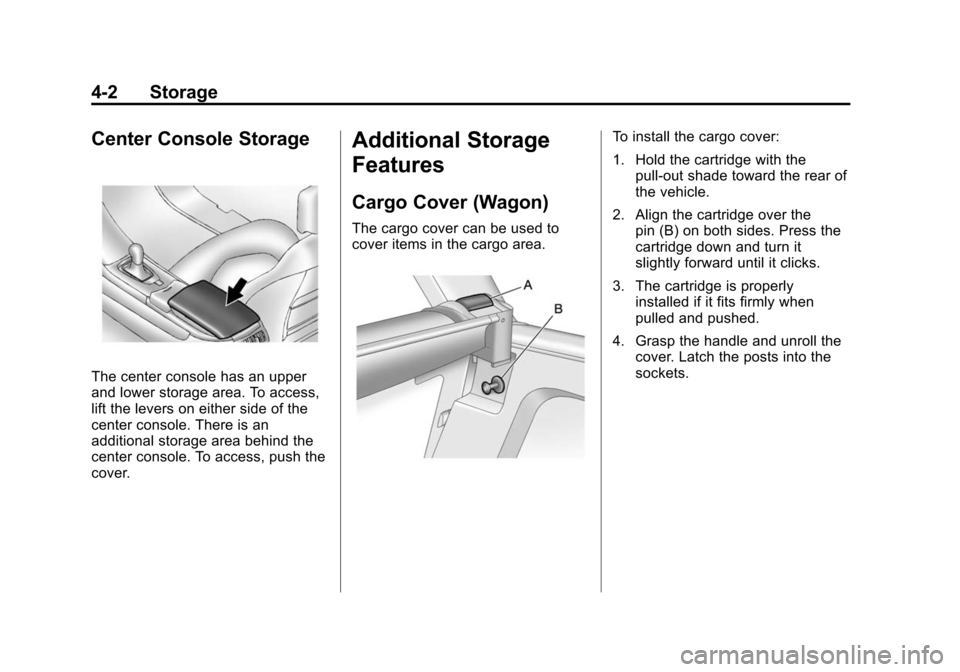
The center console has an upper
and lower storage area. To access,
lift the levers on either side of the
center console. There is an
additional storage area behind the
center console. To access, push the
cover.
Additional Storage
Features
Cargo Cover (Wagon)
The cargo cover can be used to
cover items in the cargo area.
To install the cargo cover:
1. Hold the cartridge with thepull-out shade toward the rear of
the vehicle.
2. Align the cartridge over the pin (B) on both sides. Press the
cartridge down and turn it
slightly forward until it clicks.
3. The cartridge is properly installed if it fits firmly when
pulled and pushed.
4. Grasp the handle and unroll the cover. Latch the posts into the
sockets.
Page 124 of 496
Black plate (4,1)Cadillac CTS/CTS-V Owner Manual (Include Mex) - 2012
4-4 Storage
D-Ring Sliders
There are four D-Ring sliders that
move along rails on both sides of
the cargo management area. These
can be used as tie-downs when
storing cargo.
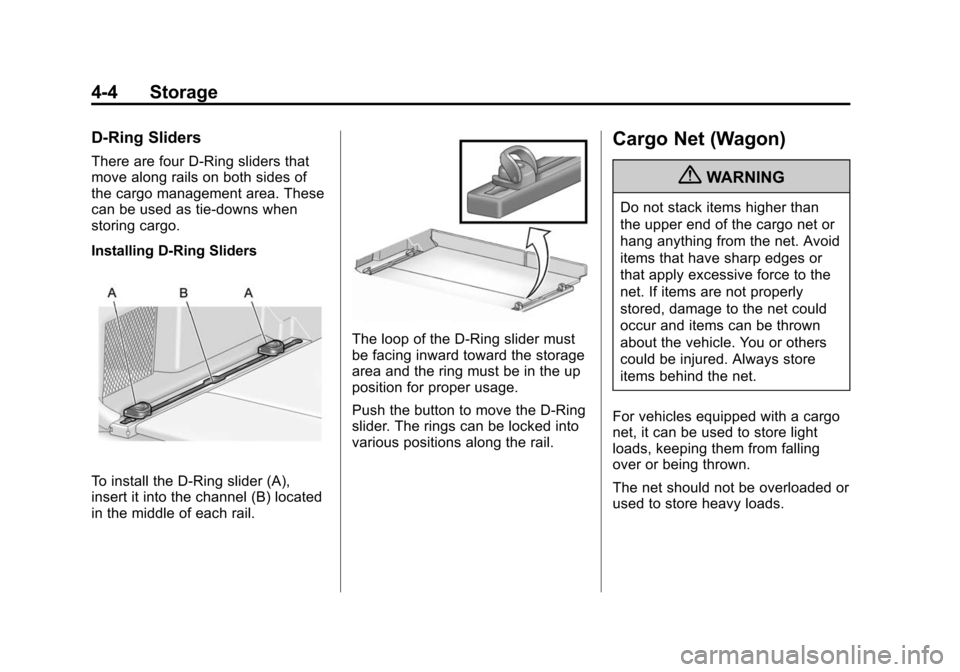
Installing D-Ring Sliders
To install the D-Ring slider (A),
insert it into the channel (B) located
in the middle of each rail.
The loop of the D-Ring slider must
be facing inward toward the storage
area and the ring must be in the up
position for proper usage.
Push the button to move the D-Ring
slider. The rings can be locked into
various positions along the rail.
Cargo Net (Wagon)
{WARNING
Do not stack items higher than
the upper end of the cargo net or
hang anything from the net. Avoid
items that have sharp edges or
that apply excessive force to the
net. If items are not properly
stored, damage to the net could
occur and items can be thrown
about the vehicle. You or others
could be injured. Always store
items behind the net.
For vehicles equipped with a cargo
net, it can be used to store light
loads, keeping them from falling
over or being thrown.
The net should not be overloaded or
used to store heavy loads.
Page 127 of 496
Black plate (7,1)Cadillac CTS/CTS-V Owner Manual (Include Mex) - 2012
Storage 4-7
Do not exceed the maximum vehicle
capacity when loading the vehicle.
For more information on vehicle
capacity and loading, seeVehicle
Load Limits on page 9‑11.
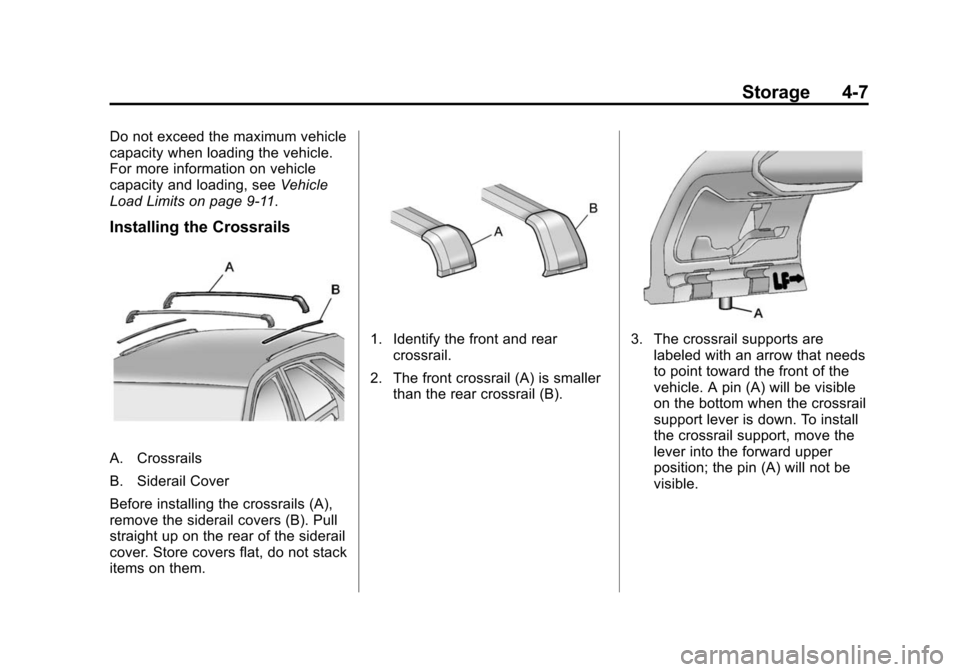
Installing the Crossrails
A. Crossrails
B. Siderail Cover
Before installing the crossrails (A),
remove the siderail covers (B). Pull
straight up on the rear of the siderail
cover. Store covers flat, do not stack
items on them.
1. Identify the front and rear crossrail.
2. The front crossrail (A) is smaller than the rear crossrail (B).3. The crossrail supports arelabeled with an arrow that needs
to point toward the front of the
vehicle. A pin (A) will be visible
on the bottom when the crossrail
support lever is down. To install
the crossrail support, move the
lever into the forward upper
position; the pin (A) will not be
visible.
Page 128 of 496
Black plate (8,1)Cadillac CTS/CTS-V Owner Manual (Include Mex) - 2012
4-8 Storage
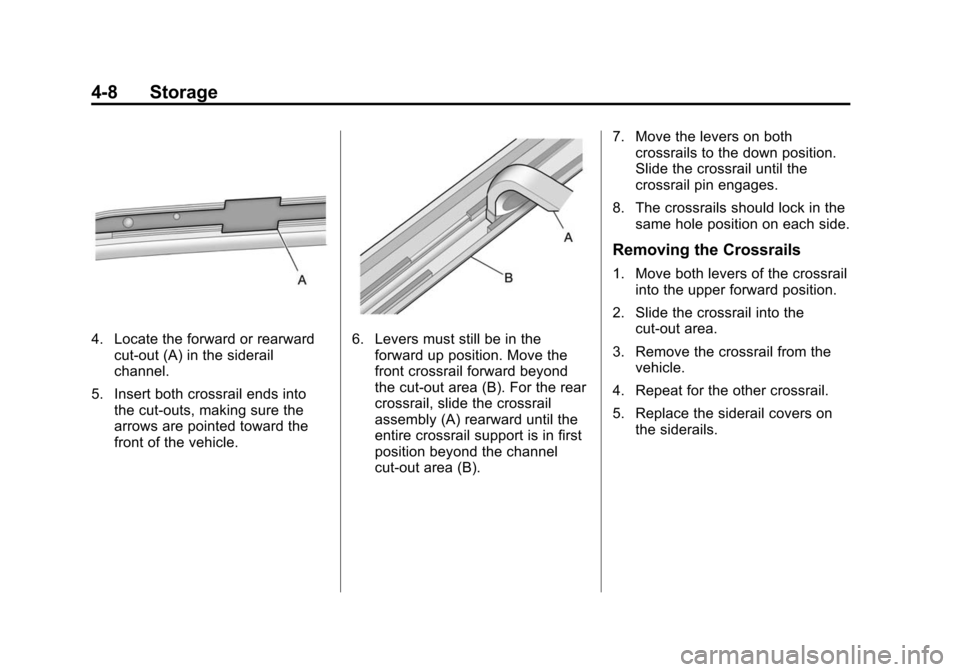
4. Locate the forward or rearwardcut-out (A) in the siderail
channel.
5. Insert both crossrail ends into the cut-outs, making sure the
arrows are pointed toward the
front of the vehicle.6. Levers must still be in theforward up position. Move the
front crossrail forward beyond
the cut-out area (B). For the rear
crossrail, slide the crossrail
assembly (A) rearward until the
entire crossrail support is in first
position beyond the channel
cut-out area (B). 7. Move the levers on both
crossrails to the down position.
Slide the crossrail until the
crossrail pin engages.
8. The crossrails should lock in the same hole position on each side.
Removing the Crossrails
1. Move both levers of the crossrail
into the upper forward position.
2. Slide the crossrail into the cut-out area.
3. Remove the crossrail from the vehicle.
4. Repeat for the other crossrail.
5. Replace the siderail covers on the siderails.
Page 130 of 496
Black plate (2,1)Cadillac CTS/CTS-V Owner Manual (Include Mex) - 2012
5-2 Instruments and Controls
Anti-theft Alarm SystemMessages . . . . . . . . . . . . . . . . . . 5-43
Service Vehicle Messages . . . 5-43
Tire Messages . . . . . . . . . . . . . . . 5-43
Transmission Messages . . . . . 5-44
Vehicle Speed Messages . . . . 5-45
Washer Fluid Messages . . . . . 5-45
Vehicle Personalization
Vehicle Personalization . . . . . . 5-46
Universal Remote System
Universal Remote System . . . 5-53
Universal Remote System Programming . . . . . . . . . . . . . . . 5-53
Universal Remote System Operation . . . . . . . . . . . . . . . . . . 5-57
Controls
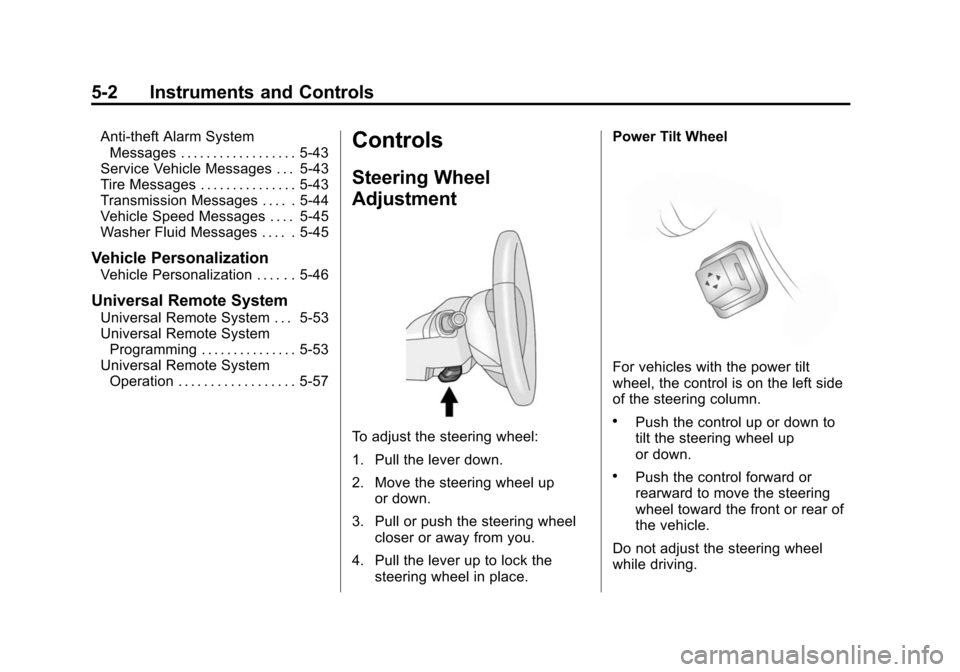
Steering Wheel
Adjustment
To adjust the steering wheel:
1. Pull the lever down.
2. Move the steering wheel up
or down.
3. Pull or push the steering wheel closer or away from you.
4. Pull the lever up to lock the steering wheel in place. Power Tilt Wheel
For vehicles with the power tilt
wheel, the control is on the left side
of the steering column.
.Push the control up or down to
tilt the steering wheel up
or down.
.Push the control forward or
rearward to move the steering
wheel toward the front or rear of
the vehicle.
Do not adjust the steering wheel
while driving.
Page 133 of 496

Black plate (5,1)Cadillac CTS/CTS-V Owner Manual (Include Mex) - 2012
Instruments and Controls 5-5
Heavy snow or ice can overload the
wiper motor. A circuit breaker will
stop the motor until it cools down.
Rainsense™
For vehicles with Rainsense, a
sensor located near the top center
of the windshield detects the
amount of water on the windshield
and automatically controls the
frequency of the windshield wiper.
Keep this area of the windshield
clear of debris to allow for best
system performance.
Sedan and Coupe Model Shown,Wagon Model Similar
3(Rainsense Wipe Sensitivity
Control): Move the windshield
wiper lever to
3. Turn the3
band on the wiper lever to adjust the
sensitivity.
.Turn the band up for more
sensitivity to moisture.
.Turn the band down for less
sensitivity to moisture.
.Move the windshield wiper lever
out of the
3position to
deactivate Rainsense.
Wiper Arm Assembly Protection
When using an automatic car wash,
move the windshield wiper lever to
the
(position. This disables the
windshield wipers and/or rear
wipers, if equipped.
Windshield Washer
{WARNING
In freezing weather, do not use
the washer until the windshield is
warmed. Otherwise the washer
fluid can form ice on the
windshield, blocking your vision.
Sedan and Coupe Model
K(Washer Fluid): Press the
button with this symbol, on the end
of the windshield washer lever to
wash the windshield. The washer
fluid sprays onto the windshield and
the wipers run for a few cycles to
clear the windshield. Press and hold
Kfor more wash cycles.
Wagon Model
Pull the lever toward you to spray
washer fluid on the windshield. The
spray continues until the lever is
released. The wipers will run a few
times.