change time CADILLAC CTS 2012 2.G Owner's Guide
[x] Cancel search | Manufacturer: CADILLAC, Model Year: 2012, Model line: CTS, Model: CADILLAC CTS 2012 2.GPages: 496, PDF Size: 6.36 MB
Page 284 of 496
Black plate (34,1)Cadillac CTS/CTS-V Owner Manual (Include Mex) - 2012
9-34 Driving and Operating
If driving safely on a wet road and it
becomes necessary to slam on the
brakes and continue braking to
avoid a sudden obstacle, a
computer senses that the wheels
are slowing down. If one of the
wheels is about to stop rolling, the
computer will separately work the
brakes at each wheel.
ABS can change the brake pressure
to each wheel, as required, faster
than any driver could. This can help
the driver steer around the obstacle
while braking hard.
As the brakes are applied, the
computer keeps receiving updates
on wheel speed and controls
braking pressure accordingly.Remember: ABS does not change
the time needed to get a foot up to
the brake pedal or always decrease
stopping distance. If you get too
close to the vehicle in front of you,
there will not be enough time to
apply the brakes if that vehicle
suddenly slows or stops. Always
leave enough room up ahead to
stop, even with ABS.
Using ABS
Do not pump the brakes. Just hold
the brake pedal down firmly and let
ABS work. You might hear the ABS
pump or motor operating and feel
the brake pedal pulsate, but this is
normal.
Braking in Emergencies
ABS allows the driver to steer and
brake at the same time. In many
emergencies, steering can help
more than even the very best
braking.
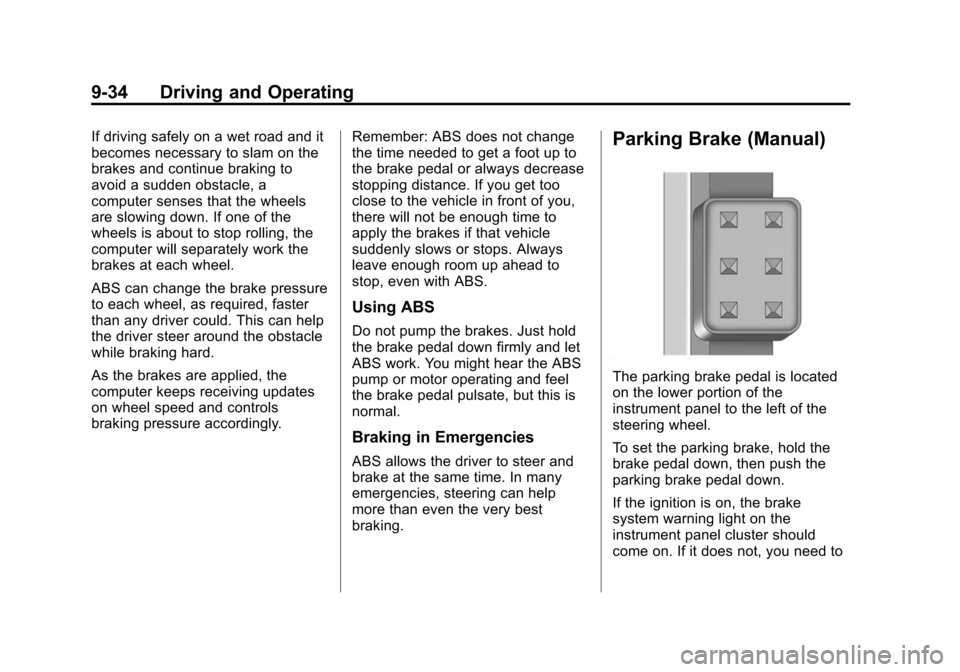
Parking Brake (Manual)
The parking brake pedal is located
on the lower portion of the
instrument panel to the left of the
steering wheel.
To set the parking brake, hold the
brake pedal down, then push the
parking brake pedal down.
If the ignition is on, the brake
system warning light on the
instrument panel cluster should
come on. If it does not, you need to
Page 290 of 496

Black plate (40,1)Cadillac CTS/CTS-V Owner Manual (Include Mex) - 2012
9-40 Driving and Operating
If StabiliTrak needs to be turned off,
press and hold the TCS/StabiliTrak
button until the StabiliTrak Off light
comes on. The Stabilitrak Off light
comes on and a DIC message
displays. Press the TCS/StabiliTrak
button again to turn both systems
back on.
If cruise control is being used when
the StabiliTrak activates, the cruise
control will automatically disengage.
When road conditions allow,
reengage the cruise control. See
Cruise Control on page 9‑41for
more information.
Competitive Driving Mode
To select this optional handling
mode, press the TCS/
StabiliTrak button quickly two times
and STABILITRAK COMPETITIVE MODE displays in the Driver
Information Center (DIC). While in
the StabiliTrak Competitive Mode,
the StabiliTrak Off light comes on,
TCS does not limit wheel spin, and
more effort is required to turn the
steering wheel. Adjust your driving
accordingly.
Press the TCS/StabiliTrak button
again, or turn the ignition to ACC/
ACCESSORY and restart the
vehicle, to turn TCS back on and
turn the TCS/StabiliTrak warning
light off.
Notice:
When traction control is
turned off, or Competitive Driving
Mode is active, it is possible to
lose traction. If you attempt to
shift with the drive wheels
spinning with a loss of traction, it
is possible to cause damage to
the transmission. Do not attempt
to shift when the drive wheels do
not have traction. Damage caused
by misuse of the vehicle is not
covered. See the warranty book
for additional information.
Magnetic Ride Control
With this feature on the CTS-V, the
Magnetic Ride Control system
adjusts the ride of the vehicle to
Tour or Sport modes. Magnetic Ride
Control monitors the suspension
system to determine the proper
system response.
TOUR: Use for normal city and
highway driving. This setting
provides a smooth, soft ride.
SPORT: Use where road conditions
or personal preference demand
more control. This setting provides
more “feel,” or response to road
conditions.
The setting can be changed at any
time. Based on road conditions,
steering wheel angle, and the
vehicle speed, the system
automatically adjusts to provide the
best handling while providing a
smooth ride. The Tour and Sport
modes will feel similar on a smooth
road. Select a new setting whenever
driving conditions change.
Page 322 of 496

Black plate (10,1)Cadillac CTS/CTS-V Owner Manual (Include Mex) - 2012
10-10 Vehicle Care
4. Lift and remove the enginecover.
5. Reverse Steps 1 through 4 to reinstall engine cover.
Engine Cover (CTS-V)
To remove:
The engine cover consists of two
pieces. Only the larger front piece
needs to be removed to access the
engine oil and power steering
fill caps.
1. Raise the front of the enginecover (A) to release it from the
ball studs (B).
2. Pull the engine cover forward until it is clear of the smaller
piece.
3. Lift and remove the engine cover.
4. Reverse Steps 1 through 3 to reinstall engine cover.Engine Oil
To ensure proper engine
performance and long life, careful
attention must be paid to engine oil.
Following these simple, but
important steps will help protect
your investment:
.Always use engine oil approved
to the proper specification and of
the proper viscosity grade. See
“Selecting the Right Engine Oil”
in this section.
.Check the engine oil level
regularly and maintain the
proper oil level. See “Checking
Engine Oil” and“When to Add
Engine Oil” in this section.
.Change the engine oil at the
appropriate time. See Engine Oil
Life System on page 10‑12.
.Always dispose of engine oil
properly. See “What to Do with
Used Oil” in this section.
Page 324 of 496
Black plate (12,1)Cadillac CTS/CTS-V Owner Manual (Include Mex) - 2012
10-12 Vehicle Care
Notice:Failure to use the
recommended engine oil or
equivalent can result in engine
damage not covered by the
vehicle warranty. Check with your
dealer or service provider on
whether the oil is approved to the
dexos1 specification.
Viscosity Grade
SAE 5W‐30 is the best viscosity
grade for the vehicle. Do not use
other viscosity grade oils such as
SAE 10W‐30, 10W‐40, or 20W‐50.
If in an area of extreme cold, where
the temperature falls below −20°F
(−29°C), an SAE 0W‐30 oil should
be used. An oil of this viscosity
grade will provide easier cold
starting for the engine at extremely
low temperatures. When selecting
an oil of the appropriate viscosity grade, always select an oil that
meets the dexos1 specification or
equivalent. See
“Specification”for
more information.
Engine Oil Additives/Engine
Oil Flushes
Do not add anything to the oil. The
recommended oils with the dexos
specification and displaying the
dexos certification mark are all that
is needed for good performance and
engine protection.
Engine oil system flushes are not
recommended and could cause
engine damage not covered by the
vehicle warranty.
What to Do with Used Oil
Used engine oil contains certain
elements that can be unhealthy for
your skin and could even cause
cancer. Do not let used oil stay on
your skin for very long. Clean your
skin and nails with soap and water,
or a good hand cleaner. Wash or
properly dispose of clothing or rags containing used engine oil. See the
manufacturer's warnings about the
use and disposal of oil products.
Used oil can be a threat to the
environment. If you change your
own oil, be sure to drain all the oil
from the filter before disposal. Never
dispose of oil by putting it in the
trash or pouring it on the ground,
into sewers, or into streams or
bodies of water. Recycle it by taking
it to a place that collects used oil.
Engine Oil Life System
When to Change Engine Oil
This vehicle has a computer system
that indicates when to change the
engine oil and filter. This is based
on a combination of factors which
include engine revolutions, engine
temperature, and miles driven.
Based on driving conditions, the
mileage at which an oil change is
indicated can vary considerably. For
the oil life system to work properly,
the system must be reset every time
the oil is changed.
Page 325 of 496

Black plate (13,1)Cadillac CTS/CTS-V Owner Manual (Include Mex) - 2012
Vehicle Care 10-13
When the system has calculated
that oil life has been diminished, it
indicates that an oil change is
necessary. A CHANGE ENGINE
OIL SOON message comes on. See
Engine Oil Messages on page 5‑35.
Change the oil as soon as possible
within the next 1 000 km (600 mi).
It is possible that, if driving under
the best conditions, the oil life
system might indicate that an oil
change is not necessary for up to a
year. The engine oil and filter must
be changed at least once a year
and at this time the system must be
reset. Your dealer has trained
service people who will perform this
work and reset the system. It is also
important to check the oil regularly
over the course of an oil drain
interval and keep it at the proper
level.
If the system is ever reset
accidentally, the oil must be
changed at 5 000 km (3,000 mi)
since the last oil change.
Remember to reset the oil life
system whenever the oil is changed.How to Reset the Engine Oil
Life System
Reset the system whenever the
engine oil is changed so that the
system can calculate the next
engine oil change. To reset the
system:
1. Using the DIC MENU button,display OIL LIFE REMAINING
on the DIC. See Driver
Information Center (DIC) on
page 5‑27 andEngine Oil
Messages on page 5‑35.
2. Press the Set/Reset button and hold for two seconds to clear the
CHANGE ENGINE OIL SOON
message and reset the oil life
at 100%.
Be careful not to reset the oil life
display accidentally at any time
other than after the oil is
changed. It cannot be reset
accurately until the next oil
change. The oil life system can also be reset
as follows:
1. Turn the ignition on with the
engine off.
2. Fully press and release the accelerator pedal three times
within five seconds.
If the CHANGE ENGINE OIL
SOON message is not on, the
system is reset.
The system is reset when the
CHANGE ENGINE OIL SOON
message is off.
If the CHANGE ENGINE OIL SOON
message comes back on when the
vehicle is started, the engine oil life
system has not been reset. Repeat
the procedure.
Page 339 of 496
Black plate (27,1)Cadillac CTS/CTS-V Owner Manual (Include Mex) - 2012
Vehicle Care 10-27
Some driving conditions or climates
can cause a brake squeal when the
brakes are first applied or lightly
applied. This does not mean
something is wrong with the brakes.
Properly torqued wheel nuts are
necessary to help prevent brake
pulsation. When tires are rotated,
inspect brake pads for wear and
evenly tighten wheel nuts in the
proper sequence to torque
specifications inCapacities and
Specifications on page 12‑2.
Brake linings should always be
replaced as complete axle sets.
Brake Pedal Travel
See your dealer if the brake pedal
does not return to normal height,
or if there is a rapid increase in
pedal travel. This could be a sign
that brake service might be
required.
Brake Adjustment
Every time the brakes are applied,
with or without the vehicle moving,
the brakes adjust for wear.
Replacing Brake System Parts
The braking system on a vehicle is
complex. Its many parts have to be
of top quality and work well together
if the vehicle is to have really good
braking. The vehicle was designed
and tested with top-quality brake
parts. When parts of the braking
system are replaced, be sure to get
new, approved replacement parts.
If this is not done, the brakes might
not work properly. For example,
installing disc brake pads that are
wrong for the vehicle, can change
the balance between the front and
rear brakes —for the worse. The
braking performance expected can
change in many other ways if the
wrong replacement brake parts are
installed.
Brake Fluid
The brake master cylinder reservoir
is filled with DOT 3 brake fluid as
indicated on the reservoir cap. See
Engine Compartment Overview on
page 10‑6 for the location of the
reservoir.
There are only two reasons why the
brake fluid level in the reservoir
might go down:
.The brake fluid level goes down
because of normal brake lining
wear. When new linings are
installed, the fluid level goes
back up.
.A fluid leak in the brake
hydraulic system can also cause
a low fluid level. Have the brake
Page 390 of 496
Black plate (78,1)Cadillac CTS/CTS-V Owner Manual (Include Mex) - 2012
10-78 Vehicle Care
the tires have been rotated. See
Tire Pressure on page 10‑70
andVehicle Load Limits on
page 9‑11.
Reset the Tire Pressure Monitor
System. See Tire Pressure
Monitor Operation on
page 10‑73.
Check that all wheel nuts are
properly tightened. See “Wheel
Nut Torque” underCapacities
and Specifications on
page 12‑2.
{WARNING
Rust or dirt on a wheel, or on the
parts to which it is fastened, can
make wheel nuts become loose
after time. The wheel could come
off and cause an accident. When
changing a wheel, remove any
rust or dirt from places where the
wheel attaches to the vehicle. In
(Continued)
WARNING (Continued)
an emergency, a cloth or a paper
towel can be used; however, use
a scraper or wire brush later to
remove all rust or dirt.
Lightly coat the center of the
wheel hub with wheel bearing
grease after a wheel change or
tire rotation to prevent corrosion
or rust build-up. Do not get
grease on the flat wheel
mounting surface or on the
wheel nuts or bolts.
When It Is Time for New
Tires
Factors such as maintenance,
temperatures, driving speeds,
vehicle loading, and road conditions
affect the wear rate of the tires.
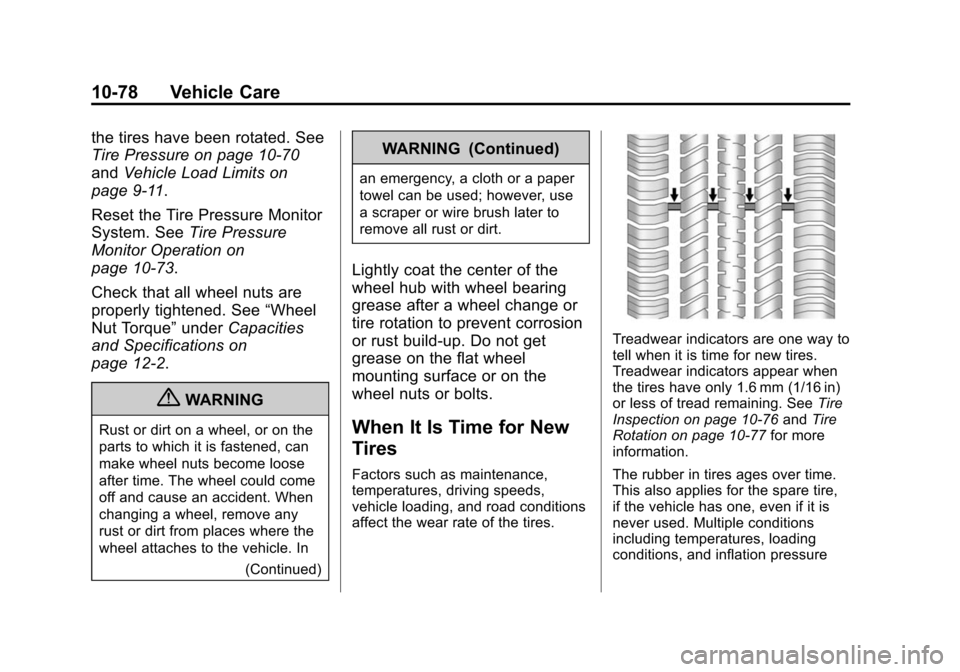
Treadwear indicators are one way to
tell when it is time for new tires.
Treadwear indicators appear when
the tires have only 1.6 mm (1/16 in)
or less of tread remaining. See Tire
Inspection on page 10‑76 andTire
Rotation on page 10‑77 for more
information.
The rubber in tires ages over time.
This also applies for the spare tire,
if the vehicle has one, even if it is
never used. Multiple conditions
including temperatures, loading
conditions, and inflation pressure
Page 459 of 496

Black plate (7,1)Cadillac CTS/CTS-V Owner Manual (Include Mex) - 2012
Customer Information 13-7
GM Mobility
Reimbursement Program
(U.S. and Canada)
This program is available to
qualified applicants for cost
reimbursement of eligible
aftermarket adaptive equipment
required for the vehicle, such as
hand controls or a wheelchair/
scooter lift for the vehicle.
For more information on the limited
offer, visit www.gmmobility.com or
call the GM Mobility Assistance
Center at 1-800-323-9935. Text
Telephone (TTY) users, call
1-800-833-9935.General Motors of Canada also
has a Mobility Program. Call
1-800-GM-DRIVE (463-7483)
for details. TTY users call
1-800-263-3830.
Roadside Service
(U.S. and Canada)
In the United States or Canada, call
1-800-882-1112.
Text Telephone (TTY), U.S. only,
call
1-888-889-2438.
Service is available 24 hours a day,
365 days a year.
Calling for Service
When calling Roadside Service,
have the following information
ready:
.Your name, home address, and
home telephone number.
.Telephone number of your
location.
.Location of the vehicle.
.Model, year, color, and license
plate number of the vehicle.
.Odometer reading, Vehicle
Identification Number (VIN), and
delivery date of the vehicle.
.Description of the problem.
Coverage
Services are provided up to 5 years/
160 000 km (100,000 mi), whichever
comes first.
In the U.S., anyone driving the
vehicle is covered. In Canada, a
person driving the vehicle without
permission from the owner is not
covered.
Roadside Service is not a part of
the New Vehicle Limited Warranty.
Cadillac and General Motors of
Canada Limited reserve the right to
make any changes or discontinue
the Roadside Service program at
any time without notification.
Cadillac and General Motors of
Canada Limited reserve the right to
limit services or payment to an
owner or driver if they decide the
Page 460 of 496
Black plate (8,1)Cadillac CTS/CTS-V Owner Manual (Include Mex) - 2012
13-8 Customer Information
claims are made too often, or the
same type of claim is made many
times.
Cadillac Owner Privileges™
.Emergency Fuel Delivery:
Delivery of enough fuel for the
vehicle to get to the nearest
service station.
.Lock‐Out Service:Service to
unlock the vehicle if you are
locked out. A remote unlock may
be available if you have OnStar.
For security reasons, the driver
must present identification
before this service is given.
.Emergency Tow From a Public
Road or Highway: Tow to the
nearest Cadillac dealer for
warranty service, or if the vehicle
was in a crash and cannot be
driven. Assistance is also given
when the vehicle is stuck in the
sand, mud, or snow.
.Flat Tire Change: Service to
change a flat tire with spare
tire. The spare tire, if equipped,
must be in good condition and
properly inflated. It is your
responsibility for the repair or
replacement of the tire if it is not
covered by the warranty.
.Battery Jump Start: Service to
jump start a dead battery.
.Trip Routing Service: Detailed
maps of North America are
provided when requested either
with the most direct route or the
most scenic route. Additional
travel information is also
available. Allow three weeks for
delivery.
.Trip Interruption Benefits and
Service: If your trip is
interrupted due to a warranty
failure, incidental expenses may
be reimbursed during the
5 years/160 000 km (100,000 mi)
Powertrain warranty period.
Items considered are hotel,
meals, and rental car.
Cadillac Technician Roadside
Service (U.S. only)
Cadillac's exceptional Roadside
Service is more than an auto club
or towing service. It provides every
Cadillac owner in the United States
with the advantage of contacting a
Cadillac advisor and, where
available, a Cadillac trained dealer
technician who can provide on-site
service.
A dealer technician will travel to
your location within a 30 mile
radius of a participating Cadillac
dealership. If beyond this radius, we
will arrange to have your car towed
to the nearest Cadillac dealership.
Each technician travels with a
specially equipped service vehicle
complete with the necessary
Cadillac parts and tools required to
handle most roadside repairs.
Page 462 of 496
Black plate (10,1)Cadillac CTS/CTS-V Owner Manual (Include Mex) - 2012
13-10 Customer Information
This program expires two years
from the date of the invoice for the
vehicle, regardless of vehicle
mileage and changes in vehicle
ownership.
For more information about the
renewal of this program at the end
of its term, contact the Cadillac
Customer Assistance Center
at 01-800-466-0805.
Services Provided
.Flat Tire Change: If unable to
change a flat tire, Roadside
Assistance will provide towing
service to the nearest authorized
Cadillac dealership. It is the
owner's responsibility for the
repair or replacement of the tire.
This service is limited to the
transfer of the vehicle to the
repair facility.
.Emergency Fuel Delivery:
Delivery of enough fuel for the
vehicle to get to the nearest
service station.
.Lock-Out Service: Service to
unlock the vehicle if you are
locked out.
.Battery Jump Start: Service to
jump start a dead battery.
.*Emergency Messages:
Transmission of urgent phone
messages.
.*Emergency Calls: Call for
emergency services.
.*Dealership Location
Assistance: Information
regarding addresses and
telephone numbers for Cadillac
dealers.
.Emergency Towing: Tow to the
nearest dealer for warranty
service if the vehicle cannot be
driven.
If the vehicle is involved in an
accident during the commission
of a crime, administrative
violation, or breach of traffic
regulations, Roadside
Assistance will not provideservice. When the vehicle is not
accessible to be towed, all
maneuvers required to access it
will be at the owner's expense.
If the vehicle is in another city
outside of your residence,
Roadside Assistance is limited
to moving the vehicle to the
nearest dealer. If you would like
the vehicle moved to a different
dealer, you will be asked to
cover the difference in cost at
the time of the move.
If the vehicle cannot be received
by the nearest Cadillac dealer
due to scheduling conflicts, the
vehicle will be taken to a safe
place where it will remain for up
to 48 hours until it can be taken
to the dealer. If the storage costs
exceed the amount authorized,
the owner is responsible to pay
the difference at the time of
service. Contact Roadside
Assistance for more information
on authorized amounts.