center console CADILLAC CTS 2012 2.G Owners Manual
[x] Cancel search | Manufacturer: CADILLAC, Model Year: 2012, Model line: CTS, Model: CADILLAC CTS 2012 2.GPages: 496, PDF Size: 6.36 MB
Page 23 of 496
Black plate (17,1)Cadillac CTS/CTS-V Owner Manual (Include Mex) - 2012
In Brief 1-17
adjustment button to make the
clock hands go backward.
Holding either button down will
cause the clock to advance
faster. Release the button before
the desired time is reached.
3. Push and release either button to adjust the time by one minute
increments until the desired time
is reached.
For more information on setting the
clock, see Clock on page 5‑8.
Satellite Radio
Vehicles with an XM™ satellite radio
tuner and a valid XM satellite radio
subscription can receive XM
programming.
XM Satellite Radio Service
XM is a satellite radio service based
in the 48 contiguous United States
and 10 Canadian provinces. XM
satellite radio has a wide variety of
programming and commercial-free music, coast to coast, and in
digital-quality sound. A fee is
required to receive the XM service.
For more information refer to:
.www.xmradio.com or call
1-800-929-2100 (U.S.).
.www.xmradio.ca or call
1-877-438-9677 (Canada).
For more information, see Satellite
Radio on page 7‑11.
Portable Audio Devices
Some vehicles have a 3.5 mm
(1/8 in) auxiliary input and a USB
port located in the center console.
External devices such as iPods
®,
laptop computers, MP3 players, CD
changers, and USB storage devices
may be connected, depending on
the audio system.
For more information, see Auxiliary
Devices on page 7‑33.
Bluetooth®
The Bluetooth system allows users
with a Bluetooth-enabled cell phone
to make and receive hands-free
calls using the vehicle audio system
and controls.
The Bluetooth-enabled cell phone
must be paired with the in-vehicle
Bluetooth system before it can be
used in the vehicle. Not all phones
will support all functions.
See Bluetooth on page 7‑35.
Mobile Apps
Mobile Apps
Mobile apps are available for
download through iTunes®to then
access the iPhone®App Store and
Google™ Marketplace for
Android™. Search for the apps to
download. The apps are free of
charge; however, myCadillac
requires the user to link their own
vehicle and OnStar MyLink requires
an active OnStar subscription.
Page 27 of 496

Black plate (21,1)Cadillac CTS/CTS-V Owner Manual (Include Mex) - 2012
In Brief 1-21
Power Outlets
Accessory power outlets can be
used to plug in electrical equipment,
such as a cell phone or MP3 player.
There are three accessory power
outlets. The power outlets located
below the climate control system,
inside the center console storage
bin, and on the rear of the center
console are powered while the
vehicle is in ON/RUN, START or
ACC/ACCESSORY mode, or until
the driver door is opened within
10 minutes of turning off the vehicle.
On the CTS Wagon there is an
additional accessory power outlet
located near the rear cargo net that
is powered at all times.
Remove the cover to access and
replace when not in use.
SeePower Outlets on page 5‑9.
Universal Remote System
The Universal Home Remote
System allows for garage door
openers, security systems, and
home automation devices to be
programmed to work with these
buttons in the vehicle.
SeeUniversal Remote System on
page 5‑53.
Sunroof
The ignition must be in ON/RUN or
ACC/ACCESSORY, or in Retained
Accessory Power (RAP), to operate
the sunroof and power sunshade.
See Ignition Positions (Key Access)
on page 9‑16 orIgnition Positions
(Keyless Access) on page 9‑18 and
Retained Accessory Power (RAP)
on page 9‑22. The sunroof switches are on the
overhead console.
The driver side switch (A) operates
the sunshade.
Open/Close:
Press the front or
rear of the switch (A) to open or
close the sunshade.
Express Open/Express Close:
Press and release the rear or front
of the switch (A) to express open or
express close the sunshade.
The passenger side switch (B)
operates the sunroof.
Page 41 of 496

Black plate (9,1)Cadillac CTS/CTS-V Owner Manual (Include Mex) - 2012
Keys, Doors, and Windows 2-9
Programming with a Recognized
Transmitter
A new transmitter can be
programmed to the vehicle when
there is one recognized transmitter.
For vehicles sold in Canada, two
recognized transmitters are required
to program a new transmitter.
1. Make sure the vehicle is off.
2. Place the recognizedtransmitter(s) in the cupholder.
Have the new transmitter
available with you.
3. Insert the vehicle key into the key lock cylinder located on
the outside of the driver door.
4. Turn the key to the unlock position five times within
five seconds.
5. The Driver Information Center (DIC) displays READY TO
LEARN ELECTRONIC
KEY #2, 3 or 4.
6. Place the new transmitter intothe transmitter pocket with the
buttons facing the front of the
vehicle. The transmitter pocket
is inside the center console
storage area located between
the driver and front passenger
seats.
7. A beep sounds once the transmitter is programmed. The
DIC displays READY TO LEARN
ELECTRONIC KEY #3 or 4,
or MAXIMUM # ELECTRONIC
KEYS LEARNED. 8. Press the ignition control knob to
exit programming mode.
9. Remove the transmitter from the transmitter pocket and press
K
on the keyless access
transmitter two times.
10. To program additional transmitters, repeat Steps 6
through 9.
Programming without a
Recognized Transmitter
United States owners are permitted
to program a new transmitter to their
vehicle when a recognized
transmitter is not available. The
Canadian immobilizer standard
requires that Canadian owners see
their dealer for programming new
transmitters when two recognized
transmitters are not available.
Page 42 of 496

Black plate (10,1)Cadillac CTS/CTS-V Owner Manual (Include Mex) - 2012
2-10 Keys, Doors, and Windows
The procedure requires three
10-minute cycles to complete the
matching process.
1. Make sure the vehicle is off.
2. Place the new transmitter intothe transmitter pocket with the
buttons facing the front of the
vehicle. The transmitter pocket
is inside the center console
storage area located between
the driver and front passenger
seats. 3. Insert the vehicle key into the
key lock cylinder located on the
driver door.
4. Turn the key to the unlock position five times within
five seconds.
5. The DIC displays PRESS START CONTROL TO
LEARN KEYS.
6. Press the ignition switch in.
7. The DIC reads LEARN DELAY ACTIVE WAIT XX MIN and
counts down to zero.
8. The DIC displays PRESS START CONTROL TO LEARN
KEYS again.
9. Press the ignition switch in again.
10. Repeat Steps 7, 8, and 9.
11. The DIC reads LEARN DELAY ACTIVE WAIT XX MIN and
counts down to zero. 12. A beep sounds and the DIC
reads READY TO LEARN
ELECTRONIC KEY # X. All
previously known transmitter
programming has been erased.
13. A beep sounds once programming is complete. The
DIC displays READY TO
LEARN ELECTRONIC
KEY # 2.
To program additional
transmitters, insert each
transmitter in the pocket until a
beep is heard and the DIC
advances to the next electronic
key number. Up to four
transmitters can be
programmed. The DIC displays
MAXIMUM # ELECTRONIC
KEYS LEARNED and exits the
programming mode.
14. Press the ignition control knob if programming is complete.
15. Press
Kon each newly
programmed transmitter to
complete the process.
Page 43 of 496
Black plate (11,1)Cadillac CTS/CTS-V Owner Manual (Include Mex) - 2012
Keys, Doors, and Windows 2-11
Starting the Vehicle with a Low
Transmitter Battery
Replace the battery if the REPLACE
BATTERY IN REMOTE KEY
message displays in the DIC. See
“Replace Battery In Remote Key”
underKey and Lock Messages on
page 5‑37 for additional information.
If the transmitter battery is weak, the
DIC may display ELECTRONIC
KEY NOT DETECTED when you try
to start the vehicle. To start the
vehicle, place the transmitter in
the center console storage area
transmitter pocket with the buttons
facing to the front of the vehicle.
Then, with the vehicle in P (Park) or
N (Neutral), press the brake pedal
and the ignition control knob. See
Starting the Engine on page 9‑20,
for additional information about the
vehicle's electronic keyless ignition.
Replace the transmitter battery as
soon as possible.
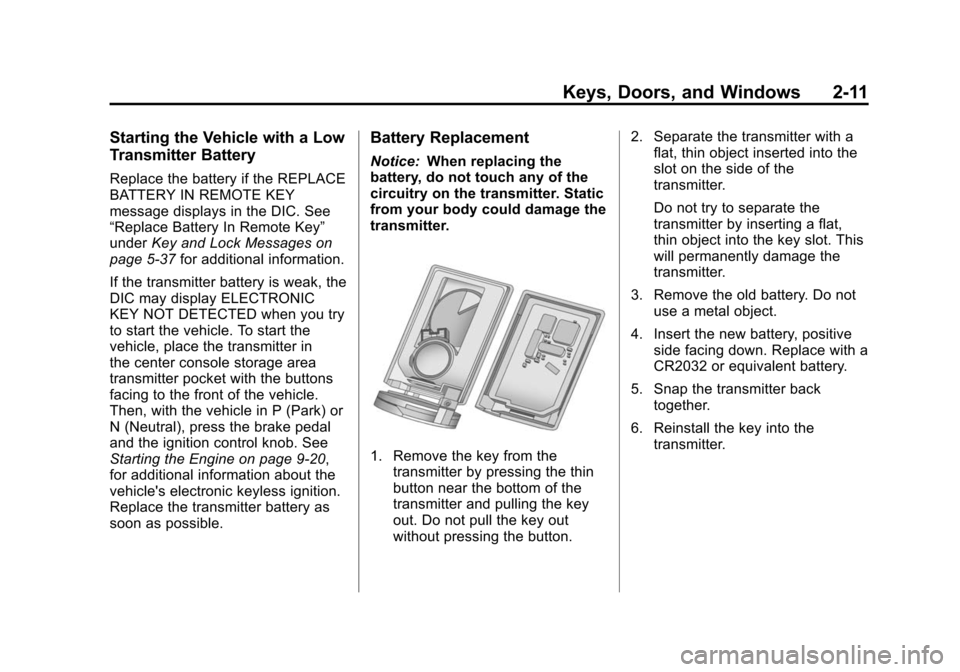
Battery Replacement
Notice: When replacing the
battery, do not touch any of the
circuitry on the transmitter. Static
from your body could damage the
transmitter.
1. Remove the key from the transmitter by pressing the thin
button near the bottom of the
transmitter and pulling the key
out. Do not pull the key out
without pressing the button. 2. Separate the transmitter with a
flat, thin object inserted into the
slot on the side of the
transmitter.
Do not try to separate the
transmitter by inserting a flat,
thin object into the key slot. This
will permanently damage the
transmitter.
3. Remove the old battery. Do not use a metal object.
4. Insert the new battery, positive side facing down. Replace with a
CR2032 or equivalent battery.
5. Snap the transmitter back together.
6. Reinstall the key into the transmitter.
Page 59 of 496

Black plate (27,1)Cadillac CTS/CTS-V Owner Manual (Include Mex) - 2012
Keys, Doors, and Windows 2-27
One or more keyless access
transmitters can be matched to the
vehicle's immobilizer control unit.
Only a correctly matched keyless
access transmitter will start the
vehicle. If the keyless access
transmitter is ever damaged, you
may not be able to start your
vehicle.
When trying to start the vehicle, the
security light comes on briefly when
the ignition is turned on.
If the engine does not start and the
security light stays on, there is a
problem with the system. Turn the
ignition control knob off and try
again.If the ignition control knob does not
rotate, and the keyless access
transmitter appears to be
undamaged, try another keyless
access transmitter. Or, you may try
placing the transmitter in the
transmitter pocket located in the
center console. See
“Electronic Key
Not Detected” underKey and Lock
Messages on page 5‑37.
If the ignition control knob still does
not rotate with the other transmitter,
the vehicle needs service. If the
ignition control knob does rotate, the
first transmitter may be faulty. See
your dealer who can service the
theft-deterrent system and have a
new keyless access transmitter
programmed to the vehicle. It is possible for the immobilizer
system to learn new or replacement
keyless access transmitters. Up to
four keyless access transmitters can
be programmed for the vehicle. To
program additional transmitters, see
“Programming Transmitters to the
Vehicle”
for keyless access under
Remote Keyless Entry (RKE)
System Operation (Key Access) on
page 2‑5 orRemote Keyless Entry
(RKE) System Operation (Keyless
Access) on page 2‑6.
Do not leave the key or device that
disarms or deactivates the theft
deterrent system in the vehicle.
Page 121 of 496

Black plate (1,1)Cadillac CTS/CTS-V Owner Manual (Include Mex) - 2012
Storage 4-1
Storage
Storage Compartments
Instrument Panel Storage . . . . . 4-1
Glove Box . . . . . . . . . . . . . . . . . . . . 4-1
Cupholders . . . . . . . . . . . . . . . . . . . 4-1
Center Console Storage . . . . . . 4-2
Additional Storage Features
Cargo Cover (Wagon) . . . . . . . . . 4-2
Cargo Management System(Wagon Only) . . . . . . . . . . . . . . . . 4-3
Cargo Net (Wagon) . . . . . . . . . . . 4-4
Convenience Net (Sedan and Coupe) . . . . . . . . . . . . . . . . . . . . . . 4-6
Roof Rack System
Roof Rack System (Wagon) . . . 4-6
Storage
Compartments
Instrument Panel Storage
There is a storage area below the
climate control system. To access,
push the cover.
Glove Box
To open, press the button. Use the
key to lock and unlock. The glove
box has a shelf that can be removed
by pulling it out.
Cupholders
There are cupholders in the front of
the center console. Push the
cover (A) to open.
There are also cupholders in the
rear center armrest. Pull the armrest
down to use.
Page 122 of 496
Black plate (2,1)Cadillac CTS/CTS-V Owner Manual (Include Mex) - 2012
4-2 Storage
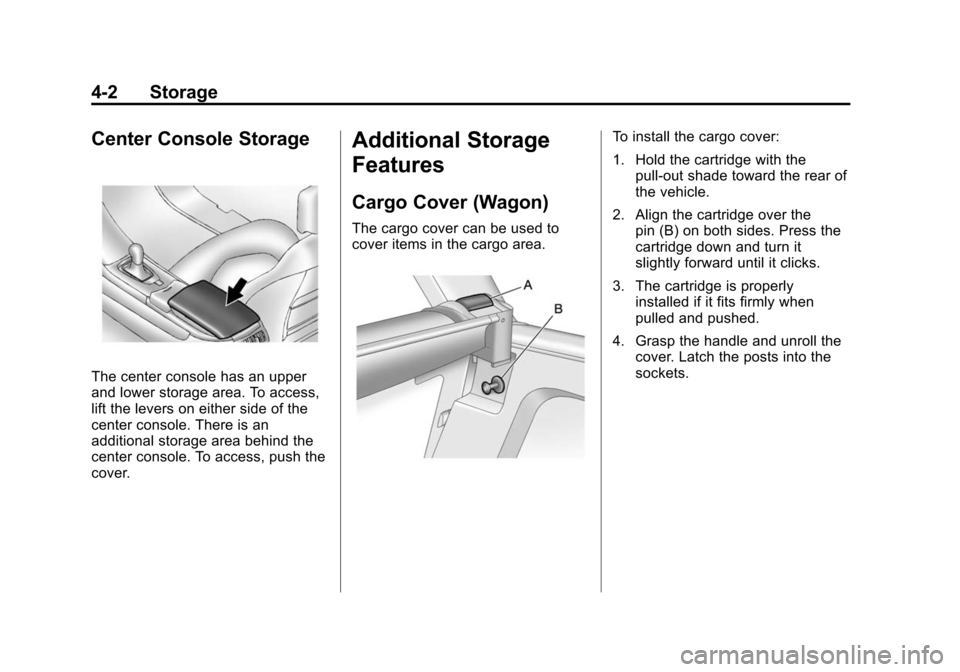
Center Console Storage
The center console has an upper
and lower storage area. To access,
lift the levers on either side of the
center console. There is an
additional storage area behind the
center console. To access, push the
cover.
Additional Storage
Features
Cargo Cover (Wagon)
The cargo cover can be used to
cover items in the cargo area.
To install the cargo cover:
1. Hold the cartridge with thepull-out shade toward the rear of
the vehicle.
2. Align the cartridge over the pin (B) on both sides. Press the
cartridge down and turn it
slightly forward until it clicks.
3. The cartridge is properly installed if it fits firmly when
pulled and pushed.
4. Grasp the handle and unroll the cover. Latch the posts into the
sockets.
Page 137 of 496

Black plate (9,1)Cadillac CTS/CTS-V Owner Manual (Include Mex) - 2012
Instruments and Controls 5-9
3. Push and release either buttonto adjust the time by one minute
increments.
Power Outlets
Accessory power outlets can be
used to plug in electrical equipment,
such as a cell phone or MP3 player.
There are three accessory power
outlets. The power outlets located
below the climate control system,
inside the center console storage
bin, and on the rear of the center
console are powered while the
vehicle is in ON/RUN, START or
ACC/ACCESSORY mode, or until
the driver door is opened within
10 minutes of turning off the vehicle.
On the CTS Wagon there is an
additional accessory power outlet
located near the rear cargo net that
is powered at all times. Remove the cover to access and
replace when not in use.
Notice:
Leaving electrical
equipment plugged in for an
extended period of time while
the vehicle is off will drain the
battery. Always unplug electrical
equipment when not in use and
do not plug in equipment that
exceeds the maximum 20 ampere
rating.
Certain electrical accessories
may not be compatible with the
accessory power outlet and could
overload vehicle or adapter fuses.
If a problem is experienced, see
your dealer.
When adding electrical equipment,
be sure to follow the proper
installation instructions included
with the equipment. See Add-On
Electrical Equipment on page 9‑61. Notice:
Hanging heavy
equipment from the power outlet
can cause damage not covered
by the vehicle warranty. The
power outlets are designed for
accessory power plugs only, such
as cell phone charge cords.
Cigarette Lighter
The vehicle may have a cigarette
lighter. To use the lighter, push it in
all the way and let go. When it is
ready, it will pop back out by itself.
Notice: Holding a cigarette lighter
in while it is heating does not let
the lighter back away from the
heating element when it is hot.
Damage from overheating can
occur to the lighter or heating
element, or a fuse could be
blown. Do not hold a cigarette
lighter in while it is heating.
Page 138 of 496

Black plate (10,1)Cadillac CTS/CTS-V Owner Manual (Include Mex) - 2012
5-10 Instruments and Controls
Ashtrays
The vehicle may have two
removable ashtrays. One ashtray
can be placed into the instrument
panel storage compartment and the
other into the center console rear
compartment.
To empty the ashtrays, hold on to
the edges of the bin and pull straight
out. To reinstall, push the tray back
into place.
Notice:If papers, pins, or other
flammable items are put in the
ashtray, hot cigarettes or other
smoking materials could ignite
them and possibly damage the
vehicle. Never put flammable
items in the ashtray.
Warning Lights,
Gauges, and
Indicators
Warning lights and gauges can
signal that something is wrong
before it becomes serious enough
to cause an expensive repair or
replacement. Paying attention to the
warning lights and gauges could
prevent injury.
Warning lights come on when there
could be a problem with a vehicle
function. Some warning lights come
on briefly when the engine is started
to indicate they are working. Gauges can indicate when there
could be a problem with a vehicle
function. Often gauges and warning
lights work together to indicate a
problem with the vehicle.
When one of the warning lights
comes on and stays on while
driving, or when one of the gauges
shows there may be a problem,
check the section that explains what
to do. Follow this manual's advice.
Waiting to do repairs can be costly
and even dangerous.