key battery CADILLAC CTS 2012 2.G Owners Manual
[x] Cancel search | Manufacturer: CADILLAC, Model Year: 2012, Model line: CTS, Model: CADILLAC CTS 2012 2.GPages: 496, PDF Size: 6.36 MB
Page 36 of 496

Black plate (4,1)Cadillac CTS/CTS-V Owner Manual (Include Mex) - 2012
2-4 Keys, Doors, and Windows
Key Access
If the vehicle has the Key Access
System, there is no key in the
transmitter.
Notice: If the transmitter does not
have a button near the base, do
not pull on the chrome base of
the transmitter. Pulling on the
base of this transmitter could
damage it.
This vehicle may have the Key
Access System or a Keyless Access
System. See Remote Keyless Entry
(RKE) System Operation (Key
Access) on page 2‑5 orRemote Keyless Entry (RKE) System
Operation (Keyless Access) on
page 2‑6
for more information. See
Ignition Positions (Key Access) on
page 9‑16 orIgnition Positions
(Keyless Access) on page 9‑18 for
information on starting the vehicle.
See your dealer if a new key is
needed.
Notice: If the keys get locked in
the vehicle, it may have to be
damaged to get them out. Always
carry a spare key.
Contact Roadside Service if locked
out of the vehicle. See Roadside
Service (U.S. and Canada) on
page 13‑7 orRoadside Service
(Mexico) on page 13‑9.
With an active OnStar subscription,
an OnStar Advisor may remotely
unlock the vehicle. See OnStar
Overview on page 14‑1.
Remote Keyless Entry
(RKE) System
See Radio Frequency Statement on
page 13‑21 for information
regarding Part 15 of the Federal
Communications Commission (FCC)
rules and Industry Canada
Standards RSS-GEN/210/220/310.
If there is a decrease in the RKE
operating range:
.Check the distance. The
transmitter may be too far from
the vehicle.
.Check the location. Other
vehicles or objects may be
blocking the signal.
.Check the transmitter's battery.
See “Battery Replacement” later
in this section.
.If the transmitter is still not
working correctly, see your
dealer or a qualified technician
for service.
Page 38 of 496

Black plate (6,1)Cadillac CTS/CTS-V Owner Manual (Include Mex) - 2012
2-6 Keys, Doors, and Windows
page 3‑8andVehicle
Personalization on page 5‑46 for
more information.
Programming Transmitters to
the Vehicle
Only RKE transmitters programmed
to the vehicle will work. If a
transmitter is lost or stolen, a
replacement can be purchased and
programmed through your dealer.
When the replacement transmitter is
programmed to the vehicle, all
remaining transmitters must also be
programmed. Any lost or stolen
transmitters no longer work once the
new transmitter is programmed.
Each vehicle can have up to eight
transmitters programmed to it.
Battery Replacement
Replace the battery if the REPLACE
BATTERY IN REMOTE KEY
message displays in the DIC. See
“Replace Battery In Remote Key”
under Key and Lock Messages on
page 5‑37 for additional information. Notice:
When replacing the
battery, do not touch any of the
circuitry on the transmitter. Static
from your body could damage the
transmitter.
To replace the battery:
1. Separate the transmitter with a flat, thin object inserted into the
notch, located above the
metal base.
2. Remove the old battery. Do not use a metal object. 3. Insert the new battery, positive
side facing up. Replace with a
CR2032 or equivalent battery.
4. Snap the transmitter back together.
Remote Keyless Entry
(RKE) System Operation
(Keyless Access)
The Keyless Access System
transmitter will work up to 60 m
(195 ft) away.
The Keyless Access System locks
and unlocks the doors and trunk
without pressing the buttons on the
keyless access transmitter. The
keyless access transmitter must be
within 1 m (3 ft) of the door or trunk
being opened.
Page 43 of 496
Black plate (11,1)Cadillac CTS/CTS-V Owner Manual (Include Mex) - 2012
Keys, Doors, and Windows 2-11
Starting the Vehicle with a Low
Transmitter Battery
Replace the battery if the REPLACE
BATTERY IN REMOTE KEY
message displays in the DIC. See
“Replace Battery In Remote Key”
underKey and Lock Messages on
page 5‑37 for additional information.
If the transmitter battery is weak, the
DIC may display ELECTRONIC
KEY NOT DETECTED when you try
to start the vehicle. To start the
vehicle, place the transmitter in
the center console storage area
transmitter pocket with the buttons
facing to the front of the vehicle.
Then, with the vehicle in P (Park) or
N (Neutral), press the brake pedal
and the ignition control knob. See
Starting the Engine on page 9‑20,
for additional information about the
vehicle's electronic keyless ignition.
Replace the transmitter battery as
soon as possible.
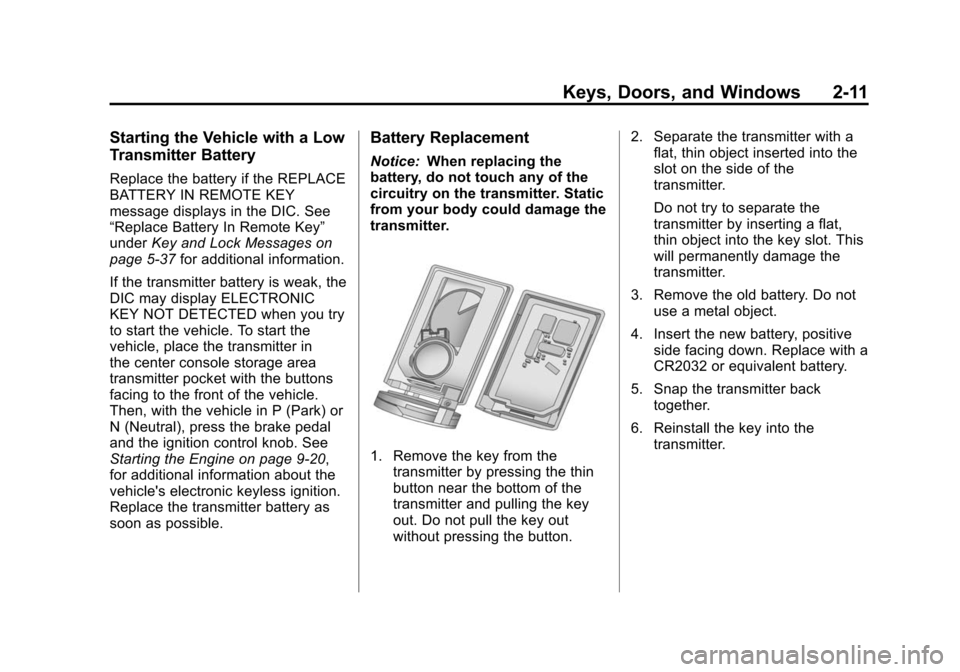
Battery Replacement
Notice: When replacing the
battery, do not touch any of the
circuitry on the transmitter. Static
from your body could damage the
transmitter.
1. Remove the key from the transmitter by pressing the thin
button near the bottom of the
transmitter and pulling the key
out. Do not pull the key out
without pressing the button. 2. Separate the transmitter with a
flat, thin object inserted into the
slot on the side of the
transmitter.
Do not try to separate the
transmitter by inserting a flat,
thin object into the key slot. This
will permanently damage the
transmitter.
3. Remove the old battery. Do not use a metal object.
4. Insert the new battery, positive side facing down. Replace with a
CR2032 or equivalent battery.
5. Snap the transmitter back together.
6. Reinstall the key into the transmitter.
Page 48 of 496

Black plate (16,1)Cadillac CTS/CTS-V Owner Manual (Include Mex) - 2012
2-16 Keys, Doors, and Windows
From the inside, use the power door
lock switch (C). SeePower Door
Locks on page 2‑16.
To open a door from the inside,
push the door latch button (B).
A tone will sound when the button is
pushed.
If the vehicle has lost battery power,
the driver door can be opened
manually.
.From inside the vehicle, pull the
manual door release handle.
.From outside the vehicle, use
the key to unlock the trunk.
Then, pull the door release tab,
located under the package shelf
at the top of the trunk, to unlock
and unlatch the driver door.
Central Door Unlocking
System
The vehicle has a central door
unlocking feature. When unlocking
the driver door, the other doors can
be unlocked by holding the key in the turned position for a few
seconds or by quickly turning the
key twice in the lock cylinder.
Power Door Locks
The switches are located on the
front doors.
K(Unlock):
Press to unlock the
doors.
Q(Lock): Remove the key from
the ignition and press to lock the
doors.
Page 54 of 496

Black plate (22,1)Cadillac CTS/CTS-V Owner Manual (Include Mex) - 2012
2-22 Keys, Doors, and Windows
into overhead obstructions such as
a garage door or roof mounted
cargo during power operation. The
liftgate can still be opened fully
manually.
OFF:The liftgate only operates
manually in this position.
Manual operation of a liftgate that
also has power operation requires
more effort than a standard manual
liftgate.
In either the MAX or the ¾ mode,
the liftgate can be power opened
and closed by:
.Pressing and holding the power
liftgate button 8on the Remote
Keyless Entry (RKE) transmitter
until the liftgate starts moving.
See Remote Keyless Entry
(RKE) System Operation (Key
Access) on page 2‑5 orRemote
Keyless Entry (RKE) System
Operation (Keyless Access) on
page 2‑6.
.Pressing the power liftgate
button in the center of the mode
selector switch on the driver
door, with the driver door
unlocked.
.Pressing the touch pad on the
liftgate outside handle, with all
doors unlocked, to open the
liftgate.
.Pressing and releasing the
power liftgate button on the
liftgate adjacent to the latch to
close the liftgate. Pressing any button that operates
the power liftgate, or the touch pad
while the liftgate is moving, stops it.
Pressing the button or RKE again
reverses the direction. There is a
minimum that the power liftgate
must already be open for the
system to hold it open. If movement
is stopped below that minimum, the
liftgate closes.
Do not force the liftgate open or
closed during a power cycle.
The power liftgate may be
temporarily disabled under extreme
temperatures or low battery
conditions. If this occurs, the liftgate
can still be operated manually.
If the transmission is shifted out of
P (Park) while the power function is
in progress, the liftgate power
function will continue to completion.
If the transmission is shifted out of
P (Park) and accelerate before the
power liftgate latch is closed, the
liftgate may reverse to the open
Page 56 of 496

Black plate (24,1)Cadillac CTS/CTS-V Owner Manual (Include Mex) - 2012
2-24 Keys, Doors, and Windows
electric latch will still power latch
once contact is made with the
striker. Always close the liftgate
before driving.
If the RKE button is pressed while
power operation is disabled, the turn
signals will flash and the liftgate will
not move.
The liftgate has an electric latch.
If the battery is disconnected or has
low voltage, the liftgate will not
open. The liftgate will resume
operation when the battery is
reconnected and charged.Vehicle Security
This vehicle has theft-deterrent
features; however, they do not make
it impossible to steal.
Anti-theft Alarm System
This vehicle may have an anti-theft
alarm system.
The security light, located in the
instrument panel cluster, comes on
when the system is arming.
Arming the System
To arm the system:
1. Open the door.
2. Lock the door with thetransmitter. The security light
should come on and stay on. 3. Close all doors. The security
light should go off after about
30 seconds. The alarm is not
armed until the security light
goes off.
If a locked door or trunk is opened
without using the key in the driver
door key cylinder or the transmitter,
a 10-second pre-alarm will occur.
The horn will chirp and the lights will
flash. If the key is not placed in the
ignition and turned to START or the
door is not unlocked by pressing the
unlock button on the transmitter
during the 10-second pre-alarm, the
alarm will go off. The headlamps will
flash and the horn will sound for
about 30 seconds, then will turn off
to save the battery power.
The theft-deterrent system will not
activate if the doors are locked with
the key or the manual door lock.
It activates only if the power door
lock switch is used while the door is
open, or with the transmitter. You
should also remember that you can
Page 63 of 496

Black plate (31,1)Cadillac CTS/CTS-V Owner Manual (Include Mex) - 2012
Keys, Doors, and Windows 2-31
Express Window Anti‐Pinch
Override
{WARNING
If express override is activated,
the window will not reverse
automatically. You or others could
be injured and the window could
be damaged. Before you use
express override, make sure that
all people and obstructions are
clear of the window path.
The anti‐pinch feature can be
overridden. Hold the window switch
all the way up to the second
position. The window will rise for as
long as the switch is held. Once the
switch is released, the express
mode is re‐activated.
In this mode, the window can close
on an object in its path. Use care
when using the override mode.
Programming the Power
Windows
If the vehicle battery has been
recharged, disconnected or not
working, the front power windows
will need to be reprogrammed for
the express-up feature to work.
Before reprogramming, replace or
recharge the vehicle's battery.
To program:
1. With the ignition in ON/RUN or ACC/ACCESSORY, or when
Retained Accessory Power
(RAP) is active, close all doors.
2. Press and hold the power window switch until the window
is fully open.
3. Pull the power window switch up until the window is fully closed.
4. Continue holding the switch up for approximately two seconds
after the window is completely
closed. The window is now reprogrammed.
Repeat the process for the other
windows.
Window Lockout
o
(Window Lockout): This feature
prevents the rear passenger
windows from operating, except
from the driver position.
Press
oto activate the rear
window lockout switch. The LED
light comes on when activated.
Page 129 of 496

Black plate (1,1)Cadillac CTS/CTS-V Owner Manual (Include Mex) - 2012
Instruments and Controls 5-1
Instruments and
Controls
Controls
Steering Wheel Adjustment . . . 5-2
Steering Wheel Controls . . . . . . 5-3
Heated Steering Wheel . . . . . . . 5-4
Horn . . . . . . . . . . . . . . . . . . . . . . . . . . 5-4
Windshield Wiper/Washer . . . . . 5-4
Rear Window Wiper/Washer . . . . . . . . . . . . . . . . . . . . . . 5-6
Headlamp Washer . . . . . . . . . . . . 5-7
Compass . . . . . . . . . . . . . . . . . . . . . 5-7
Clock . . . . . . . . . . . . . . . . . . . . . . . . . 5-8
Power Outlets . . . . . . . . . . . . . . . . . 5-9
Cigarette Lighter . . . . . . . . . . . . . . 5-9
Ashtrays . . . . . . . . . . . . . . . . . . . . . 5-10
Warning Lights, Gauges, and
Indicators
Warning Lights, Gauges, and Indicators . . . . . . . . . . . . . . . . . . 5-10
Instrument Cluster . . . . . . . . . . . 5-11
Speedometer . . . . . . . . . . . . . . . . 5-13
Odometer . . . . . . . . . . . . . . . . . . . . 5-13
Trip Odometer . . . . . . . . . . . . . . . 5-13
Tachometer . . . . . . . . . . . . . . . . . . 5-13 Fuel Gauge . . . . . . . . . . . . . . . . . . 5-13
Boost Gauge . . . . . . . . . . . . . . . . 5-14
Engine Speed Limiter . . . . . . . . 5-14
Engine Oil Pressure
Gauge . . . . . . . . . . . . . . . . . . . . . . 5-15
Engine Coolant Temperature Gauge . . . . . . . . . . . . . . . . . . . . . . 5-16
Safety Belt Reminders . . . . . . . 5-16
Airbag Readiness Light . . . . . . 5-17
Passenger Airbag Status Indicator . . . . . . . . . . . . . . . . . . . . 5-18
Charging System Light . . . . . . 5-19
Malfunction Indicator Lamp . . . . . . . . . . . . . 5-19
Brake System Warning Light . . . . . . . . . . . . . . . . . . . . . . . 5-22
Antilock Brake System (ABS) Warning Light . . . . . . . . . . . . . . 5-23
Up-Shift Light . . . . . . . . . . . . . . . . 5-23
StabiliTrak
®OFF Light . . . . . . . 5-23
Traction Control System (TCS)/StabiliTrak
®Light . . . . 5-24
Engine Coolant Temperature Warning Light . . . . . . . . . . . . . . 5-24
Tire Pressure Light . . . . . . . . . . 5-25
Engine Oil Pressure Light . . . . 5-25
Security Light . . . . . . . . . . . . . . . . 5-26
High-Beam On Light . . . . . . . . . 5-26 Front Fog Lamp Light . . . . . . . . 5-26
Lamps On Reminder . . . . . . . . . 5-26
Cruise Control Light . . . . . . . . . 5-27
Information Displays
Driver Information
Center (DIC) . . . . . . . . . . . . . . . 5-27
Vehicle Messages
Vehicle Messages . . . . . . . . . . . 5-31
Battery Voltage and ChargingMessages . . . . . . . . . . . . . . . . . . 5-31
Brake System Messages . . . . 5-32
Compass Messages . . . . . . . . . 5-34
Cruise Control Messages . . . . 5-34
Door Ajar Messages . . . . . . . . . 5-34
Engine Cooling System Messages . . . . . . . . . . . . . . . . . . 5-35
Engine Oil Messages . . . . . . . . 5-35
Engine Power Messages . . . . 5-36
Fuel System Messages . . . . . . 5-36
Key and Lock Messages . . . . . 5-37
Lamp Messages . . . . . . . . . . . . . 5-39
Object Detection System Messages . . . . . . . . . . . . . . . . . . 5-39
Ride Control System Messages . . . . . . . . . . . . . . . . . . 5-40
Airbag System Messages . . . . 5-43
Page 147 of 496

Black plate (19,1)Cadillac CTS/CTS-V Owner Manual (Include Mex) - 2012
Instruments and Controls 5-19
Charging System Light
The charging system light comes on
briefly when the ignition is turned
on, but the engine is not running, as
a check to show the light is working.
The light turns off when the engine
is started. If it does not, have the
vehicle serviced by your dealer.
If the light stays on, or comes on
while driving, there may be a
problem with the electrical charging
system. Have it checked by your
dealer. Driving while this light is on
could drain the battery.
When this light comes on, the Driver
Information Center (DIC) also
displays a message.See
Battery Voltage and Charging
Messages on page 5‑31.
If a short distance must be driven
with the light on, be sure to turn off
all accessories, such as the radio
and air conditioner.
Malfunction
Indicator Lamp
A computer system called OBD II
(On-Board Diagnostics-Second
Generation) monitors the operation
of the vehicle to ensure emissions
are at acceptable levels, to produce
a cleaner environment. This light
comes on when the vehicle is
placed in ON/RUN as a check to
show it is working. If it does not,
have the vehicle serviced by your
dealer. See Ignition Positions (Key
Access) on page 9‑16 orIgnition
Positions (Keyless Access) on
page 9‑18 for more information.
This light should come on when the
ignition is on, but the engine is not
running, as a check to show it is
working. If it does not, have the
vehicle serviced by your dealer.
If the malfunction indicator lamp
comes on and stays on while the
engine is running, this indicates that
there is an OBD II problem and
service is required.
Page 166 of 496

Black plate (38,1)Cadillac CTS/CTS-V Owner Manual (Include Mex) - 2012
5-38 Instruments and Controls
buttons facing the front of the
vehicle and then start the
vehicle.
.The vehicle's battery voltage is
low. The battery voltage must be
above 10 volts for the keyless
access transmitter to be
detected properly.
ELECTRONIC KEY NOT
DETECTED RESTART
ALLOWED
If the vehicle has the keyless
access system, this message
displays when the keyless access
transmitter is not detected inside the
vehicle while you are trying to turn
the ignition off. The vehicle may be
near a strong radio antenna signal
causing the keyless access system
to be jammed. If you have the
keyless access transmitter with you,
get out of the vehicle and lock the
doors. If you do not have the
keyless access transmitter with you,
you will be able to start the vehicle
again within five minutes, or after
the vehicle's content theft-deterrentsystem is armed. See
Starting the
Engine on page 9‑20 for more
information.
LEARN DELAY ACTIVE WAIT
XX MIN (MINUTES)
If the vehicle has the keyless
access system, this message
displays when matching new
transmitters to the vehicle. See the
Keyless Access information for
Remote Keyless Entry (RKE)
System Operation (Key Access) on
page 2‑5 orRemote Keyless Entry
(RKE) System Operation (Keyless
Access) on page 2‑6 for more
information.
MAXIMUM # ELECTRONIC
KEYS LEARNED
If the vehicle has the keyless
access system, this message
displays when the maximum
number of transmitters have been
learned. See the Keyless Access
information for Remote Keyless
Entry (RKE) System Operation (Key
Access) on page 2‑5 orRemote Keyless Entry (RKE) System
Operation (Keyless Access) on
page 2‑6
for more information.
PRESS START CONTROL TO
LEARN KEYS
If the vehicle has the keyless
access system, this message
displays when matching new
transmitters to the vehicle. See
the keyless access information
forRemote Keyless Entry (RKE)
System Operation (Key Access) on
page 2‑5 orRemote Keyless Entry
(RKE) System Operation (Keyless
Access) on page 2‑6 for more
information.
READY TO LEARN
ELECTRONIC KEY # X
If the vehicle has the keyless
access system, this message
displays while matching new
transmitters to the vehicle. See the
keyless access information for
Remote Keyless Entry (RKE)
System Operation (Key Access) on
page 2‑5 orRemote Keyless Entry