instrument cluster CADILLAC CTS 2013 2.G User Guide
[x] Cancel search | Manufacturer: CADILLAC, Model Year: 2013, Model line: CTS, Model: CADILLAC CTS 2013 2.GPages: 478, PDF Size: 7.7 MB
Page 149 of 478
Black plate (27,1)Cadillac CTS/CTS-V Owner Manual - 2013 - crc2 - 8/22/12
Instruments and Controls 5-27
Cruise Control Light
This light comes on whenever the
cruise control is active.
The light goes out when the cruise
control is turned off. SeeCruise
Control on page 9‑39 for more
information.
Information Displays
Driver Information
Center (DIC)
The Driver Information Center (DIC)
provides status of many vehicle
systems. The DIC displays warning/
status messages. The DIC display
is at the bottom of the instrument
cluster. The DIC buttons are on the
instrument panel next to the
steering wheel.
The DIC comes on when the ignition
is on. After a short delay, the DIC
displays the information that was
last displayed before the engine
was turned off.
The top line of the DIC display
shows the DIC information. The
bottom line shows the compass.
The compass displays in the trip/
fuel menus and in some vehicle
information menus. If a problem is detected, a warning
message appears on the display. All
messages should be taken
seriously; clearing the message
does not correct the problem.DIC Operation and Displays
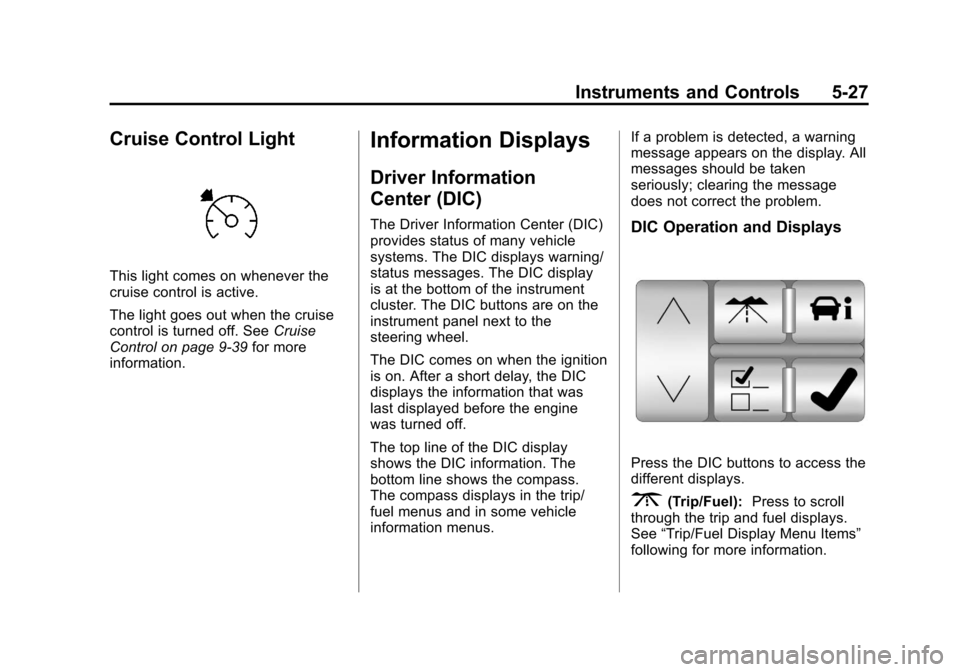
Press the DIC buttons to access the
different displays.
3(Trip/Fuel):
Press to scroll
through the trip and fuel displays.
See “Trip/Fuel Display Menu Items”
following for more information.
Page 154 of 478

Black plate (32,1)Cadillac CTS/CTS-V Owner Manual - 2013 - crc2 - 8/22/12
5-32 Instruments and Controls
BATTERY VOLTS LOW
This message displays when the
electrical system is charging less
than 10 volts or the battery has
been drained.
If this message appears
immediately after starting the
engine, it is possible that the
generator can still recharge the
battery. The battery should recharge
while driving, but may take a few
hours to do so. Consider using an
auxiliary charger to boost the
battery after returning home or
arriving at a final destination. Make
sure you follow the manufacturer's
instructions.
If this message appears while
driving or after starting the vehicle
and stays on, have it checked
immediately to determine the cause
of this problem.
To help the generator recharge the
battery quickly, reduce the load on
the electrical system by turning off
the accessories.The normal battery voltage range is
11.5 to 15.5 volts. Monitor battery
voltage on the DIC by pressing the
vehicle information button until
Battery Voltage is displayed.
SERVICE BATTERY
CHARGING SYSTEM
This message displays when there
is a problem with the generator and
battery charging systems. Driving
with this problem could drain the
battery. Turn off all unnecessary
accessories. Stop and turn off the
vehicle as soon as it is safe to do
so. Have the electrical system
checked by your dealer. Under
certain conditions, the charging
system light may also turn on in the
instrument cluster. See
Charging
System Light on page 5‑19.
Brake System Messages
PARK BRAKE RELEASED
For vehicles with the electric parking
brake, this message displays when
the parking brake has been released from the set position. See
the electric parking brake
information under
Parking Brake
(Electric) on page 9‑33 orParking
Brake (Manual) on page 9‑32.
PARK BRAKE SET
For vehicles with the electric parking
brake, this message displays when
the parking brake has been applied
to the set position. See the electric
parking brake information under
Parking Brake (Electric) on
page 9‑33 orParking Brake
(Manual) on page 9‑32.
PRESS BRAKE TO START
ENGINE (AUTOMATIC
TRANSMISSION ONLY)
If the vehicle has the keyless
access system, this message
displays if you try to start the engine
without having the brake pressed.
The brake needs to be pressed
when starting the engine. See
Ignition Positions (Keyless Access)
on page 9‑15 orIgnition Positions
(Key Access) on page 9‑17.
Page 155 of 478
Black plate (33,1)Cadillac CTS/CTS-V Owner Manual - 2013 - crc2 - 8/22/12
Instruments and Controls 5-33
RELEASE PARK BRAKE
SWITCH
For vehicles with the electric parking
brake, this message displays if the
switch is pulled while the vehicle is
moving. See the electric parking
brake information underParking
Brake (Electric) on page 9‑33 or
Parking Brake (Manual) on
page 9‑32.
SERVICE BRAKE ASSIST
This message displays if there is a
problem with the brake system. The
brake system warning light and the
antilock brake system (ABS)
warning light may also display on
the instrument cluster. See Brake
System Warning Light on page 5‑22
and Antilock Brake System (ABS)
Warning Light on page 5‑23. Stop
as soon as possible and turn off the
vehicle. Restart the vehicle and
check for the message on the DIC
display. If the message displays
immediately or again after you begin
driving, the brake system needs service. See your dealer as soon as
possible. See
Antilock Brake
System (ABS) on page 9‑31.
SERVICE BRAKE SYSTEM
This message displays, while the
ignition is on, when the brake fluid
level is low. The brake system
warning light on the instrument
panel cluster also comes on. See
Brake System Warning Light on
page 5‑22. This message may also
be displayed for other brake system
problems. Have the brake system
serviced by your dealer as soon as
possible.
SERVICE PARK BRAKE
For vehicles with the electric parking
brake, this message displays if a
problem is detected with the electric
parking brake system. See your
dealer for service.
STEP ON BRAKE TO
RELEASE PARK BRAKE
For vehicles with the electric parking
brake, this message displays if you
try to release the park brake system
without first pressing the brake
pedal. See the electric parking
brake information under Parking
Brake (Electric) on page 9‑33 or
Parking Brake (Manual) on
page 9‑32.
Compass Messages
CALIBRATING DRIVE IN
CIRCLES
This message displays when
calibrating the compass. Drive the
vehicle in circles at less than 8 km/h
(5 mph) to complete the calibration.
See Compass on page 5‑7 for more
information.
Page 157 of 478

Black plate (35,1)Cadillac CTS/CTS-V Owner Manual - 2013 - crc2 - 8/22/12
Instruments and Controls 5-35
If this message continues to appear,
have the system repaired by your
dealer as soon as possible to avoid
damage to the engine.
ENGINE OVERHEATED IDLE
ENGINE
Notice:If you drive the vehicle
while the engine is overheating,
severe engine damage may
occur. If an overheat warning
appears on the instrument cluster
and/or DIC, stop the vehicle as
soon as possible. Do not increase
the engine speed above normal
idling speed. See Engine
Overheating on page 10‑21 for
more information.
This message displays when the
engine coolant temperature is too
hot. Stop and allow the vehicle to
idle until it cools down. If the
message does not clear in a few
minutes or if the overheat light stays
on, shut the vehicle off and have it
serviced before driving again. See
Engine Coolant Temperature
Warning Light on page 5‑24. See
Overheated Engine Protection
Operating Mode on page 10‑22 for
information on driving to a safe
place in an emergency.
Engine Oil Messages
CHANGE ENGINE OIL SOON
When this message displays, it
means that service is required for
the vehicle. See your dealer. See
Maintenance Schedule on
page 11‑3 andEngine Oil on
page 10‑9.
When you reset the CHANGE
ENGINE OIL SOON message by
clearing it from the display, you still
must reset the engine oil life system
separately. For more information on
resetting the engine oil life system,
see Engine Oil Life System on
page 10‑11.
ENGINE OIL LOW ADD OIL
On some vehicles, this message
displays if the oil level in the vehicle
is low. Check the oil level before
filling to the recommended level. You may need to let the vehicle cool
or warm up and cycle the ignition to
be sure this message clears. If the
oil is not low and this message
continues to be displayed, take the
vehicle to your dealer for service.
This message clears itself after
10 seconds, until the next ignition
cycle. See
Engine Oil on page 10‑9.
OIL PRESSURE LOW STOP
ENGINE
Notice:If you drive the vehicle
while the engine oil pressure is
low, severe engine damage may
occur. If a low oil pressure
warning appears on the
instrument cluster and/or DIC,
stop the vehicle as soon as
possible. Do not drive the vehicle
until the cause of the low oil
pressure is corrected. See Engine
Oil on page 10‑9 for more
information.
This message displays when the
vehicle's engine oil pressure is low.
The oil pressure light may also
appear on the instrument cluster.
Page 163 of 478
Black plate (41,1)Cadillac CTS/CTS-V Owner Manual - 2013 - crc2 - 8/22/12
Instruments and Controls 5-41
heavier, but you will still be able to
steer the vehicle. SeeSteering on
page 9‑4.
SERVICE STABILITRAK
This message displays if there has
been a problem detected with the
StabiliTrak
®system. The TCS/
StabiliTrak warning light on the
instrument cluster also comes on.
If this message comes on while you
are driving, pull off the road as soon
as possible and stop carefully. Try
resetting the system by turning the
ignition off then back on. If this
message still stays on or comes
back on again while you are driving,
the vehicle needs service. Have the
StabiliTrak system inspected by
your dealer as soon as possible.
See StabiliTrak
®System on
page 9‑36.
SERVICE SUSPENSION
SYSTEM
This message displays when there
is a problem with the Magnetic Ride
Control system. See Magnetic Ride
Control on page 9‑38. Have the
vehicle serviced by your dealer.
SERVICE TRACTION
CONTROL
This message displays when there
is a problem with the Traction
Control System (TCS). The TCS/
StabiliTrak warning light on the
instrument cluster also comes on.
When this message displays, the
system will not limit wheel spin.
Adjust your driving accordingly. See
your dealer for service. See Traction
Control System (TCS) on
page 9‑35.
STABILITRAK
COMPETITIVE MODE
This message displays when the
Competitive Driving Mode is
selected. When in this mode, the
Traction Control System (TCS) will not be operating and the TCS/
StabiliTrak warning light will turn on.
Adjust your driving accordingly. See
Competitive Driving Mode on
page 9‑37.
STABILITRAK NOT READY
This message may display after first
driving the vehicle and exceeding
30 km/h (19 mph) for 30 seconds.
The TCS/StabiliTrak warning light
on the instrument cluster also
comes on. The StabiliTrak system is
not functional until the message has
turned off. See
StabiliTrak
®System
on page 9‑36.
STABILITRAK OFF
This message displays when you
turn off StabiliTrak, or when the
stability control system has been
automatically disabled. The TCS/
StabiliTrak warning light on the
instrument cluster also comes on.
Page 180 of 478

Black plate (2,1)Cadillac CTS/CTS-V Owner Manual - 2013 - crc2 - 8/22/12
6-2 Lighting
;(Parking Lamps):Turns on the
parking lamps together with the
following:
.Sidemarker Lamps
.Taillamps
.License Plate Lamps
.Instrument Panel Lights
5(Headlamps): Turns on the
headlamps, together with the
previously listed lamps and lights.
Exterior Lamps Off
Reminder
A warning chime will sound if the
exterior lamp control is left on in
either the headlamp or parking lamp
position and the driver door is
opened with the ignition off.
Headlamp High/
Low-Beam Changer
Push the turn signal lever away
from you to turn the high beams on.
Pull the lever toward you and then
release it to return to low beams.
If the vehicle is turned off while the
high beams are on, they will come
on the next time the vehicle is
started.
This indicator light turns on in the
instrument cluster when the
high-beam headlamps are on.
Flash-to-Pass
This feature allows the high-beam
headlamps to be used to signal the
driver in front of you that you want
to pass. Pull and hold the turn signal lever
toward you to use this feature.
When this is done the following will
occur:
.If the headlamps are off or in
low-beam mode, the high-beam
headlamps will turn on at full
brightness. Release the lever to
turn them off.
.If the headlamps are already in
high-beam mode, they will
remain on high beam.
Daytime Running
Lamps (DRL)
Daytime Running Lamps (DRL) can
make it easier for others to see the
front of your vehicle during the day.
Fully functional daytime running
lamps are required on all vehicles
first sold in Canada.
Page 181 of 478

Black plate (3,1)Cadillac CTS/CTS-V Owner Manual - 2013 - crc2 - 8/22/12
Lighting 6-3
The DRL system will make either
the reduced intensity low-beam
headlamps or dedicated DRLs come
on when the following conditions
are met:
.It is still daylight and the ignition
is in ON/RUN or START.
.The exterior lamp control is inPor AUTO and the headlamps
are off.
.The automatic transmission is
not in P (Park).
When DRLs are on, only the
reduced intensity low-beam
headlamps or dedicated DRLs will
be on. The other exterior lamps and
the instrument cluster will not be on.
When the exterior lamp control is in
AUTO and it is dark enough outside,
the DRL turn off and the low-beam
headlamps will turn on. When it is
bright enough outside, the low-beam
headlamps will go off, and the DRL
will turn back on. If the vehicle is
started in a dark garage, the
automatic headlamp system comes on immediately. Once the vehicle
leaves the garage, it takes about
one minute for the automatic
headlamp system to change to DRL
if it is light outside. During that
delay, the instrument cluster may
not be as bright as usual. Make sure
the instrument panel brightness
knob is in the full bright position.
See
Instrument Panel Illumination
Control on page 6‑6.
Turning the exterior lamp control to
off or to the low-beam headlamp
position will turn off the DRL. If the
parking lamps or the fog lamps were
turned on instead, the DRL will still
turn off.
This will work regardless of gear
position and whether or not the
parking brake is set.
When the DRL are active and a turn
signal is operated, the DRL on the
side the turn signal is activated, will
turn off until the turn signal is
turned off.
Automatic Headlamp
System
When it is dark enough outside, the
automatic headlamp system turns
on the headlamps at the normal
brightness, along with the taillamps,
sidemarker, parking lamps, and the
instrument panel lights. The radio
lights will also be dim.
To turn off the automatic headlamp
system, turn the exterior lamp
control to the off position and then
release it.
The vehicle has a light sensor on
the top of the instrument panel in
the defroster grille which regulates
when the automatic headlamps turn
Page 182 of 478

Black plate (4,1)Cadillac CTS/CTS-V Owner Manual - 2013 - crc2 - 8/22/12
6-4 Lighting
on. Do not cover the sensor,
otherwise the headlamps will come
on whenever the ignition is on.
The system may also turn on the
headlamps when driving through a
parking garage, heavy overcast
weather, or a tunnel. This is normal.
If the vehicle is started in a dark
garage, the automatic headlamp
system will come on immediately.
Once the vehicle leaves the garage,
it takes approximately one minute
for the automatic headlamp system
to change if it is bright enough
outside. During that delay, the
instrument cluster may not be as
bright as usual. Make sure the
instrument panel brightness control
is in the full bright position. See
Instrument Panel Illumination
Control on page 6‑6.
To idle the vehicle with the
automatic headlamp system off, turn
the control to the off position.The headlamps will also stay on
after you exit the vehicle. This
feature can be programmed using
the Driver Information Center (DIC).
See
Vehicle Personalization on
page 5‑45.
The regular headlamp system can
be turned on when needed.
Lights On with Wipers
If the windshield wipers are
activated in daylight with the engine
on, and the exterior lamp control is
in AUTO, the headlamps, parking
lamps, and other exterior lamps
come on. The transition time for the
lamps coming on varies based on
wiper speed. When the wipers are
not operating, these lamps turn off.
Move the exterior lamp control to
P
or;to disable this feature.
Adaptive Forward
Lighting (AFL)
The Adaptive Forward Lighting
System (AFL) pivots the headlamps
horizontally to provide greater road
illumination while turning. To enable
AFL, set the exterior lamp control on
the turn signal lever to the AUTO
position. Moving the switch out of
the AUTO position will deactivate
the system. AFL will operate when
the vehicle speed is greater than
3 km/h (2 mph). AFL will not operate
when the transmission is in
R (Reverse). AFL is not immediately
operable after starting the vehicle;
driving a short distance is required
to calibrate the AFL. See Exterior
Lamp Controls on page 6‑1.
Page 183 of 478

Black plate (5,1)Cadillac CTS/CTS-V Owner Manual - 2013 - crc2 - 8/22/12
Lighting 6-5
Hazard Warning Flashers
|(Hazard Warning Flasher):
Press this button to make the front
and rear turn signal lamps flash on
and off. This warns others that you
are having trouble. Press again to
turn the flashers off.
Turn and Lane-Change
Signals
Move the lever all the way up or
down to signal a turn.
An arrow on the instrument cluster
flashes in the direction of the turn or
lane change.
Raise or lower the lever until the
arrow starts to flash to signal a lane
change. Hold it briefly until the lane
change is complete. The arrow will
automatically flash three times.
The lever returns to its starting
position when it is released.
If after signaling a turn or lane
change the arrow flashes rapidly or
does not come on, a signal bulb
may be burned out. Have any burned out bulbs
replaced. If a bulb is not burned out,
check the fuse. See
Fuses and
Circuit Breakers on page 10‑35.
Turn Signal On Chime
If the turn signal is left on for about
1.6 km (1 mi), a warning chime will
sound and the TURN SIGNAL ON
message will appear on the Driver
Information Center (DIC) display.
See “Turn Signal On” underLamp
Messages on page 5‑39.
Fog Lamps
Use the fog lamps for better vision
in foggy or misty conditions. The fog
lamp control is on the turn signal
lever.
Page 274 of 478
Black plate (32,1)Cadillac CTS/CTS-V Owner Manual - 2013 - crc2 - 8/22/12
9-32 Driving and Operating
suddenly slows or stops. Always
leave enough room up ahead to
stop, even with ABS.
Using ABS
Do not pump the brakes. Just hold
the brake pedal down firmly and let
ABS work. You might hear the ABS
pump or motor operating and feel
the brake pedal pulsate, but this is
normal.
Braking in Emergencies
ABS allows the driver to steer and
brake at the same time. In many
emergencies, steering can help
more than even the very best
braking.
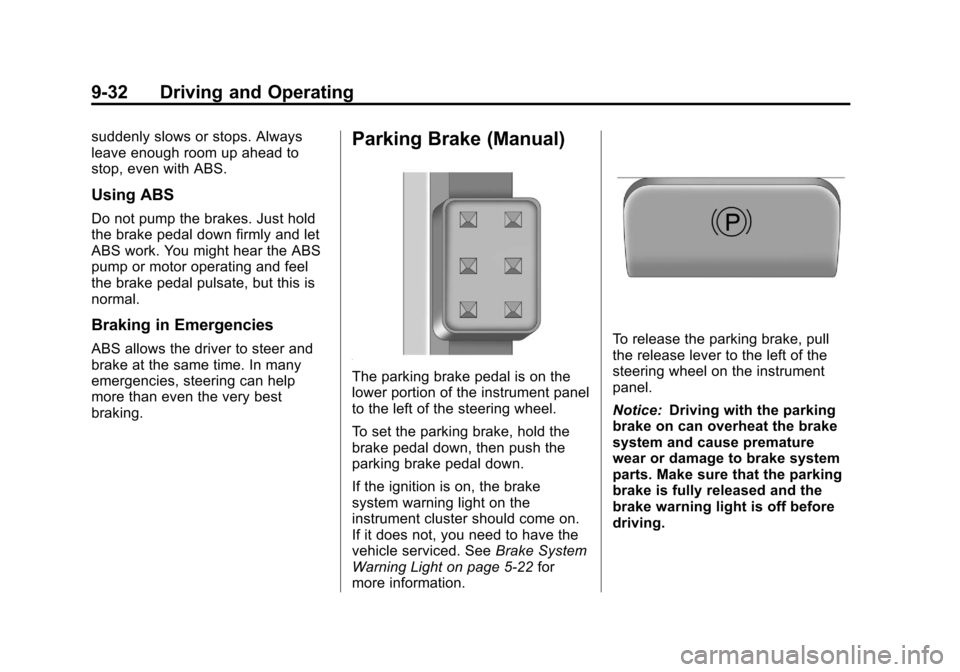
Parking Brake (Manual)
The parking brake pedal is on the
lower portion of the instrument panel
to the left of the steering wheel.
To set the parking brake, hold the
brake pedal down, then push the
parking brake pedal down.
If the ignition is on, the brake
system warning light on the
instrument cluster should come on.
If it does not, you need to have the
vehicle serviced. SeeBrake System
Warning Light on page 5‑22 for
more information.
To release the parking brake, pull
the release lever to the left of the
steering wheel on the instrument
panel.
Notice: Driving with the parking
brake on can overheat the brake
system and cause premature
wear or damage to brake system
parts. Make sure that the parking
brake is fully released and the
brake warning light is off before
driving.