maintenance CADILLAC CTS 2013 2.G User Guide
[x] Cancel search | Manufacturer: CADILLAC, Model Year: 2013, Model line: CTS, Model: CADILLAC CTS 2013 2.GPages: 478, PDF Size: 7.7 MB
Page 147 of 478
Black plate (25,1)Cadillac CTS/CTS-V Owner Manual - 2013 - crc2 - 8/22/12
Instruments and Controls 5-25
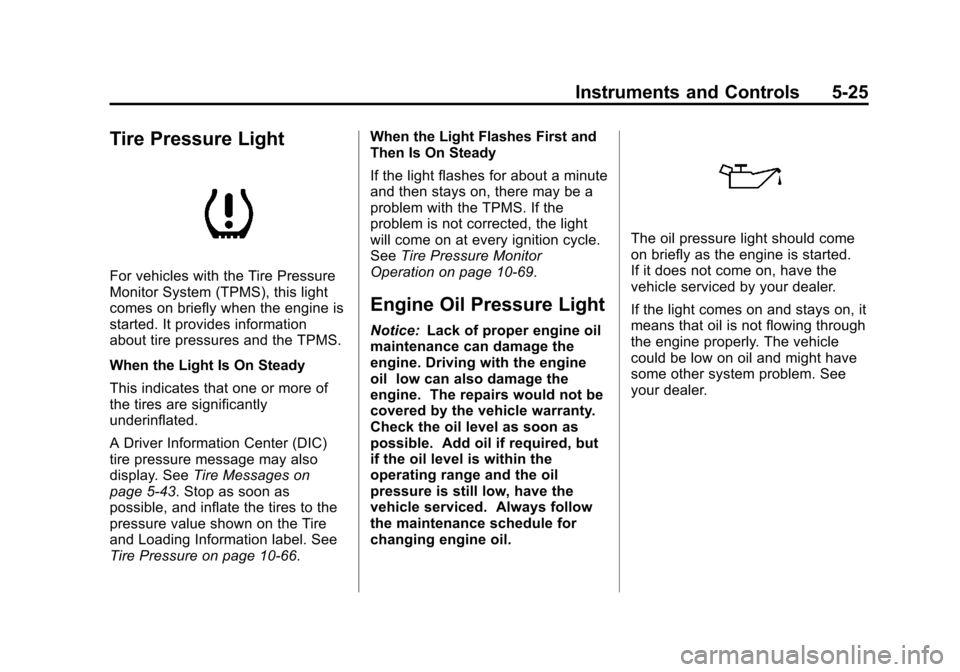
Tire Pressure Light
For vehicles with the Tire Pressure
Monitor System (TPMS), this light
comes on briefly when the engine is
started. It provides information
about tire pressures and the TPMS.
When the Light Is On Steady
This indicates that one or more of
the tires are significantly
underinflated.
A Driver Information Center (DIC)
tire pressure message may also
display. SeeTire Messages on
page 5‑43. Stop as soon as
possible, and inflate the tires to the
pressure value shown on the Tire
and Loading Information label. See
Tire Pressure on page 10‑66. When the Light Flashes First and
Then Is On Steady
If the light flashes for about a minute
and then stays on, there may be a
problem with the TPMS. If the
problem is not corrected, the light
will come on at every ignition cycle.
See
Tire Pressure Monitor
Operation on page 10‑69.
Engine Oil Pressure Light
Notice: Lack of proper engine oil
maintenance can damage the
engine. Driving with the engine
oil low can also damage the
engine. The repairs would not be
covered by the vehicle warranty.
Check the oil level as soon as
possible. Add oil if required, but
if the oil level is within the
operating range and the oil
pressure is still low, have the
vehicle serviced. Always follow
the maintenance schedule for
changing engine oil.
The oil pressure light should come
on briefly as the engine is started.
If it does not come on, have the
vehicle serviced by your dealer.
If the light comes on and stays on, it
means that oil is not flowing through
the engine properly. The vehicle
could be low on oil and might have
some other system problem. See
your dealer.
Page 151 of 478

Black plate (29,1)Cadillac CTS/CTS-V Owner Manual - 2013 - crc2 - 8/22/12
Instruments and Controls 5-29
To reset the timer to zero, press and
hold the set/reset button.
Inst (Instantaneous) Economy
Displays the current fuel economy in
either liters per 100 kilometers(L/100 km) or miles per
gallon (mpg). This number changes
frequently as driving conditions
change. It cannot be reset.
AVG (Average) Speed
Displays the average speed of the
vehicle in either kilometers per
hour (km/h) or miles per hour (mph).
This calculation is based on the
various vehicle speeds recorded
since the last reset of this display.
Press the set/reset button to reset
to zero.
Speedometer
Displays a digital speedometer in
the DIC. The speed displays in
either kilometers per hour (km/h) or
miles per hour (mph). To change the
units from English to metric, see
“Units” later in this section. Blank Display
This display shows no information.
Vehicle Information Display
Menu Items
T(Vehicle Information):
Press
to display the following menu items:
Oil Life Remaining
If the vehicle has this display, it
shows the estimated oil life
remaining. If you see 99% Oil Life
Remaining on the display, that
means that 99% of the current oil
life remains.
When the oil life is depleted, the
Change Engine Oil Soon message
displays. Change the oil as soon as
possible. Additional maintenance is
also recommended in the
Maintenance Schedule in this
manual. See Maintenance Schedule
on page 11‑3 andEngine Oil on
page 10‑9.
The Oil Life must be reset after
each oil change. Avoid accidental
resetting of the Oil Life system. It cannot be reset accurately until
the next oil change. To reset the
engine oil life system, See
Engine
Oil Life System on page 10‑11. The
system is reset when 100%
displays.
Units
Select to display English or metric
units of measure. Press the set/
reset button to select when units is
displayed.
Parking Assist
If the vehicle has the Ultrasonic
Rear Parking Assist (URPA) system,
this display allows the system to be
turned on or off. Once in this
display, press the set/reset button to
select between On or Off. The
URPA system automatically turns
back on after each vehicle start.
When the URPA system is turned
off and the vehicle is shifted out of
P (Park), the DIC displays the
PARKING ASSIST OFF message as
a reminder that the system has
Page 157 of 478

Black plate (35,1)Cadillac CTS/CTS-V Owner Manual - 2013 - crc2 - 8/22/12
Instruments and Controls 5-35
If this message continues to appear,
have the system repaired by your
dealer as soon as possible to avoid
damage to the engine.
ENGINE OVERHEATED IDLE
ENGINE
Notice:If you drive the vehicle
while the engine is overheating,
severe engine damage may
occur. If an overheat warning
appears on the instrument cluster
and/or DIC, stop the vehicle as
soon as possible. Do not increase
the engine speed above normal
idling speed. See Engine
Overheating on page 10‑21 for
more information.
This message displays when the
engine coolant temperature is too
hot. Stop and allow the vehicle to
idle until it cools down. If the
message does not clear in a few
minutes or if the overheat light stays
on, shut the vehicle off and have it
serviced before driving again. See
Engine Coolant Temperature
Warning Light on page 5‑24. See
Overheated Engine Protection
Operating Mode on page 10‑22 for
information on driving to a safe
place in an emergency.
Engine Oil Messages
CHANGE ENGINE OIL SOON
When this message displays, it
means that service is required for
the vehicle. See your dealer. See
Maintenance Schedule on
page 11‑3 andEngine Oil on
page 10‑9.
When you reset the CHANGE
ENGINE OIL SOON message by
clearing it from the display, you still
must reset the engine oil life system
separately. For more information on
resetting the engine oil life system,
see Engine Oil Life System on
page 10‑11.
ENGINE OIL LOW ADD OIL
On some vehicles, this message
displays if the oil level in the vehicle
is low. Check the oil level before
filling to the recommended level. You may need to let the vehicle cool
or warm up and cycle the ignition to
be sure this message clears. If the
oil is not low and this message
continues to be displayed, take the
vehicle to your dealer for service.
This message clears itself after
10 seconds, until the next ignition
cycle. See
Engine Oil on page 10‑9.
OIL PRESSURE LOW STOP
ENGINE
Notice:If you drive the vehicle
while the engine oil pressure is
low, severe engine damage may
occur. If a low oil pressure
warning appears on the
instrument cluster and/or DIC,
stop the vehicle as soon as
possible. Do not drive the vehicle
until the cause of the low oil
pressure is corrected. See Engine
Oil on page 10‑9 for more
information.
This message displays when the
vehicle's engine oil pressure is low.
The oil pressure light may also
appear on the instrument cluster.
Page 235 of 478
Black plate (1,1)Cadillac CTS/CTS-V Owner Manual - 2013 - crc2 - 8/22/12
Climate Controls 8-1
Climate Controls
Climate Control Systems
Dual Automatic Climate ControlSystem . . . . . . . . . . . . . . . . . . . . . . 8-1
Air Vents
Air Vents . . . . . . . . . . . . . . . . . . . . . . 8-6
Maintenance
Passenger Compartment AirFilter . . . . . . . . . . . . . . . . . . . . . . . . . 8-6
Climate Control Systems
Dual Automatic Climate Control System
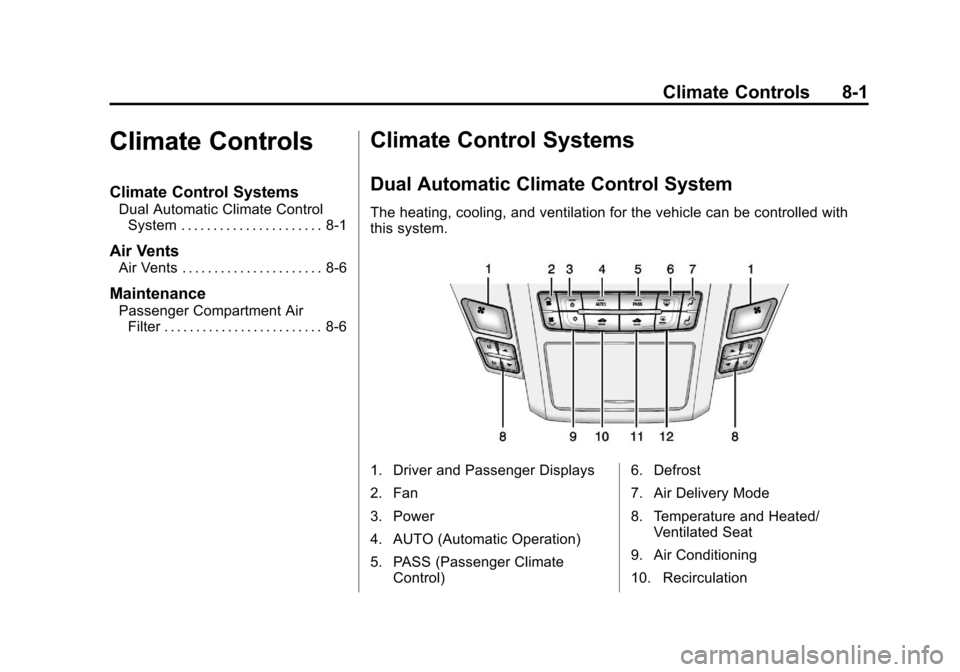
The heating, cooling, and ventilation for the vehicle can be controlled with
this system.
1. Driver and Passenger Displays
2. Fan
3. Power
4. AUTO (Automatic Operation)
5. PASS (Passenger Climate
Control) 6. Defrost
7. Air Delivery Mode
8. Temperature and Heated/
Ventilated Seat
9. Air Conditioning
10. Recirculation
Page 240 of 478

Black plate (6,1)Cadillac CTS/CTS-V Owner Manual - 2013 - crc2 - 8/22/12
8-6 Climate Controls
Air Vents
Use the air outlets in the center and
on the side of the instrument panel
to direct the airflow. Use the
thumbwheels near the air outlets to
open or close off the airflow.
Operation Tips
.Clear away any ice, snow,
or leaves from air inlets at the
base of the windshield that could
block the flow of air into the
vehicle.
.Keep the path under the front
seats clear of objects to help
circulate the air inside of the
vehicle more effectively.
.Use of non-GM approved hood
deflectors can adversely affect
the performance of the system.
Check with your dealer before
adding equipment to the outside
of the vehicle.
Maintenance
Passenger Compartment
Air Filter
The passenger compartment air
filter traps most of the dust and
pollen from the air entering the
vehicle. The filter will need to be
changed periodically. See
Maintenance Schedule on
page 11‑3.
Using the climate control system
without the passenger air filter
installed could let water or other
debris enter the system. This could
cause a water leak or noises. Make
sure a new air filter is installed after
removing the old one.
The passenger compartment air
filter is under the hood below the
windshield wiper arm and the
screen on the passenger side of the
vehicle. SeeEngine Compartment
Overview on page 10‑5 for more
information on location.
Page 241 of 478

Black plate (7,1)Cadillac CTS/CTS-V Owner Manual - 2013 - crc2 - 8/22/12
Climate Controls 8-7
To replace the passenger
compartment air filter:
1. Turn the ignition to ON/RUN withthe engine off.
2. Turn on the windshield wipers and turn the ignition off again
when the wipers are straight up
on the windshield.
This allows access to the leaf
screen. The passenger
compartment air filter is under
the screen.
3. Open the hood to access the engine compartment. See Hood
on page 10‑4 for more
information.
4. Remove the three screws that hold the screen in place and lift
off the screen by lifting and
sliding it toward the center of the
vehicle.
5. Pull out on the two tabs on each end of the filter cover.
6. Lift the filter cover off by pulling it straight up. 7. Remove the old filter and insert
a new one.
See Maintenance Replacement
Parts on page 11‑15 for the
correct part number for the filter.
8. Reverse Steps 1 through 6 to reinstall the cover.
Page 246 of 478

Black plate (4,1)Cadillac CTS/CTS-V Owner Manual - 2013 - crc2 - 8/22/12
9-4 Driving and Operating
Helpful braking tips to keep in mind
include:
.Keep enough distance between
you and the vehicle in front
of you.
.Avoid needless heavy braking.
.Keep pace with traffic.
If the engine ever stops while the
vehicle is being driven, brake
normally but do not pump the
brakes. Doing so could make the
pedal harder to push down. If the
engine stops, there will be some
power brake assist but it will be
used when the brake is applied.
Once the power assist is used up, it
can take longer to stop and the
brake pedal will be harder to push.
Steering
Hydraulic Power Steering
Your vehicle has hydraulic power
steering. It may require
maintenance. See Power Steering
Fluid on page 10‑22. If power steering assist is lost
because the engine stops or
because of a system malfunction,
the vehicle can be steered but may
require increased effort. See your
dealer if there is a problem.
Curve Tips
.Take curves at a reasonable
speed.
.Reduce speed before entering a
curve.
.Maintain a reasonable steady
speed through the curve.
.Wait until the vehicle is out of
the curve before accelerating
gently into the straightaway.
Steering in Emergencies
.There are some situations when
steering around a problem may
be more effective than braking.
.Holding both sides of the
steering wheel allows you to turn
180 degrees without removing
a hand.
.Antilock Brake System (ABS)
allows steering while braking.
Off-Road Recovery
The vehicle's right wheels can drop
off the edge of a road onto the
shoulder while driving. Follow
these tips:
1. Ease off the accelerator and
then, if there is nothing in the
way, steer the vehicle so that it
straddles the edge of the
pavement.
Page 289 of 478
Black plate (47,1)Cadillac CTS/CTS-V Owner Manual - 2013 - crc2 - 8/22/12
Driving and Operating 9-47
Fuel
Use of the recommended fuel is an
important part of the proper
maintenance of this vehicle. To help
keep the engine clean and maintain
optimum vehicle performance, we
recommend the use of gasoline
advertised as TOP TIER Detergent
Gasoline.
Look for the TOP TIER label on the
fuel pump to ensure gasoline meets
enhanced detergency standards
developed by auto companies. A list
of marketers providing TOP TIER
Detergent Gasoline can be found at
www.toptiergas.com. TOP TIER
gasoline is only available in the U.S.
and Canada.
The eighth digit of the Vehicle
Identification Number (VIN) shows
the code letter or number that
identifies the vehicle's engine. The
VIN is at the top left of the
instrument panel. SeeVehicle
Identification Number (VIN) on
page 12‑1.
Recommended Fuel
If the vehicle has a V6 engine, use
regular unleaded gasoline with a
posted octane rating of 87 or higher.
If the octane rating is less than 87,
an audible knocking noise, commonly referred to as spark
knock, might be heard when driving.
If this occurs, use a gasoline rated
at 87 octane or higher as soon as
possible. If heavy knocking is heard
when using gasoline rated at
87 octane or higher, the engine
needs service.
If the vehicle has the 6.2L V8 engine
(VIN Code P), use premium
unleaded gasoline with a posted
octane rating of 91 or higher. For
best performance, use premium
unleaded gasoline with a posted
octane rating of 93. In an
emergency, you can use regular
unleaded gasoline with an octane
rating of 87 or higher. If 87 octane
fuel is used, do not perform any
aggressive driving maneuvers such
as wide open throttle applications.
You might also hear audible spark
knock during acceleration. Refill the
tank with premium fuel as soon as
possible to avoid damaging the
engine. If heavy knocking is heard
Page 296 of 478
Black plate (54,1)Cadillac CTS/CTS-V Owner Manual - 2013 - crc2 - 8/22/12
9-54 Driving and Operating
Parking on Hills
{WARNING
Parking the vehicle on a hill with
the trailer attached can be
dangerous. If something goes
wrong, the rig could start to move.
People can be injured, and both
the vehicle and the trailer can be
damaged. When possible, always
park the rig on a flat surface.
If parking the rig on a hill:
1. Press the brake pedal, but do not shift into P (Park) yet. Turn
the wheels into the curb if facing
downhill or into traffic if facing
uphill.
2. Have someone place chocks under the trailer wheels.
3. When the wheel chocks are in place, release the brake pedal
until the chocks absorb the load. 4. Reapply the brake pedal. Then
apply the parking brake and shift
into P (Park) for vehicles with an
automatic transmission or into
gear for vehicles with a manual
transmission.
5. Release the brake pedal.
Leaving After Parking on a Hill
1. Apply and hold the brake pedal while you:
.Start the engine.
.Shift into a gear.
.Release the parking brake.
2. Let up on the brake pedal.
3. Drive slowly until the trailer is clear of the chocks.
4. Stop and have someone pick up and store the chocks.
Maintenance When Trailer
Towing
The vehicle needs service more
often when pulling a trailer. See the
Maintenance Schedule on
page 11‑3. Things that are
especially important in trailer
operation are automatic
transmission fluid, engine oil, axle
lubricant, belts, cooling system and
brake system. Inspect these before
and during the trip.
Check periodically to see that all
hitch nuts and bolts are tight.
Engine Cooling When Trailer
Towing
The cooling system may temporarily
overheat during severe operating
conditions. See Engine Overheating
on page 10‑21.
Trailer Towing (CTS-V and
Coupe)
The vehicle is neither designed nor
intended to tow a trailer.
Page 304 of 478
Black plate (4,1)Cadillac CTS/CTS-V Owner Manual - 2013 - crc2 - 8/22/12
10-4 Vehicle Care
Vehicle Checks
Doing Your Own
Service Work
{WARNING
It can be dangerous to work on
your vehicle if you do not have
the proper knowledge, service
manual, tools, or parts. Always
follow owner manual procedures
and consult the service manual
for your vehicle before doing any
service work.
If doing some of your own service
work, use the proper service
manual. It tells you much more
about how to service the vehicle
than this manual can. To order the
proper service manual, see Service
Publications Ordering Information
on page 13‑16. This vehicle has an airbag system.
Before attempting to do your own
service work, see
Servicing the
Airbag-Equipped Vehicle on
page 3‑31.
Keep a record with all parts receipts
and list the mileage and the date of
any service work performed. See
Maintenance Records on
page 11‑17.
Notice: Even small amounts of
contamination can cause damage
to vehicle systems. Do not allow
contaminants to contact the
fluids, reservoir caps,
or dipsticks.
Hood
To open the hood:
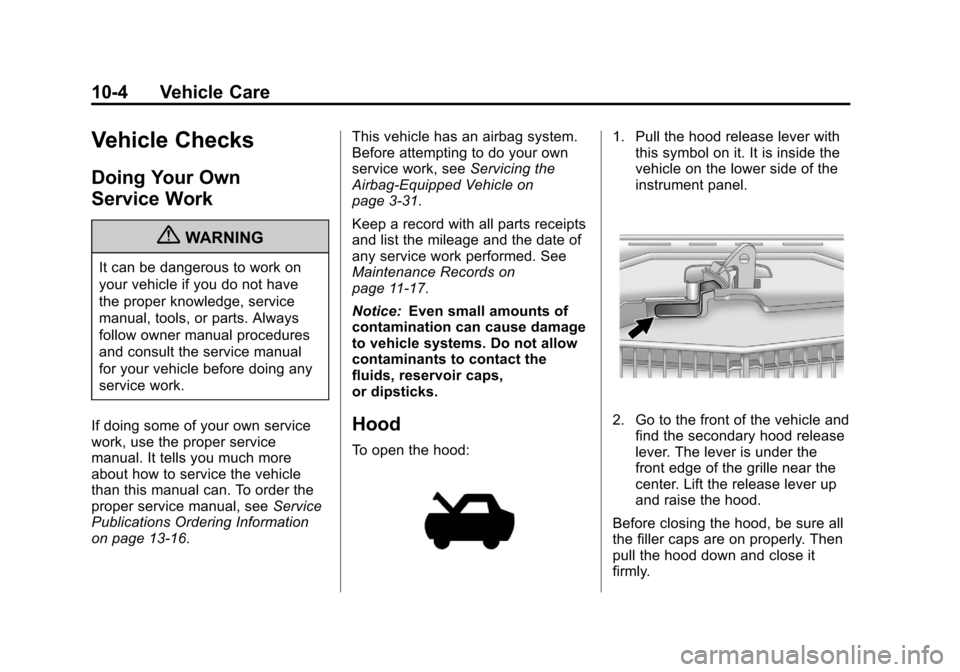
1. Pull the hood release lever with this symbol on it. It is inside the
vehicle on the lower side of the
instrument panel.
2. Go to the front of the vehicle and
find the secondary hood release
lever. The lever is under the
front edge of the grille near the
center. Lift the release lever up
and raise the hood.
Before closing the hood, be sure all
the filler caps are on properly. Then
pull the hood down and close it
firmly.