keyless CADILLAC CTS 2013 2.G Owner's Manual
[x] Cancel search | Manufacturer: CADILLAC, Model Year: 2013, Model line: CTS, Model: CADILLAC CTS 2013 2.GPages: 478, PDF Size: 7.7 MB
Page 50 of 478

Black plate (20,1)Cadillac CTS/CTS-V Owner Manual - 2013 - crc2 - 8/22/12
2-20 Keys, Doors, and Windows
Turn the selector switch to choose
one of three modes:
MAX:The liftgate power opens to
the full open height.
3/4: The liftgate power opens to a
reduced open height that can be set
in a range of approximately ¾ open
to full open. Use this setting to
prevent the liftgate from opening
into overhead obstructions such as
a garage door or roof mounted
cargo during power operation. The
liftgate can still be opened fully
manually.
OFF: The liftgate only operates
manually in this position.
Manual operation of a liftgate that
also has power operation requires
more effort than a standard manual
liftgate. In either the MAX or the ¾ mode,
the liftgate can be power opened
and closed by:
.Pressing and holding the power
liftgate button
8on the Remote
Keyless Entry (RKE) transmitter
until the liftgate starts moving.
See Remote Keyless Entry
(RKE) System Operation (Key
Access) on page 2‑4 orRemote
Keyless Entry (RKE) System
Operation (Keyless Access) on
page 2‑6.
.Pressing the power liftgate
button in the center of the mode
selector switch on the driver
door, with the driver door
unlocked.
.Pressing the touch pad on the
liftgate outside handle, with all
doors unlocked, to open the
liftgate.
.Pressing and releasing the
power liftgate button on the
liftgate adjacent to the latch to
close the liftgate.
Pressing any button that operates
the power liftgate, or the touch pad
while the liftgate is moving, stops it.
Pressing the button or RKE again
reverses the direction. There is a
minimum that the power liftgate
must already be open for the
system to hold it open. If movement
is stopped below that minimum, the
liftgate closes.
Page 55 of 478
Black plate (25,1)Cadillac CTS/CTS-V Owner Manual - 2013 - crc2 - 8/22/12
Keys, Doors, and Windows 2-25
6. Repeat Steps 1 through 4 ifadditional keys are to be
programmed.
Do not leave the key or device that
disarms or deactivates the theft
deterrent system in the vehicle.
Immobilizer Operation
(Keyless Access)
This vehicle has a passive
theft-deterrent system.
The system does not have to be
manually armed or disarmed.
The vehicle is automatically
immobilized when the ignition
control knob is turned to LOCK/OFF.
The immobilization system is
disarmed when the ignition control
knob is pushed in and a valid
transmitter is found in the vehicle.
The security light in the instrument
cluster, comes on if there is a
problem with arming or disarming
the theft-deterrent system.
One or more keyless access
transmitters can be matched to the
vehicle's immobilizer control unit.
Only a correctly matched keyless
access transmitter will start the
vehicle. If the keyless access
transmitter is ever damaged, you
may not be able to start your
vehicle.
When trying to start the vehicle, the
security light comes on briefly when
the ignition is turned on. If the engine does not start and the
security light stays on, there is a
problem with the system. Turn the
ignition control knob off and try
again.
If the ignition control knob does not
turn, and the keyless access
transmitter appears to be
undamaged, try another keyless
access transmitter. Or, you may try
placing the transmitter in the
transmitter pocket located in the
center console. See
“Electronic Key
Not Detected” underKey and Lock
Messages on page 5‑36.
If the ignition control knob still does
not rotate with the other transmitter,
the vehicle needs service. If the
ignition control knob does rotate, the
first transmitter may be faulty. See
your dealer who can service the
theft-deterrent system and have a
new keyless access transmitter
programmed to the vehicle.
Page 56 of 478
Black plate (26,1)Cadillac CTS/CTS-V Owner Manual - 2013 - crc2 - 8/22/12
2-26 Keys, Doors, and Windows
It is possible for the immobilizer
system to learn new or replacement
keyless access transmitters. Up to
four keyless access transmitters can
be programmed for the vehicle. To
program additional transmitters, see
“Programming Transmitters to the
Vehicle”for keyless access under
Remote Keyless Entry (RKE)
System Operation (Key Access) on
page 2‑4 orRemote Keyless Entry
(RKE) System Operation (Keyless
Access) on page 2‑6.
Do not leave the key or device that
disarms or deactivates the theft
deterrent system in the vehicle.Exterior Mirrors
Convex Mirrors
{CAUTION
A convex mirror can make things,
like other vehicles, look farther
away than they really are. If you
cut too sharply into the right lane,
you could hit a vehicle on the
right. Check the inside mirror or
glance over your shoulder before
changing lanes.
The passenger side mirror is convex
shaped. A convex mirror's surface is
curved so more can be seen from
the driver seat.
Power Mirrors
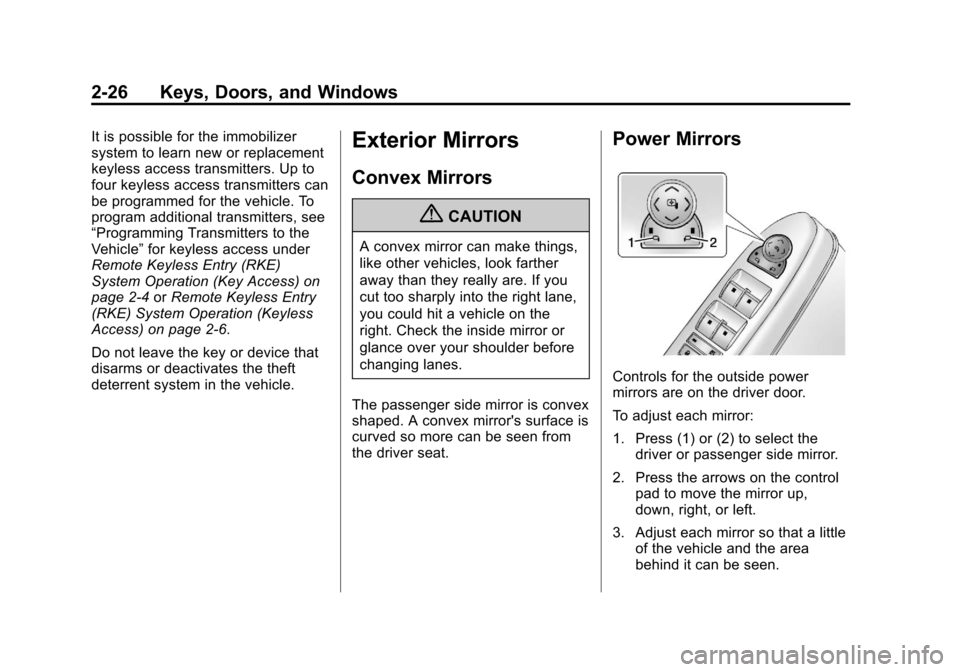
Controls for the outside power
mirrors are on the driver door.
To adjust each mirror:
1. Press (1) or (2) to select the driver or passenger side mirror.
2. Press the arrows on the control pad to move the mirror up,
down, right, or left.
3. Adjust each mirror so that a little of the vehicle and the area
behind it can be seen.
Page 70 of 478
Black plate (8,1)Cadillac CTS/CTS-V Owner Manual - 2013 - crc2 - 8/22/12
3-8 Seats and Restraints
B(Exit Button):Moves the driver
seat and/or power steering column
to the exit position. See “Exit Recall”
later in this section.
Storing Memory Positions
To save into memory:
1. Adjust the driver seat, outside
mirrors, and the power steering
column (if equipped) to the
desired driving positions.
2. Press and hold “1”until two
beeps sound.
3. Repeat for a second driver using “2.”
The vehicle comes with two Remote
Keyless Entry (RKE) transmitters.
Each transmitter has a number
“1” or“2” on it. These numbers
correspond to “1”and “2”on the
driver door. The current driver is
identified when
Kon the RKE
transmitter is pressed, or when
“1” or“2” on the driver door is
pressed. To recall, press and release
“1”
or“2.” The vehicle must be in
P (Park) for an automatic
transmission, or the parking brake
must be applied for a manual
transmission. A single beep sounds
when the button is pressed. The
seat, outside mirrors, and/or power
steering column move to the
position previously stored for the
identified driver.
Automatic Entry Recall
If entry/exit recall is programmed on
in the vehicle personalization menu,
automatic entry recall occurs when
the ignition is turned on. See
Vehicle Personalization on
page 5‑45.
To stop recall movement, press one
of the power seat, memory,
or outside mirror buttons, or the
power steering column switch (if
equipped).
If something has blocked the driver
seat or the steering column while
recalling a memory position, the
recall may stop. Remove the obstruction; then press the
appropriate control for the area that
is not recalling for two seconds. Try
recalling the memory position again
by pressing the appropriate memory
button. If the memory position is still
not recalling, see your dealer for
service.
Exit Recall
B(Exit Button):
Press to move
the driver seat back a preset
distance and/or the power steering
column (if equipped) up and
forward. A single beep sounds when
the exit feature activates. The
vehicle must be in P (Park) for an
automatic transmission, or the
parking brake must be applied for a
manual transmission.
If entry/exit recall is programmed on
in the vehicle personalization menu,
automatic seat and/or steering
column movement occurs upon
leaving the vehicle, if the following
conditions are met. See Vehicle
Personalization on page 5‑45.
Page 71 of 478
Black plate (9,1)Cadillac CTS/CTS-V Owner Manual - 2013 - crc2 - 8/22/12
Seats and Restraints 3-9
On vehicles with Remote Keyless
Entry (RKE), automatic exit recall
movements occur when the ignition
key is removed.
On vehicles with Remote Keyless
Access, automatic exit recall
movements occur when the
following steps are completed:
1. The ignition is turned on forvehicles with an automatic
transmission, or the engine is
started on vehicles with a
manual transmission.
2. The automatic transmission is shifted out of P (Park), or the
parking brake is released on
vehicles with a manual
transmission.
3. The automatic transmission is shifted back into P (Park), or the
parking brake is re-engaged on
vehicles with a manual
transmission.
4. The ignition is turned off.
5. The driver door is opened. Steps 2 and 3 are intended to reflect
that the vehicle has been moved.
If the vehicle is not moved or the
steps above are not performed,
automatic exit recall movement will
not occur. In this case, press
Bto
activate exit recall movements.
If something has blocked the driver
seat while recalling the exit position,
the recall may stop. Remove the
obstruction; then press and hold the
power seat control rearward for
two seconds. Try recalling the exit
position again. If the exit position is
still not recalling, see your dealer for
service.
Heated and Ventilated
Front Seats
{WARNING
If you cannot feel temperature
change or pain to the skin, the
seat heater may cause burns. To
reduce the risk of burns, people
with such a condition should use
care when using the seat heater,
especially for long periods of
time. Do not place anything on
the seat that insulates against
heat, such as a blanket, cushion,
cover, or similar item. This may
cause the seat heater to
overheat. An overheated seat
heater may cause a burn or may
damage the seat.
Page 141 of 478

Black plate (19,1)Cadillac CTS/CTS-V Owner Manual - 2013 - crc2 - 8/22/12
Instruments and Controls 5-19
{WARNING
If the airbag readiness light ever
comes on and stays on, it means
that something may be wrong
with the airbag system. To help
avoid injury to yourself or others,
have the vehicle serviced right
away. SeeAirbag Readiness
Light on page 5‑17 for more
information, including important
safety information.
Charging System Light
The charging system light comes on
briefly when the ignition is turned
on, but the engine is not running, as
a check to show the light is working. The light turns off when the engine
is started. If it does not, have the
vehicle serviced by your dealer.
If the light stays on, or comes on
while driving, there may be a
problem with the electrical charging
system. Have it checked by your
dealer. Driving while this light is on
could drain the battery.
When this light comes on, the Driver
Information Center (DIC) also
displays a message.
See
Battery Voltage and Charging
Messages on page 5‑31.
If a short distance must be driven
with the light on, be sure to turn off
all accessories, such as the radio
and air conditioner.
Malfunction
Indicator Lamp
A computer system called OBD II
(On-Board Diagnostics-Second
Generation) monitors the operation
of the vehicle to ensure emissions
are at acceptable levels, helping to maintain a clean environment. The
malfunction indicator lamp comes
on when the vehicle is placed in
ON/RUN, as a check to show it is
working. If it does not, have the
vehicle serviced by your dealer. See
Ignition Positions (Keyless Access)
on page 9‑15
orIgnition Positions
(Key Access) on page 9‑17 for more
information.
This light should come on when the
ignition is on, but the engine is not
running, as a check to show it is
working. If it does not, have the
vehicle serviced by your dealer.
If the malfunction indicator lamp
comes on while the engine is
running, this indicates that the OBD
II system has detected a problem
and diagnosis and service might be
required.
Page 154 of 478

Black plate (32,1)Cadillac CTS/CTS-V Owner Manual - 2013 - crc2 - 8/22/12
5-32 Instruments and Controls
BATTERY VOLTS LOW
This message displays when the
electrical system is charging less
than 10 volts or the battery has
been drained.
If this message appears
immediately after starting the
engine, it is possible that the
generator can still recharge the
battery. The battery should recharge
while driving, but may take a few
hours to do so. Consider using an
auxiliary charger to boost the
battery after returning home or
arriving at a final destination. Make
sure you follow the manufacturer's
instructions.
If this message appears while
driving or after starting the vehicle
and stays on, have it checked
immediately to determine the cause
of this problem.
To help the generator recharge the
battery quickly, reduce the load on
the electrical system by turning off
the accessories.The normal battery voltage range is
11.5 to 15.5 volts. Monitor battery
voltage on the DIC by pressing the
vehicle information button until
Battery Voltage is displayed.
SERVICE BATTERY
CHARGING SYSTEM
This message displays when there
is a problem with the generator and
battery charging systems. Driving
with this problem could drain the
battery. Turn off all unnecessary
accessories. Stop and turn off the
vehicle as soon as it is safe to do
so. Have the electrical system
checked by your dealer. Under
certain conditions, the charging
system light may also turn on in the
instrument cluster. See
Charging
System Light on page 5‑19.
Brake System Messages
PARK BRAKE RELEASED
For vehicles with the electric parking
brake, this message displays when
the parking brake has been released from the set position. See
the electric parking brake
information under
Parking Brake
(Electric) on page 9‑33 orParking
Brake (Manual) on page 9‑32.
PARK BRAKE SET
For vehicles with the electric parking
brake, this message displays when
the parking brake has been applied
to the set position. See the electric
parking brake information under
Parking Brake (Electric) on
page 9‑33 orParking Brake
(Manual) on page 9‑32.
PRESS BRAKE TO START
ENGINE (AUTOMATIC
TRANSMISSION ONLY)
If the vehicle has the keyless
access system, this message
displays if you try to start the engine
without having the brake pressed.
The brake needs to be pressed
when starting the engine. See
Ignition Positions (Keyless Access)
on page 9‑15 orIgnition Positions
(Key Access) on page 9‑17.
Page 158 of 478

Black plate (36,1)Cadillac CTS/CTS-V Owner Manual - 2013 - crc2 - 8/22/12
5-36 Instruments and Controls
SeeEngine Oil Pressure Light on
page 5‑25. See Engine Oil on
page 10‑9.
Stop the vehicle immediately, as
engine damage can result from
driving a vehicle with low oil
pressure. Have the vehicle serviced
by your dealer as soon as possible
when this message is displayed.
Engine Power Messages
ENGINE POWER IS REDUCED
This message displays when the
engine power is being reduced to
protect the engine from damage.
There could be several malfunctions
that might cause this message.
Reduced engine power can affect
the vehicle's ability to accelerate.
If this message is on, but there is no
reduction in performance, proceed
to your destination. The
performance may be reduced the
next time the vehicle is driven. The
vehicle may be driven at a reduced
speed while this message is on, but
acceleration and speed may be reduced. Anytime this message
stays on, take the vehicle to your
dealer for service as soon as
possible.
Fuel System Messages
FUEL LEVEL LOW
This message displays when the
vehicle is low on fuel. Refill the fuel
tank as soon as possible. A chime
may sound when this message
displays. See
Filling the Tank on
page 9‑49.
TIGHTEN GAS CAP
This message displays when the
fuel cap has not been fully
tightened. Recheck the fuel cap to
ensure that it is on and tightened
properly.
Key and Lock Messages
ACCESSORY MODE ACTIVE
If the vehicle has the keyless
access system, this message
displays when the accessory mode is active. See
Ignition Positions
(Keyless Access) on page 9‑15 or
Ignition Positions (Key Access) on
page 9‑17 for more information.
ELECTRONIC KEY ALREADY
KNOWN
If the vehicle has the keyless
access system, this message
displays if you try to match a
transmitter that has already been
learned. See the keyless access
information for Remote Keyless
Entry (RKE) System Operation (Key
Access) on page 2‑4 orRemote
Keyless Entry (RKE) System
Operation (Keyless Access) on
page 2‑6 for more information.
Page 159 of 478

Black plate (37,1)Cadillac CTS/CTS-V Owner Manual - 2013 - crc2 - 8/22/12
Instruments and Controls 5-37
ELECTRONIC KEY NOT
DETECTED
If the vehicle has the keyless
access system, this message
displays if the vehicle does not
detect the presence of a transmitter
when you have attempted to start
the vehicle or a vehicle door has
just closed. The following conditions
may cause this message to appear:
.Driver-added equipment plugged
into the accessory power outlet
on the center console is causing
interference. Examples of these
devices are cell phones and cell
phone chargers, two-way radios,
power inverters, or similar items.
Try moving the keyless access
transmitter away from these
devices when starting the
vehicle. In addition, PDA devices
and remote garage and gate
openers may also generate
Electromagnetic Interference
(EMI) that may interfere with the
keyless access transmitter. Donot carry the keyless access
transmitter in the same pocket or
bag as these devices.
.The vehicle is experiencing
Electromagnetic Interference
(EMI). Some locations, such as
airports, automatic toll booths,
and some gas stations have EMI
fields which may interfere with
the keyless access transmitter.
If moving the transmitter to
different locations within the
vehicle does not help, place the
transmitter in the center console
transmitter pocket with thebuttons facing the front of the
vehicle and then start the
vehicle.
.The vehicle's battery voltage is
low. The battery voltage must be
above 10 volts for the keyless
access transmitter to be
detected properly.
ELECTRONIC KEY NOT
DETECTED RESTART
ALLOWED
If the vehicle has the keyless
access system, this message
displays when the keyless access
transmitter is not detected inside the
vehicle while you are trying to turn
the ignition off. The vehicle may be
near a strong radio antenna signal
causing the keyless access system
to be jammed. If you have the
keyless access transmitter with you,
get out of the vehicle and lock the
doors. If you do not have the
keyless access transmitter with you,
you will be able to start the vehicle
again within five minutes, or after
the vehicle's content theft-deterrent
Page 160 of 478

Black plate (38,1)Cadillac CTS/CTS-V Owner Manual - 2013 - crc2 - 8/22/12
5-38 Instruments and Controls
system is armed. SeeStarting the
Engine on page 9‑19 for more
information.
LEARN DELAY ACTIVE WAIT
XX MIN (MINUTES)
If the vehicle has the keyless
access system, this message
displays when matching new
transmitters to the vehicle. See the
Keyless Access information for
Remote Keyless Entry (RKE)
System Operation (Key Access) on
page 2‑4 orRemote Keyless Entry
(RKE) System Operation (Keyless
Access) on page 2‑6 for more
information.
MAXIMUM # ELECTRONIC
KEYS LEARNED
If the vehicle has the keyless
access system, this message
displays when the maximum
number of transmitters have been
learned. See the Keyless Access
information for Remote Keyless
Entry (RKE) System Operation (Key
Access) on page 2‑4 orRemote Keyless Entry (RKE) System
Operation (Keyless Access) on
page 2‑6
for more information.
PRESS START CONTROL TO
LEARN KEYS
If the vehicle has the keyless
access system, this message
displays when matching new
transmitters to the vehicle. See the
keyless access information for
Remote Keyless Entry (RKE)
System Operation (Key Access) on
page 2‑4orRemote Keyless Entry
(RKE) System Operation (Keyless
Access) on page 2‑6 for more
information.
READY TO LEARN
ELECTRONIC KEY # X
If the vehicle has the keyless
access system, this message
displays while matching new
transmitters to the vehicle. See the
keyless access information for
Remote Keyless Entry (RKE)
System Operation (Key Access) on
page 2‑4 orRemote Keyless Entry (RKE) System Operation (Keyless
Access) on page 2‑6
for more
information.
REPLACE BATTERY IN
REMOTE KEY
This message displays when the
battery in the Remote Keyless Entry
(RKE) or keyless access transmitter
needs to be replaced. To replace
the battery, see “Battery
Replacement” underRemote
Keyless Entry (RKE) System
Operation (Key Access) on
page 2‑4 orRemote Keyless Entry
(RKE) System Operation (Keyless
Access) on page 2‑6.
ROTATE CONTROL TO OFF
POSITION
If the vehicle has the keyless
access system, this message
displays as a reminder to turn the
ignition off. To avoid draining the
battery, make sure the ignition is
turned off before leaving the vehicle.