steering wheel CADILLAC CTS 2013 2.G Owner's Manual
[x] Cancel search | Manufacturer: CADILLAC, Model Year: 2013, Model line: CTS, Model: CADILLAC CTS 2013 2.GPages: 478, PDF Size: 7.7 MB
Page 149 of 478
Black plate (27,1)Cadillac CTS/CTS-V Owner Manual - 2013 - crc2 - 8/22/12
Instruments and Controls 5-27
Cruise Control Light
This light comes on whenever the
cruise control is active.
The light goes out when the cruise
control is turned off. SeeCruise
Control on page 9‑39 for more
information.
Information Displays
Driver Information
Center (DIC)
The Driver Information Center (DIC)
provides status of many vehicle
systems. The DIC displays warning/
status messages. The DIC display
is at the bottom of the instrument
cluster. The DIC buttons are on the
instrument panel next to the
steering wheel.
The DIC comes on when the ignition
is on. After a short delay, the DIC
displays the information that was
last displayed before the engine
was turned off.
The top line of the DIC display
shows the DIC information. The
bottom line shows the compass.
The compass displays in the trip/
fuel menus and in some vehicle
information menus. If a problem is detected, a warning
message appears on the display. All
messages should be taken
seriously; clearing the message
does not correct the problem.DIC Operation and Displays
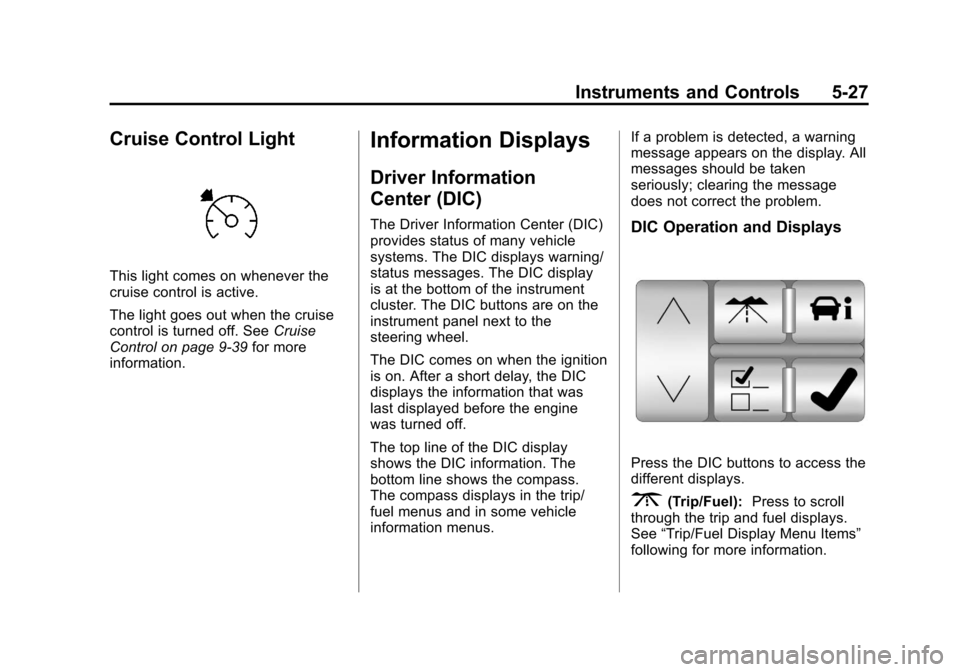
Press the DIC buttons to access the
different displays.
3(Trip/Fuel):
Press to scroll
through the trip and fuel displays.
See “Trip/Fuel Display Menu Items”
following for more information.
Page 162 of 478

Black plate (40,1)Cadillac CTS/CTS-V Owner Manual - 2013 - crc2 - 8/22/12
5-40 Instruments and Controls
after continued driving, the system
needs service. Take the vehicle to
your dealer.
SIDE BLIND ZONE ALERT
SYSTEM OFF
This message indicates that the
driver has turned the system off.
SIDE BLIND ZONE ALERT
SYSTEM TEMPORARILY
UNAVAILABLE
This message indicates that the
SBZA system is disabled because
the sensor is blocked and cannot
detect vehicles in the blind zone.
The sensor may be blocked by mud,
dirt, snow, ice, or slush. This
message may also activate during
heavy rain or due to road spray. The
vehicle does not need service. For
cleaning, seeExterior Care on
page 10‑105.
Ride Control System
Messages
ALL WHEEL DRIVE OFF
If the vehicle has the All-Wheel
Drive (AWD) system, this message
displays when there is a temporary
condition making the AWD system
unavailable. The vehicle will run in
2WD. This could be caused by:
.Loss of wheel or vehicle speed
.AWD system overheat
.Certain vehicle electrical
conditions
This message turns off when the
above conditions are no longer
present and the warning message is
reset.
To reset the warning message, turn
the ignition off and then back on
again after 30 seconds. If the
message stays on, see your dealer
right away. See All-Wheel Drive on
page 9‑31.
SERVICE ALL WHEEL DRIVE
This message displays if a problem
occurs with the All-Wheel Drive
(AWD) system. The vehicle will run
in 2WD. This could be caused by:
.An electronics problem
.An AWD system oil overheat
.Worn out or overheated clutch
plates
.Various electrical issues
If this message appears, stop as
soon as possible and turn off the
ignition for 30 seconds. Restart the
vehicle and check for the message
on the DIC display. If the message
still displays or appears again when
you begin driving, the system needs
service. See your dealer right away.
SERVICE POWER STEERING
This message displays if a problem
is detected with the speed variable
assist steering system. When this
message is displayed, you may
notice that the effort required to
steer the vehicle increases or feels
Page 163 of 478
Black plate (41,1)Cadillac CTS/CTS-V Owner Manual - 2013 - crc2 - 8/22/12
Instruments and Controls 5-41
heavier, but you will still be able to
steer the vehicle. SeeSteering on
page 9‑4.
SERVICE STABILITRAK
This message displays if there has
been a problem detected with the
StabiliTrak
®system. The TCS/
StabiliTrak warning light on the
instrument cluster also comes on.
If this message comes on while you
are driving, pull off the road as soon
as possible and stop carefully. Try
resetting the system by turning the
ignition off then back on. If this
message still stays on or comes
back on again while you are driving,
the vehicle needs service. Have the
StabiliTrak system inspected by
your dealer as soon as possible.
See StabiliTrak
®System on
page 9‑36.
SERVICE SUSPENSION
SYSTEM
This message displays when there
is a problem with the Magnetic Ride
Control system. See Magnetic Ride
Control on page 9‑38. Have the
vehicle serviced by your dealer.
SERVICE TRACTION
CONTROL
This message displays when there
is a problem with the Traction
Control System (TCS). The TCS/
StabiliTrak warning light on the
instrument cluster also comes on.
When this message displays, the
system will not limit wheel spin.
Adjust your driving accordingly. See
your dealer for service. See Traction
Control System (TCS) on
page 9‑35.
STABILITRAK
COMPETITIVE MODE
This message displays when the
Competitive Driving Mode is
selected. When in this mode, the
Traction Control System (TCS) will not be operating and the TCS/
StabiliTrak warning light will turn on.
Adjust your driving accordingly. See
Competitive Driving Mode on
page 9‑37.
STABILITRAK NOT READY
This message may display after first
driving the vehicle and exceeding
30 km/h (19 mph) for 30 seconds.
The TCS/StabiliTrak warning light
on the instrument cluster also
comes on. The StabiliTrak system is
not functional until the message has
turned off. See
StabiliTrak
®System
on page 9‑36.
STABILITRAK OFF
This message displays when you
turn off StabiliTrak, or when the
stability control system has been
automatically disabled. The TCS/
StabiliTrak warning light on the
instrument cluster also comes on.
Page 174 of 478

Black plate (52,1)Cadillac CTS/CTS-V Owner Manual - 2013 - crc2 - 8/22/12
5-52 Instruments and Controls
cause the driver seat to move
rearward a certain distance, and the
steering column to move full up and
full forward, if equipped. Entry
Recall will only occur by pressing
the door mounted“1”or“2” button.
Entry/Exit Recall On (Vehicles
without Power Tilt Steering
Wheel): If this setting is selected
the following option will be available:
Easy Exit will automatically move
the driver seat rearward a certain
distance when the key is removed
from the ignition on key access
vehicles, or when the ignition is
turned off and the driver door is
opened on keyless access vehicles.
This movement will also occur when
the door mounted exit button is
pressed.
Easy Entry will automatically recall
the driver seat and outside mirror
memory positions of the current
driver (1 or 2) when the ignition is
turned on. Entry/Exit Recall On (Vehicles
with Power Tilt Steering Wheel):
If this setting is selected the
following two options will be
available:
.Entry/Exit Steering and Seat:
Easy Exit will automatically
move the steering column to a
full up and full forward position
and move the driver seat
rearward a certain distance
when the key is removed from
the ignition on key access
vehicles, or when the ignition is
turned off and the driver door is
opened on keyless access
vehicles. These movements will
also occur when the door
mounted exit button is pressed.
Easy Entry will automatically
recall the driver seat, outside
mirrors, and steering column
memory positions of the current
driver (1 or 2) when the ignition
is turned on.
.Entry/Exit Steering Only:
Easy
Exit will automatically move the
steering column to a full up and
full forward position when the
key is removed from the ignition
on key access vehicles, or when
the ignition is turned off and the
driver door is opened on keyless
access vehicles. This movement
will also occur when the door
mounted exit button is pressed.
Easy Entry will automatically
recall the driver seat, outside
mirrors, and steering column
memory positions of the current
driver (1 or 2) when the ignition
is turned on.
No Change: No change will be
made to this feature. The current
setting will remain.
Page 197 of 478
Black plate (9,1)Cadillac CTS/CTS-V Owner Manual - 2013 - crc2 - 8/22/12
Infotainment System 7-9
Selecting a Station
Seek Tuning
If the radio station is not known:
Briefly press
¨SEEK or©SEEK.
The radio will search for the next
receivable station. If the radio does
not find a station, it switches
automatically to a more sensitive
search level. If it still does not find a
station, the frequency that was last
active begins to play and “None
Found” displays.
If the radio station is known:
Press and hold
¨SEEK or©SEEK
until the desired station on the
pop-up frequency display is almost
reached, then release the button.
Manual Tuning
Turn the TUNE/TONE knob to
select the frequency on the pop-up
display. Station List
Turn the MENU/SELECT knob to
display the station list. To create a
list of available stations, select
“Refresh AM Station List”
or
“Refresh FM Station List,”
depending on which band is
being used.
In FM, RDS information may be
utilized to categorize the stations by
genre.
In both AM and FM, the stations are
arranged in frequency order.Storing a Radio Station as a
Favorite
Drivers are encouraged to set up
their radio station favorites while the
vehicle is stopped. Tune to favorite
stations using the presets, favorites
button, and steering wheel controls,
if the vehicle has this feature.
FAV (Favorites): A maximum of
36 stations can be programmed as
favorites using the six softkeys
below the radio station frequency
tabs on the display and by using the radio favorites page button (FAV
button). Press the FAV button to go
through up to six pages of favorites,
each having six favorite stations
available per page. Each page of
favorites can contain any
combination of AM, FM,
or SiriusXM
®stations.
To store a station as a favorite:
1. Tune to the desired radio station.
2. Press the FAV button to display the page where the station is to
be stored.
3. Press and hold one of the six softkeys until a beep sounds
and “Favorite Saved” displays.
When that softkey is pressed
and released, the radio recalls
the station that was set.
4. Repeat the steps for each radio station to be stored as a favorite.
The number of favorites pages can
be set up using the CONFIG button.
Page 200 of 478
Black plate (12,1)Cadillac CTS/CTS-V Owner Manual - 2013 - crc2 - 8/22/12
7-12 Infotainment System
Selecting a Station by Station List
The infotainment system can list all
SiriusXM stations.
To select a station from the
station list:
1. Turn the TUNE/TONE knob andhighlight the desired station.
2. Press the TUNE/TONE knob to select the station.
The highlighted station will also
automatically be selected if TUNE/
TONE is released and no longer
turned.
Selecting a Station by Category
The infotainment system can list
SiriusXM stations by genre.
To select a station from the
category list:
1. Turn the MENU/SELECT knob and highlight the desired genre,
then press the MENU/SELECT
knob to select the genre. 2. Turn the MENU/SELECT knob
and highlight the desired station,
then press the MENU/SELECT
knob to select the station.
Storing a SiriusXM Station as a
Favorite
Drivers are encouraged to set up
their radio station favorites while the
vehicle is stopped. Tune to favorite
stations using the presets, favorites
button, and steering wheel controls,
if the vehicle has this feature.
FAV (Favorites): A maximum of
36 stations can be programmed as
favorites using the six softkeys
below the radio station frequency
tabs on the display and by using the
radio favorites page button (FAV
button). Press the FAV button to go
through up to six pages of favorites,
each having six favorite stations
available per page. Each page of
favorites can contain any
combination of AM, FM, or SiriusXM
stations. To store a station as a favorite:
1. Tune to the desired radio station.
2. Press the FAV button to display
the page where the station is to
be stored.
3. Press and hold one of the six softkeys until a beep sounds.
When that softkey is pressed
and released, the radio recalls
the station that was set.
4. Repeat the steps for each radio station to be stored as a favorite.
The number of favorites pages can
be set up using the CONFIG button.
To set up the number of favorites
pages:
1. Press the CONFIG button to display the radio setup menu.
2. Press the softkey below the FAV label.
3. Select the desired number of favorites pages by pressing the
softkey below the displayed
page numbers.
Page 225 of 478

Black plate (37,1)Cadillac CTS/CTS-V Owner Manual - 2013 - crc2 - 8/22/12
Infotainment System 7-37
.Pair cell phone(s) to the vehicle.
The system may not work with
all cell phones. See“Pairing”in
this section for more information.
.If the cell phone has voice
dialing capability, learn to use
that feature to access the
address book or contact list. See
“Voice Pass-Thru” in this section
for more information.
.See “Storing and Deleting Phone
Numbers” in this section for
more information.
{WARNING
When using a cell phone, it can
be distracting to look too long or
too often at the screen of the
phone or the infotainment
(navigation) system. Taking your
eyes off the road too long or too
often could cause a crash
resulting in injury or death. Focus
your attention on driving. Vehicles with a Bluetooth
®system
can use a Bluetooth-capable cell
phone with a Hands-Free Profile to
make and receive phone calls. The
system can be used while the
ignition is in the ON/RUN or ACC/
ACCESSORY position. The range of
the Bluetooth system can be up to
9.1 m (30 ft). Not all phones support
all functions, and not all phones
work with the Bluetooth system. See
www.gm.com/bluetooth for more
information on compatible phones.
Voice Recognition
The Bluetooth system uses voice
recognition to interpret voice
commands to dial phone numbers
and name tags.
For additional information say “Help”
while you are in a voice
recognition menu.
Noise: Keep interior noise levels to
a minimum. The system may not
recognize voice commands if there
is too much background noise. When to Speak:
A short tone
sounds after the system responds
indicating when it is waiting for a
voice command. Wait until the tone
and then speak.
How to Speak: Speak clearly in a
calm and natural voice.
Audio System
When using the in-vehicle Bluetooth
system, sound comes through the
vehicle's front audio system
speakers and over-rides the audio
system. Use the audio system
volume knob, during a call, to
change the volume level. The
adjusted volume level remains in
memory for later calls. To prevent
missed calls, a minimum volume
level is used if the volume is turned
down too low.
Bluetooth Controls
Use the buttons on the steering
wheel to operate the in-vehicle
Bluetooth system. See Steering
Wheel Controls on page 5‑3 for
more information.
Page 239 of 478

Black plate (5,1)Cadillac CTS/CTS-V Owner Manual - 2013 - crc2 - 8/22/12
Climate Controls 8-5
Sensors
The solar sensor on the instrument
panel, near the windshield, monitors
the solar heat.
The interior temperature sensor, on
the instrument panel to the right of
the steering wheel, measures the
temperature of the air inside the
vehicle.The climate control system uses the
information from these sensors to
adjust the fan speed and the air
delivery, in order to maintain the
selected temperature. The system
may also supply cooler air to the
side of the vehicle facing the sun.
The recirculation mode will also be
activated, as necessary.
Do not cover the sensors or the
automatic climate control system will
not work properly.
Air Quality Sensor
For vehicles with an air quality
sensor, the climate control system
adjusts to limit some exhaust fumes
from being pulled inside your
vehicle.
Press the AUTO button on the
climate control to activate the air
quality sensor. The recirculation
indicator light comes on when poor
quality air is detected. The air
quality sensor will not maintain
recirculation for an extended period
to prevent the air inside the vehicle
from becoming too dry or stuffy.
Under certain conditions, the air
quality sensor will not activate, such
as during cold weather or with
extreme odors. Press
Mto
activate recirculation.
The air quality sensor system does
not protect against carbon monoxide
(CO), which you cannot see or
smell. See Engine Exhaust on
page 9‑24.
Page 243 of 478

Black plate (1,1)Cadillac CTS/CTS-V Owner Manual - 2013 - crc2 - 8/22/12
Driving and Operating 9-1
Driving and
Operating
Driving Information
Distracted Driving . . . . . . . . . . . . . 9-2
Defensive Driving . . . . . . . . . . . . . 9-3
Drunk Driving . . . . . . . . . . . . . . . . . 9-3
Control of a Vehicle . . . . . . . . . . . 9-3
Braking . . . . . . . . . . . . . . . . . . . . . . . 9-3
Steering . . . . . . . . . . . . . . . . . . . . . . . 9-4
Off-Road Recovery . . . . . . . . . . . . 9-4
Loss of Control . . . . . . . . . . . . . . . . 9-5
Competitive Driving . . . . . . . . . . . 9-5
Driving on Wet Roads . . . . . . . . . 9-6
Highway Hypnosis . . . . . . . . . . . . 9-7
Hill and Mountain Roads . . . . . . 9-7
Winter Driving . . . . . . . . . . . . . . . . . 9-8
If the Vehicle Is Stuck . . . . . . . . . 9-9
Vehicle Load Limits . . . . . . . . . . 9-10
Starting and Operating
New Vehicle Break-In . . . . . . . . 9-14
Ignition Positions (KeylessAccess) . . . . . . . . . . . . . . . . . . . . 9-15
Ignition Positions (Key Access) . . . . . . . . . . . . . . . . . . . . 9-17
Starting the Engine . . . . . . . . . . 9-19 Retained Accessory
Power (RAP) . . . . . . . . . . . . . . . 9-21
Engine Coolant Heater . . . . . . . 9-21
Shifting Into Park . . . . . . . . . . . . 9-22
Shifting out of Park . . . . . . . . . . 9-23
Parking (Manual Transmission) . . . . . . . . . . . . . . 9-23
Parking over Things That Burn . . . . . . . . . . . . . . . . . . 9-23
Engine Exhaust
Engine Exhaust . . . . . . . . . . . . . . 9-24
Running the Vehicle WhileParked . . . . . . . . . . . . . . . . . . . . . 9-24
Automatic Transmission
Automatic Transmission . . . . . 9-25
Manual Mode . . . . . . . . . . . . . . . . 9-26
Manual Transmission
Manual Transmission . . . . . . . . 9-29
Drive Systems
All-Wheel Drive . . . . . . . . . . . . . . 9-31
Brakes
Antilock BrakeSystem (ABS) . . . . . . . . . . . . . . 9-31
Parking Brake (Manual) . . . . . . 9-32
Parking Brake (Electric) . . . . . . 9-33
Brake Assist (Except CTS-V) . . . . . . . . . . . . 9-35
Ride Control Systems
Traction ControlSystem (TCS) . . . . . . . . . . . . . . 9-35
StabiliTrak
®System . . . . . . . . . 9-36
Competitive Driving Mode . . . 9-37
Magnetic Ride Control . . . . . . . 9-38
Limited-Slip Rear Axle . . . . . . . 9-38
Cruise Control
Cruise Control . . . . . . . . . . . . . . . 9-39
Object Detection Systems
Ultrasonic Parking Assist . . . . 9-41
Side Blind Zone Alert (SBZA) . . . . . . . . . . . . . . . 9-42
Rear Vision Camera (RVC) . . . . . . . . . . . . . 9-45
Fuel
Fuel . . . . . . . . . . . . . . . . . . . . . . . . . 9-47
Recommended Fuel . . . . . . . . . 9-47
Gasoline Specifications . . . . . . 9-48
Page 246 of 478

Black plate (4,1)Cadillac CTS/CTS-V Owner Manual - 2013 - crc2 - 8/22/12
9-4 Driving and Operating
Helpful braking tips to keep in mind
include:
.Keep enough distance between
you and the vehicle in front
of you.
.Avoid needless heavy braking.
.Keep pace with traffic.
If the engine ever stops while the
vehicle is being driven, brake
normally but do not pump the
brakes. Doing so could make the
pedal harder to push down. If the
engine stops, there will be some
power brake assist but it will be
used when the brake is applied.
Once the power assist is used up, it
can take longer to stop and the
brake pedal will be harder to push.
Steering
Hydraulic Power Steering
Your vehicle has hydraulic power
steering. It may require
maintenance. See Power Steering
Fluid on page 10‑22. If power steering assist is lost
because the engine stops or
because of a system malfunction,
the vehicle can be steered but may
require increased effort. See your
dealer if there is a problem.
Curve Tips
.Take curves at a reasonable
speed.
.Reduce speed before entering a
curve.
.Maintain a reasonable steady
speed through the curve.
.Wait until the vehicle is out of
the curve before accelerating
gently into the straightaway.
Steering in Emergencies
.There are some situations when
steering around a problem may
be more effective than braking.
.Holding both sides of the
steering wheel allows you to turn
180 degrees without removing
a hand.
.Antilock Brake System (ABS)
allows steering while braking.
Off-Road Recovery
The vehicle's right wheels can drop
off the edge of a road onto the
shoulder while driving. Follow
these tips:
1. Ease off the accelerator and
then, if there is nothing in the
way, steer the vehicle so that it
straddles the edge of the
pavement.